light TOYOTA AURIS HYBRID 2017 Owners Manual
[x] Cancel search | Manufacturer: TOYOTA, Model Year: 2017, Model line: AURIS HYBRID, Model: TOYOTA AURIS HYBRID 2017Pages: 664, PDF Size: 27.42 MB
Page 302 of 664
3024-6. Using the driving support systems
AURIS Touring Sports_EE (12L13E)
■Cruise control can be set when
Vehicles with a Multidrive
●The shift lever is in the D or range 4 or higher of M has been selected.
●Range 4 or higher has been selected by using the paddle shift.
(vehicles with paddle shift switch)
●Vehicle speed is above approximately 40 km/h (25 mph).
Vehicles with a manual transmission
Vehicle speed is above approximately 40 km/h (25 mph).
■Accelerating after setting the vehicle speed
●The vehicle can be accelerated by operating accelerator pedal. After accel-
erating, the set speed resumes.
●Even without canceling the cruise control, the set speed can be increased
by first accelerating the vehicle to the desired speed and then pushing the
lever down to set the new speed.
■Automatic cruise control cancelation
Cruise control is automatically canceled in any of the following situations.
●Actual vehicle speed falls more than approximately 16 km/h (10 mph) below
the set speed.
At this time, the memorized set speed is not retained.
●Actual vehicle speed is below approximately 40 km/h (25 mph).
●VSC is activated.
●Speed limiter is activated. (if equipped)
■If the cruise control indicator light comes on in yellow (vehicles with a 3-
ring meter) or “Check cruise control system.” is displayed on the multi-
information display (vehicles with a 2-ring meter)
Press the “ON-OFF” button once to deactivate the system, and then press
the button again to reactivate the system.
If the cruise control speed cannot be set or if the cruise control cancels imme-
diately after being activated, there may be a malfunction in the cruise control
system. Have the vehicle inspected by any authorized Toyota dealer or
repairer, or another duly qualified and equipped professional.
AURIS Touring Sports_OM_Europe_OM12L13E.book 302 ページ 2016年6月27日 月曜日 午後5時21分
Page 305 of 664
3054-6. Using the driving support systems
AURIS Touring Sports_EE (12L13E)
4
Driving
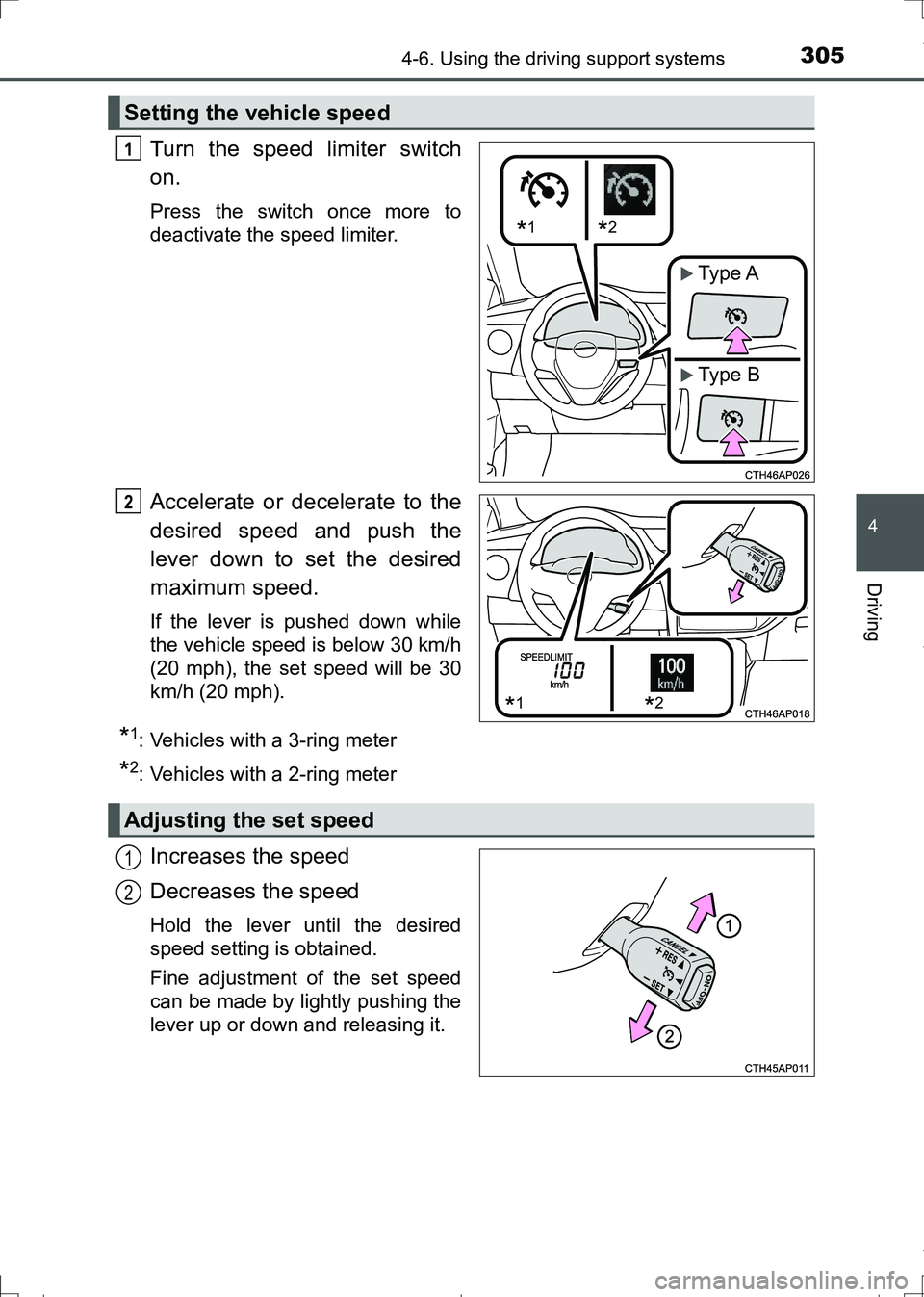
Turn the speed limiter switch
on.
Press the switch once more to
deactivate the speed limiter.
Accelerate or decelerate to the
desired speed and push the
lever down to set the desired
maximum speed.
If the lever is pushed down while
the vehicle speed is below 30 km/h
(20 mph), the set speed will be 30
km/h (20 mph).
*1: Vehicles with a 3-ring meter
*2: Vehicles with a 2-ring meter
Increases the speed
Decreases the speed
Hold the lever until the desired
speed setting is obtained.
Fine adjustment of the set speed
can be made by lightly pushing the
lever up or down and releasing it.
Setting the vehicle speed
*1*2
Type A
Type B
1
*1*2
2
Adjusting the set speed
1
2
AURIS Touring Sports_OM_Europe_OM12L13E.book 305 ページ 2016年6月27日 月曜日 午後5時21分
Page 313 of 664
3134-6. Using the driving support systems
AURIS Touring Sports_EE (12L13E)
4
Driving
■The Toyota parking assist-sensor can be operated when
Vehicles without a smart entry & start system:
The engine switch is in the “ON” position.
Vehicles with a smart entry & start system:
The engine switch is in IGNITION ON mode.
●Front sensors:
• Vehicles with a Multidrive:
The shift lever is in a position other than P.
• Vehicles with a manual transmission:
The parking brake is not applied.
• The vehicle speed is less than about 10 km/h (6 mph).
(At any speed when the shift lever is in R)
●Rear sensors:
The shift lever is in R.
■Sensor detection information
●Certain vehicle conditions and the surrounding environment may affect the
ability of the sensor to correctly detect obstacles. Particular instances where
this may occur are listed below.
• There is dirt, snow or ice on the sensor.
• A sensor is frozen.
• A sensor is covered in any way.
• The vehicle is leaning considerably to one side.
• On an extremely bumpy road, on an incline, on gravel, or on grass.
• The vicinity of the vehicle is noisy due to vehicle horns, motorcycle
engines, air brakes of large vehicles, or other loud noises producing ultra-
sonic waves.
• There is another vehicle equipped with parking assist sensors in the
vicinity.
• A sensor is coated with a sheet of spray or heavy rain.
• The vehicle is equipped with a fender pole or wireless antenna.
• Towing eyelet is installed.
• A bumper or sensor receives a strong impact.
• The vehicle is approaching a tall or curved curb.
• In harsh sunlight or intense cold weather.
• A non-genuine Toyota suspension (lowered suspension etc.) is installed.
In addition to the examples above, there are instances in which, because of
their shapes, signs and other objects may be judged by the sensor to be
closer than they are.
AURIS Touring Sports_OM_Europe_OM12L13E.book 313 ページ 2016年6月27日 月曜日 午後5時21分
Page 332 of 664
3324-6. Using the driving support systems
AURIS Touring Sports_EE (12L13E)
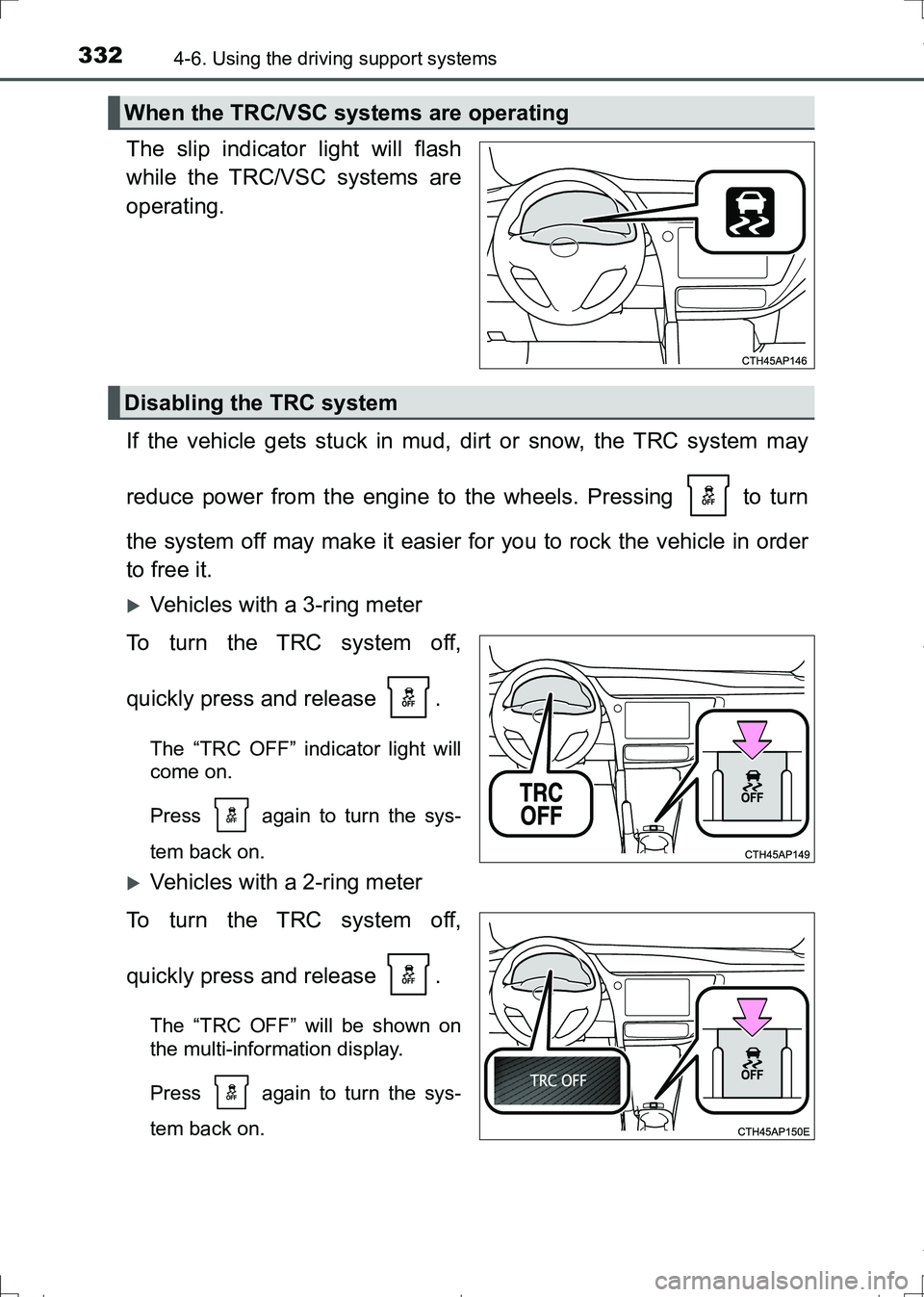
The slip indicator light will flash
while the TRC/VSC systems are
operating.
If the vehicle gets stuck in mud, dirt or snow, the TRC system may
reduce power from the engine to the wheels. Pressing to turn
the system off may make it easier for you to rock the vehicle in order
to free it.
Vehicles with a 3-ring meter
To turn the TRC system off,
quickly press and release .
The “TRC OFF” indicator light will
come on.
Press again to turn the sys-
tem back on.
Vehicles with a 2-ring meter
To turn the TRC system off,
quickly press and release .
The “TRC OFF” will be shown on
the multi-information display.
Press again to turn the sys-
tem back on.
When the TRC/VSC systems are operating
Disabling the TRC system
AURIS Touring Sports_OM_Europe_OM12L13E.book 332 ページ 2016年6月27日 月曜日 午後5時21分
Page 333 of 664
3334-6. Using the driving support systems
AURIS Touring Sports_EE (12L13E)
4
Driving
■Turning off both TRC and VSC systems
Vehicles with a 3-ring meter
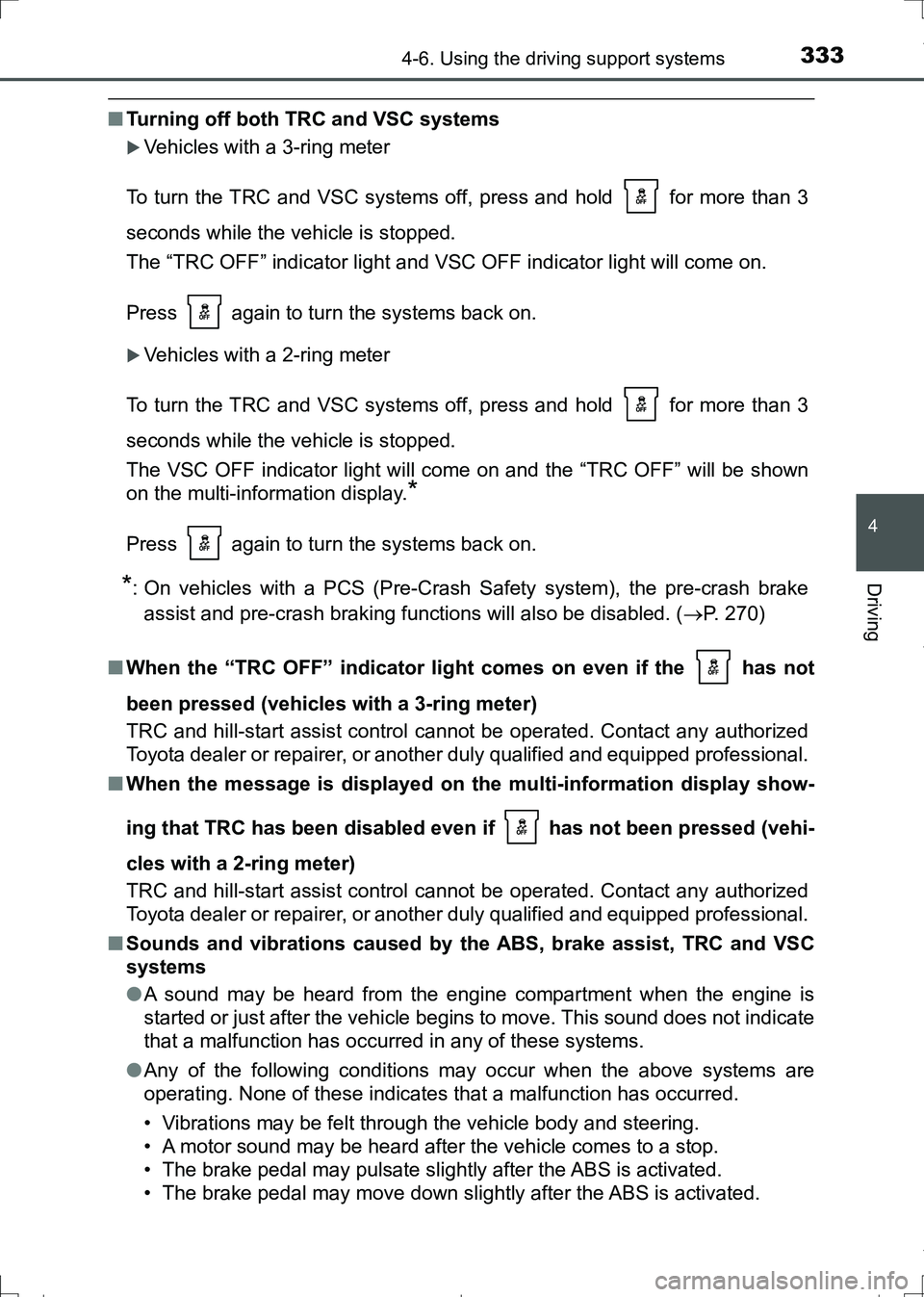
To turn the TRC and VSC systems off, press and hold for more than 3
seconds while the vehicle is stopped.
The “TRC OFF” indicator light and VSC OFF indicator light will come on.
Press again to turn the systems back on.
Vehicles with a 2-ring meter
To turn the TRC and VSC systems off, press and hold for more than 3
seconds while the vehicle is stopped.
The VSC OFF indicator light will come on and the “TRC OFF” will be shown
on the multi-information display.
*
Press again to turn the systems back on.
*: On vehicles with a PCS (Pre-Crash Safety system), the pre-crash brake
assist and pre-crash braking functions will also be disabled. (P. 270)
■When the “TRC OFF” indicator light comes on even if the has not
been pressed (vehicles with a 3-ring meter)
TRC and hill-start assist control cannot be operated. Contact any authorized
Toyota dealer or repairer, or another duly qualified and equipped professional.
■When the message is displayed on the multi-information display show-
ing that TRC has been disabled even if has not been pressed (vehi-
cles with a 2-ring meter)
TRC and hill-start assist control cannot be operated. Contact any authorized
Toyota dealer or repairer, or another duly qualified and equipped professional.
■Sounds and vibrations caused by the ABS, brake assist, TRC and VSC
systems
●A sound may be heard from the engine compartment when the engine is
started or just after the vehicle begins to move. This sound does not indicate
that a malfunction has occurred in any of these systems.
●Any of the following conditions may occur when the above systems are
operating. None of these indicates that a malfunction has occurred.
• Vibrations may be felt through the vehicle body and steering.
• A motor sound may be heard after the vehicle comes to a stop.
• The brake pedal may pulsate slightly after the ABS is activated.
• The brake pedal may move down slightly after the ABS is activated.
AURIS Touring Sports_OM_Europe_OM12L13E.book 333 ページ 2016年6月27日 月曜日 午後5時21分
Page 336 of 664
3364-6. Using the driving support systems
AURIS Touring Sports_EE (12L13E)
WARNING
■Hill- start assist control does not operate effectively when
●Do not overly rely on hill-start assist control. Hill-start assist control may
not operate effectively on steep inclines and roads covered with ice.
●Unlike the parking brake, hill-start assist control is not intended to hold the
vehicle stationary for an extended period of time. Do not attempt to use
hill-start assist control to hold the vehicle on an incline, as doing so may
lead to an accident.
■When the VSC is activated
The slip indicator light flashes. Always drive carefully. Reckless driving may
cause an accident. Exercise particular care when the indicator light flashes.
■When the TRC/VSC systems are turned off
Be especially careful and drive at a speed appropriate to the road condi-
tions. As these are the systems to help ensure vehicle stability and driving
force, do not turn the TRC/VSC systems off unless necessary.
■Replacing tires
Make sure that all tires are of the specified size, brand, tread pattern and
total load capacity. In addition, make sure that the tires are inflated to the
recommended tire inflation pressure level.
The ABS, TRC and VSC systems will not function correctly if different tires
are installed on the vehicle.
Contact any authorized Toyota dealer or repairer, or another duly qualified
and equipped professional for further information when replacing tires or
wheels.
■Handling of tires and the suspension
Using tires with any kind of problem or modifying the suspension will affect
the driving assist systems, and may cause a system to malfunction.
AURIS Touring Sports_OM_Europe_OM12L13E.book 336 ページ 2016年6月27日 月曜日 午後5時21分
Page 337 of 664
337
AURIS Touring Sports_EE (12L13E)
4
Driving
4-7. Driving tips
●Use fluids that are appropriate to the prevailing outside tempera-
tures.
• Engine oil
• Engine coolant
• Washer fluid
●Have a service technician inspect the condition of the battery.
●Have the vehicle fitted with four snow tires or purchase a set of tire
chains for the front tires.
Ensure that all tires are the same size and brand, and that chains match
the size of the tires.
Perform the following according to the driving conditions:
●Do not try to forcibly open a window or move a wiper that is frozen.
Pour warm water over the frozen area to melt the ice. Wipe away
the water immediately to prevent it from freezing.
●To ensure proper operation of the climate control system fan,
remove any snow that has accumulated on the air inlet vents in
front of the windshield.
●Check for and remove any excess ice or snow that may have accu-
mulated on the exterior lights, vehicle’s roof, chassis, around the
tires or on the brakes.
●Remove any snow or mud from the bottom of your shoes before
getting in the vehicle.
Accelerate the vehicle slowly, keep a safe distance between you and
the vehicle ahead, and drive at a reduced speed suitable to road con-
ditions.
Winter driving tips
Carry out the necessary preparations and inspections before
driving the vehicle in winter. Always drive the vehicle in a man-
ner appropriate to the prevailing weather conditions.
Preparation for winter
Before driving the vehicle
When driving the vehicle
AURIS Touring Sports_OM_Europe_OM12L13E.book 337 ページ 2016年6月27日 月曜日 午後5時21分
Page 357 of 664
3575-4. Playing audio CDs and MP3/WMA discs
AURIS Touring Sports_EE (12L13E)
5
Audio system
NOTICE
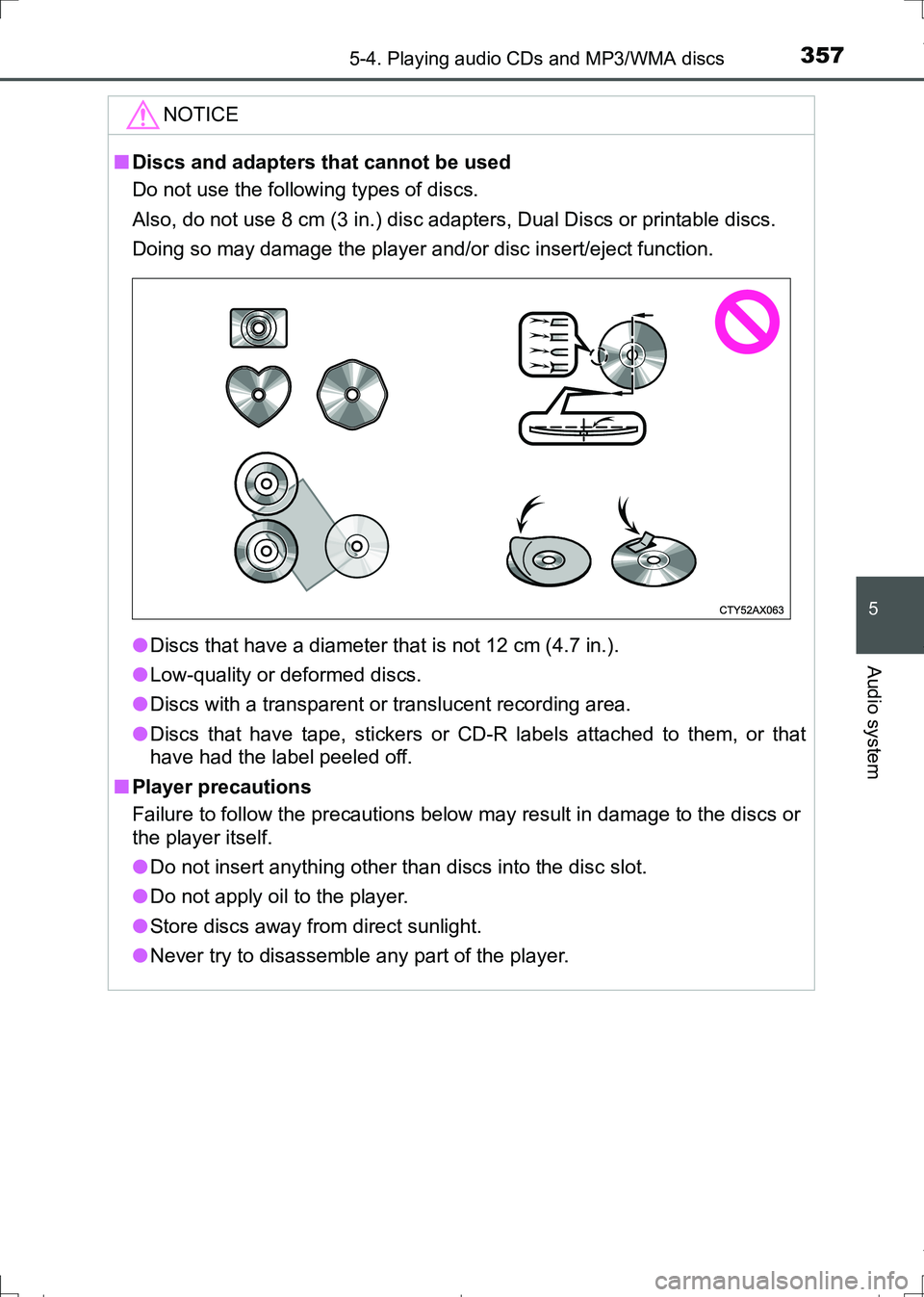
■Discs and adapters that cannot be used
Do not use the following types of discs.
Also, do not use 8 cm (3 in.) disc adapters, Dual Discs or printable discs.
Doing so may damage the player and/or disc insert/eject function.
●Discs that have a diameter that is not 12 cm (4.7 in.).
●Low-quality or deformed discs.
●Discs with a transparent or translucent recording area.
●Discs that have tape, stickers or CD-R labels attached to them, or that
have had the label peeled off.
■Player precautions
Failure to follow the precautions below may result in damage to the discs or
the player itself.
●Do not insert anything other than discs into the disc slot.
●Do not apply oil to the player.
●Store discs away from direct sunlight.
●Never try to disassemble any part of the player.
AURIS Touring Sports_OM_Europe_OM12L13E.book 357 ページ 2016年6月27日 月曜日 午後5時21分
Page 399 of 664
399
AURIS Touring Sports_EE (12L13E)
5
Audio system
5-10. Bluetooth®
■When using the Bluetooth® audio/Phone
●In the following situations, the system may not function.
• The portable player does not support Bluetooth
®
• The cellular phone is located outside the service area
• The Bluetooth® device is switched off
• The Bluetooth® device has a low battery
• The Bluetooth® device is not connected to the system
• The Bluetooth® device is behind the seat or in the glove box or console
box, or is touching or covered by metal objects
●There may be a delay if a cellular phone connection is made during
Bluetooth
® audio playback.
●Depending on the type of portable audio player that is connected to the sys-
tem, operation may differ slightly and certain functions may not be available.
■When transferring ownership of the vehicle
Be sure to initialize the system to prevent personal data from being improp-
erly accessed. (P. 385)
■About Bluetooth
®
■Compatible models
●Bluetooth® specifications:
Ver. 1.1, or higher (recommended: Ver. 2.1 + EDR or higher)
●Following Profiles:
• A2DP (Advanced Audio Distribution Profile) Ver. 1.0, or higher (recom-
mended: Ver. 1.2 or higher)
• AVRCP (Audio/Video Remote Control Profile) Ver. 1.0 or higher (recom-
mended: Ver. 1.3 or higher)
Portable players must correspond to the above specifications in order to be
connected to the Bluetooth
® audio system. However, please note that some
functions may be limited depending on the type of portable player.
●Cellular phone
• HFP (Hands Free Profile) Ver. 1.0 or higher (recommended: Ver. 1.5)
• OPP (Object Push Profile) Ver. 1.1
• PBAP (Phone Book Access Profile) Ver. 1.0
Bluetooth®
Bluetooth is a registered trademark of
Bluetooth SIG, Inc.
AURIS Touring Sports_OM_Europe_OM12L13E.book 399 ページ 2016年6月27日 月曜日 午後5時21分
Page 403 of 664
403
6Interior features
AURIS Touring Sports_EE (12L13E)6-1. Using the
air conditioning
system and defogger
Heater system ................... 404
Automatic air
conditioning system ......... 409
Power heater ..................... 417
Seat heaters ...................... 419
6-2. Using the interior lights
Interior lights list................. 421
• Interior lights .................. 422
• Vanity lights ................... 422
• Personal lights ............... 4236-3. Using the storage
features
List of storage features ...... 425
• Glove box ...................... 426
• Console box .................. 426
• Bottle holders ................ 427
• Cup holders ................... 428
• Auxiliary boxes .............. 429
Luggage compartment
features............................ 431
6-4. Other interior features
Other interior features ........ 443
• Sun visors...................... 443
• Vanity mirrors ................ 443
• Clock ............................. 444
• Portable ashtray ............ 444
• Power outlets................. 445
• Armrest .......................... 446
• Assist grips .................... 447
• Coat hooks .................... 447
• Panoramic roof
shade............................. 448
AURIS Touring Sports_OM_Europe_OM12L13E.book 403 ページ 2016年6月27日 月曜日 午後5時21分