engine TOYOTA AVALON 2014 XX40 / 4.G Repair Manual
[x] Cancel search | Manufacturer: TOYOTA, Model Year: 2014, Model line: AVALON, Model: TOYOTA AVALON 2014 XX40 / 4.GPages: 496, PDF Size: 6.75 MB
Page 164 of 496

1644-2. Driving procedures
AVALON (U)_(OM41452U)
■S mode
●When the shift range is “4” or lower, holding the shift lever toward “+” sets
the shift range to “6”.
● To prevent the engine from over-revving, upshifting may automatically
occur.
● To protect the automatic transmission, a function is adopted that automati-
cally shifts to the top range when the temperature is too hot.
■ AI-SHIFT
AI-SHIFT automatically selects the suitable gear according to driver input and
the driving situation.
AI-SHIFT automatically operates when the shift lever is in the D position.
(Shifting the shift lever to the S position or paddle shifting cancels the func-
tion.)
■ When driving with cruise control or radar cruise control activated
When downshifting to 5 or 4 by shifting the shift lever to the S position or pad-
dle shifting, cruise control or radar cruise control will not be canceled.
( P. 190, 194)
■ If the shift lever cannot be shifted from P
P. 414
■ If the “S” indicator does not come on or the “D” indicator is displayed
even after shifting the shift lever to S
This may indicate a malfunction in the automatic transmission system. Have
the vehicle inspected by your Toyota dealer immediately.
(In this situation, the transmission will operate in the same manner as when
the shift lever is in D.)
■ Downshift restriction warning buzze r (S mode or paddle shifting)
To help ensure safety and driving performance, downshifting operation may
sometimes be restricted. In some circumstances, downshifting may not be
possible even when the shift lever or paddle shift switches are operated. (A
buzzer will sound twice.)
CAUTION
■ When driving on slippery road surfaces
Be careful of downshifting and sudden acceleration, as this could result in
the vehicle skidding to the side or spinning.
Page 165 of 496
1654-2. Driving procedures
4
Driving
AVALON (U)_(OM41452U)
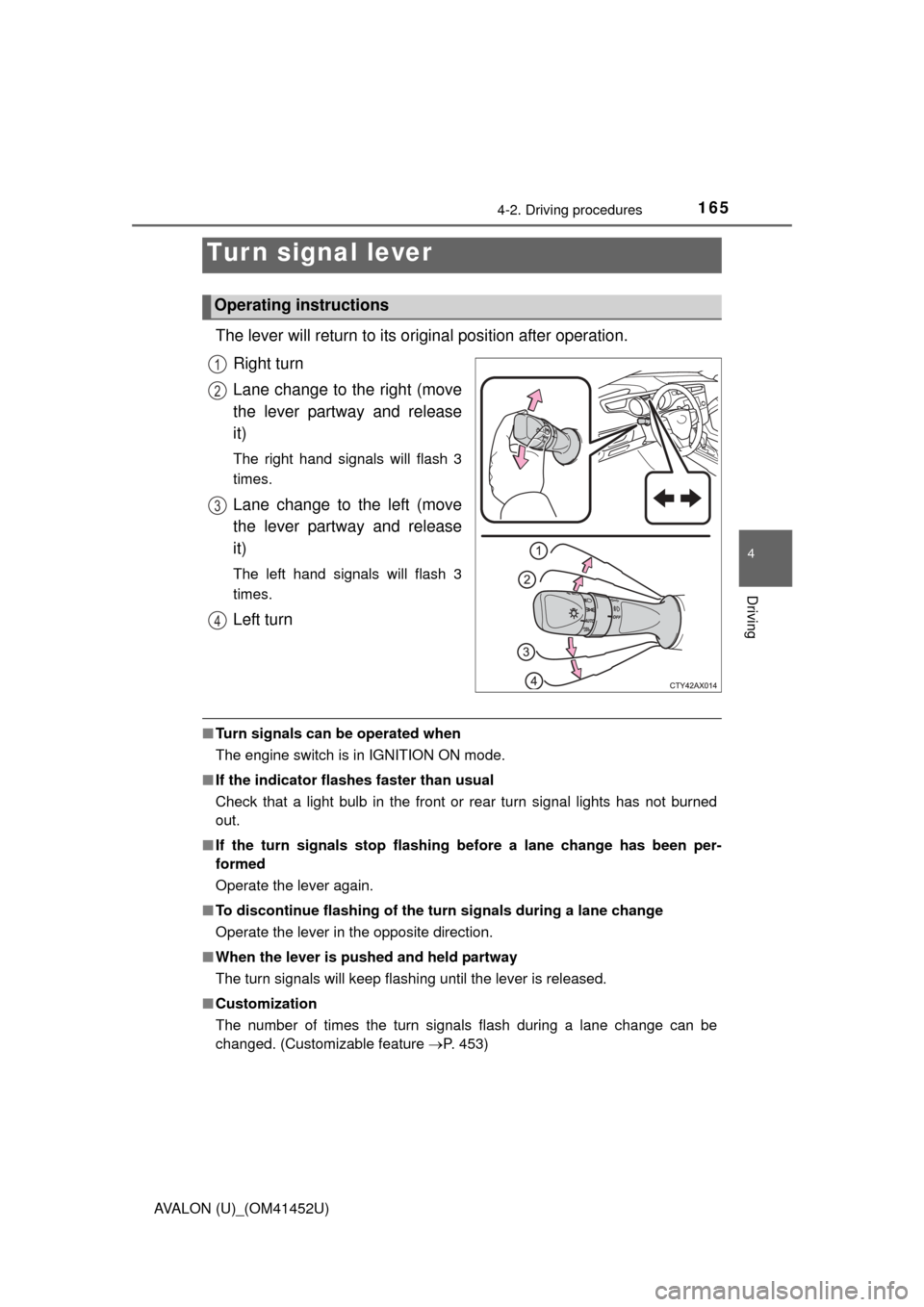
The lever will return to its original position after operation.
Right turn
Lane change to the right (move
the lever partway and release
it)
The right hand signals will flash 3
times.
Lane change to the left (move
the lever partway and release
it)
The left hand signals will flash 3
times.
Left turn
■ Turn signals can be operated when
The engine switch is in IGNITION ON mode.
■ If the indicator flashes faster than usual
Check that a light bulb in the front or rear turn signal lights has not burned
out.
■ If the turn signals stop flashing before a lane change has been per-
formed
Operate the lever again.
■ To discontinue flashing of the turn signals during a lane change
Operate the lever in the opposite direction.
■ When the lever is pushed and held partway
The turn signals will keep flashing until the lever is released.
■ Customization
The number of times the turn signals flash during a lane change can be
changed. (Customizable feature P. 453)
Tur n signal lever
Operating instructions
1
2
3
4
Page 168 of 496
168
AVALON (U)_(OM41452U)
4-3. Operating the lights and wipers
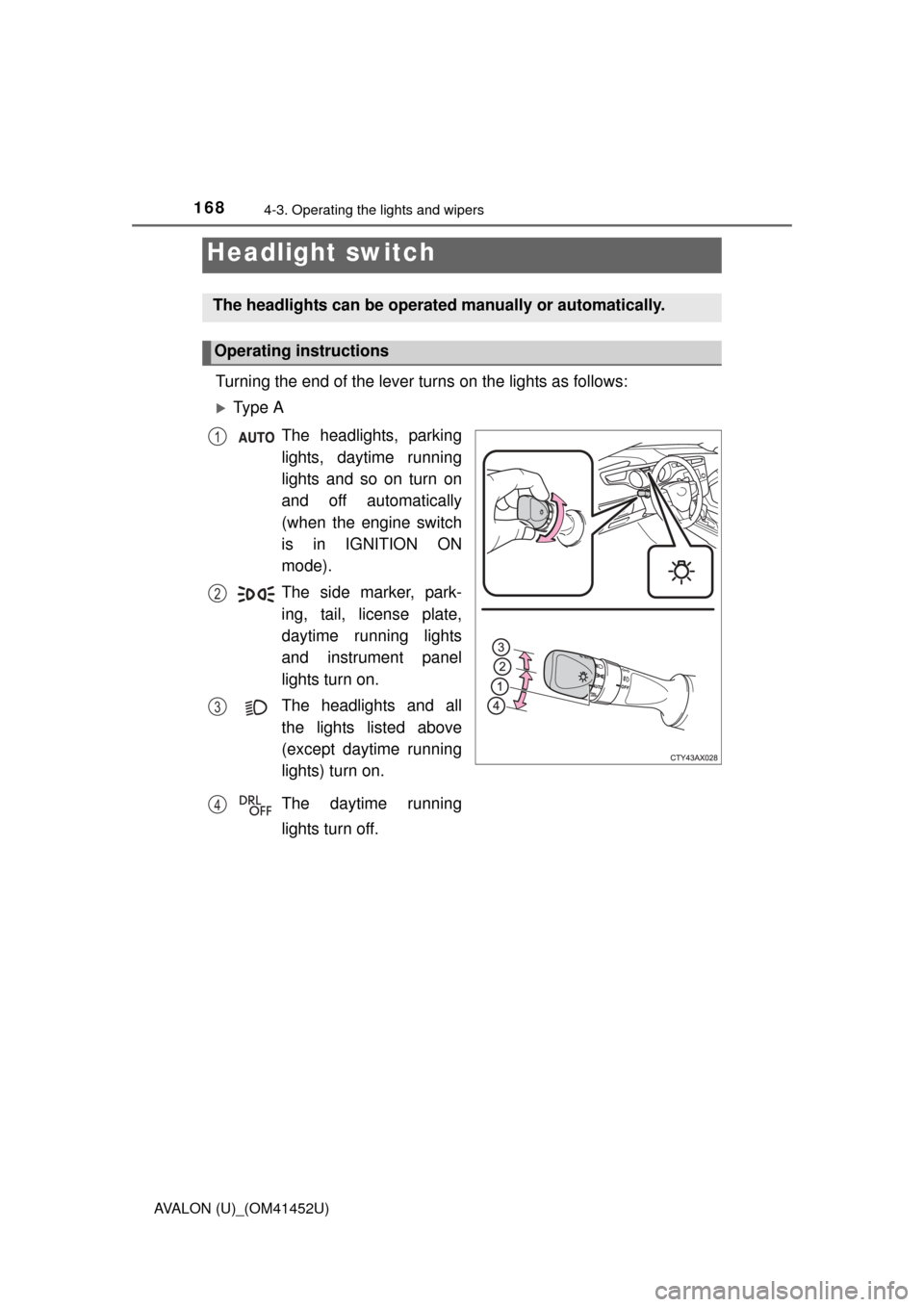
Turning the end of the lever turns on the lights as follows:
Ty p e AThe headlights, parking
lights, daytime running
lights and so on turn on
and off automatically
(when the engine switch
is in IGNITION ON
mode).
The side marker, park-
ing, tail, license plate,
daytime running lights
and instrument panel
lights turn on.
The headlights and all
the lights listed above
(except daytime running
lights) turn on.
The daytime running
lights turn off.
Headlight switch
The headlights can be operated manually or automatically.
Operating instructions
1
2
3
4
Page 169 of 496
1694-3. Operating the lights and wipers
4
Driving
AVALON (U)_(OM41452U)
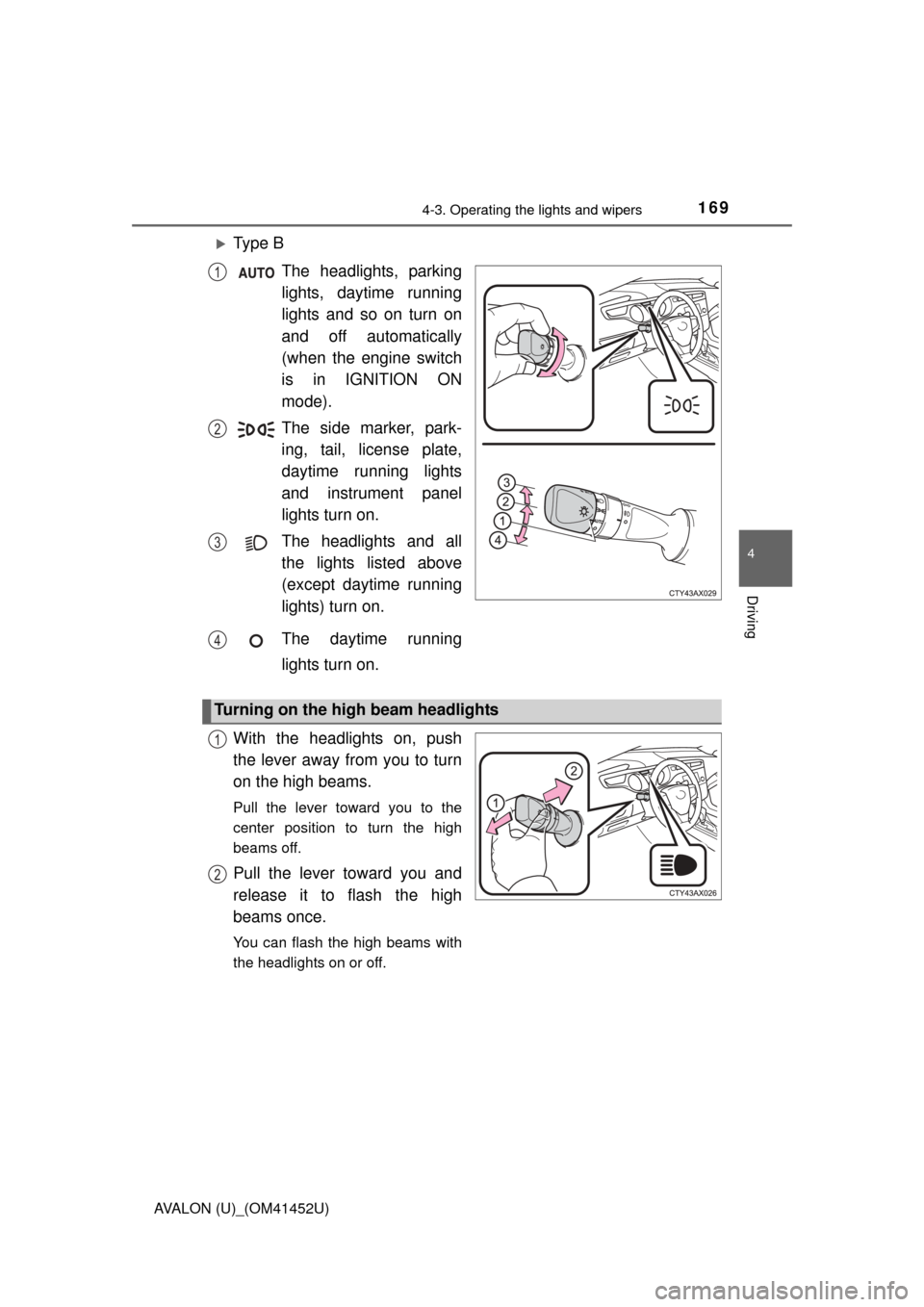
Ty p e BThe headlights, parking
lights, daytime running
lights and so on turn on
and off automatically
(when the engine switch
is in IGNITION ON
mode).
The side marker, park-
ing, tail, license plate,
daytime running lights
and instrument panel
lights turn on.
The headlights and all
the lights listed above
(except daytime running
lights) turn on.
The daytime running
lights turn on.
With the headlights on, push
the lever away from you to turn
on the high beams.
Pull the lever toward you to the
center position to turn the high
beams off.
Pull the lever toward you and
release it to flash the high
beams once.
You can flash the high beams with
the headlights on or off.
1
2
3
4
Turning on the high beam headlights
1
2
Page 170 of 496

1704-3. Operating the lights and wipers
AVALON (U)_(OM41452U)
■Daytime running light system
●Vehicles with halogen headlights: To make your vehicle more visible to other
drivers, the headlight high beam turn on automatically (at a decreased inten-
sity) whenever the engine is started and the parking brake is released. Day-
time running lights are not designed for use at night.
Vehicles with discharge headlights: To make your vehicle more visible to
other drivers, the parking lights turn on automatically (at an increased inten-
sity) whenever the engine is started and the parking brake is released. Day-
time running lights are not designed for use at night.
Type A: Daytime running lights can be turned off by operating the switch.
● Compared to turning on the headlights, the daytime running light system
offers greater durability and consumes less electricity, so it can help improve
fuel economy.
■ Headlight control sensor
■ Automatic light off system
●When the headlights are on: The headlights and tail lights turn off 30 sec-
onds after the engine switch is turned off and a door is opened and all of the
doors and trunk are closed. (The lights turn off immediately if on the
key is pressed twice after all the doors are closed.)
● When only the tail lights are on: The tail lights turn off automatically if the
engine switch is turned off and the driver’s door is opened.
To turn the lights on again, turn the engine switch to IGNITION ON mode, or
turn the light switch off once and then back to or .
If any of the doors or trunk lid is kept open, the lights automatically turn off
after 20 minutes.
■ Light reminder buzzer
A buzzer sounds when the engine switch is turned off or turned to ACCES-
SORY mode and the driver’s door is opened while the lights are turned on. The sensor may not function properly if an
object is placed on the sensor, or anything
that blocks the sensor is affixed to the
windshield.
Doing so interferes with the sensor
detecting the level of ambient light and
may cause the automatic headlight sys-
tem to malfunction.
Page 171 of 496

1714-3. Operating the lights and wipers
4
Driving
AVALON (U)_(OM41452U)■
Automatic headlight leveling system (if equipped)
The level of the headlights is automatically adjusted according to the number
of passengers and the loading condition of the vehicle to ensure that the
headlights do not interfere with other road users.
■ Customization
Settings (e.g. light sensor sensitivity) can be changed.
(Customizable features: P. 453)
NOTICE
■To prevent battery discharge
Do not leave the lights on longer than necessary when the engine is not
running.
Page 174 of 496

1744-3. Operating the lights and wipers
AVALON (U)_(OM41452U)
■The Automatic High Beam can be operated when
The engine switch is in IGNITION ON mode.
■ Camera sensor detection information
●High beam may not be automatically turned off in the following situations:
• When oncoming vehicles suddenly appear from a curve
• When the vehicle is cut in front of by another
● High beam may be turned off if an oncoming vehicle that is using fog lights
without using the headlights is detected.
● House lights, street lights, red traffic signals, and illuminated billboards or
signs may cause the high beam to turn off.
● The following factors may affect the amount of time taken to turn high beam
on or off:
• The brightness of headlights, fog lights, and tail lights of oncoming and
preceding vehicles
• The condition of the road (gradient, curve, condition of the road surface etc.)
• The number of passengers and amount of luggage
● High beam may be turned on or off when unexpected by the driver.
Page 183 of 496
1834-3. Operating the lights and wipers
4
Driving
AVALON (U)_(OM41452U)
■The windshield wiper and washer can be operated when
The engine switch is in IGNITION ON mode.
■ Effects of vehicle speed on wiper operation (vehicles with rain-sensing
windshield wipers)
With low speed windshield wiper operat ion selected, wiper operation will be
switched from low speed to intermittent wiper operation only when the vehicle
is stationary.
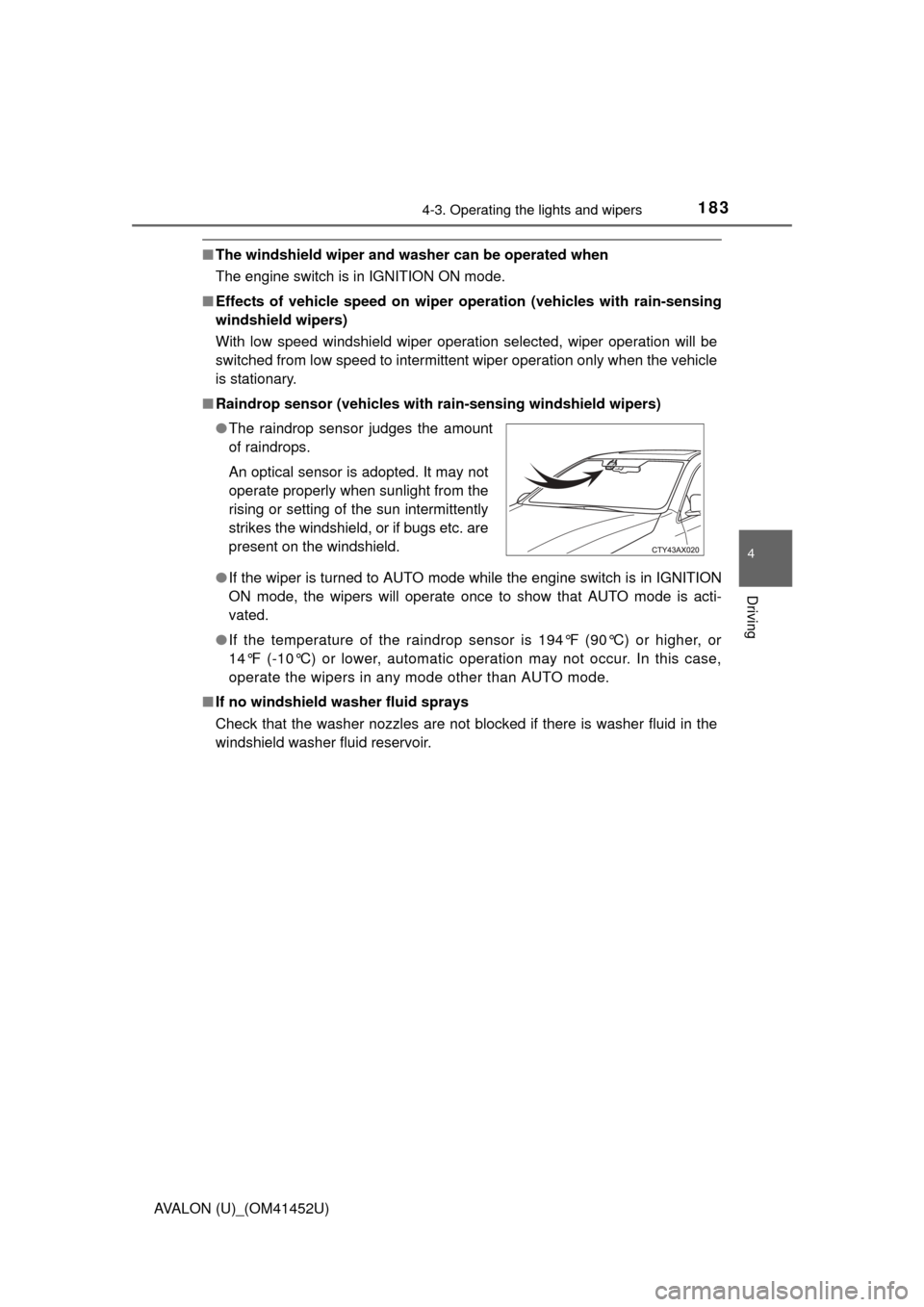
■ Raindrop sensor (vehicles with ra in-sensing windshield wipers)
● If the wiper is turned to AUTO mode while the engine switch is in IGNITION
ON mode, the wipers will operate once to show that AUTO mode is acti-
vated.
● If the temperature of the raindrop sensor is 194°F (90°C) or higher, or
14°F (-10°C) or lower, automatic operation may not occur. In this case,
operate the wipers in any mode other than AUTO mode.
■ If no windshield washer fluid sprays
Check that the washer nozzles are not blocked if there is washer fluid in the
windshield washer fluid reservoir. ●The raindrop sensor judges the amount
of raindrops.
An optical sensor is adopted. It may not
operate properly when sunlight from the
rising or setting of the sun intermittently
strikes the windshield, or if bugs etc. are
present on the windshield.
Page 185 of 496

185
4
Driving
AVALON (U)_(OM41452U)
4-4. Refueling
●Close all the doors and windows, and turn the engine switch off.
● Confirm the type of fuel.
■Fuel types
Use unleaded gasoline (Octane rating 87 [Research Octane Number 91] or
higher)
Opening the fuel tank cap
Perform the following steps to open the fuel tank cap:
Before refueling the vehicle
Page 197 of 496
1974-5. Using the driving support systems
4
Driving
AVALON (U)_(OM41452U)
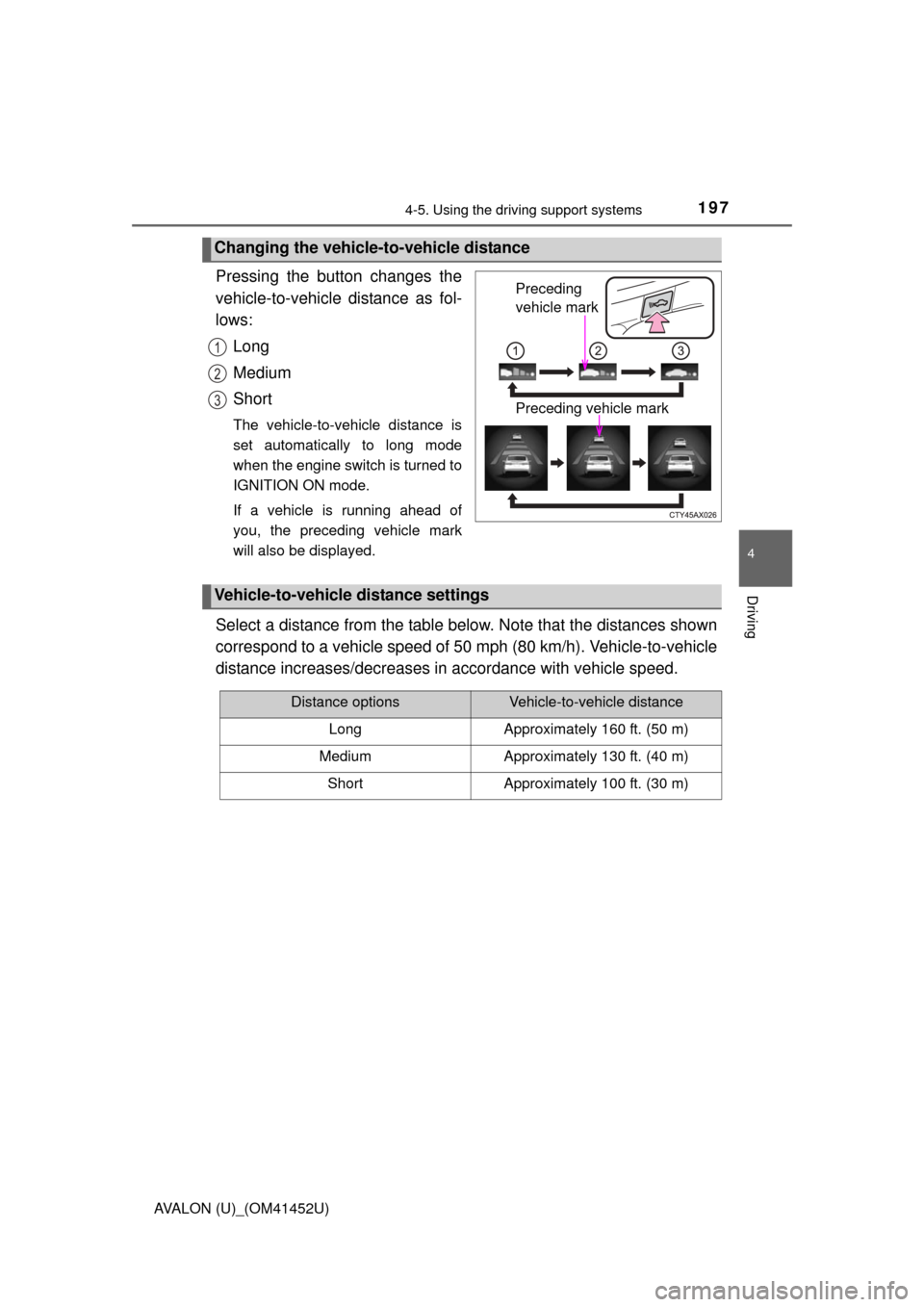
Pressing the button changes the
vehicle-to-vehicle distance as fol-
lows:Long
Medium
Short
The vehicle-to-vehicle distance is
set automatically to long mode
when the engine switch is turned to
IGNITION ON mode.
If a vehicle is running ahead of
you, the preceding vehicle mark
will also be displayed.
Select a distance from the table below. Note that the distances shown
correspond to a vehicle speed of 50 mph (80 km/h). Vehicle-to-vehicle
distance increases/decreases in accordance with vehicle speed.
Changing the vehicle-to-vehicle distance
Preceding
vehicle mark
Preceding vehicle mark
1
2
3
Vehicle-to-vehicle distance settings
Distance optionsVehicle-to-vehicle distance
LongApproximately 160 ft. (50 m)
MediumApproximately 130 ft. (40 m)
ShortApproximately 100 ft. (30 m)