display TOYOTA AVALON 2015 XX40 / 4.G User Guide
[x] Cancel search | Manufacturer: TOYOTA, Model Year: 2015, Model line: AVALON, Model: TOYOTA AVALON 2015 XX40 / 4.GPages: 500
Page 81 of 500
812. Instrument cluster
2
Instrument cluster
AVALON (U)_(OM41456U)■
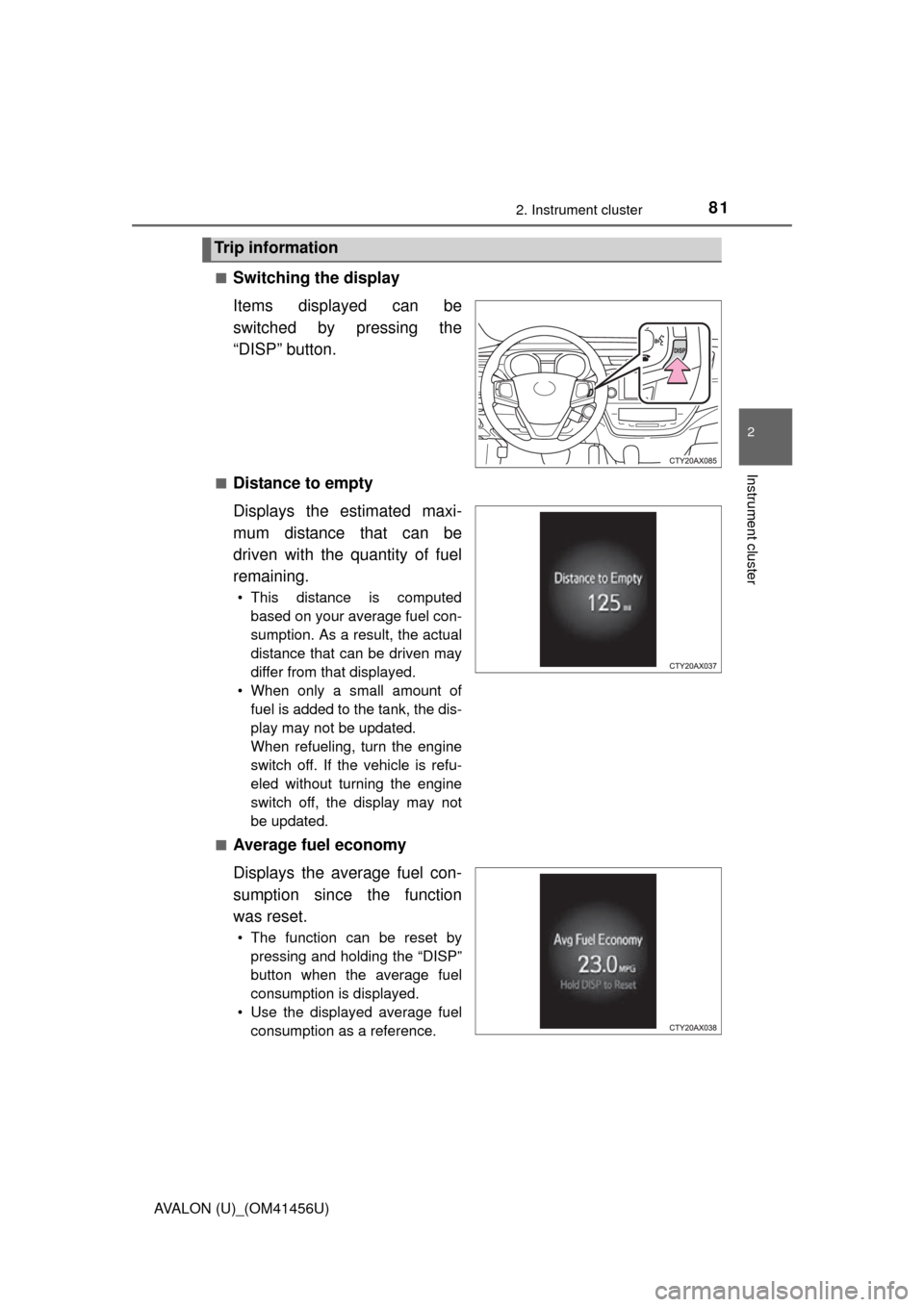
Switching the display
Items displayed can be
switched by pressing the
“DISP” button.
■Distance to empty
Displays the estimated maxi-
mum distance that can be
driven with the quantity of fuel
remaining.
• This distance is computed
based on your average fuel con-
sumption. As a result, the actual
distance that can be driven may
differ from that displayed.
• When only a small amount of fuel is added to the tank, the dis-
play may not be updated.
When refueling, turn the engine
switch off. If the vehicle is refu-
eled without turning the engine
switch off, the display may not
be updated.
■
Average fuel economy
Displays the average fuel con-
sumption since the function
was reset.
• The function can be reset by pressing and holding the “DISP”
button when the average fuel
consumption is displayed.
• Use the displayed average fuel consumption as a reference.
Trip information
Page 82 of 500
822. Instrument cluster
AVALON (U)_(OM41456U)■
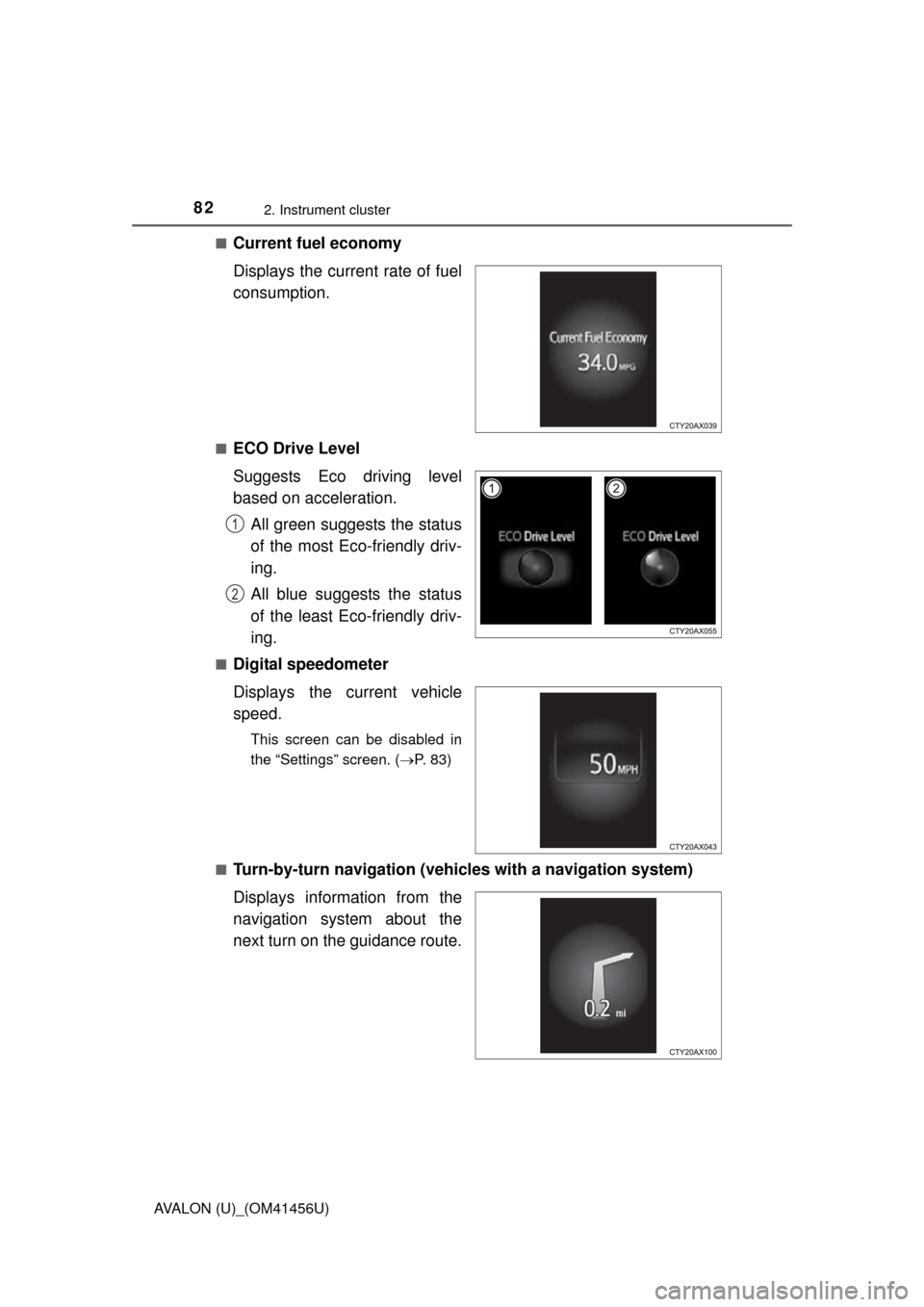
Current fuel economy
Displays the current rate of fuel
consumption.
■ECO Drive Level
Suggests Eco driving level
based on acceleration.
All green suggests the status
of the most Eco-friendly driv-
ing.
All blue suggests the status
of the least Eco-friendly driv-
ing.
■Digital speedometer
Displays the current vehicle
speed.
This screen can be disabled in
the “Settings” screen. ( P. 83)
■
Turn-by-turn navigation (vehicl es with a navigation system)
Displays information from the
navigation system about the
next turn on the guidance route.
1
2
Page 83 of 500
832. Instrument cluster
2
Instrument cluster
AVALON (U)_(OM41456U)■
Customizable items
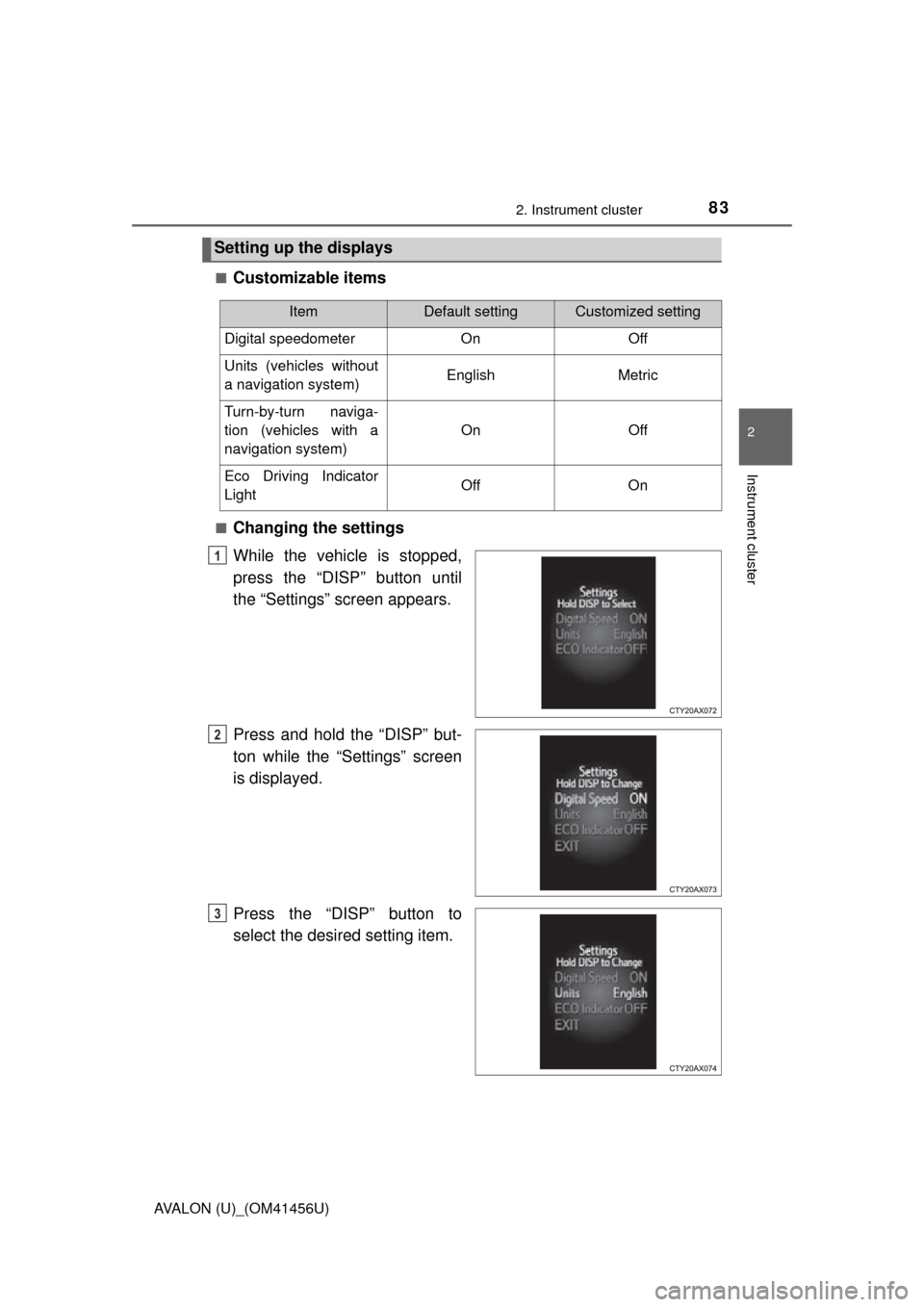
■Changing the settings
While the vehicle is stopped,
press the “DISP” button until
the “Settings” screen appears.
Press and hold the “DISP” but-
ton while the “Settings” screen
is displayed.
Press the “DISP” button to
select the desired setting item.
Setting up the displays
ItemDefault settingCustomized setting
Digital speedometer On Off
Units (vehicles without
a navigation system) English Metric
Turn-by-turn naviga-
tion (vehicles with a
navigation system) On Off
Eco Driving Indicator
Light Off On
1
2
3
Page 84 of 500
842. Instrument cluster
AVALON (U)_(OM41456U)
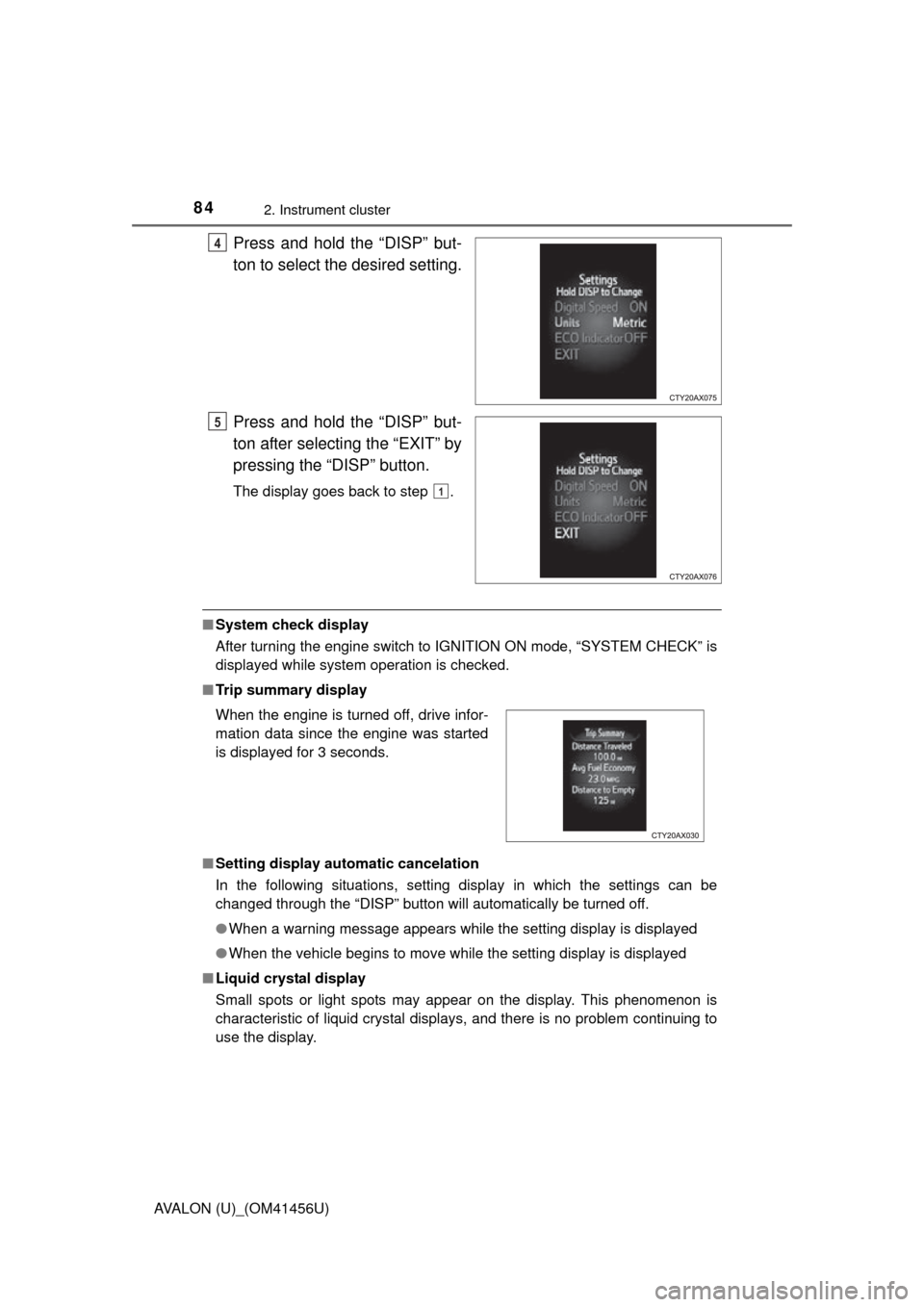
Press and hold the “DISP” but-
ton to select the desired setting.
Press and hold the “DISP” but-
ton after selecting the “EXIT” by
pressing the “DISP” button.
The display goes back to step .
■System check display
After turning the engine switch to IGNITION ON mode, “SYSTEM CHECK” is
displayed while system operation is checked.
■ Trip summary display
■ Setting display automatic cancelation
In the following situations, setting display in which the settings can b\
e
changed through the “DISP” button will automatically be turned off.
●When a warning message appears while the setting display is displayed
● When the vehicle begins to move while the setting display is displayed
■ Liquid crystal display
Small spots or light spots may appear on the display. This phenomenon is
characteristic of liquid crystal displays, and there is no problem continuing to
use the display.
4
5
1
When the engine is turned off, drive infor-
mation data since the engine was started
is displayed for 3 seconds.
Page 85 of 500
852. Instrument cluster
2
Instrument cluster
AVALON (U)_(OM41456U)
CAUTION
■The information display at low temperatures
Allow the interior of the vehicle to warm up before using the liquid crystal
information display. At extremely low temperatures, the information display
monitor may respond slowly, and display changes may be delayed.
For example, there is a lag between the driver’s shifting and the new gear
number appearing on the display. This lag could cause the driver to down-
shift again, causing rapid and excessive engine braking and possibly an
accident resulting in death or injury.
■ Cautions during setting up the display
As the engine needs to be running during setting up the display, ensure that
the vehicle is parked in a place with adequate ventilation. In a closed area
such as a garage, exhaust gases including harmful carbon monoxide (CO)
may collect and enter the vehicle. This may lead to death or a serious
health hazard.
NOTICE
■During setting up the display
To prevent battery discharge, ensure that the engine is running while setting
up the display features.
Page 86 of 500
862. Instrument cluster
AVALON (U)_(OM41456U)
Audio system
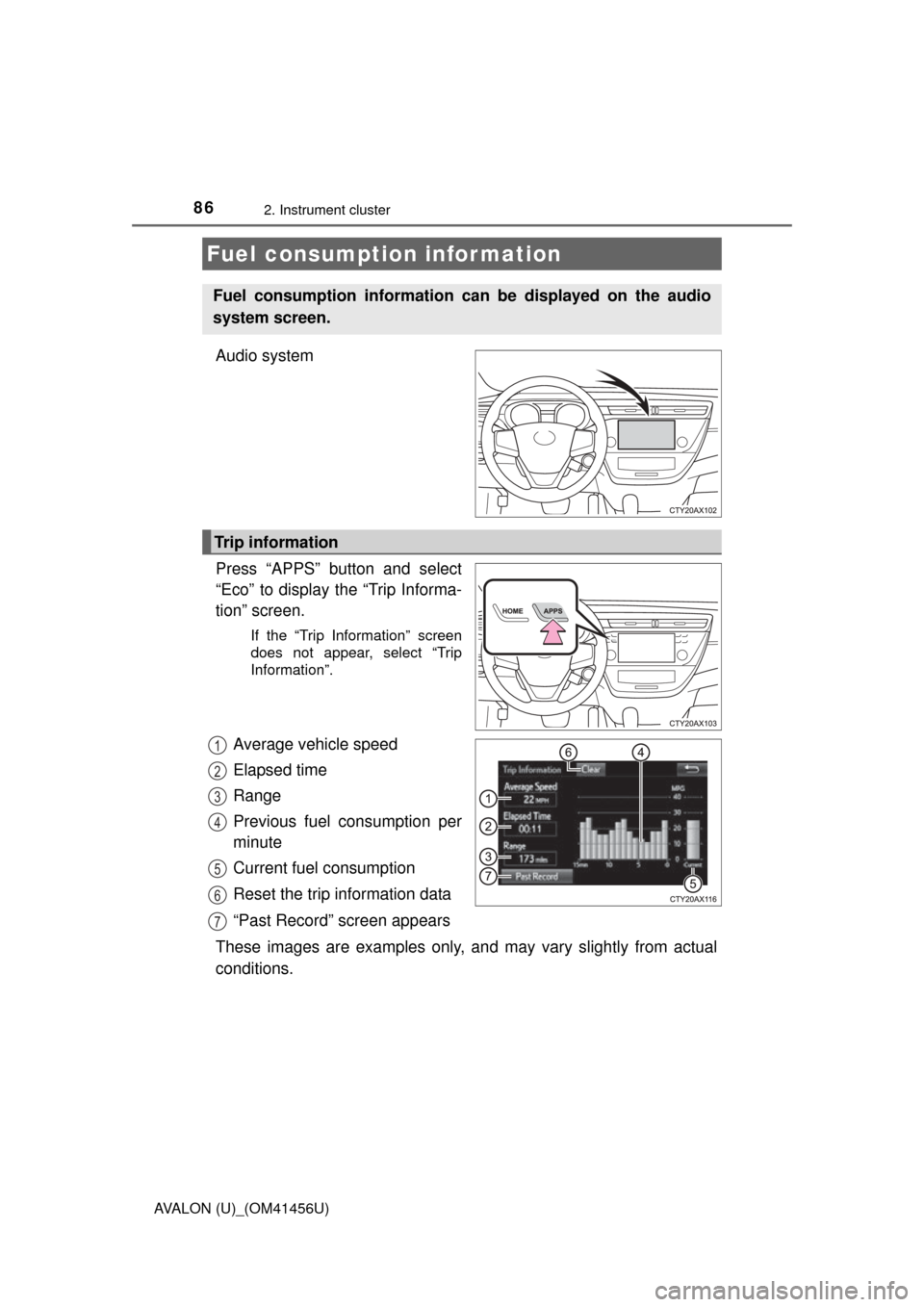
Press “APPS” button and select
“Eco” to display the “Trip Informa-
tion” screen.
If the “Trip Information” screen
does not appear, select “Trip
Information”.
Average vehicle speed
Elapsed time
Range
Previous fuel consumption per
minute
Current fuel consumption
Reset the trip information data
“Past Record” screen appears
These images are examples only, an d may vary slightly from actual
conditions.
Fuel consumption information
Fuel consumption information can be displayed on the audio
system screen.
Trip information
1
2
3
4
5
6
7
Page 87 of 500
872. Instrument cluster
2
Instrument cluster
AVALON (U)_(OM41456U)
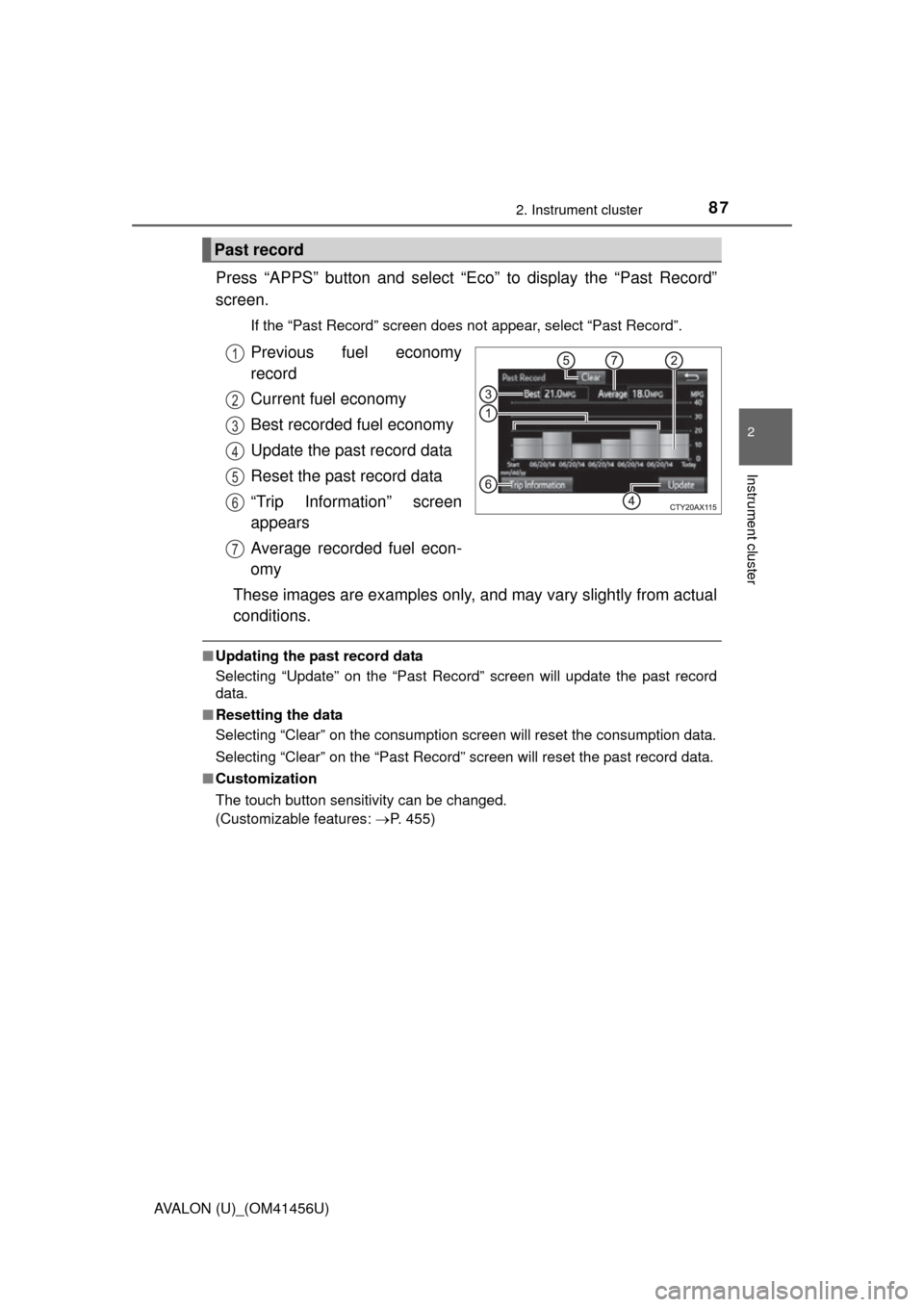
Press “APPS” button and select “Eco” to display the “Past Record”
screen.
If the “Past Record” screen does not appear, select “Past Record”.
Previous fuel economy
record
Current fuel economy
Best recorded fuel economy
Update the past record data
Reset the past record data
“Trip Information” screen
appears
Average recorded fuel econ-
omy
These images are examples only, and may vary slightly from actual
conditions.
■ Updating the past record data
Selecting “Update” on the “Past Record” screen will update t\
he past record
data.
■ Resetting the data
Selecting “Clear” on the consumption screen will reset the consumption data.
Selecting “Clear” on the “Past Record” screen will reset the past record data.
■ Customization
The touch button sensitivity can be changed.
(Customizable features: P. 455)
Past record
1
2
3
4
5
6
7
Page 97 of 500
973-2. Opening, closing and locking the doors
3
Operation of each component
AVALON (U)_(OM41456U)■
Alarms and warning indicators
An alarm sounds and warning message displays shown on the multi-informa-
tion display are used to protect against unexpected accidents or theft of the
vehicle resulting from erroneous operation. When a warning message is dis-
played, take appropriate measures based on the displayed message.
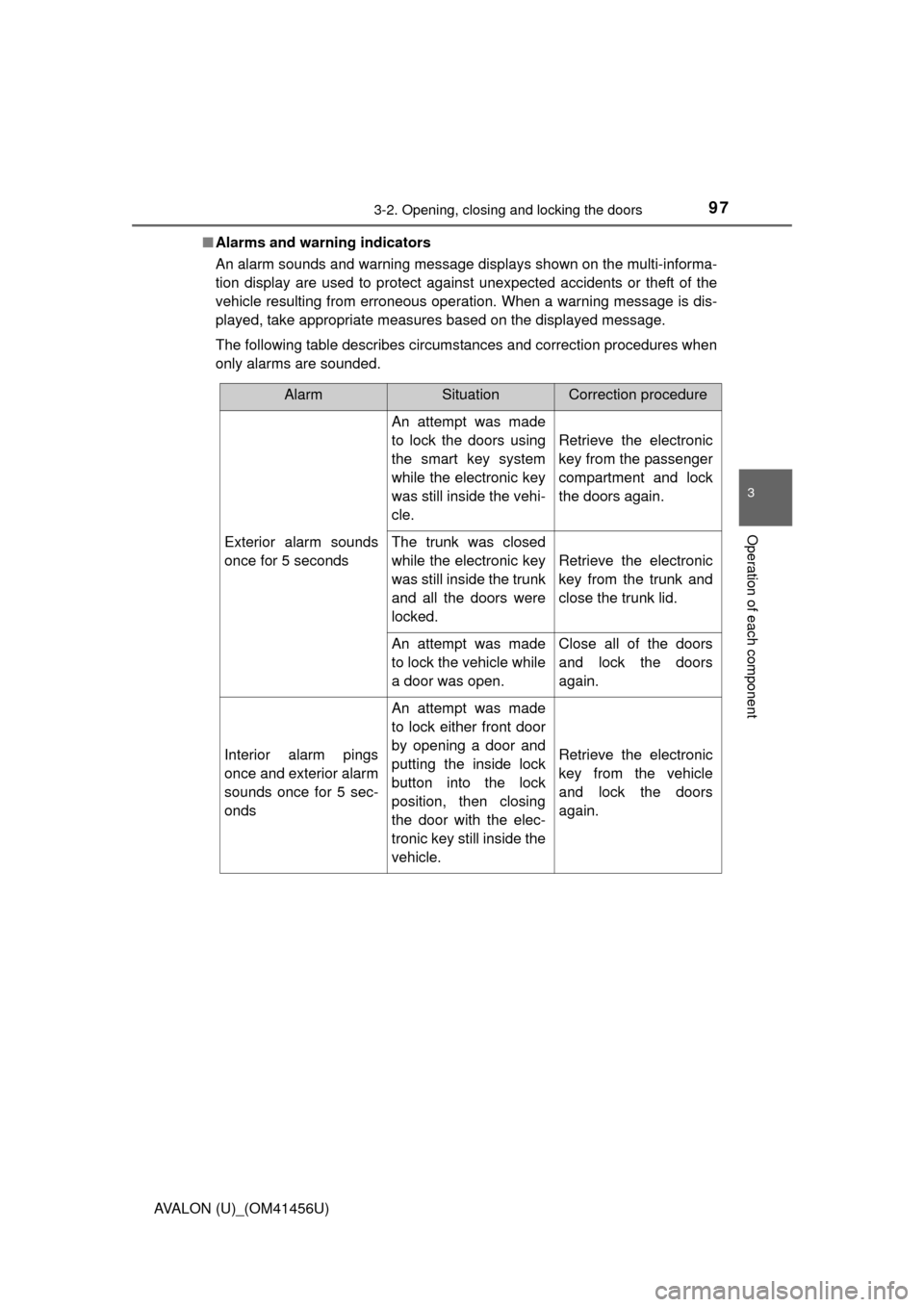
The following table describes circumstances and correction procedures when
only alarms are sounded.
AlarmSituationCorrection procedure
Exterior alarm sounds
once for 5 seconds
An attempt was made
to lock the doors using
the smart key system
while the electronic key
was still inside the vehi-
cle.
Retrieve the electronic
key from the passenger
compartment and lock
the doors again.
The trunk was closed
while the electronic key
was still inside the trunk
and all the doors were
locked.
Retrieve the electronic
key from the trunk and
close the trunk lid.
An attempt was made
to lock the vehicle while
a door was open.Close all of the doors
and lock the doors
again.
Interior alarm pings
once and exterior alarm
sounds once for 5 sec-
onds
An attempt was made
to lock either front door
by opening a door and
putting the inside lock
button into the lock
position, then closing
the door with the elec-
tronic key still inside the
vehicle.
Retrieve the electronic
key from the vehicle
and lock the doors
again.
Page 98 of 500
983-2. Opening, closing and locking the doors
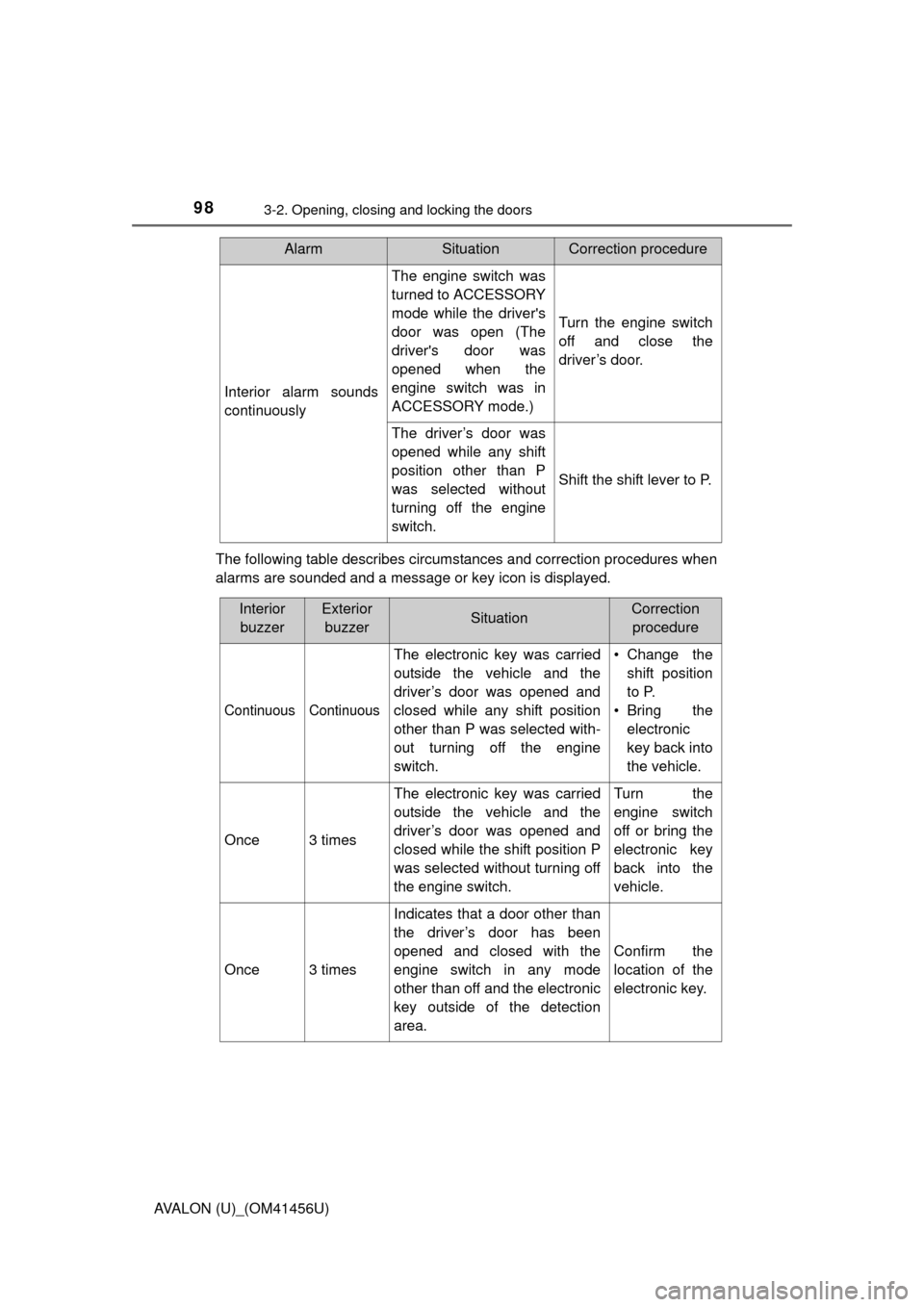
AVALON (U)_(OM41456U)The following table describes circumstances and correction procedures when
alarms are sounded and a message or key icon is displayed.
Interior alarm sounds
continuously
The engine switch was
turned to ACCESSORY
mode while the driver's
door was open (The
driver's door was
opened when the
engine switch was in
ACCESSORY mode.)
Turn the engine switch
off and close the
driver’s door.
The driver’s door was
opened while any shift
position other than P
was selected without
turning off the engine
switch.
Shift the shift lever to P.
AlarmSituationCorrection procedure
Interior
buzzerExterior buzzerSituationCorrection procedure
Continuous Continuous
The electronic key was carried
outside the vehicle and the
driver’s door was opened and
closed while any shift position
other than P was selected with-
out turning off the engine
switch. • Change the
shift position
to P.
• Bring the electronic
key back into
the vehicle.
Once3 times
The electronic key was carried
outside the vehicle and the
driver’s door was opened and
closed while the shift position P
was selected without turning off
the engine switch.Turn the
engine switch
off or bring the
electronic key
back into the
vehicle.
Once3 times
Indicates that a door other than
the driver’s door has been
opened and closed with the
engine switch in any mode
other than off and the electronic
key outside of the detection
area.
Confirm the
location of the
electronic key.
Page 100 of 500
1003-2. Opening, closing and locking the doors
AVALON (U)_(OM41456U)■
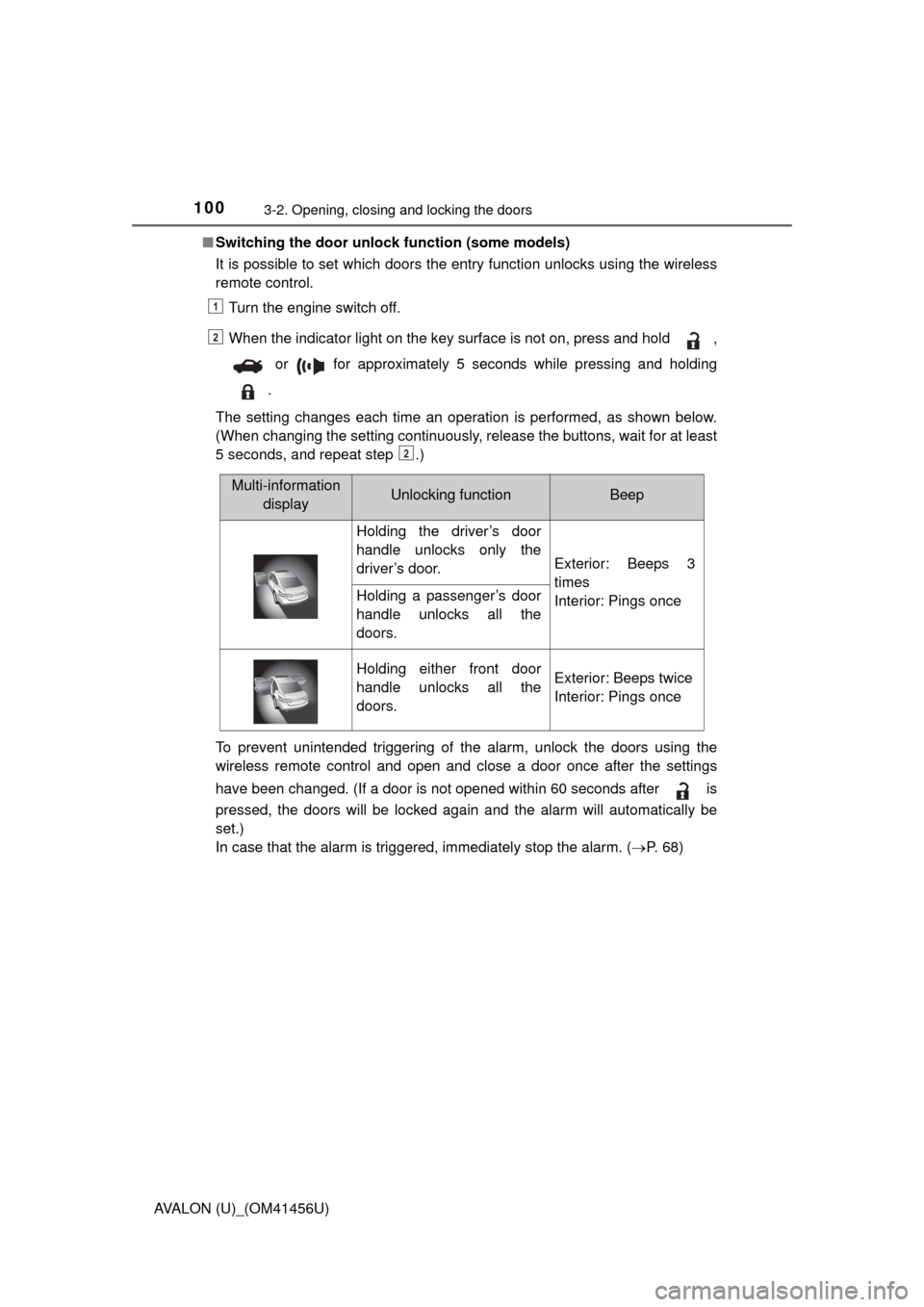
Switching the door unlock function (some models)
It is possible to set which doors the entry function unlocks using the wireless
remote control.
Turn the engine switch off.
When the indicator light on the key surface is not on, press and hold ,
or for approximately 5 seconds while pressing and holding
.
The setting changes each time an operation is performed, as shown below.
(When changing the setting continuously, release the buttons, wait for at least
5 seconds, and repeat step .)
To prevent unintended triggering of the alarm, unlock the doors using the
wireless remote control and open and close a door once after the settings
have been changed. (If a door is not opened within 60 seconds after is
pressed, the doors will be locked again and the alarm will automatically be
set.)
In case that the alarm is triggered, immediately stop the alarm. ( P. 6 8 )
1
2
2
Multi-information
displayUnlocking functionBeep
Holding the driver’s door
handle unlocks only the
driver’s door.
Exterior: Beeps 3
times
Interior: Pings once
Holding a passenger’s door
handle unlocks all the
doors.
Holding either front door
handle unlocks all the
doors.Exterior: Beeps twice
Interior: Pings once