display TOYOTA AVALON 2015 XX40 / 4.G Owner's Manual
[x] Cancel search | Manufacturer: TOYOTA, Model Year: 2015, Model line: AVALON, Model: TOYOTA AVALON 2015 XX40 / 4.GPages: 500
Page 140 of 500

1403-5. Opening, closing the windows and moon roof
AVALON (U)_(OM41456U)■
Moon roof open warning buzzer
The buzzer sounds and a message is shown on the multi-information display
when the engine switch is turned off and the driver’s door is opened with the
moon roof open.
CAUTION
Observe the following precautions.
Failure to do so may cause death or serious injury.
■Opening the moon roof
● Do not allow any passengers to put their hands or heads outside the vehi-
cle while it is moving.
● Do not sit on top of the moon roof.
■ Closing the moon roof
● The driver is responsible for moon roof opening and closing operations.
In order to prevent accidental operation, especially by a child, do not let a
child operate the moon roof. It is possible for children and other passen-
gers to have body parts caught in the moon roof.
● Check to make sure that all passengers do not have any part of their body
in a position where it could be caught when the moon roof is being oper-
ated.
● When exiting the vehicle, turn the engine switch off, carry the key and exit
the vehicle along with the child. There may be accidental operation, due to
mischief, etc., that may possibly lead to an accident.
■ Jam protection function
● Never use any part of your body to intentionally activate the jam protection
function.
● The jam protection function may not work if something gets caught just
before the moon roof fully closes.
Page 159 of 500
159
4
Driving
AVALON (U)_(OM41456U)
4-2. Driving procedures
Check that the parking brake is set.
Check that the shift lever is set in P.
Firmly depress the brake pedal.
Messages indicating how to start the engine and how to turn to ACCES-
SORY mode will be displayed alternately on the multi-information display.
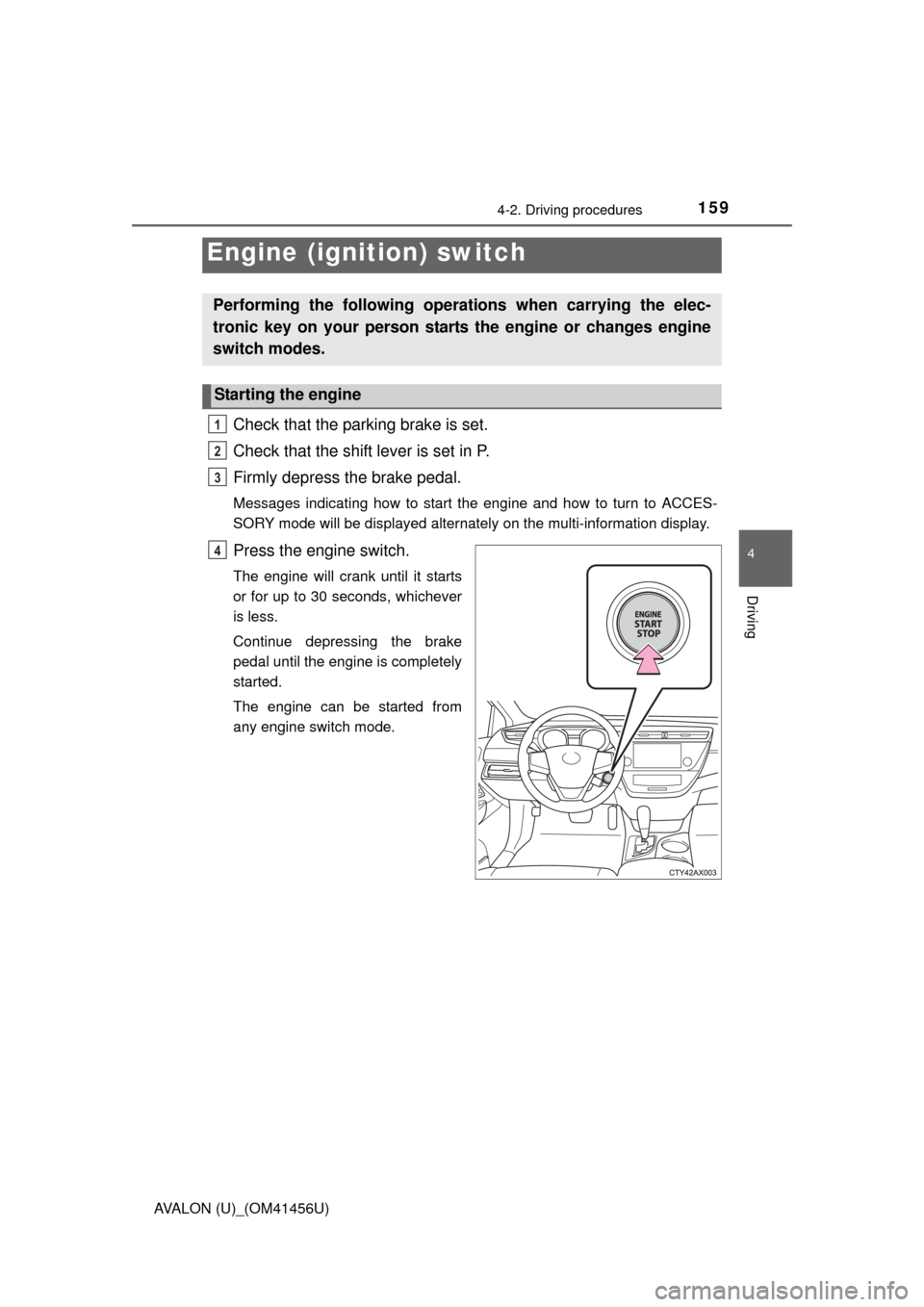
Press the engine switch.
The engine will crank until it starts
or for up to 30 seconds, whichever
is less.
Continue depressing the brake
pedal until the engine is completely
started.
The engine can be started from
any engine switch mode.
Engine (ignition) switch
Performing the following operations when carrying the elec-
tronic key on your person starts the engine or changes engine
switch modes.
Starting the engine
1
2
3
4
Page 160 of 500
1604-2. Driving procedures
AVALON (U)_(OM41456U)
Stop the vehicle.
Shift the shift lever to P.
Set the parking brake. (P. 170)
Press the engine switch.
Driving-related data will be displayed on the multi-information display.
( P. 84)
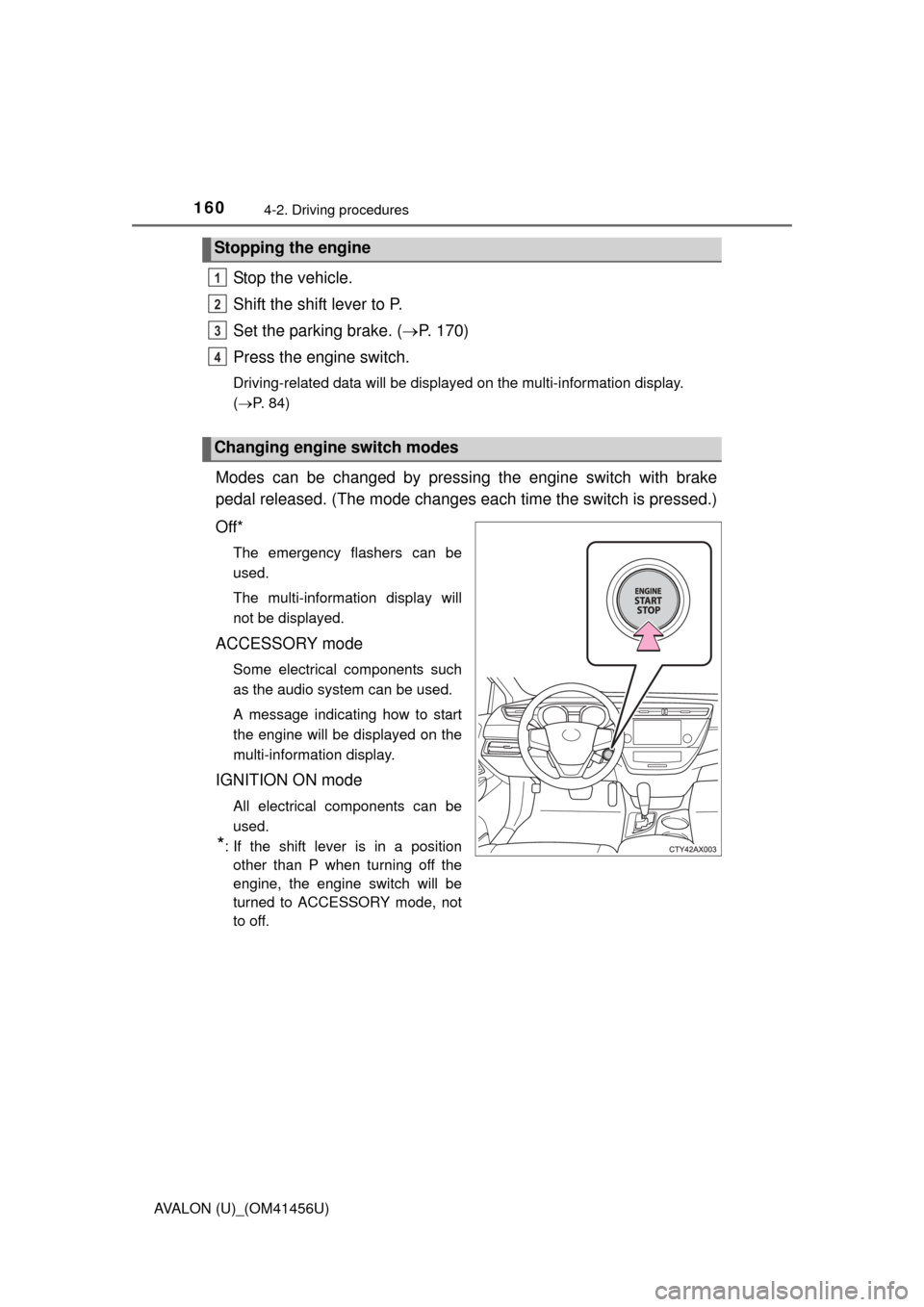
Modes can be changed by pressing the engine switch with brake
pedal released. (The mode changes ea ch time the switch is pressed.)
Off*
The emergency flashers can be
used.
The multi-information display will
not be displayed.
ACCESSORY mode
Some electrical components such
as the audio system can be used.
A message indicating how to start
the engine will be displayed on the
multi-information display.
IGNITION ON mode
All electrical components can be
used.
*: If the shift lever is in a position other than P when turning off the
engine, the engine switch will be
turned to ACCESSORY mode, not
to off.
Stopping the engine
Changing engine switch modes
1
2
3
4
Page 161 of 500

1614-2. Driving procedures
4
Driving
AVALON (U)_(OM41456U)
If the engine is stopped with the shift lever in a position other than P, a
message indicating to shift the shift lever to P will be displayed on the
multi-information display. At this time, the engine switch will not be
turned off but instead be turned to ACCESSORY mode. Perform the
following procedure to turn the switch off:
Check that the parking brake is set.
Shift the shift lever to P.
Check that “Turn Power OFF” is displayed on the multi-information
display and then press the engine switch once.
Check that “Turn Power OFF” on the multi-information display is
turned off.
When stopping the engine with the shift lever in a position other
than P
1
2
3
4
Page 163 of 500
1634-2. Driving procedures
4
Driving
AVALON (U)_(OM41456U)■
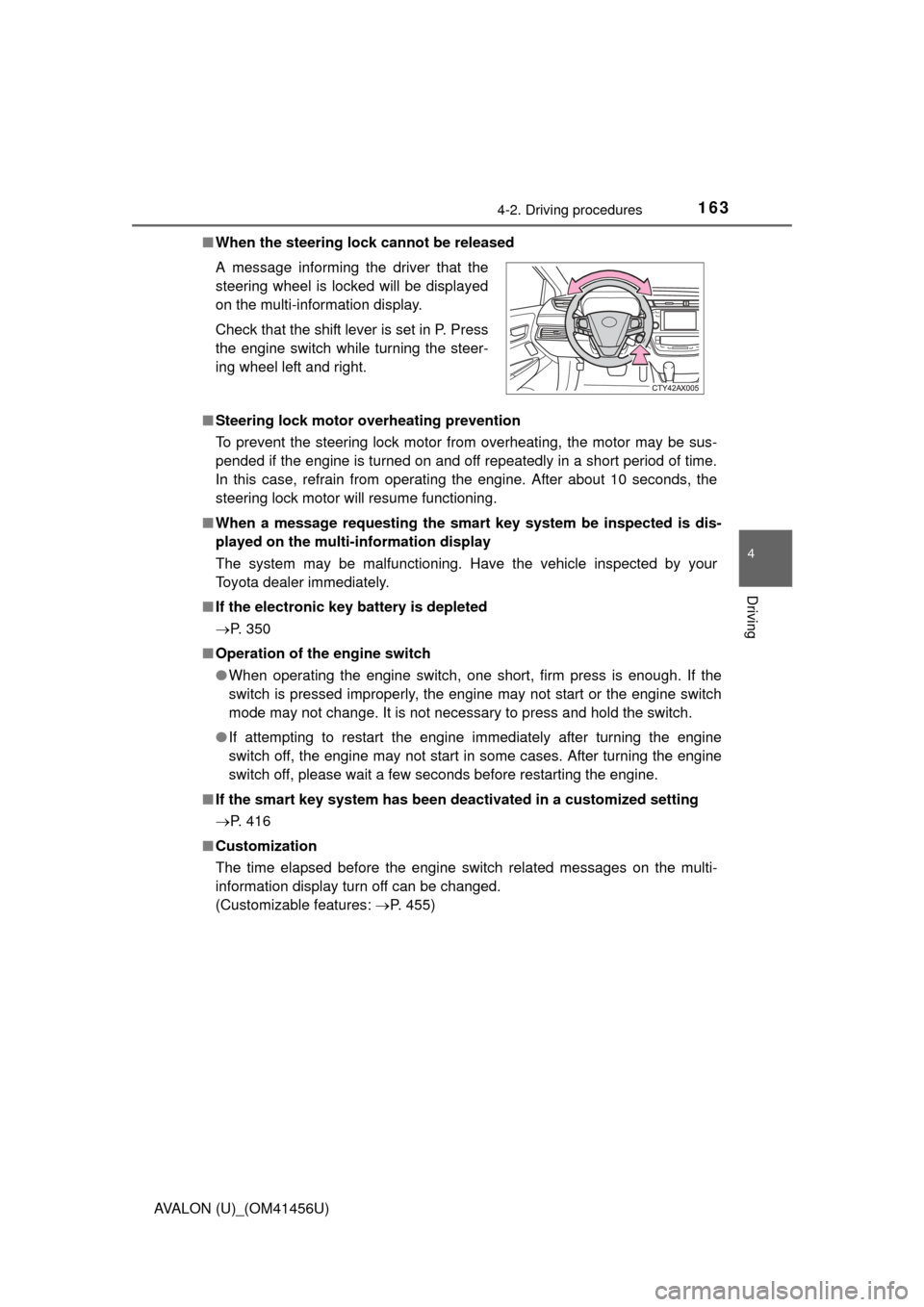
When the steering lock cannot be released
■ Steering lock motor overheating prevention
To prevent the steering lock motor from overheating, the motor may be sus-
pended if the engine is turned on and off repeatedly in a short period of time.
In this case, refrain from operating the engine. After about 10 seconds, the
steering lock motor will resume functioning.
■ When a message requesting the smart key system be inspected is dis-
played on the multi-information display
The system may be malfunctioning. Have the vehicle inspected by your
Toyota dealer immediately.
■ If the electronic key battery is depleted
P. 350
■ Operation of the engine switch
●When operating the engine switch, one short, firm press is enough. If the
switch is pressed improperly, the engine may not start or the engine switch
mode may not change. It is not necessary to press and hold the switch.
● If attempting to restart the engine immediately after turning the engine
switch off, the engine may not start in some cases. After turning the engine
switch off, please wait a few seconds before restarting the engine.
■ If the smart key system has been deactivated in a customized setting
P. 416
■ Customization
The time elapsed before the engine switch related messages on the multi-
information display turn off can be changed.
(Customizable features: P. 455)
A message informing the driver that the
steering wheel is locked will be displayed
on the multi-information display.
Check that the shift lever is set in P. Press
the engine switch while turning the steer-
ing wheel left and right.
Page 167 of 500
1674-2. Driving procedures
4
Driving
AVALON (U)_(OM41456U)
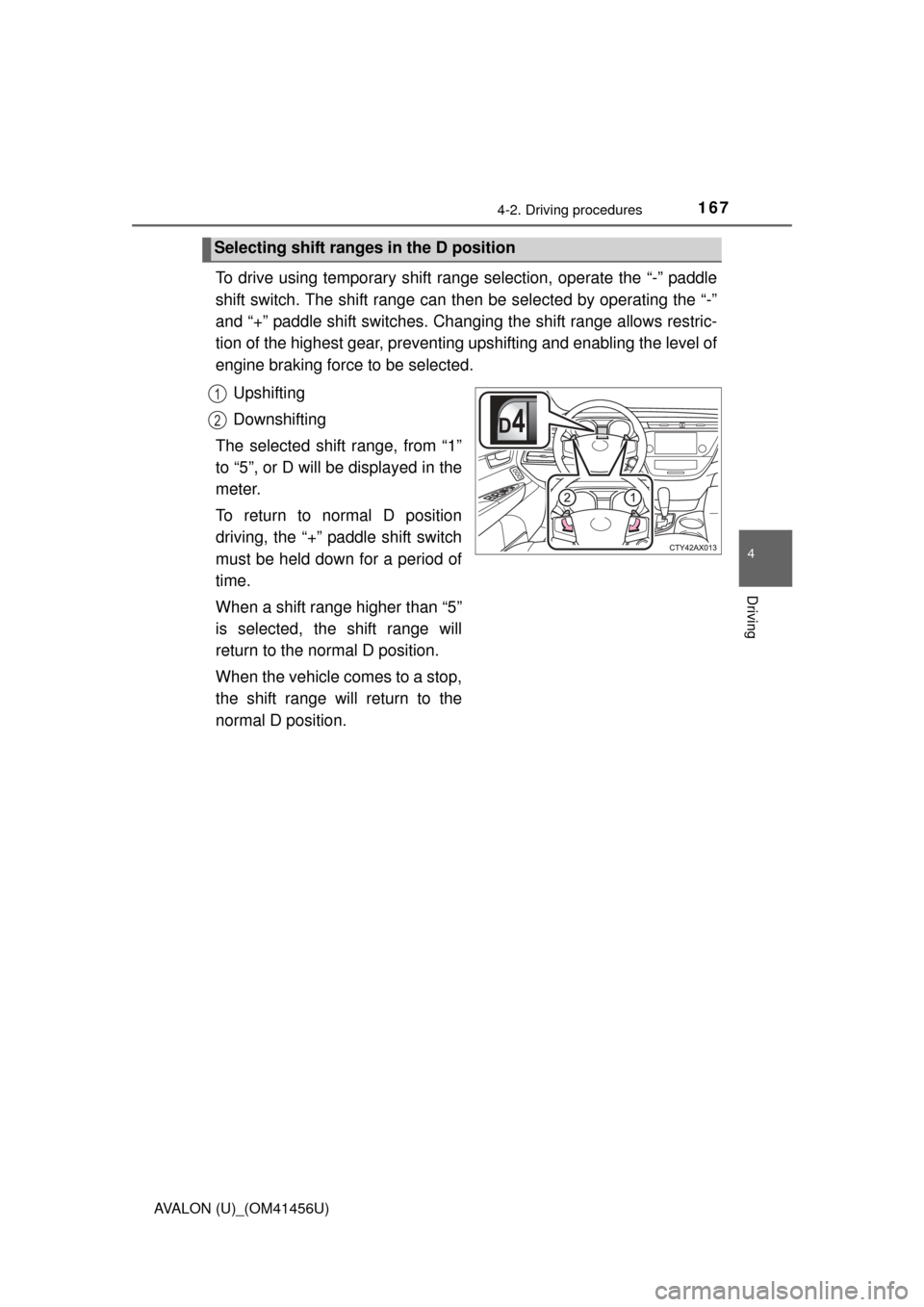
To drive using temporary shift range selection, operate the “-” paddle
shift switch. The shift range can then be selected by operating the “-”
and “+” paddle shift switches. Changing the shift range allows restric-
tion of the highest gear, preventing upshifting and enabling the level of
engine braking force to be selected.Upshifting
Downshifting
The selected shift range, from “1”
to “5”, or D will be displayed in the
meter.
To return to normal D position
driving, the “+” paddle shift switch
must be held down for a period of
time.
When a shift range higher than “5”
is selected, the shift range will
return to the normal D position.
When the vehicle comes to a stop,
the shift range will return to the
normal D position.
Selecting shift ranges in the D position
1
2
Page 168 of 500

1684-2. Driving procedures
AVALON (U)_(OM41456U)
■S mode
●When the shift range is “4” or lower, holding the shift lever toward “+” sets
the shift range to “6”.
● To prevent the engine from over-revving, upshifting may automatically
occur.
● To protect the automatic transmission, a function is adopted that automati-
cally shifts to the top range when the temperature is too hot.
■ AI-SHIFT
AI-SHIFT automatically selects the suitable gear according to driver input and
the driving situation.
AI-SHIFT automatically operates when the shift lever is in the D position.
(Shifting the shift lever to the S position or paddle shifting cancels the func-
tion.)
■ When driving with cruise control or radar cruise control activated
When downshifting to 5 or 4 by shifting the shift lever to the S position or pad-
dle shifting, cruise control or radar cruise control will not be canceled.
( P. 194, 198)
■ If the shift lever cannot be shifted from P
P. 415
■ If the “S” indicator does not come on or the “D” indicator is displayed
even after shifting the shift lever to S
This may indicate a malfunction in the automatic transmission system. Have
the vehicle inspected by your Toyota dealer immediately.
(In this situation, the transmission will operate in the same manner as when
the shift lever is in D.)
■ Downshift restriction warning buzze r (S mode or paddle shifting)
To help ensure safety and driving performance, downshifting operation may
sometimes be restricted. In some circumstances, downshifting may not be
possible even when the shift lever or paddle shift switches are operated. (A
buzzer will sound twice.)
CAUTION
■ When driving on slippery road surfaces
Be careful of downshifting and sudden acceleration, as this could result in
the vehicle skidding to the side or spinning.
Page 194 of 500
194
AVALON (U)_(OM41456U)
4-5. Using the driving support systems
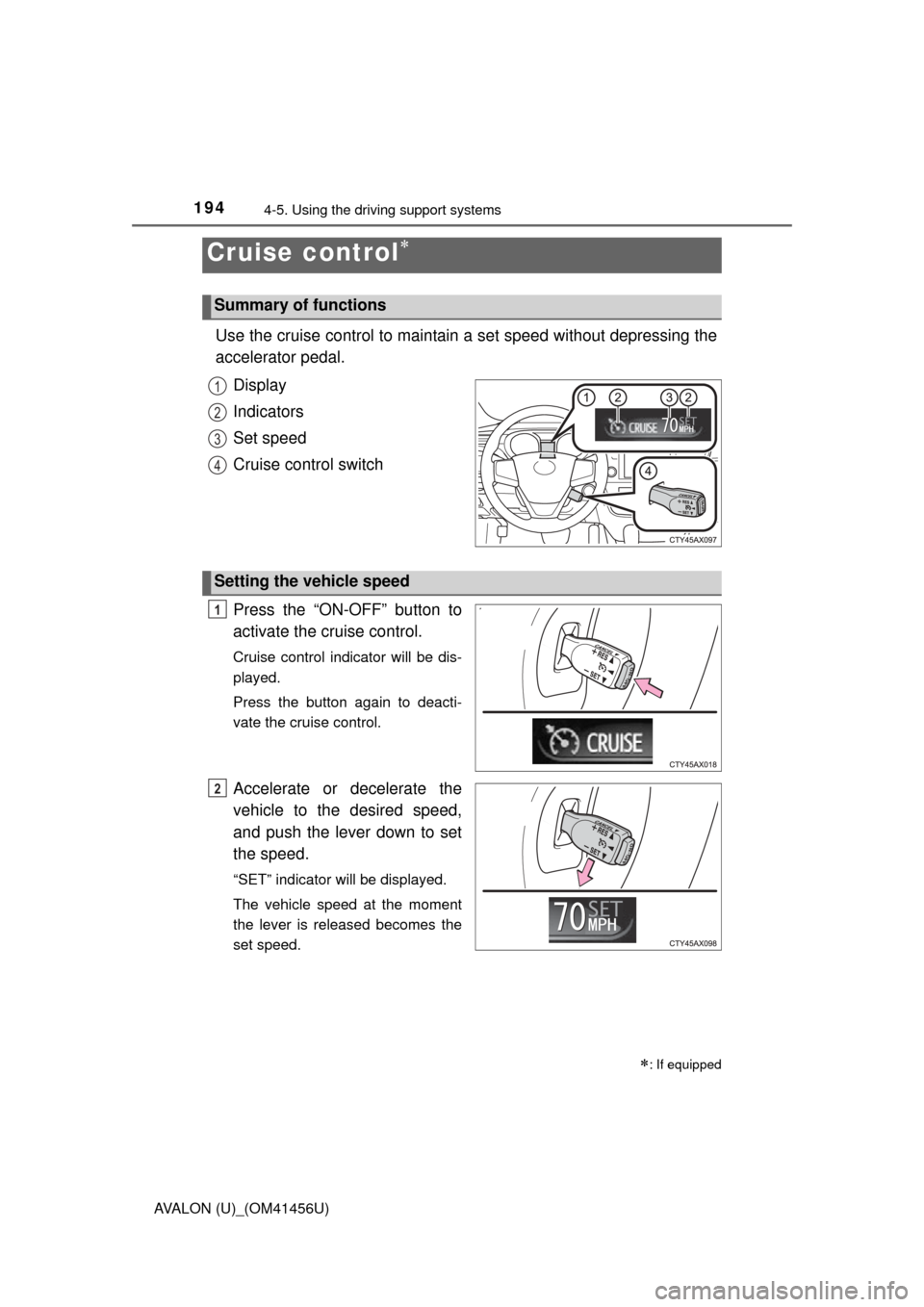
Use the cruise control to maintain a set speed without depressing the
accelerator pedal.
Display
Indicators
Set speed
Cruise control switch
Press the “ON-OFF” button to
activate the cruise control.
Cruise control indicator will be dis-
played.
Press the button again to deacti-
vate the cruise control.
Accelerate or decelerate the
vehicle to the desired speed,
and push the lever down to set
the speed.
“SET” indicator will be displayed.
The vehicle speed at the moment
the lever is released becomes the
set speed.
Cruise control
: If equipped
Summary of functions
1
2
3
4
Setting the vehicle speed
1
2
Page 196 of 500

1964-5. Using the driving support systems
AVALON (U)_(OM41456U)
■Cruise control can be set when
●The shift lever is in D or range 4 or higher of S has been selected.
● Range 4 or higher of D has been selected by using the paddle shift.
● Vehicle speed is above approximately 25 mph (40 km/h).
■ Accelerating after setting the vehicle speed
●The vehicle can be accelerated normally. After acceleration, the set speed
resumes.
● Even without canceling the cruise control, the set speed can be increased
by first accelerating the vehicle to the desired speed and then pushing the
lever down to set the new speed.
■ Automatic cruise co ntrol cancelation
Cruise control will stop maintaining the vehicle speed in any of the following
situations.
● Actual vehicle speed falls more than approximately 10 mph (16 km/h) below
the preset vehicle speed.
At this time, the memorized set speed is not retained.
● Actual vehicle speed is below approximately 25 mph (40 km/h).
● VSC is activated.
■ If the warning message for the crui se control is shown on the multi-
information display
Press the “ON-OFF” button once to deactivate the system, and then press
the button again to reactivate the system.
If the cruise control speed cannot be set or if the cruise control cancels imme-
diately after being activated, there may be a malfunction in the cruise control
system. Have the vehicle inspected by your Toyota dealer.
Page 198 of 500
1984-5. Using the driving support systems
AVALON (U)_(OM41456U)
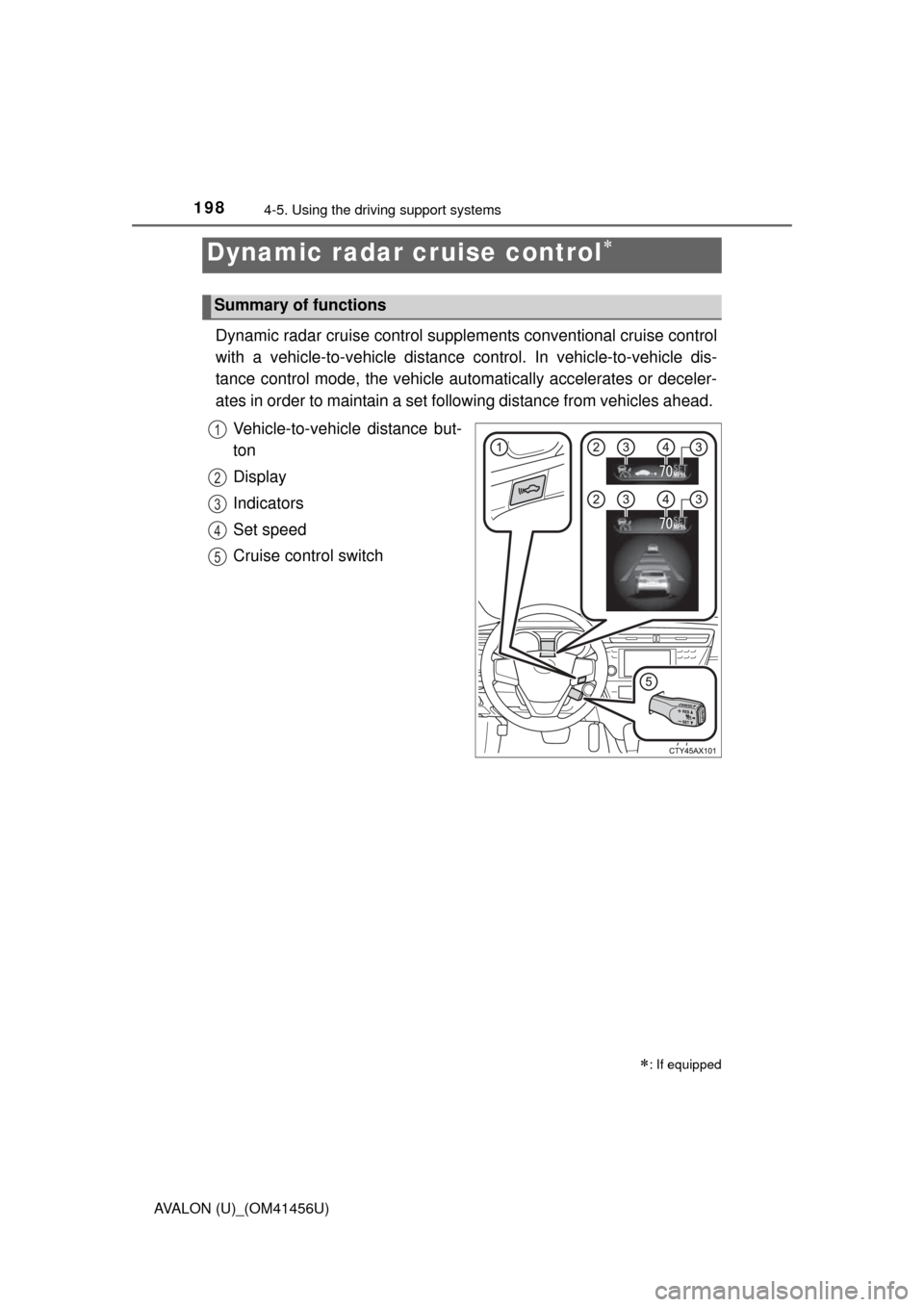
Dynamic radar cruise control supple ments conventional cruise control
with a vehicle-to-vehicle distance control. In vehicle-to-vehicle dis-
tance control mode, the vehicle automatically accelerates or deceler-
ates in order to maintain a set fo llowing distance from vehicles ahead.
Vehicle-to-vehicle distance but-
ton
Display
Indicators
Set speed
Cruise control switch
Dynamic radar cruise control
: If equipped
Summary of functions
1
2
3
4
5