engine TOYOTA AVALON 2017 XX40 / 4.G Repair Manual
[x] Cancel search | Manufacturer: TOYOTA, Model Year: 2017, Model line: AVALON, Model: TOYOTA AVALON 2017 XX40 / 4.GPages: 492, PDF Size: 7.17 MB
Page 167 of 492
1674-2. Driving procedures
4
Driving
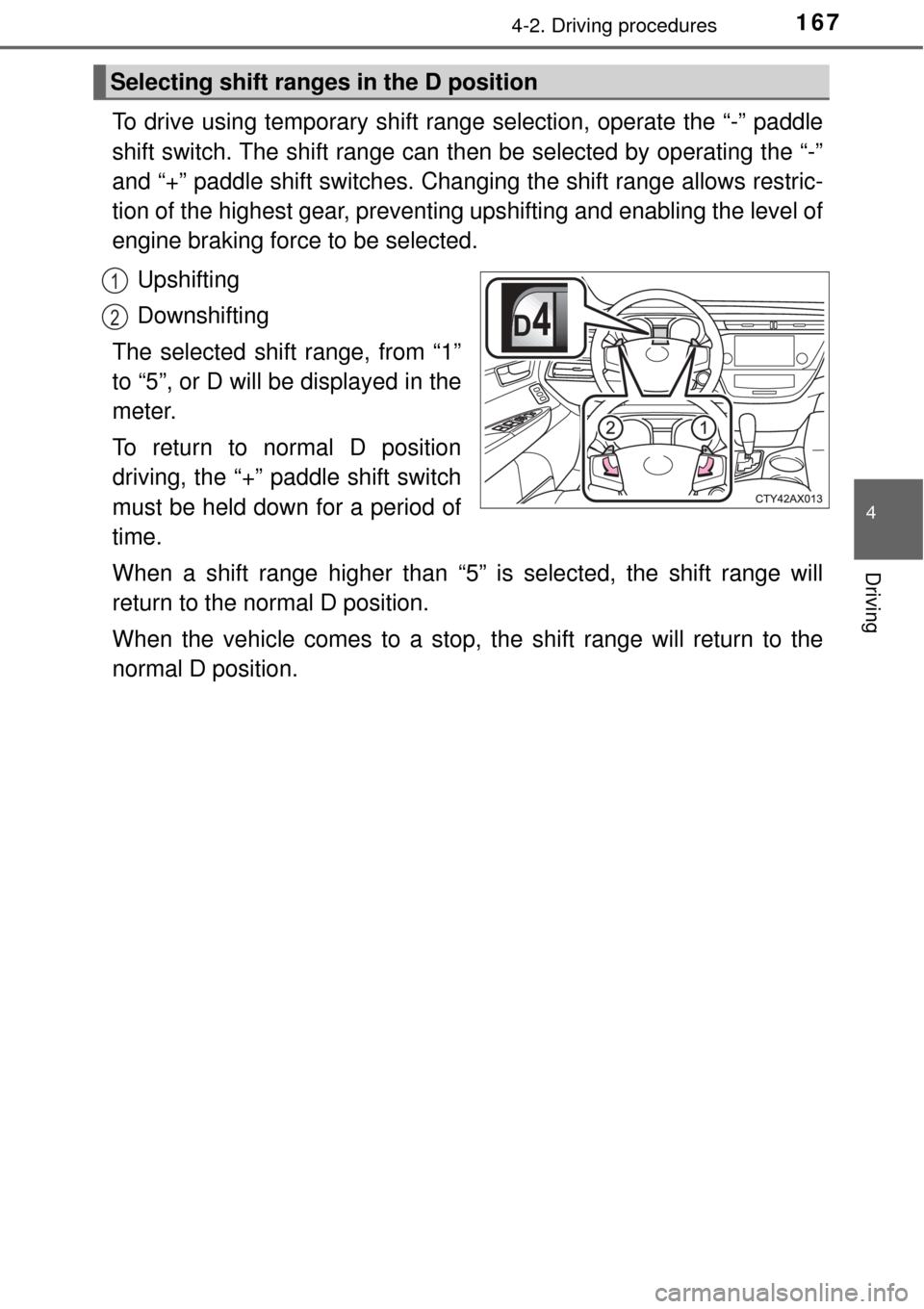
To drive using temporary shift range selection, operate the “-” paddle
shift switch. The shift range can then be selected by operating the “-”
and “+” paddle shift switches. Changing the shift range allows restric-
tion of the highest gear, preventing upshifting and enabling the level of
engine braking force to be selected.Upshifting
Downshifting
The selected shift range, from “1”
to “5”, or D will be displayed in the
meter.
To return to normal D position
driving, the “+” paddle shift switch
must be held down for a period of
time.
When a shift range higher than “5” is selected, the shift range will
return to the normal D position.
When the vehicle comes to a stop, the shift range will return to the
normal D position.
Selecting shift ranges in the D position
1
2
Page 168 of 492

1684-2. Driving procedures
■S mode
●When the shift range is “4” or lower, holding the shift lever toward “+” sets
the shift range to “6”.
● To prevent the engine from over-re vving, upshifting may automatically
occur.
● To protect the automatic transmission, a function is adopted that automati-
cally shifts to the top range when the temperature is too hot.
■ AI-SHIFT
AI-SHIFT automatically selects the suitable gear according to driver input and
the driving situation.
AI-SHIFT automatically operates when the shift lever is in the D position.
(Shifting the shift lever to the S position or paddle shifting cancels the func-
tion.)
■ When driving with cruise control or radar cruise control activated
When downshifting to 5 or 4 by shifting the shift lever to the S position or pad-
dle shifting, cruise control or radar cruise control will not be cancele\
d.
( →P. 222, 235)
■ Shift lock system
The shift lock system is a system to prevent accidental operation of the shift
lever in starting.
The shift lever can be shifted from P only when the engine switch is in ON
mode and the brake pedal is being depressed.
Page 169 of 492
1694-2. Driving procedures
4
Driving
■If the shift lever canno t be shifted from P
First, check whether the brake pedal is being depressed.
If the shift lever cannot be shifted with your foot on the brake pedal, there may
be a problem with the shift lock system. Have the vehicle inspected by y\
our
Toyota dealer immediately.
The following steps may be used as an emergency measure to ensure that
the shift lever can be shifted.
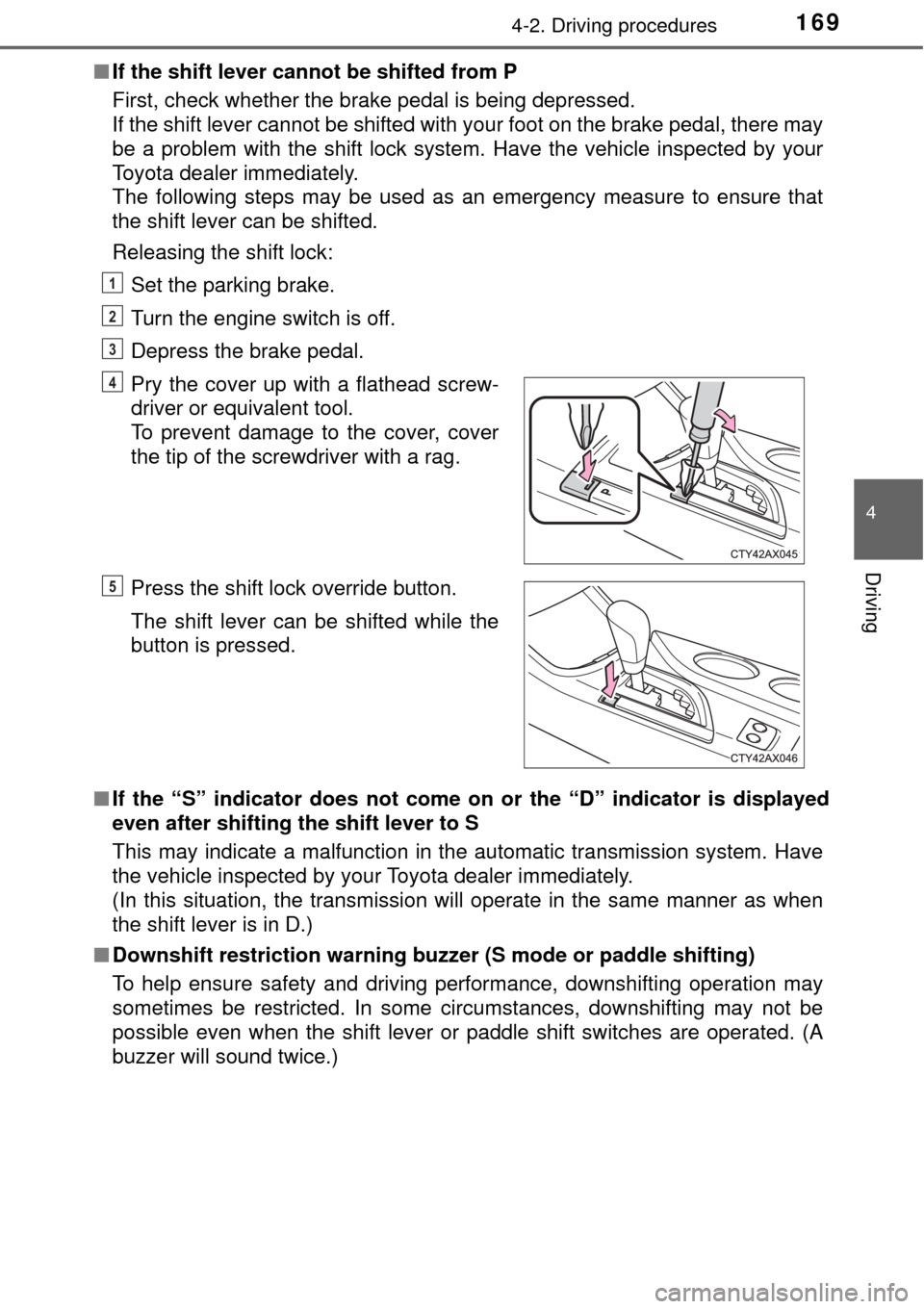
Releasing the shift lock:
Set the parking brake.
Turn the engine switch is off.
Depress the brake pedal.
■ If the “S” indicator does not come on or the “D” indicator is displayed
even after shifting the shift lever to S
This may indicate a malfunction in the automatic transmission system. Have
the vehicle inspected by your Toyota dealer immediately.
(In this situation, the transmission will operate in the same manner as when
the shift lever is in D.)
■ Downshift restriction warning buzzer (S mode or paddle shifting)
To help ensure safety and driving performance, downshifting operation may
sometimes be restricted. In some circumstances, downshifting may not be
possible even when the shift lever or paddle shift switches are operated. (A
buzzer will sound twice.) Pry the cover up with a flathead screw-
driver or equivalent tool.
To prevent damage to the cover, cover
the tip of the screwdriver with a rag.
Press the shift lock override button.
The shift lever can be shifted while the
button is pressed.
1
2
3
4
5
Page 170 of 492

1704-2. Driving procedures
WARNING
■When driving on slippery road surfaces
Do not accelerate or shift gears suddenly.
Sudden changes in engine braking may cause the vehicle to spin or skid,
resulting in an accident.
■ To prevent an accident when releasing the shift lock
Before pressing the shift lock override button, make sure to set the parking
brake and depress the brake pedal.
If the accelerator pedal is accidentally depressed instead of the brake pedal
when the shift lock override button is pressed and the shift lever is shifted
out of P, the vehicle may suddenly start, possibly leading to an accident
resulting in death or serious injury.
Page 171 of 492

1714-2. Driving procedures
4
Driving
The lever will return to its original position after operation.
Right turn
Lane change to the right (move
the lever partway and release
it)
The right hand signals will flash 3
times.
Lane change to the left (move
the lever partway and release
it)
The left hand signals will flash 3
times.
Left turn
■ Turn signals can be operated when
The engine switch is in IGNITION ON mode.
■ If the indicator flashes faster than usual
Check that a light bulb in the front or rear turn signal lights has not burned
out.
■ If the turn signals stop flashing before a lane change has been per-
formed
Operate the lever again.
■ To discontinue flashing of the turn signals during a lane change
Operate the lever in the opposite direction.
■ When the lever is pushed and held partway
The turn signals will keep flashing until the lever is released.
■ Customization
The number of times the turn signals flash during a lane change can be
changed. (Customizable feature →P. 449)
Turn signal lever
Operating instructions
1
2
3
4
Page 173 of 492

173
4
Driving
4-3. Operating the lights and wipers
Turning the end of the lever turns on the lights as follows:The headlights, parking
lights, daytime running
lights (→P. 174) and so
on turn on and off auto-
matically (when the
engine switch is in IGNI-
TION ON mode).
The side marker, park-
ing, tail, license plate,
daytime running lights
( → P. 174) and instru-
ment panel lights turn
on.
The headlights and all the lights listed above (except day-
time running lights) turn on.
*1The daytime running lights turn off.
*2The daytime running lights turn on. ( →P. 174)
*1: For the U.S.A.
*2: For Canada
With the headlights on, push
the lever away from you to turn
on the high beams.
Pull the lever toward you to the
center position to turn the high
beams off.
Pull the lever toward you and
release it to flash the high
beams once.
You can flash the high beams with the headlights on or off.
Headlight switch
The headlights can be operated manually or automatically.
Operating instructions
1
2
3
4
Turning on the high beam headlights
1
2
Page 174 of 492
1744-3. Operating the lights and wipers
■Daytime running light system (veh icles with halogen headlights)
● To make your vehicle more visible to other drivers during daytime driving,
the daytime running lights turn on automatically whenever the engine is
started and the parking brake is released with the headlight switch off or in
the “AUTO” position. (Illuminate dimmer than the headlight high beam.)
Daytime running lights are not designed for use at night.
For the U.S.A.: Daytime running lights can be turned off by operating the
switch.
● Compared to turning on the headlights, the daytime running light system
offers greater durability and consumes less electricity, so it can help improve
fuel economy.
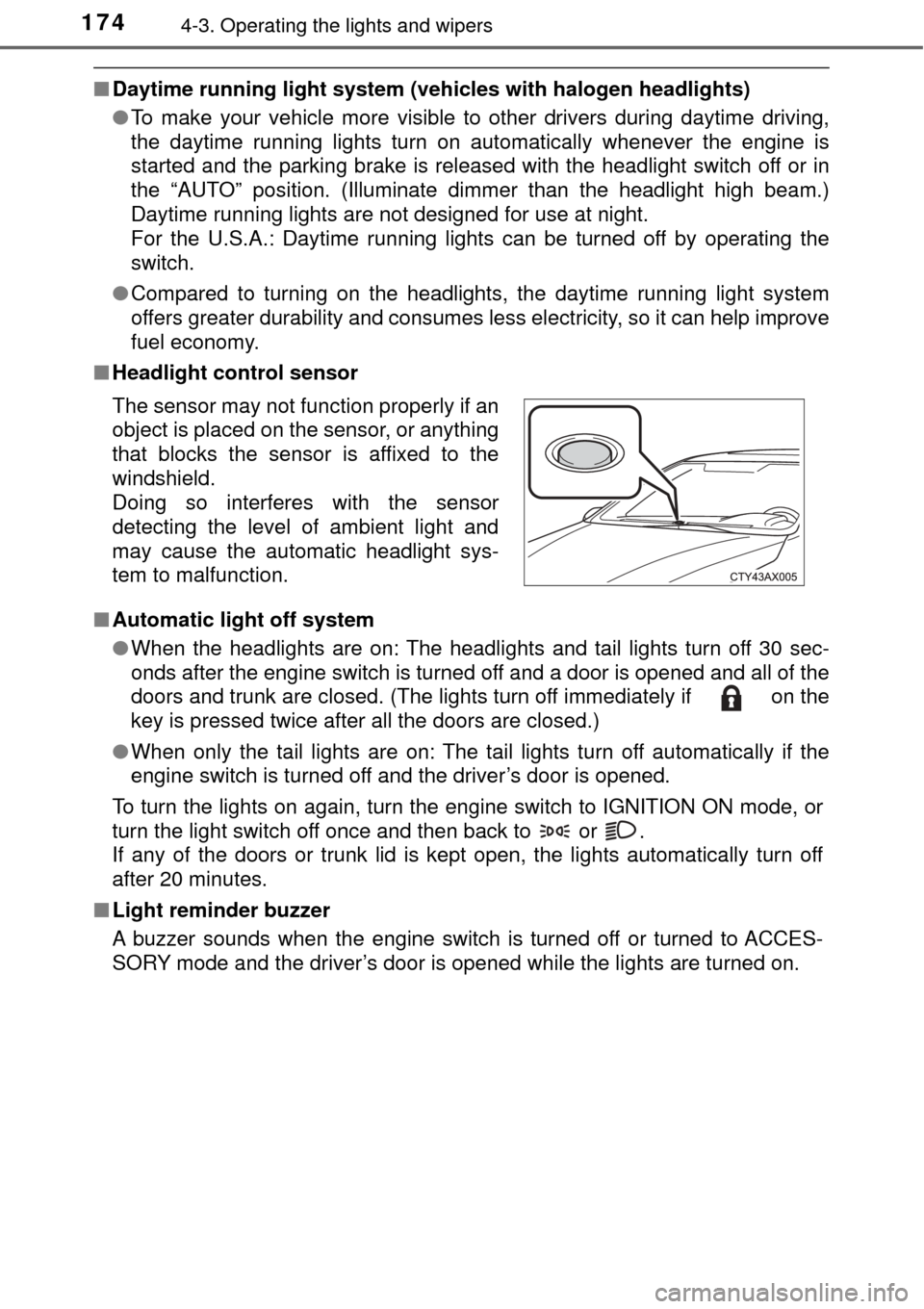
■ Headlight control sensor
■ Automatic light off system
●When the headlights are on: The headlights and tail lights turn off 30 sec-
onds after the engine switch is turned off and a door is opened and all of the
doors and trunk are closed. (The lights turn off immediately if on the
key is pressed twice after all the doors are closed.)
● When only the tail lights are on: The tail lights turn off automatically if the
engine switch is turned off and the driver’s door is opened.
To turn the lights on again, turn the engine switch to IGNITION ON mode, or
turn the light switch off once and then back to or .
If any of the doors or trunk lid is kept open, the lights automatically turn off
after 20 minutes.
■ Light reminder buzzer
A buzzer sounds when the engine switch is turned off or turned to ACCES-
SORY mode and the driver’s door is opened while the lights are turned on. The sensor may not function properly if an
object is placed on the sensor, or anything
that blocks the sensor is affixed to the
windshield.
Doing so interferes with the sensor
detecting the level of ambient light and
may cause the automatic headlight sys-
tem to malfunction.
Page 175 of 492

The level of the headlights is automatically adjusted according to the n\
umber
of passengers and")
1754-3. Operating the lights and wipers
4
Driving
■Automatic headlight leveling system (if equipped)
The level of the headlights is automatically adjusted according to the n\
umber
of passengers and the loading condition of the vehicle to ensure that the
headlights do not interfere with other road users.
■ Customization
Settings (e.g. light sensor sensitivity) can be changed.
(Customizable features: →P. 449)
NOTICE
■To prevent battery discharge
Do not leave the lights on longer than necessary when the engine is not
running.
Page 184 of 492
1844-3. Operating the lights and wipers
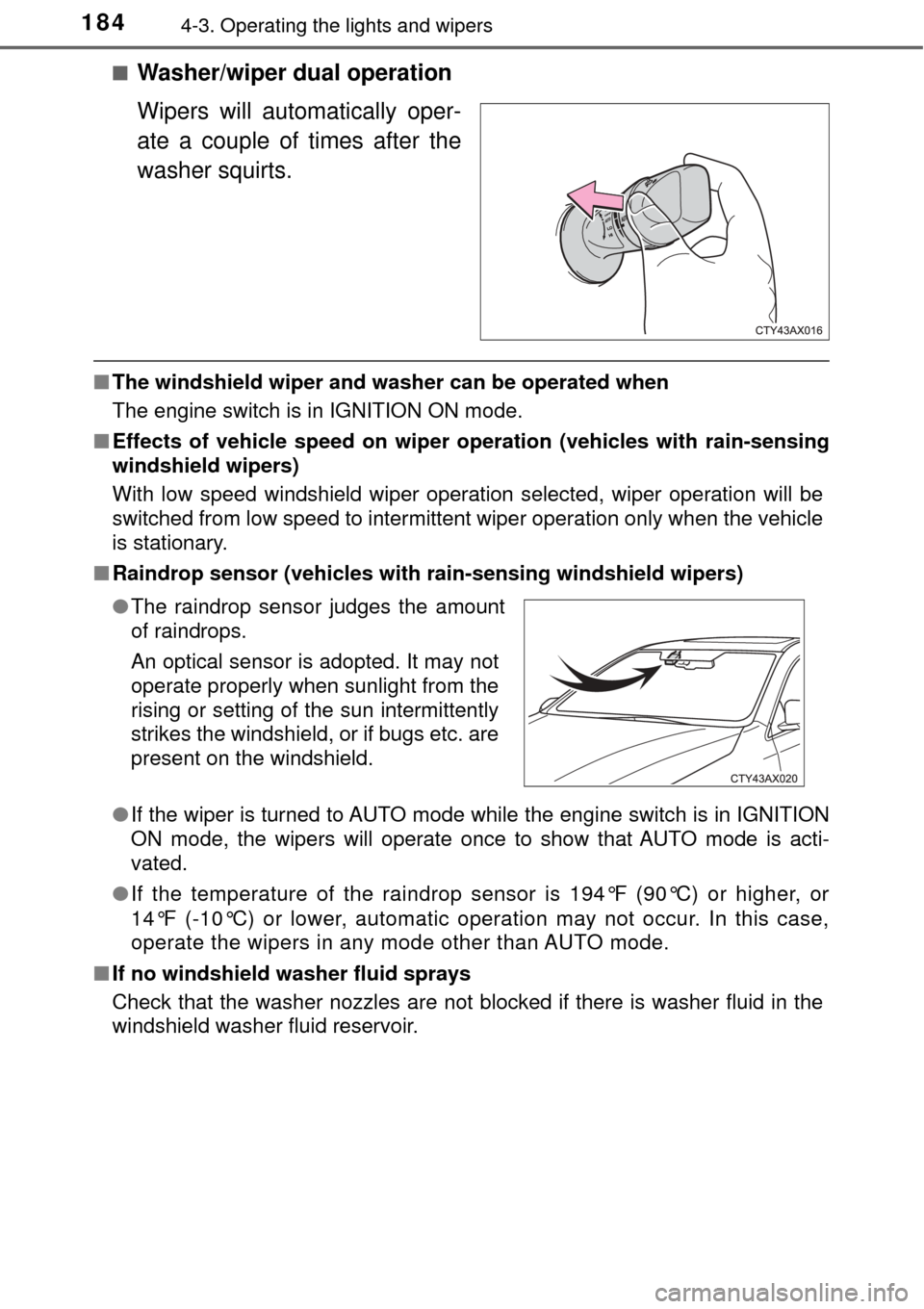
■Washer/wiper dual operation
Wipers will automatically oper-
ate a couple of times after the
washer squirts.
■The windshield wiper and washer can be operated when
The engine switch is in IGNITION ON mode.
■ Effects of vehicle speed on wiper operation (vehicles with rain-sensing
windshield wipers)
With low speed windshield wiper operation selected, wiper operation will be
switched from low speed to intermittent wiper operation only when the vehicle
is stationary.
■ Raindrop sensor (vehicles with rain-sensing windshield wipers)
●If the wiper is turned to AUTO mode while the engine switch is in IGNITION
ON mode, the wipers will operate once to show that AUTO mode is acti-
vated.
● If the temperature of the raindrop sensor is 194°F (90°C) or higher, or
14°F (-10°C) or lower, automatic operation may not occur. In this case,
operate the wipers in any mode other than AUTO mode.
■ If no windshield washer fluid sprays
Check that the washer nozzles are not blocked if there is washer fluid in the
windshield washer fluid reservoir.
●The raindrop sensor judges the amount
of raindrops.
An optical sensor is adopted. It may not
operate properly when sunlight from the
rising or setting of the sun intermittently
strikes the windshield, or if bugs etc. are
present on the windshield.
Page 186 of 492
1864-4. Refueling
●Close all the doors and windows, and turn the engine switch off.
● Confirm the type of fuel.
■Fuel types
→P. 433
■ Fuel tank opening for unleaded gasoline
To help prevent incorrect fueling, your vehicle has a fuel tank opening that
only accommodates the special nozzle on unleaded fuel pumps.
Opening the fuel tank cap
Perform the following steps to open the fuel tank cap:
Before refueling the vehicle