engine TOYOTA AVALON 2017 XX40 / 4.G Owner's Manual
[x] Cancel search | Manufacturer: TOYOTA, Model Year: 2017, Model line: AVALON, Model: TOYOTA AVALON 2017 XX40 / 4.GPages: 492, PDF Size: 7.17 MB
Page 88 of 492

882. Instrument cluster
■Liquid crystal display
Small spots or light spots may appear on the display. This phenomenon is
characteristic of liquid crystal displays, and there is no problem continuing to
use the display.
WARNING
■The information display at low temperatures
Allow the interior of the vehicle to warm up before using the liquid crystal
information display. At extremely low temperatures, the information display
monitor may respond slowly, and display changes may be delayed.
For example, there is a lag between the driver’s shifting and the new gear
number appearing on the display. This lag could cause the driver to down-
shift again, causing rapid and excessive engine braking and possibly an
accident resulting in death or injury.
■ Cautions during setting up the display
As the engine needs to be running during setting up the display, ensure that
the vehicle is parked in a place with adequate ventilation. In a closed area
such as a garage, exhaust gases including harmful carbon monoxide (CO)
may collect and enter the vehicle. This may lead to death or a serious
health hazard.
NOTICE
■During setting up the display
To prevent battery discharge, ensure that the engine is running while setting
up the display features.
Page 94 of 492

943-1. Key information
■When riding in an aircraft
When bringing an electronic key onto an aircraft, make sure you do not press
any buttons on the electronic key while inside the aircraft cabin. If you are
carrying an electronic key in your bag etc., ensure that the buttons are not
likely to be pressed accidentally. Pressing a button may cause the electronic
key to emit radio waves that could interfere with the operation of the aircraft.
■ Conditions affecting operation
→P. 1 1 4
■ Electronic key battery depletion
●The standard battery life is 1 to 2 years.
● If the battery becomes low, an alarm will sound in the cabin when the engine
stops.
● As the electronic key always receives radio waves, the battery will become
depleted even if the electronic key is not used. The following symptoms indi-
cate that the electronic key battery may be depleted. Replace the battery
when necessary. ( →P. 360)
• The smart key system or the wireless remote control does not operate.
• The detection area becomes smaller.
• The LED indicator on the key surface does not turn on.
● To avoid serious deterioration, do not leave the electronic key within 3 ft. (1
m) of the following electrical appl iances that produce a magnetic field:
•TVs
• Personal computers
• Cellular phones, cordless phones and battery chargers
• Recharging cellular phones or cordless phones
• Table lamps
• Induction cookers
■ Replacing the battery
→P. 360
■ Confirmation of the registered key number
The number of keys already registered to the vehicle can be confirmed. Ask
your Toyota dealer for details.
■ If a wrong key is used
The key cylinder rotates freely to isolate inside mechanism.
■ Customization
Settings (e.g. wireless remote control system) can be changed.
(Customizable features: →P. 449)
Page 100 of 492
1003-2. Opening, closing and locking the doors
Move the inside lock button to the lock position.
Close the door.
The door cannot be locked if the engine switch is in ACCESSORY or
IGNITION ON mode, or the electronic key is left inside the vehicle.
The key may not be detected correctly and the door may be locked.
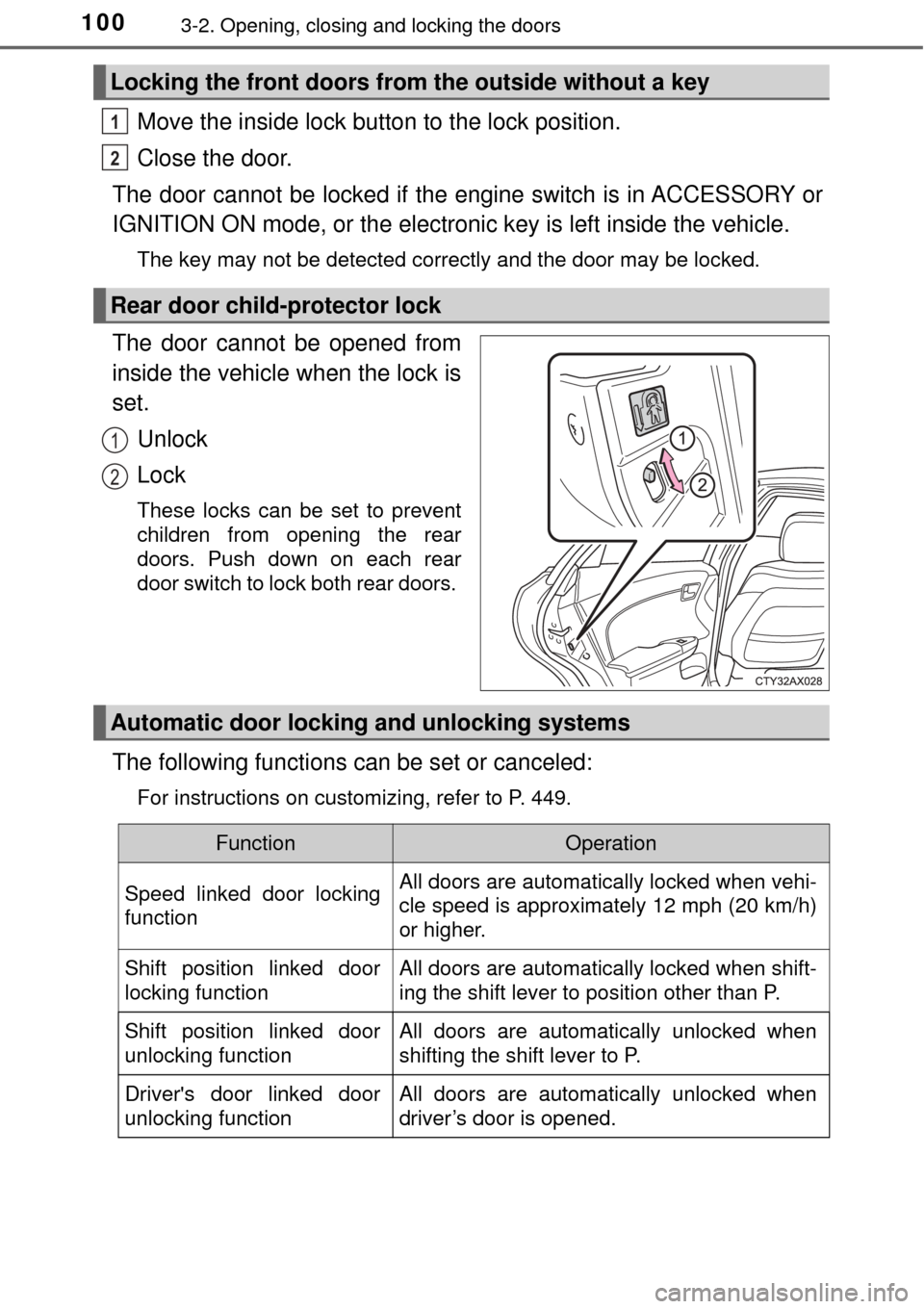
The door cannot be opened from
inside the vehicle when the lock is
set.
Unlock
Lock
These locks can be set to prevent
children from opening the rear
doors. Push down on each rear
door switch to lock both rear doors.
The following functions can be set or canceled:
For instructions on customizing, refer to P. 449.
Locking the front doors from the outside without a key
Rear door child-protector lock
1
2
1
2
Automatic door lockin g and unlocking systems
FunctionOperation
Speed linked door locking
functionAll doors are automatically locked when vehi-
cle speed is approximately 12 mph (20 km/h)
or higher.
Shift position linked door
locking functionAll doors are automatically locked when shift-
ing the shift lever to position other than P.
Shift position linked door
unlocking functionAll doors are automatically unlocked when
shifting the shift lever to P.
Driver's door linked door
unlocking functionAll doors are automatically unlocked when
driver’s door is opened.
Page 101 of 492
1013-2. Opening, closing and locking the doors
3
Operation of each component
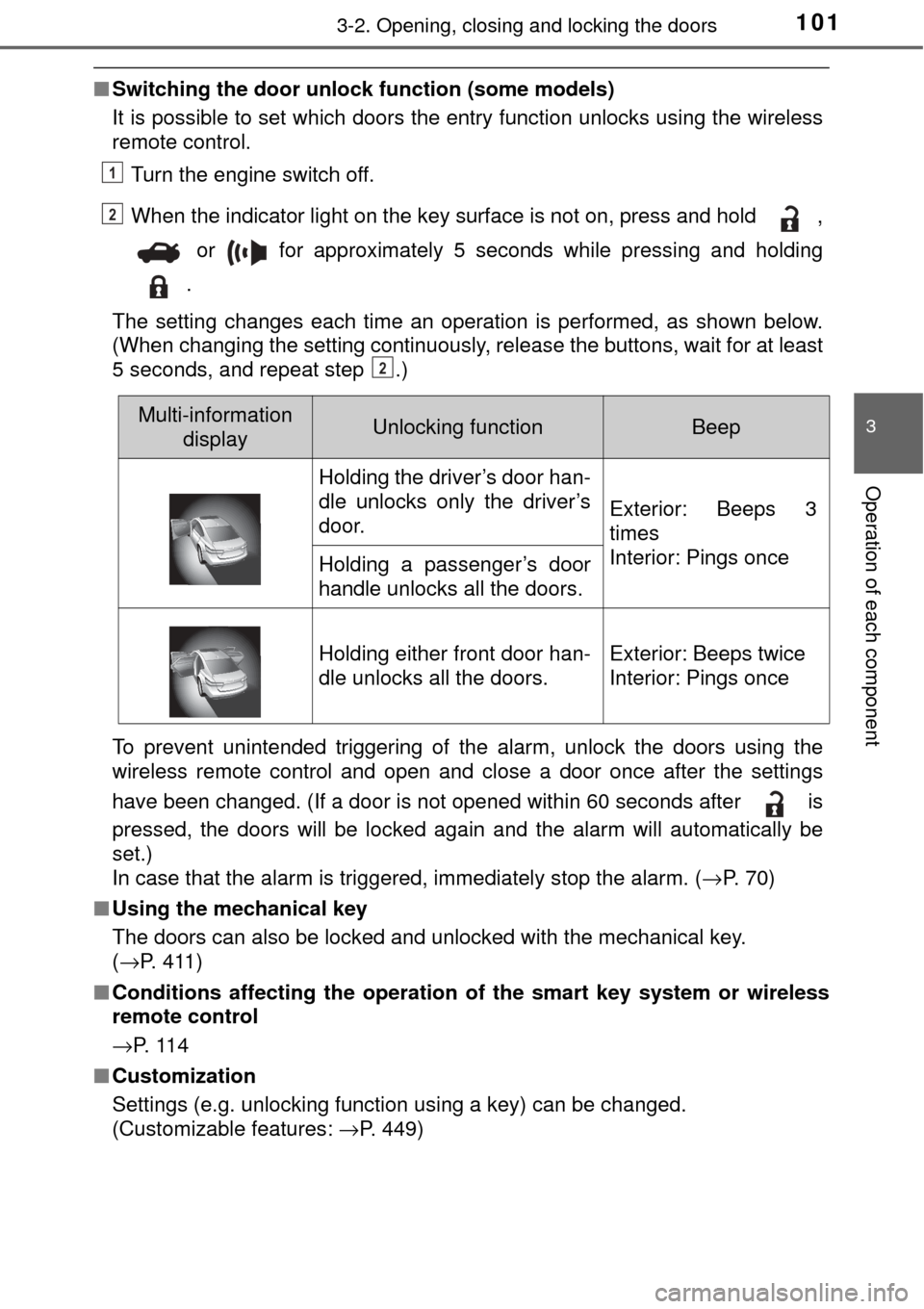
■Switching the door unlock function (some models)
It is possible to set which doors the entry function unlocks using the wireless
remote control.
Turn the engine switch off.
When the indicator light on the key surface is not on, press and hold ,
or for approximately 5 seconds while pressing and holding
.
The setting changes each time an operation is performed, as shown below.
(When changing the setting continuously, release the buttons, wait for at least
5 seconds, and repeat step .)
To prevent unintended triggering of the alarm, unlock the doors using the
wireless remote control and open and close a door once after the settings
have been changed. (If a door is not opened within 60 seconds after is
pressed, the doors will be locked again and the alarm will automatically be
set.)
In case that the alarm is triggered, immediately stop the alarm. ( →P. 70)
■ Using the mechanical key
The doors can also be locked and unlocked with the mechanical key.
(→P. 411)
■ Conditions affecting the operation of the smart key system or wireless
remote control
→P. 1 1 4
■ Customization
Settings (e.g. unlocking function using a key) can be changed.
(Customizable features: →P. 449)
1
2
2
Multi-information
displayUnlocking functionBeep
Holding the driver’s door han-
dle unlocks only the driver’s
door.
Exterior: Beeps 3
times
Interior: Pings once
Holding a passenger’s door
handle unlocks all the doors.
Holding either front door han-
dle unlocks all the doors.Exterior: Beeps twice
Interior: Pings once
Page 108 of 492
1083-2. Opening, closing and locking the doors
●Locks and unlocks the doors ( →P. 97)
● Opens the trunk ( →P. 103)
● Starts the engine ( →P. 160)
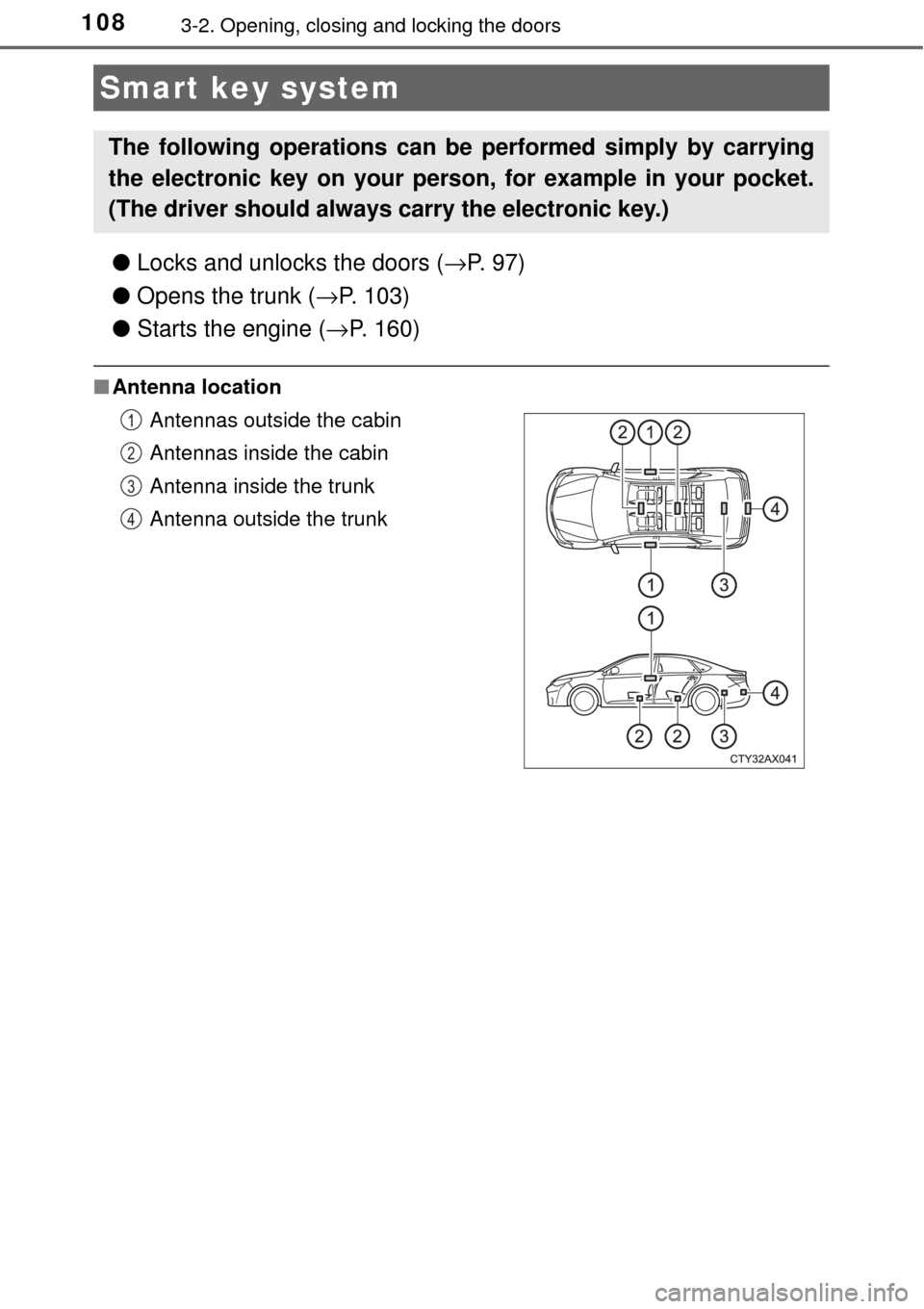
■Antenna location
Smart key system
The following operations can be performed simply by carrying
the electronic key on your person, for example in your pocket.
(The driver should always carry the electronic key.)
Antennas outside the cabin
Antennas inside the cabin
Antenna inside the trunk
Antenna outside the trunk1
2
3
4
Page 109 of 492
1093-2. Opening, closing and locking the doors
3
Operation of each component
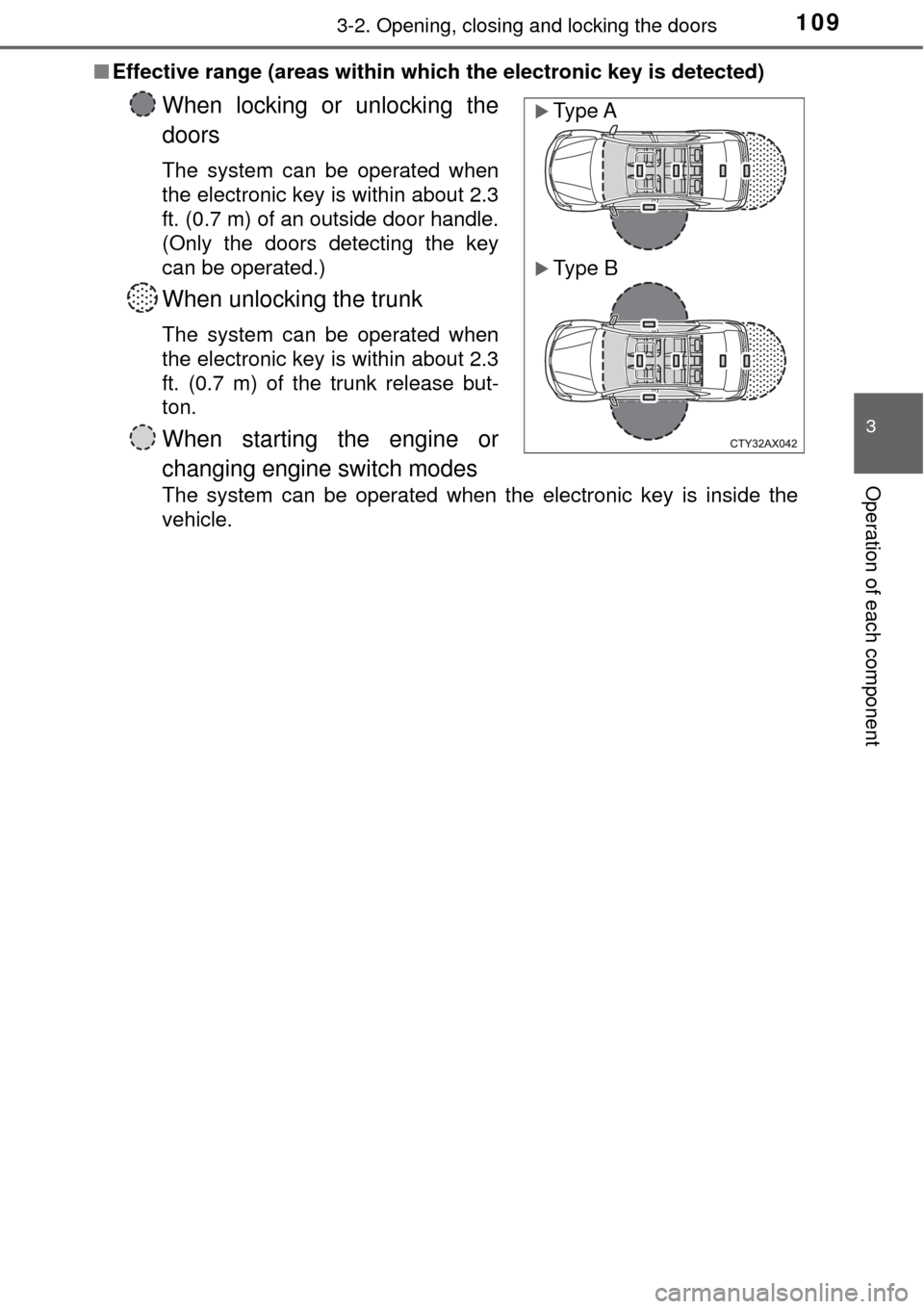
■Effective range (areas within which the electronic key is detected)
When locking or unlocking the
doors
The system can be operated when
the electronic key is within about 2.3
ft. (0.7 m) of an outside door handle.
(Only the doors detecting the key
can be operated.)
When unlocking the trunk
The system can be operated when
the electronic key is within about 2.3
ft. (0.7 m) of the trunk release but-
ton.
When starting the engine or
changing engine switch modes
The system can be operated when the electronic key is inside the
vehicle.
Type A
Type B
Page 111 of 492
1113-2. Opening, closing and locking the doors
3
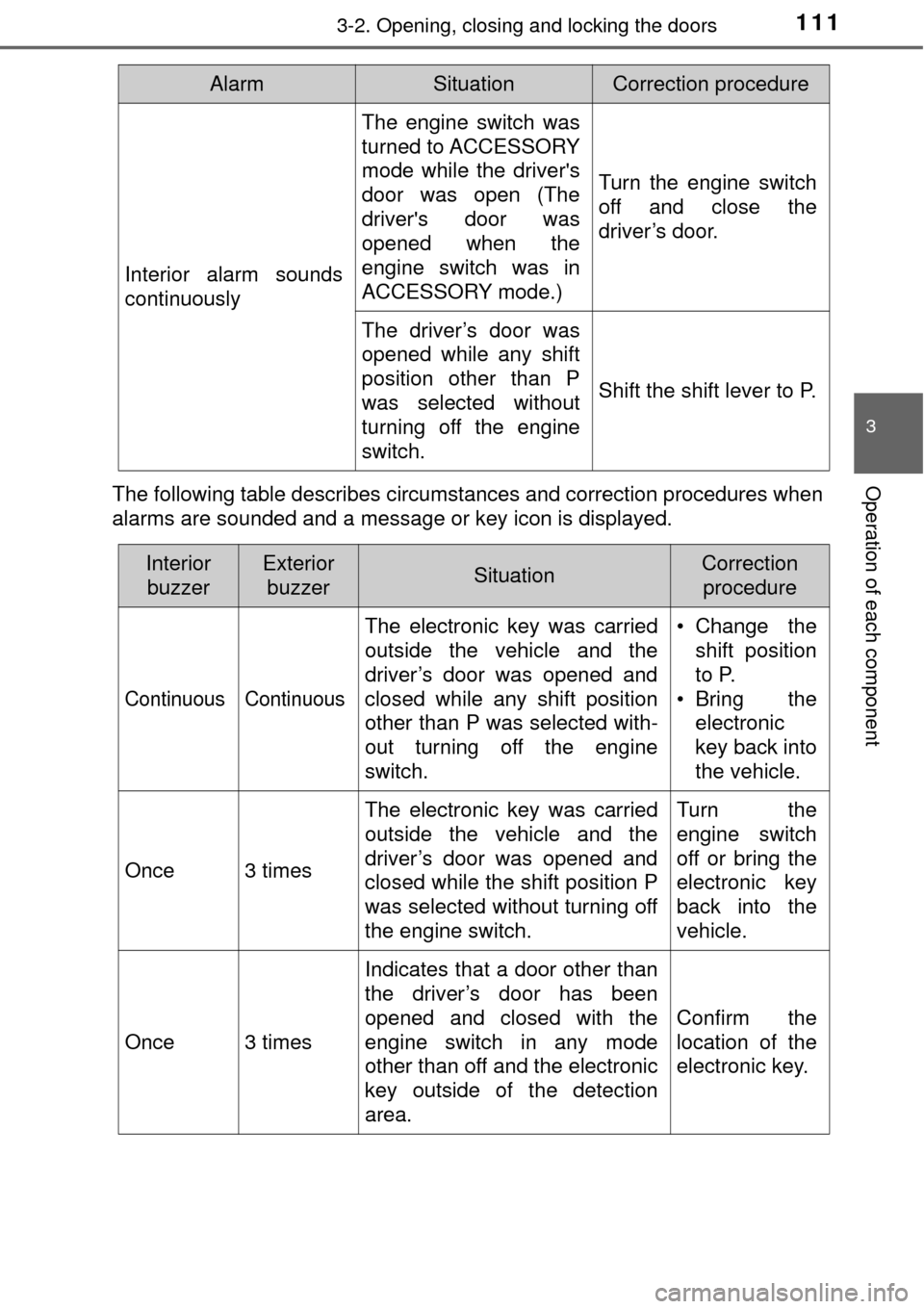
Operation of each componentThe following table describes circumstances and correction procedures when
alarms are sounded and a message or key icon is displayed.
Interior alarm sounds
continuously
The engine switch was
turned to ACCESSORY
mode while the driver's
door was open (The
driver's door was
opened when the
engine switch was in
ACCESSORY mode.)
Turn the engine switch
off and close the
driver’s door.
The driver’s door was
opened while any shift
position other than P
was selected without
turning off the engine
switch.
Shift the shift lever to P.
AlarmSituationCorrection procedure
InteriorbuzzerExterior buzzerSituationCorrection procedure
Continuous Continuous
The electronic key was carried
outside the vehicle and the
driver’s door was opened and
closed while any shift position
other than P was selected with-
out turning off the engine
switch. • Change the
shift position
to P.
• Bring the electronic
key back into
the vehicle.
Once3 times
The electronic key was carried
outside the vehicle and the
driver’s door was opened and
closed while the shift position P
was selected without turning off
the engine switch.Turn the
engine switch
off or bring the
electronic key
back into the
vehicle.
Once3 times
Indicates that a door other than
the driver’s door has been
opened and closed with the
engine switch in any mode
other than off and the electronic
key outside of the detection
area.
Confirm the
location of the
electronic key.
Page 112 of 492
1123-2. Opening, closing and locking the doors
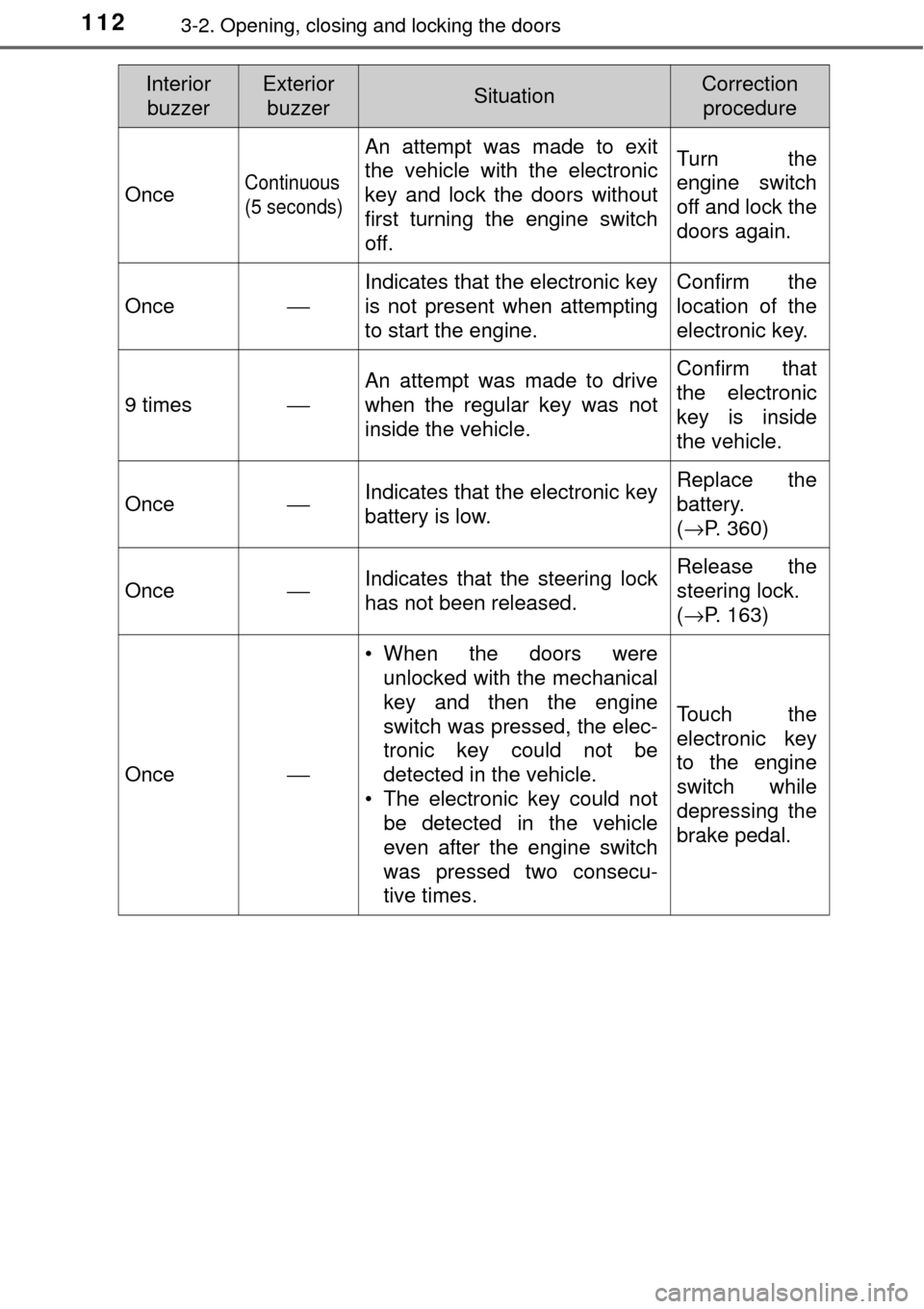
OnceContinuous
(5 seconds)
An attempt was made to exit
the vehicle with the electronic
key and lock the doors without
first turning the engine switch
off.Turn the
engine switch
off and lock the
doors again.
Once
⎯ Indicates that the electronic key
is not present when attempting
to start the engine. Confirm the
location of the
electronic key.
9 times⎯
An attempt was made to drive
when the regular key was not
inside the vehicle.Confirm that
the electronic
key is inside
the vehicle.
Once⎯Indicates that the electronic key
battery is low.Replace the
battery.
(
→P. 360)
Once⎯Indicates that the steering lock
has not been released.Release the
steering lock.
(→P. 163)
Once⎯
• When the doors were
unlocked with the mechanical
key and then the engine
switch was pressed, the elec-
tronic key could not be
detected in the vehicle.
• The electronic key could not be detected in the vehicle
even after the engine switch
was pressed two consecu-
tive times.
Touch the
electronic key
to the engine
switch while
depressing the
brake pedal.
InteriorbuzzerExterior buzzerSituationCorrection procedure
Page 114 of 492

1143-2. Opening, closing and locking the doors
■Conditions affecting operation
The smart key system uses weak radio waves. In the following situations, the
communication between the electronic key and the vehicle may be affected,
preventing the smart key system, wireless remote control and engine immobi-
lizer system from operating properly. (Ways of coping: →P. 411)
● When the electronic key battery is depleted
● Near a TV tower, electric power plant, gas station, radio station, large dis-
play, airport or other facility that generates strong radio waves or electrical
noise
● When carrying a portable radio, cellular phone, cordless phone or other
wireless communication device
● When the electronic key is in contact with, or is covered by the following
metallic objects
• Cards to which aluminum foil is attached
• Cigarette boxes that have aluminum foil inside
• Metallic wallets or bags
• Coins
• Hand warmers made of metal
• Media such as CDs and DVDs
● When other wireless keys (that emit radio waves) are being used nearby
● When carrying the electronic key together with the following devices that
emit radio waves
• Another vehicle’s electronic key or a wireless key that emits radio waves
• Personal computers or personal digital assistants (PDAs)
• Digital audio players
• Portable game systems
● If window tint with a metallic content or metallic objects are attached to the
rear window
Page 115 of 492

1153-2. Opening, closing and locking the doors
3
Operation of each component
■Note for the entry function
●Even when the electronic key is within the effective range (detection areas),
the system may not operate properly in the following cases:
• The electronic key is too close to the window or outside door handle, near
the ground, or in a high place when the doors are locked or unlocked.
• The electronic key is near the ground or in a high place, or too close to
the rear bumper center when the trunk is opened.
• The electronic key is on the instrument panel, rear package tray or floor, or in the door pockets or glove box when the engine is started or engine
switch modes are changed.
● Do not leave the electronic key on top of the instrument panel or near t\
he
door pockets when exiting the vehicle. Depending on the radio wave recep-
tion conditions, it may be detected by the antenna outside the cabin and the
door will become lockable from the out side, possibly trapping the electronic
key inside the vehicle.
● As long as the electronic key is within the effective range, the doors may be
locked or unlocked by anyone. However, only the doors detecting the elec-
tronic key can be used to unlock the vehicle.
● Even if the electronic key is not inside the vehicle, it may be possible to start
the engine if the electronic key is near the window.
● The doors may unlock or lock if a large amount of water splashes on the
door handle, such as in the rain or in a car wash when the electronic key is
within the effective range. (The doors will automatically be locked after
approximately 60 seconds if the doors are not opened and closed.)
● If the wireless remote control is used to lock the doors when the electronic
key is near the vehicle, there is a possibility that the door may not be
unlocked by the entry function. (Use the wireless remote control to unlock
the doors.)