cruise control TOYOTA AVALON 2020 (in English) User Guide
[x] Cancel search | Manufacturer: TOYOTA, Model Year: 2020, Model line: AVALON, Model: TOYOTA AVALON 2020Pages: 540, PDF Size: 10.4 MB
Page 248 of 540
2484-5. Using the driving support systems
In vehicle-to-vehicle distance control mode, the vehicle automa tically
accelerates, decelerates and st ops to match the speed changes o f the
preceding vehicle even if the acc elerator pedal is not depressed. In
constant speed control mode, t he vehicle runs at a fixed speed.
Use the dynamic radar cruise control with full-speed range on f ree-
ways and highways.
● Vehicle-to-vehicle distance control mode ( P. 251)
● Constant speed c ontrol mode (P. 257)
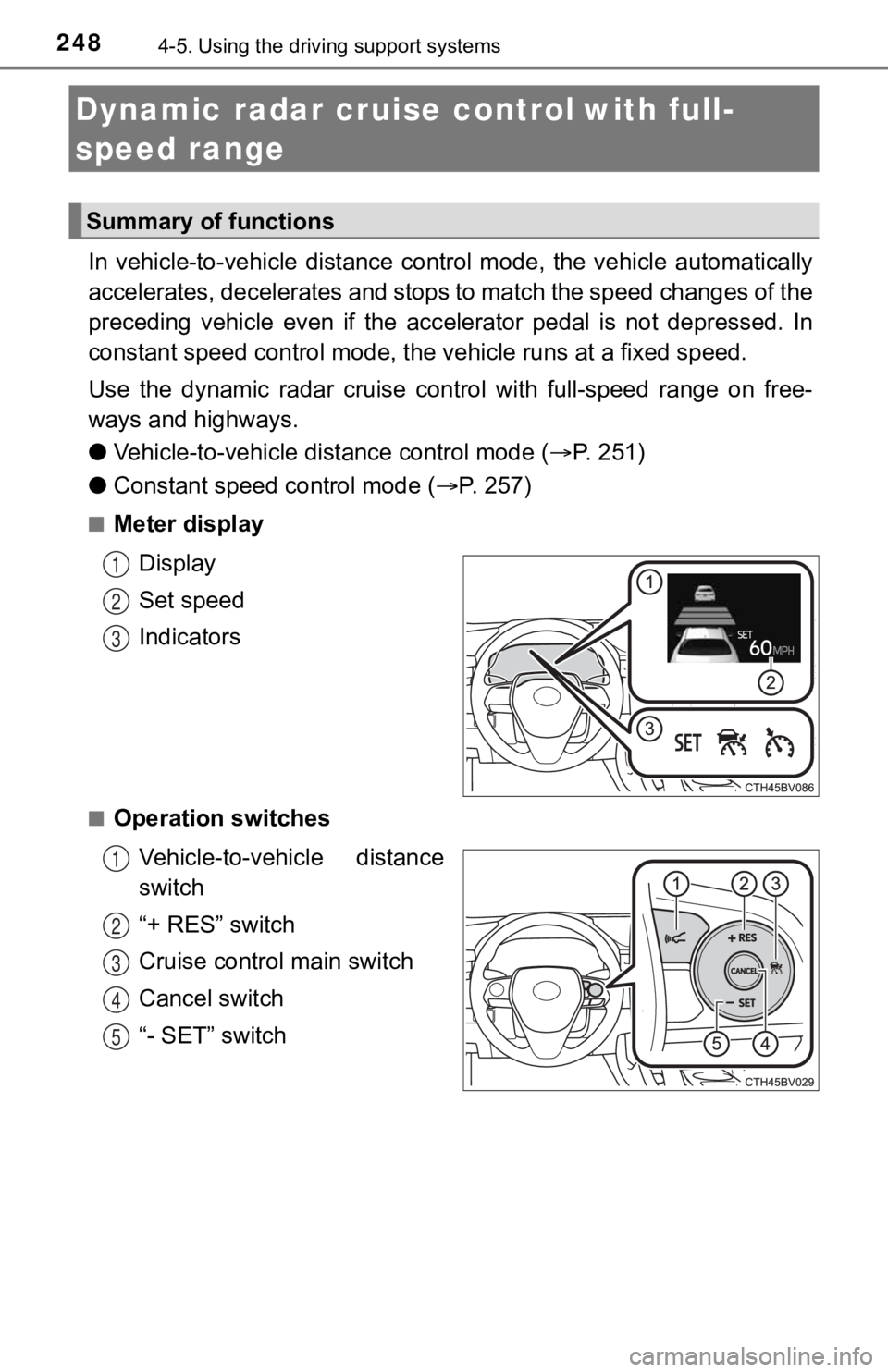
■Meter display
Display
Set speed
Indicators
■Operation switchesVehicle-to-vehicle distance
switch
“+ RES” switch
Cruise control main switch
Cancel switch
“- SET” switch
Dynamic radar cruise control with full-
speed range
Summary of functions
1
2
3
1
2
3
4
5
Page 249 of 540
2494-5. Using the driving support systems
4
Driving
WARNING
■Before using dynamic radar cruise control with full-speed range
● Driving safely is the sole responsibility of the driver. Do not rely solely on
the system, and drive safely by always paying careful attention to your sur-
roundings.
● The dynamic radar cruise control with full-speed range provides driving
assistance to reduce the driver's burden. However, there are li mitations to
the assistance provided.
Read the following conditions carefully. Do not overly rely on this system
and always drive carefully.
• When the sensor may not be correctly detecting the vehicle ahe ad:
P. 259
• Conditions under which the vehicle-to-vehicle distance control mode
may not function correctly: P. 260
● Set the speed appropriately depending on the speed limit, traff ic flow, road
conditions, weather conditions, etc. The driver is responsible for checking
the set speed.
● Even when the system is functioning normally, the condition of the preced-
ing vehicle as detected by the system may differ from the condition
observed by the driver. Therefore, the driver must always remai n alert,
assess the danger of each situation and drive safely. Relying on this sys-
tem or assuming the system ensures safety while driving can lea d to an
accident, resulting in death or serious injury.
● Switch the dynamic radar cruise control with full-speed range o ff using the
cruise control main switch when not in use.
■ Cautions regarding the driving assist systems
Observe the following precautions, as there are limitations to the assistance
provided by the system.
Failure to do so may cause an accident resulting in death or se rious injury.
● Assisting the driver to measure following distance
The dynamic radar cruise control with full-speed range is only intended to
help the driver in determining the following distance between the driver’s
own vehicle and a designated vehicle traveling ahead. It is not a mecha-
nism that allows careless or inattentive driving, and it is not a system that
can assist the driver in low-visibility conditions. It is still necessary for
driver to pay close attention to the vehicle’s surroundings.
● Assisting the driver to judge proper following distance
The dynamic radar cruise control with full-speed range determines
whether the following distance between the driver’s own vehicle and a
designated vehicle traveling ahead is within a set range. It is not capable
of making any other type of judgement. Therefore, it is absolutely neces-
sary for the driver to remain vigilant and to determine whether or not there
is a possibility of danger in any given situation.
Page 250 of 540
2504-5. Using the driving support systems
WARNING
●Assisting the driver to operate the vehicle
The dynamic radar cruise control with full-speed range has limited capabil-
ity to prevent or avoid a collision with a vehicle traveling ah ead. Therefore,
if there is ever any danger, the driver must take immediate and direct con-
trol of the vehicle and act appropriately in order to ensure th e safety of all
involved.
■ Situations unsuitable for dynamic radar cruise control with ful l-speed
range
Do not use dynamic radar cruise control with full-speed range in any of the
following situations.
Doing so may result in inappropriate speed control and could ca use an acci-
dent resulting in death or serious injury.
● Roads where there are pedestrians, cyclists, etc.
● In heavy traffic
● On roads with sharp bends
● On winding roads
● On slippery roads, such as those covered with rain, ice or snow
● On steep downhills, or where there are sudden changes between s harp up
and down gradients
Vehicle speed may exceed the set speed when driving down a stee p hill.
● At entrances to freeways and highways
● When weather conditions are bad enough that they may prevent the sen-
sors from detecting correctly (fog, snow, sandstorm, heavy rain, etc.)
● When there is rain, snow, etc. on the front surface of the radar sensor or
camera sensor
● In traffic conditions that require frequent repeated acceleration and decel-
eration
● When an approach warning buzzer is heard often
Page 252 of 540
2524-5. Using the driving support systems
Example of acceleration
When there are no longer any preceding vehicles driving slower
than the set speed
The system accelerates until the set speed is reached. The syst em then
returns to constant speed cruising.
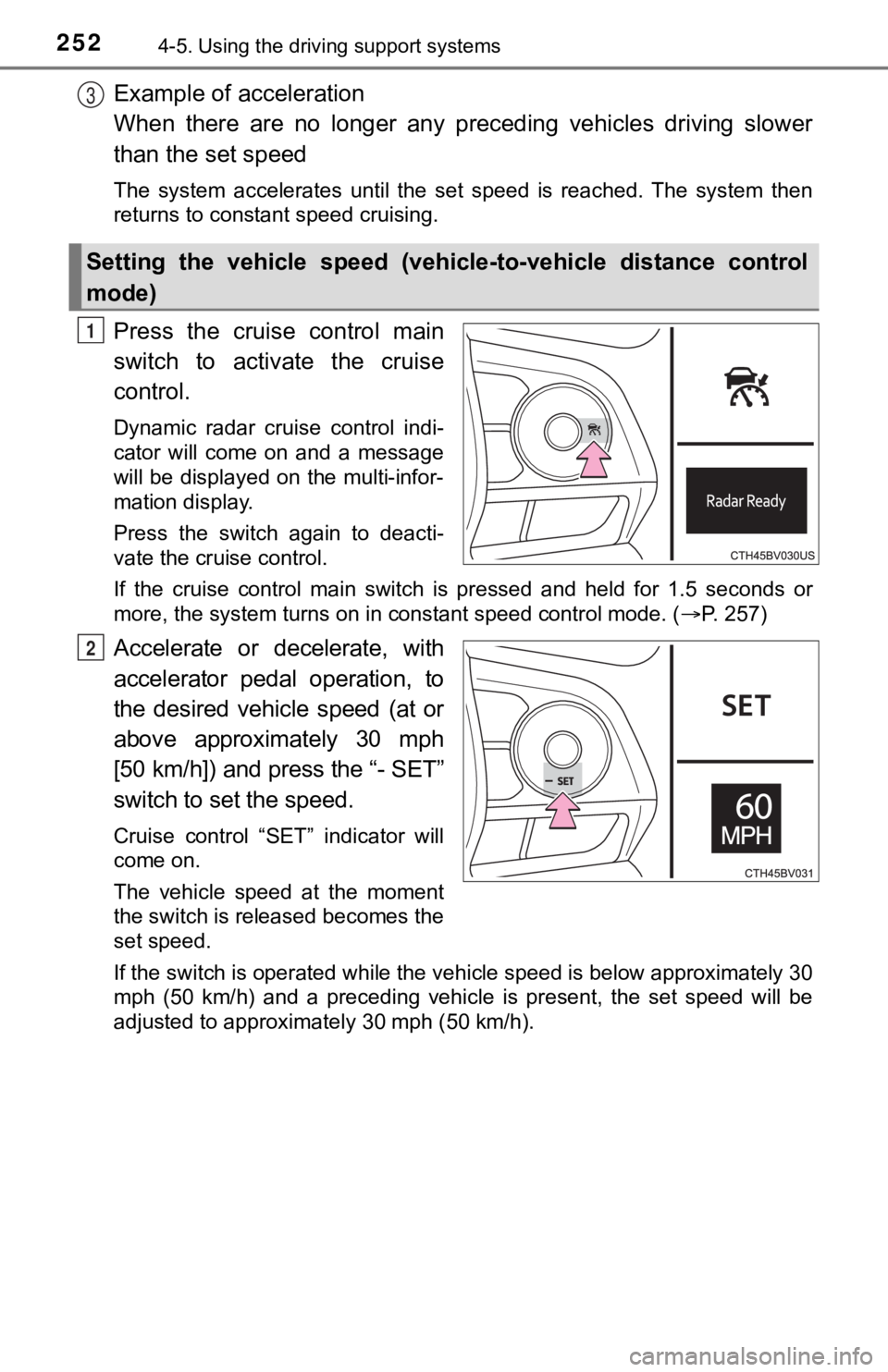
Press the cruise control main
switch to activate the cruise
control.
Dynamic radar cruise control indi-
cator will come on and a message
will be displayed on the multi-infor-
mation display.
Press the switch again to deacti-
vate the cruise control.
If the cruise control main switch is pressed and held for 1.5 seconds or
more, the system turns on in constant speed control mode. ( P. 257)
Accelerate or decelerate, with
accelerator pedal operation, to
the desired vehicle speed (at or
above approximately 30 mph
[50 km/h]) and press the “- SET”
switch to set the speed.
Cruise control “SET” indicator will
come on.
The vehicle speed at the moment
the switch is released becomes the
set speed.
If the switch is operated while the vehicle speed is below appr oximately 30
mph (50 km/h) and a preceding vehicle is present, the set speed will be
adjusted to approximately 30 mph (50 km/h).
Setting the vehicle speed (vehicle-to-vehicle distance control
mode)
3
1
2
Page 255 of 540
2554-5. Using the driving support systems
4
Driving
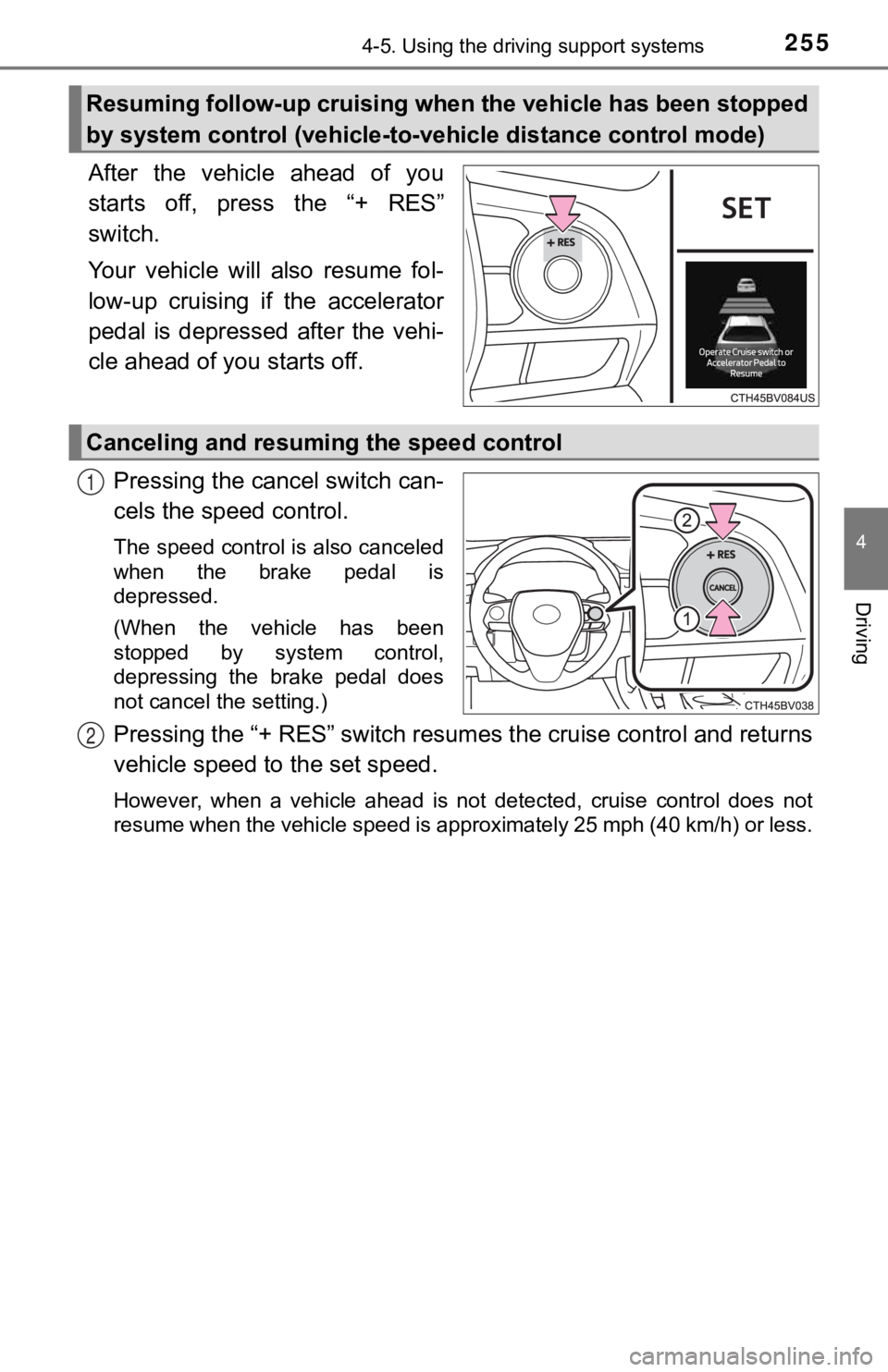
After the vehicle ahead of you
starts off, press the “+ RES”
switch.
Your vehicle will also resume fol-
low-up cruising if the accelerator
pedal is depressed after the vehi-
cle ahead of you starts off.Pressing the cancel switch can-
cels the speed control.
The speed control is also canceled
when the brake pedal is
depressed.
(When the vehicle has been
stopped by system control,
depressing the brake pedal does
not cancel the setting.)
Pressing the “+ RES” switch resumes the cruise control and retu rns
vehicle speed to the set speed.
However, when a vehicle ahead is not detected, cruise control does not
resume when the vehicle speed is approximately 25 mph (40 km/h) or less.
Resuming follow-up cruising when the vehicle has been stopped
by system control (vehicle-to-vehicle distance control mode)
Canceling and resuming the speed control
1
2
Page 256 of 540
2564-5. Using the driving support systems
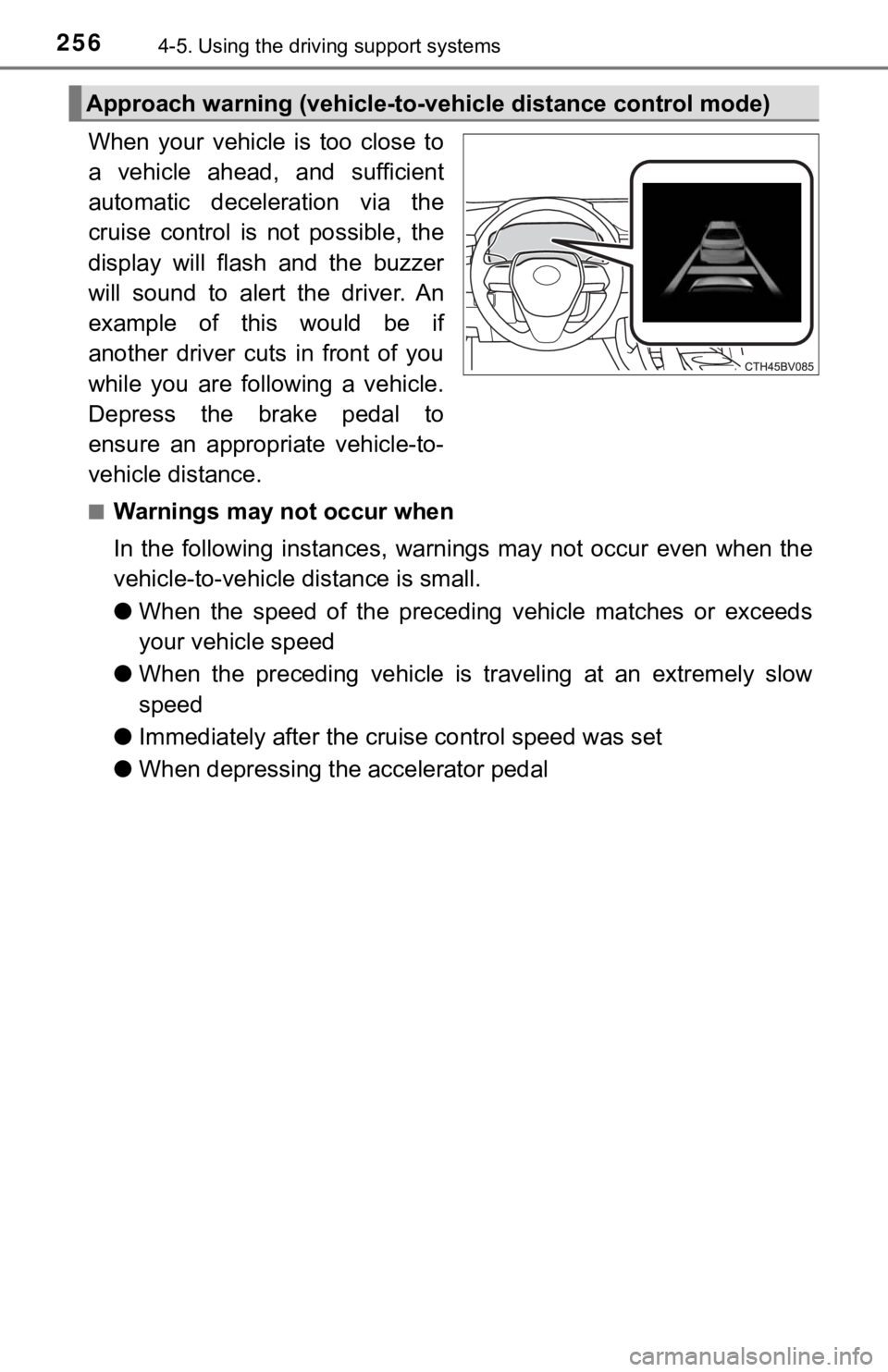
When your vehicle is too close to
a vehicle ahead, and sufficient
automatic deceleration via the
cruise control is not possible, the
display will flash and the buzzer
will sound to alert the driver. An
example of this would be if
another driver cuts in front of you
while you are following a vehicle.
Depress the brake pedal to
ensure an appropriate vehicle-to-
vehicle distance.
■Warnings may not occur when
In the following instances, war nings may not occur even when th e
vehicle-to-vehicle distance is small.
● When the speed of the preceding vehicle matches or exceeds
your vehicle speed
● When the preceding vehicle is traveling at an extremely slow
speed
● Immediately after the cruise control speed was set
● When depressing the accelerator pedal
Approach warning (vehicle-to-v ehicle distance control mode)
Page 257 of 540
2574-5. Using the driving support systems
4
Driving
When constant speed control mode is selected, your vehicle will main-
tain a set speed without controllin g the vehicle-to-vehicle distance.
Select this mode only when vehic le-to-vehicle distance control mode
does not function correctly due to a dirty radar sensor, etc.
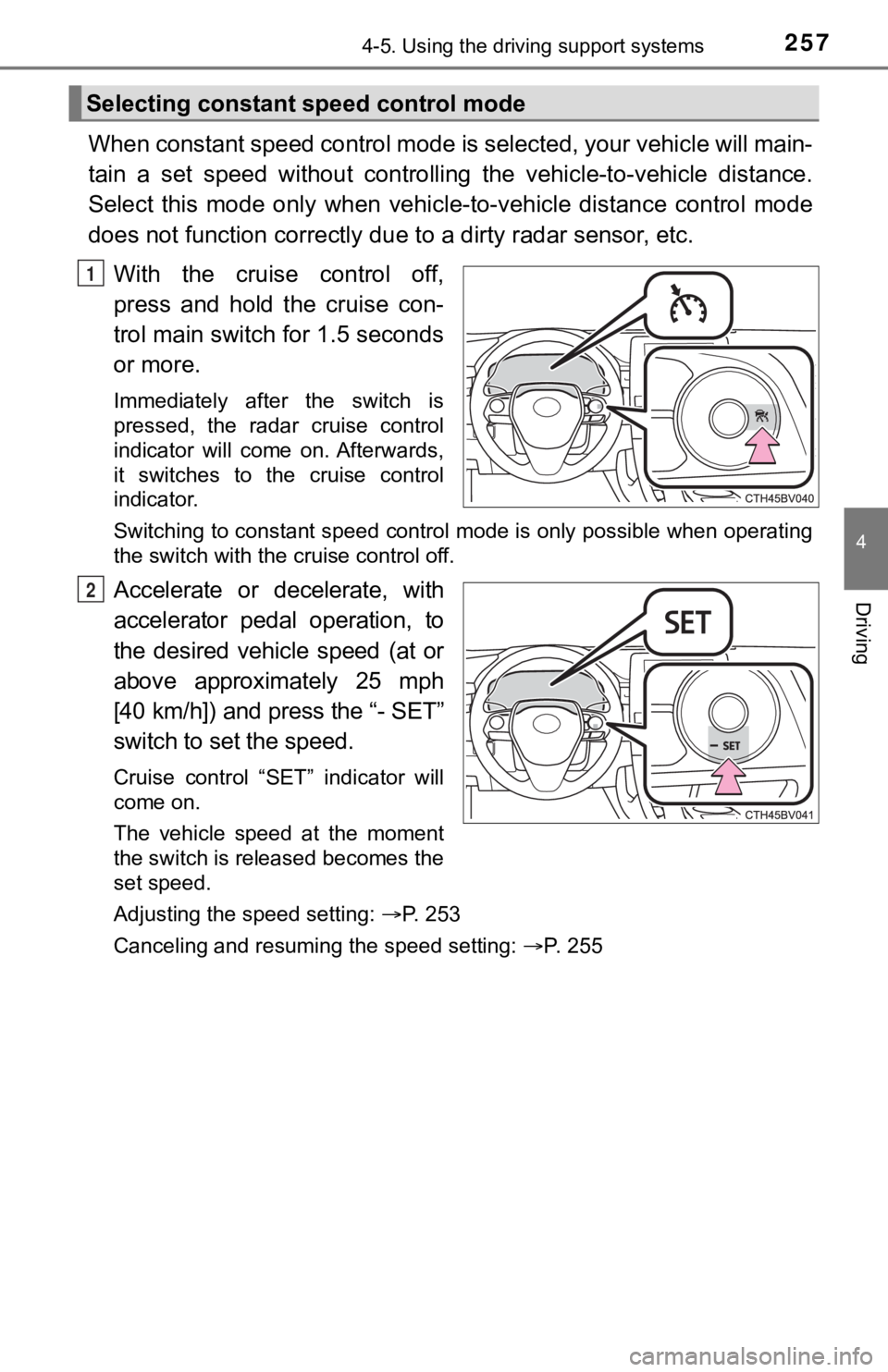
With the cruise control off,
press and hold the cruise con-
trol main switch for 1.5 seconds
or more.
Immediately after the switch is
pressed, the radar cruise control
indicator will come on. Afterwards,
it switches to the cruise control
indicator.
Switching to constant speed control mode is only possible when operating
the switch with the cruise control off.
Accelerate or decelerate, with
accelerator pedal operation, to
the desired vehicle speed (at or
above approximately 25 mph
[40 km/h]) and press the “- SET”
switch to se t the speed.
Cruise control “SET” indicator will
come on.
The vehicle speed at the moment
the switch is released becomes the
set speed.
Adjusting the speed setting: P. 253
Canceling and resuming the speed setting: P. 255
Selecting constant speed control mode
1
2
Page 258 of 540

2584-5. Using the driving support systems
■Dynamic radar cruise control wi th full-speed range can be set when
● The shift lever is in D or range 4 or higher of S has been sele cted.
● Range 4 or higher of D has been selected by using the paddle sh ift switch.
(vehicles with paddle shift switches)
● Vehicle speed is at or above approximately 30 mph (50 km/h). Ho wever,
when a preceding vehicle is detected, the dynamic radar cruise control with
full-speed range can be set even if the vehicle speed is below approximately
30 mph (50 km/h).
■ Accelerating after setting the vehicle speed
The vehicle can accelerate by operating the accelerator pedal. After acceler-
ating, the set speed resumes. However, during vehicle-to-vehicl e distance
control mode, the vehicle speed may decrease below the set spee d in order
to maintain the distance to the preceding vehicle.
■ When the vehicle stops while follow-up cruising
●Pressing the “+ RES” switch while the vehicle ahead stops will resume fol-
low-up cruising if the vehicle ahead starts off within approxim ately 3 sec-
onds after the switch is pressed.
● If the vehicle ahead starts off within 3 seconds after your vehicle stops, fol-
low-up cruising will be resumed.
■ Automatic cancelation of vehicle-to-vehicle distance control mo de
Vehicle-to-vehicle distance control mode is automatically cance led in the fol-
lowing situations.
● Actual vehicle speed falls at or below approximately 25 mph (40 km/h) when
there are no vehicles ahead.
● The preceding vehicle leaves the lane when your vehicle is following at a
vehicle speed at or below approximately 25 mph (40 km/h). Other wise, the
sensor can not properly detect the vehicle. (“Radar Cruise Control Unavail-
able” is displayed on the multi-information display)
● VSC is activated.
● TRAC is activated for a period of time.
● When the VSC or TRAC system is turned off.
● The sensor cannot detect correctly because it is covered in some way.
● Pre-collision braking is activated.
● The parking brake is operated.
● The vehicle is stopped by system control on a steep incline.
● The following are detected when the vehicle has been stopped by system
control:
• The driver is not wearing a seat belt.
• The driver’s door is opened.
• The vehicle has been stopped for about 3 minutes
If vehicle-to-vehicle distance control mode is automatically ca nceled for any
other reason, there may be a malfunction in the system. Contact your Toyota
dealer.
Page 259 of 540
2594-5. Using the driving support systems
4
Driving
■Automatic cancelation of c onstant speed control mode
Constant speed control mode is automatically canceled in the following situa-
tions:
● Actual vehicle speed is more than approximately 10 mph (16 km/h ) below
the set vehicle speed.
● Actual vehicle speed falls below approximately 25 mph (40 km/h) .
● VSC is activated.
● TRAC is activated for a period of time.
● When the VSC or TRAC system is turned off.
● Pre-collision braking is activated.
If constant speed control mode is automatically canceled for an y other rea-
son, there may be a malfunction in the system. Contact your Toyota dealer.
■ Brake system operation sound
If the brakes are applied automatically while the vehicle is in vehicle-to-vehi-
cle distance control mode, a brake system operation sound may b e heard.
This does not indicate a malfunction.
■ Warning messages and buzzers for d ynamic radar cruise control with
full-speed range
Warning messages and buzzers are used to indicate a system malfunction or
to inform the driver of the need for caution while driving. If a warning message
is shown on the multi-information display, read the message and follow the
instructions.
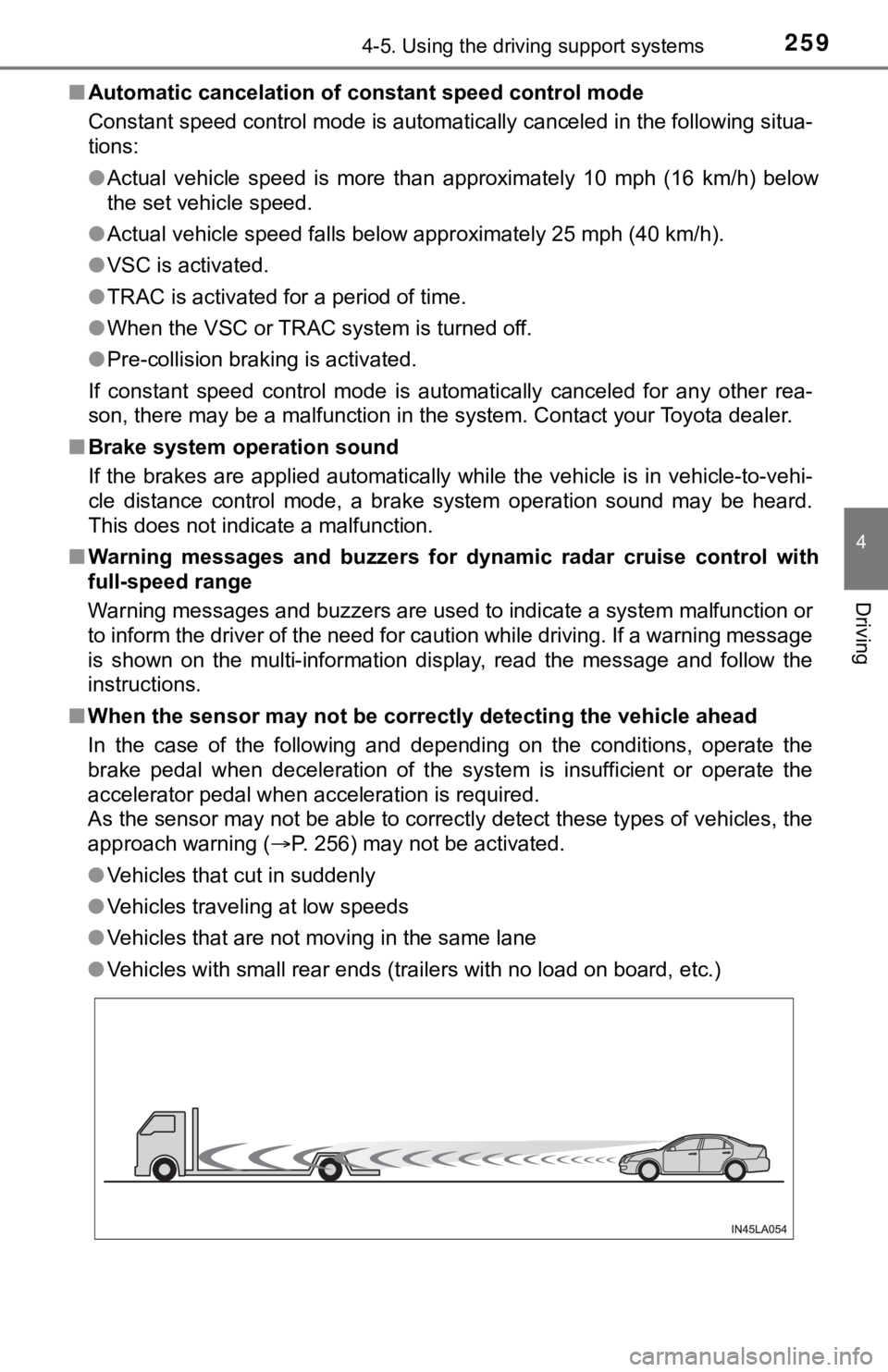
■ When the sensor may not be correctly detect ing the vehicle ahead
In the case of the following and depending on the conditions, o perate the
brake pedal when deceleration of the system is insufficient or operate the
accelerator pedal when acceleration is required.
As the sensor may not be able to correctly detect these types o f vehicles, the
approach warning ( P. 256) may not be activated.
● Vehicles that cut in suddenly
● Vehicles traveling at low speeds
● Vehicles that are not moving in the same lane
● Vehicles with small rear ends (trailers with no load on board, etc.)
Page 443 of 540
4437-2. Steps to take in an emergency
7
When trouble arises
■If “A New Key has been Registered Contact Your Dealer for Detai ls” is
displayed
This message will be displayed each time the driver’s door is opened when
the doors are unlocked from the outside for approximately one week after a
new electronic key has been registered.
If this message is displayed but you have not had a new electro nic key regis-
tered, ask your Toyota dealer to check if an unknown electronic key (other
than those in your possession) has been registered.
■ When “Headlight System Malfunction Visit Your Dealer” is displa yed
The following systems may be malfunctioning. Have the vehicle i nspected by
your Toyota dealer immediately.
● The LED headlight system
● Automatic High Beam
■ “Front Camera Unavailable” or “Front Camera Unavailable Remove
Debris On Windshield” is displayed
The following systems may be suspended until the problem shown in the
message is resolved.
● PCS (Pre-Collision System)
● LDA (Lane Departure Alert with steering control)
● Dynamic radar cruise control with full-speed range
● Automatic High Beam
■ If “Maintenance Required Soon” is displayed
Indicates that all maintenance according to the driven distance on the mainte-
nance schedule
* should be performed soon.
Comes on approximately 4500 miles (7200 km) after the message has been
reset.
If necessary, perform maintenance. Please reset the message aft er the main-
tenance is performed. ( P. 373)
*: Refer to the separate “Scheduled Maintenance Guide” or “Owner’ s Manual
Supplement” for the maintenance interval applicable to your veh icle.
■ If “Maintenance Required Visit Your Dealer” is displayed
Indicates that all maintenance is required to correspond to the driven distance
on the maintenance schedule
*.
Comes on approximately 5000 miles (8000 km) after the message has been
reset.
(The indicator will not work properly unless the message has been reset.)
Perform the necessary maintenance. Please reset the message aft er the
maintenance is performed. ( P. 373)
*: Refer to the separate “Scheduled Maintenance Guide” or “Owner’ s Manual
Supplement” for the maintenance interval applicable to your veh icle.