light TOYOTA AVALON 2022 Owners Manual
[x] Cancel search | Manufacturer: TOYOTA, Model Year: 2022, Model line: AVALON, Model: TOYOTA AVALON 2022Pages: 572, PDF Size: 9.42 MB
Page 329 of 572
3294-5. Using the driving support systems
4
Driving
◆EPS (Electric Power Steering)
Employs an electric motor to reduce the amount of effort needed to
turn the steering wheel
◆Adaptive Variable Suspension System (if equipped)
By independently controlling the damping force of the shock
absorbers for each of the 4 wheels according to the road and dr iv-
ing conditions, this system helps riding comfort with superior vehi-
cle stability, and helps good vehicle posture ( P. 3 2 4 )
◆The Secondary Collision Brake
When the SRS airbag sensor detects a collision and the system
operates, the brakes and stop li ghts are automatically controlled to
reduce the vehicle speed and hel p reduce the possibility of further
damage due to a secondary collision.
◆Dynamic Torque Control AWD system (if equipped)
Automatically switches from fron t-wheel drive to all-wheel drive
(AWD) according to the driving conditions, helping to ensure re li-
able handling and stability. Ex amples of conditions where the s ys-
tem will switch to AWD are when cornering, going uphill, starting off
or accelerating, and when the road surface is slippery due to s now,
rain, etc.
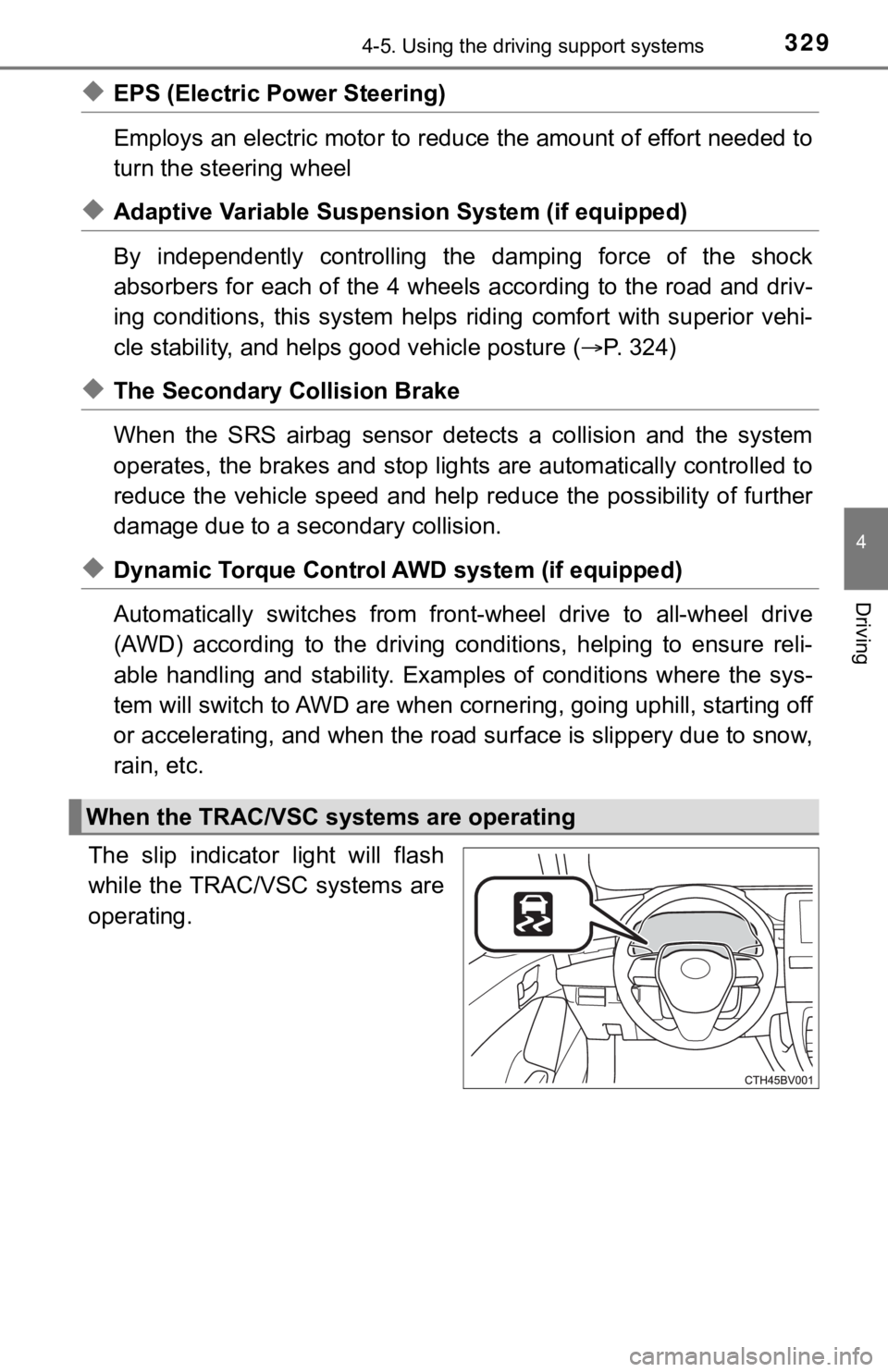
The slip indicator light will flash
while the TRAC/VSC systems are
operating.
When the TRAC/VSC systems are operating
Page 331 of 572

3314-5. Using the driving support systems
4
Driving
■Turning off both TRAC and VSC systems
To turn the TRAC and VSC systems off, press and hold for more than 3
seconds while the vehicle is stopped.
The VSC OFF indicator light will come on and the “Traction Cont rol Turned
Off” will be shown on the multi-information display
*.
Press again to turn the system back on.
*: Pre-collision brake assist and pre-collision braking will also be disabled. The PCS warning light will come o n and the message will be shown on the
multi-information display. ( P. 242)
■ When the message is displayed on the multi-information display show-
ing that TRAC has been disabled even if has not been pressed
TRAC is temporary deactivated. If the information continues to show, contact
your Toyota dealer.
■ Operating conditions of hill-start assist control
When the following four conditions are met, the hill-start assi st control will
operate:
● The shift lever is in a position other than P or N (when starting off forward/
backward on an upward incline)
● The vehicle is stopped
● The accelerator pedal is not depressed
● The parking brake is not engaged
■ Automatic system cancelation of hill-start assist control
The hill-start assist control will turn off in any of the follo wing situations:
● The shift lever is shifted to P or N
● The accelerator pedal is depressed
● The parking brake is engaged
● 2 seconds at maximum elapsed after the brake pedal is released
Page 332 of 572

3324-5. Using the driving support systems
■Sounds and vibrations caused by the ABS, brake assist, VSC, TRA C and
hill-start assist control systems
● A sound may be heard from the engine compartment when the brake pedal
is depressed repeatedly, when the engine is started or just aft er the vehicle
begins to move. This sound does not indicate that a malfunction has
occurred in any of these systems.
● Any of the following conditions may occur when the above system s are
operating. None of these indicates that a malfunction has occur red.
• Vibrations may be felt through the vehicle body and steering.
• A motor sound may be heard also after the vehicle comes to a s top.
• The brake pedal may pulsate slightly after the ABS is activate d.
• The brake pedal may move down slightly after the ABS is activa ted.
■ EPS operation sound
When the steering wheel is operated, a motor sound (whirring so und) may be
heard. This does not indicate a malfunction.
■ Active Cornering Assist operation sounds and vibrations
When the Active Cornering Assist is operated, operation sounds and vibra-
tions may be generated from the brake system, but this is not a malfunction.
■ Automatic reactivation of TRAC and VSC systems
After turning the TRAC and VSC systems off, the systems will be automati-
cally re-enabled in the following situations:
● When the engine switch is turned off
● If only the TRAC system is turned off, the TRAC will turn on wh en vehicle
speed increases
If both the TRAC and VSC systems are turned off, automatic re-e nabling will
not occur when vehicle speed increases.
■ Operating conditions of Active Cornering Assist
The system operates when the following occurs.
●TRAC/VSC can operate
● The driver is attempting to accelerate while turning
● The system detects that the vehicle is sliding to the outer sid e
● The brake pedal is released
■ Secondary Collision Brake operating conditions
The system operates when the SRS airbag sensor detects a collis ion while
the vehicle is in motion.
However, the system does not operate in any of the following si tuations.
● The vehicle speed is below 6 mph (10 km/h)
● Components are damaged
Page 335 of 572

3354-5. Using the driving support systems
4
Driving
WARNING
■Hill- start assist control does not operate effectively when
● Do not overly rely on hill-start assist control. Hill-start assist control may
not operate effectively on steep inclines and roads covered wit h ice.
● Unlike the parking brake, hill-st art assist control is not intended to hold the
vehicle stationary for an extended period of time. Do not attempt to use
hill-start assist control to hold the vehicle on an incline, as doing so may
lead to an accident.
■ When the TRAC/VSC is activated
The slip indicator light flashes. Always drive carefully. Reckless driving may
cause an accident. Exercise particular care when the indicator light flashes.
■ When the TRAC/VSC systems are turned off
Be especially careful and drive at a speed appropriate to the r oad condi-
tions. As these are the systems to help ensure vehicle stability and driving
force, do not turn the TRAC/VSC systems off unless necessary.
■ Replacing tires
Make sure that all tires are of the specified size, brand, trea d pattern and
total load capacity. In addition, make sure that the tires are inflated to the
recommended tire inflation pressure level.
The ABS, TRAC and VSC systems will not function correctly if different tires
are installed on the vehicle.
Contact your Toyota dealer for further information when replaci ng tires or
wheels.
■ Handling of tires and the suspension
Using tires with any kind of problem or modifying the suspensio n will affect
the driving assist systems, and may cause a system to malfunction.
■ Secondary Collision Brake
Do not rely solely upon the Secondary Collision Brake. This system is
designed to help reduce the possibility of further damage due to a second-
ary collision, however, that effect changes according to variou s conditions.
Overly relying on the system may result in death or serious inj ury.
Page 336 of 572
3364-6. Driving tips
●Use fluids that are appropriate t o the prevailing outside tempera-
tures. • Engine oil
• Engine coolant
• Washer fluid
● Have a service technician inspec t the condition of the battery.
● Have the vehicle fitted with four snow tires or purchase a set of tire
chains for the front tires.
*
Ensure that all tires are the same size and brand, and that cha ins match
the size of the tires.
*: Tire chains cannot be mounted on vehicles with 18 and 19-inch tires.
Perform the following according to the driving conditions:
● Do not try to forcibly open a window or move a wiper that is fr ozen.
Pour warm water over the frozen area to melt the ice. Wipe away
the water immediately to p revent it from freezing.
● To ensure proper operation of the climate control system fan,
remove any snow that has accumulated on the air inlet vents in
front of the windshield.
● Check for and remove any excess ic e or snow that may have accu-
mulated on the exterior lights, vehicle’s roof, chassis, around the
tires or on the brakes.
● Remove any snow or mud from the bottom of your shoes before
getting in the vehicle.
Winter driving tips
Carry out the necessary preparations and inspections before
driving the vehicle in winter. Always drive the vehicle in a ma n-
ner appropriate to the prevailing weather conditions.
Preparation for winter
Before driving the vehicle
Page 341 of 572

341
5Interior features
5-1. Using the air conditioning system and defogger
Automatic air conditioning system............................. 342
Heated steering wheel/ seat heaters/
seat ventilators ................ 349
5-2. Using the interior lights Interior lights list ................ 352
• Interior light ................... 353
• Personal lights .............. 353
• Ambient lights ............... 354
5-3. Using the storage features
List of storage features ..... 355
• Glove box...................... 356
• Console box .................. 356
• Bottle holders ................ 357
• Cup holders .................. 358
• Auxiliary boxes.............. 359
• Open tray ...................... 360
Trunk features ................... 361 5-4. Other interior features
Other interior features ....... 362
• Sun visors ..................... 362
• Vanity mirrors................ 362
• Power outlet .................. 363
• USB charging ports....... 364
• Wireless charger ........... 366
• Armrest ......................... 375
• Assist grips ................... 375
• Coat hooks.................... 376
Garage door opener.......... 377
Page 350 of 572
3505-1. Using the air conditioning system and defogger
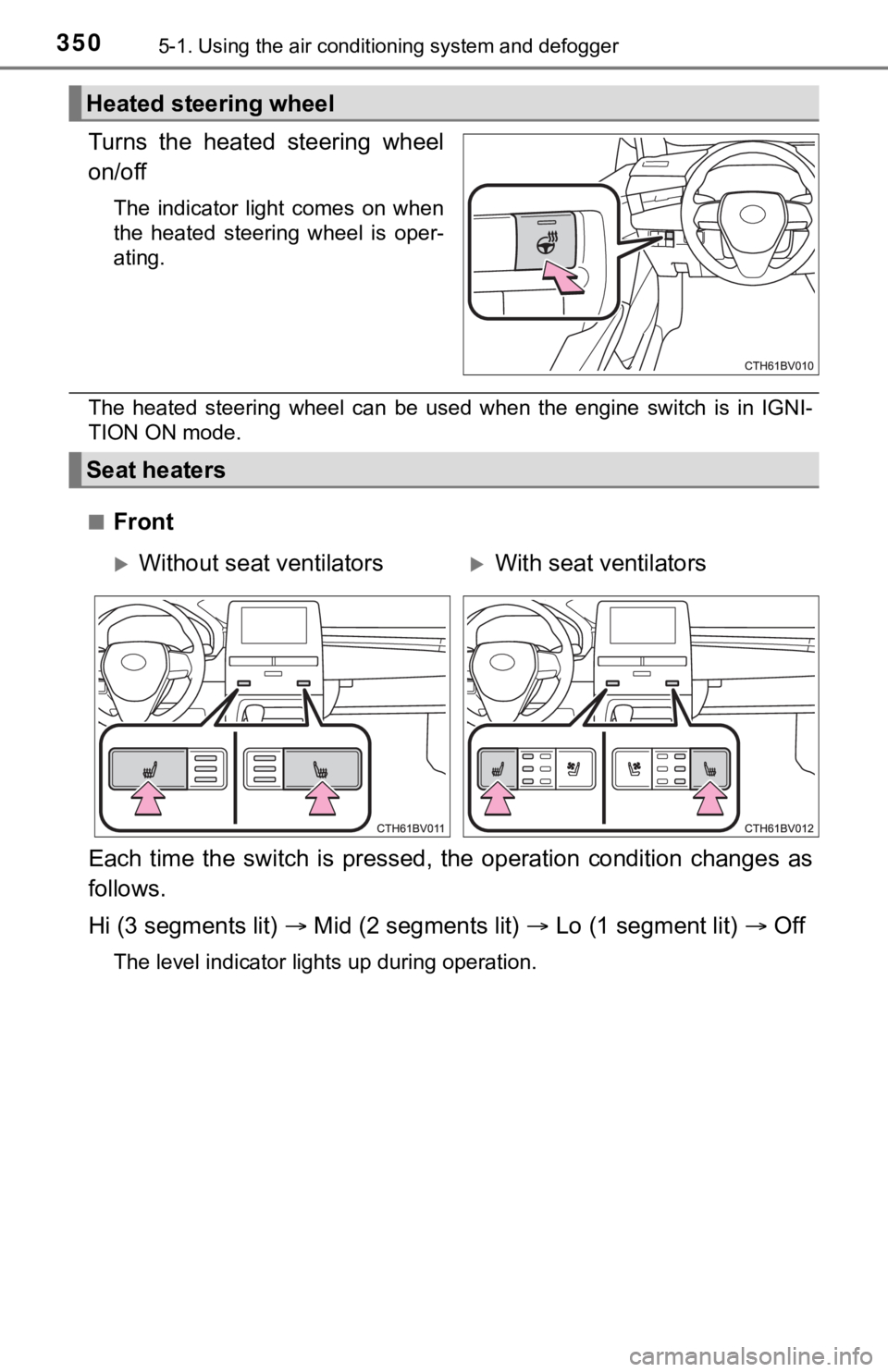
Turns the heated steering wheel
on/off
The indicator light comes on when
the heated steering wheel is oper-
ating.
The heated steering wheel can be used when the engine switch is in IGNI-
TION ON mode.
■
Front
Each time the switch is pressed, the operation condition change s as
follows.
Hi (3 segments lit) Mid (2 segments lit) Lo (1 segment lit) Off
The level indicator lights up during operation.
Heated steering wheel
Seat heaters
Without seat ventilatorsWith seat ventilators
Page 351 of 572
3515-1. Using the air conditioning system and defogger
5
Interior features
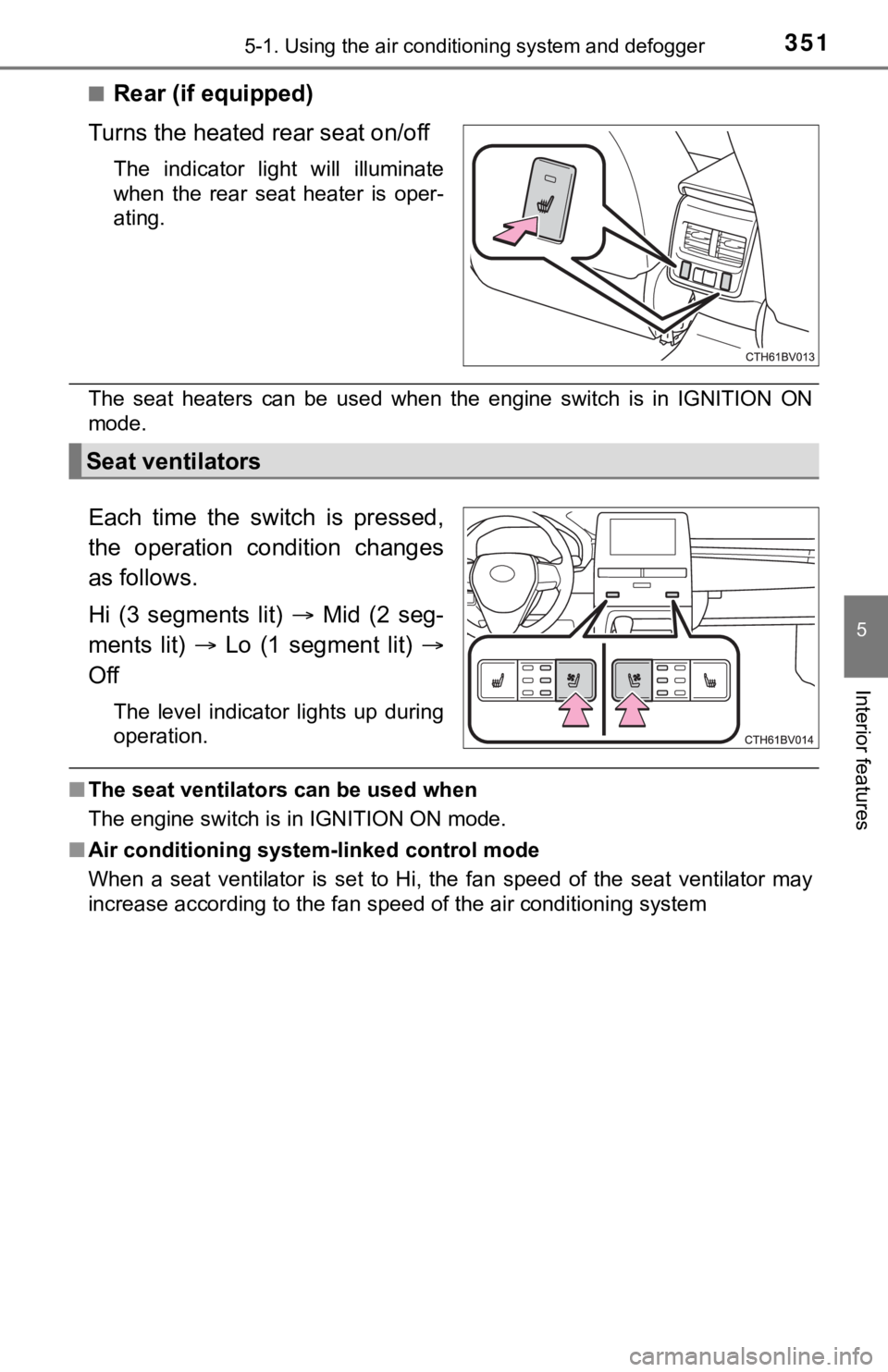
■Rear (if equipped)
Turns the heated rear seat on/off
The indicator light will illuminate
when the rear seat heater is oper-
ating.
The seat heaters can be used when the engine switch is in IGNITION ON
mode.
Each time the switch is pressed,
the operation condition changes
as follows.
Hi (3 segments lit) Mid (2 seg-
ments lit) Lo (1 segment lit)
Off
The level indicator lights up during
operation.
■ The seat ventilators can be used when
The engine switch is in IGNITION ON mode.
■ Air conditioning system-linked control mode
When a seat ventilator is set to Hi, the fan speed of the seat ventilator may
increase according to the fan speed of the air conditioning system
Seat ventilators
Page 352 of 572
3525-2. Using the interior lights
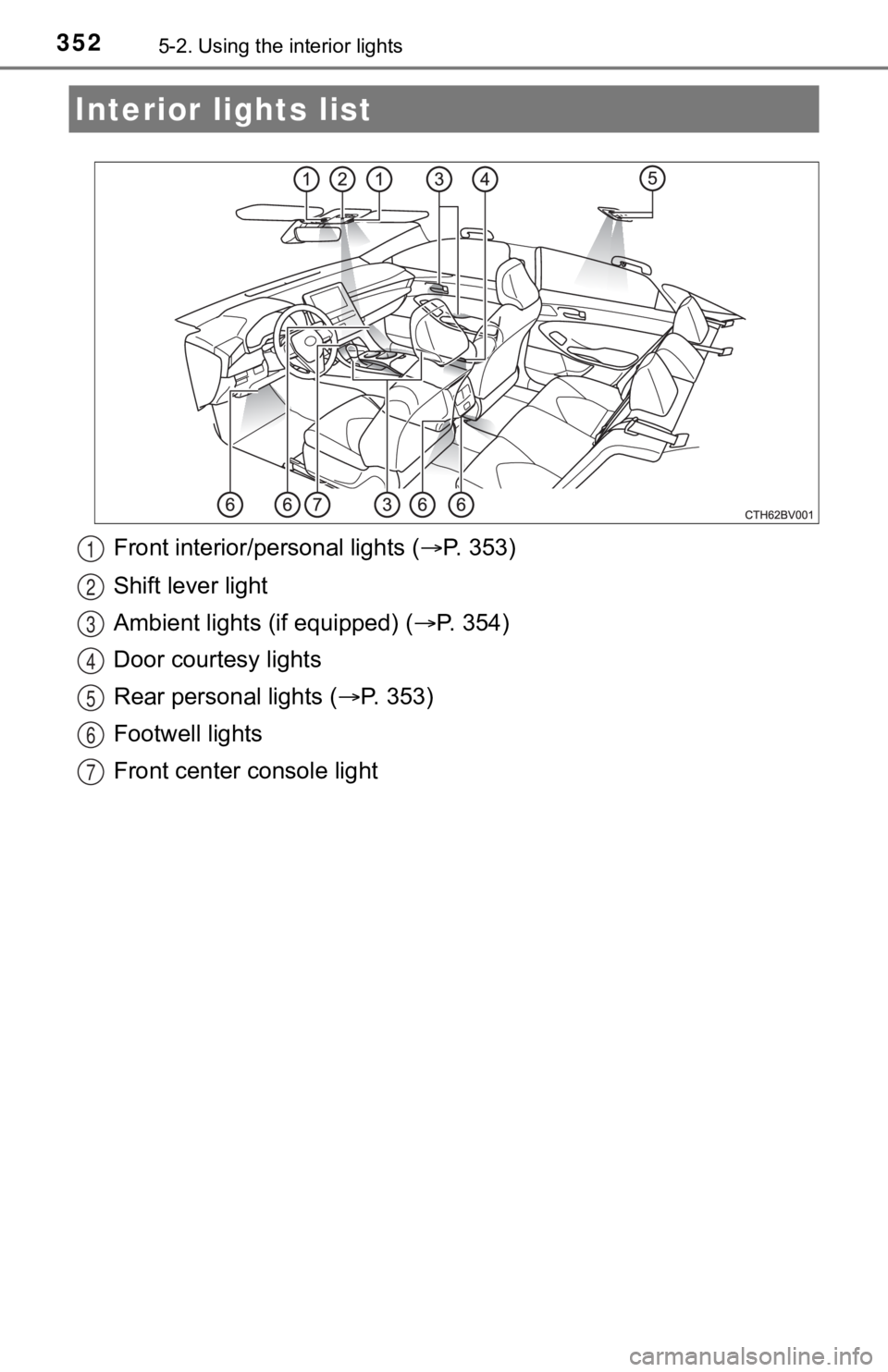
Front interior/personal lights ( P. 353)
Shift lever light
Ambient lights (if equipped) ( P. 3 5 4 )
Door courtesy lights
Rear personal lights ( P. 3 5 3 )
Footwell lights
Front center console light
Interior li ghts list
1
2
3
4
5
6
7
Page 353 of 572
3535-2. Using the interior lights
5
Interior features
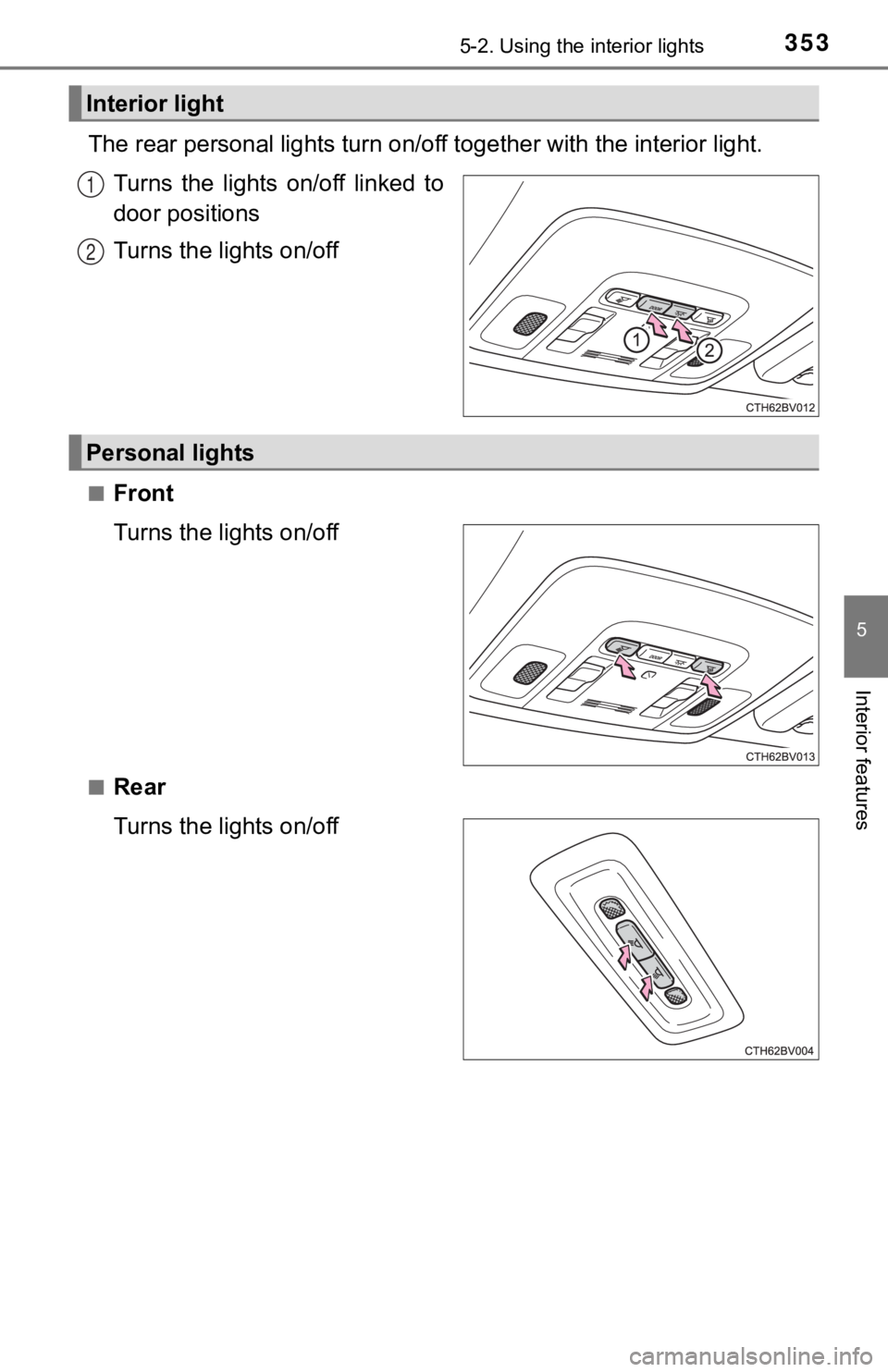
The rear personal lights turn on/off together with the interior light.
Turns the lights on/off linked to
door positions
Turns the lights on/off
■Front
Turns the lights on/off
■Rear
Turns the lights on/off
Interior light
1
2
Personal lights