change time TOYOTA AVALON 2022 User Guide
[x] Cancel search | Manufacturer: TOYOTA, Model Year: 2022, Model line: AVALON, Model: TOYOTA AVALON 2022Pages: 572, PDF Size: 9.42 MB
Page 160 of 572

1603-4. Adjusting the steering wheel and mirrors
When the mirror select switch is in the “L” or “R” position, th e outside
rear view mirrors will automati cally angle downwards when the v ehicle
is reversing in order to give a better view of the ground.
To disable this function, select neither “L” nor “R” of the mirror select
switch.
■Adjusting the mirror angle when the vehicle is reversing
With the shift lever in R, adjust the mirror angle at a desired posi-
tion.
The adjusted angle will be memori zed and the mirror will automati-
cally tilt to the memorized angle whenever the shift lever is s hifted
to R from next time.
The memorized downward tilt position of the mirror is linked to the nor-
mal position (angle adjusted with the shift lever in other than R). There-
fore, if the normal position is changed after adjustment, the t ilt position
will also change.
When the normal position is changed, readjust the angle in reve rsing.
■Mirror angle can be adjusted when
The engine switch is in ACCESSORY or IGNITION ON mode.
■ When the mirrors are fogged up
The outside rear view mirrors can be cleared using the mirror d efoggers. Turn
on the rear window defogger to turn on the outside rear view mi rror defog-
gers. ( P. 344)
■ Automatic adjustment of the mirr or angle (vehicles with driving position
memory)
A desired mirror face angle can be entered to memory and recall ed automati-
cally by the driving position memory. ( P. 148)
■ Auto anti-glare function (driver’s side only) (if equipped)
When the anti-glare inside rear view mirror is set to automatic mode, the out-
side rear view mirrors will activate in conjunction with the an ti-glare inside
rear view mirror to reduce reflected light. ( P. 157)
■ Customization
Some functions can be customized. ( P. 525)
Linked mirror function when reversing (vehicles with driving
position memory)
Page 179 of 572

1794-1. Before driving
4
Driving
NOTICE
■When driving the vehicle
● Do not depress the accelerator and brake pedals at the same tim e during
driving, as this may restrain the engine output.
● Do not use the accelerator pedal or depress the accelerator and brake
pedals at the same time to hold the vehicle on a hill.
■ When parking the vehicle
Always set the parking brake and shift the shift lever to P. Failure to do so
may cause the vehicle to move or the vehicle may accelerate sud denly if
the accelerator pedal is accidentally depressed.
■ Avoiding damage to vehicle parts
● Do not turn the steering wheel fully in either direction and ho ld it there for
an extended period of time.
Doing so may damage the power steering motor.
● When driving over bumps in the road, drive as slowly as possible to avoid
damaging the wheels, underside of the vehicle, etc.
■ If you get a flat tire while driving
A flat or damaged tire may cause the following situations. Hold the steering
wheel firmly and gradually depress the brake pedal to slow down the vehi-
cle.
● It may be difficult to control your vehicle.
● The vehicle will make abnormal sounds or vibrations.
● The vehicle will lean abnormally.
Information on what to do in case of a flat tire ( P. 470)
■ When encountering flooded roads
Do not drive on a road that has flooded after heavy rain etc. D oing so may
cause the following serious damage to the vehicle:
● Engine stalling
● Short in electrical components
● Engine damage caused by water immersion
In the event that you drive on a flooded road and the vehicle i s flooded, be
sure to have your Toyota dealer check the following:
● Brake function
● Changes in quantity and quality of oil and fluid used for the e ngine, tran-
saxle, transfer (AWD models), rear differential (AWD models), e tc.
● Lubricant condition for the propeller shaft (AWD models), beari ngs and
suspension joints (where possible), and the function of all joints, bearings,
etc.
Page 187 of 572
1874-2. Driving procedures
4
Driving
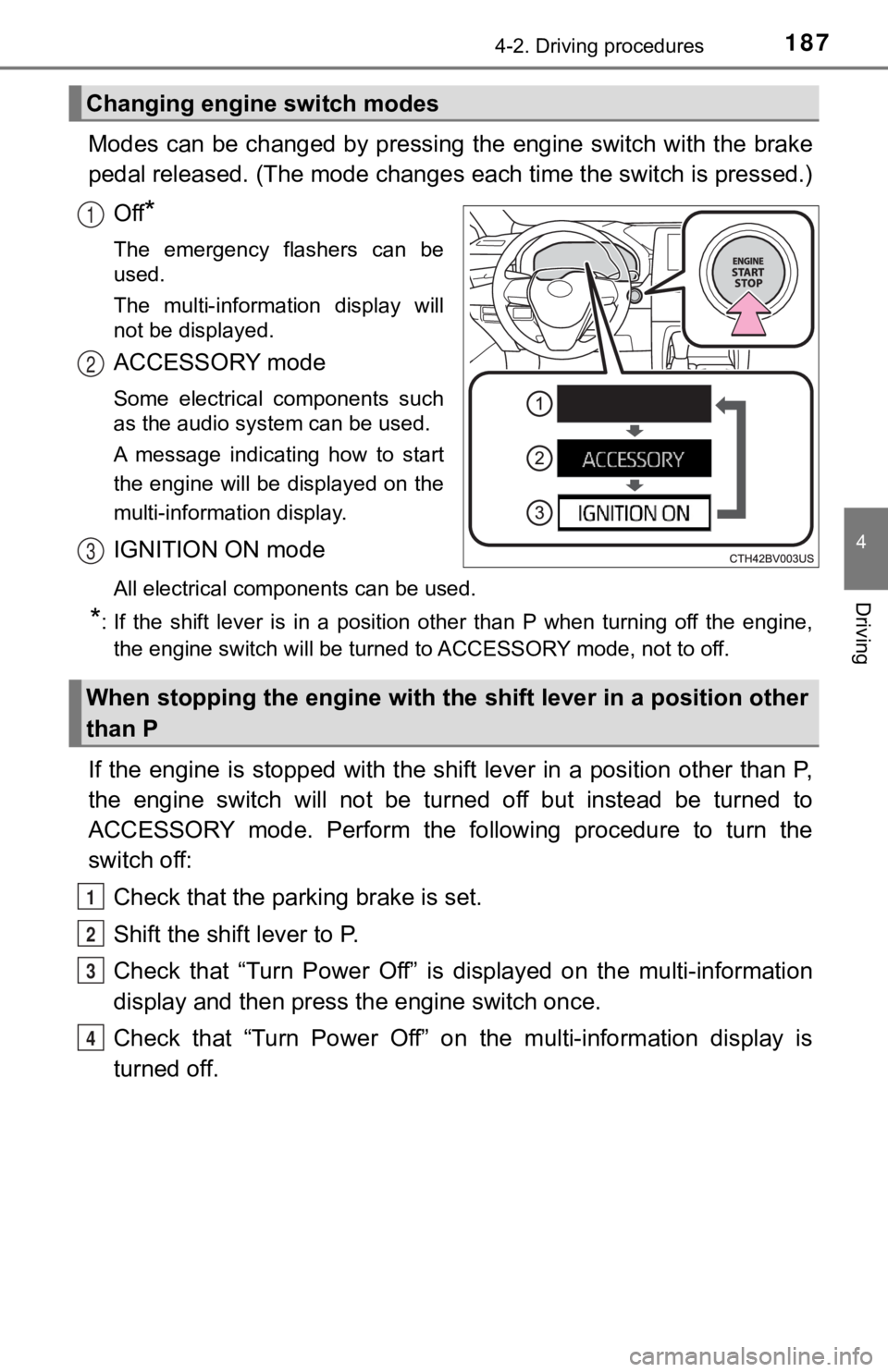
Modes can be changed by pressing the engine switch with the brake
pedal released. (The mode changes each time the switch is pressed.)
Off
*
The emergency flashers can be
used.
The multi-information display will
not be displayed.
ACCESSORY mode
Some electrical components such
as the audio system can be used.
A message indicating how to start
the engine will be displayed on the
multi-information display.
IGNITION ON mode
All electrical components can be used.
*: If the shift lever is in a position other than P when turning off the engine, the engine switch will be turned to ACCESSORY mode, not to off.
If the engine is stopped with the shift lever in a position oth er than P,
the engine switch will not be turned off but instead be turned to
ACCESSORY mode. Perform the following procedure to turn the
switch off:
Check that the park ing brake is set.
Shift the shift lever to P.
Check that “Turn Power Off” is displayed on the multi-informati on
display and then press the engine switch once.
Check that “Turn Power Off” on the multi-information display is
turned off.
Changing engine switch modes
1
2
3
When stopping the engine with the shift lever in a position other
than P
1
2
3
4
Page 189 of 572

1894-2. Driving procedures
4
Driving
■Steering lock motor overheating prevention
To prevent the steering lock motor from overheating, the motor may be sus-
pended if the engine is turned on and off repeatedly in a short period of time.
In this case, refrain from operating the engine. After about 10 seconds, the
steering lock motor will resume functioning.
■ When a message requesting the smart key system be inspected is dis-
played on the multi-information display
The system may be malfunctioning. Have the vehicle inspected by your
Toyota dealer immediately.
■ If the electronic key battery is depleted
P. 435
■ Operation of the engine switch
●If the switch is not pressed shortly and firmly, the engine swi tch mode may
not change or the engine may not start.
● If attempting to restart the engine immediately after turning t he engine
switch off, the engine may not start in some cases. After turning the engine
switch off, wait a few seconds before restarting the engine.
■ If the smart key system has been d eactivated in a customized setting
P. 484
WARNING
■ When starting the engine
Always start the engine while sitting in the driver’s seat. Do not depress the
accelerator pedal while starting the engine under any circumstances.
Doing so may cause an accident resulting in death or serious in jury.
■ Caution while driving
If engine failure occurs while the vehicle is moving, do not lock or open the
doors until the vehicle reaches a safe and complete stop. Activation of the
steering lock in this circumstance may lead to an accident, res ulting in
death or serious injury.
■ Stopping the engine in an emergency
● If you want to stop the engine in an emergency while driving th e vehicle,
press and hold the engine switch for more than 2 seconds, or press it
briefly 3 times or more in succession. ( P. 445)
However, do not touch the engine switch while driving except in an emer-
gency. Turning the engine off while driving will not cause loss of steering
or braking control, but the power assist to these systems will be lost. This
will make it more difficult to steer and brake, so you should pull over and
stop the vehicle as soon as it is safe to do so.
● If the engine switch is operated while the vehicle is running, a warning
message will be shown on the multi-information display and a buzzer
sounds.
● When restarting the engine after it was turned off while drivin g, shift the
shift lever to N and press the engine switch.
Page 197 of 572
1974-2. Driving procedures
4
Driving
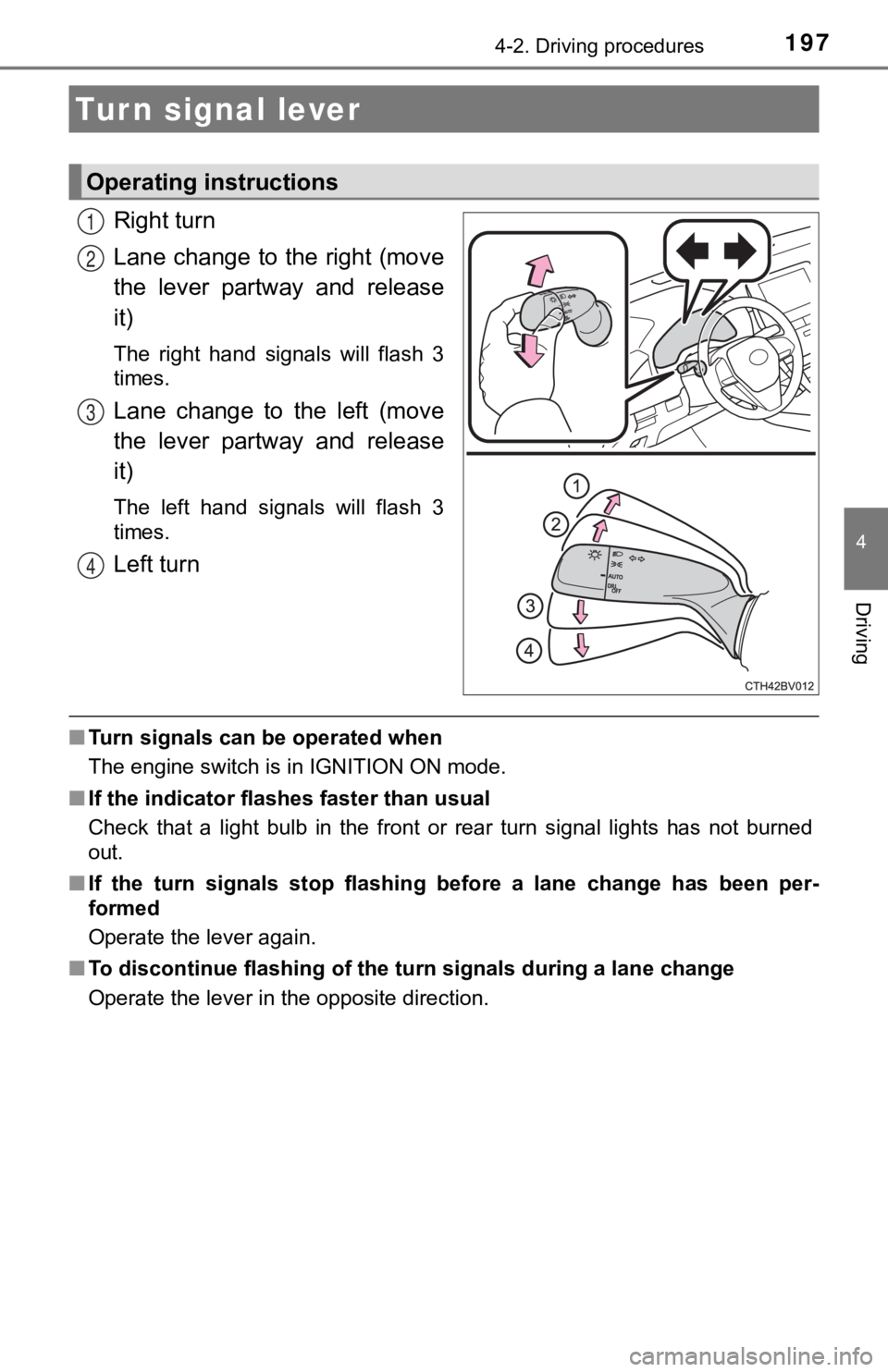
Right turn
Lane change to the right (move
the lever partway and release
it)
The right hand signals will flash 3
times.
Lane change to the left (move
the lever partway and release
it)
The left hand signals will flash 3
times.
Left turn
■Turn signals can be operated when
The engine switch is in IGNITION ON mode.
■ If the indicator flashes faster than usual
Check that a light bulb in the front or rear turn signal lights has not burned
out.
■ If the turn signals stop flashing before a lane change has been per-
formed
Operate the lever again.
■ To discontinue flashing of the turn signals during a lane chang e
Operate the lever in the opposite direction.
Turn signal lever
Operating instructions
1
2
3
4
Page 210 of 572

2104-3. Operating the lights and wipers
■Conditions to turn the high beams on/off automatically
●When all of the following conditions are met, the high beams will be turned
on automatically (after approximately 1 second):
• The vehicle speed is approximately 21 mph (34 km/h) or more.
• The area ahead of the vehicle is dark.
• There are no vehicles ahead with headlights or tail lights turned on.
• There are few streetlights on the road ahead.
● If any of the following conditions is met, the high beams will turn off automat-
ically:
• The vehicle speed is below approximately 17 mph (27 km/h).
• The area ahead of the vehicle is not dark.
• Vehicles ahead have their headlights or tail lights turned on.
• There are many streetlights on the road ahead.
■ Camera sensor detection information
●The high beams may not be automatically turned off in the following situa-
tions:
• When a vehicle suddenly appears from around a curve
• When the vehicle is cut in front of by another vehicle
• When vehicles ahead cannot be detected due to repeated curves, road
dividers or roadside trees
• When vehicles ahead appear in a faraway lane on a wide road
• When the lights of vehicles ahead are not on
● The high beams may be turned off if a vehicle ahead that is usi ng fog lights
without its headlights turned on is detected.
● House lights, street lights, traffic signals, and illuminated billboards or signs
and other reflective objects may cause the high beams to change to the low
beams, or the low beams to remain on.
● The following factors may affect the amount of time taken for t he high
beams to turn on or off:
• The brightness of the headlights, fog lights, and tail lights of vehicles
ahead
• The movement and direction of vehicles ahead
• When a vehicle ahead only has operational lights on one side
• When a vehicle ahead is a two-wheeled vehicle
• The condition of the road (gradient, curve, condition of the r oad surface,
etc.)
• The number of passengers and amount of luggage in the vehicle
● The high beams may turn on or off unexpectedly.
● Bicycles or similar vehicles may not be detected.
● In the following situations the system may not be able to correctly detect the
surrounding brightness level. This may cause the low beams to r emain on
or the high beams to flash or dazzle pedestrians or vehicles ah ead. In such
a case, it is necessary to manually switch between the high and low beams.
• When driving in inclement weather (heavy rain, snow, fog, sand storms,
etc.)
Page 211 of 572

2114-3. Operating the lights and wipers
4
Driving
• When the windshield is obscured by fog, mist, ice, dirt, etc.
• When the windshield is cracked or damaged
• When the camera sensor is deformed or dirty
• When the temperature of the camera sensor is extremely high
• When the surrounding brightness level is equal to that of head lights, tail
lights or fog lights
• When headlights or tail lights of vehicles ahead are turned off, dirty, changing color, or not aimed properly
• When the vehicle is hit by water, snow, dust, etc. from a prec eding vehi-
cle
• When driving through an area of intermittently changing brightness and
darkness
• When frequently and repeatedly driving ascending/descending roads, or roads with rough, bumpy or uneven surfaces (such as stone-paved
roads, gravel roads, etc.)
• When frequently and repeatedly taking curves or driving on a w inding
road
• When there is a highly reflective object ahead of the vehicle, such as a sign or mirror
• When the back of a preceding vehicle is highly reflective, such as a con-
tainer on a truck
• When the vehicle's headlights are damaged or dirty, or are not aimed
properly
• When the vehicle is listing or titling due to a flat tire, a trailer being towed, etc.
• When the headlights are changed between the high beams and low
beams repeatedly in an abnormal manner
• When the driver believes that the high beams may be flashing or dazzling pedestrians or other drivers
■ Temporarily lowering sensor sensitivity
The sensitivity of the sensor can be temporarily lowered.
Turn the engine switch off while the following conditions are m et.
• The headlight switch is in the or position.
• The headlight switch lever is in the original position.
• Automatic High Beam switch is on.
Turn the engine switch to the IGNITION ON mode.
Within 60 seconds after , repeat pushing the headlight switch lever to the
high beam position then pulling it to the original position qui ckly 10 times,
then leave the lever in the original position.
If the sensitivity is changed, the Automatic High Beam indicato r is turn on
and off 3 times.
1
2
32
4
Page 227 of 572

2274-5. Using the driving support systems
4
Driving
●In the following situations, if the situation has changed (or the vehicle has
been driven for some time) and the normal operating conditions are
detected, the message will disappear and the system will become opera-
tional.
If the message does not disappear, contact your Toyota dealer.
• When the temperature around the radar sensor is outside of the opera- tional range, such as when the vehicle is in the sun or in an e xtremely
cold environment
• When the front camera cannot detect objects in front of the ve hicle, such
as when driving in the dark, snow, or fog, or when bright lights are shining
into the front camera
• Depending on the conditions in the vicinity of the vehicle, th e radar may
judge the surrounding environment cannot be properly recognized . In
that case, “Pre-Collision System Unavailable See Owner's Manual ” is dis-
played.
Page 233 of 572
2334-5. Using the driving support systems
4
Driving
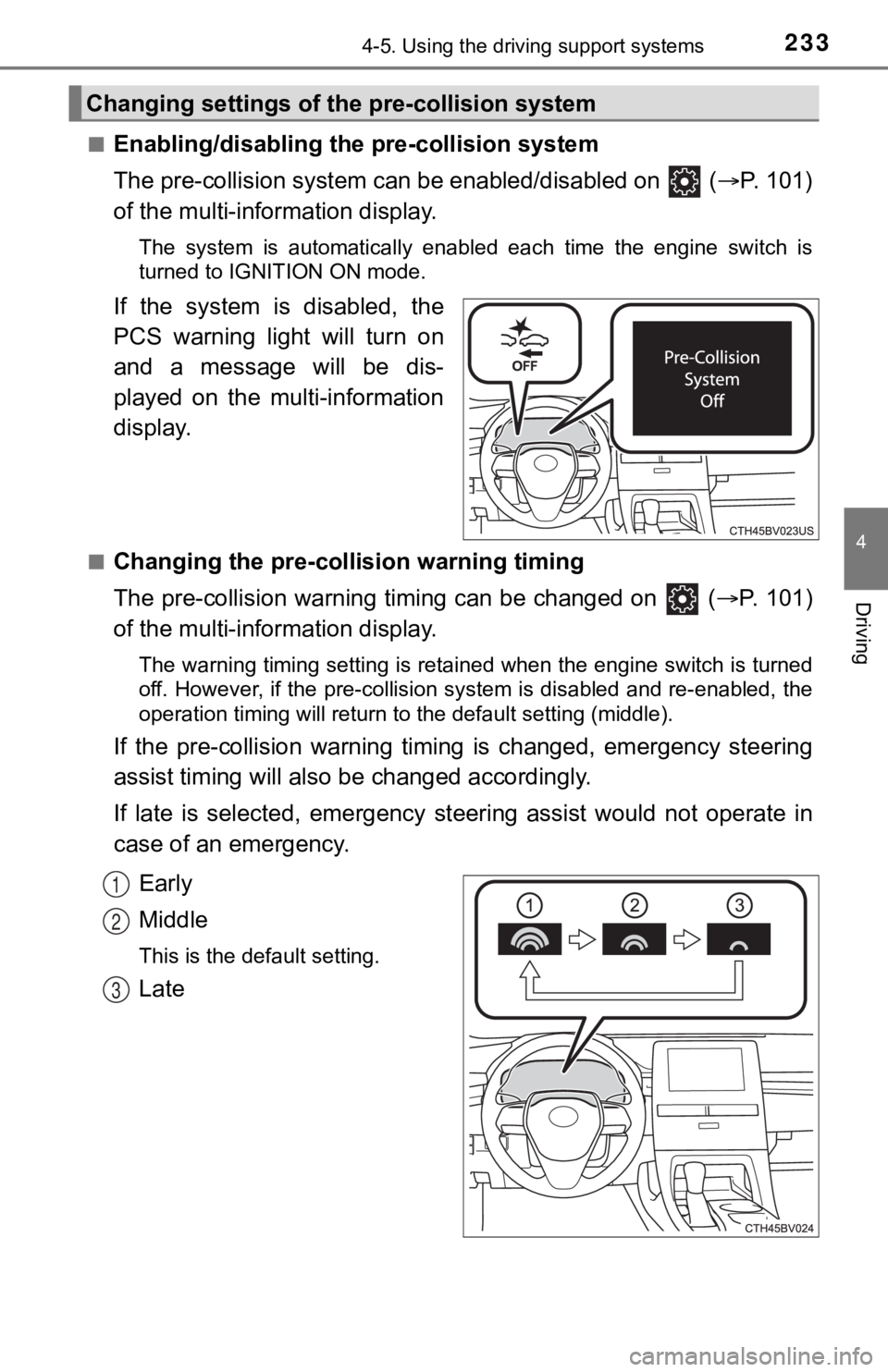
■Enabling/disabling the pre-collision system
The pre-collision system can be enabled/disabled on ( P. 1 0 1 )
of the multi-information display.
The system is automatically enabled each time the engine switch is
turned to IGNITION ON mode.
If the system is disabled, the
PCS warning light will turn on
and a message will be dis-
played on the multi-information
display.
■Changing the pre-colli sion warning timing
The pre-collision warning timing can be changed on ( P. 1 0 1 )
of the multi-information display.
The warning timing setting is retained when the engine switch is turned
off. However, if the pre-collision system is disabled and re-en abled, the
operation timing will return to the default setting (middle).
If the pre-collision warning timing is changed, e mergency steering
assist timing will also b e changed accordingly.
If late is selected, emergency st eering assist would not operate in
case of an emergency.
Early
Middle
This is the default setting.
Late
Changing settings of the pre-collision system
1
2
3
Page 240 of 572
2404-5. Using the driving support systems
• If a vehicle ahead is narrow, such as a personal mobility vehi cle
• If a preceding vehicle has a small rear end, such as an unload ed truck
• If a vehicle ahead is carrying a load which protrudes past its rear bumper
• If a vehicle ahead is irregularly shaped, such as a tractor or side car
• If a vehicle ahead is a child sized bicycle, a bicycle that is carrying a large
load, a bicycle ridden by more than one person, or a uniquely shaped
bicycle (bicycle with a child seat, tandem bicycle, etc.)
• If a pedestrian/ or the riding height of a bicyclist ahead is shorter than
approximately 3.2 ft. (1 m) or taller than approximately 6.5 ft. (2 m)
• If a pedestrian/bicyclist is wearing oversized clothing (a rai n coat, long
skirt, etc.), making their silhouette obscure
• If a pedestrian is bending forward or squatting or bicyclist i s bending for-
ward
• If a pedestrian/bicyclist is moving fast
• If a pedestrian is pushing a stroller, wheelchair, bicycle or other vehicle
• When driving in inclement weather such as heavy rain, fog, snow or a sandstorm
• When driving through steam or smoke
• When the surrounding area is dim, such as at dawn or dusk, or while at
night or in a tunnel, making a detectable object appear to be n early the
same color as its surroundings
• When driving in a place where the surrounding brightness changes sud- denly, such as at the entrance or exit of a tunnel
• After the engine has started the vehicle has not been driven for a certain
amount of time
• While making a left/right turn and for a few seconds after mak ing a left/
right turn
• While driving on a curve and for a few seconds after driving o n a curve
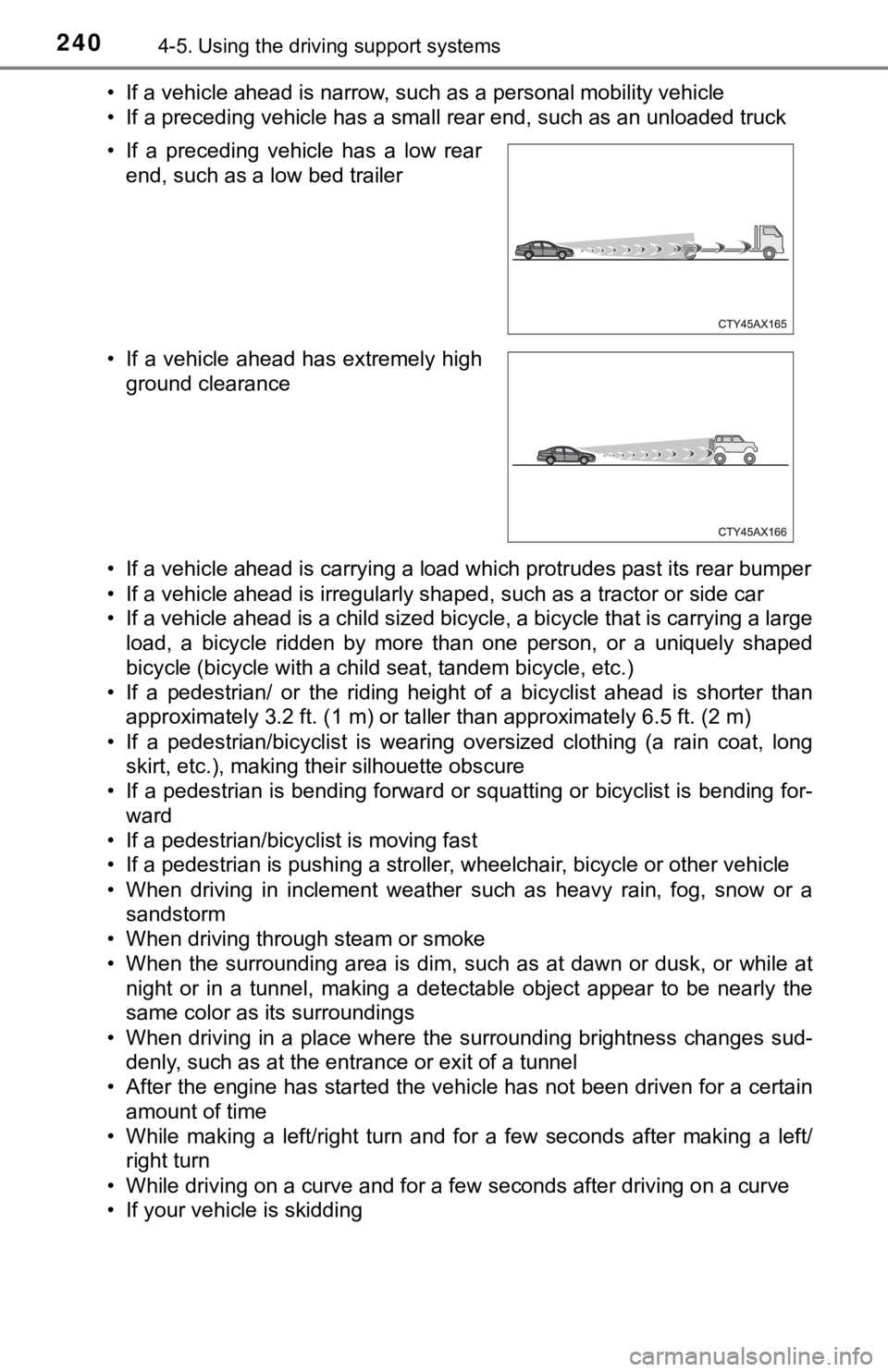
• If your vehicle is skidding • If a preceding vehicle has a low rear
end, such as a low bed trailer
• If a vehicle ahead has extremely high ground clearance