lane assist TOYOTA AVALON 2022 Owners Manual
[x] Cancel search | Manufacturer: TOYOTA, Model Year: 2022, Model line: AVALON, Model: TOYOTA AVALON 2022Pages: 572, PDF Size: 9.42 MB
Page 4 of 572

TABLE OF CONTENTS4
4-5. Using the driving support systems
Toyota Safety Sense 2.5+ ...................... 220
PCS (Pre-Collision System) ........................... 228
LTA (Lane Tracing Assist) ............................. 243
RSA (Road Sign Assist) .... 258
Dynamic radar cruise control with full-speed
range ............................... 263
BSM (Blind Spot Monitor) ........................... 279
• BSM function ................ 283
• RCTA function .............. 286
Rear Camera Detection function (vehicles with
panoramic view
monitor) ........................... 291
Intuitive parking assist ....... 295
Intelligent Clearance Sonar (ICS) ..................... 303
Driving mode select switches .......................... 324
Driving assist systems....... 328
4-6. Driving tips Winter driving tips.............. 336 5-1. Using the air conditioning
system and defogger
Automatic air conditioning system ............................. 342
Heated steering wheel/ seat heaters/
seat ventilators ................ 349
5-2. Using the interior lights Interior lights list................. 352
• Interior light ................... 353
• Personal lights............... 353
• Ambient lights................ 354
5-3. Using the storage features
List of storage features ...... 355
• Glove box ...................... 356
• Console box .................. 356
• Bottle holders ................ 357
• Cup holders ................... 358
• Auxiliary boxes .............. 359
• Open tray ...................... 360
Trunk features ................... 361
5-4. Other interior features Other interior features........ 362
• Sun visors ..................... 362
• Vanity mirrors ................ 362
• Power outlet .................. 363
• USB charging ports ....... 364
• Wireless charger ........... 366
• Armrest.......................... 375
• Assist grips .................... 375
• Coat hooks .................... 376
Garage door opener .......... 3775Interior features
Page 22 of 572
22Pictorial index
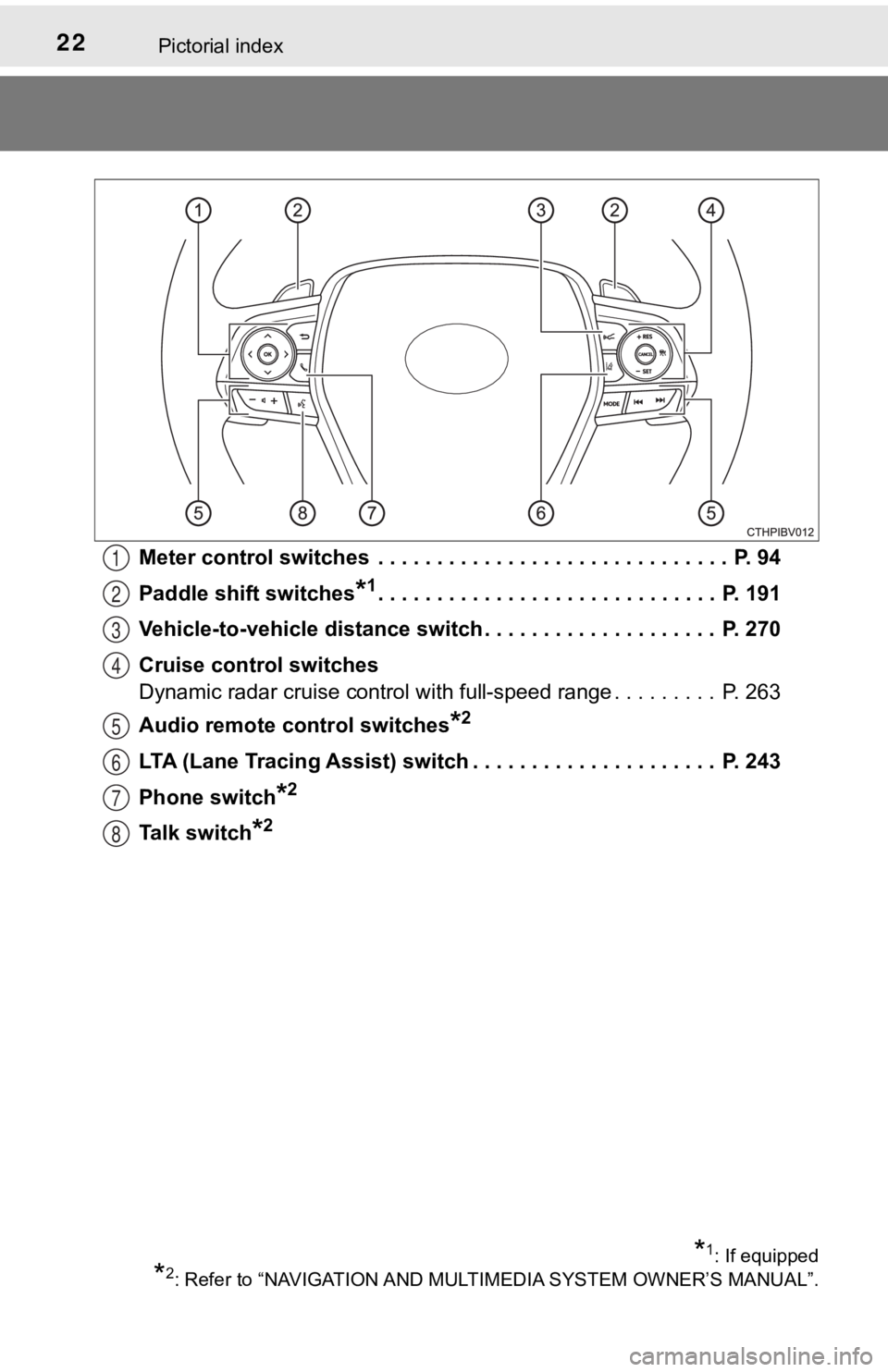
Meter control switches . . . . . . . . . . . . . . . . . . . . . . . . . . . . . . P. 94
Paddle shift switches
*1. . . . . . . . . . . . . . . . . . . . . . . . . . . . . P. 191
Vehicle-to-vehicle distance switch . . . . . . . . . . . . . . . . . . . . P. 270
Cruise control switches
Dynamic radar cruise control with full-speed range . . . . . . . . . P. 263
Audio remote control switches
*2
LTA (Lane Tracing Assist) switch . . . . . . . . . . . . . . . . . . . . . P. 243
Phone switch
*2
Talk switch*2
*1: If equipped
*2: Refer to “NAVIGATION AND MULT IMEDIA SYSTEM OWNER’S MANUAL”.
1
2
3
4
5
6
7
8
Page 93 of 572
932. Instrument cluster
2
Instrument cluster
The multi-information display presents the driver with a variety of driv-
ing-related data, such as the cur rent outside temperature. The multi-
information display can also be used to change the display sett ings
and other settings.
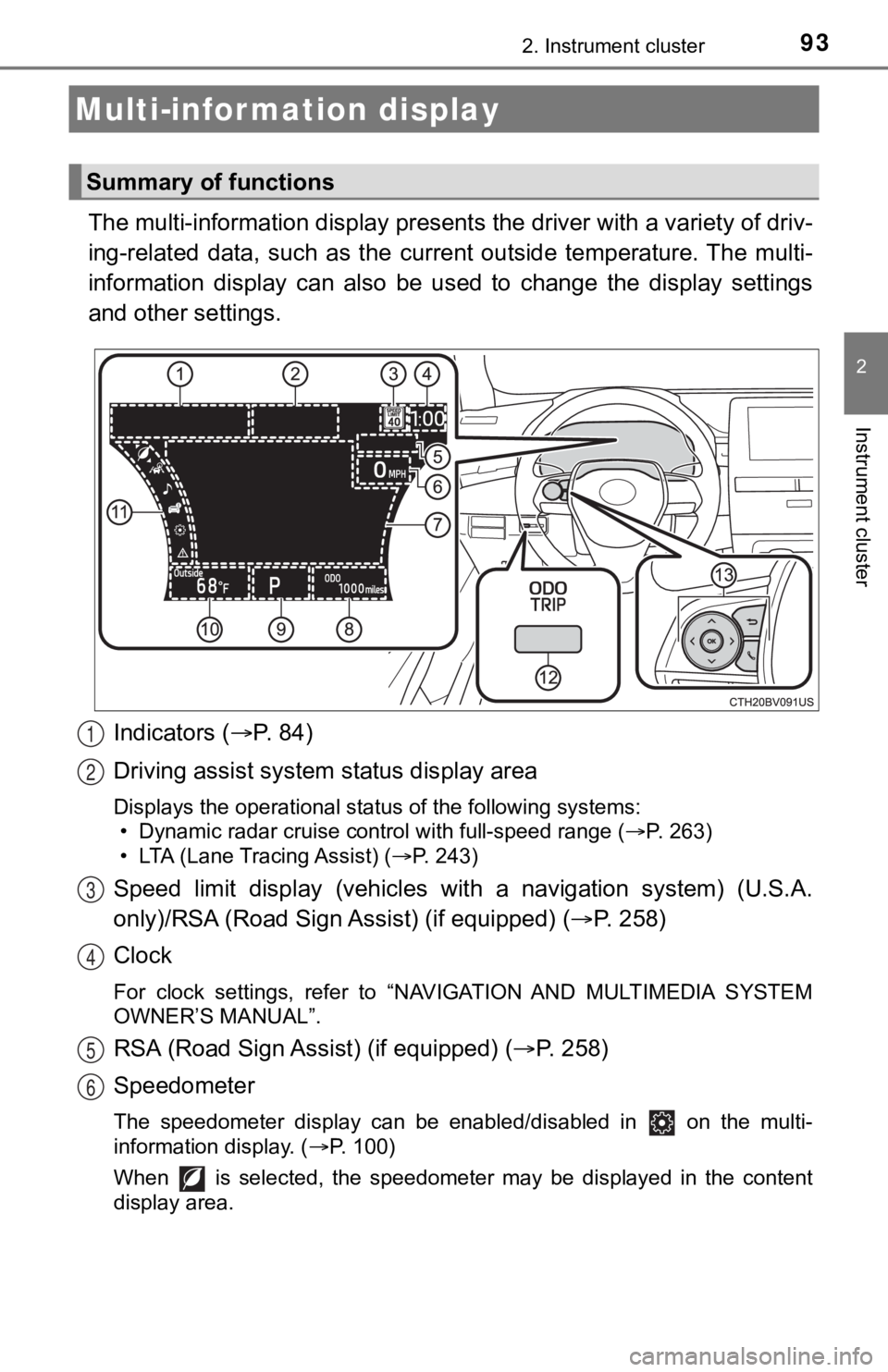
Indicators ( P. 84)
Driving assist system status display area
Displays the operational status of the following systems:
• Dynamic radar cruise control with full-speed range ( P. 263)
• LTA (Lane Tracing Assist) ( P. 243)
Speed limit display (vehicles wit h a navigation system) (U.S.A.
only)/RSA (Road Sign Assist) (if equipped) ( P. 2 5 8 )
Clock
For clock settings, refer to “NAVIGATION AND MULTIMEDIA SYSTEM
OWNER’S MANUAL”.
RSA (Road Sign Assist) (if equipped) ( P. 258)
Speedometer
The speedometer display can be enabled/disabled in on the mult i-
information display. ( P. 100)
When is selected, the speedometer may be displayed in the content
display area.
Multi-infor mation display
Summary of functions
1
2
3
4
5
6
Page 96 of 572
962. Instrument cluster
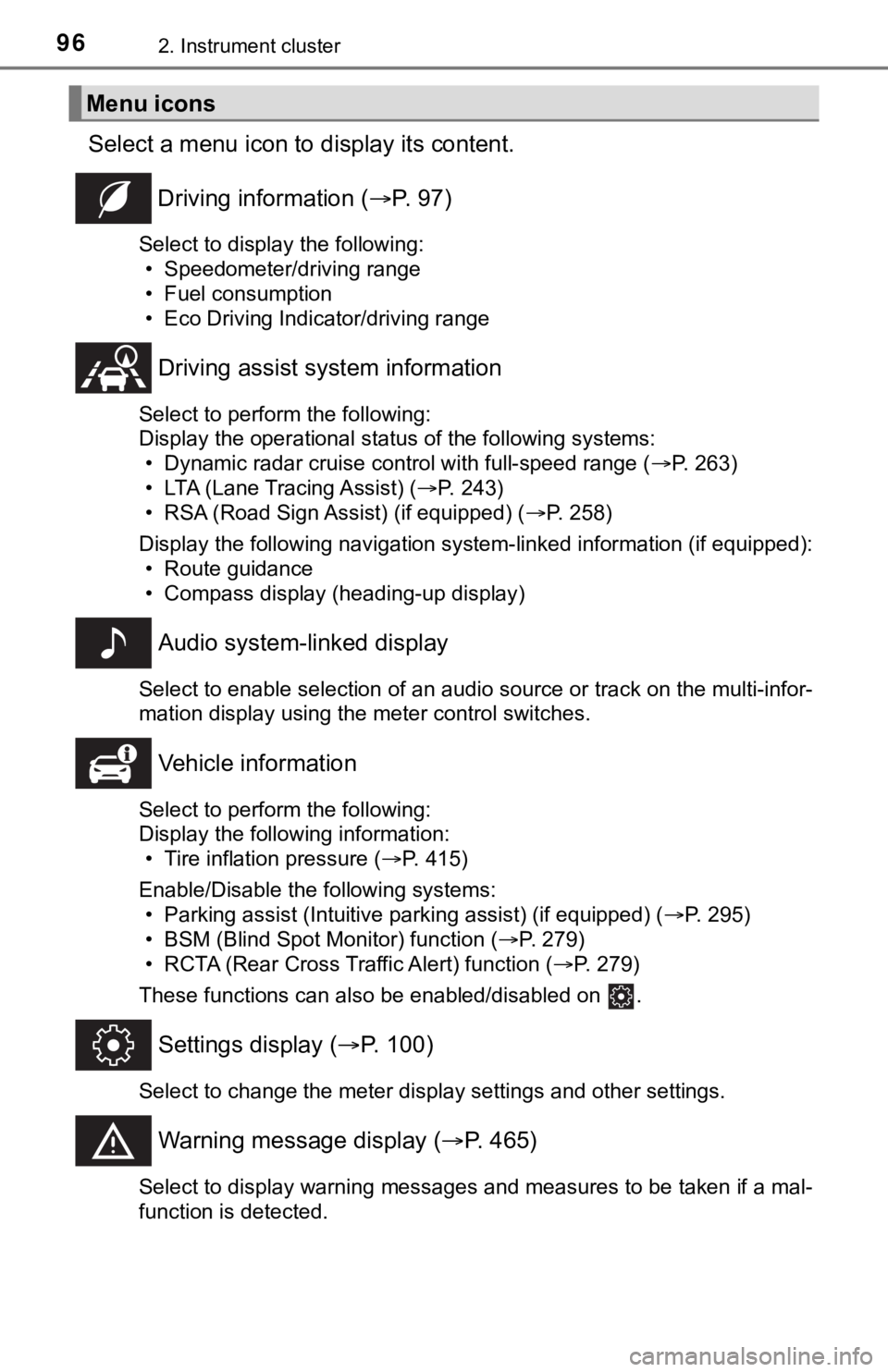
Select a menu icon to display its content.
Driving information ( P. 9 7 )
Select to display the following:
• Speedometer/driving range
• Fuel consumption
• Eco Driving Indicator/driving range
Driving assist sys tem information
Select to perform the following:
Display the operational status of the following systems:
• Dynamic radar cruise control with full-speed range ( P. 263)
• LTA (Lane Tracing Assist) ( P. 243)
• RSA (Road Sign Assist) (if equipped) ( P. 258)
Display the following navigation system-linked information (if equipped):
• Route guidance
• Compass display (heading-up display)
Audio system-linked display
Select to enable selection of an audio source or track on the multi-infor-
mation display using the meter control switches.
Vehicle information
Select to perform the following:
Display the following information: • Tire inflation pressure ( P. 415)
Enable/Disable the following systems: • Parking assist (Intuitive parking assist) (if equipped) ( P. 295)
• BSM (Blind Spot Monitor) function ( P. 279)
• RCTA (Rear Cross Traffic Alert) function ( P. 279)
These functions can also be enabled/disabled on .
Settings display ( P. 100)
Select to change the meter display settings and other settings.
Warning message display ( P. 465)
Select to display warning messages and measures to be taken if a mal-
function is detected.
Menu icons
Page 100 of 572
1002. Instrument cluster
◆Changing settings
Use the meter control switches on the steering wheel to change
settings.Press or to select .
Operate the switches to select a desired item.
Press or press and hold .
The available settings will differ depending on if is pressed or
pressed and held. Follow the instructions on the display.
◆Setting items
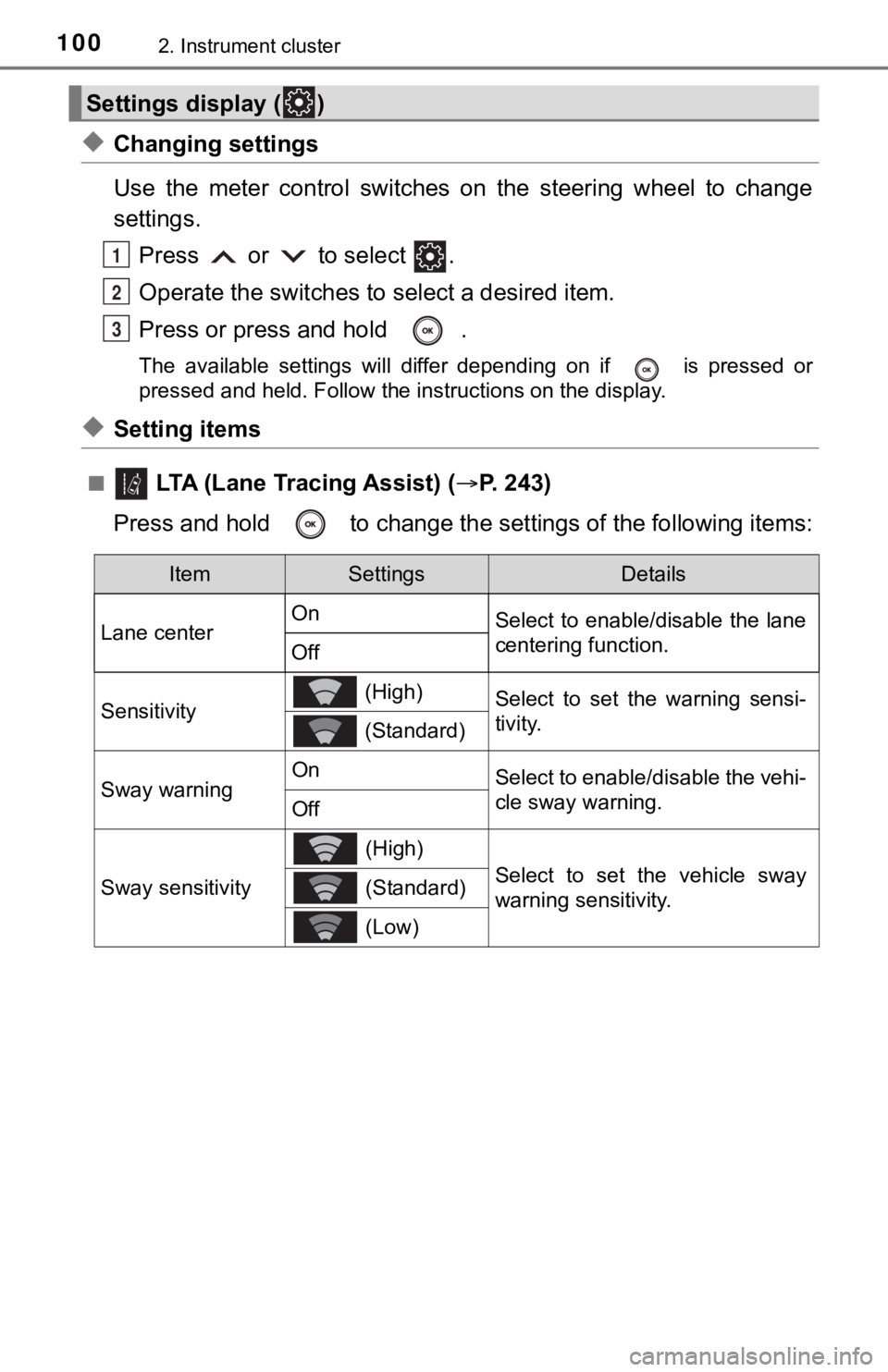
■ LTA (Lane Tracing Assist) ( P. 2 4 3 )
Press and hold to change the se ttings of the following items:
Settings display ( )
1
2
3
ItemSettingsDetails
Lane center On
Select to enable/disable the lane
centering function.
Off
Sensitivity (High)Select to set the warning sensi-
tivity.
(Standard)
Sway warningOnSelect to enable/disable the vehi-
cle sway warning.
Off
Sway sensitivity
(High)
Select to set the vehicle sway
warning sensitivity. (Standard)
(Low)
Page 113 of 572
1132. Instrument cluster
2
Instrument cluster
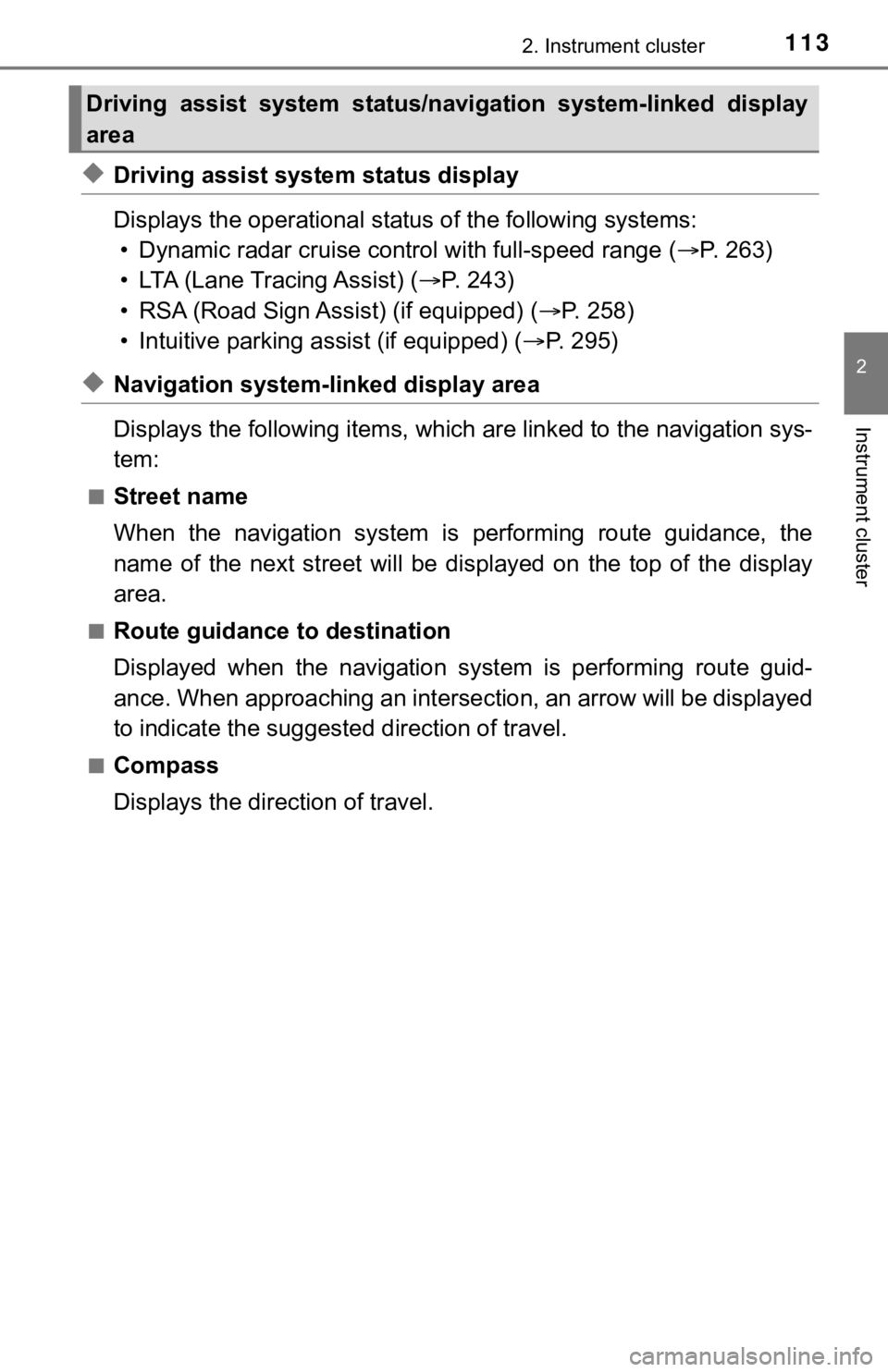
◆Driving assist system status display
Displays the operational status of the following systems:
• Dynamic radar cruise control with full-speed range ( P. 263)
• LTA (Lane Tracing Assist) ( P. 2 4 3 )
• RSA (Road Sign Assist) (if equipped) ( P. 258)
• Intuitive parking assist (if equipped) ( P. 295)
◆Navigation system-linked display area
Displays the following items, which are linked to the navigation sys-
tem:
■Street name
When the navigation system is performing route guidance, the
name of the next street will be displayed on the top of the dis play
area.
■Route guidance to destination
Displayed when the navigation s ystem is performing route guid-
ance. When approaching an intersection, an arrow will be displa yed
to indicate the suggeste d direction of travel.
■Compass
Displays the direction of travel.
Driving assist system status/navigation system-linked display
area
Page 115 of 572
1152. Instrument cluster
2
Instrument cluster
Displays the following items in the appropriate situation:
■Warning/Message
●Alert from the LTA (Lane Tracing Assist)
● Dynamic radar cruise control with full-speed range
● message
Displayed when a suggestion/advice pop-up display is displayed on the
multi-information display. ( P. 108)
● message
Displayed when a warning message is displayed on the multi-info rma-
tion display. ( P. 465)
● Outside temperature
Displayed in the following situations:
• When the engine switch is turned to IGNITION ON mode
• When the low outside temperature indicator is flashing
Displayed content is the same as that displayed on the multi-in formation
display. For details, refer to the explanation of the outside temperature
display on the multi-information display. ( P. 90)
■
Hands-free system status
Displayed when the hands-free system is operated.
■
Audio system operation status
Displayed when the audio system is operated.
Information display area
Page 171 of 572

171
4Driving
4-1. Before drivingDriving the vehicle ............. 172
Cargo and luggage ........... 180
Vehicle load limits ............. 183
Trailer towing..................... 184
Dinghy towing ................... 185
4-2. Driving procedures Engine (ignition) switch ..... 186
Automatic transmission ..... 191
Turn signal lever................ 197
Parking brake .................... 198
Brake Hold ........................ 202
4-3. Operating the lights and wipers
Headlight switch ................ 204
AHB (Automatic High Beam) ............................. 208
Windshield wipers and washer ............................ 212
4-4. Refueling Opening the fuel tank cap .................................. 216 4-5. Using the driving
support systems
Toyota Safety Sense 2.5+...................... 220
PCS (Pre-Collision System)........................... 228
LTA (Lane Tracing Assist) ............................. 243
RSA (Road Sign Assist) .... 258
Dynamic radar cruise control with full-speed
range............................... 263
BSM (Blind Spot Monitor)........................... 279
• BSM function ................ 283
• RCTA function .............. 286
Rear Camera Detection function (vehicles with
panoramic view
monitor)........................... 291
Intuitive parking assist....... 295
Intelligent Clearance Sonar (ICS) ..................... 303
Driving mode select switches .......................... 324
Driving assist systems ...... 328
4-6. Driving tips Winter driving tips ............. 336
Page 220 of 572
2204-5. Using the driving support systems
◆PCS (Pre-Collision System)
P. 2 2 8
◆LTA (Lane Tracing Assist)
P. 2 4 3
◆AHB (Automatic High Beam)
P. 2 0 8
◆RSA (Road Sign Assi st) (if equipped)
P. 2 5 8
◆Dynamic radar cruise control with full-speed range
P. 2 6 3
Toyota Safety Sense 2.5+
The Toyota Safety Sense 2.5+ c onsists of the following drive
assist systems and contributes t o a safe and comfortable driv-
ing experience:
Driving assist system
WARNING
■ Toyota Safety Sense 2.5+
The Toyota Safety Sense 2.5+ is designed to operate under the assumption
that the driver will drive safely, and is designed to help reduce the impact to
the occupants and the vehicle in the case of a collision or assist the driver in
normal driving conditions.
As there is a limit to the degree of recognition accuracy and control perfor-
mance that this system can provide, do not overly rely on this system. The
driver is always responsible for paying attention to the vehicle's surround-
ings and driving safely.
Page 229 of 572
2294-5. Using the driving support systems
4
Driving
■Pre-collision braking
If the system determines that the possibility of a frontal collision is
extremely high, the brakes are automatically applied to help avoid
the collision or reduce th e impact of the collision.
■Emergency steering assist
If the system determines that the possibility of a frontal collision is
high and that there is sufficient space for the vehicle to be s teered
into within its lane, and the dr iver has begun evasive maneuver or
steering, emergency steering assist will assist the steering move-
ments to help enhance the vehicle stability and for lane depart ure
prevention.
During operation, the indicator
will illuminate in green.
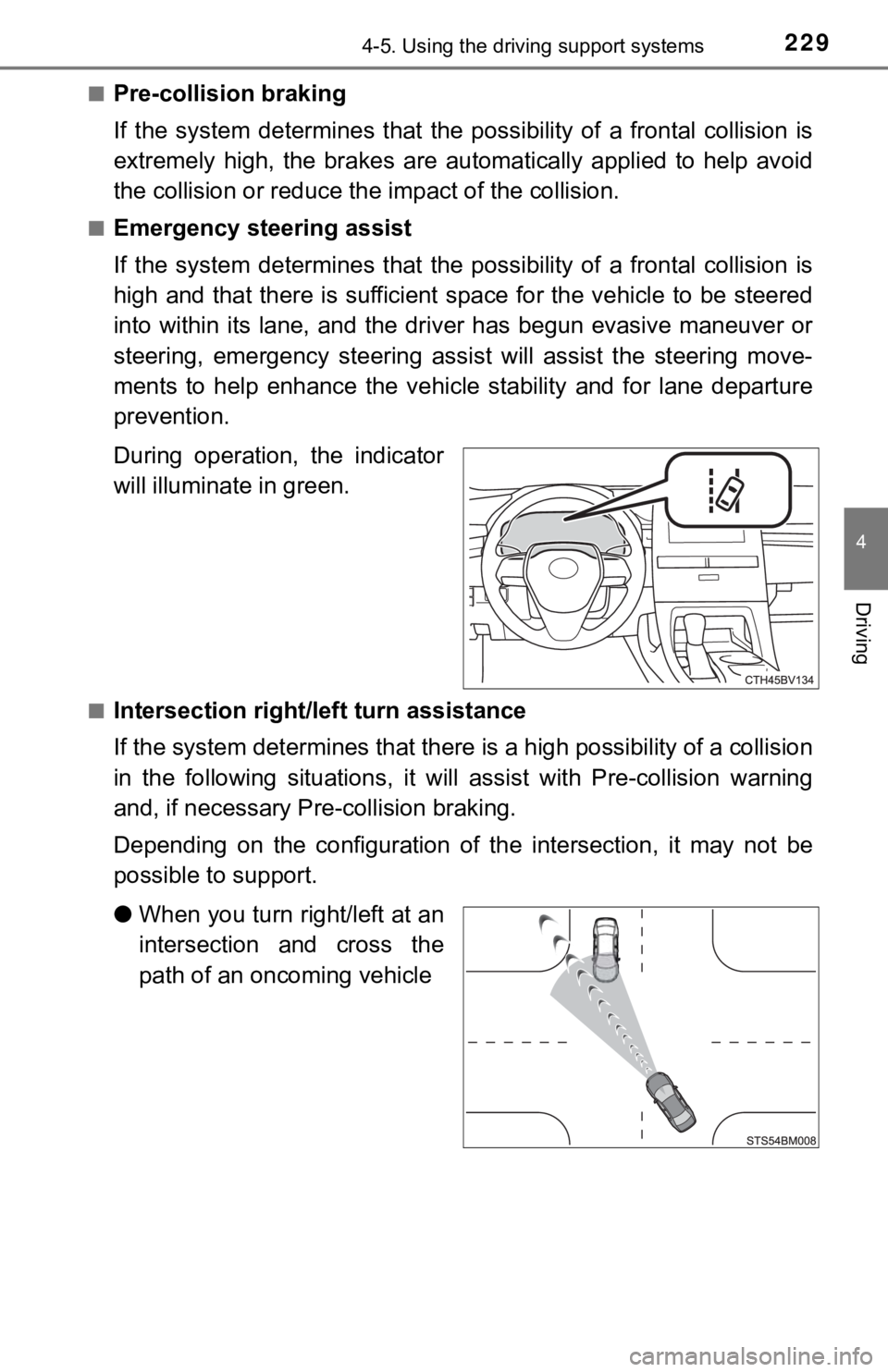
■Intersection right/left turn assistance
If the system determines that t here is a high possibility of a collision
in the following situations, it will assist with Pre-collision warning
and, if necessary Pre-collision braking.
Depending on the configuration of the intersection, it may not be
possible to support.
● When you turn right/left at an
intersection and cross the
path of an oncoming vehicle