instrument panel TOYOTA AVALON 2022 User Guide
[x] Cancel search | Manufacturer: TOYOTA, Model Year: 2022, Model line: AVALON, Model: TOYOTA AVALON 2022Pages: 572, PDF Size: 9.42 MB
Page 140 of 572

1403-2. Opening, closing and locking the doors
■Note for the entry function
●Even when the electronic key is within the effective range (detection areas),
the system may not operate properly in the following cases:
• The electronic key is too close to the window or outside door handle, near
the ground, or in a high place when the doors are locked or unl ocked.
• The electronic key is near the ground or in a high place, or t oo close to
the rear bumper center when the trunk is opened.
• The electronic key is on the instrument panel, rear package tray or floor, or in the door pockets or glove box when the engine is started or engine
switch modes are changed.
● Do not leave the electronic key on top of the instrument panel or near the
door pockets when exiting the vehicle. Depending on the radio w ave recep-
tion conditions, it may be detected by the antenna outside the cabin and the
door will become lockable from the outside, possibly trapping the electronic
key inside the vehicle.
● As long as the electronic key is within the effective range, th e doors may be
locked or unlocked by anyone. However, only the doors detecting the elec-
tronic key can be used to unlock the vehicle.
● Even if the electronic key is not inside the vehicle, it may be possible to start
the engine if the electronic key is near the window.
● The doors may unlock or lock if a large amount of water splashes on the
door handle, such as in the rain or in a car wash, when the electronic key is
within the effective range. (The doors will automatically be lo cked after
approximately 60 seconds if the doors are not opened and closed.)
● If the wireless remote control is used to lock the doors when t he electronic
key is near the vehicle, there is a possibility that the door m ay not be
unlocked by the entry function. (Use the wireless remote contro l to unlock
the doors.)
● Touching the door lock sensor while wearing gloves may delay or prevent
lock operation. Remove the gloves and touch the lock sensor aga in.
● When the lock operation is performed using the lock sensor, rec ognition sig-
nals will be shown up to two consecutive times. After this, no recognition
signals will be given.
*
● If the door handle becomes wet while the electronic key is with in the effec-
tive range, the door may lock and unlock repeatedly. In this case, follow the
following correction procedures to wash the vehicle:
• Place the electronic key in a location 6 ft. (2 m) or more awa y from the
vehicle. (Take care to ensure that the key is not stolen.)
• Set the electronic key to battery-saving mode to disable the s mart key
system. ( P. 139)
● If the electronic key is inside the vehicle and a door handle b ecomes wet
during a car wash, a message may be shown on the multi-informat ion dis-
play and a buzzer will sound outside the vehicle. To turn off t he alarm, lock
all the doors.
Page 177 of 572

1774-1. Before driving
4
Driving
WARNING
Observe the following precautions.
Failure to do so may result in death or serious injury.
■If you hear a squealing or scraping noise (brake pad wear limit indica-
tors)
Have the brake pads checked and replaced by your Toyota dealer as soon
as possible.
Rotor damage may result if the pads are not replaced when neede d.
It is dangerous to drive the vehicle when the wear limits of the brake pads
and/or those of the brake discs are exceeded.
■ When the vehicle is stopped
● Do not race the engine.
If the shift lever is any position other than P or N, the vehicle may acceler-
ate suddenly and unexpectedly, causing an accident.
● In order to prevent accidents due to the vehicle rolling away, always keep
depressing the brake pedal while the engine is running, and apply the
parking brake as necessary.
● If the vehicle is stopped on an incline, in order to prevent ac cidents caused
by the vehicle rolling forward or backward, always depress the brake pedal
and securely apply the parking brake as needed.
● Avoid revving or racing the engine.
Running the engine at high speed while the vehicle is stopped may cause
the exhaust system to overheat, which could result in a fire if combustible
material is nearby.
■ When the vehicle is parked
● Do not leave glasses, cigarette lighters, spray cans, or soft drink cans in
the vehicle when it is in the sun.
Doing so may result in the following:
• Gas may leak from a cigarette lighter or spray can, and may le ad to a
fire.
• The temperature inside the vehicle may cause the plastic lenses and
plastic material of glasses to deform or crack.
• Soft drink cans may fracture, causing the contents to spray ov er the
interior of the vehicle, and may also cause a short circuit in the vehicle’s
electrical components.
● Do not leave cigarette lighters in the vehicle. If a cigarette lighter is in a
place such as the glove box or on the floor, it may be lit accidentally when
luggage is loaded or the seat is adjusted, causing a fire.
● Do not attach adhesive discs to the windshield or windows. Do not place
containers such as air fresheners on the instrument panel or da shboard.
Adhesive discs or containers may act as lenses, causing a fire in the vehi-
cle.
Page 182 of 572

1824-1. Before driving
WARNING
■Things that must not be carried in the trunk
The following things may cause a fire if loaded in the trunk:
● Receptacles containing gasoline
● Aerosol cans
■ Storage precautions
Observe the following precautions.
Failure to do so may prevent the pedals from being depressed properly,
may block the driver’s vision, or may result in items hitting t he driver or pas-
sengers, possibly causing an accident.
● Stow cargo and luggage in the trunk whenever possible.
● To prevent cargo and luggage from sliding forward during brakin g, do not
stack anything in the enlarged trunk. Keep cargo and luggage lo w, as
close to the floor as possible.
● Do not place cargo or luggage in or on the following locations.
• At the feet of the driver
• On the front passenger or rear seats (when stacking items)
• On the package tray
• On the instrument panel
• On the dashboard
• Tray that has no lid
● Secure all items in the occupant compartment.
● When you fold down the rear seats, long items should not be pla ced
directly behind the front seats.
● Never allow anyone to ride in the enlarged trunk. It is not designed for pas-
sengers. They should ride in their seats with their seat belts properly fas-
tened.
■ Capacity and distribution
● Do not exceed the maximum axle weight rating or the total vehicle weight
rating.
● Even if the total load of occupant’s weight and the cargo load is less than
the total load capacity, do not apply the load unevenly. Improp er loading
may cause deterioration of steering or braking control which may cause
death or serious injury.
Page 204 of 572
2044-3. Operating the lights and wipers
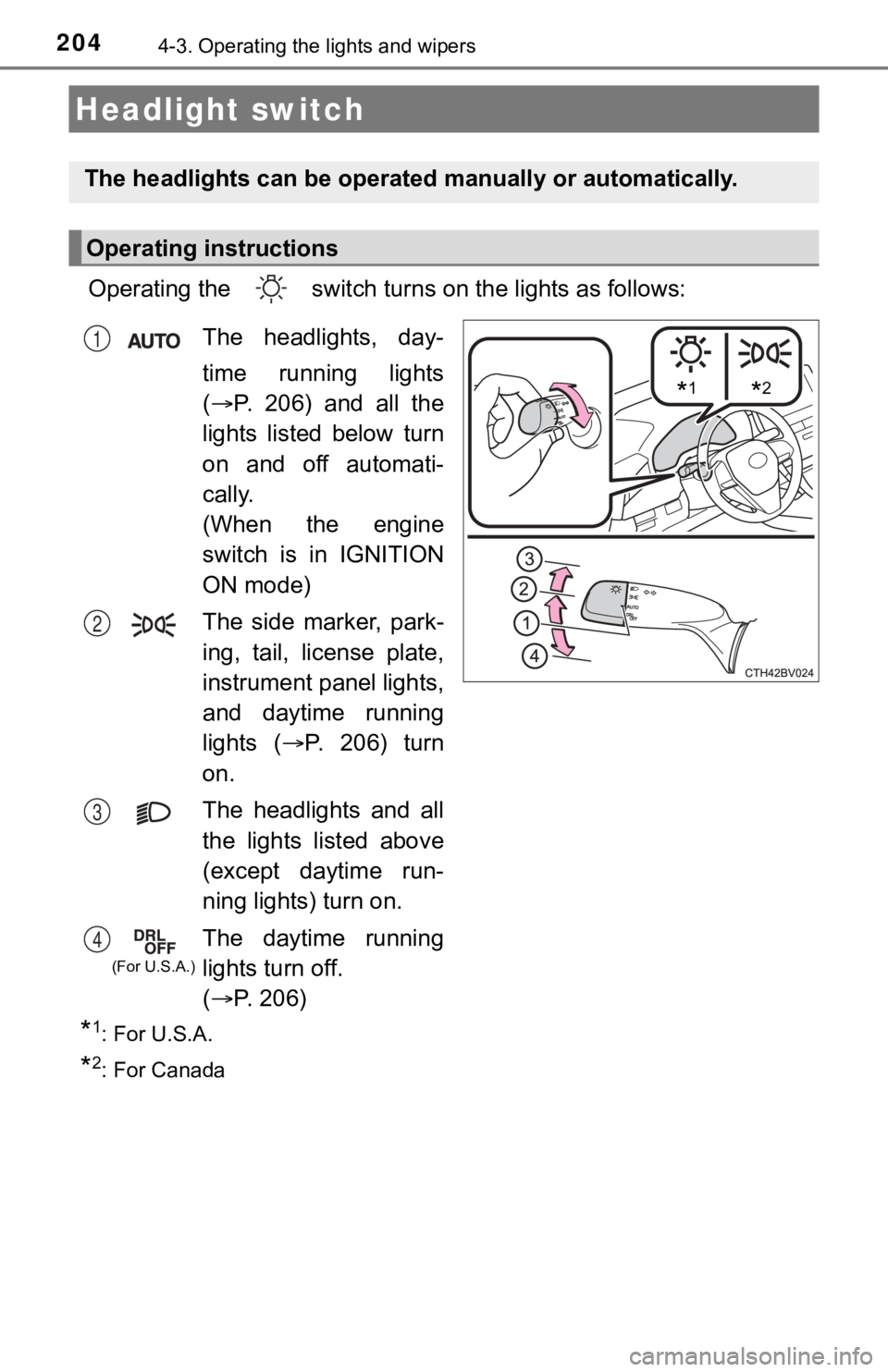
Operating the switch turns on the lights as follows:
*1: For U.S.A.
*2: For Canada
Headlight switch
The headlights can be operated manually or automatically.
Operating instructions
*1*2
The headlights, day-
time running lights
( P. 206) and all the
lights listed below turn
on and off automati-
cally.
(When the engine
switch is in IGNITION
ON mode)
The side marker, park-
ing, tail, license plate,
instrument panel lights,
and daytime running
lights ( P. 206) turn
on.
The headlights and all
the lights listed above
(except daytime run-
ning lights) turn on.
The daytime running
lights turn off.
( P. 2 0 6 )1
2
3
4
(For U.S.A.)
Page 348 of 572
3485-1. Using the air conditioning system and defogger
WARNING
■To prevent the windshield from fogging up
● Do not use during cool air operation in extremely humid weathe r.
The difference between the temperature of the outside air and that of the
windshield can cause the outer surface of the windshield to fog up, block-
ing your vision.
■ To prevent burns
Do not touch the rear view mirror surfaces when the outside rea r view mirror
defoggers are on.
NOTICE
■ To prevent battery discharge
Do not leave the air conditioning system on longer than necessa ry when the
engine is stopped.
■ When repairing/replacing parts of the air conditioning system
Have repair/replacement performed by your Toyota dealer.
When a part of the air conditioning system, such as the evapora tor, is to be
replaced, it must be replaced with a new one.
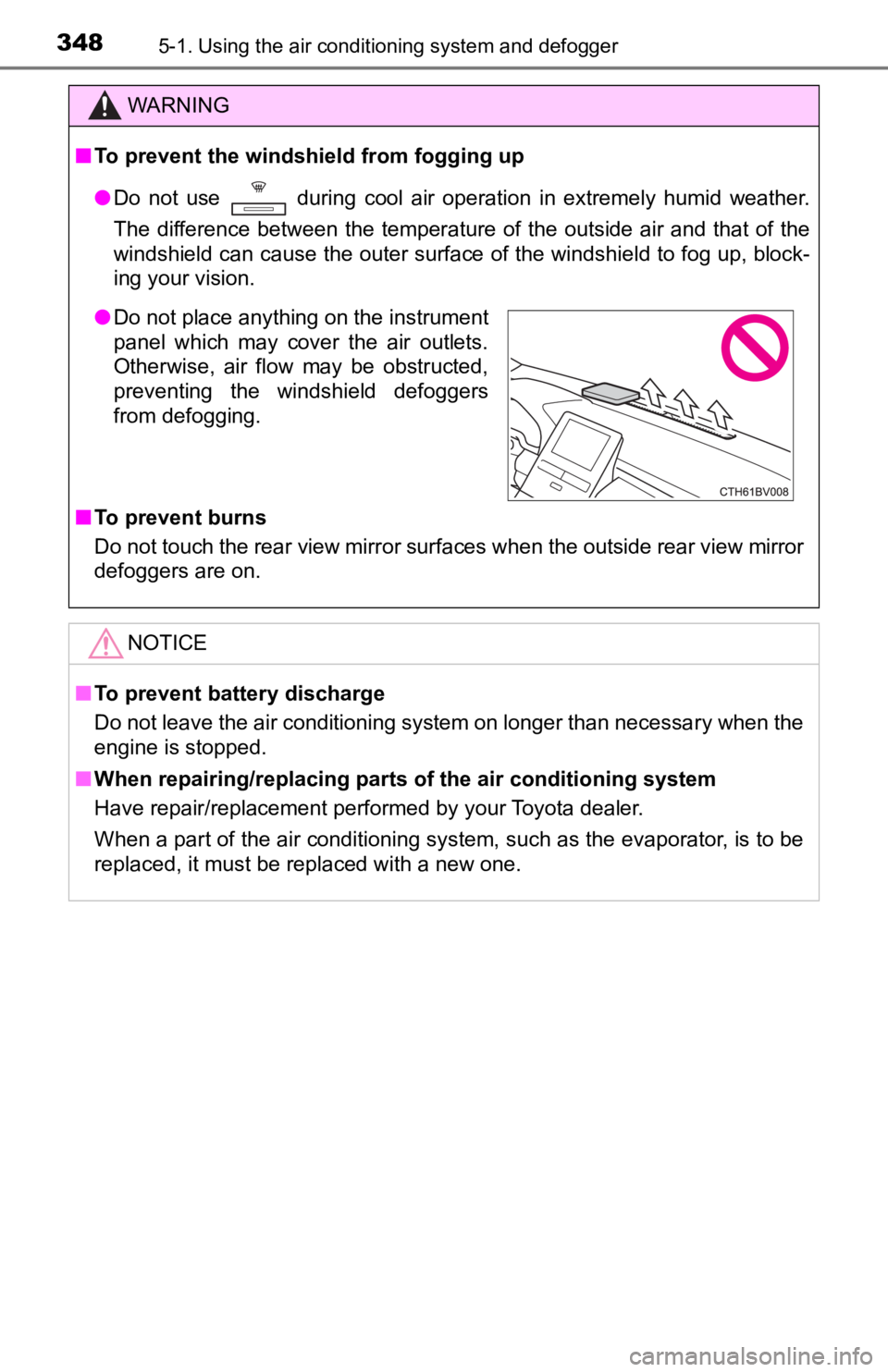
● Do not place anything on the instrument
panel which may cover the air outlets.
Otherwise, air flow may be obstructed,
preventing the windshield defoggers
from defogging.
Page 390 of 572

3906-1. Maintenance and care
■Caring for leather areas
Toyota recommends cleaning the interior of the vehicle at least twice a year to
maintain the quality of the vehicle's interior.
■ Shampooing the carpets
There are several commercial foaming-type cleaners available. U se a sponge
or brush to apply the foam. Rub in overlapping circles. Do not use water.
Wipe dirty surfaces and let them dry. Excellent results are obt ained by keep-
ing the carpet as dry as possible.
■ Seat belts
Clean with mild soap and lukewarm water using a cloth or sponge . Also
check the belts periodically for excessive wear, fraying or cut s.
WARNING
■ Water in the vehicle
● Do not splash or spill liquid in the vehicle.
Doing so may cause electrical components, etc., to malfunction or catch
fire.
● Do not get any of the SRS components or wiring in the vehicle interior wet.
(P. 38)
An electrical malfunction may cause the airbags to deploy or no t function
properly, resulting in death or serious injury.
● Vehicles with wireless charger:
Do not let the wireless charger ( P. 366) get wet. Failure to do so may
cause the charger to become hot and cause burns or could cause electric
shock resulting in death or serious injury.
■ Cleaning the interior (especially instrument panel)
Do not use polish wax or polish cleaner. The instrument panel m ay reflect
off the windshield, obstructing the driver’s view and leading to an accident,
resulting in death or serious injury.
Page 391 of 572
3916-1. Maintenance and care
6
Maintenance and care
NOTICE
■Cleaning detergents
● Do not use the following types of detergent, as they may discolor the vehi-
cle interior or cause streaks or damage to painted surfaces:
• Areas other than the seats and steering wheel: Organic substan ces
such as benzene or gasoline, alkaline or acidic solutions, dye, and
bleach
• Seats: Alkaline or acidic solutions, such as thinner, benzene, and alco-
hol
• Steering wheel: Organic substances, such as thinner, and clean er that
contains alcohol
● Do not use polish wax or polish cleaner. The instrument panel’s or other
interior part’s painted surface may be damaged.
■ Preventing damage to leather surfaces
Observe the following precautions to avoid damage to and deterioration of
leather surfaces:
● Remove any dust or dirt from leather surfaces immediately.
● Do not expose the vehicle to direct sunlight for extended periods of time.
Park the vehicle in the shade, especially during summer.
● Do not place items made of vinyl, plastic, or containing wax on the uphol-
stery, as they may stick to the leather surface if the vehicle interior heats
up significantly.
■ Water on the floor
Do not wash the vehicle floor with water.
Vehicle systems such as the audio system may be damaged if water comes
into contact with electrical components such as the audio system above or
under the floor of the vehicle. Water may also cause the body to rust.
■ When cleaning the inside of the windshield
Do not allow glass cleaner to contact the lens. Also, do not touch the lens.
(P. 221)
■ Cleaning the inside of the rear window
● Do not use glass cleaner to clean the rear window, as this may cause
damage to the rear window defogger heater wires or antenna. Use a cloth
dampened with lukewarm water to gently wipe the window clean. Wipe the
window in strokes running parallel to the heater wires or antenna.
● Be careful not to scratch or damage the heater wires or antenna .
Page 499 of 572
4998-1. Specifications
8
Vehicle specifications
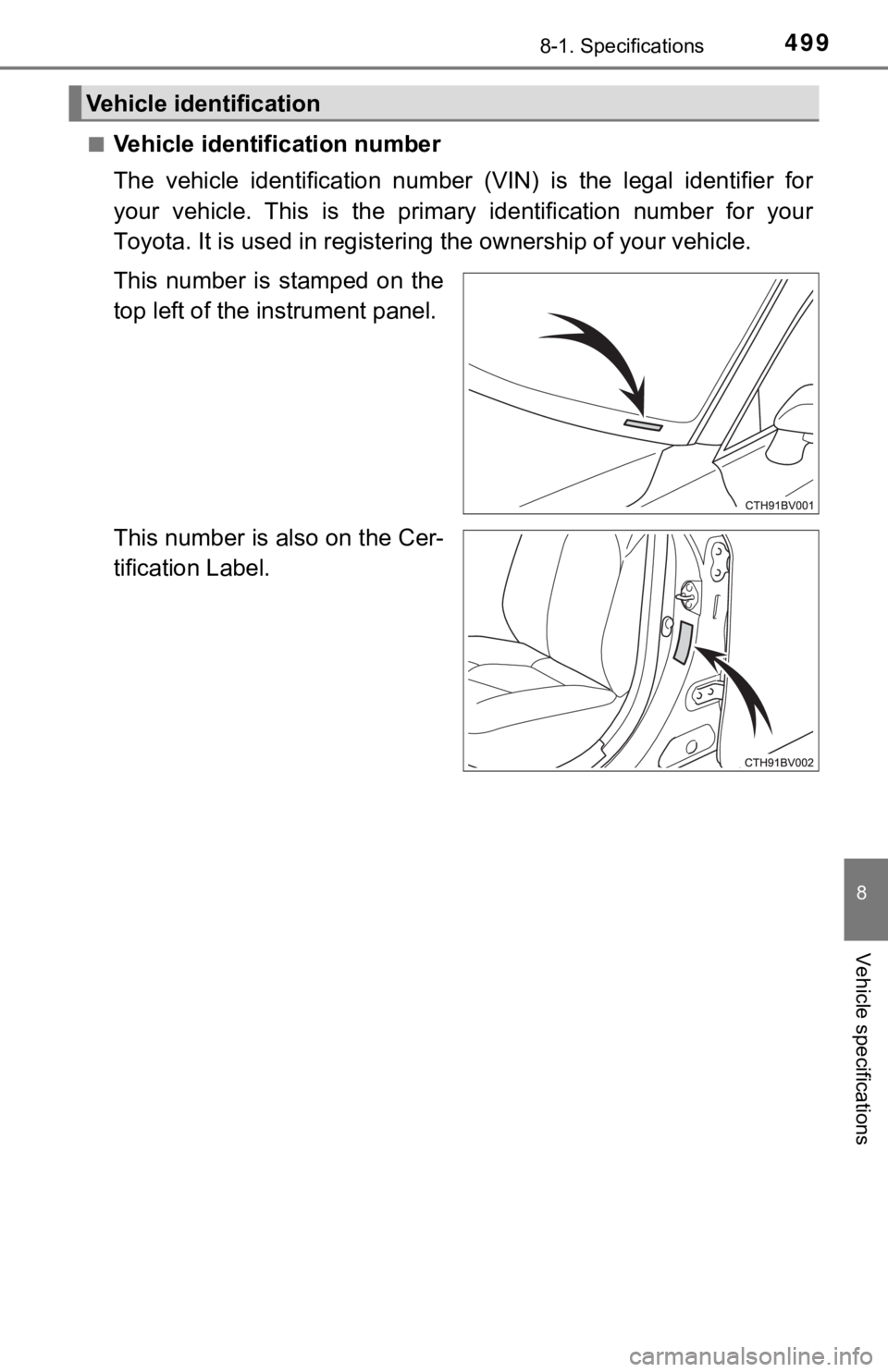
■Vehicle identification number
The vehicle identification number (VIN) is the legal identifier for
your vehicle. This is the primary identification number for you r
Toyota. It is used in registering the ownership of your vehicle.
This number is stamped on the
top left of the instrument panel.
This number is also on the Cer-
tification Label.
Vehicle identification
Page 556 of 572

556Alphabetical index
Back-up lightsReplacing light bulb .............. 441
Battery ...................................... 411 Battery checking ................... 411
If the battery is discharged.... 487
Preparing and checking before winter....................... 336
Replacing .............................. 490
Blind Spot Monitor (BSM) ....... 279 Blind Spot Monitor
function ............................... 283
Rear Cross Traffic Alert function ............................... 286
Bottle holders .......................... 357
Brake Brake Hold ............................ 202
Fluid ...................................... 506
Parking brake........................ 198
Warning light ......................... 455
Brake assist ............................. 328
Brake Hold................................ 202 Warning light ......................... 457
Brake override system ............ 173
Break-in tips ............................ 174
Brightness control Ambient lights ....................... 354
Instrument panel light control................................... 91
BSM (Blind Spot Monitor) ....... 279 Blind Spot Monitor function ............................... 283
Rear Cross Traffic Alert function ............................... 286 Care
Exterior ................................. 386
Interior .................................. 389
Seat belts.............................. 390
Wheels and wheel ornaments .......................... 387
Cargo capacity......................... 183
Cargo net.................................. 361
Chains ...................................... 337
Child restraint system............... 56
Booster seats, definition ......... 57
Booster seats, installation....... 66
Convertible seats, definition ... 57
Convertible seats, installation ............................ 64
Front passenger occupant
classification syst em ............ 50
Infant seats, definition............. 57
Infant seats, installation .......... 63
Installing CRS with LATCH anchors ............ 61
Installing CRS
with seat belts ...................... 63
Installing CRS with top tether strap.............. 67
BC
Page 561 of 572

561Alphabetical index
Head restraints ........................ 153
Head-up display ....................... 111
Headlights ................................ 204Automatic High Beam ........... 208
Light switch ........................... 204
Replacing light bulbs............. 441
Windshield wiper linked
headlight illumination .......... 207
Heated steering wheel............. 349
Heaters Automatic air conditioning system ............ 342
Outside rear view mirrors...... 344
Seat heaters ......................... 349
High mounted stoplight Replacing .............................. 441
Hill-start assist control............ 328
Hood ......................................... 401
Hooks Coat hooks............................ 376
Grocery bag hooks ............... 361
Retaining hooks (floor mat)..... 26
Horn .......................................... 156
HUD (Head-up display)............ 111 I/M test ...................................... 398
ICS (Intelligent Clearance
Sonar)..................................... 303 Warning light......................... 458
Warning messages ............... 314
Identification Engine .................................. 500
Vehicle .................................. 499
Ignition switch (engine switch) ...................... 186
Illuminated entry system ........ 354
Immobilizer system ................... 77
Indicators ................................... 87
Initialization Intelligent Clearance Sonar.................................. 314
Items to initialize ................... 533
Tire pressure warning system .... .............. 416
Inside rear view mirror ............ 157
Instrument panel light control ...................................... 91
Intelligent Clearance Sonar (ICS) ............................ 303 Warning light......................... 458
Warning messages ............... 314
Interior lights ........................... 352 Switch ................................... 353
Intuitive parking assist ........... 295
HI