windshield wipers TOYOTA AVALON 2022 User Guide
[x] Cancel search | Manufacturer: TOYOTA, Model Year: 2022, Model line: AVALON, Model: TOYOTA AVALON 2022Pages: 572, PDF Size: 9.42 MB
Page 215 of 572
2154-3. Operating the lights and wipers
4
Driving
■Lowering the windshield wipers to the retracted position
With the windshield wipers placed on the windshield, turn the e ngine switch
to IGNITION ON mode and then move the wiper lever to an operati ng posi-
tion. When the wiper switch is turned off, the windshield wipers will stop at the
retracted position.
NOTICE
■When lifting the windshield wipers
● Do not lift the windshield wipers when they are in the retracted position
below the hood. Otherwise, they may contact the hood, possibly resulting
in damage to a windshield wiper and/or the hood.
● Do not operate the wiper lever when the windshield wipers are l ifted. Oth-
erwise, the windshield wipers may contact the hood, possibly resulting in
damage to the windshield wipers and/or hood.
Page 222 of 572
2224-5. Using the driving support systems
WARNING
■To avoid malfunction of the front camera
Observe the following precautions.
Otherwise, the front camera may not operate properly, possibly leading to
an accident resulting in death or serious injury.
● Keep the windshield clean at all times.
• If the windshield is dirty or covered with an oily film, water droplets,
snow, etc., clean the windshield.
• If a glass coating agent is applied to the windshield, it will still be neces- sary to use the windshield wipers to remove water droplets, etc. from
the area of the windshield in front of the front camera.
• If the inner side of the windshield where the front camera is installed is
dirty, contact your Toyota dealer.
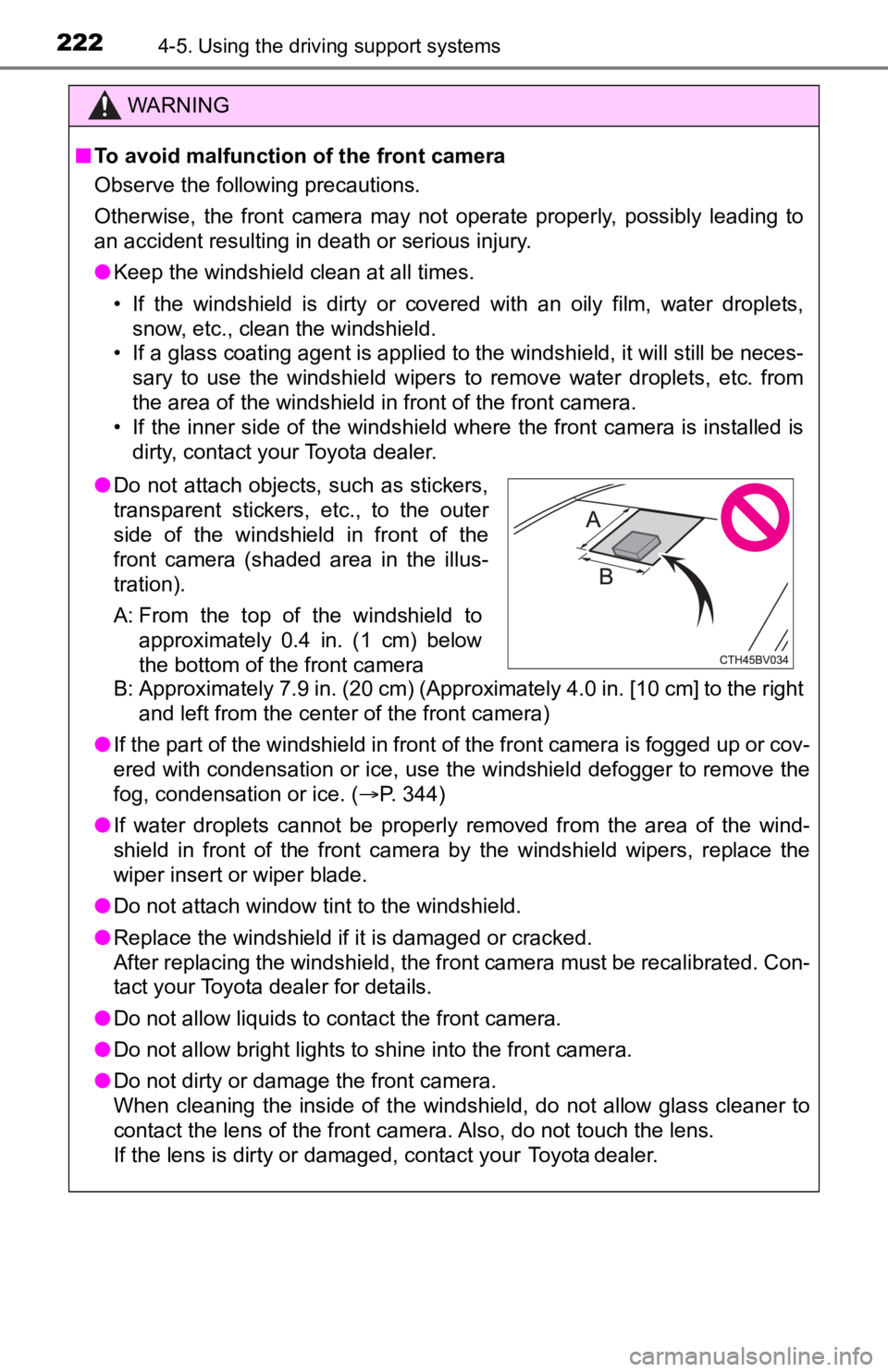
B: Approximately 7.9 in. (20 cm) (Approximately 4.0 in. [10 cm] to the right and left from the center of the front camera)
● If the part of the windshield in front of the front camera is fogged up or cov-
ered with condensation or ice, use the windshield defogger to remove the
fog, condensation or ice. ( P. 344)
● If water droplets cannot be properly removed from the area of t he wind-
shield in front of the front camera by the windshield wipers, replace the
wiper insert or wiper blade.
● Do not attach window tint to the windshield.
● Replace the windshield if it is damaged or cracked.
After replacing the windshield, the front camera must be recali brated. Con-
tact your Toyota dealer for details.
● Do not allow liquids to contact the front camera.
● Do not allow bright lights to shine into the front camera.
● Do not dirty or damage the front camera.
When cleaning the inside of the windshield, do not allow glass cleaner to
contact the lens of the front camera. Also, do not touch the lens.
If the lens is dirty or damaged, contact your Toyota dealer.
● Do not attach objects, such as stickers,
transparent stickers, etc., to the outer
side of the windshield in front of the
front camera (shaded area in the illus-
tration).
A: From the top of the windshield to
approximately 0.4 in. (1 cm) below
the bottom of the front camera
Page 396 of 572
3966-2. Maintenance
Seat belts
• Do the seat belts operatesmoothly?
• The seat belts should not be dam- aged.
Seats• Do the seat controls operate prop-erly?
Steering wheel
• Does the steering wheel rotatesmoothly?
• Does the steering wheel have the correct amount of free play?
• There should not be any strange
sounds coming from the steering
wheel.
Vehicle exterior
ItemsCheck points
ItemsCheck points
Doors/trunk• Do the doors/trunk operatesmoothly?
Engine hood• Does the engine hood lock systemwork properly?
Fluid leaks
• There should not be any signs offluid leakage after the vehicle has
been parked.
Tires
• Is the tire inflation pressure cor-rect?
• The tires should not be dam-
aged or excessively worn.
• Have the tires been rotated according to the maintenance
schedule?
• The wheel nuts should not be loose.
Windshield wipers
• The wiper blades should not show
any signs of cracking, splitting,
wear, contamination or deforma-
tion.
• The wiper blades should clear the windshield without streaking or
skipping.
Page 571 of 572

571Alphabetical index
Warning messages .................. 465
Washer...................................... 212Checking ............................... 413
Preparing and checking
before winter....................... 336
Switch ................................... 212
Washing and waxing ............... 386
Weight....................................... 498
Cargo capacity ...................... 183
Load limits............................. 183
Vehicle capacity weight ........ 498
Wheels ...................................... 431 Replacing .............................. 431
Size ....................................... 506
Window glasses....................... 162
Window lock switch ................ 162
Windows Power windows ..................... 162
Rear window defogger ............................. 344
Washer ................................. 212
Windshield wipers ................... 212
Winter driving tips ................... 336
Wireless charger...................... 366
Wireless remote control.......... 124
Battery-Saving Function ....... 139
Locking/Unlocking......... 127, 133
Panic mode ........................... 125
Replacing the battery ............ 435