fuel TOYOTA AVALON 2022 Owner's Manual
[x] Cancel search | Manufacturer: TOYOTA, Model Year: 2022, Model line: AVALON, Model: TOYOTA AVALON 2022Pages: 572, PDF Size: 9.42 MB
Page 121 of 572

1212. Instrument cluster
2
Instrument cluster
■Updating the past record data
Update the average fuel consumption by selecting “Update” to me asure the
current fuel consumption again.
■ Resetting the data
The fuel consumption data can be deleted by selecting “Clear”.
■ Cruising range
Displays the estimated maximum distance that can be driven with the quan-
tity of fuel remaining.
This distance is computed based on your average fuel consumptio n.
As a result, the actual distance that can be driven may differ from that dis-
played.
Page 171 of 572

171
4Driving
4-1. Before drivingDriving the vehicle ............. 172
Cargo and luggage ........... 180
Vehicle load limits ............. 183
Trailer towing..................... 184
Dinghy towing ................... 185
4-2. Driving procedures Engine (ignition) switch ..... 186
Automatic transmission ..... 191
Turn signal lever................ 197
Parking brake .................... 198
Brake Hold ........................ 202
4-3. Operating the lights and wipers
Headlight switch ................ 204
AHB (Automatic High Beam) ............................. 208
Windshield wipers and washer ............................ 212
4-4. Refueling Opening the fuel tank cap .................................. 216 4-5. Using the driving
support systems
Toyota Safety Sense 2.5+...................... 220
PCS (Pre-Collision System)........................... 228
LTA (Lane Tracing Assist) ............................. 243
RSA (Road Sign Assist) .... 258
Dynamic radar cruise control with full-speed
range............................... 263
BSM (Blind Spot Monitor)........................... 279
• BSM function ................ 283
• RCTA function .............. 286
Rear Camera Detection function (vehicles with
panoramic view
monitor)........................... 291
Intuitive parking assist....... 295
Intelligent Clearance Sonar (ICS) ..................... 303
Driving mode select switches .......................... 324
Driving assist systems ...... 328
4-6. Driving tips Winter driving tips ............. 336
Page 174 of 572

1744-1. Before driving
■Breaking in your new Toyota
To extend the life of the vehicle, observing the following prec autions is recom-
mended:
● For the first 186 miles (300 km):
Avoid sudden stops.
● For the first 621 miles (1000 km):
• Do not drive at extremely high speeds.
• Avoid sudden acceleration.
• Do not drive continuously in low gears.
• Do not drive at a constant speed for extended periods.
■ Operating your vehicle in a foreign country
Comply with the relevant vehicle registration laws and confirm the availability
of the correct fuel. ( P. 500)
■ Eco-friendly driving
P. 109, 114
Page 206 of 572
2064-3. Operating the lights and wipers
■Daytime running light system
●Type A:
The daytime running lights illuminate using the same lights as the low beam
headlights and illuminate dimmer than the low beam headlights.
Type B:
The daytime running lights illuminate using the same lights as the parking
lights and illuminate brighter than the parking lights.
● To make your vehicle more visible to other drivers during dayti me driving,
the daytime running lights turn on automatically when all of the following
conditions are met. (The daytime running lights are not designe d for use at
night.)
• The engine is running
• The parking brake is released
• The headlight switch is in the or
* position
*: When the surroundings are bright
The daytime running lights remain on after they illuminate, even if the parking
brake is set again.
● For U.S.A.: Daytime running lights can be turned off by operati ng the switch.
● Compared to turning on the headlights, the daytime running ligh t system
offers greater durability and consumes less electricity, so it can help improve
fuel economy.
■ Cornering lights (if equipped)
When the cornering lights are on for more than 30 minutes, they will turn off
automatically.
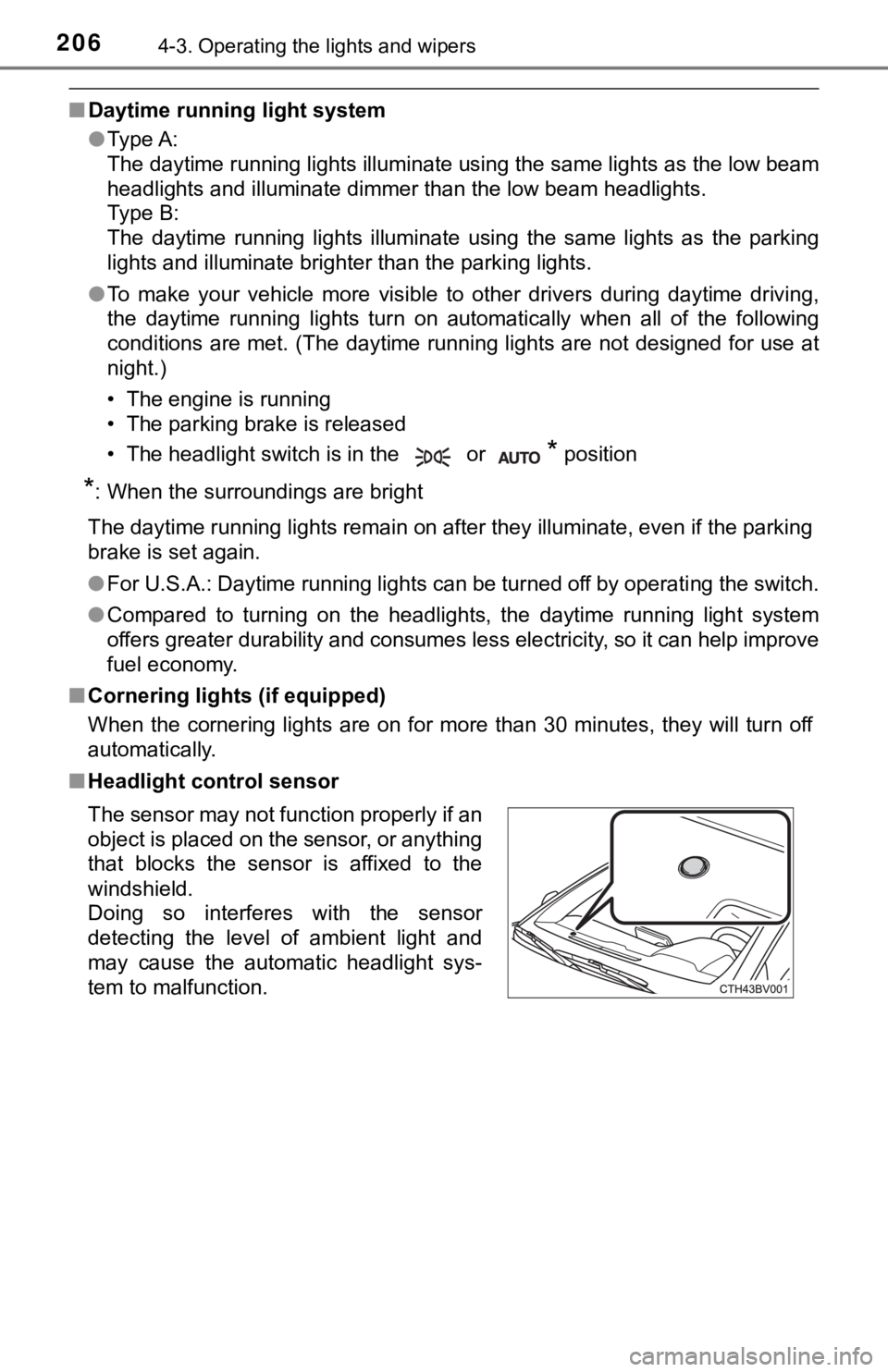
■ Headlight control sensor
The sensor may not function properly if an
object is placed on the sensor, or anything
that blocks the sensor is affixed to the
windshield.
Doing so interferes with the sensor
detecting the level of ambient light and
may cause the automatic headlight sys-
tem to malfunction.
Page 216 of 572
2164-4. Refueling
●Close all the doors and windows, and turn the engine switch off.
● Confirm the type of fuel.
■Fuel types
P. 500, 509
■ Fuel tank opening for unleaded gasoline
To help prevent incorrect fueling, your vehicle has a fuel tank opening that
only accommodates the special nozzle on unleaded fuel pumps.
■ If the malfunction indicator lamp illuminates
The malfunction indicator lamp may illuminate erroneously if re fueling is per-
formed repeatedly when the fuel tank is nearly full.
Opening the fuel tank cap
Perform the following steps to open the fuel tank cap:
Before refueling the vehicle
Page 217 of 572
2174-4. Refueling
4
Driving
WARNING
■When refueling the vehicle
Observe the following precautions while refueling the vehicle. Failure to do
so may result in death or serious injury.
● After exiting the vehicle and before opening the fuel door, touch an
unpainted metal surface to discharge any static electricity. It is important to
discharge static electricity before refueling because sparks resulting from
static electricity can cause fuel vapors to ignite while refueling.
● Always hold the grips on the fuel tank cap and turn it slowly to remove it.
A whooshing sound may be heard when the fuel tank cap is loosened.
Wait until the sound cannot be heard before fully removing the cap. In hot
weather, pressurized fuel may spray out the filler neck and cau se injury.
● Do not allow anyone that has not discharged static electricity from their
body to come close to an open fuel tank.
● Do not inhale vaporized fuel.
Fuel contains substances that are harmful if inhaled.
● Do not smoke while refueling the vehicle.
Doing so may cause the fuel to ignite and cause a fire.
● Do not return to the vehicle or touch any person or object that is statically
charged.
This may cause static electricity to build up, resulting in a p ossible ignition
hazard.
■ When refueling
Observe the following precautions to prevent fuel overflowing from the fuel
tank:
● Securely insert the fuel nozzle into the fuel filler neck.
● Stop filling the tank after the fuel nozzle automatically click s off.
● Do not top off the fuel tank.
NOTICE
■Refueling
Do not spill fuel during refueling.
Doing so may damage the vehicle, such as causing the emission c ontrol
system to operate abnormally or damaging fuel system components or the
vehicle’s painted surface.
Page 218 of 572
2184-4. Refueling
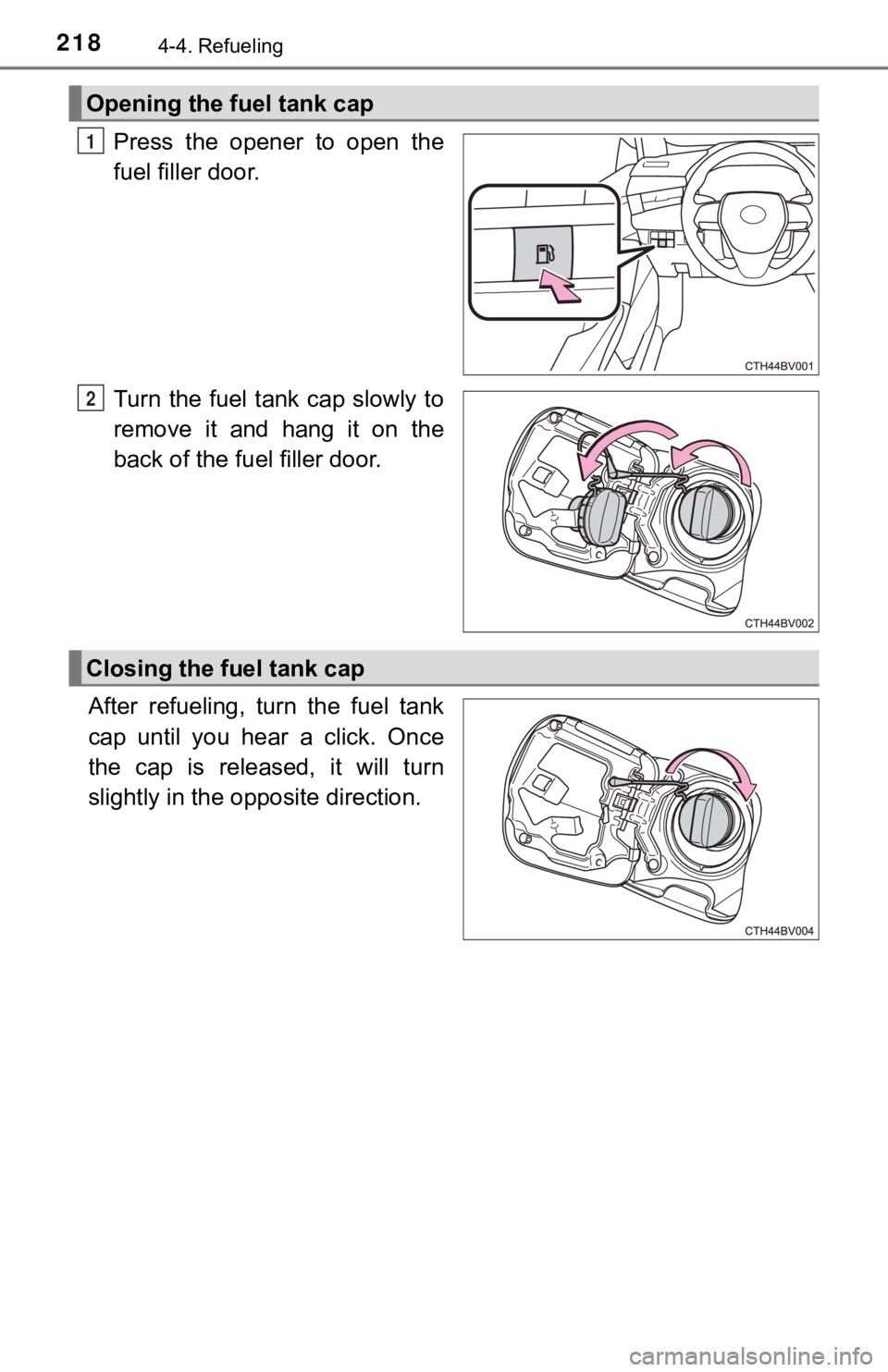
Press the opener to open the
fuel filler door.
Turn the fuel tank cap slowly to
remove it and hang it on the
back of the fuel filler door.
After refueling, turn the fuel tank
cap until you hear a click. Once
the cap is released, it will turn
slightly in the opposite direction.
Opening the fuel tank cap
1
2
Closing the fuel tank cap
Page 219 of 572
2194-4. Refueling
4
Driving
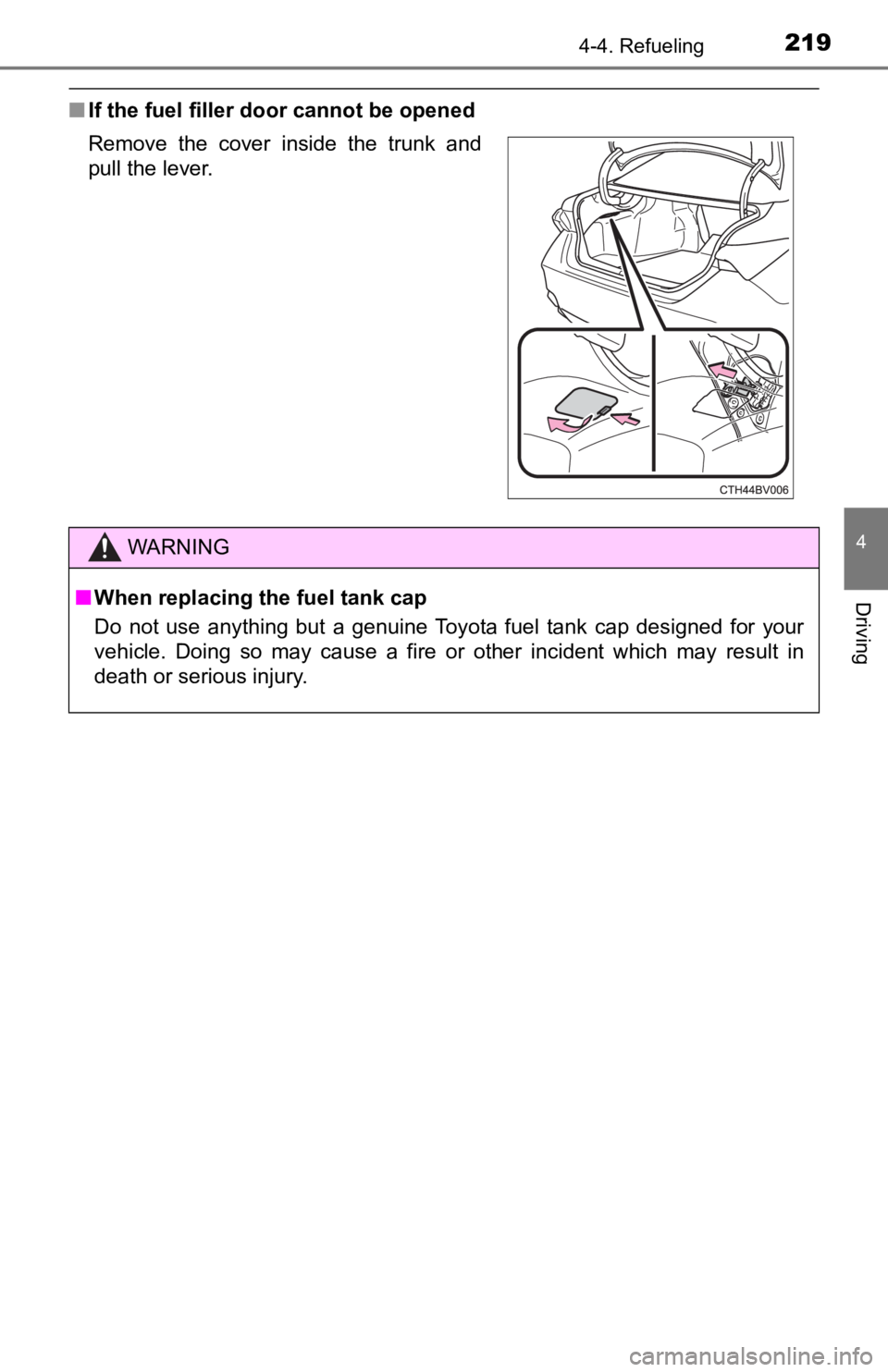
■If the fuel filler door cannot be opened
Remove the cover inside the trunk and
pull the lever.
WARNING
■When replacing the fuel tank cap
Do not use anything but a genuine Toyota fuel tank cap designed for your
vehicle. Doing so may cause a fire or other incident which may result in
death or serious injury.
Page 324 of 572
3244-5. Using the driving support systems
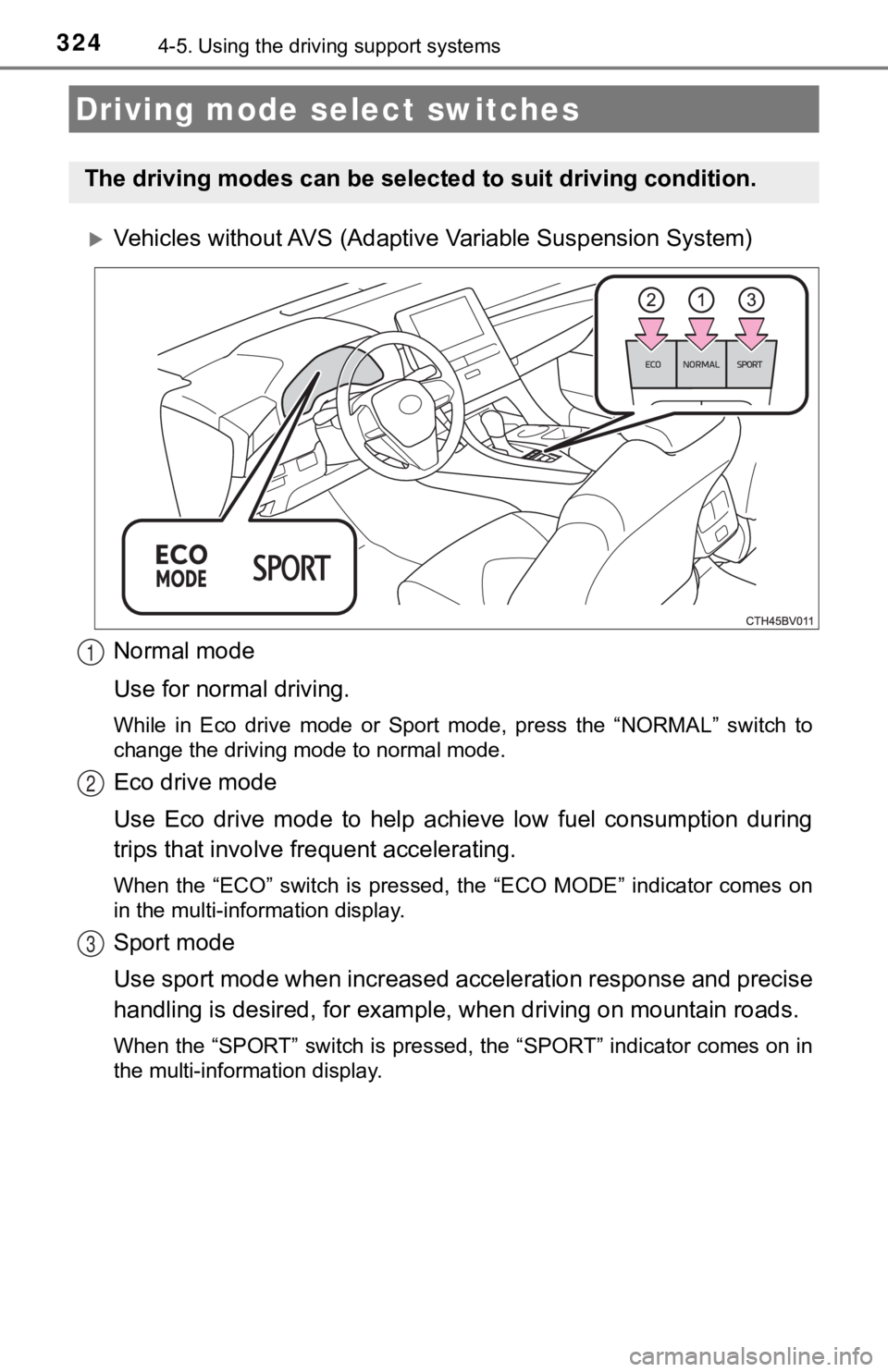
Vehicles without AVS (Adaptive Variable Suspension System)
Normal mode
Use for normal driving.
While in Eco drive mode or Sport mode, press the “NORMAL” switch to
change the driving mode to normal mode.
Eco drive mode
Use Eco drive mode to help achieve low fuel consumption during
trips that involve frequent accelerating.
When the “ECO” switch is pressed, the “ECO MODE” indicator comes on
in the multi-information display.
Sport mode
Use sport mode when increased acceleration response and precise
handling is desired, for exampl e, when driving on mountain road s.
When the “SPORT” switch is pressed, the “SPORT” indicator comes on in
the multi-information display.
Driving mode select switches
The driving modes can be select ed to suit driving condition.
1
2
3
Page 326 of 572
3264-5. Using the driving support systems
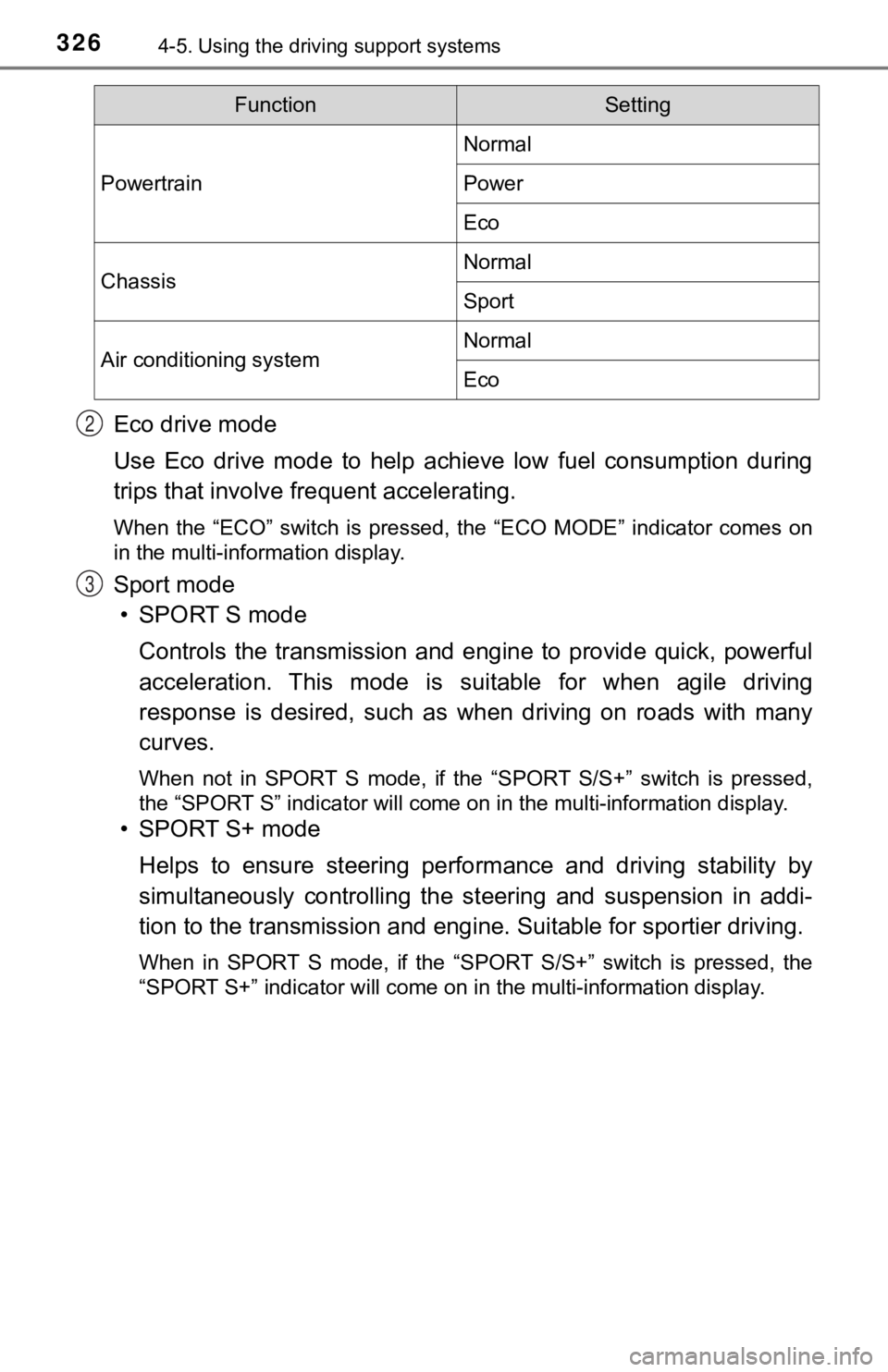
Eco drive mode
Use Eco drive mode to help achieve low fuel consumption during
trips that involve frequent accelerating.
When the “ECO” switch is pressed, the “ECO MODE” indicator comes on
in the multi-information display.
Sport mode
• SPORT S mode
Controls the transmission and eng ine to provide quick, powerful
acceleration. This mode is suitable for when agile driving
response is desired, such as when driving on roads with many
curves.
When not in SPORT S mode, if the “SPORT S/S+” switch is pressed ,
the “SPORT S” indicator will come on in the multi-information d isplay.
• SPORT S+ mode
Helps to ensure steering perfo rmance and driving stability by
simultaneously controlling the steering and suspension in addi-
tion to the transmission and engi ne. Suitable for sportier driving.
When in SPORT S mode, if the “SPORT S/S+” switch is pressed, th e
“SPORT S+” indicator will come on in the multi-information disp lay.
FunctionSetting
Powertrain
Normal
Power
Eco
ChassisNormal
Sport
Air conditioning systemNormal
Eco
2
3