mirror TOYOTA AVALON 2022 Owner's Manual
[x] Cancel search | Manufacturer: TOYOTA, Model Year: 2022, Model line: AVALON, Model: TOYOTA AVALON 2022Pages: 572, PDF Size: 9.42 MB
Page 161 of 572

1613-4. Adjusting the steering wheel and mirrors
3
Operation of each component
WARNING
■Important points while driving
Observe the following precautions while driving.
Failure to do so may result in loss of control of the vehicle and cause an
accident, resulting in death or serious injury.
● Do not adjust the mirrors while driving.
● Do not drive with the mirrors folded.
● Both the driver and passenger side mirrors must be extended and properly
adjusted before driving.
■ When a mirror is moving
To avoid personal injury and mirror malfunction, be careful not to get your
hand caught by the moving mirror.
■ When the mirror defoggers are operating
Do not touch the rear view mirror surfaces, as they can become very hot
and burn you.
Page 175 of 572
1754-1. Before driving
4
Driving
WARNING
Observe the following precautions.
Failure to do so may result in death or serious injury.
■When starting the vehicle
Always keep your foot on the brake pedal while stopped with the engine
running. This prevents the vehicle from creeping.
■ When driving the vehicle
● Do not drive if you are unfamiliar with the location of the brake and accel-
erator pedals to avoid depressing the wrong pedal.
• Accidentally depressing the accelerator pedal instead of the b rake
pedal will result in sudden acceleration that may lead to an accident.
• When backing up, you may twist your body around, leading to a diffi-
culty in operating the pedals. Make sure to operate the pedals properly.
• Make sure to keep a correct driving posture even when moving t he
vehicle only slightly. This allows you to depress the brake and accelera-
tor pedals properly.
• Depress the brake pedal using your right foot. Depressing the brake
pedal using your left foot may delay response in an emergency, result-
ing in an accident.
● Do not drive the vehicle over or stop the vehicle near flammable materials.
The exhaust system and exhaust gases can be extremely hot. Thes e hot
parts may cause a fire if there is any flammable material nearby.
● During normal driving, do not turn off the engine. Turning the engine off
while driving will not cause loss of steering or braking control, but the
power assist to these systems will be lost. This will make it more difficult to
steer and brake, so you should pull over and stop the vehicle as soon as it
is safe to do so.
However, in the event of an emergency, such as if it becomes im possible
to stop the vehicle in the normal way: P. 445
● Use engine braking (downshift) to maintain a safe speed when driving
down a steep hill.
Using the brakes continuously may cause the brakes to overheat and lose
effectiveness. ( P. 192)
● Do not adjust the display, the positions of the steering wheel, the seat, or
the inside or outside rear view mirrors while driving.
Doing so may result in a loss of vehicle control.
● Always check that all passengers’ arms, heads or other parts of their body
are not outside the vehicle.
● AWD models: Do not drive the vehicle off-road.
This is not an AWD vehicle designed for off-road driving. Proceed with all
due caution if it becomes unavoidable to drive off-road.
Page 211 of 572
2114-3. Operating the lights and wipers
4
Driving
• When the windshield is obscured by fog, mist, ice, dirt, etc.
• When the windshield is cracked or damaged
• When the camera sensor is deformed or dirty
• When the temperature of the camera sensor is extremely high
• When the surrounding brightness level is equal to that of head lights, tail
lights or fog lights
• When headlights or tail lights of vehicles ahead are turned off, dirty, changing color, or not aimed properly
• When the vehicle is hit by water, snow, dust, etc. from a prec eding vehi-
cle
• When driving through an area of intermittently changing brightness and
darkness
• When frequently and repeatedly driving ascending/descending roads, or roads with rough, bumpy or uneven surfaces (such as stone-paved
roads, gravel roads, etc.)
• When frequently and repeatedly taking curves or driving on a w inding
road
• When there is a highly reflective object ahead of the vehicle, such as a sign or mirror
• When the back of a preceding vehicle is highly reflective, such as a con-
tainer on a truck
• When the vehicle's headlights are damaged or dirty, or are not aimed
properly
• When the vehicle is listing or titling due to a flat tire, a trailer being towed, etc.
• When the headlights are changed between the high beams and low
beams repeatedly in an abnormal manner
• When the driver believes that the high beams may be flashing or dazzling pedestrians or other drivers
■ Temporarily lowering sensor sensitivity
The sensitivity of the sensor can be temporarily lowered.
Turn the engine switch off while the following conditions are m et.
• The headlight switch is in the or position.
• The headlight switch lever is in the original position.
• Automatic High Beam switch is on.
Turn the engine switch to the IGNITION ON mode.
Within 60 seconds after , repeat pushing the headlight switch lever to the
high beam position then pulling it to the original position qui ckly 10 times,
then leave the lever in the original position.
If the sensitivity is changed, the Automatic High Beam indicato r is turn on
and off 3 times.
1
2
32
4
Page 223 of 572

2234-5. Using the driving support systems
4
Driving
WARNING
●Do not subject the front camera to a strong impact.
● Do not change the installation position or direction of the front camera or
remove it.
● Do not disassemble the front camera.
● Do not modify any components of the vehicle around the front ca mera
(inside rear view mirror, etc.) or ceiling.
● Do not attach any accessories to the hood, front grille or front bumper that
may obstruct the front camera. Contact your Toyota dealer for details.
● If a surfboard or other long object is to be mounted on the roo f, make sure
that it will not obstruct the front camera.
● Do not modify the headlights or other lights.
Page 279 of 572
2794-5. Using the driving support systems
4
Driving
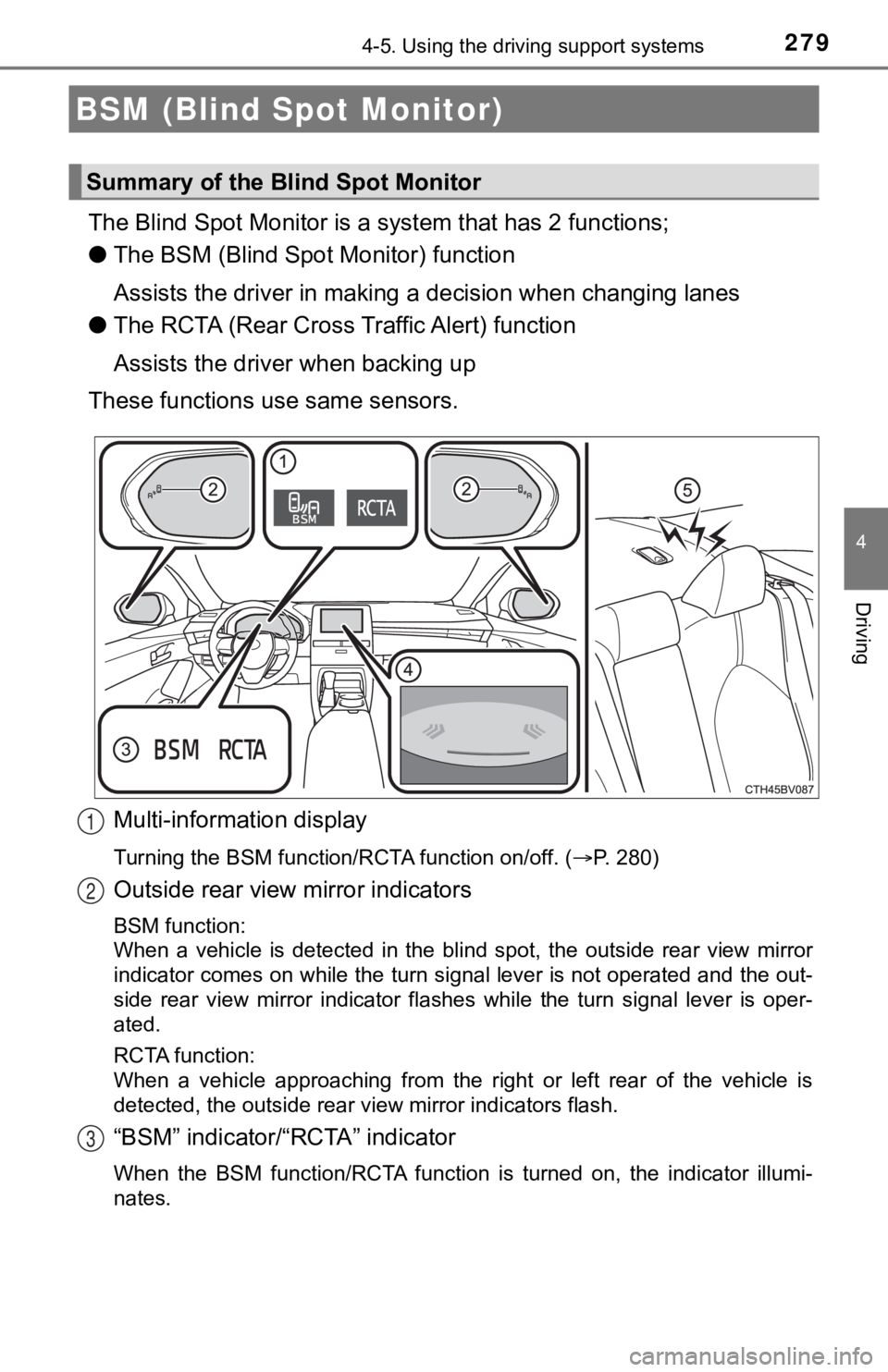
The Blind Spot Monitor is a system that has 2 functions;
● The BSM (Blind Spot Monitor) function
Assists the driver in making a decision when changing lanes
● The RCTA (Rear Cross T raffic Alert) function
Assists the driver when backing up
These functions use same sensors.
Multi-information display
Turning the BSM function/RCTA function on/off. ( P. 280)
Outside rear view mirror indicators
BSM function:
When a vehicle is detected in the blind spot, the outside rear view mirror
indicator comes on while the turn signal lever is not operated and the out-
side rear view mirror indicator flashes while the turn signal l ever is oper-
ated.
RCTA function:
When a vehicle approaching from the right or left rear of the v ehicle is
detected, the outside rear view mirror indicators flash.
“BSM” indicator/“RCTA” indicator
When the BSM function/RCTA function is turned on, the indicator illumi-
nates.
BSM (Blind Spot Monitor)
Summary of the Blind Spot Monitor
1
2
3
Page 280 of 572
2804-5. Using the driving support systems
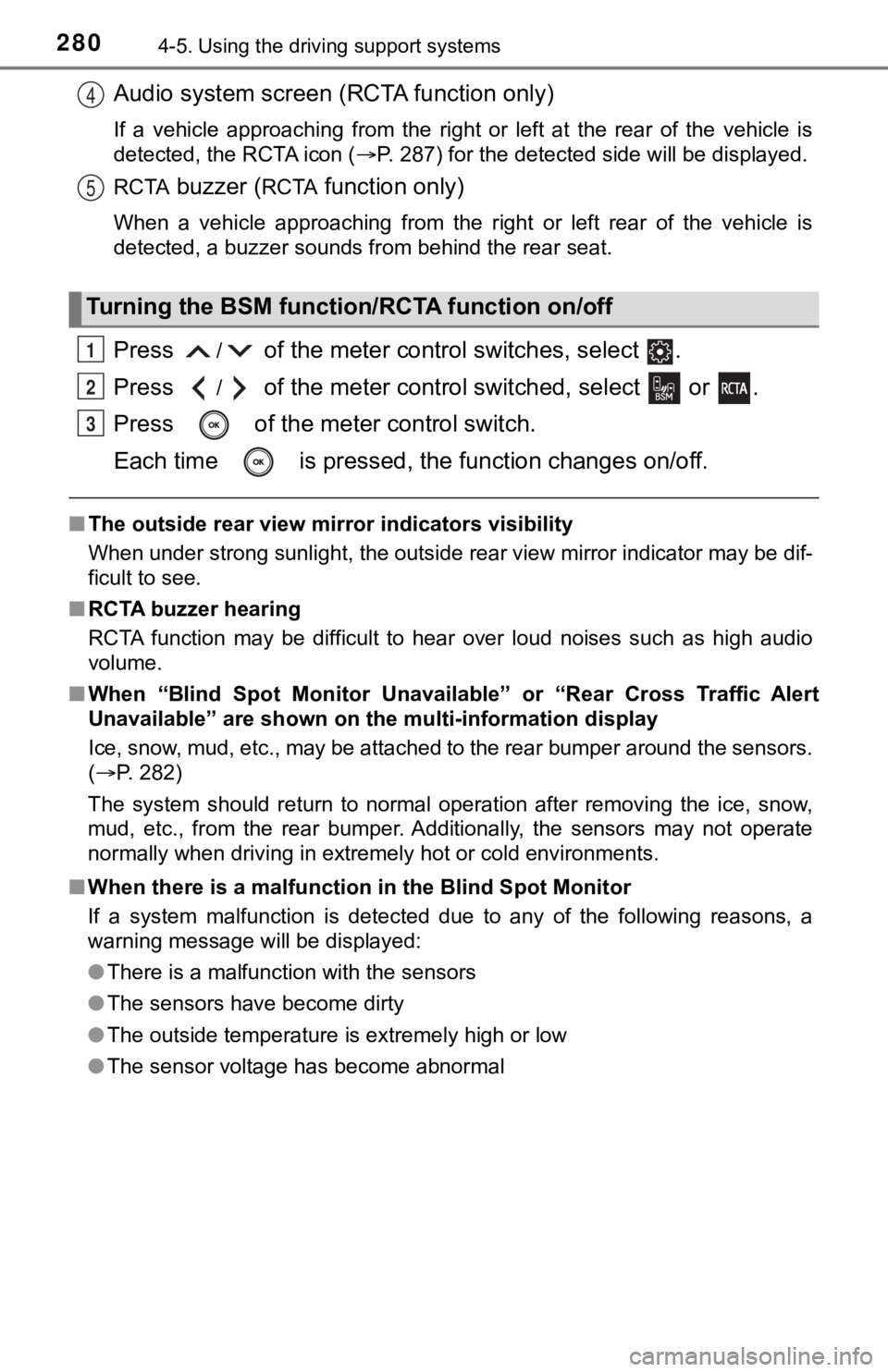
Audio system screen (RCTA function only)
If a vehicle approaching from the right or left at the rear of the vehicle is
detected, the RCTA icon ( P. 287) for the detected side will be displayed.
RCTA
buzzer (RCTA function only)
When a vehicle approaching from the right or left rear of the v ehicle is
detected, a buzzer sounds from behind the rear seat.
Press / of the meter control switches, select .
Press
/ of the meter control sw itched, select or .
Press of the meter control switch.
Each time is pressed, t he function changes on/off.
■The outside rear view mirror indicators visibility
When under strong sunlight, the outside rear view mirror indica tor may be dif-
ficult to see.
■ RCTA buzzer hearing
RCTA function may be difficult to hear over loud noises such as high audio
volume.
■ When “Blind Spot Monitor Unava ilable” or “Rear Cross Traffic Alert
Unavailable” are shown on the multi-information display
Ice, snow, mud, etc., may be attached to the rear bumper around the sensors.
( P. 282)
The system should return to normal operation after removing the ice, snow,
mud, etc., from the rear bumper. Additionally, the sensors may not operate
normally when driving in extremely hot or cold environments.
■ When there is a malfunction in the Blind Spot Monitor
If a system malfunction is detected due to any of the following reasons, a
warning message will be displayed:
● There is a malfunction with the sensors
● The sensors have become dirty
● The outside temperature is extremely high or low
● The sensor voltage has become abnormal
Turning the BSM function/RCTA function on/off
4
5
1
2
3
Page 283 of 572
2834-5. Using the driving support systems
4
Driving
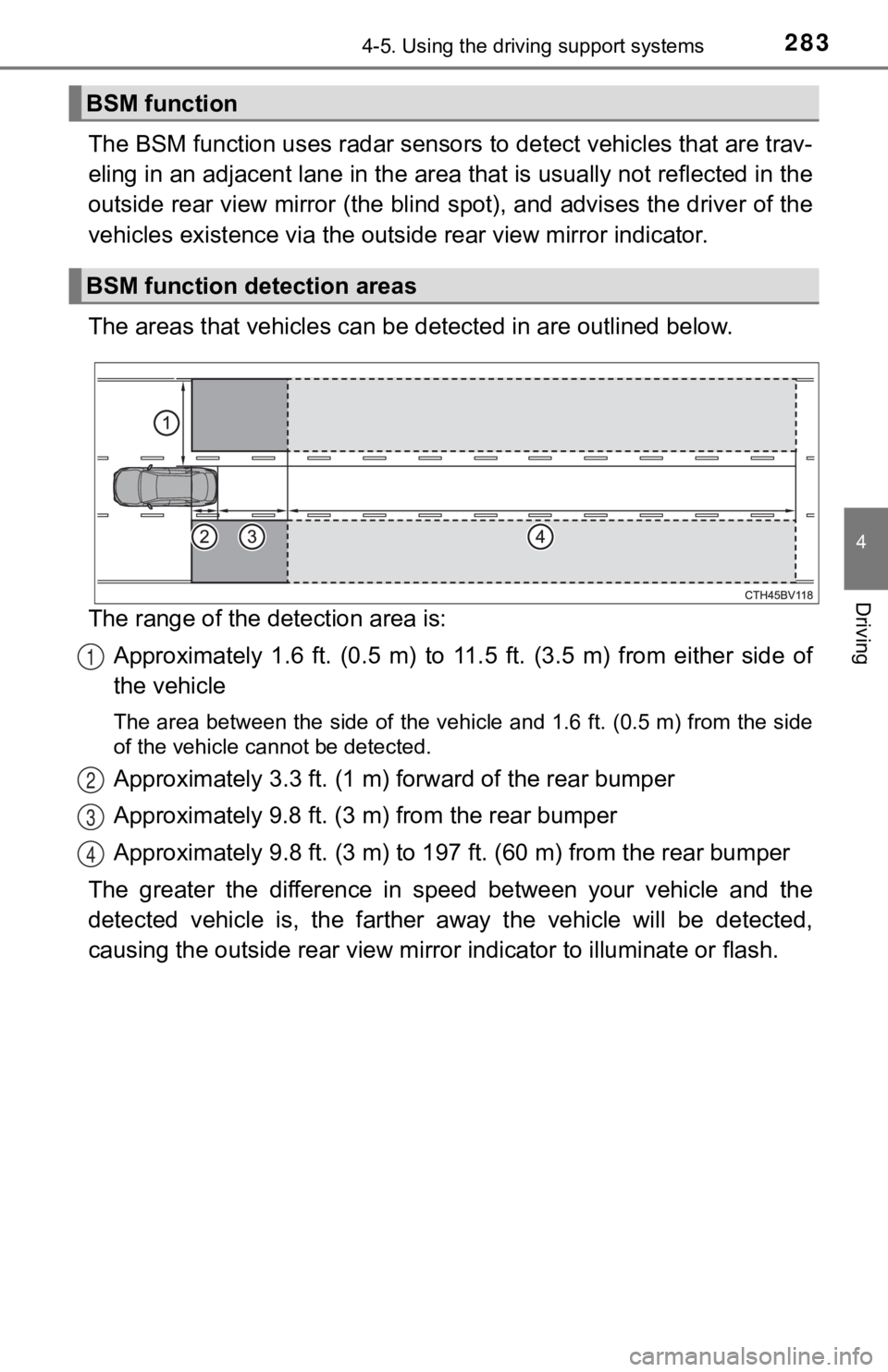
The BSM function uses radar sensors to detect vehicles that are trav-
eling in an adjacent lane in the area that is usually not reflected in the
outside rear view mirror (the blind spot), and advises the driv er of the
vehicles existence vi a the outside rear vie w mirror indicator.
The areas that vehicles can be detected in are outlined below.
The range of the detection area is: Approximately 1.6 ft. (0.5 m) to 11.5 ft. (3.5 m) from either s ide of
the vehicle
The area between the side of the vehicle and 1.6 ft. (0.5 m) from the side
of the vehicle cannot be detected.
Approximately 3.3 ft. (1 m) f orward of the rear bumper
Approximately 9.8 ft. (3 m) from the rear bumper
Approximately 9.8 ft. (3 m) to 19 7 ft. (60 m) from the rear bumper
The greater the difference in speed between your vehicle and th e
detected vehicle is, the farther away the vehicle will be detec ted,
causing the outsi de rear view mirror indicator to illuminate or flash.
BSM function
BSM function detection areas
1
2
3
4
Page 286 of 572
2864-5. Using the driving support systems
●Instances of the BSM function unnecessarily detecting a vehicle and/or
object may increase under the following conditions:
• When the sensor is misaligned due to a strong impact to the se nsor or its
surrounding area
• When there is only a short distance between your vehicle and a guardrail,
wall, etc.
• When there is only a short distance between your vehicle and a following
vehicle
• When vehicle lanes are narrow and a vehicle driving 2 lanes ac ross from
your vehicle enters the detection area
• When driving on roads with sharp bends, consecutive curves, or uneven
surfaces
• When items such as a bicycle carrier are installed on the rear of the vehi-
cle
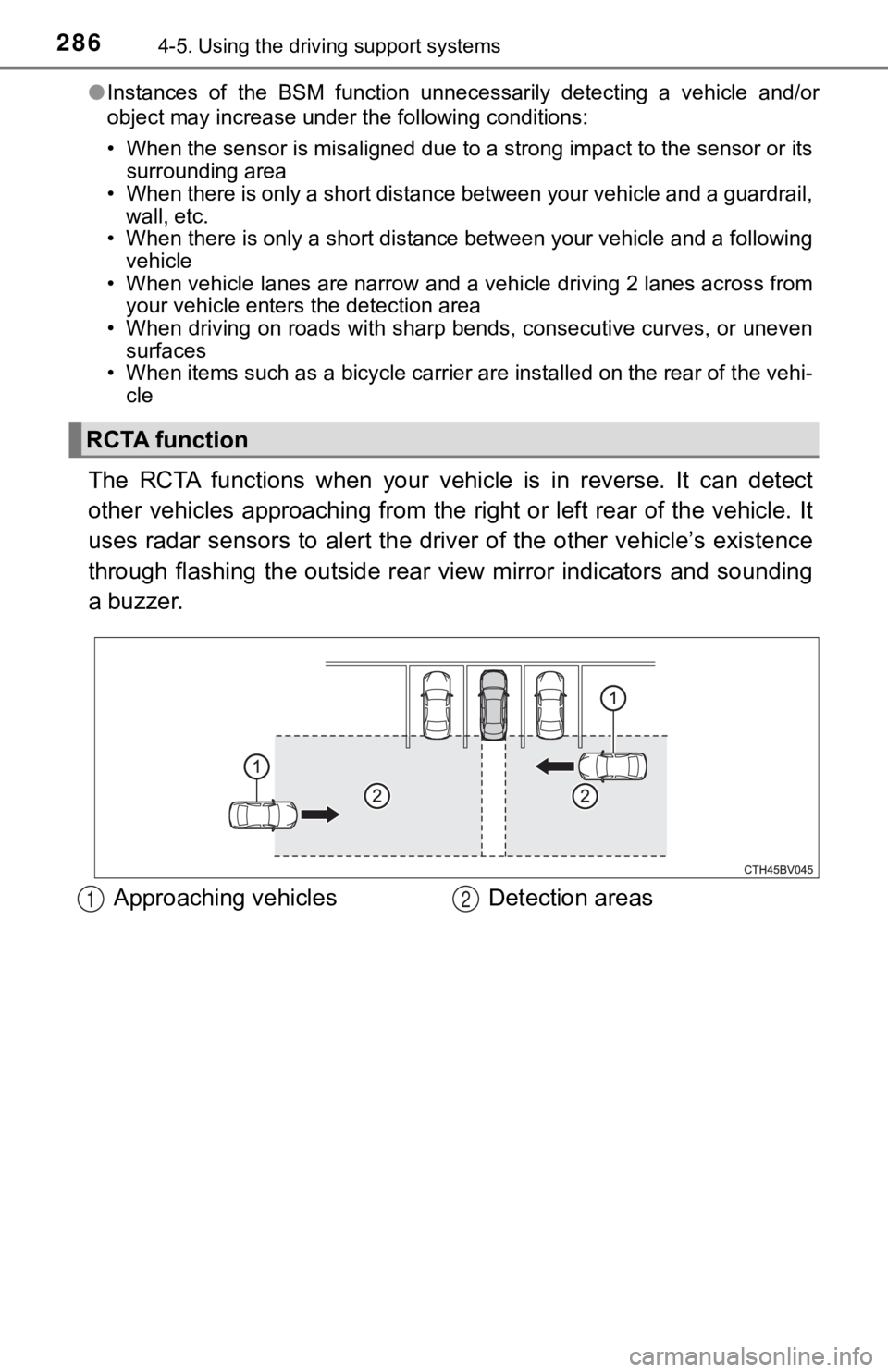
The RCTA functions when your vehicle is in reverse. It can dete ct
other vehicles approaching from the right or left rear of the v ehicle. It
uses radar sensors to alert the driver of the other vehicle’s existence
through flashing the outside rear view mirror indicators and so unding
a buzzer.
RCTA function
Approaching vehicles Detection areas12
Page 341 of 572

341
5Interior features
5-1. Using the air conditioning system and defogger
Automatic air conditioning system............................. 342
Heated steering wheel/ seat heaters/
seat ventilators ................ 349
5-2. Using the interior lights Interior lights list ................ 352
• Interior light ................... 353
• Personal lights .............. 353
• Ambient lights ............... 354
5-3. Using the storage features
List of storage features ..... 355
• Glove box...................... 356
• Console box .................. 356
• Bottle holders ................ 357
• Cup holders .................. 358
• Auxiliary boxes.............. 359
• Open tray ...................... 360
Trunk features ................... 361 5-4. Other interior features
Other interior features ....... 362
• Sun visors ..................... 362
• Vanity mirrors................ 362
• Power outlet .................. 363
• USB charging ports....... 364
• Wireless charger ........... 366
• Armrest ......................... 375
• Assist grips ................... 375
• Coat hooks.................... 376
Garage door opener.......... 377
Page 344 of 572
3445-1. Using the air conditioning system and defogger
■Switching between outside air and recirculated air modes
Press .
The mode switches between outside air mode (indicator off) and recir-
culated air mode (indicator on) each time is pressed.
■
Defogging the windshield
Defoggers are used to defog the windshield and front side win-
dows.
Press .
The dehumidification function operates and fan speed increases.
Set the outside/recirculated air mode button to the outside air mode if
the recirculated air mode is used. (It may switch automatically .)
To defog the windshield and the side windows early, turn the ai r flow and
temperature up.
To return to the previous mode, press again when the windshiel d
is defogged.
■
Defogging the rear window and outside rear view mirrors
Defoggers are used to defog the rear window, and to remove rain -
drops, dew and frost from the outside rear view mirrors.
Press .
The defoggers will automatically turn off after a period of tim e.
Other functions