key TOYOTA AVALON 2022 Service Manual
[x] Cancel search | Manufacturer: TOYOTA, Model Year: 2022, Model line: AVALON, Model: TOYOTA AVALON 2022Pages: 572, PDF Size: 9.42 MB
Page 374 of 572
3745-4. Other interior features
NOTICE
■Conditions in which the wireless charger may not operate correctly
In the following situations, the wireless charger may not operate correctly:
● When a portable device is fully charged
● When there is a foreign object between the charging area and portable
device
● When a portable device becomes hot while charging
● When a portable device is placed on the wireless area with its charging
surface facing up
● When a portable device is not centered on the charging area
● When the vehicle is near a TV tower, electric power plant, gas station,
radio station, large display, airport or other facility that ge nerates strong
radio waves or electrical noise
● When the portable device is in contact with, or is covered by a ny of the fol-
lowing metallic objects:
• Cards to which aluminum foil is attached
• Cigarette boxes that have aluminum foil inside
• Metallic wallets or bags
• Coins
• Metal hand warmers
• Media such as CDs and DVDs
● When wireless keys (that emit radio waves) other than those of your vehi-
cle are being used nearby.
If in situations other than above the wireless charger does not operate prop-
erly or the operation indicator light is blinking, the wireless charger may be
malfunctioning. Contact your Toyota dealer.
■ To prevent failure or damage to data
● Do not bring magnetic cards, such as a credit card, or magnetic recording
media, close to the wireless charger while charging. Otherwise, data may
be erased due to the influence of magnetism.
Additionally, do not bring precision instruments such as wrist watches,
close to the wireless charger, as such objects may malfunction.
● Do not leave portable devices in the cabin. The temperature ins ide the
cabin may become high when parked in the sun, and cause damage to the
device.
■ To prevent battery discharge
Do not use the wireless charger for a long period of time with the engine
stopped.
Page 385 of 572

385
6Maintenance and care
6-1. Maintenance and careCleaning and protecting the vehicle exterior .......... 386
Cleaning and protecting the vehicle interior ........... 389
6-2. Maintenance Maintenance requirements ................... 392
General maintenance........ 394
Emission inspection and maintenance (I/M)
programs......................... 398
6-3. Do-it-yourself maintenance
Do-it-yourself service precautions ..................... 399
Hood ................................. 401
Positioning a floor jack ...... 402
Engine compartment ......... 403
Tires .................................. 414
Tire inflation pressure ....... 428
Wheels .............................. 431
Air conditioning filter.......... 433
Electronic key battery........ 435
Checking and replacing fuses ............................... 438
Light bulbs......................... 441
Page 386 of 572
3866-1. Maintenance and care
●Working from top to bottom, liberally apply water to the vehicl e
body, wheel wells and underside of the vehicle to remove any di rt
and dust.
● Wash the vehicle body using a sponge or soft cloth, such as a
chamois.
● For hard-to-remove marks, use car wash soap and rinse thoroughl y
with water.
● Wipe away any water.
● Wax the vehicle when the wate rproof coating deteriorates.
If water does not bead on a clean surface, apply wax when the vehicle
body is cool.
■Automatic car washes
●Fold the mirrors before washing the vehicle. Start washing from the front of
the vehicle. Make sure to extend the mirrors before driving.
● Brushes used in automatic car washes may scratch the vehicle su rface,
parts (wheel, etc.) and harm your vehicle's paint.
● Vehicles with a rear spoiler: In certain automatic car washes, the rear spoiler
may interfere with machine operation. This may prevent the vehicle from
being cleaned properly or result in damage to the rear spoiler.
■ High pressure car washes
As water may enter the cabin, do not bring the nozzle tip near the gaps
around the doors or perimeter of the windows, or spray these ar eas continu-
ously.
■ When using a car wash
If the door handle becomes wet while the electronic key is within the effective
range, the door may lock and unlock repeatedly. In that case, f ollow the fol-
lowing correction procedures to wash the vehicle:
● Place the key in a position 6 ft. (2 m) or more separate from t he vehicle
while the vehicle is being washed. (Take care to ensure that th e key is not
stolen.)
● Set the electronic key to battery-saving mode to disable the sm art key sys-
tem. ( P. 139)
Cleaning and prot ecting the vehicle
exterior
Perform the following to protect the vehicle and maintain it in
prime condition:
Page 411 of 572
4116-3. Do-it-yourself maintenance
6
Maintenance and care
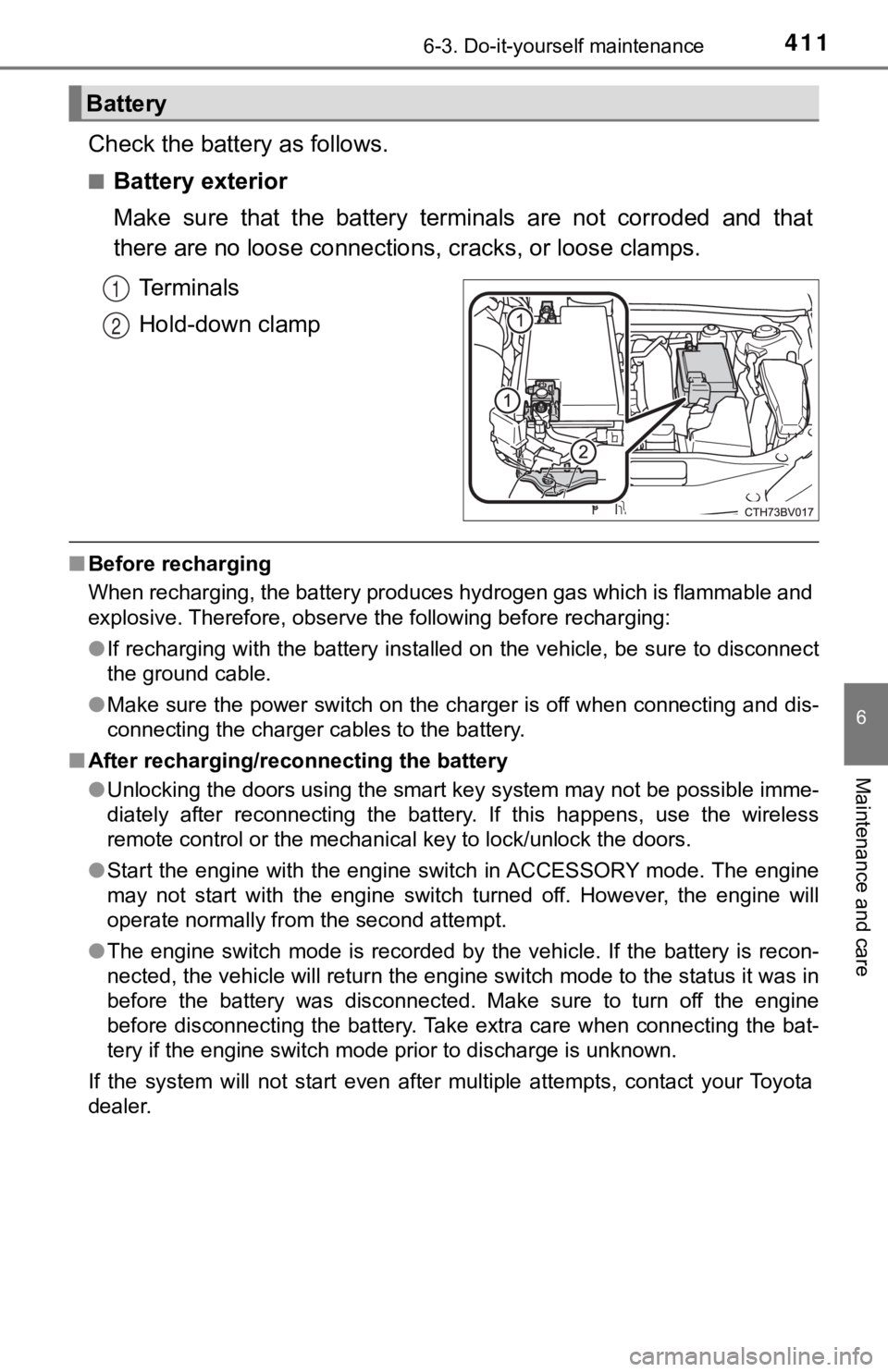
Check the battery as follows.
■Battery exterior
Make sure that the battery terminals are not corroded and that
there are no loose connections, cracks, or loose clamps.
Terminals
Hold-down clamp
■ Before recharging
When recharging, the battery produces hydrogen gas which is flammable and
explosive. Therefore, observe the following before recharging:
●If recharging with the battery installed on the vehicle, be sur e to disconnect
the ground cable.
● Make sure the power switch on the charger is off when connectin g and dis-
connecting the charger cables to the battery.
■ After recharging/reconnecting the battery
●Unlocking the doors using the smart key system may not be possi ble imme-
diately after reconnecting the battery. If this happens, use the wireless
remote control or the mechanical key to lock/unlock the doors.
● Start the engine with the engine switch in ACCESSORY mode. The engine
may not start with the engine switch turned off. However, the e ngine will
operate normally from the second attempt.
● The engine switch mode is recorded by the vehicle. If the batte ry is recon-
nected, the vehicle will return the engine switch mode to the s tatus it was in
before the battery was disconnected. Make sure to turn off the engine
before disconnecting the battery. Take extra care when connecti ng the bat-
tery if the engine switch mode prior to discharge is unknown.
If the system will not start even after multiple attempts, contact your Toyota
dealer.
Battery
1
2
Page 435 of 572
4356-3. Do-it-yourself maintenance
6
Maintenance and care
●Flathead screwdriver
● Small flathead screwdriver
● Lithium battery CR2032
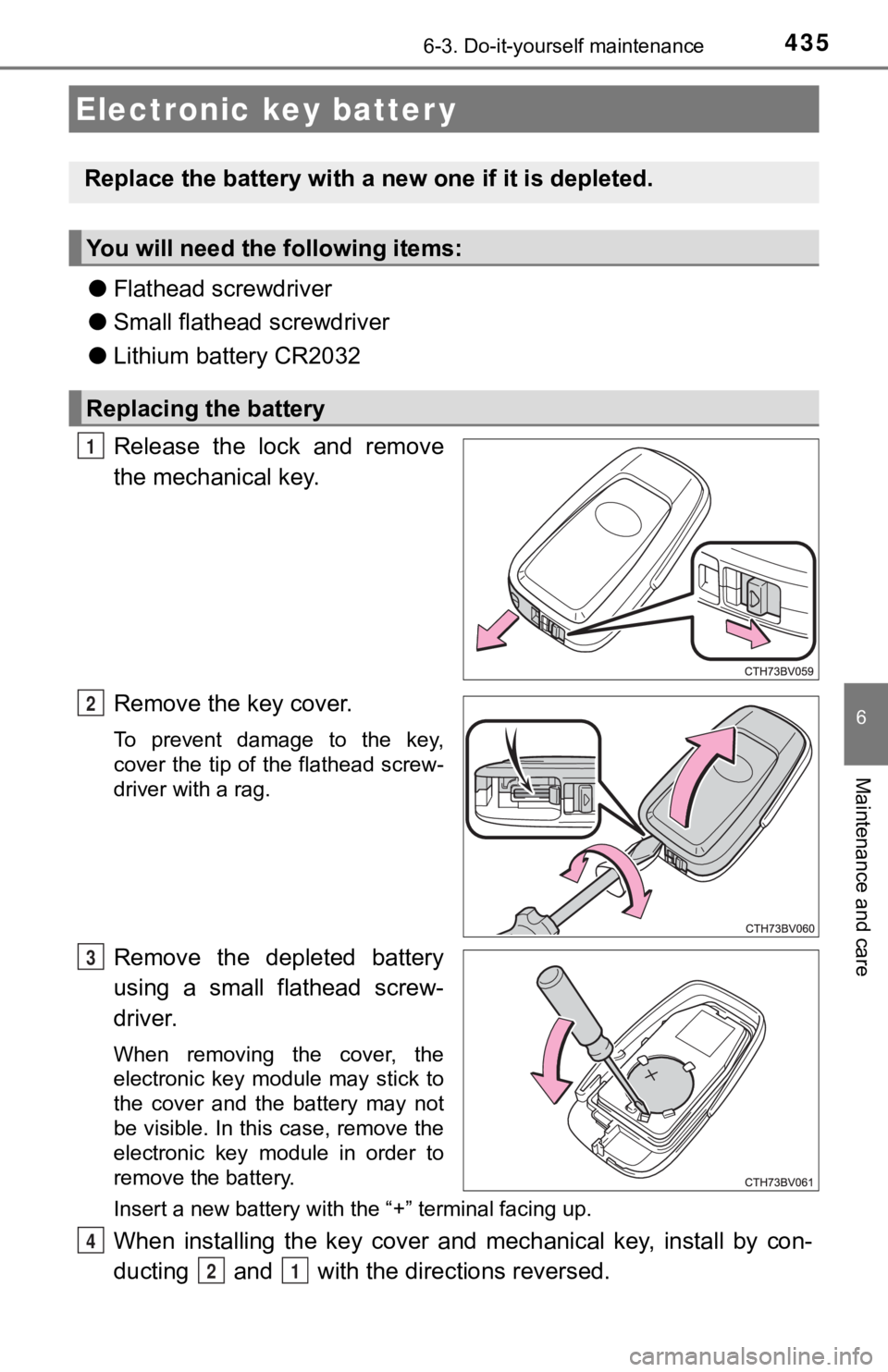
Release the lock and remove
the mechanical key.
Remove the key cover.
To prevent damage to the key,
cover the tip of the flathead screw-
driver with a rag.
Remove the depleted battery
using a small flathead screw-
driver.
When removing the cover, the
electronic key module may stick to
the cover and the battery may not
be visible. In this case, remove the
electronic key module in order to
remove the battery.
Insert a new battery with the “+” terminal facing up.
When installing the key cover and mechanical key, install by co n-
ducting and with the directions reversed.
Electronic key batter y
Replace the battery with a n ew one if it is depleted.
You will need the following items:
Replacing the battery
1
2
3
4
21
Page 436 of 572

4366-3. Do-it-yourself maintenance
Operate the or switch and check that the doors can
be locked/unlocked.
■When replacing the key battery
Be careful not to lose the battery or any other small parts.
■ Use a CR2032 lithium battery
●Batteries can be purchased at your Toyota dealer, local electrical appliance
shops or camera stores.
● Replace only with the same or equivalent type recommended by the manu-
facturer.
● Dispose of used batteries according to local laws.
■ If the key battery is depleted
The following symptoms may occur:
●The smart key system and wireless remote control will not funct ion properly.
● The operational range will be reduced.
WARNING
■ Battery precautions
Observe the following precautions.
Failure to do so may result in death or serious injury.
● Do not swallow the battery. Doing so may cause chemical burns.
● A coin battery or button battery is used in the electronic key. If a battery is
swallowed, it may cause severe chemical burns in as little as 2 hours and
may result in death or serious injury.
● Keep away new and removed batteries from children.
● If the cover cannot be firmly closed, stop using the electronic key and stow
the key in the place where children cannot reach, and then contact your
Toyota dealer.
● If you accidentally swallow a battery or put a battery into a part of your
body, get emergency medical attention immediately.
■ To prevent battery explosion or leakage of flammable liquid or gas
● Replace the battery with a new battery of the same type. If a w rong type of
battery is used, it may explode.
● Do not expose batteries to extremely low pressure due to high altitude or
extremely high temperatures.
● Do not burn, break or cut a battery.
5
Page 443 of 572

443
7When trouble arises
7-1. Essential informationEmergency flashers .......... 444
If your vehicle has to be stopped in
an emergency ................. 445
If the vehicle is submerged or water on the road is
rising ............................... 446
7-2. Steps to take in an emergency
If your vehicle needs to be towed ..................... 448
If you think something is wrong .......................... 453
Fuel pump shut off system ............................ 454
If a warning light turns on or a warning
buzzer sounds ................ 455
If a warning message is displayed ..................... 465
If you have a flat tire.......... 470
If the engine will not start ................................. 482
If the electronic key does not operate properly........ 484
If the vehicle battery is discharged ................... 487
If your vehicle overheats ........................ 492
If the vehicle becomes stuck ............................... 495
Page 467 of 572

4677-2. Steps to take in an emergency
7
When trouble arises
■Warning messages
The warning messages explained below may differ from the actual messages
according to operation conditions and vehicle specifications.
■ System warning lights
The master warning light does not come on or flash in the following cases.
Instead, a separate system warning light will come on along wit h a message
shown on the multi-information display.
● Malfunction in the ABS
The ABS warning light comes on. ( P. 456)
● Malfunction in the tire pressure warning system
The tire pressure warning light comes on. ( P. 459)
● Remaining fuel level is low
The low fuel level warning light comes on. ( P. 458)
■ If a message instructing to refer to the Owner’s Manual is disp layed
● If the following messages are shown, there may be a malfunction .
Immediately stop the vehicle in a safe place and contact your T oyota dealer.
Continuing to drive the vehicle may be dangerous.
• “Low Braking Power Stop in a Safe Place See Owner’s Manual”
• “Oil Pressure Low Stop in a Safe Place See Owner’s Manual”
• “Charging System Malfunction Stop in a Safe Place See Owner’s Man-
ual”
● If the following message is shown, there may be a malfunction.
Immediately have the vehicle inspected by your Toyota dealer.
• “Smart Key System Malfunction See Owner’s Manual”
● If “Engine Coolant Temp High Stop in a Safe Place See Owner’s Manual” is
displayed, follow the instructions accordingly. ( P. 492)
■ If “Shift to P Before Exiting Vehicle” is shown
Message is displayed when the driver’s door is opened without t urning the
engine switch off with the shift lever in any position other than P.
Shift the shift lever to P.
■ If “Auto Power Off to Con serve Battery” is displayed
Power was turned off due to the automatic power off function.
Next time when starting the engine, increase the engine speed s lightly and
maintain that level for approximately 5 minutes to recharge the battery.
Page 468 of 572

4687-2. Steps to take in an emergency
■If “A New Key has been Registered Contact Your Dealer for Detai ls” is
displayed
This message will be displayed each time the driver’s door is opened when
the doors are unlocked from the outside for approximately one week after a
new electronic key has been registered.
If this message is displayed but you have not had a new electro nic key regis-
tered, ask your Toyota dealer to check if an unknown electronic key (other
than those in your possession) has been registered.
■ When “Headlight System Malfunction Visit Your Dealer” is displa yed
The following systems may be malfunctioning. Have the vehicle i nspected by
your Toyota dealer immediately.
● The LED headlight system
● AHB (Automatic High Beam)
■ If “Radar Cruise Control Unavailable See Owner's Manual” is sho wn
The dynamic radar cruise control with full-speed range system is suspended
temporarily or until the problem shown in the message is resolv ed. (causes
and coping methods: P. 226)
■ If “Radar Cruise Control Unavailable” is shown
The dynamic radar cruise control with full-speed range system c annot be
used temporarily. Use the system when it becomes available agai n.
■ If a message that indicates the mal function of front camera is displayed
The following systems may be suspended until the problem shown in the
message is resolved.
● PCS (Pre-Collision System)
● LTA (Lane Tracing Assist)
● AHB (Automatic High Beam)
● RSA (Road Sign Assist) (if equipped)
● Dynamic radar cruise control with full-speed range
■ If a message that indicates the malfunction of radar sensor is displayed
The following systems may be suspended until the problem shown in the
message is resolved. ( P. 226, 455)
● PCS (Pre-Collision System)
● LTA (Lane Tracing Assist)
● Dynamic radar cruise control with full-speed range (if equipped )
Page 482 of 572
4827-2. Steps to take in an emergency
One of the following may be the cause of the problem:
● There may not be sufficient fuel in the vehicle’s tank.
Refuel the vehicle.
● The engine may be flooded.
Try to restart the engine again following correct starting proc edures.
( P. 186)
● There may be a malf unction in the engine immobilizer system.
( P. 77)
One of the following may be the cause of the problem:
● The battery may be discharged. ( P. 487)
● The battery terminal connecti ons may be loose or corroded.
The engine starting system may be malfunctioning due to an elec trical
problem such as electronic key battery depletion or a blown fus e.
However, an interim measure is a vailable to start the engine.
( P. 483)
If the engine will not star t
If the engine will not start eve n though correct starting proce -
dures are being followed ( P. 186), consider each of the follow-
ing points:
The engine will not start even t hough the starter motor operates
normally.
The starter motor turns over slowly, the interior lights and he ad-
lights are dim, or the horn does not sound or sounds at a low
volume.
The starter motor d oes not turn over