lights TOYOTA AVALON 2022 Workshop Manual
[x] Cancel search | Manufacturer: TOYOTA, Model Year: 2022, Model line: AVALON, Model: TOYOTA AVALON 2022Pages: 572, PDF Size: 9.42 MB
Page 350 of 572
3505-1. Using the air conditioning system and defogger
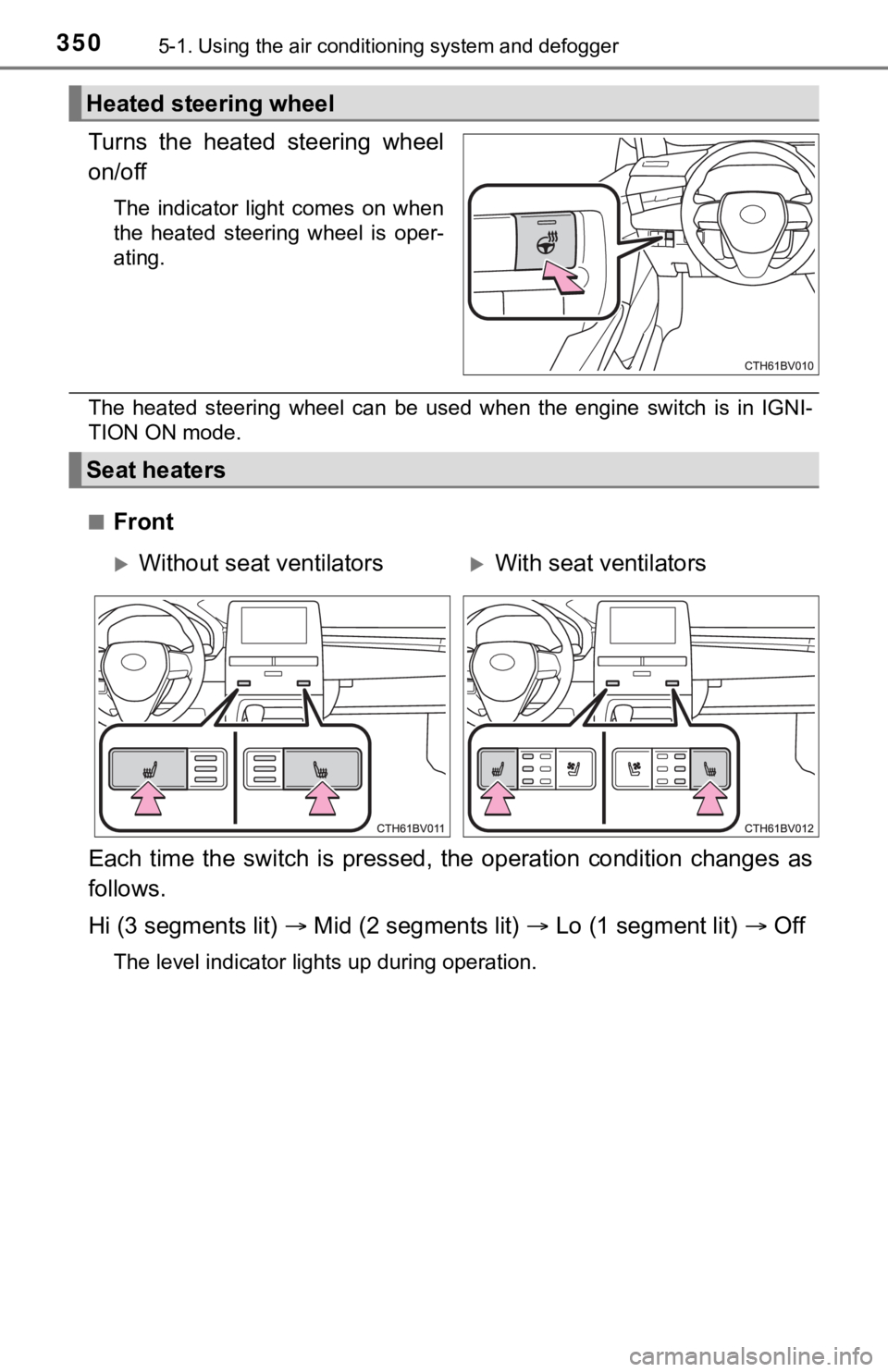
Turns the heated steering wheel
on/off
The indicator light comes on when
the heated steering wheel is oper-
ating.
The heated steering wheel can be used when the engine switch is in IGNI-
TION ON mode.
■
Front
Each time the switch is pressed, the operation condition change s as
follows.
Hi (3 segments lit) Mid (2 segments lit) Lo (1 segment lit) Off
The level indicator lights up during operation.
Heated steering wheel
Seat heaters
Without seat ventilatorsWith seat ventilators
Page 351 of 572
3515-1. Using the air conditioning system and defogger
5
Interior features
■Rear (if equipped)
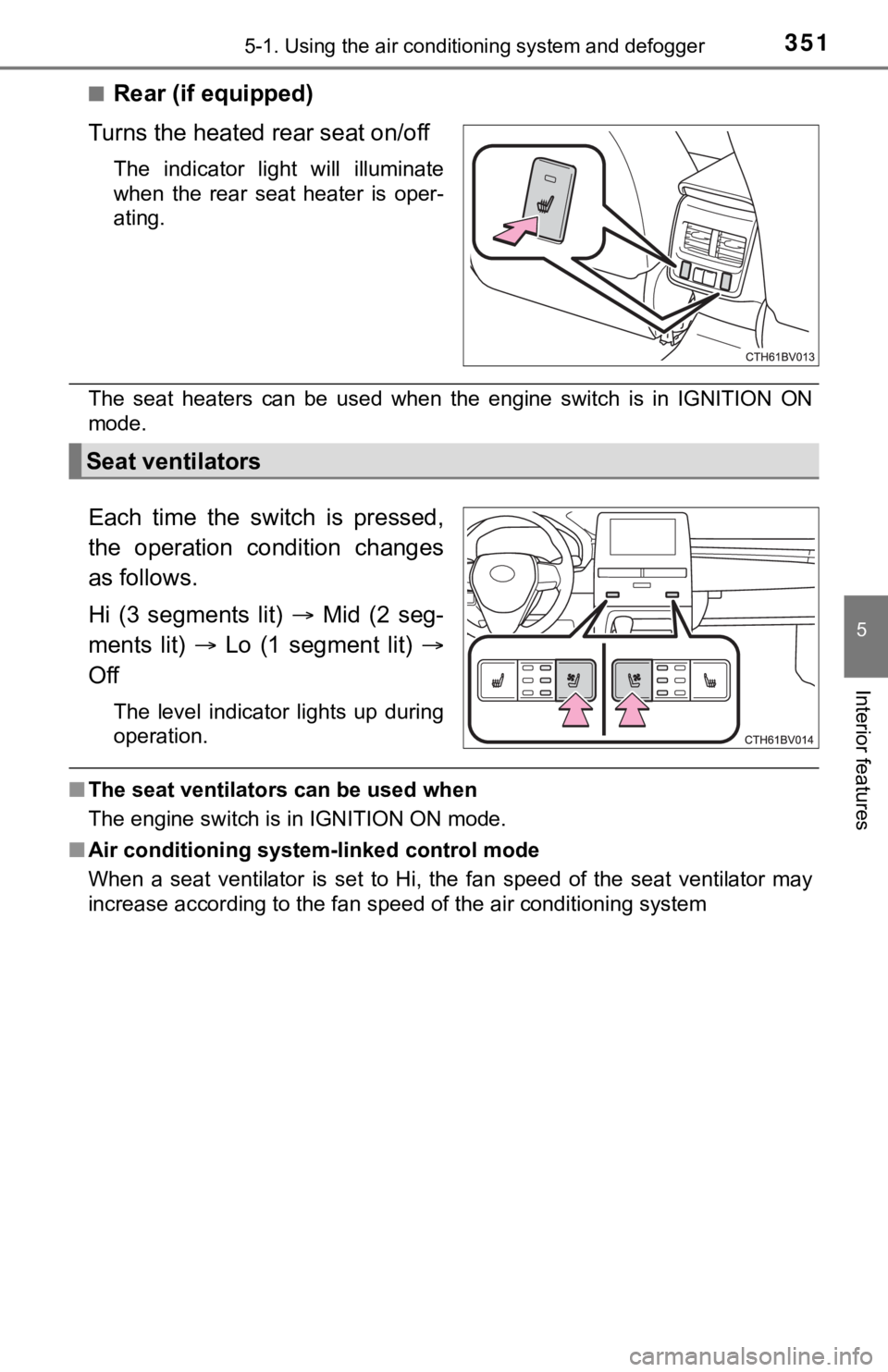
Turns the heated rear seat on/off
The indicator light will illuminate
when the rear seat heater is oper-
ating.
The seat heaters can be used when the engine switch is in IGNITION ON
mode.
Each time the switch is pressed,
the operation condition changes
as follows.
Hi (3 segments lit) Mid (2 seg-
ments lit) Lo (1 segment lit)
Off
The level indicator lights up during
operation.
■ The seat ventilators can be used when
The engine switch is in IGNITION ON mode.
■ Air conditioning system-linked control mode
When a seat ventilator is set to Hi, the fan speed of the seat ventilator may
increase according to the fan speed of the air conditioning system
Seat ventilators
Page 352 of 572
3525-2. Using the interior lights
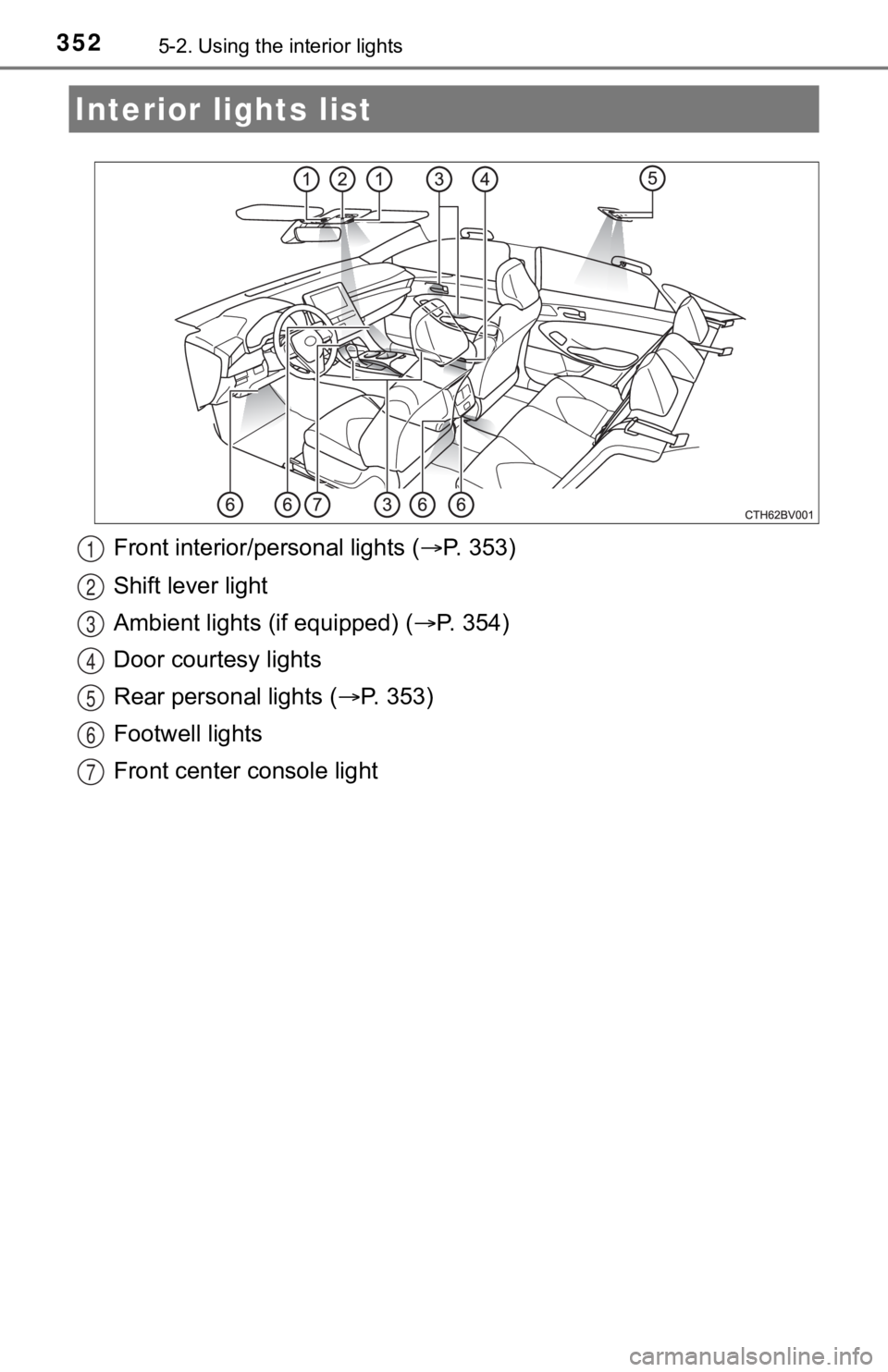
Front interior/personal lights ( P. 353)
Shift lever light
Ambient lights (if equipped) ( P. 3 5 4 )
Door courtesy lights
Rear personal lights ( P. 3 5 3 )
Footwell lights
Front center console light
Interior li ghts list
1
2
3
4
5
6
7
Page 353 of 572
3535-2. Using the interior lights
5
Interior features
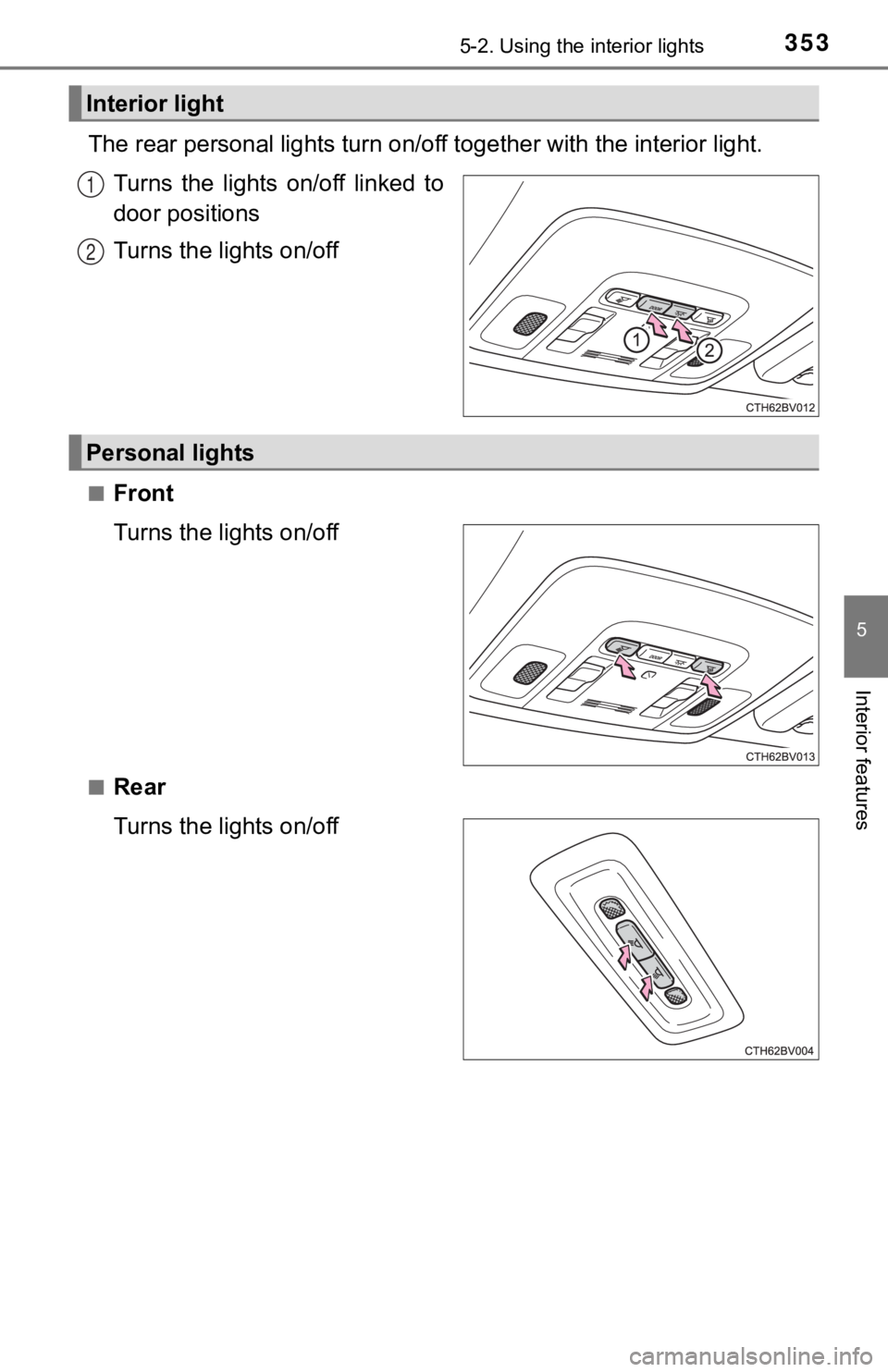
The rear personal lights turn on/off together with the interior light.
Turns the lights on/off linked to
door positions
Turns the lights on/off
■Front
Turns the lights on/off
■Rear
Turns the lights on/off
Interior light
1
2
Personal lights
Page 354 of 572
3545-2. Using the interior lights
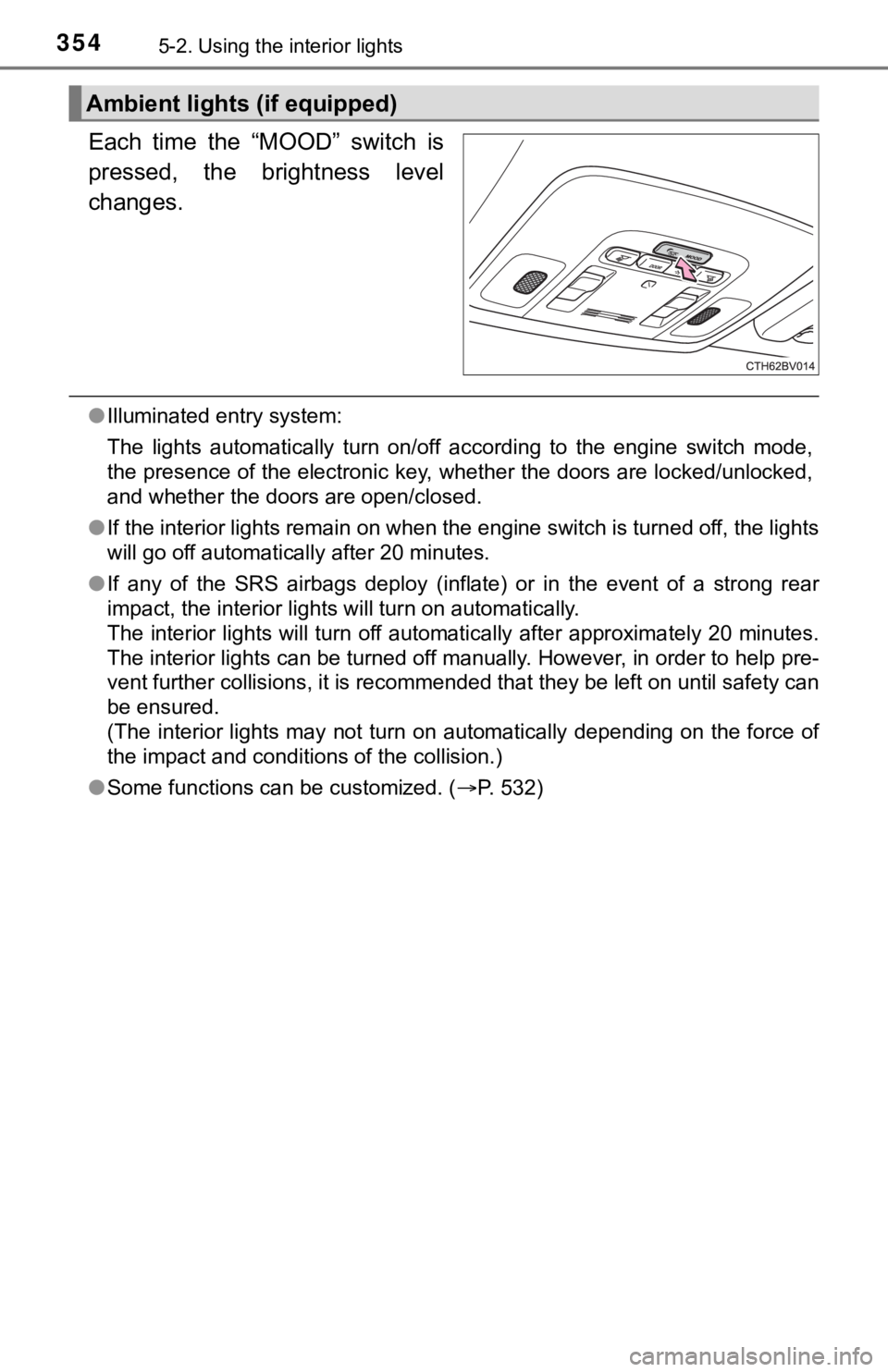
Each time the “MOOD” switch is
pressed, the brightness level
changes.
●Illuminated entry system:
The lights automatically turn on/off according to the engine switch mode,
the presence of the electronic key, whether the doors are locke d/unlocked,
and whether the doors are open/closed.
● If the interior lights remain on when the engine switch is turned off, the lights
will go off automatically after 20 minutes.
● If any of the SRS airbags deploy (inflate) or in the event of a strong rear
impact, the interior lights will turn on automatically.
The interior lights will turn off automatically after approxima tely 20 minutes.
The interior lights can be turned off manually. However, in ord er to help pre-
vent further collisions, it is recommended that they be left on until safety can
be ensured.
(The interior lights may not turn on automatically depending on the force of
the impact and conditions of the collision.)
● Some functions can be customized. ( P. 532)
Ambient lights (if equipped)
Page 362 of 572
3625-4. Other interior features
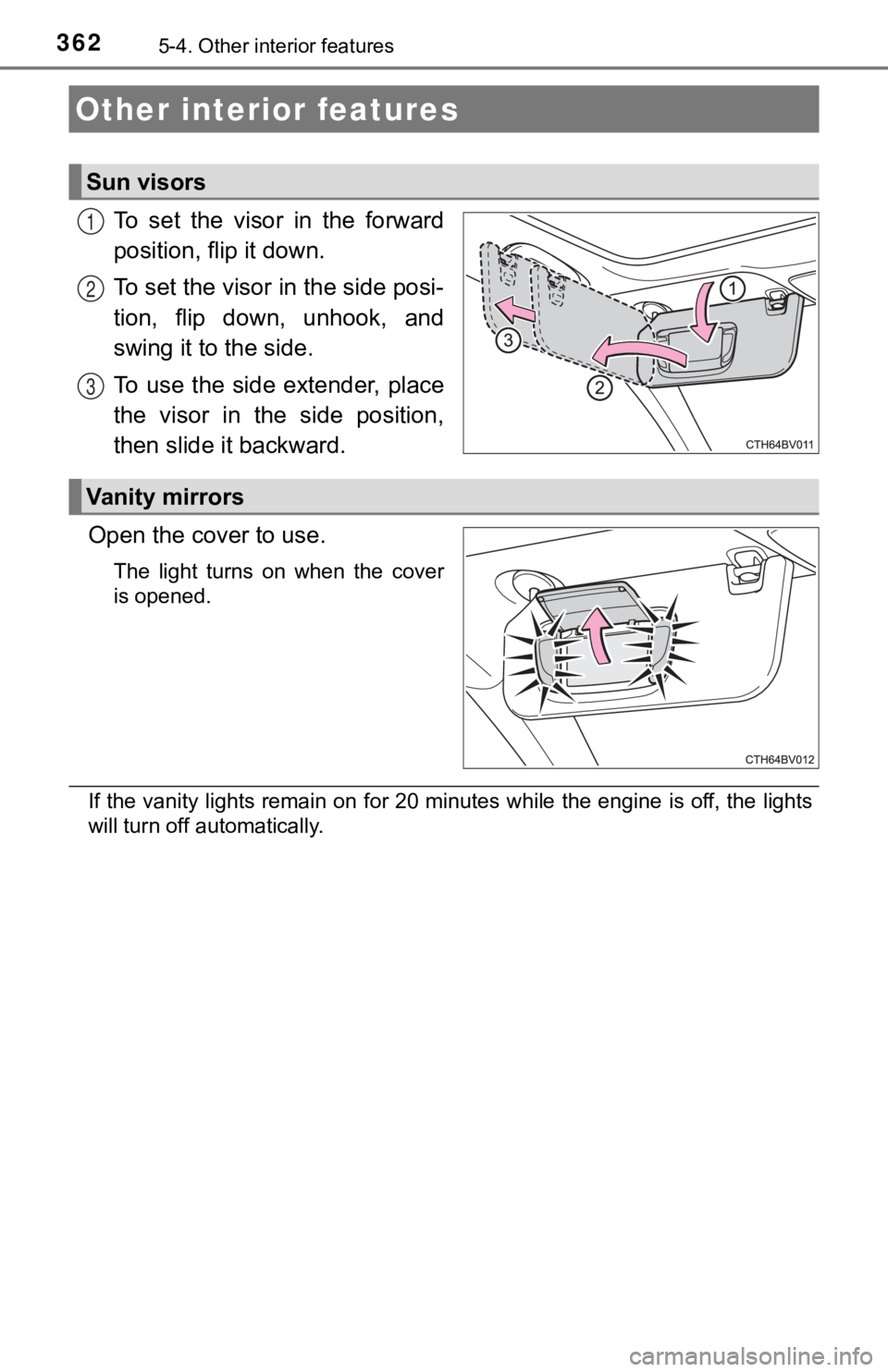
To set the visor in the forward
position, flip it down.
To set the visor in the side posi-
tion, flip down, unhook, and
swing it to the side.
To use the side extender, place
the visor in the side position,
then slide it backward.
Open the cover to use.
The light turns on when the cover
is opened.
If the vanity lights remain on for 20 minutes while the engine is off, the lights
will turn off automatically.
Other interior features
Sun visors
1
2
3
Vanity mirrors
Page 368 of 572
3685-4. Other interior features
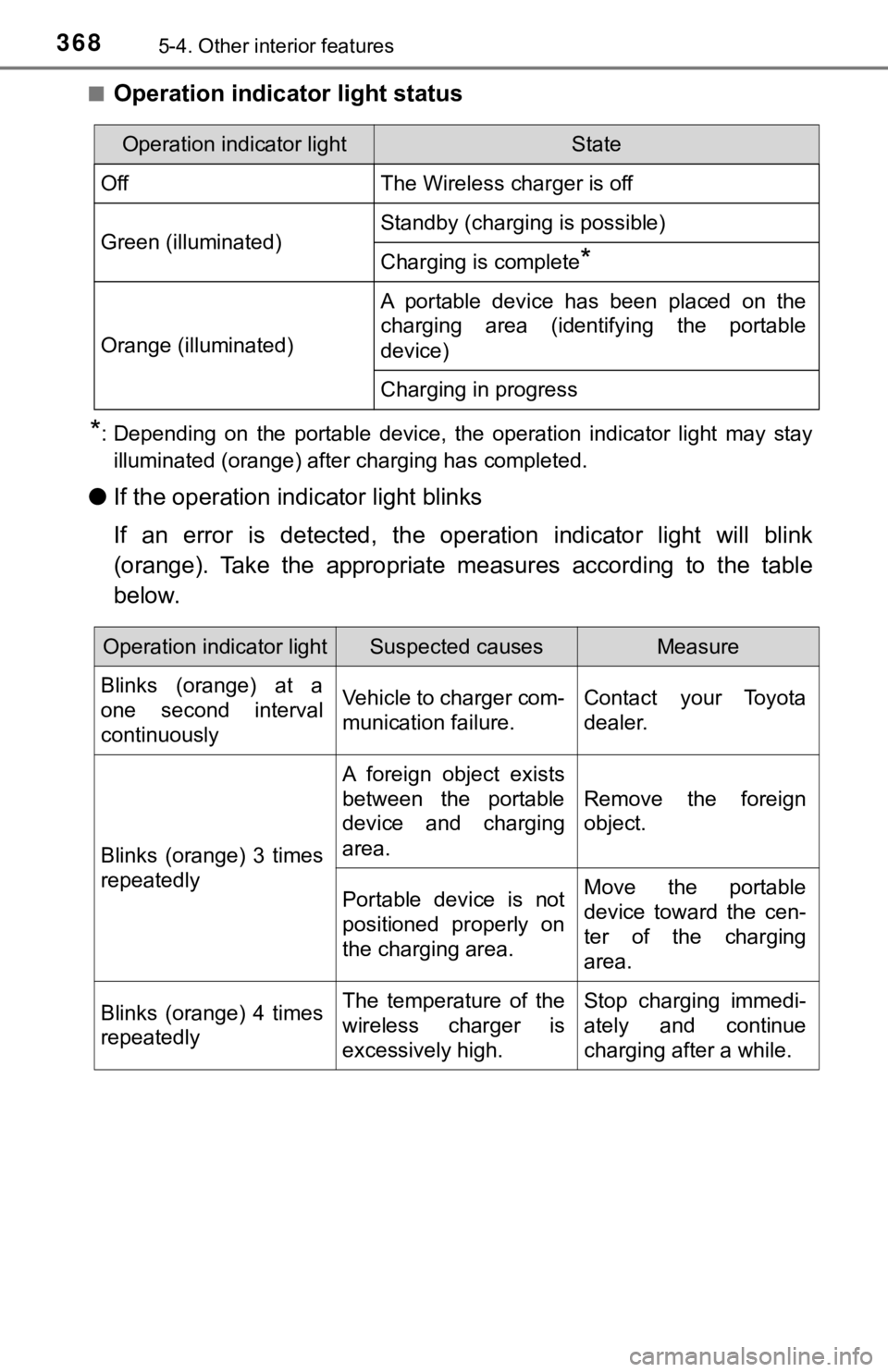
■Operation indicator light status
*: Depending on the portable device, the operation indicator light may stay
illuminated (orange) after charging has completed.
● If the operation indi cator light blinks
If an error is detected, the operation indicator light will bli nk
(orange). Take the appropriate measures according to the table
below.
Operation indicator lightState
OffThe Wireless charger is off
Green (illuminated)Standby (charging is possible)
Charging is complete*
Orange (illuminated)
A portable device has been placed on the
charging area (identifying the portable
device)
Charging in progress
Operation indicator lightSuspected causesMeasure
Blinks (orange) at a
one second interval
continuously Vehicle to charger com-
munication failure.
Contact your Toyota
dealer.
Blinks (orange) 3 times
repeatedly A foreign object exists
between the portable
device and charging
area.
Remove the foreign
object.
Portable device is not
positioned properly on
the charging area. Move the portable
device toward the cen-
ter of the charging
area.
Blinks (orange) 4 times
repeatedly The temperature of the
wireless charger is
excessively high.Stop charging immedi-
ately and continue
charging after a while.
Page 388 of 572

3886-1. Maintenance and care
NOTICE
■To prevent paint deterioration an d corrosion on the body and compo-
nents (aluminum wheels, etc.)
● Wash the vehicle immediately in the following cases:
• After driving near the sea coast
• After driving on salted roads
• If coal tar or tree sap is present on the paint surface
• If dead insects, insect droppings or bird droppings are present on the
paint surface
• After driving in an area contaminated with soot, oily smoke, mine dust,
iron powder or chemical substances
• If the vehicle becomes heavily soiled with dust or mud
• If liquids such as benzene and gasoline are spilled on the pai nt surface
● If the paint is chipped or scratched, have it repaired immediately.
● To prevent the wheels from corroding, remove any dirt and store in a place
with low humidity when storing the wheels.
■ Cleaning the exterior lights
● Wash carefully. Do not use organic substances or scrub with a h ard brush.
This may damage the surfaces of the lights.
● Do not apply wax to the surfaces of the lights.
Wax may cause damage to the lenses.
■ When using a high pressure car wash
Do not bring the nozzle tip close to boots (rubber or resin manufactured
cover), connectors or the following parts. The parts may be damaged if they
come into contact with high-pressure water.
• Traction related parts
• Steering parts
• Suspension parts
• Brake parts.
● Keep the cleaning nozzle at least 11.9 in. (30 cm) away from th e vehicle
body. Otherwise resin section, such as moldings and bumpers, may be
deformed and damaged. Also, do not continuously hold the nozzle in the
same place.
● Do not spray the lower part of the windshield continuously. If water enters
the air conditioning system intake located near the lower part of the wind-
shield, the air conditioning system may not operate correctly.
● Do not wash the underside of the vehicle using a high pressure car
washer.
Page 395 of 572
3956-2. Maintenance
6
Maintenance and care
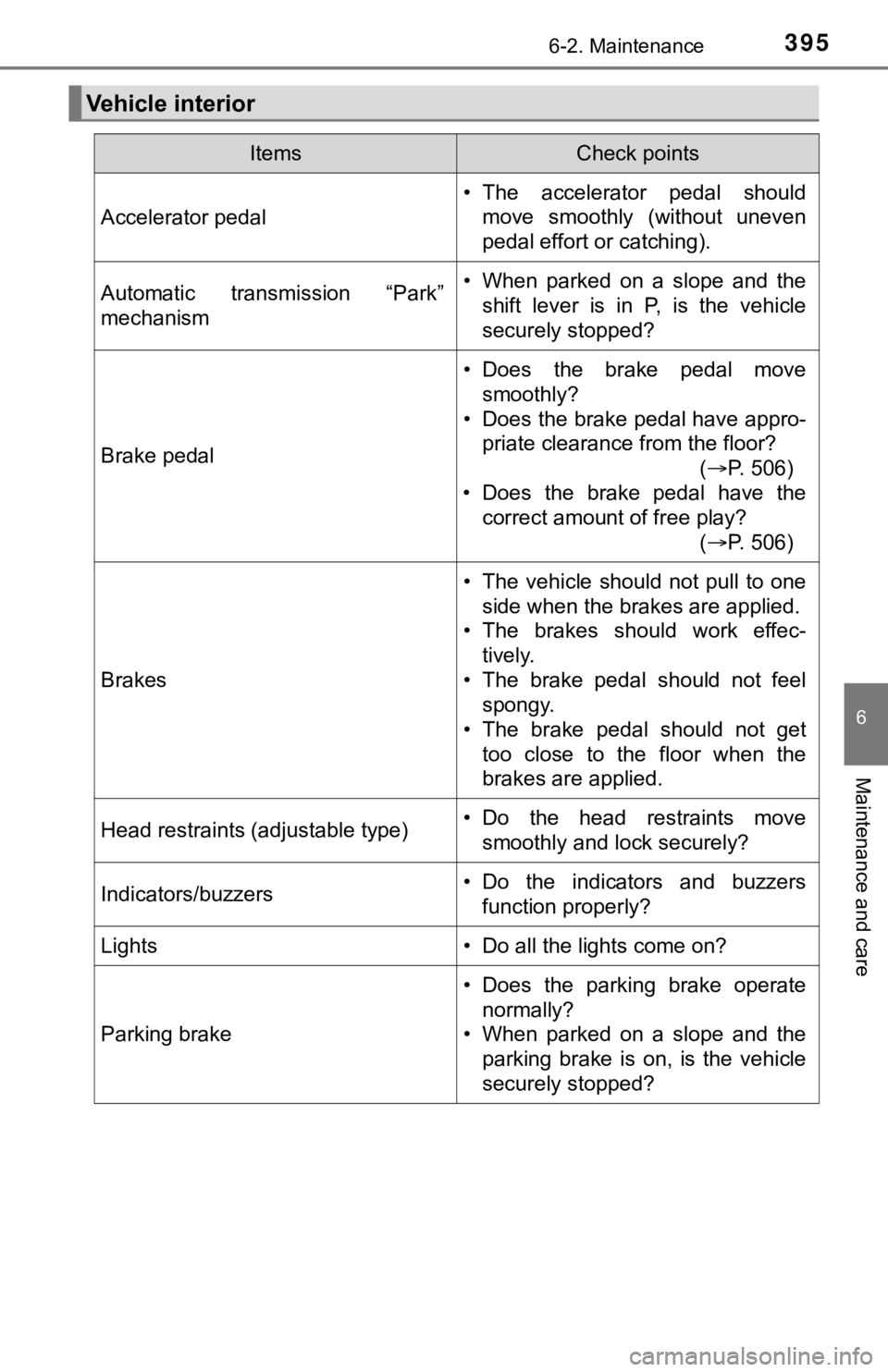
Vehicle interior
ItemsCheck points
Accelerator pedal
• The accelerator pedal shouldmove smoothly (without uneven
pedal effort or catching).
Automatic transmission “Park”
mechanism• When parked on a slope and theshift lever is in P, is the vehicle
securely stopped?
Brake pedal
• Does the brake pedal move
smoothly?
• Does the brake pedal have appro- priate clearance from the floor?
(P. 506)
• Does the brake pedal have the correct amount of free play?
(P. 506)
Brakes
• The vehicle should not pull to one
side when the brakes are applied.
• The brakes should work effec- tively.
• The brake pedal should not feel spongy.
• The brake pedal should not get
too close to the floor when the
brakes are applied.
Head restraints (adjustable type)• Do the head restraints movesmoothly and lock securely?
Indicators/buzzers• Do the indicators and buzzersfunction properly?
Lights • Do all the lights come on?
Parking brake
• Does the parking brake operate
normally?
• When parked on a slope and the parking brake is on, is the vehicle
securely stopped?
Page 417 of 572
4176-3. Do-it-yourself maintenance
6
Maintenance and care
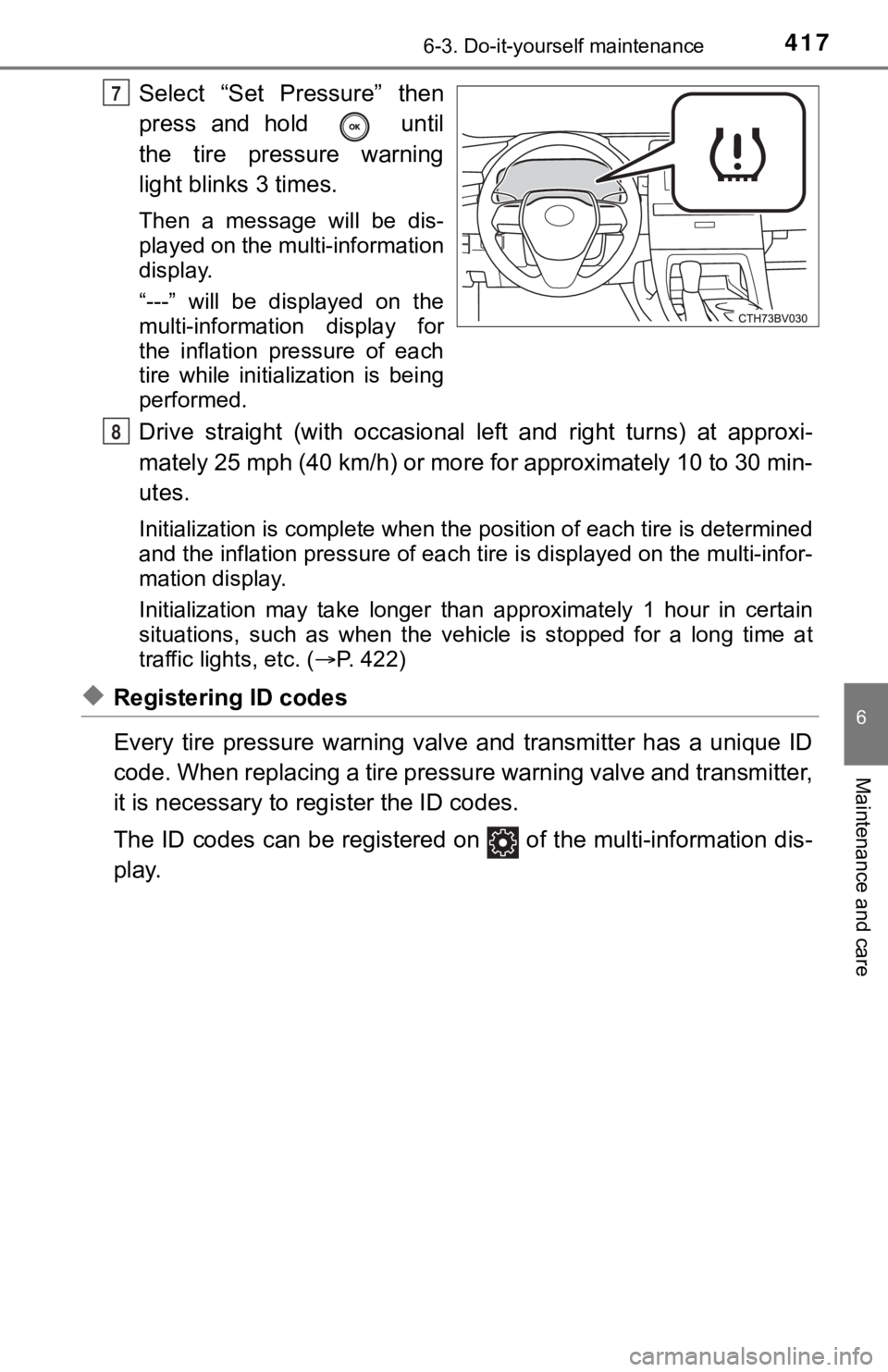
Select “Set Pressure” then
press and hold until
the tire pressure warning
light blinks 3 times.
Then a message will be dis-
played on the multi-information
display.
“---” will be displayed on the
multi-information display for
the inflation pressure of each
tire while initialization is being
performed.
Drive straight (with occasional left and right turns) at approxi-
mately 25 mph (40 km/h) or more for approximately 10 to 30 min-
utes.
Initialization is complete when the position of each tire is determined
and the inflation pressure of ea ch tire is displayed on the multi-infor-
mation display.
Initialization may ta ke longer than approximately 1 hour in cer tain
situations, such as when the veh icle is stopped for a long time at
traffic lights, etc. ( P. 422)
◆Registering ID codes
Every tire pressure warning valve and transmitter has a unique ID
code. When replacing a tire pressure warning valve and transmit ter,
it is necessary to reg ister the ID codes.
The ID codes can be registered on of the multi-information dis -
play.
7
8