key battery TOYOTA AVALON HYBRID 2019 (in English) User Guide
[x] Cancel search | Manufacturer: TOYOTA, Model Year: 2019, Model line: AVALON HYBRID, Model: TOYOTA AVALON HYBRID 2019Pages: 556, PDF Size: 9.73 MB
Page 192 of 556

1924-2. Driving procedures
■Auto power off function
If the vehicle is left in ACCESSORY mode for more than 20 minut es or ON
mode (with the hybrid system not operating) for more than an ho ur with the
shift lever in P, the power switch will automatically turn off. However, this func-
tion cannot entirely prevent 12-volt battery discharge. Do not leave the vehi-
cle with the power switch in ACCESSORY or ON mode for long peri ods of
time when the hybrid system is not operating.
■ Sounds and vibrations sp ecific to a hybrid vehicle
P. 72
■ Electronic key battery depletion
P. 130
■ When the ambient temperature is low, such as during winter driv ing con-
ditions
When starting the hybrid system, the flashing time of the “READ Y” indicator
may be long. Leave the vehicle as it is until the “READY” indic ator is steady
on, as steady means the vehicle is able to move.
■ Conditions affecting operation
P. 145
■ Notes for the entry function
P. 146
■ If the hybrid system does not start
●The immobilizer system may not have been deactivated. ( P. 80)
Contact your Toyota dealer.
● Check that the shift lever is securely set in P. The hybrid sys tem may not
start if the shift lever is displaced out of P.
● If a message related to start-up is shown on the multi-informat ion display,
read the message and follow the instructions.
■ Steering lock
After turning the power switch off and opening and closing the doors, the
steering wheel will be locked due to the steering lock function . Operating the
power switch again automatically cancels the steering lock.
Page 193 of 556
1934-2. Driving procedures
4
Driving
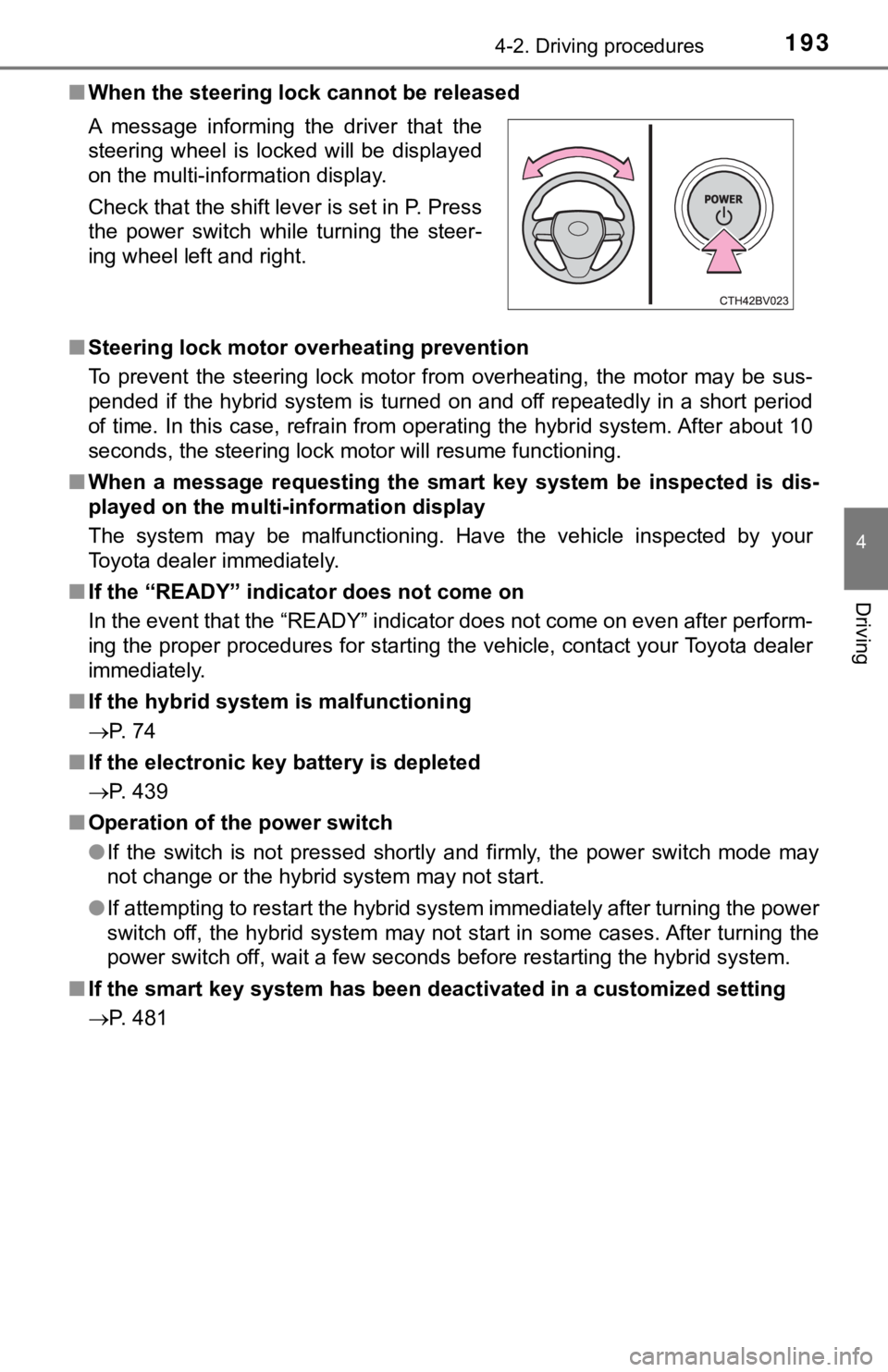
■When the steering lock cannot be released
■ Steering lock motor overheating prevention
To prevent the steering lock motor from overheating, the motor may be sus-
pended if the hybrid system is turned on and off repeatedly in a short period
of time. In this case, refrain from operating the hybrid system . After about 10
seconds, the steering lock motor will resume functioning.
■ When a message requesting the smart key system be inspected is dis-
played on the multi-information display
The system may be malfunctioning. Have the vehicle inspected by your
Toyota dealer immediately.
■ If the “READY” indicator does not come on
In the event that the “READY” indicator does not come on even a fter perform-
ing the proper procedures for starting the vehicle, contact you r Toyota dealer
immediately.
■ If the hybrid system is malfunctioning
P. 74
■ If the electronic key battery is depleted
P. 439
■ Operation of the power switch
●If the switch is not pressed shortly and firmly, the power swit ch mode may
not change or the hybrid system may not start.
● If attempting to restart the hybrid system immediately after tu rning the power
switch off, the hybrid system may not start in some cases. Afte r turning the
power switch off, wait a few seconds before restarting the hybrid system.
■ If the smart key system has been d eactivated in a customized setting
P. 481 A message informing the driver that the
steering wheel is locked will be displayed
on the multi-information display.
Check that the shift lever is set in P. Press
the power switch while turning the steer-
ing wheel left and right.
Page 215 of 556
2154-3. Operating the lights and wipers
4
Driving
■12-volt battery-saving function
In the following conditions, the remaining lights will go off a utomatically after
20 minutes in order to prevent the 12-volt battery from being discharged:
● The headlights and/or tail lights are on.
● The power switch is in ACCESSORY mode or turned off.
This function will be canceled in any of the following situatio ns:
● When the power switch is turned to ON mode.
● When the light switch is operated.
● When a door or the trunk is opened or closed.
■ Welcome lighting
If the headlight switch is turned to and the surrounding area is dark,
unlocking the doors using the smart key system or wireless remo te control
will turn the parking lights and tail lights on automatically.
■ Customization
Some functions can be customized. ( P. 522)
NOTICE
■To prevent 12-volt b attery discharge
Do not leave the lights on longer than necessary when the hybri d system is
off.
Page 385 of 556

385
6Maintenance and care
6-1. Maintenance and careCleaning and protecting the vehicle exterior .......... 386
Cleaning and protecting the vehicle interior ........... 389
6-2. Maintenance Maintenance requirements ................... 392
General maintenance........ 394
Emission inspection and maintenance (I/M)
programs......................... 398
6-3. Do-it-yourself maintenance
Do-it-yourself service precautions ..................... 399
Hood ................................. 401
Positioning a floor jack ......................... 402
Engine compartment ......... 403
12-volt battery ................... 411
Tires .................................. 415
Tire inflation pressure ....... 427
Wheels .............................. 430
Air conditioning filter.......... 432
Cleaning the hybrid battery (traction battery)
air intake vent and
filter ................................. 434
Electronic key battery........ 439
Checking and replacing fuses ................ 441
Light bulbs......................... 444
Page 387 of 556
3876-1. Maintenance and care
6
Maintenance and care
■When using a car wash
If the door handle becomes wet while the electronic key is within the effective
range, the door may lock and unlock repeatedly. In that case, f ollow the fol-
lowing correction procedures to wash the vehicle:
● Place the key in a position 6 ft. (2 m) or more separate from t he vehicle
while the vehicle is being washed. (Take care to ensure that th e key is not
stolen.)
● Set the electronic key to battery-saving mode to disable the sm art key sys-
tem. ( P. 144)
■ Aluminum wheels
●Remove any dirt immediately by using a neutral detergent.
● Wash detergent off with water immediately after use.
● To protect the paint from damage, make sure to observe the following pre-
cautions.
• Do not use acidic, alkaline or abrasive detergent
• Do not use hard brushes
• Do not use detergent on the wheels when they are hot, such as after driv-
ing or parking in hot weather
■ Bumpers
Do not scrub with abrasive cleaners.
WARNING
■When washing the vehicle
Do not apply water to the inside of the engine compartment. Doing so may
cause the electrical components, etc. to catch fire.
■ Precautions regarding the exhaust pipes
Exhaust gasses cause the exhaust pipes to become quite hot.
When washing the vehicle, be careful not to touch the pipes unt il it has
cooled sufficiently, as touching a hot exhaust pipes can cause burns.
■ Precaution regarding the rear b umper with Blind Spot Monitor
If the paint of the rear bumper is chipped or scratched, the sy stem may mal-
function. If this occurs, avoid using the system and consult yo ur Toyota
dealer.
Page 412 of 556
4126-3. Do-it-yourself maintenance
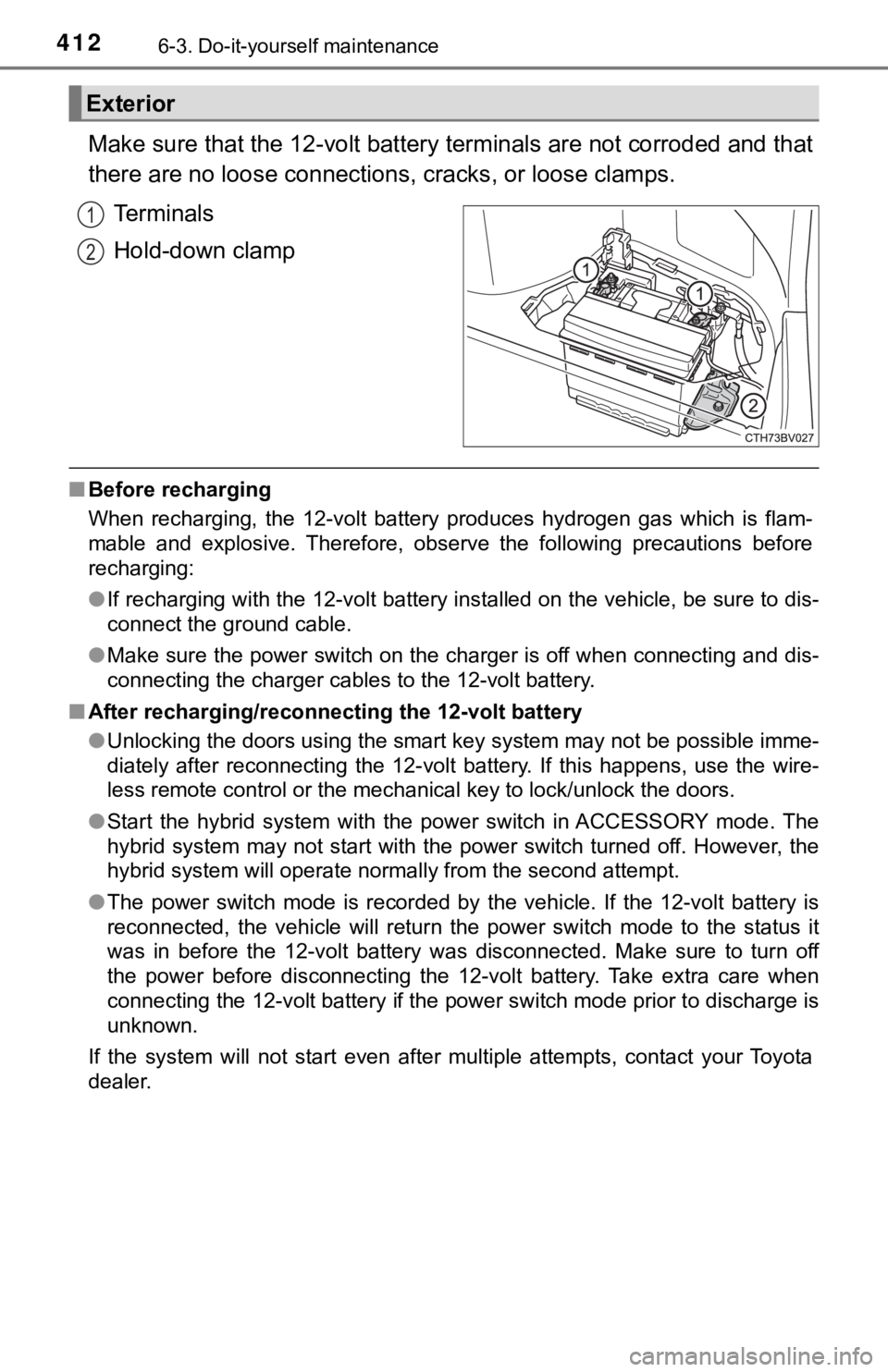
Make sure that the 12-volt battery terminals are not corroded and that
there are no loose connections, cracks, or loose clamps.
Terminals
Hold-down clamp
■ Before recharging
When recharging, the 12-volt battery produces hydrogen gas which is flam-
mable and explosive. Therefore, observe the following precautio ns before
recharging:
● If recharging with the 12-volt battery installed on the vehicle , be sure to dis-
connect the ground cable.
● Make sure the power switch on the charger is off when connectin g and dis-
connecting the charger cables to the 12-volt battery.
■ After recharging/reconnecting the 12-volt battery
●Unlocking the doors using the smart key system may not be possi ble imme-
diately after reconnecting the 12-volt battery. If this happens, use the wire-
less remote control or the mechanical key to lock/unlock the do ors.
● Start the hybrid system with the power switch in ACCESSORY mode . The
hybrid system may not start with the power switch turned off. H owever, the
hybrid system will operate normally from the second attempt.
● The power switch mode is recorded by the vehicle. If the 12-vol t battery is
reconnected, the vehicle will return the power switch mode to t he status it
was in before the 12-volt battery was disconnected. Make sure t o turn off
the power before disconnecting the 12-volt battery. Take extra care when
connecting the 12-volt battery if the power switch mode prior t o discharge is
unknown.
If the system will not start even after multiple attempts, contact your Toyota
dealer.
Exterior
1
2
Page 439 of 556
4396-3. Do-it-yourself maintenance
6
Maintenance and care
●Flathead screwdriver
● Small flathead screwdriver
● Lithium battery CR2032
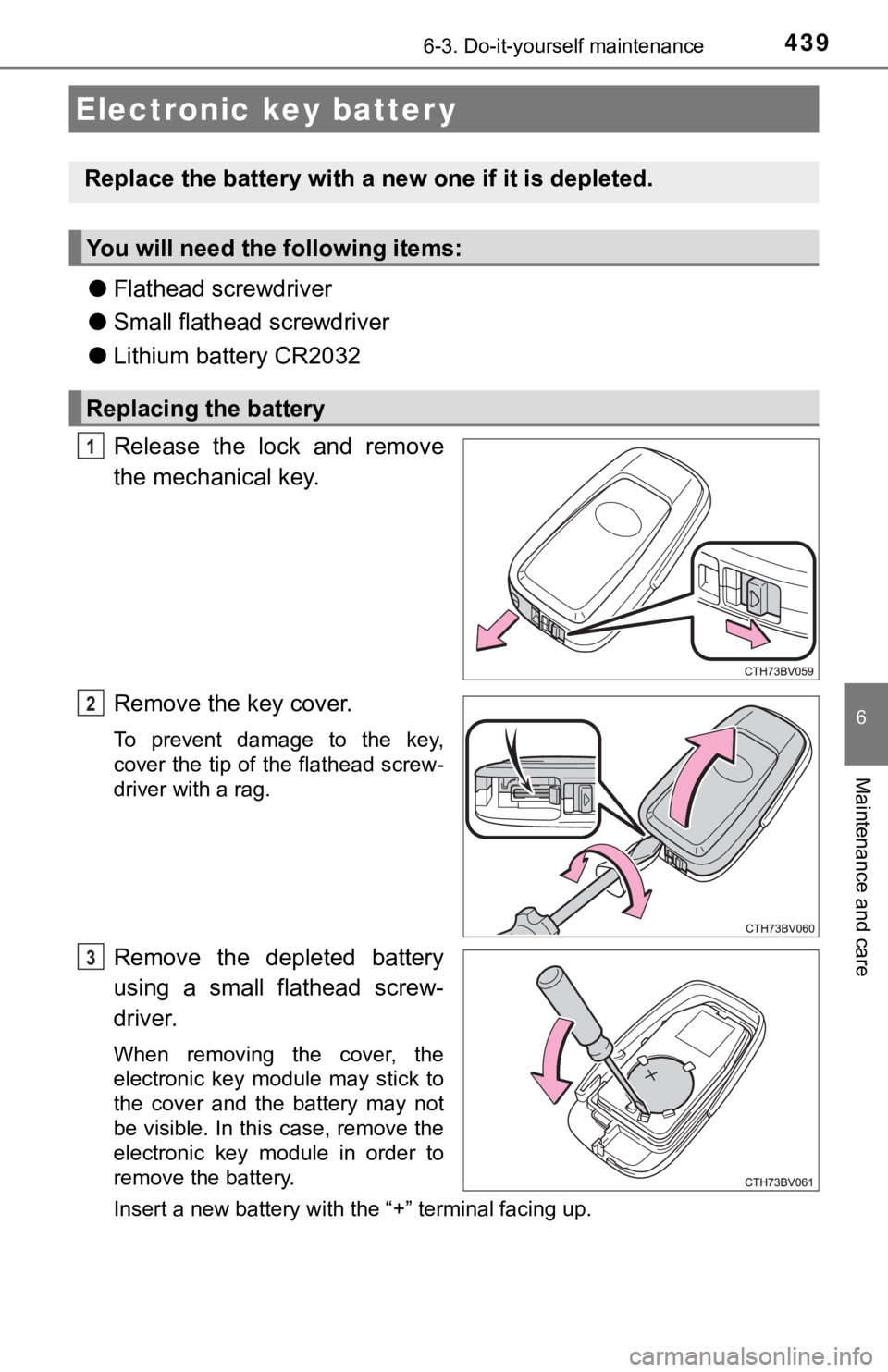
Release the lock and remove
the mechanical key.
Remove the key cover.
To prevent damage to the key,
cover the tip of the flathead screw-
driver with a rag.
Remove the depleted battery
using a small flathead screw-
driver.
When removing the cover, the
electronic key module may stick to
the cover and the battery may not
be visible. In this case, remove the
electronic key module in order to
remove the battery.
Insert a new battery with the “+” terminal facing up.
Electronic key batter y
Replace the battery with a n ew one if it is depleted.
You will need the following items:
Replacing the battery
1
2
3
Page 440 of 556
4406-3. Do-it-yourself maintenance
When installing the key cover and mechanical key, install by con-
ducting and with the directions reversed.
Operate the or switch and check that the doors can
be locked/unlocked.
■ When replacing the key battery
Be careful not to lose the battery or any other small parts.
■ Use a CR2032 lithium battery
●Batteries can be purchased at your Toyota dealer, local electri cal appliance
shops or camera stores.
● Replace only with the same or equivalent type recommended by th e manu-
facturer.
● Dispose of used batteries according to local laws.
■ If the key battery is depleted
The following symptoms may occur:
●The smart key system and wireless remote control will not funct ion properly.
● The operational range will be reduced.
WARNING
■Removed battery a nd other parts
These parts are small and if swallowed by a child, they can cau se choking.
Keep away from children. Failure to do so could result in death or serious
injury.
NOTICE
■ For normal operation after replacing the battery
Observe the following precautions to prevent accidents:
● Always work with dry hands.
Moisture may cause the battery to rust.
● Do not touch or move any other component inside the remote cont rol.
● Do not bend either of the battery terminals.
4
21
5
Page 445 of 556

445
7When trouble arises
7-1. Essential informationEmergency flashers .......... 446
If your vehicle has to be stopped in an
emergency ...................... 447
7-2. Steps to take in an emergency
If your vehicle needs to be towed ..................... 448
If you think something is wrong .......................... 451
If a warning light turns on or a warning buzzer
sounds ............................ 452
If a warning message is displayed ..................... 462
If you have a flat tire.......... 468
If the hybrid system will not start ..................... 479
If the electronic key does not operate
properly ........................... 481
If the 12-volt battery is discharged ................... 484
If your vehicle overheats ........................ 491
If the vehicle becomes stuck ................ 495
Page 464 of 556

4647-2. Steps to take in an emergency
■Warning messages
The warning messages explained below may differ from the actual messages
according to operation conditions and vehicle specifications.
■ System warning lights
The master warning light does not come on or flash in the following cases.
Instead, a separate system warning light will come on along wit h a message
shown on the multi-information display.
● Malfunction in the ABS
The ABS warning light comes on. ( P. 453)
● Malfunction in the brake system
The brake system warning light (yellow) comes on. ( P. 452)
● Malfunction in the tire pressure warning system
The tire pressure warning light comes on. ( P. 455)
● Remaining fuel level is low
The low fuel level warning light comes on. ( P. 455)
■ If a message instructing to refer to the Owner’s Manual is disp layed
● If the following messages are shown, there may be a malfunction .
Immediately stop the vehicle in a safe place and contact your T oyota dealer.
Continuing to drive the vehicle may be dangerous.
• “Low Braking Power Stop in a Safe Place See Owner’s Manual”
• “Oil Pressure Low Stop in a Safe Place See Owner’s Manual”
• “Charging System Malfunction Stop in a Safe Place See Owner’s Man-
ual”
● If the following message is shown, there may be a malfunction.
Immediately have the vehicle inspected by your Toyota dealer.
• “Hybrid System Malfunction”
• “Check Engine”
• “Hybrid Battery System Malfunction”
• “Accelerator System Malfunction”
• “Smart Key System Malfunction”
● If “Engine Coolant Temp High Stop in a Safe Place See Owner’s Manual” is
displayed, follow the instructions accordingly. ( P. 491)
● If “Maintenance Required for Traction Battery Cooling Parts See Owner’s
Manual” is displayed, follow the instructions accordingly. ( P. 434)