window TOYOTA AVALON HYBRID 2019 (in English) Owner's Guide
[x] Cancel search | Manufacturer: TOYOTA, Model Year: 2019, Model line: AVALON HYBRID, Model: TOYOTA AVALON HYBRID 2019Pages: 556, PDF Size: 9.73 MB
Page 333 of 556
3335-1. Using the air conditioning system and defogger
5
Interior features
Individual mode (indicator off):
The temperature for the driver’s and front passenger’s side can be
adjusted separately.
■
Fan speed setting
To adjust the fan speed, press to increase the fan speed
and to decrease the fan speed.
Press to turn the fan off.
■
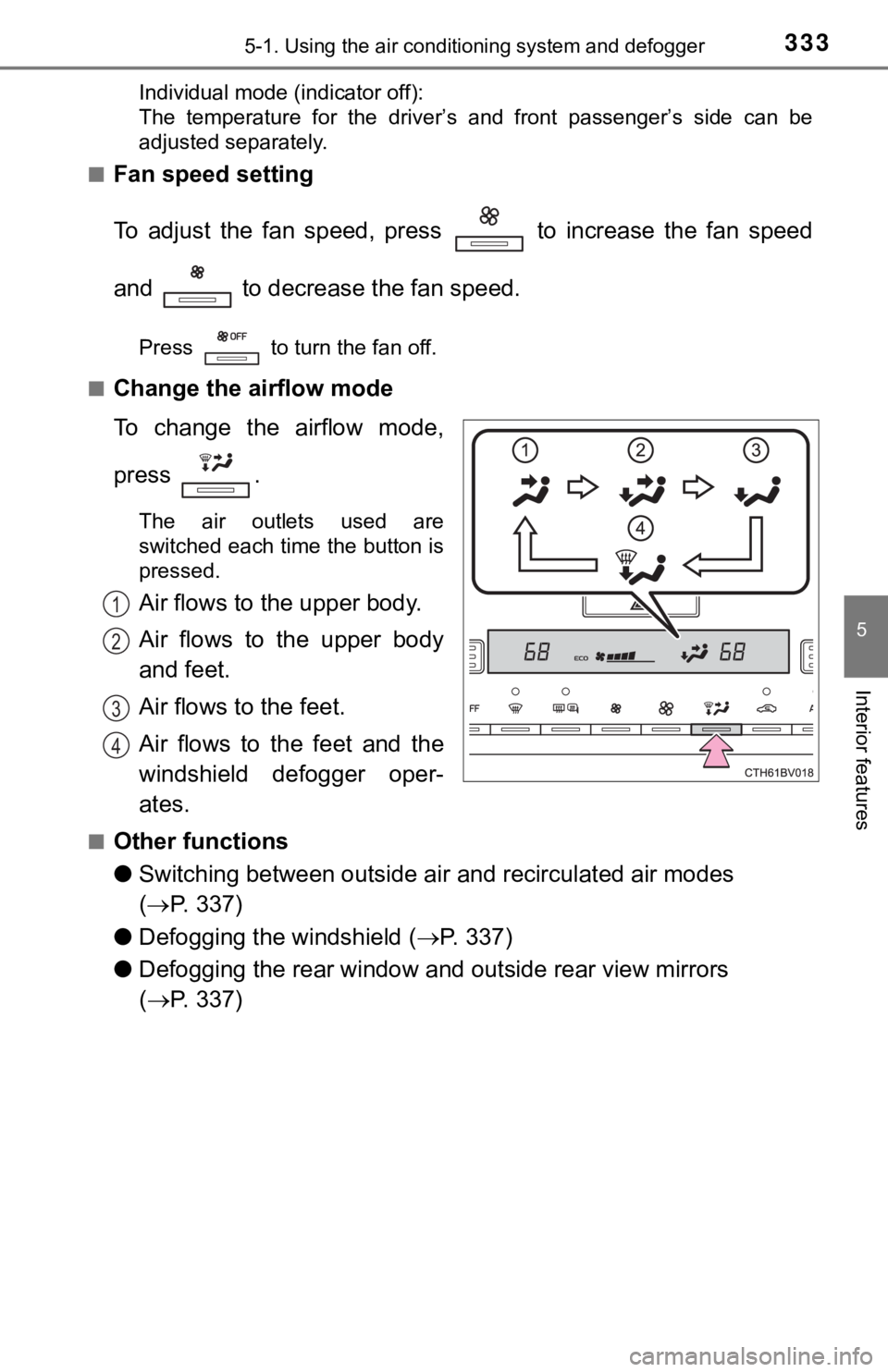
Change the airflow mode
To change the airflow mode,
press .
The air outlets used are
switched each time the button is
pressed.
Air flows to the upper body.
Air flows to the upper body
and feet.
Air flows to the feet.
Air flows to the feet and the
windshield defogger oper-
ates.
■Other functions
● Switching between outside air and recirculated air modes
( P. 337)
● Defogging the windshield ( P. 3 3 7 )
● Defogging the rear window and outside rear view mirrors
( P. 337)
1
2
3
4
Page 337 of 556
3375-1. Using the air conditioning system and defogger
5
Interior features
■Switching between outside air and recirculated air modes
Press .
The mode switches between outside air mode (indicator off) and recir-
culated air mode (indicator on) each time is pressed.
■
Defogging the windshield
Defoggers are used to defog the windshield and front side win-
dows.
Press .
The dehumidification function operates and fan speed increases.
Set the outside/recirculated air mode button to the outside air mode if
the recirculated air mode is used. (It may switch automatically .)
To defog the windshield and the side windows early, turn the ai r flow and
temperature up.
To return to the previous mode, press again when the windshiel d
is defogged.
■
Defogging the rear window and outside rear view mirrors
Defoggers are used to defog the rear window, and to remove rain -
drops, dew and frost from the outside rear view mirrors.
Press .
The defoggers will automatically turn off after a period of tim e.
Other functions
Page 339 of 556
3395-1. Using the air conditioning system and defogger
5
Interior features
■Using automatic mode
Fan speed is adjusted automatically according to the temperatur e setting and
the ambient conditions.
Therefore, the fan may stop for a while until warm or cool air is ready to flow
immediately after is pressed or is selected.
■ How the system judges if a seat is occupied in S-FLOW mode
The system judges if a passenger is in the vehicle as follows:
• Front passenger seat: The front passenger seat is judged to be occupied when the syst em detects
an object on the front passenger seat, fastening of the front p assenger seat
belt, changing of the set temperature for the front passenger s eat, or the
opening and closing of the front passenger door. (However, when only
opening and closing of the front passenger door is detected, th e system will
judge that the passenger seat is unoccupied after the vehicle s peed
reaches approximately 12 mph (20 km/h) or more.)
• Rear seats (automatic S-FLOW mode only): The rear seats are judged to be occupied when the system detect s the
opening and closing of a rear door.
If a seat is judged to be occupied, the system will retain that judgement for 60
minutes after the power switch is turned off.
■ Changing from automatic S-FLOW mode to manual S-FLOW mode
When the system is operating in automatic S-FLOW mode, if a rea r door is
opened and then closed, S-FLOW mode will be disabled. To enable S-FLOW
mode, select on the air conditioning control screen. (In this case, the
system will operate in manual S-FLOW mode.)
■ Changing from manual S-FLOW mode to automatic S-FLOW mode
Select on the air conditioning control screen to disable S-FLO W
mode (check that indicator is not illuminated).
Turn the power switch off.
Wait for 60 minutes or more and change the power switch to ON m ode.
■ Fogging up of the windows
●The windows will easily fog up when the humidity in the vehicle is high.
Turning or on will dehumidify the air from the outlets and
defog the windshield effectively.
● If you turn or off, the windows may fog up more easily.
● The windows may fog up if the recirculated air mode is used.
1
2
3
Page 386 of 556
3866-1. Maintenance and care
●Working from top to bottom, liberally apply water to the vehicl e
body, wheel wells and underside of the vehicle to remove any di rt
and dust.
● Wash the vehicle body using a sponge or soft cloth, such as a
chamois.
● For hard-to-remove marks, use car wash soap and rinse thoroughl y
with water.
● Wipe away any water.
● Wax the vehicle when the wate rproof coating deteriorates.
If water does not bead on a clean surface, apply wax when the vehicle
body is cool.
■Automatic car washes
●Fold the mirrors before washing the vehicle. Start washing from the front of
the vehicle. Make sure to extend the mirrors before driving.
● Brushes used in automatic car washes may scratch the vehicle su rface and
harm your vehicle's paint.
● Vehicles with a rear spoiler: In certain automatic car washes, the rear spoiler
may interfere with machine operation. This may prevent the vehicle from
being cleaned properly or result in damage to the rear spoiler.
■ High pressure car washes
●Do not allow the nozzles of the car wash to come within close p roximity of
the windows.
● Before using the car wash, check that the fuel filler door on y our vehicle is
closed properly.
Cleaning and prot ecting the vehicle
exterior
Perform the following to protect the vehicle and maintain it in
prime condition:
Page 391 of 556

3916-1. Maintenance and care
6
Maintenance and care
NOTICE
■Cleaning detergents
● Do not use the following types of detergent, as they may discol or the vehi-
cle interior or cause streaks or damage to painted surfaces:
• Areas other than the seats and steering wheel: Organic substan ces
such as benzene or gasoline, alkaline or acidic solutions, dye, and
bleach
• Seats: Alkaline or acidic solutions, such as thinner, benzene, and alco-
hol
• Steering wheel: Organic substances, such as thinner, and clean er that
contains alcohol
● Do not use polish wax or polish cleaner. The instrument panel’s or other
interior part’s painted surface may be damaged.
■ Preventing damage to leather surfaces
Observe the following precautions to avoid damage to and deterioration of
leather surfaces:
● Remove any dust or dirt from leather surfaces immediately.
● Do not expose the vehicle to direct sunlight for extended perio ds of time.
Park the vehicle in the shade, especially during summer.
● Do not place items made of vinyl, plastic, or containing wax on the uphol-
stery, as they may stick to the leather surface if the vehicle interior heats
up significantly.
■ Water on the floor
Do not wash the vehicle floor with water.
Vehicle systems such as the audio system may be damaged if wate r comes
into contact with electrical components such as the audio syste m above or
under the floor of the vehicle. Water may also cause the body to rust.
■ When cleaning the inside of the windshield
Do not allow glass cleaner to contact the lens. Also, do not to uch the lens.
( P. 231)
■ Cleaning the inside of the rear window
● Do not use glass cleaner to clean the rear window, as this may cause
damage to the rear window defogger heater wires or antenna. Use a cloth
dampened with lukewarm water to gently wipe the window clean. Wipe the
window in strokes running parallel to the heater wires or antenna.
● Be careful not to scratch or damage the heater wires or antenna .
Page 422 of 556

4226-3. Do-it-yourself maintenance
■Situations in which the tire pressure warning system may not oper-
ate properly
●In the following situations, the tire pressure warning system m ay not
operate properly.
• If non-genuine Toyota wheels are used.
• If a tire has been replaced with a tire that is not an OE (Ori ginal
Equipment) tire.
• If a tire has been replaced with a tire that is not of the spe cified size.
• If tire chains, e tc. are installed.
• If a window tint that affects r adio wave signals is installed.
• If there is a lot of snow or ice on the vehicle, particularly around the
wheels or wheel housings.
• If the tire inflation pressure is much higher than the specifi ed level.
• If wheels not equipped with tire pressure warning valve and tr ansmit-
ter are used.
• If the ID codes of the tire pre ssure warning valve and transmi tters are
not registered in the tire pressure warning computer.
●Performance may be affected in the following situations.
• When driving near a TV tower, electric power plant, gas statio n, radio
station, large display, airport or other facilit y that generates strong
radio waves or electrical noise
• When carrying a portable radio, cellular phone, cordless phone or
other wireless communication device
If tire position information is not correctly displayed due to the radio
wave conditions, the display ma y be corrected by changing the l ocation
of the vehicle as the radio wa ve conditions may change.
●When the vehicle is stopped, the time taken for the warning to start or
turn off may be longer.
●When the inflation pressure of a tire drops rapidly, for exampl e when a
tire has burst, the warning may not operate.
■Initialization procedure
●Make sure to perform the initialization procedure after adjusti ng the tire
inflation pressure.
Also, make sure the tires are cold before performing the initia lization
procedure or adjusting the tire inflation pressure.
●If the power switch is turned off during initialization, it is not necessary to
restart the initialization procedure from the beginning as it w ill begin
automatically when the power swit ch is turned back to ON mode.
●If initialization has accidentally been started when it is not necessary,
adjust the tire inflation pressu re to the specified level when the tires are
cold and then perform the ini tialization procedure again.
●While the position of each tire is being determined and the inf lation pres-
sures are not being displayed on the multi-information display, if the
inflation pressure of a tire drops, the tire pressure warning l ight will come
on.
Page 481 of 556
4817-2. Steps to take in an emergency
7
When trouble arises
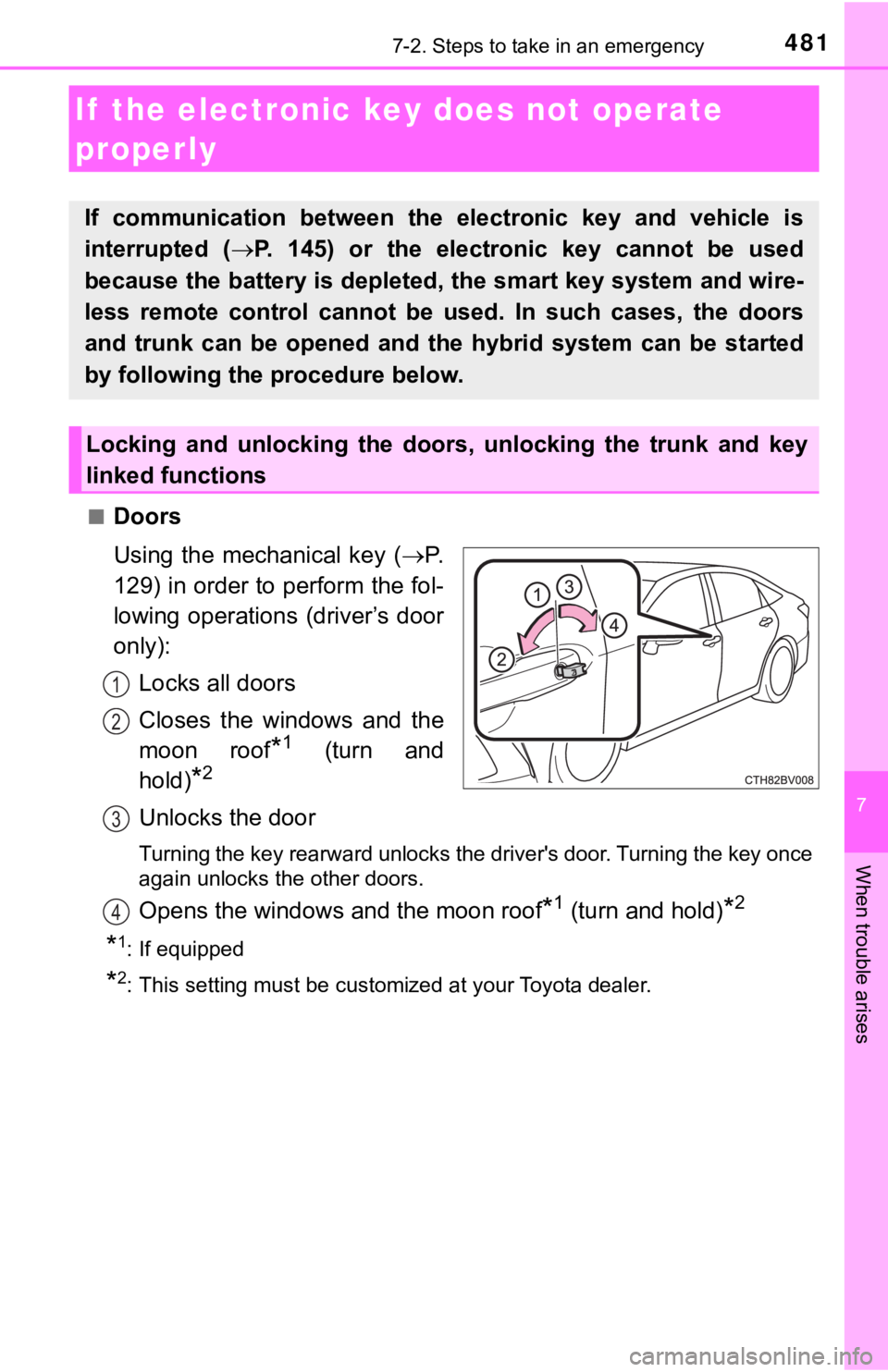
■Doors
Using the mechanical key (P.
129) in order to perform the fol-
lowing operations (driver’s door
only):
Locks all doors
Closes the windows and the
moon roof
*1 (turn and
hold)
*2
Unlocks the door
Turning the key rearward unlocks the driver's door. Turning the key once
again unlocks the other doors.
Opens the windows and the moon roof*1 (turn and hold)*2
*1: If equipped
*2: This setting must be customized at your Toyota dealer.
If the electronic ke y does not operate
properly
If communication between the electronic key and vehicle is
interrupted ( P. 145) or the electronic key cannot be used
because the battery is depleted, the smart key system and wire-
less remote control cannot be used. In such cases, the doors
and trunk can be opened and the hybrid system can be started
by following the procedure below.
Locking and unlocking the doors, unlocking the trunk and key
linked functions
1
2
3
4
Page 483 of 556

4837-2. Steps to take in an emergency
7
When trouble arises
■Stopping the hybrid system
Shift the shift lever to P and press the power switch as you no rmally do when
stopping the hybrid system.
■ Replacing the key battery
As the above procedure is a temporary measure, it is recommende d that the
electronic key battery be replaced immediately when the battery is depleted.
( P. 439)
■ Changing power switch modes
Release the brake pedal and press the power switch in step abo ve.
The hybrid system does not start and modes will be changed each time the
switch is pressed. ( P. 191)
■ When the electronic key does not work properly
●Make sure that the smart key system has not been deactivated in the cus-
tomization setting. If it is off, turn the function on.
(Customizable features: P. 522)
● Check if battery-saving mode is set. If it is set, cancel the f unction.
( P. 144)
WARNING
■ When using the mechanical key and operating the power windows o r
moon roof
Operate the power window or moon roof after checking to make su re that
there is no possibility of any passenger having any of their body parts
caught in the window or moon roof. Also, do not allow children to operate
the mechanical key. It is possible for children and other passe ngers to get
caught in the power window or moon roof.
3
Page 516 of 556
5168-1. Specifications
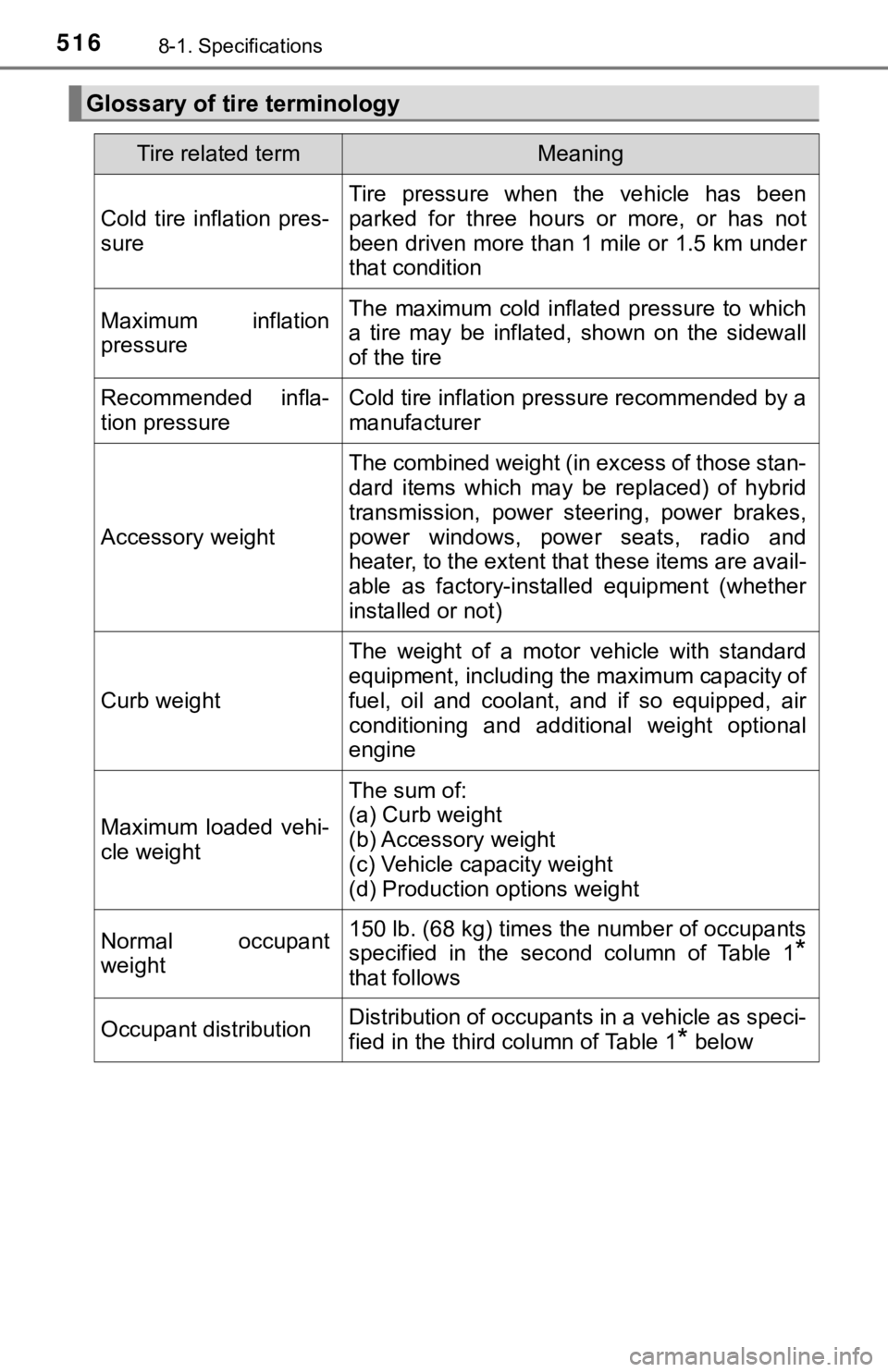
Glossary of tire terminology
Tire related termMeaning
Cold tire inflation pres-
sure
Tire pressure when the vehicle has been
parked for three hours or more, or has not
been driven more than 1 mile or 1.5 km under
that condition
Maximum inflation
pressureThe maximum cold inflated pressure to which
a tire may be inflated, shown on the sidewall
of the tire
Recommended infla-
tion pressureCold tire inflation pressure recommended by a
manufacturer
Accessory weight
The combined weight (in excess of those stan-
dard items which may be replaced) of hybrid
transmission, power steering, power brakes,
power windows, power seats, radio and
heater, to the extent that these items are avail-
able as factory-installed equipment (whether
installed or not)
Curb weight
The weight of a motor vehicle with standard
equipment, including the maximum capacity of
fuel, oil and coolant, and if so equipped, air
conditioning and additional weight optional
engine
Maximum loaded vehi-
cle weight
The sum of:
(a) Curb weight
(b) Accessory weight
(c) Vehicle capacity weight
(d) Production options weight
Normal occupant
weight150 lb. (68 kg) times the number of occupants
specified in the second column of Table 1
*
that follows
Occupant distributionDistribution of occupants in a vehicle as speci-
fied in the third column of Table 1
* below
Page 526 of 556
5268-2. Customization
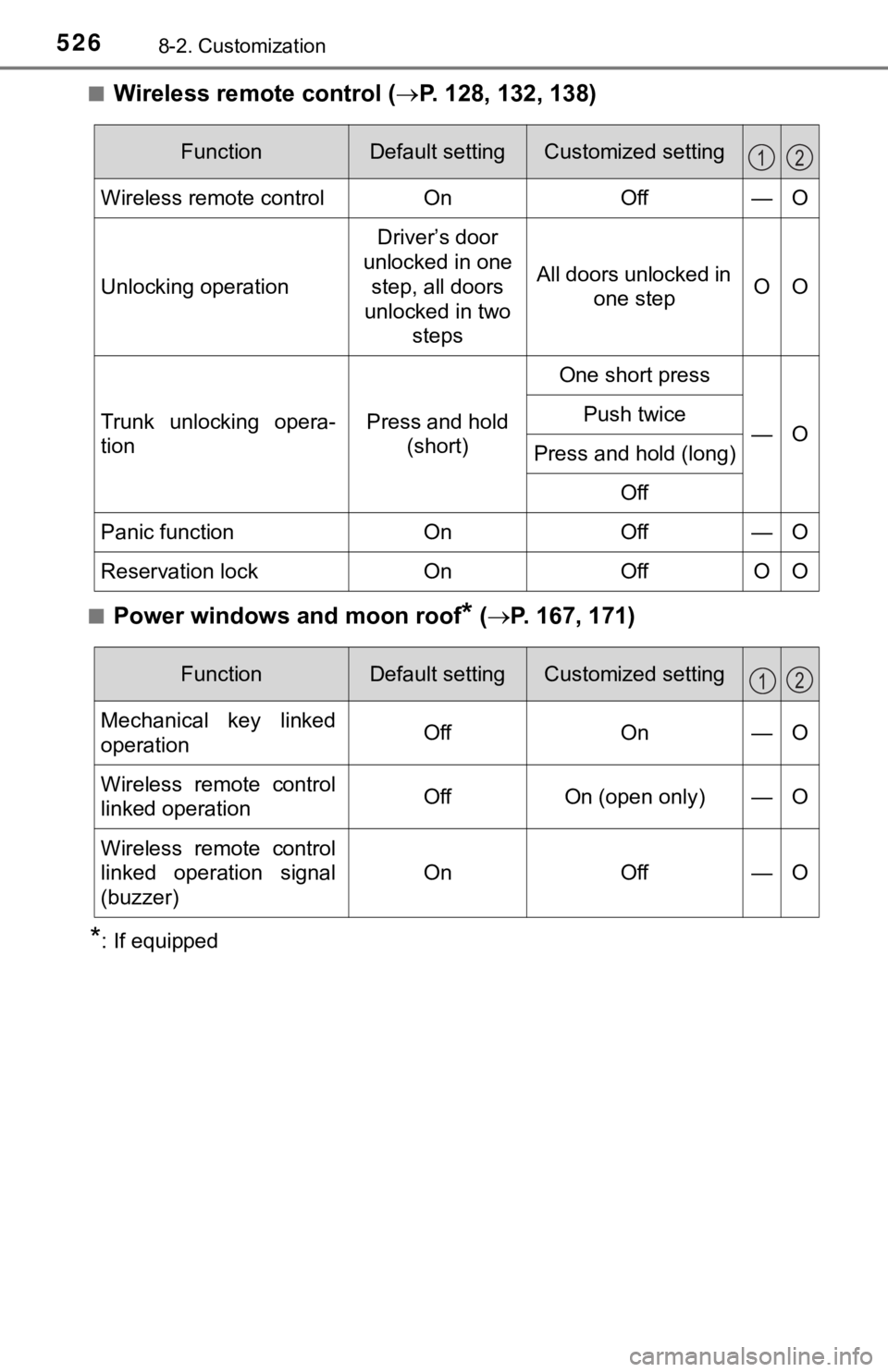
■Wireless remote control (P. 128, 132, 138)
■Power windows and moon roof* ( P. 167, 171)
*: If equipped
FunctionDefault settingCustomized setting
Wireless remote controlOnOff—O
Unlocking operation
Driver’s door
unlocked in one
step, all doors
unlocked in two steps
All doors unlocked in one stepOO
Trunk unlocking opera-
tionPress and hold (short)
One short press
—OPush twice
Press and hold (long)
Off
Panic functionOnOff—O
Reservation lockOnOffOO
12
FunctionDefault settingCustomized setting
Mechanical key linked
operationOffOn—O
Wireless remote control
linked operationOffOn (open only)—O
Wireless remote control
linked operation signal
(buzzer)
OnOff—O
12