lane assist TOYOTA AVALON HYBRID 2019 Owners Manual (in English)
[x] Cancel search | Manufacturer: TOYOTA, Model Year: 2019, Model line: AVALON HYBRID, Model: TOYOTA AVALON HYBRID 2019Pages: 556, PDF Size: 9.73 MB
Page 3 of 556
3
1
9 7 6
5
4
3
2
8
4-2. Driving proceduresPower (ignition) switch ...... 190
EV drive mode................... 196
Hybrid transmission........... 199
Turn signal lever................ 205
Parking brake .................... 206
Brake Hold ........................ 210
4-3. Operating the lights and wipers
Headlight switch ................ 212
Automatic High Beam ....... 216
Windshield wipers and washer ..................... 220
4-4. Refueling Opening the fuel tank cap .......................... 224
4-5. Using the driving support systems
Toyota Safety Sense P ..... 229
PCS (Pre-Collision System) .... 236
LDA (Lane Departure Alert with
steering control) .............. 247
Dynamic radar cruise control with full-speed
range ............................... 258
BSM (Blind Spot Monitor) ........ 271
• BSM function ................ 275
• RCTA function .............. 277
Rear Camera Detection function ........................... 282
Intuitive parking assist ....... 286
Intelligent Clearance Sonar (ICS) ..................... 294
Driving mode select switches .......................... 315
Driving assist systems....... 317 4-6. Driving tips
Hybrid vehicle driving tips ....................... 324
Winter driving tips .............. 327
5-1. Using the air conditioning system
and defogger
Automatic air conditioning system ............................. 332
Heated steering wheel/ seat heaters/
seat ventilators ................ 343
5-2. Using the interior lights Interior lights list................. 346
• Interior light ................... 347
• Personal lights............... 347
• Ambient lights................ 348
5-3. Using the storage features
List of storage features ...... 349
• Glove box ...................... 350
• Console box .................. 350
• Bottle holders ................ 351
• Cup holders ................... 352
• Auxiliary boxes .............. 353
• Open tray ...................... 354
Trunk features ................... 355
5Interior features
Page 96 of 556
962. Instrument cluster
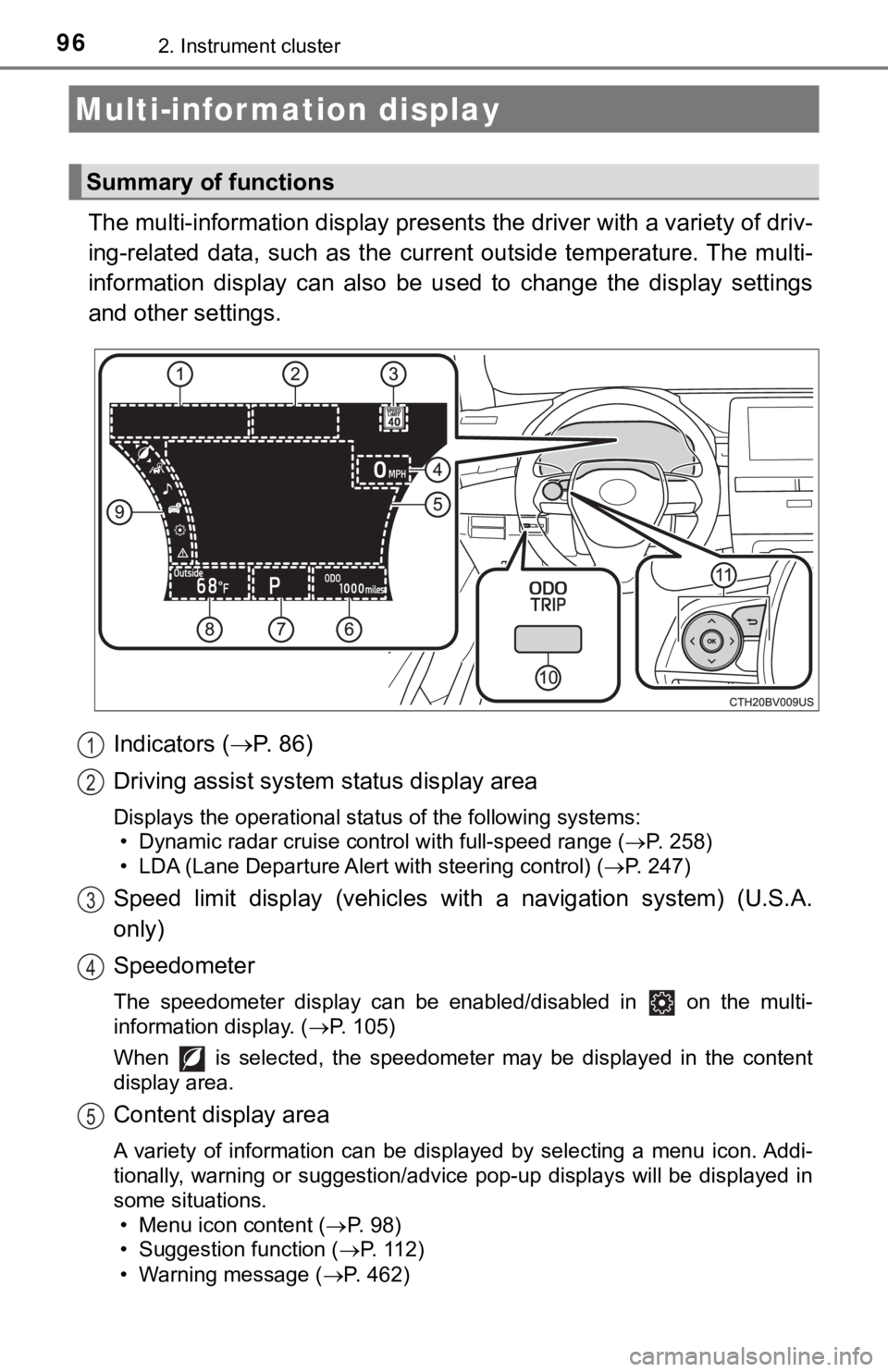
The multi-information display presents the driver with a variety of driv-
ing-related data, such as the cur rent outside temperature. The multi-
information display can also be used to change the display sett ings
and other settings.
Indicators ( P. 86)
Driving assist system status display area
Displays the operational status of the following systems:
• Dynamic radar cruise control with full-speed range ( P. 258)
• LDA (Lane Departure Alert with steering control) ( P. 247)
Speed limit display (vehicles with a navigation system) (U.S.A.
only)
Speedometer
The speedometer display can be enabled/disabled in on the mult i-
information display. ( P. 105)
When is selected, the speedometer may be displayed in the content
display area.
Content display area
A variety of information can be displayed by selecting a menu i con. Addi-
tionally, warning or suggestion/advice pop-up displays will be displayed in
some situations. • Menu icon content ( P. 98)
• Suggestion function ( P. 112)
• Warning message ( P. 462)
Multi-infor mation display
Summary of functions
1
2
3
4
5
Page 98 of 556
982. Instrument cluster
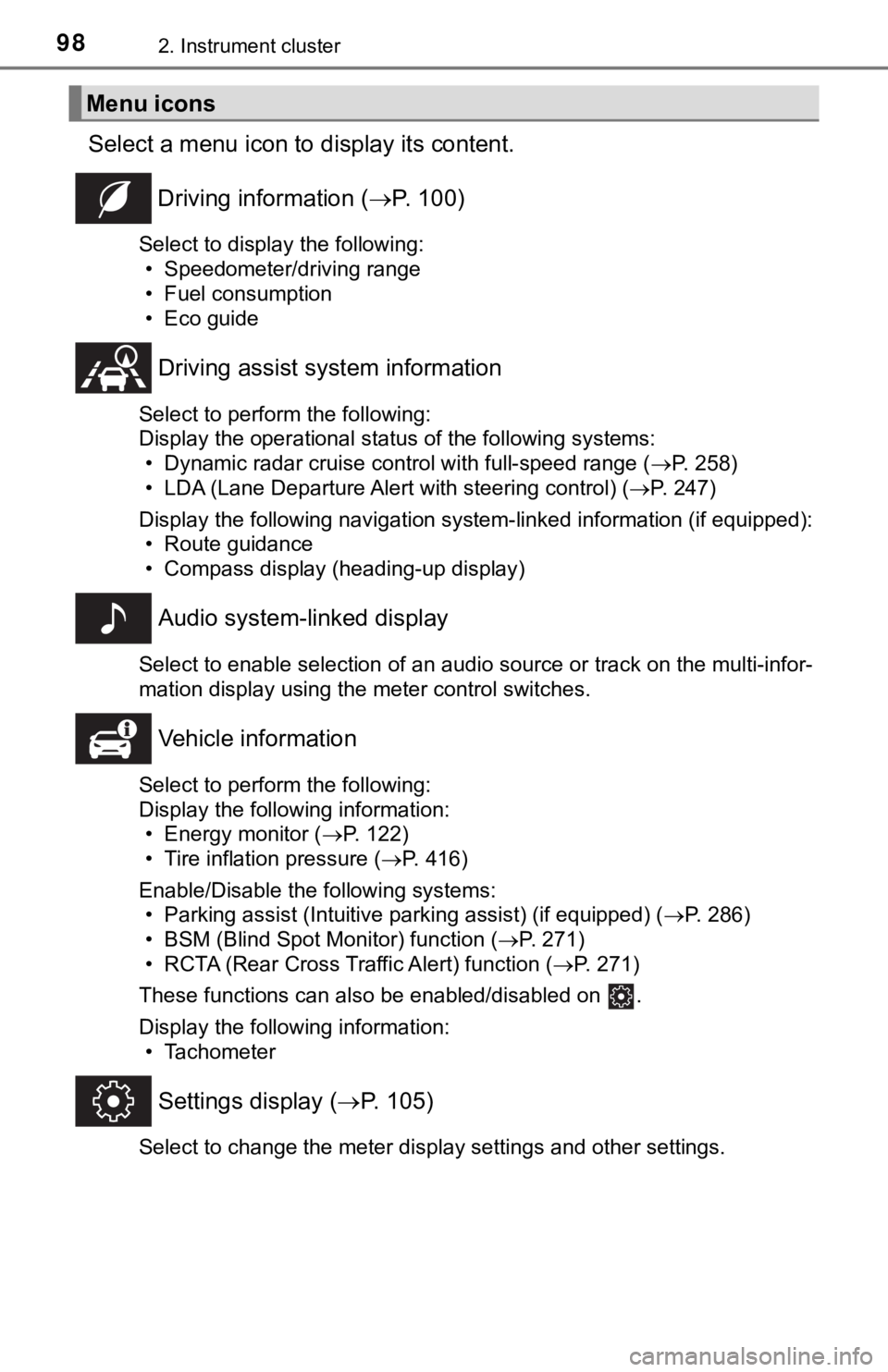
Select a menu icon to display its content.
Driving information ( P. 100)
Select to display the following:
• Speedometer/driving range
• Fuel consumption
• Eco guide
Driving assist sys tem information
Select to perform the following:
Display the operational status of the following systems:
• Dynamic radar cruise control with full-speed range ( P. 258)
• LDA (Lane Departure Alert with steering control) ( P. 247)
Display the following navigation system-linked information (if equipped):
• Route guidance
• Compass display (heading-up display)
Audio system-linked display
Select to enable selection of an audio source or track on the multi-infor-
mation display using the meter control switches.
Vehicle information
Select to perform the following:
Display the following information: • Energy monitor ( P. 122)
• Tire inflation pressure ( P. 416)
Enable/Disable the following systems: • Parking assist (Intuitive parking assist) (if equipped) ( P. 286)
• BSM (Blind Spot Monitor) function ( P. 271)
• RCTA (Rear Cross Traffic Alert) function ( P. 271)
These functions can also be enabled/disabled on .
Display the following information: • Tachometer
Settings display ( P. 105)
Select to change the meter display settings and other settings.
Menu icons
Page 105 of 556
1052. Instrument cluster
2
Instrument cluster
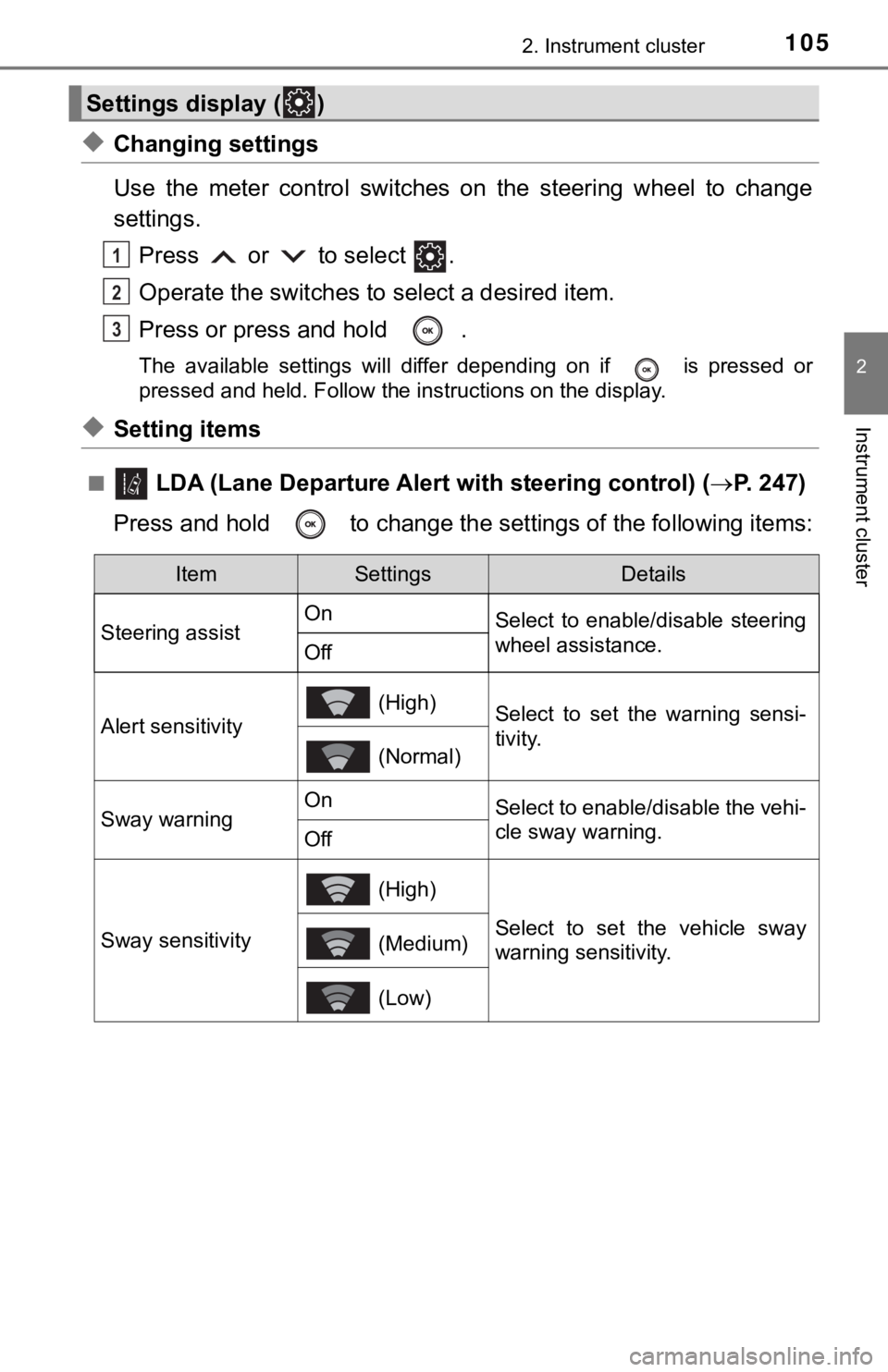
◆Changing settings
Use the meter control switches on the steering wheel to change
settings.Press or to select .
Operate the switches to select a desired item.
Press or press and hold .
The available settings will differ depending on if is pressed or
pressed and held. Follow the instructions on the display.
◆Setting items
■ LDA (Lane Departure Alert with steering control) (P. 247)
Press and hold to change the se ttings of the following items:
Settings display ( )
1
2
3
ItemSettingsDetails
Steering assist On
Select to enable/disable steering
wheel assistance.
Off
Alert sensitivity
(High)Select to set the warning sensi-
tivity.
(Normal)
Sway warningOnSelect to enable/disable the vehi-
cle sway warning.
Off
Sway sensitivity
(High)
Select to set the vehicle sway
warning sensitivity. (Medium)
(Low)
Page 117 of 556
1172. Instrument cluster
2
Instrument cluster
◆Driving assist system status display
Displays the operational status of the following systems:
• Dynamic radar cruise control with full-speed range ( P. 258)
• LDA (Lane Departure Alert with steering control) ( P. 2 4 7 )
• Intuitive parking assist (if equipped) ( P. 286)
◆Navigation system-linked display area
Displays the following items, which are linked to the navigation sys-
tem:
■Street name
When the navigation system is performing route guidance, the
name of the next street will be displayed on the top of the dis play
area.
■Route guidance to destination
Displayed when the navigation s ystem is performing route guid-
ance. When approaching an intersection, an arrow will be displa yed
to indicate the suggeste d direction of travel.
■Compass
Displays the direction of travel.
Driving assist system status/navigation system-linked display
area
Page 175 of 556

175
4Driving
4-1. Before drivingDriving the vehicle ............. 176
Cargo and luggage ........... 184
Vehicle load limits ............. 187
Trailer towing..................... 188
Dinghy towing ................... 189
4-2. Driving procedures Power (ignition) switch ...... 190
EV drive mode .................. 196
Hybrid transmission........... 199
Turn signal lever................ 205
Parking brake .................... 206
Brake Hold ........................ 210
4-3. Operating the lights and wipers
Headlight switch ................ 212
Automatic High Beam ....... 216
Windshield wipers and washer ..................... 220
4-4. Refueling Opening the fuel tank cap .......................... 224 4-5. Using the driving
support systems
Toyota Safety Sense P ..... 229
PCS (Pre-Collision System) .... 236
LDA (Lane Departure Alert with steering
control) ............................ 247
Dynamic radar cruise control with full-speed
range............................... 258
BSM (Blind Spot Monitor) ........ 271
• BSM function ................ 275
• RCTA function .............. 277
Rear Camera Detection function ........................... 282
Intuitive parking assist....... 286
Intelligent Clearance Sonar (ICS) ..................... 294
Driving mode select switches .......................... 315
Driving assist systems ...... 317
4-6. Driving tips Hybrid vehicle driving tips....................... 324
Winter driving tips ............. 327
Page 247 of 556
2474-5. Using the driving support systems
4
Driving
When driving on highways and freeways with white (yellow) lines, this
function alerts the driver when the vehicle might depart from i ts lane
and provides assistance by opera ting the steering wheel to keep the
vehicle in its lane.
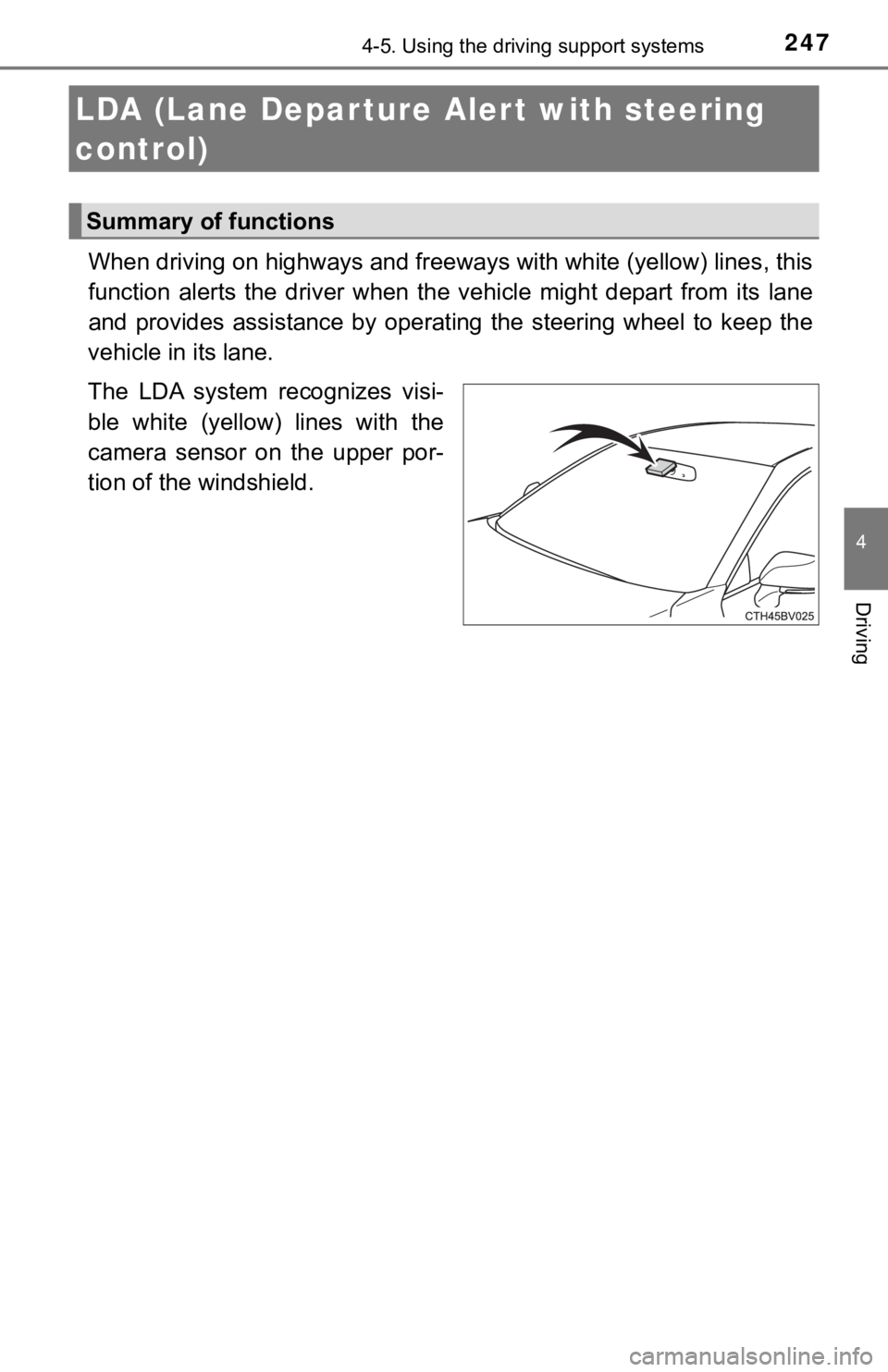
The LDA system recognizes visi-
ble white (yellow) lines with the
camera sensor on the upper por-
tion of the windshield.
LDA (Lane Depar ture Al ert with steering
control)
Summary of functions
Page 249 of 556
2494-5. Using the driving support systems
4
Driving
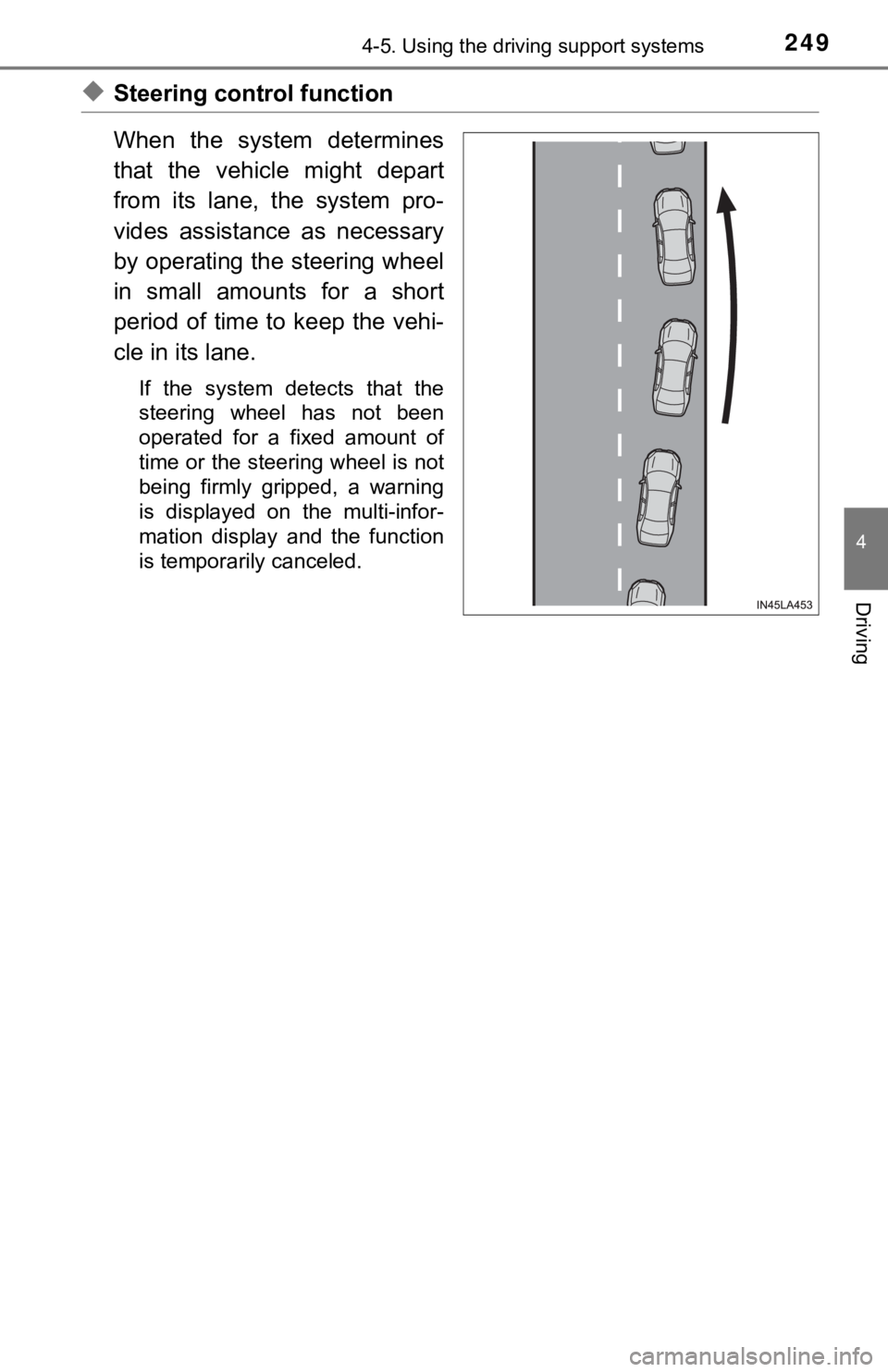
◆Steering control function
When the system determines
that the vehicle might depart
from its lane, the system pro-
vides assistance as necessary
by operating the steering wheel
in small amounts for a short
period of time to keep the vehi-
cle in its lane.
If the system detects that the
steering wheel has not been
operated for a fixed amount of
time or the steering wheel is not
being firmly gripped, a warning
is displayed on the multi-infor-
mation display and the function
is temporarily canceled.
Page 253 of 556
2534-5. Using the driving support systems
4
Driving
The illustration used is intended as an example, and may differ from
the image that is actually display ed on the multi-information display.
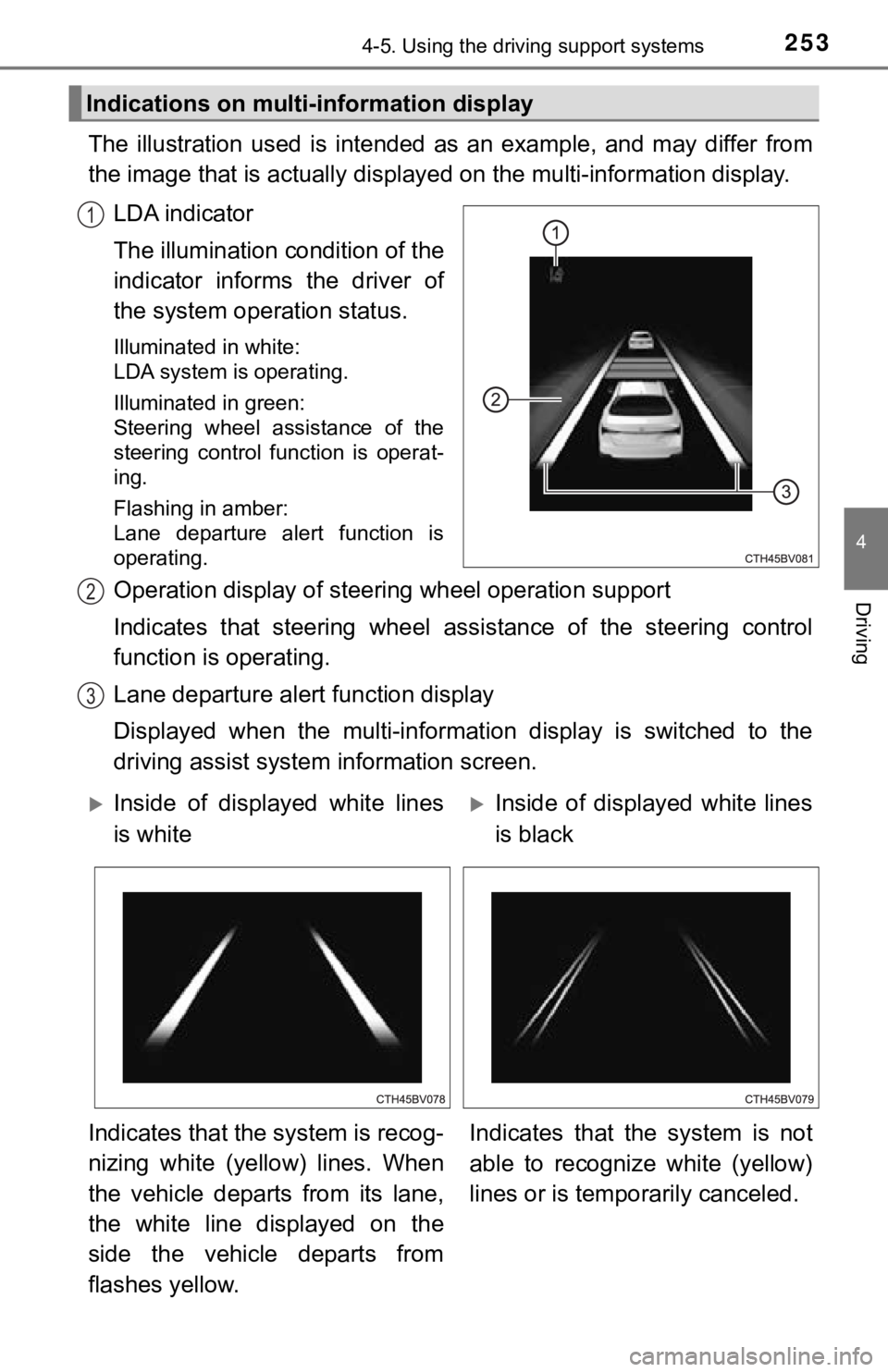
LDA indicator
The illumination condition of the
indicator informs the driver of
the system ope ration status.
Illuminated in white:
LDA system is operating.
Illuminated in green:
Steering wheel assistance of the
steering control function is operat-
ing.
Flashing in amber:
Lane departure alert function is
operating.
Operation display of steer ing wheel operation support
Indicates that steering wheel as sistance of the steering control
function is operating.
Lane departure alert function display
Displayed when the multi-informat ion display is switched to the
driving assist system information screen.
Indications on multi-information display
1
2
3
Inside of displayed white lines
is whiteInside of displayed white lines
is black
Indicates that the system is recog-
nizing white (yellow) lines. When
the vehicle departs from its lane,
the white line displayed on the
side the vehicle departs from
flashes yellow. Indicates that the system is not
able to recognize white (yellow)
lines or is tempo
rarily canceled.
Page 254 of 556

2544-5. Using the driving support systems
■Operation conditio ns of each function
● Lane departure alert function
This function operates when all of the following conditions are met.
• LDA is turned on.
• Vehicle speed is approximately 32 mph (50 km/h) or more.
• System recognizes white (yellow) lines.
• Width of traffic lane is approximately 9.8 ft. (3 m) or more.
• Turn signal lever is not operated.
• Vehicle is driven on a straight road or around a gentle curve with a radius
of more than approximately 492 ft. (150 m).
• No system malfunctions are detected. ( P. 257)
● Steering control function
This function operates when all of the following conditions are met in addi-
tion to the operation conditions for the lane departure alert function.
• Setting for “Steering Assist” in of the multi-information dis play is set to
“On”. ( P. 105)
• Vehicle is not accelerated or decelerated by a certain amount or more.
• Steering wheel is not operated with a steering force level suitable for
changing lanes.
• ABS, VSC, TRAC and PCS are not operating.
• TRAC or VSC is not turned off.
• Hands off steering wheel warning is not displayed. ( P. 2 5 5 )
● Vehicle sway warning function
This function operates when all of the following conditions are met.
• Setting for “Sway Warning” in of the multi-information display is set to “On”. ( P. 105)
• Vehicle speed is approximately 32 mph (50 km/h) or more.
• Width of traffic lane is approximately 9.8 ft. (3 m) or more.
• No system malfunctions are detected. ( P. 257)