seat memory TOYOTA AVALON HYBRID 2019 Owners Manual (in English)
[x] Cancel search | Manufacturer: TOYOTA, Model Year: 2019, Model line: AVALON HYBRID, Model: TOYOTA AVALON HYBRID 2019Pages: 556, PDF Size: 9.73 MB
Page 2 of 556

TABLE OF CONTENTS2
For your information....................... 6
Reading this manual .................... 12
How to search .............................. 13
Pictorial index .............................. 14
1-1. For safe useBefore driving ...................... 24
For safe driving ................... 26
Seat belts ............................ 28
SRS airbags ........................ 34
Front passenger occupant classification system ......... 48
Safety information for children ............................. 53
Child restraint systems ........ 54
Installing child restraints ...... 58
Exhaust gas precautions ..... 68
1-2. Hybrid system Hybrid system features ....... 69
Hybrid system precautions ....................... 73
1-3. Theft deterrent system Immobilizer system ............. 80
Alarm ................................... 82
2. Instrument cluster Warning lights and
indicators ........................... 86
Gauges and meters............. 92
Multi-information display ..... 96
Head-up display ................ 115
Energy monitor/ consumption screen ........ 122 3-1. Key information
Keys................................... 128
3-2. Opening, closing and locking the doors
Doors ................................. 132
Trunk ................................. 138
Smart key system .............. 142
3-3. Adjusting the seats Front seats......................... 149
Rear seats ......................... 151
Driving position memory ........................... 153
Head restraints .................. 158
3-4. Adjusting the steering wheel and mirrors
Steering wheel ................... 160
Inside rear view mirror ....... 162
Outside rear view mirrors ............................. 164
3-5. Opening and closing the windows
Power windows.................. 167
Moon roof .......................... 171
4-1. Before driving Driving the vehicle ............. 176
Cargo and luggage ............ 184
Vehicle load limits .............. 187
Trailer towing ..................... 188
Dinghy towing .................... 189
1For safety and security
2Instrument cluster
3Operation of each
component
4Driving
Page 21 of 556
21Pictorial index
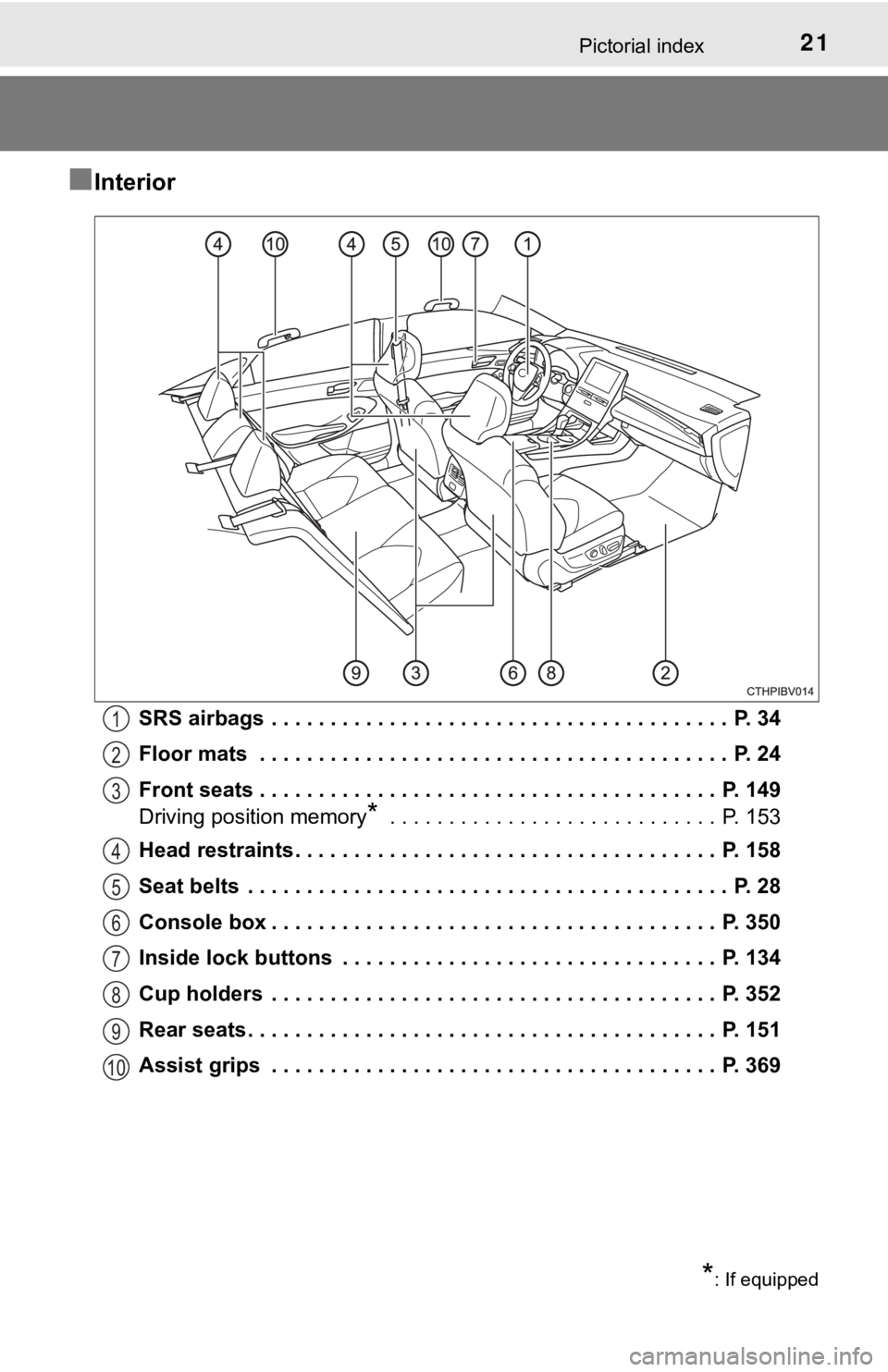
■Interior
SRS airbags . . . . . . . . . . . . . . . . . . . . . . . . . . . . . . . . . . . . . . . P. 34
Floor mats . . . . . . . . . . . . . . . . . . . . . . . . . . . . . . . . . . . . . . . . P. 24
Front seats . . . . . . . . . . . . . . . . . . . . . . . . . . . . . . . . . . . . . . . P. 149
Driving position memory
* . . . . . . . . . . . . . . . . . . . . . . . . . . . . P. 153
Head restraints . . . . . . . . . . . . . . . . . . . . . . . . . . . . . . . . . . . . P. 158
Seat belts . . . . . . . . . . . . . . . . . . . . . . . . . . . . . . . . . . . . . . . . . P. 28
Console box . . . . . . . . . . . . . . . . . . . . . . . . . . . . . . . . . . . . . . P. 350
Inside lock buttons . . . . . . . . . . . . . . . . . . . . . . . . . . . . . . . . P. 134
Cup holders . . . . . . . . . . . . . . . . . . . . . . . . . . . . . . . . . . . . . . P. 352
Rear seats . . . . . . . . . . . . . . . . . . . . . . . . . . . . . . . . . . . . . . . . P. 151
Assist grips . . . . . . . . . . . . . . . . . . . . . . . . . . . . . . . . . . . . . . P. 369
1
2
3
4
5
6
7
8
9
10
*: If equipped
Page 127 of 556

127
3
Operation of
each component
3-1. Key information
Keys .................................. 128
3-2. Opening, closing and locking the doors
Doors ................................ 132
Trunk ................................. 138
Smart key system ............. 142
3-3. Adjusting the seats Front seats ........................ 149
Rear seats......................... 151
Driving position memory ........................... 153
Head restraints.................. 158
3-4. Adjusting the steering wheel and mirrors
Steering wheel .................. 160
Inside rear view mirror ...... 162
Outside rear view mirrors ............................. 164
3-5. Opening and closing the windows
Power windows ................. 167
Moon roof .......................... 171
Page 149 of 556
149
3
Operation of each component
3-3. Adjusting the seats
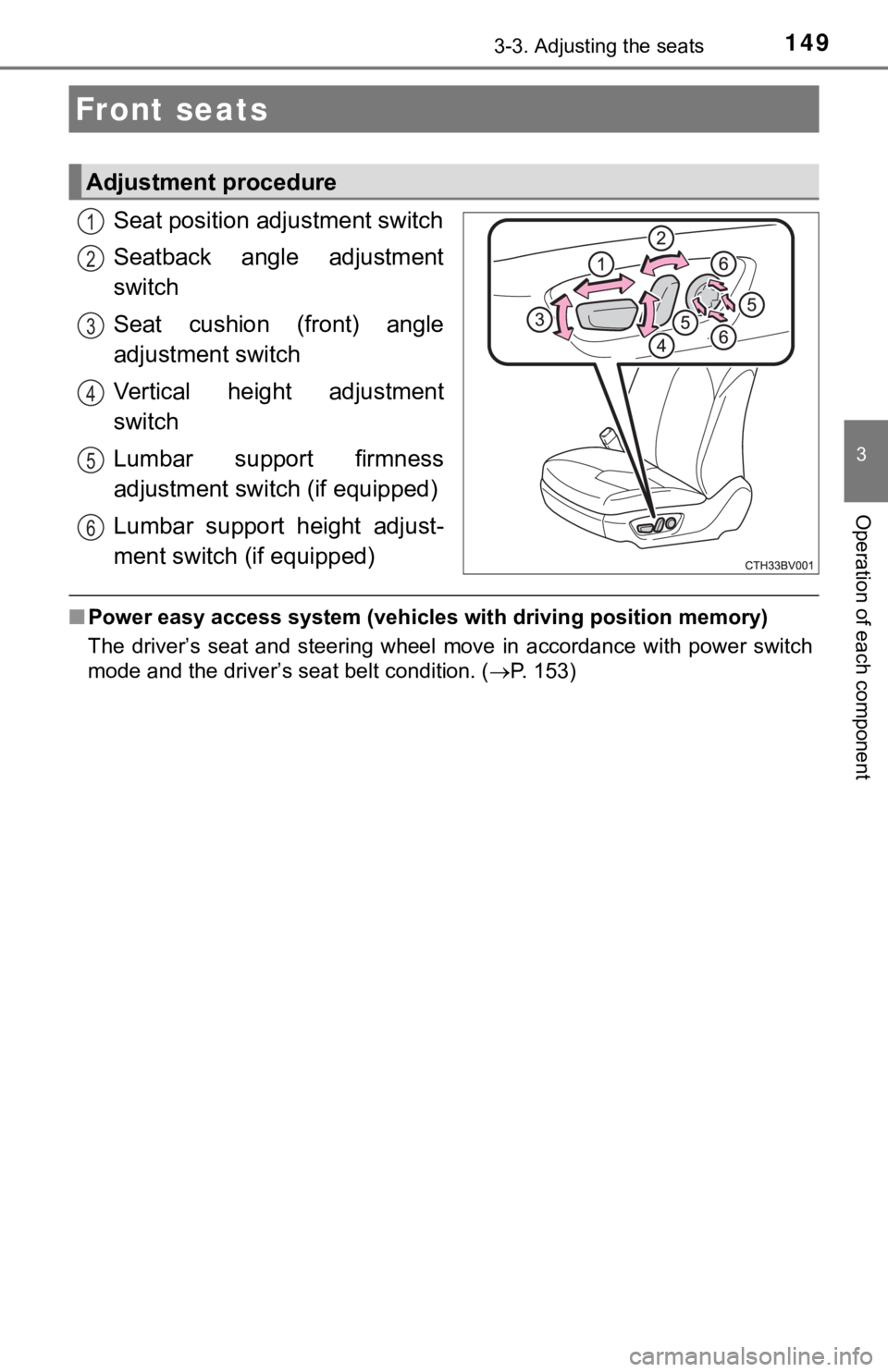
Seat position ad justment switch
Seatback angle adjustment
switch
Seat cushion (front) angle
adjustment switch
Vertical height adjustment
switch
Lumbar support firmness
adjustment switch (if equipped)
Lumbar support height adjust-
ment switch (if equipped)
■ Power easy access system (vehicles with driving position memory )
The driver’s seat and steering wheel move in accordance with po wer switch
mode and the driver’s seat belt condition. ( P. 153)
Front seats
Adjustment procedure
1
2
3
4
5
6
Page 154 of 556
1543-3. Adjusting the seats
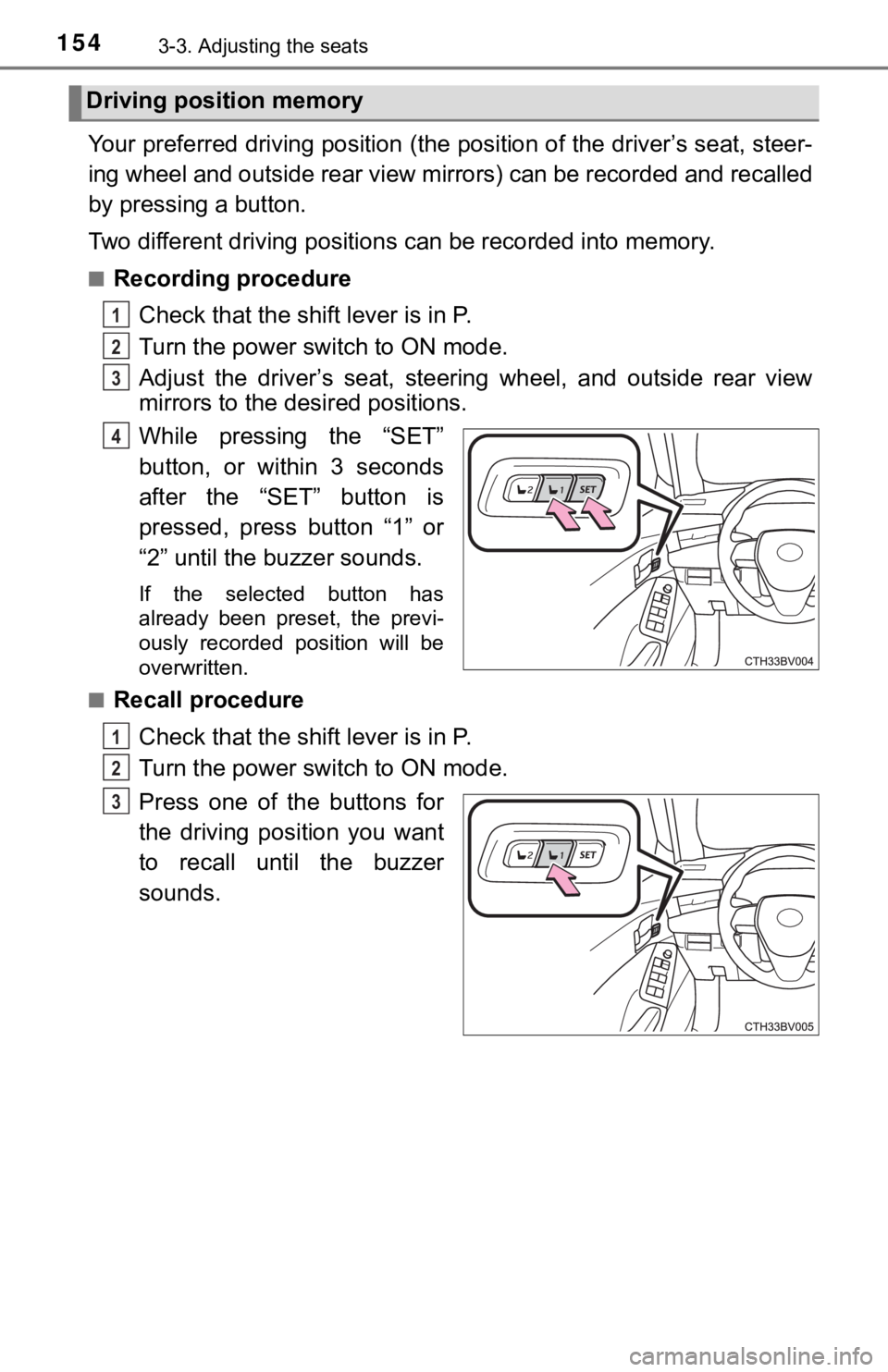
Your preferred driving position (the position of the driver’s seat, steer-
ing wheel and outside rear view mirrors) can be recorded and re called
by pressing a button.
Two different driving positions can be recorded into memory.
■Recording procedure
Check that the shift lever is in P.
Turn the power switch to ON mode.
Adjust the driver’s seat, steerin g wheel, and outside rear view
mirrors to the desired positions.
While pressing the “SET”
button, or within 3 seconds
after the “SET” button is
pressed, press button “1” or
“2” until the buzzer sounds.
If the selected button has
already been preset, the previ-
ously recorded position will be
overwritten.
■
Recall procedure
Check that the shift lever is in P.
Turn the power switch to ON mode.
Press one of the buttons for
the driving position you want
to recall until the buzzer
sounds.
Driving position memory
1
2
3
4
1
2
3
Page 155 of 556

1553-3. Adjusting the seats
3
Operation of each component
■To stop the position recall operation part-way through
Perform any of the following operations:
●Press the “SET” button.
● Press button “1” or “2”.
● Operate any of the seat adjustment switches (only cancels seat position
recall).
● Operate the tilt and telescopic steering control switch (only cancels steering
wheel position recall).
■ Seat positions that can be memorized ( P. 149)
The adjusted positions other than the position adjusted by lumb ar support
switch can be recorded.
■ Operating the driving position memory after turning the power s witch off
Recorded seat positions can be activated up to 180 seconds afte r the driver’s
door is opened and another 60 seconds after it is closed again.
■ In order to correctly use the dr iving position memory function
If a seat position is already in the furthest possible position and the seat is
operated in the same direction, the recorded position may be sl ightly different
when it is recalled.
Page 156 of 556
1563-3. Adjusting the seats
Each electronic key can be registered to recall your preferred driving
position.
■Registering procedure
Record your driving position to button 1 or 2 before performing the
following:
Carry only the key you want to register, and then close the dri ver’s
door.
If 2 or more keys are in the vehicle, the driving position cann ot be
recorded properly.
Check that the shift lever is in P.
Turn the power switch to ON mode.
Recall the driving position that you want to record.
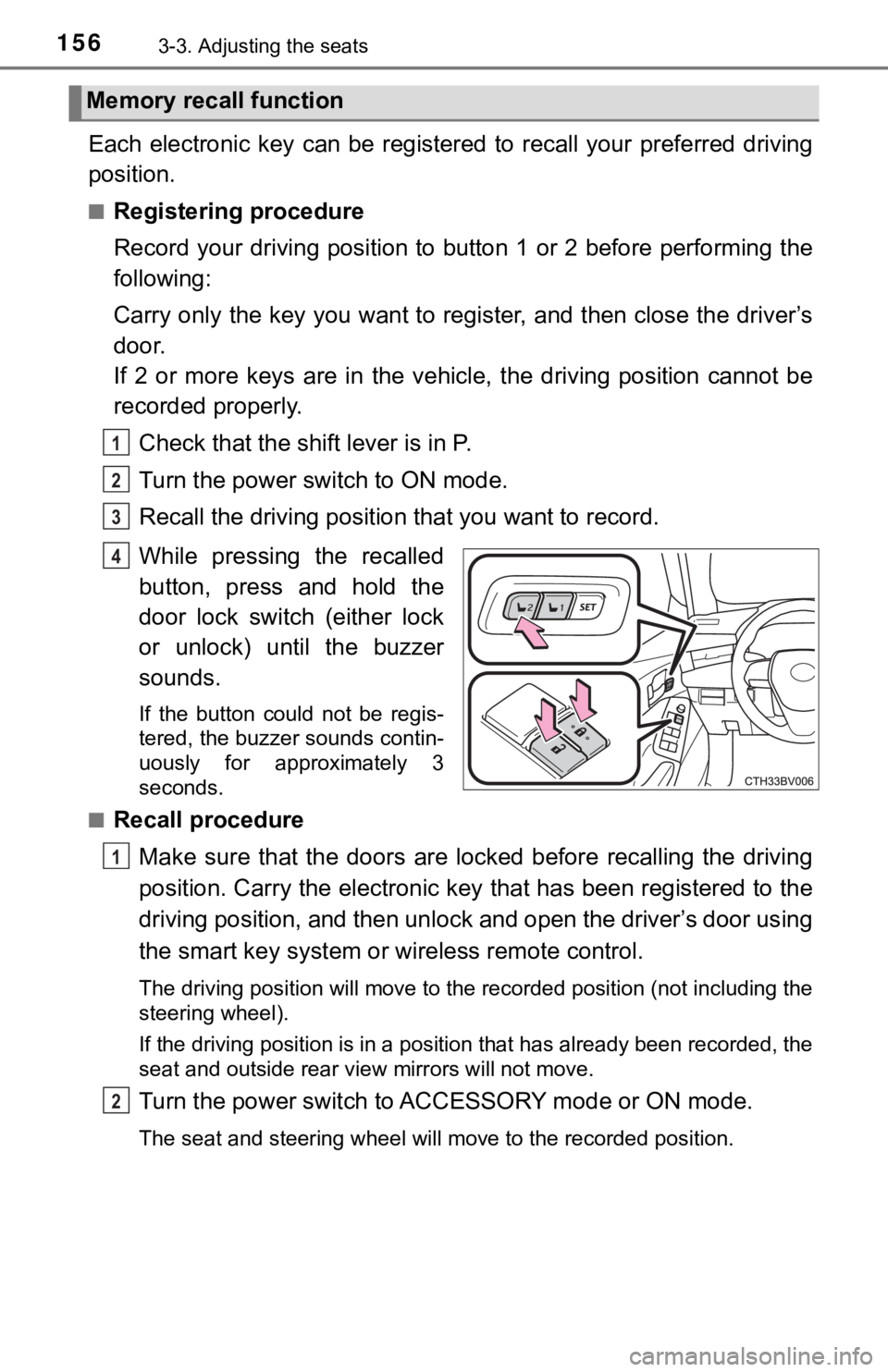
While pressing the recalled
button, press and hold the
door lock switch (either lock
or unlock) until the buzzer
sounds.
If the button could not be regis-
tered, the buzzer sounds contin-
uously for approximately 3
seconds.
■
Recall procedure
Make sure that the doors are locked before recalling the drivin g
position. Carry the electronic ke y that has been registered to the
driving position, and then unlock and open the driver’s door using
the smart key system or wireless remote control.
The driving position will move to the recorded position (not in cluding the
steering wheel).
If the driving position is in a position that has already been recorded, the
seat and outside rear view mirrors will not move.
Turn the power switch to ACCESSORY mode or ON mode.
The seat and steering wheel will move to the recorded position.
Memory recall function
1
2
3
4
1
2
Page 157 of 556

1573-3. Adjusting the seats
3
Operation of each component
■Cancelation procedure
Carry only the key you want to cancel and then close the driver ’s
door.
If 2 or more keys are in the vehicle, the driving position cann ot be
canceled properly.
Turn the power switch to ON mode.
While pressing the “SET” button, press and hold the door lock
switch (either lock or unlock) until the buzzer sounds twice.
If it button could not be canceled, the buzzer sounds continuou sly for
approximately 3 seconds.
■ Recalling the driving position u sing the memory recall function
● Different driving positions can be registered for each electron ic key. There-
fore, the driving position that is recalled may be different de pending on the
key being carried.
● If a door other than the driver’s door is unlocked with the sma rt key system,
the driving position cannot be recalled. In this case, press the driving posi-
tion button which has been set.
■ Customization
Some functions can be customized. ( P. 522)
WARNING
■Seat adjustment caution
Take care during seat adjustment so that the seat does not stri ke the rear
passenger or squeeze your body against the steering wheel.
1
2
Page 161 of 556
1613-4. Adjusting the steering wheel and mirrors
3
Operation of each component
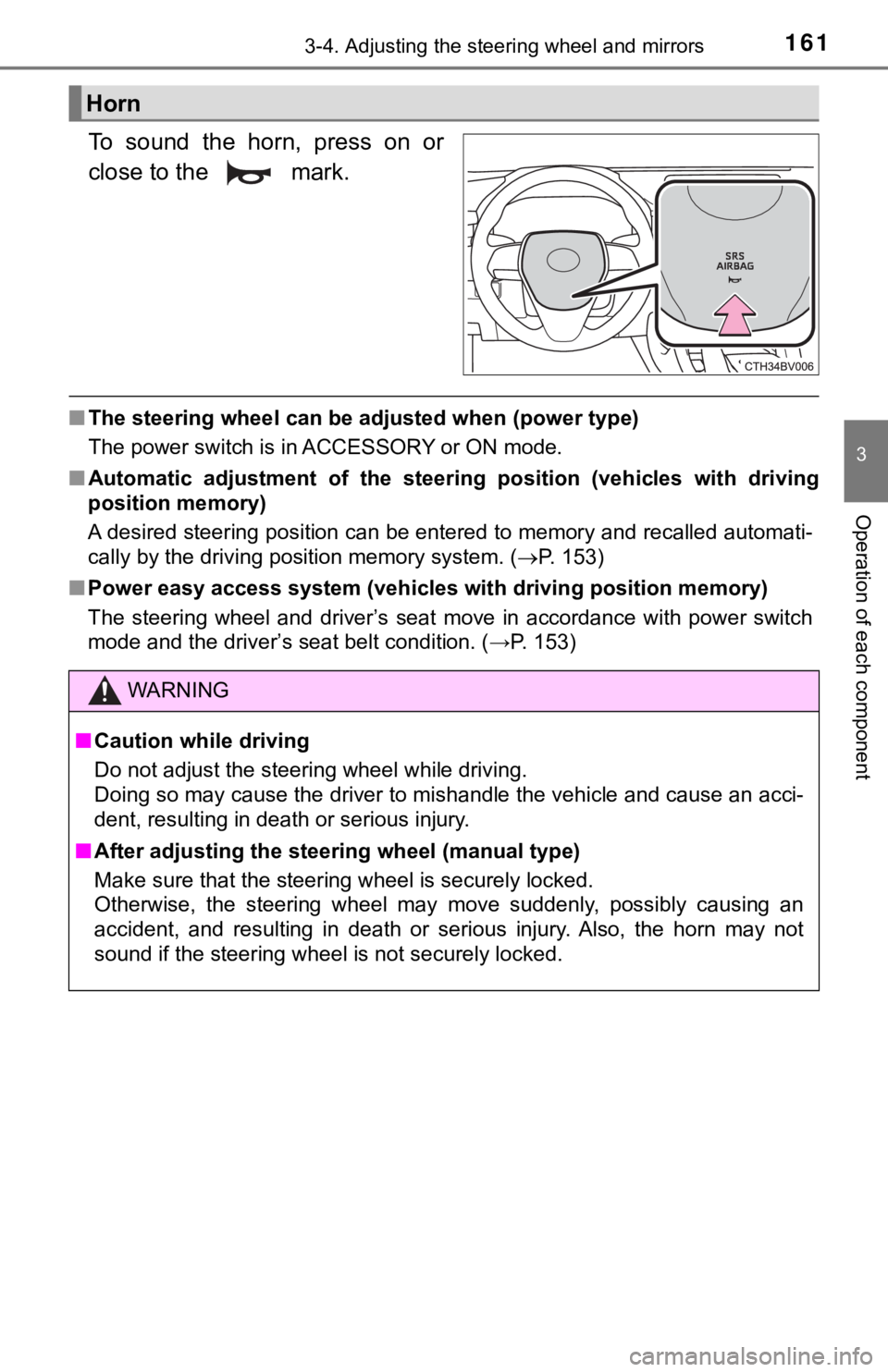
To sound the horn, press on or
close to the mark.
■The steering wheel can be adjusted when (power type)
The power switch is in ACCESSORY or ON mode.
■ Automatic adjustment of the steer ing position (vehicles with driving
position memory)
A desired steering position can be entered to memory and recall ed automati-
cally by the driving position memory system. ( P. 153)
■ Power easy access system (vehicles with driving position memory )
The steering wheel and driver’s seat move in accordance with po wer switch
mode and the driver’s seat belt condition. (→P. 153)
Horn
WARNING
■ Caution while driving
Do not adjust the steering wheel while driving.
Doing so may cause the driver to mishandle the vehicle and caus e an acci-
dent, resulting in death or serious injury.
■ After adjusting the steer ing wheel (manual type)
Make sure that the steering wheel is securely locked.
Otherwise, the steering wheel may move suddenly, possibly causi ng an
accident, and resulting in death or serious injury. Also, the h orn may not
sound if the steering wheel is not securely locked.
Page 527 of 556
5278-2. Customization
8
Vehicle specifications
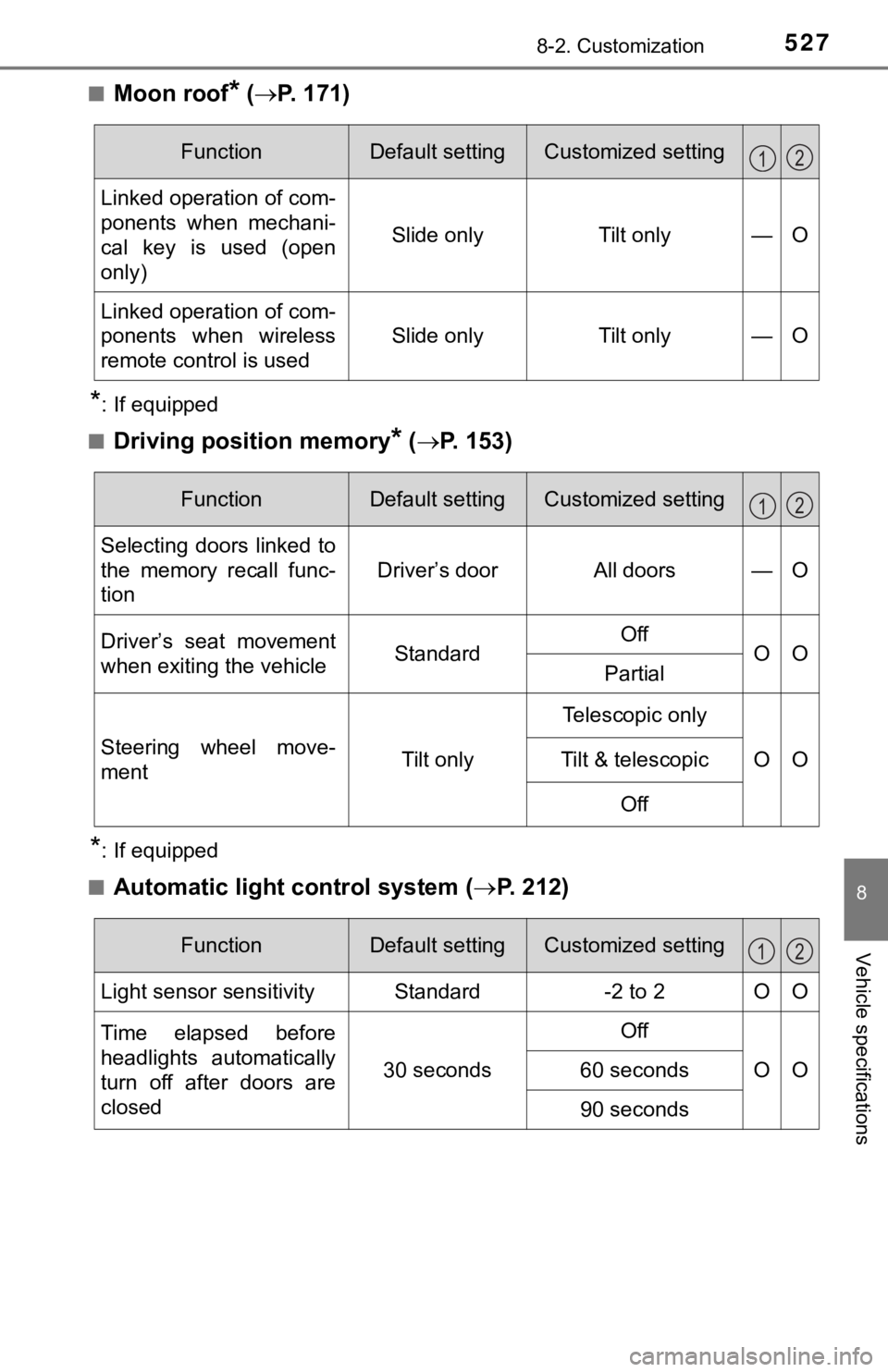
■Moon roof* ( P. 171)
*: If equipped
■
Driving position memory* ( P. 153)
*: If equipped
■
Automatic light control system ( P. 212)
FunctionDefault settingCustomized setting
Linked operation of com-
ponents when mechani-
cal key is used (open
only)
Slide onlyTilt only—O
Linked operation of com-
ponents when wireless
remote control is used
Slide onlyTilt only—O
12
FunctionDefault settingCustomized setting
Selecting doors linked to
the memory recall func-
tion
Driver’s doorAll doors—O
Driver’s seat movement
when exiting the vehicleStandardOffOOPartial
Steering wheel move-
ment Tilt onlyTelescopic only
OO
Tilt & telescopic
Off
12
FunctionDefault settingCustomized setting
Light sensor sensitivityStandard-2 to 2OO
Time elapsed before
headlights automatically
turn off after doors are
closed
30 seconds
Off
OO60 seconds
90 seconds
12