windshield wipers TOYOTA AVALON HYBRID 2019 Owners Manual (in English)
[x] Cancel search | Manufacturer: TOYOTA, Model Year: 2019, Model line: AVALON HYBRID, Model: TOYOTA AVALON HYBRID 2019Pages: 556, PDF Size: 9.73 MB
Page 3 of 556

3
1
9 7 6
5
4
3
2
8
4-2. Driving proceduresPower (ignition) switch ...... 190
EV drive mode................... 196
Hybrid transmission........... 199
Turn signal lever................ 205
Parking brake .................... 206
Brake Hold ........................ 210
4-3. Operating the lights and wipers
Headlight switch ................ 212
Automatic High Beam ....... 216
Windshield wipers and washer ..................... 220
4-4. Refueling Opening the fuel tank cap .......................... 224
4-5. Using the driving support systems
Toyota Safety Sense P ..... 229
PCS (Pre-Collision System) .... 236
LDA (Lane Departure Alert with
steering control) .............. 247
Dynamic radar cruise control with full-speed
range ............................... 258
BSM (Blind Spot Monitor) ........ 271
• BSM function ................ 275
• RCTA function .............. 277
Rear Camera Detection function ........................... 282
Intuitive parking assist ....... 286
Intelligent Clearance Sonar (ICS) ..................... 294
Driving mode select switches .......................... 315
Driving assist systems....... 317 4-6. Driving tips
Hybrid vehicle driving tips ....................... 324
Winter driving tips .............. 327
5-1. Using the air conditioning system
and defogger
Automatic air conditioning system ............................. 332
Heated steering wheel/ seat heaters/
seat ventilators ................ 343
5-2. Using the interior lights Interior lights list................. 346
• Interior light ................... 347
• Personal lights............... 347
• Ambient lights................ 348
5-3. Using the storage features
List of storage features ...... 349
• Glove box ...................... 350
• Console box .................. 350
• Bottle holders ................ 351
• Cup holders ................... 352
• Auxiliary boxes .............. 353
• Open tray ...................... 354
Trunk features ................... 355
5Interior features
Page 15 of 556
15Pictorial index
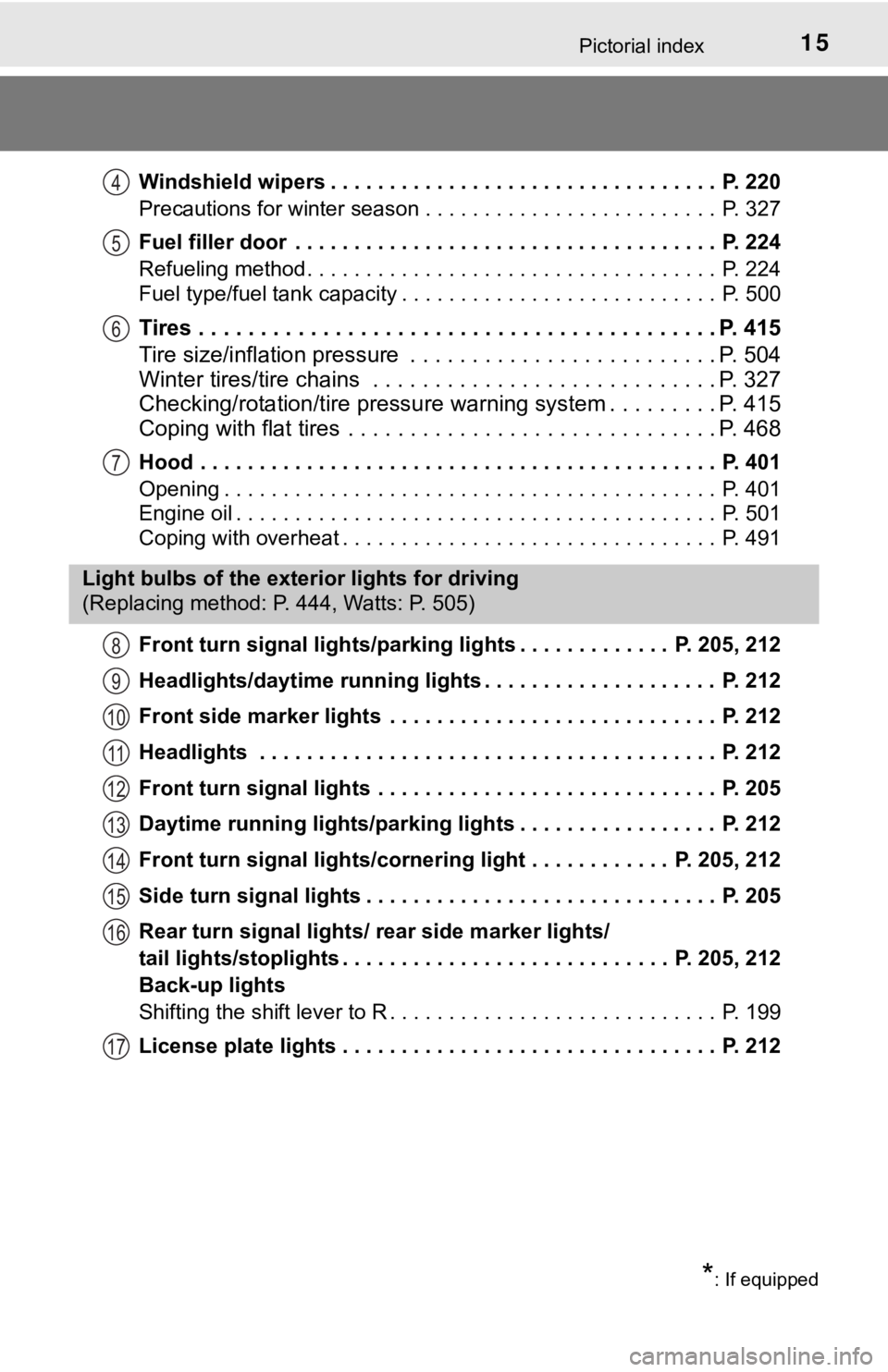
Windshield wipers . . . . . . . . . . . . . . . . . . . . . . . . . . . . . . . . . P. 220
Precautions for winter season . . . . . . . . . . . . . . . . . . . . . . . . . P. 327
Fuel filler door . . . . . . . . . . . . . . . . . . . . . . . . . . . . . . . . . . . . P. 224
Refueling method . . . . . . . . . . . . . . . . . . . . . . . . . . . . . . . . . . . P. 224
Fuel type/fuel tank capacity . . . . . . . . . . . . . . . . . . . . . . . . . . . P. 500
Tires . . . . . . . . . . . . . . . . . . . . . . . . . . . . . . . . . . . . . . . . . . P. 415
Tire size/inflation pressure . . . . . . . . . . . . . . . . . . . . . . . . . P. 504
Winter tires/tire chains . . . . . . . . . . . . . . . . . . . . . . . . . . . . P. 327
Checking/rotation/tire pressur e warning system . . . . . . . . .P. 415
Coping with flat tires . . . . . . . . . . . . . . . . . . . . . . . . . . . . . . P. 468
Hood . . . . . . . . . . . . . . . . . . . . . . . . . . . . . . . . . . . . . . . . . . . . P. 401
Opening . . . . . . . . . . . . . . . . . . . . . . . . . . . . . . . . . . . . . . . . . . P. 401
Engine oil . . . . . . . . . . . . . . . . . . . . . . . . . . . . . . . . . . . . . . . . . P. 501
Coping with overheat . . . . . . . . . . . . . . . . . . . . . . . . . . . . . . . . P. 491
Front turn signal lights/parking lights . . . . . . . . . . . . . P. 205, 212
Headlights/daytime running lights . . . . . . . . . . . . . . . . . . . . P. 212
Front side marker lights . . . . . . . . . . . . . . . . . . . . . . . . . . . . P. 212
Headlights . . . . . . . . . . . . . . . . . . . . . . . . . . . . . . . . . . . . . . . P. 212
Front turn signal lights . . . . . . . . . . . . . . . . . . . . . . . . . . . . . P. 205
Daytime running lights/parking lights . . . . . . . . . . . . . . . . . P. 212
Front turn signal lights/cornering light . . . . . . . . . . . . P. 205, 212
Side turn signal lights . . . . . . . . . . . . . . . . . . . . . . . . . . . . . . P. 205
Rear turn signal lights/ r ear side marker lights/
tail lights/stoplights . . . . . . . . . . . . . . . . . . . . . . . . . . . . P. 205, 212
Back-up lights
Shifting the shift lever to R . . . . . . . . . . . . . . . . . . . . . . . . . . . . P. 199
License plate lights . . . . . . . . . . . . . . . . . . . . . . . . . . . . . . . . P. 212
4
5
6
7
Light bulbs of the exter ior lights for driving
(Replacing method: P. 444, Watts: P. 505)
8
9
10
11
12
13
14
15
16
17
*: If equipped
Page 175 of 556

175
4Driving
4-1. Before drivingDriving the vehicle ............. 176
Cargo and luggage ........... 184
Vehicle load limits ............. 187
Trailer towing..................... 188
Dinghy towing ................... 189
4-2. Driving procedures Power (ignition) switch ...... 190
EV drive mode .................. 196
Hybrid transmission........... 199
Turn signal lever................ 205
Parking brake .................... 206
Brake Hold ........................ 210
4-3. Operating the lights and wipers
Headlight switch ................ 212
Automatic High Beam ....... 216
Windshield wipers and washer ..................... 220
4-4. Refueling Opening the fuel tank cap .......................... 224 4-5. Using the driving
support systems
Toyota Safety Sense P ..... 229
PCS (Pre-Collision System) .... 236
LDA (Lane Departure Alert with steering
control) ............................ 247
Dynamic radar cruise control with full-speed
range............................... 258
BSM (Blind Spot Monitor) ........ 271
• BSM function ................ 275
• RCTA function .............. 277
Rear Camera Detection function ........................... 282
Intuitive parking assist....... 286
Intelligent Clearance Sonar (ICS) ..................... 294
Driving mode select switches .......................... 315
Driving assist systems ...... 317
4-6. Driving tips Hybrid vehicle driving tips....................... 324
Winter driving tips ............. 327
Page 214 of 556
2144-3. Operating the lights and wipers
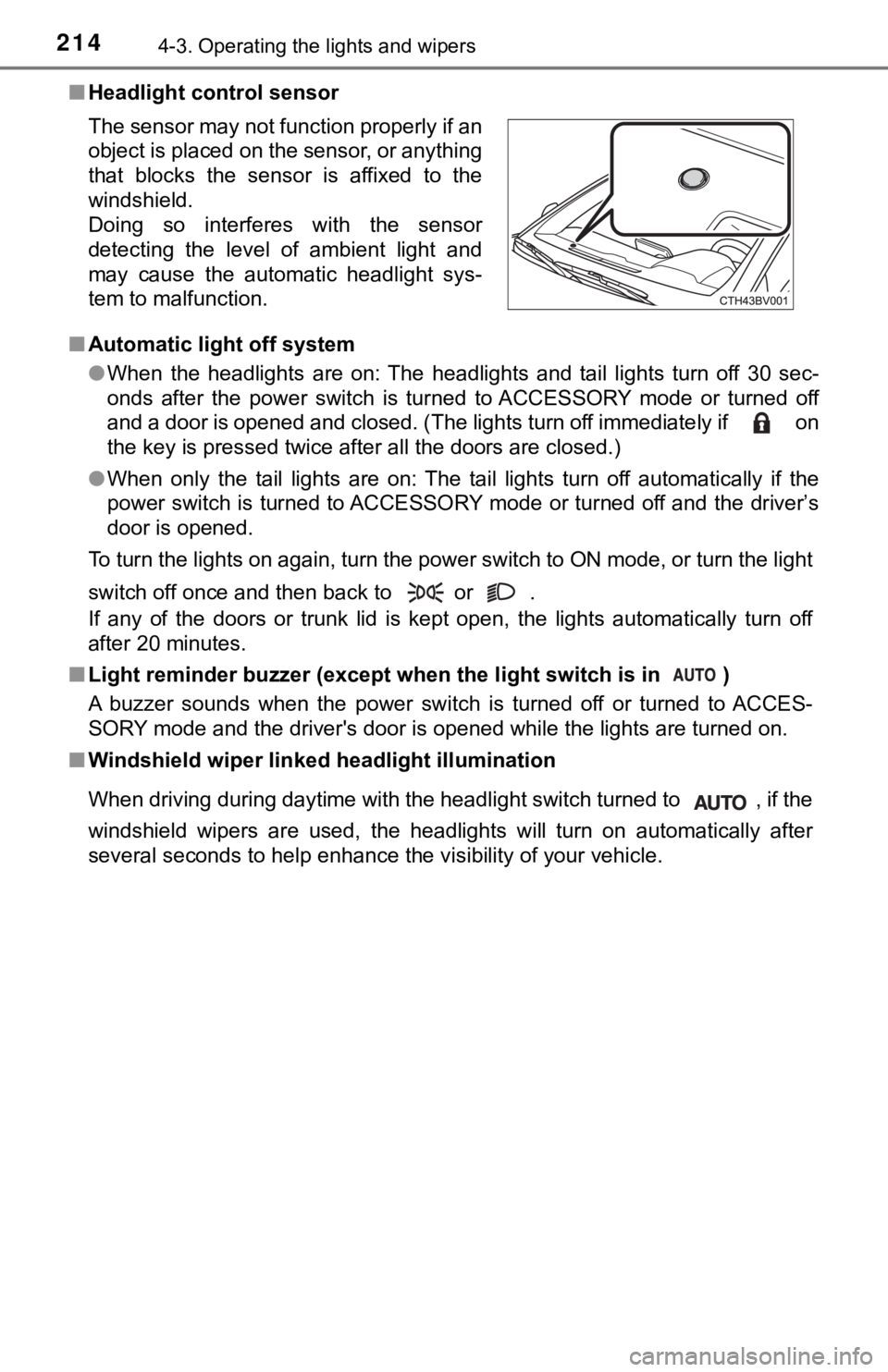
■Headlight control sensor
■ Automatic light off system
●When the headlights are on: The headlights and tail lights turn off 30 sec-
onds after the power switch is turned to ACCESSORY mode or turn ed off
and a door is opened and closed. (The lights turn off immediate ly if on
the key is pressed twice after all the doors are closed.)
● When only the tail lights are on: The tail lights turn off automatically if the
power switch is turned to ACCESSORY mode or turned off and the driver’s
door is opened.
To turn the lights on again, turn the power switch to ON mode, or turn the light
switch off once and then back to or .
If any of the doors or trunk lid is kept open, the lights automatically turn off
after 20 minutes.
■ Light reminder buzzer (except when the light switch is in )
A buzzer sounds when the power switch is turned off or turned to ACCES-
SORY mode and the driver's door is opened while the lights are turned on.
■ Windshield wiper linked h eadlight illumination
When driving during daytime with the headlight switch turned to , if the
windshield wipers are used, the headlights will turn on automat ically after
several seconds to help enhance the visibility of your vehicle. The sensor may not function properly if an
object is placed on the sensor, or anything
that blocks the sensor is affixed to the
windshield.
Doing so interferes with the sensor
detecting the level of ambient light and
may cause the automatic headlight sys-
tem to malfunction.
Page 219 of 556

2194-3. Operating the lights and wipers
4
Driving
●In the following situations the system may not be able to correctly detect the
surrounding brightness level. This may cause the low beams to r emain on
or the high beams to flash or dazzle pedestrians or vehicles ah ead. In such
a case, it is necessary to manually switch between the high and low beams.
• When driving in inclement weather (heavy rain, snow, fog, sand storms,
etc.)
• When the windshield is obscured by fog, mist, ice, dirt, etc.
• When the windshield is cracked or damaged
• When the camera sensor is deformed or dirty
• When the temperature of the camera sensor is extremely high
• When the surrounding brightness level is equal to that of head lights, tail
lights or fog lights
• When headlights or tail lights of vehicles ahead are turned off, dirty, changing color, or not aimed properly
• When the vehicle is hit by water, snow, dust, etc. from a prec eding vehi-
cle
• When driving through an area of intermittently changing brightness and
darkness
• When frequently and repeatedly driving ascending/descending roads, or roads with rough, bumpy or uneven surfaces (such as stone-paved
roads, gravel roads, etc.)
• When frequently and repeatedly taking curves or driving on a w inding
road
• When there is a highly reflective object ahead of the vehicle, such as a sign or mirror
• When the back of a preceding vehicle is highly reflective, suc h as a con-
tainer on a truck
• When the vehicle's headlights are damaged or dirty, or are not aimed
properly
• When the vehicle is listing or titling due to a flat tire, a trailer being towed, etc.
• When the headlights are changed between the high beams and low
beams repeatedly in an abnormal manner
• When the driver believes that the high beams may be flashing or dazzling pedestrians or other drivers
■ Temporarily lowering sensor sensitivity
The sensitivity of the sensor can be temporarily lowered.
Turn the power switch off while the following conditions are me t.
• The headlight switch is in .
• The headlight switch lever is in high beam position.
Turn the power switch to the ON mode.
Within 5 seconds after , repeat pulling the headlight switch le ver to the
original position then pushing it to the high beam position qui ckly 9 times,
then leave the lever in high beam position.
Automatic High Beam (headlights) may turn on even when the vehi cle is
stopped.
1
2
32
Page 220 of 556
2204-3. Operating the lights and wipers
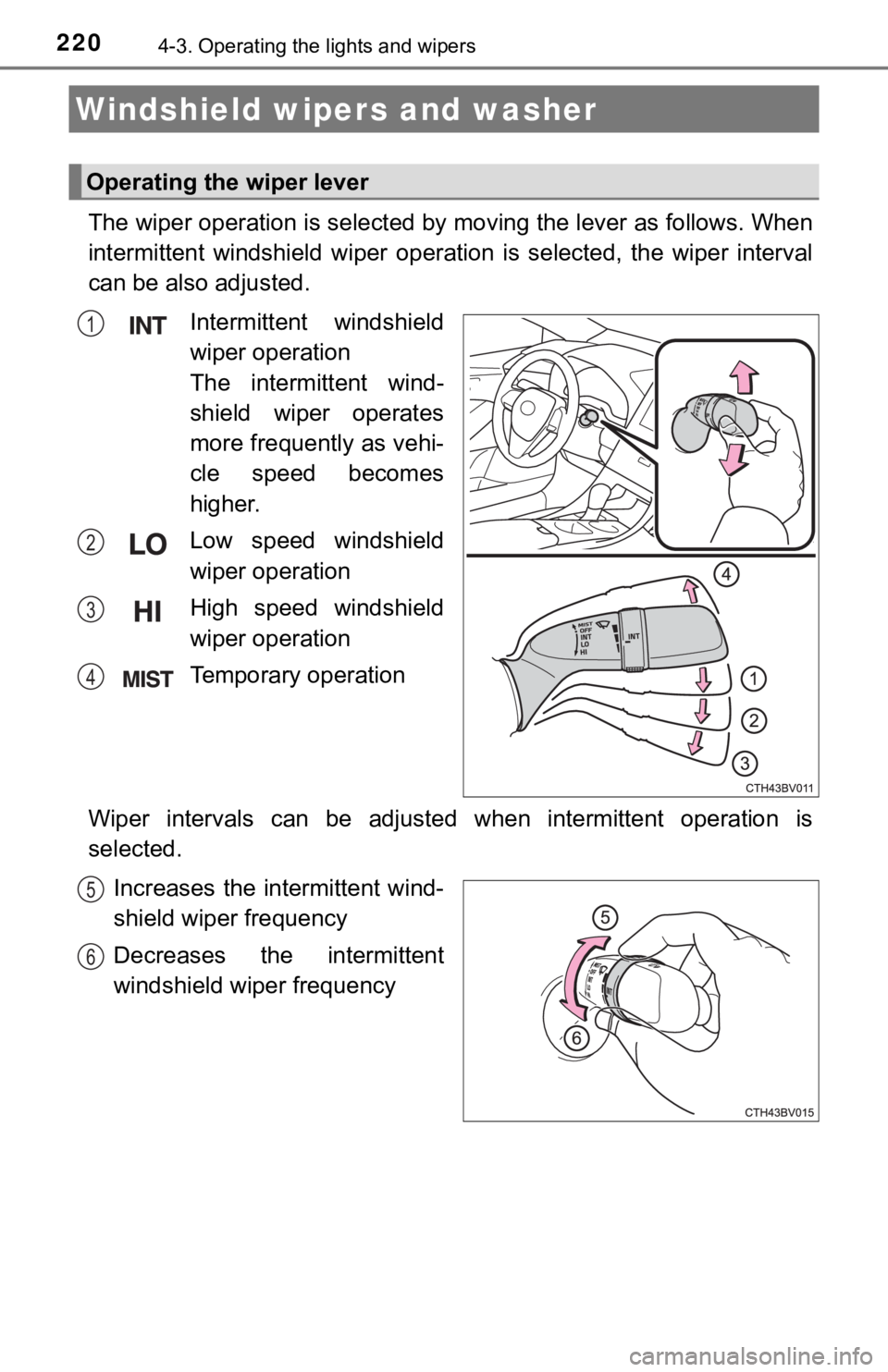
The wiper operation is selected by moving the lever as follows. When
intermittent windshield wiper operation is selected, the wiper interval
can be also adjusted.
Intermittent windshield
wiper operation
The intermittent wind-
shield wiper operates
more frequently as vehi-
cle speed becomes
higher.
Low speed windshield
wiper operation
High speed windshield
wiper operation
Temporary operation
Wiper intervals can be adjusted when intermittent operation is
selected. Increases the intermittent wind-
shield wiper frequency
Decreases the intermittent
windshield wiper frequency
Windshield wipers and washer
Operating the wiper lever
1
2
3
4
5
6
Page 221 of 556
2214-3. Operating the lights and wipers
4
Driving
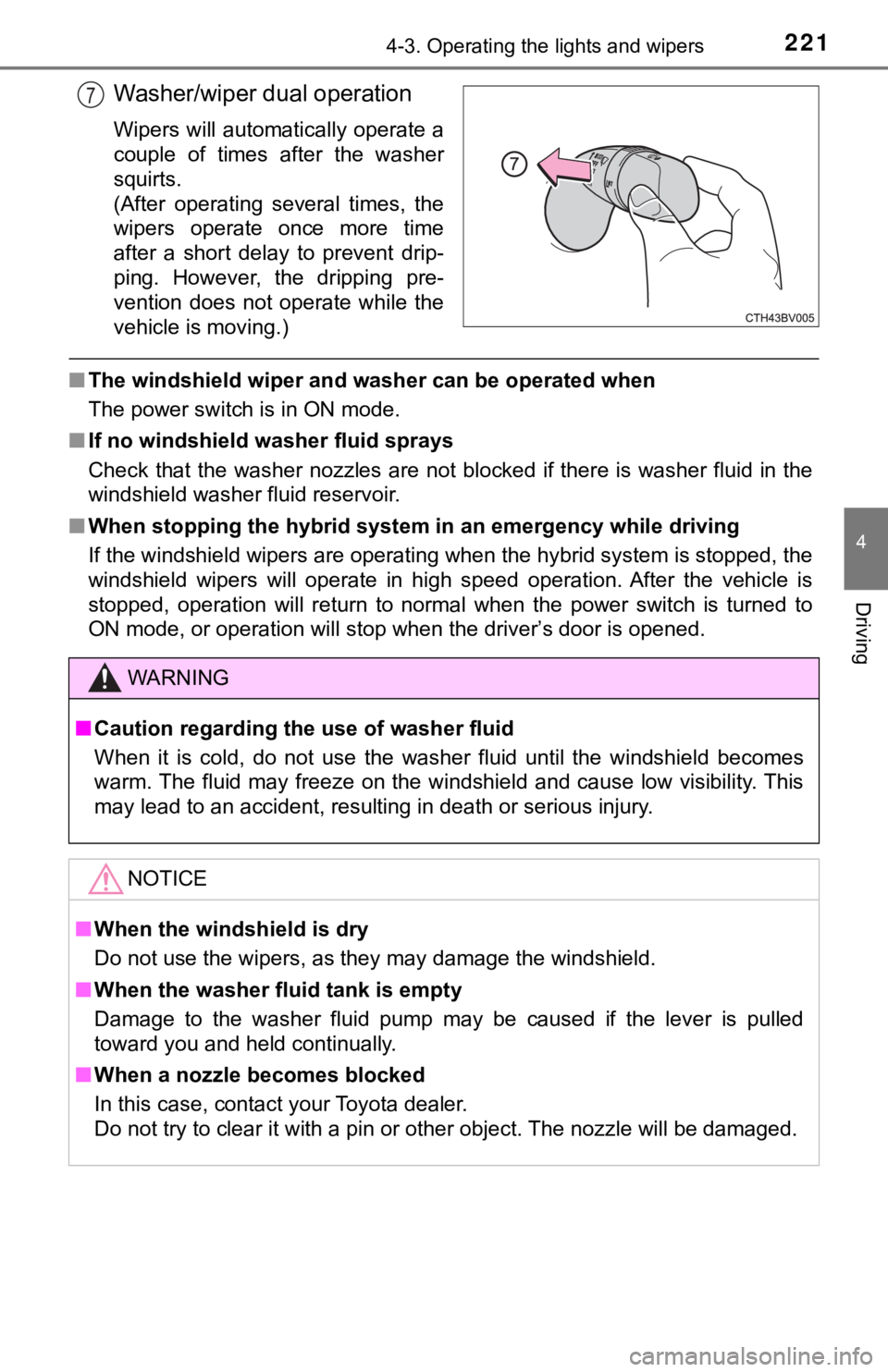
Washer/wiper dual operation
Wipers will automatically operate a
couple of times after the washer
squirts.
(After operating several times, the
wipers operate once more time
after a short delay to prevent drip-
ping. However, the dripping pre-
vention does not operate while the
vehicle is moving.)
■The windshield wiper and washer can be operated when
The power switch is in ON mode.
■ If no windshield washer fluid sprays
Check that the washer nozzles are not blocked if there is washe r fluid in the
windshield washer fluid reservoir.
■ When stopping the hybrid system in an emergency while driving
If the windshield wipers are operating when the hybrid system is stopped, the
windshield wipers will operate in high speed operation. After t he vehicle is
stopped, operation will return to normal when the power switch is turned to
ON mode, or operation will stop when the driver’s door is opene d.
7
WARNING
■Caution regarding the use of washer fluid
When it is cold, do not use the washer fluid until the windshie ld becomes
warm. The fluid may freeze on the windshield and cause low visi bility. This
may lead to an accident, resulting in death or serious injury.
NOTICE
■ When the windshield is dry
Do not use the wipers, as they may damage the windshield.
■ When the washer fluid tank is empty
Damage to the washer fluid pump may be caused if the lever is p ulled
toward you and held continually.
■ When a nozzle becomes blocked
In this case, contact your Toyota dealer.
Do not try to clear it with a pin or other object. The nozzle will be damaged.
Page 222 of 556
2224-3. Operating the lights and wipers
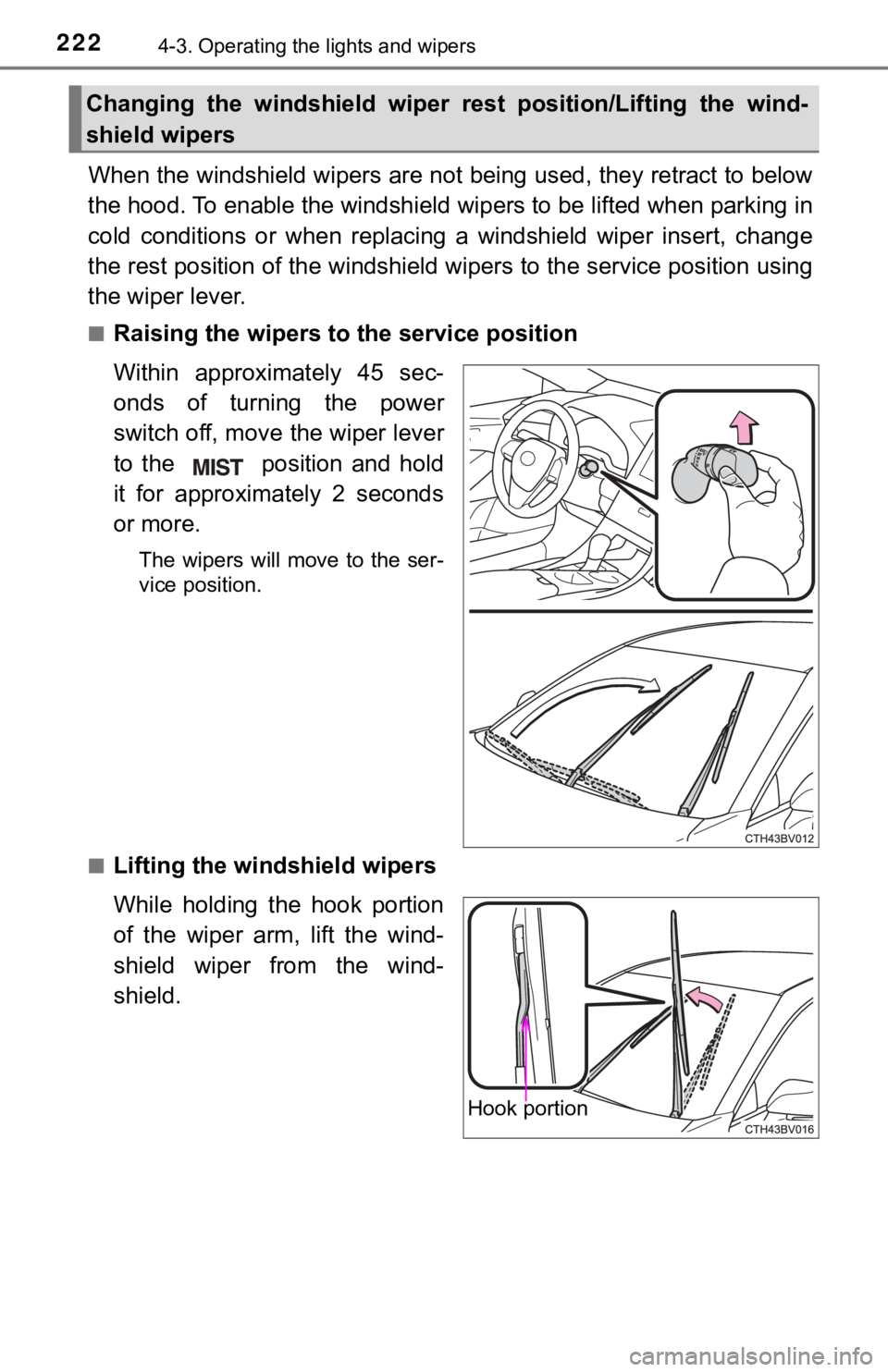
When the windshield wipers are not being used, they retract to below
the hood. To enable the windshie ld wipers to be lifted when parking in
cold conditions or when replacing a windshield wiper insert, ch ange
the rest position of the windshiel d wipers to the service position using
the wiper lever.
■Raising the wipers to the service position
Within approximately 45 sec-
onds of turning the power
switch off, move the wiper lever
to the position and hold
it for approximately 2 seconds
or more.
The wipers will move to the ser-
vice position.
■
Lifting the winds hield wipers
While holding the hook portion
of the wiper arm, lift the wind-
shield wiper from the wind-
shield.
Changing the windshield wiper rest position/Lifting the wind-
shield wipers
Hook portion
Page 223 of 556

2234-3. Operating the lights and wipers
4
Driving
■Lowering the windshield wipers to the retracted position
With the windshield wipers placed on the windshield, turn the p ower switch to
ON mode and then move the wiper lever to an operating position. When the
wiper switch is turned off, the windshield wipers will stop at the retracted posi-
tion.
NOTICE
■ When lifting the windshield wipers
● Do not lift the windshield wipers when they are in the retracte d position
below the hood. Otherwise, they may contact the hood, possibly resulting
in damage to a windshield wiper and/or the hood.
● Do not operate the wiper lever when the windshield wipers are l ifted. Oth-
erwise, the windshield wipers may contact the hood, possibly re sulting in
damage to the windshield wipers and/or hood.
Page 233 of 556
2334-5. Using the driving support systems
4
Driving
WARNING
■To avoid malfunction of the camera sensor
Observe the following precautions.
Otherwise, the camera sensor may not operate properly, possibly leading to
an accident resulting in death or serious injury.
● Keep the windshield clean at all times.
• If the windshield is dirty or covered with an oily film, water droplets,
snow, etc., clear the windshield.
• If a glass coating agent is applied to the windshield, it will still be neces-
sary to use the windshield wipers to remove water droplets, etc . from
the area of the windshield in front of the camera sensor.
• If the inner side of the windshield where the camera sensor is installed
is dirty, contact your Toyota dealer.
● If the part of the windshield in front of the camera sensor is fogged up or
covered with condensation or ice, use the windshield defogger t o remove
the fog, condensation or ice. ( P. 337)
● If water droplets cannot be properly removed from the area of t he wind-
shield in front of the camera sensor by the windshield wipers, replace the
wiper insert or wiper blade.
If the wiper inserts or wiper blades need to be replaced, contact your Toy-
ota dealer.
● Do not attach window tinting to the windshield.
● Replace the windshield if it is damaged or cracked.
If the windshield needs to be replaced, contact your Toyota dea ler.
● Do not get the camera sensor wet.
● Do not allow bright lights to shine into the camera sensor.
● Do not dirty or damage the camera sensor.
When cleaning the inside of the windshield, do not allow glass cleaner to
contact the lens. Also, do not touch the lens.
If the lens is dirty or damaged, contact your Toyota dealer.
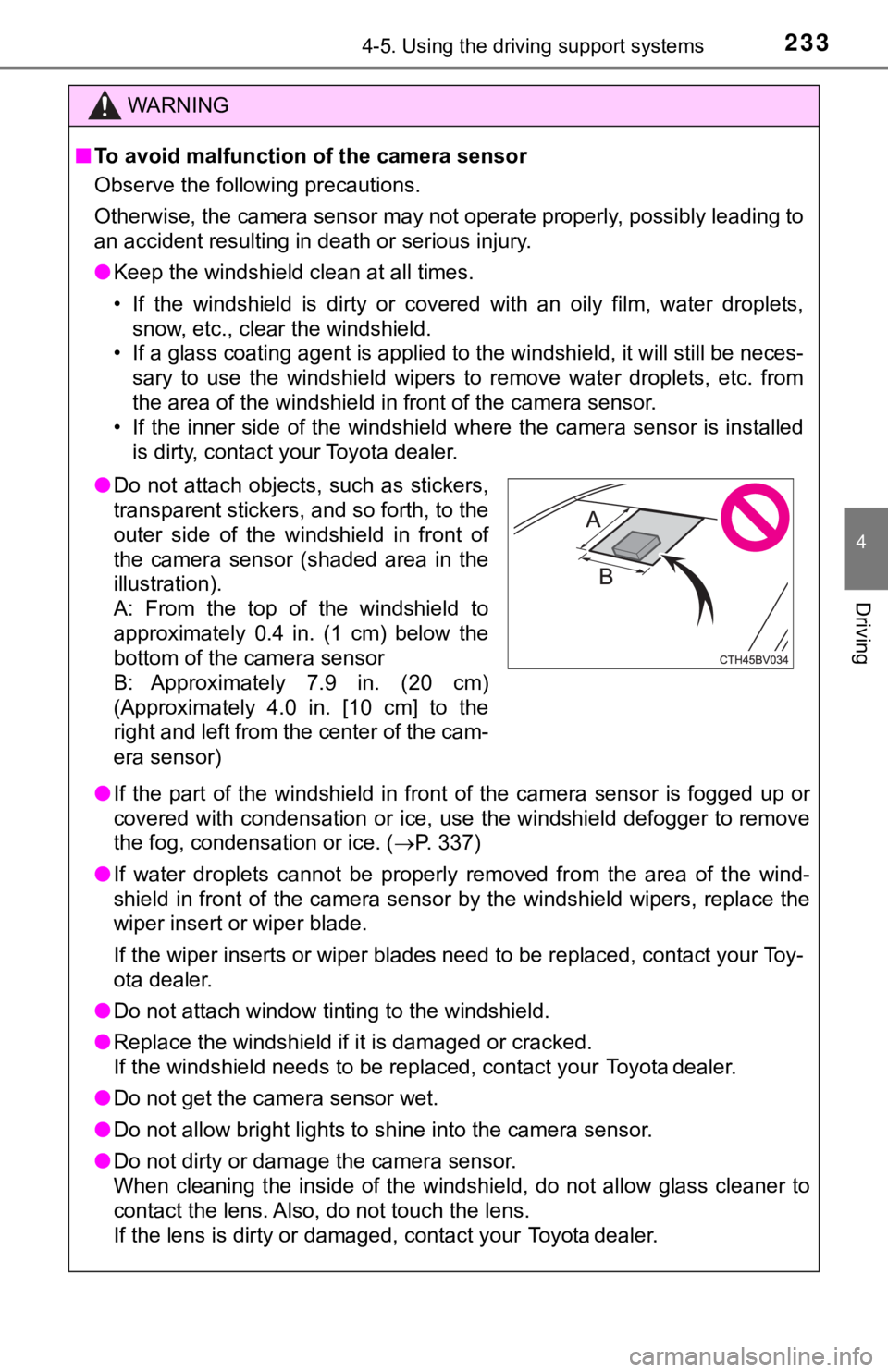
● Do not attach objects, such as stickers,
transparent stickers, and so forth, to the
outer side of the windshield in front of
the camera sensor (shaded area in the
illustration).
A: From the top of the windshield to
approximately 0.4 in. (1 cm) below the
bottom of the camera sensor
B: Approximately 7.9 in. (20 cm)
(Approximately 4.0 in. [10 cm] to the
right and left from the center of the cam-
era sensor)