towing TOYOTA AVALON HYBRID 2020 (in English) User Guide
[x] Cancel search | Manufacturer: TOYOTA, Model Year: 2020, Model line: AVALON HYBRID, Model: TOYOTA AVALON HYBRID 2020Pages: 560, PDF Size: 11.03 MB
Page 291 of 560

2914-5. Using the driving support systems
4
Driving
●In some situations, such as the following, the rear camera dete ction function
may operate even though there are no pedestrians in the detection area.
• When a three dimensional object, such as a pole, traffic cone, fence, or parked vehicle, is detected
• When a moving object, such as a car or motorcycle is detected
• When backing up toward moving objects such as flags or puddles , or air-
borne matter, such as smoke, steam, rain, or snow
• When there is a pattern on the road, due to the road being mad e of cob-
blestone or gravel or having tram rails, traces of repair, white lines,
pedestrian crossings or fallen leaves on the surface
• When backing up on a metal cover (grating), such as those used for
drainage ditches
• When backing up toward the roadside or a bump in the road
• When an object is reflected in a puddle or on a wet road surfa ce
• When there are shadows on the road
• When backing up over a bump in the road
• If the vehicle is significantly tilted, such as when carrying a heavy load
• When backing up toward an incline/decline
• If the suspension has been modified or tires of a size other than specified are installed
• If the rear of the vehicle is raised or lowered due to the carried load
• If an electronic component, such as a backlit license plate or rear fog
light, is installed near the rear camera
• If a bumper protector, such as an additional trim strip, is installed to the rear bumper
• If the orientation of the rear camera has been changed due to a collision
or other impact, or removal and installation
• If a towing eyelet is installed to the rear of the vehicle
• When the rear camera is obscured (dirt, snow, ice, etc. are at tached) or
scratched
• When water is flowing over the rear camera lens
• If there is a flashing light in the detection area, such as th e emergency
flashers of another vehicle
■ Situations in which the rear cam era detection function may be difficult to
notice
● If buzzer may be difficult to hear if the surrounding area is noisy, the volume
of the audio system volume is high, the air conditioning system is being
used, etc.
● If the temperature in the cabin is extremely high or low, the a udio system
screen may not operate correctly.
Page 298 of 560

2984-5. Using the driving support systems
WARNING
■Sensors
Certain vehicle conditions and the surrounding environment may affect the
ability of a sensor to correctly detect an object. Particular instances where
this may occur are listed below.
● There is dirt, snow or ice on the sensor. (Wiping the sensors w ill resolve
this problem.)
● The sensor is frozen. (Thawing the area will resolve this probl em.)
In especially cold weather, if a sensor is frozen the screen ma y show an
abnormal display, or objects may not be detected.
● The sensor is covered in any way.
● The vehicle is leaning considerably to one side.
● On an extremely bumpy road, on an incline, on gravel, or on grass.
● The vicinity of the vehicle is noisy due to vehicle horns, moto rcycle
engines, air brakes of large vehicles, or other loud noises pro ducing ultra-
sonic waves.
● There is another vehicle equipped with parking assist sensors i n the vicin-
ity.
● The sensor is coated with a sheet of spray or heavy rain.
● The sensor is drenched with water on a flooded road.
● The vehicle is equipped with a fender pole or wireless antenna.
● Towing eyelets are installed.
● The bumper or sensor receives a strong impact.
● The vehicle is approaching a tall or curved curb.
● The detection range is reduced due to an object such as a sign.
● In harsh sunlight or intense cold weather.
● The area directly under the bumpers is not detected.
● If objects draw too close to the sensor.
● A non-genuine Toyota suspension (lowered suspension, etc.) is i nstalled.
● A backlit license plate is installed.
In addition to the examples above, there are instances in which , because of
their shape, signs and other objects may be judged by a sensor to be closer
than they are.
Page 313 of 560

3134-5. Using the driving support systems
4
Driving
NOTICE
■To prevent the system from malfunctioning
● If the area around a sensor is subjected to an impact, the syst em may not
operate properly due to the sensor being misaligned. Have the v ehicle
inspected by your Toyota dealer.
● When using a high pressure washer to wash the vehicle, do not spray the
sensors directly, as doing so may cause a sensor to malfunction .
● When using steam to clean the vehicle, do not direct steam too close to
the sensors as doing so may cause a sensor to malfunction.
■ To prevent a radar sensor from malfunctioning
● If the area around a radar sensor is subjected to an impact, th e system
may not operate properly due to a sensor malfunction. Have the vehicle
inspected by your Toyota dealer.
● Observe the radar sensor handling precautions. ( P. 280)
■ To prevent unnecessary operation of the Intelligent Clearance S onar
system
In the following situations, disable the Intelligent Clearance Sonar system
as the system may operate even though there is no possibility o f a collision.
● When inspecting the vehicle using a chassis roller, chassis dynamo or free
roller
● When loading the vehicle onto a boat, truck or other transport vessel
● If the suspension has been modified or tires of a size other th an specified
are installed
● If the front of the vehicle is raised or lowered due to the carried load
● When equipment that may obstruct a sensor is installed, such as a towing
eyelet, bumper protector (an additional trim strip, etc.), bicy cle carrier, or
snow plow
● When using an automatic car wash
Page 319 of 560
3194-5. Using the driving support systems
4
Driving
■Situations in which the Rear Cross Traffic Auto Brake function may not
operate properly
In some situations such as the following, this function may not operate prop-
erly.
● Objects and vehicles which the radar sensors are not designed t o detect
• Stationary objects
• Vehicles which are moving away from your vehicle
• Pedestrians, motorcycles, bicycles, etc.
*
• Objects which are extremely close to a radar sensor
• Vehicles which are approaching from the right or left at the r ear of the
vehicle at a traveling speed of less than approximately 5 mph ( 8 km/h)
• Vehicles which are approaching from the right or left at the r ear of the
vehicle at a traveling speed of more than approximately 15 mph (24 km/h)
*: Depending on conditions, detection of a vehicle and/or object may occur.
● Situations in which the radar sensors may not be able to detect an object
• When a sensor or the area around a sensor is extremely hot or cold
• If the rear bumper is covered with ice, snow, dirt, etc.
• If heavy rain or water strikes the vehicle
• When the detection area of a radar sensor is obstructed by an adjacent
vehicle
• If the vehicle is significantly tilted
• When equipment that may obstruct a sensor is installed, such a s a towing
eyelet, bumper protector (an additional trim strip, etc.), bicy cle carrier, or
snow plow
• If the suspension has been modified or tires of a size other than specified
are installed
• If the front of the vehicle is raised or lowered due to the ca rried load
• If a sticker or an electronic component, such as a backlit license plate
(especially fluorescent type), fog lights, a fender pole or wir eless antenna
is installed near a radar sensor
• If the orientation of a radar sensor has been changed due to a collision or
other impact or removal and installation
• When multiple vehicles are approaching with only a small gap between each vehicle
• When a vehicle is approaching at high speed
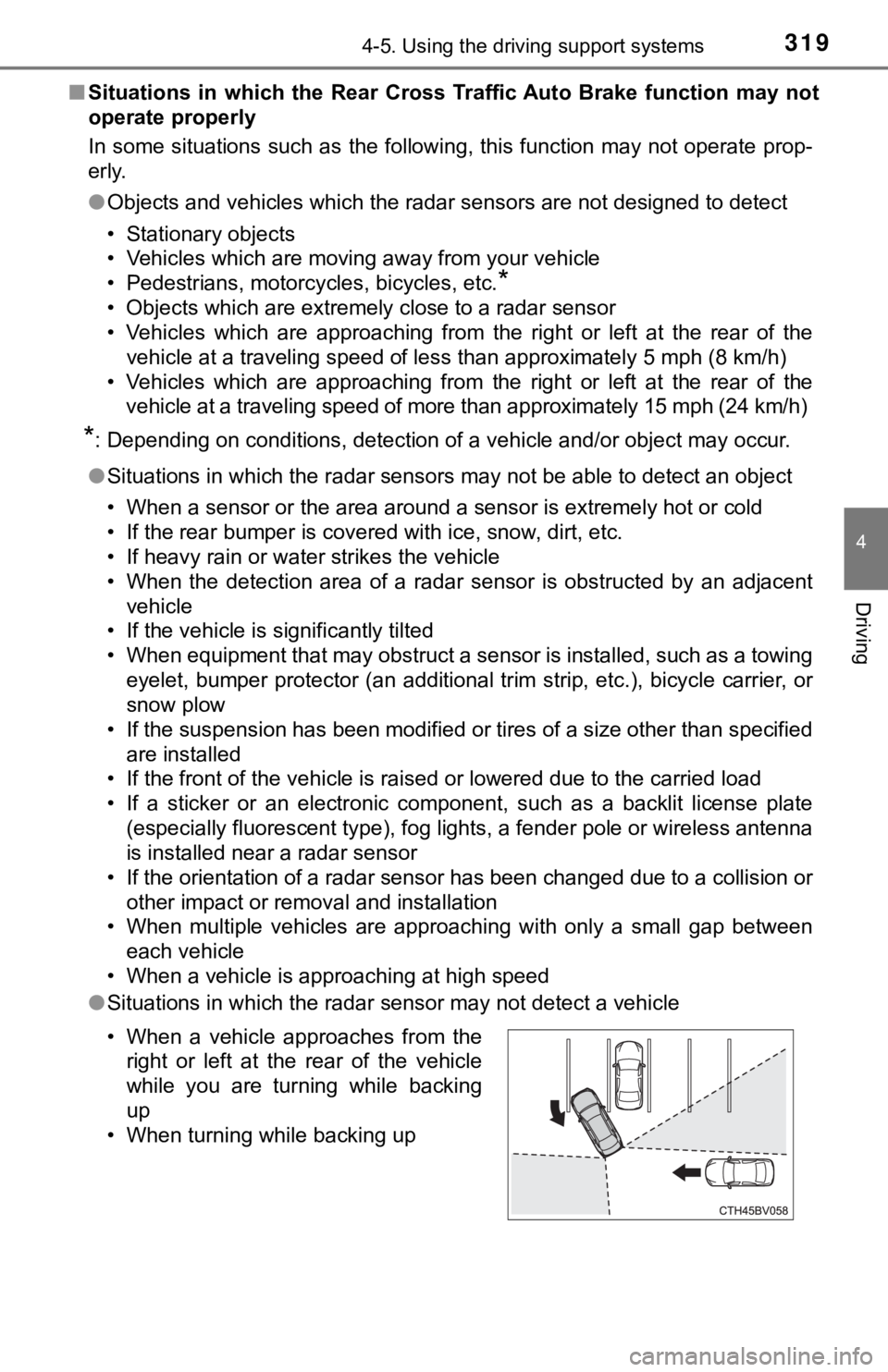
● Situations in which the radar sensor may not detect a vehicle
• When a vehicle approaches from the
right or left at the rear of the vehicle
while you are turning while backing
up
• When turning while backing up
Page 357 of 560
3575-3. Using the storage features
5
Interior features
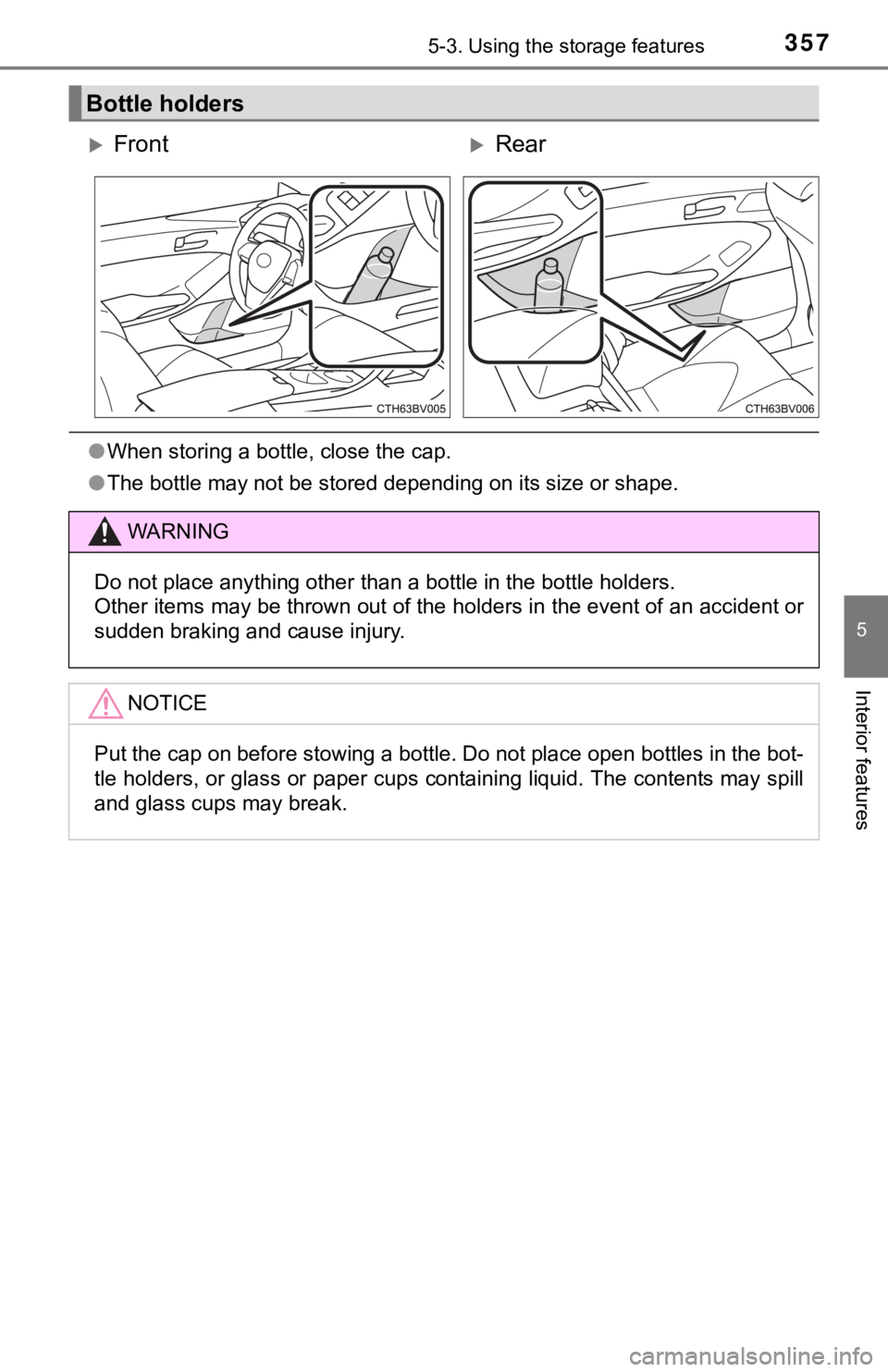
●When storing a bottle, close the cap.
● The bottle may not be stored depending on its size or shape.
Bottle holders
FrontRear
WARNING
Do not place anything other than a bottle in the bottle holders .
Other items may be thrown out of the holders in the event of an accident or
sudden braking and cause injury.
NOTICE
Put the cap on before stowing a bottle. Do not place open bottles in the bot-
tle holders, or glass or paper cups containing liquid. The cont ents may spill
and glass cups may break.
Page 449 of 560
449
7
When trouble arises
7-2. Steps to take in an emergency
The following may indicate a problem with your transmission. Contact
your Toyota dealer or commercial towing service before towing.
● A warning message for the hybrid system is shown on the multi-
information display and the vehicle does not move.
● The vehicle makes an abnormal sound.
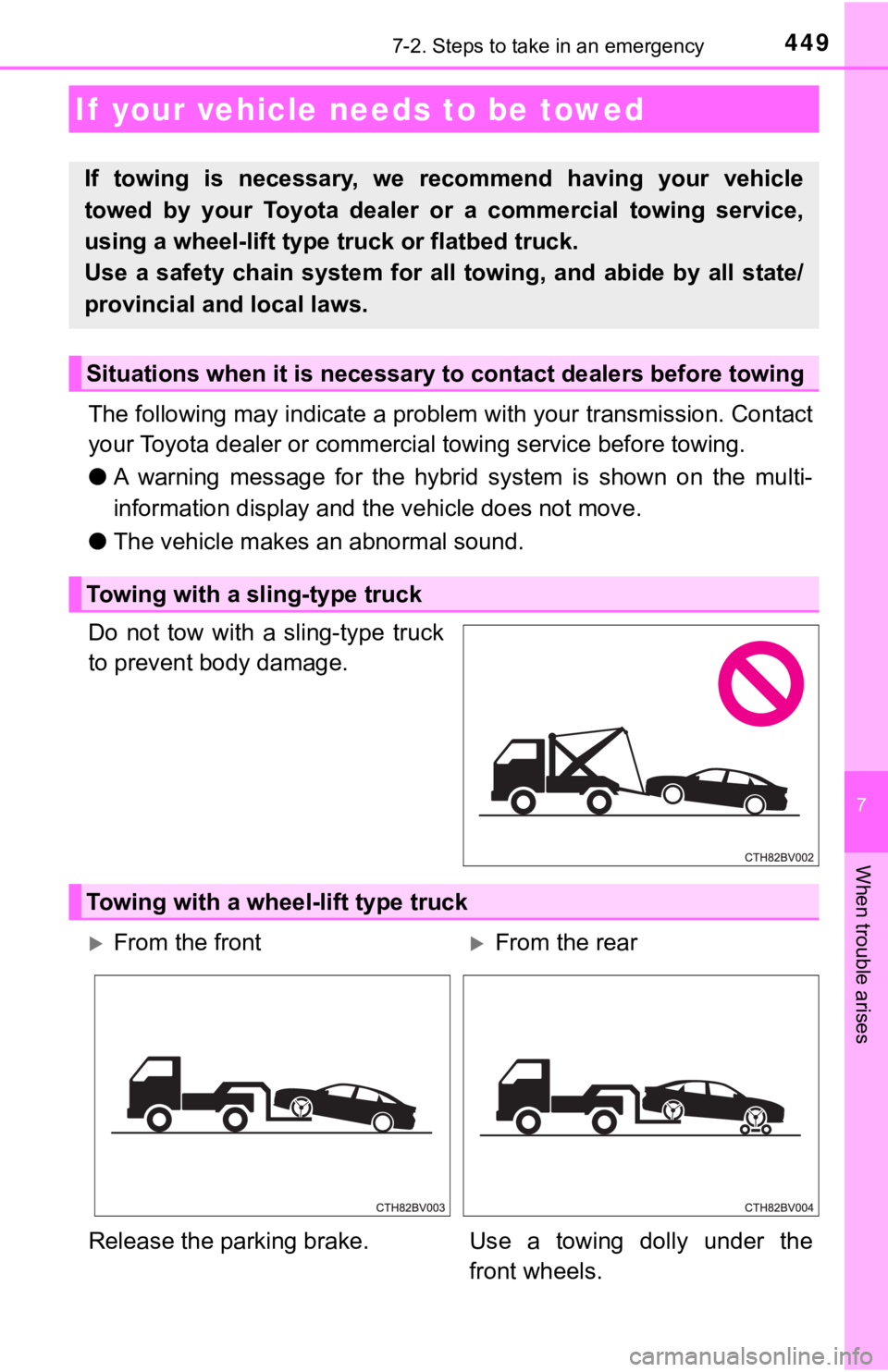
Do not tow with a sling-type truck
to prevent body damage.
If your vehicle needs to be towed
If towing is necessary, we recommend having your vehicle
towed by your Toyota dealer or a commercial towing service,
using a wheel-lift type t ruck or flatbed truck.
Use a safety chain system for all towing, and abide by all stat e/
provincial and local laws.
Situations when it is necessary to contact dealers before towing
Towing with a sling-type truck
Towing with a wheel-lift type truck
From the frontFrom the rear
Release the parking brake. Us e a towing dolly under the
front wheels.
Page 451 of 560
4517-2. Steps to take in an emergency
7
When trouble arises
WARNING
Observe the following precautions.
Failure to do so may result in death or serious injury.
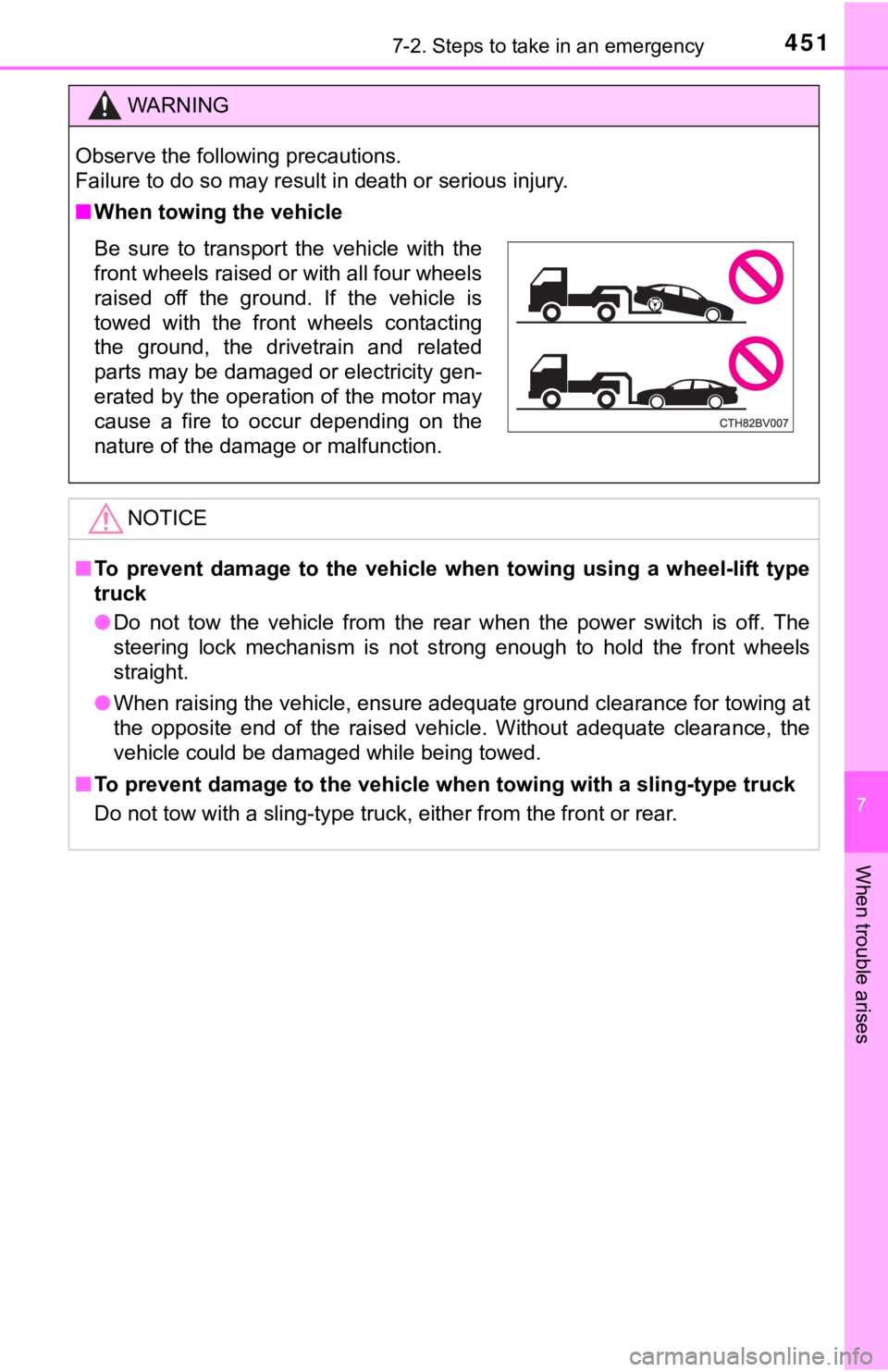
■When towing the vehicle
NOTICE
■To prevent damage to the vehicle when towing using a wheel-lift type
truck
● Do not tow the vehicle from the rear when the power switch is o ff. The
steering lock mechanism is not strong enough to hold the front wheels
straight.
● When raising the vehicle, ensure adequate ground clearance for towing at
the opposite end of the raised vehicle. Without adequate clearance, the
vehicle could be damaged while being towed.
■ To prevent damage to the vehicle when towing with a sling-type truck
Do not tow with a sling-type truck, either from the front or re ar.
Be sure to transport the vehicle with the
front wheels raised or with all four wheels
raised off the ground. If the vehicle is
towed with the front wheels contacting
the ground, the drivetrain and related
parts may be damaged or electricity gen-
erated by the operation of the motor may
cause a fire to occur depending on the
nature of the damage or malfunction.
Page 472 of 560
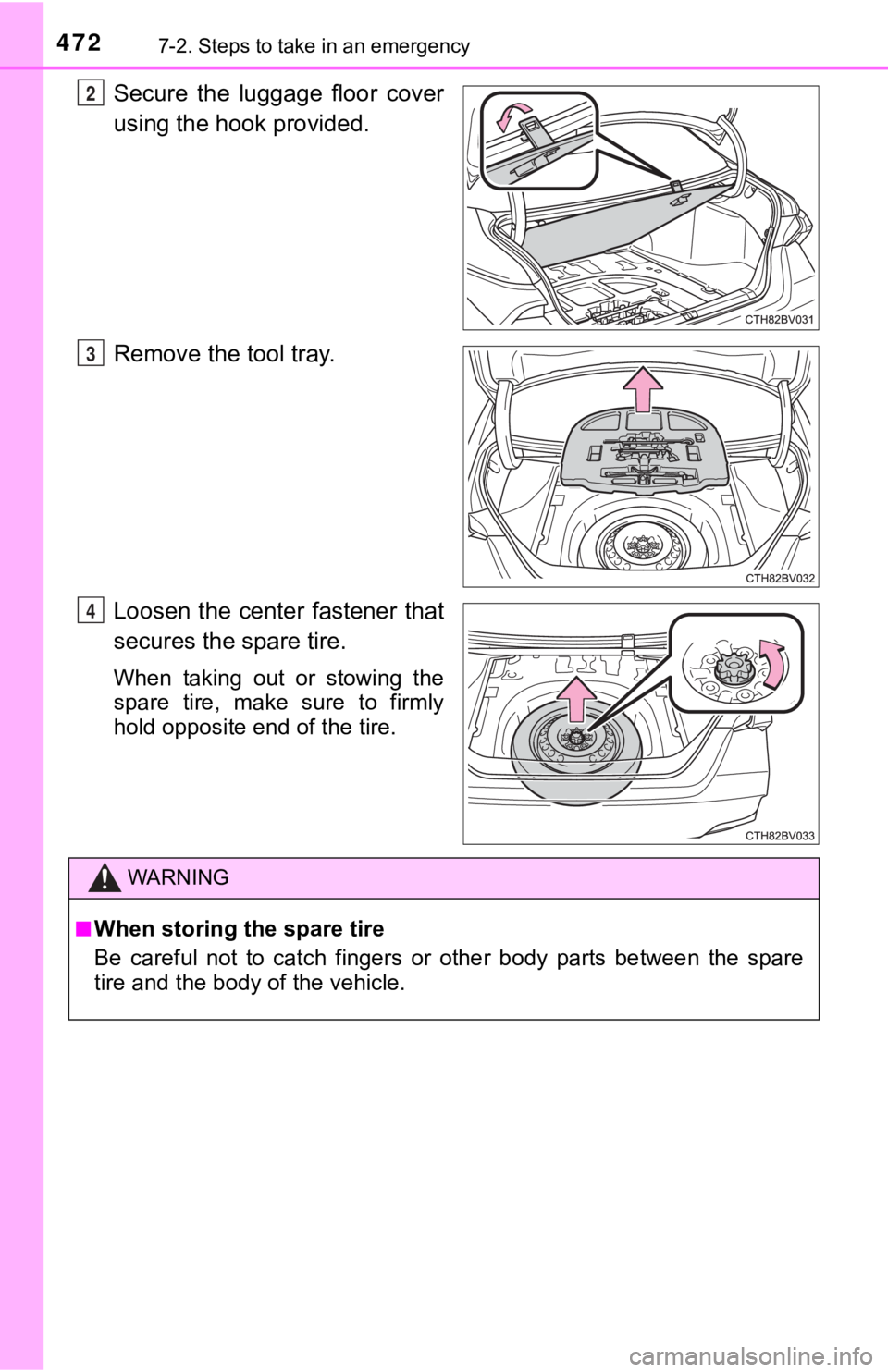
4727-2. Steps to take in an emergency
Secure the luggage floor cover
using the hook provided.
Remove the tool tray.
Loosen the center fastener that
secures the spare tire.
When taking out or stowing the
spare tire, make sure to firmly
hold opposite end of the tire.
2
3
4
WARNING
■When storing the spare tire
Be careful not to catch fingers or other body parts between the spare
tire and the body of the vehicle.
Page 497 of 560

4977-2. Steps to take in an emergency
7
When trouble arises
NOTICE
■To avoid damaging the transmission and other components
● Avoid spinning the front wheels and depressing the accelerator pedal
more than necessary.
● If the vehicle remains stuck even after these procedures are pe rformed,
the vehicle may require towing to be freed.
Page 545 of 560

545Alphabetical index
Daytime running light system .................................... 219
Defogger Outside rear view mirrors...... 343
Rear window ......................... 343
Windshield ............................ 343
Dimensions .............................. 500
Dinghy towing .......................... 195
Display Dynamic radar cruise control
with full-speed range .......... 264
LDA (Lane Departure Alert with steering control) .......... 259
Multi-information display ....... 102
Warning messages ............... 463
Do-it-yourself maintenance .... 399
Door courtesy lights
Location ................................ 352
Wattage ................................ 507
Door lock Doors .................................... 138
Smart key system ................. 138
Wireless remote control ........ 138 Doors ........................................ 138
Automatic door locking and unlocking systems ....... 141
Door lock .............................. 140
Outside rear view mirrors ..... 170
Rear door child-protector ...... 141
Side doors ............................ 138
Side windows........................ 173
Drive-Start Control .................. 184
Driver’s seat belt reminder light ........................ 456
Driver’s seat position memory .................................. 159
Driving Break-in tips.......................... 184
Correct posture ....................... 26
Driving mode select switches ............................. 321
Hybrid vehicle driving tips ..... 330
Procedures ........................... 182
Winter drive tips .................... 333
Driving information ................. 106
Driving position memory ........ 159
Memory recall function ......... 162
Power easy access system .......... ...................... 159
Dynamic radar cruise control with full-speed range ............ 264
D