from the rear bumper TOYOTA AVALON HYBRID 2021 Owners Manual (in English)
[x] Cancel search | Manufacturer: TOYOTA, Model Year: 2021, Model line: AVALON HYBRID, Model: TOYOTA AVALON HYBRID 2021Pages: 560, PDF Size: 13.21 MB
Page 152 of 560

1523-2. Opening, closing and locking the doors
■Note for the entry function
●Even when the electronic key is within the effective range (detection areas),
the system may not operate properly in the following cases:
• The electronic key is too close to the window or outside door handle, near
the ground, or in a high place when the doors are locked or unlocked.
• The electronic key is near the ground or in a high place, or too close to
the rear bumper center when the trunk is opened.
• The electronic key is on the instrument panel, rear package tray or floor,
or in the door pockets or glove box when the hybrid system is started or
power switch modes are changed.
●Do not leave the electronic key on top of the instrument panel or near the
door pockets when exiting the vehicle. Depending on the radio wave recep-
tion conditions, it may be detected by the antenna outside the cabin and the
door will become lockable from the outside, possibly trapping the electronic
key inside the vehicle.
●As long as the electronic key is within the effective range, the doors may be
locked or unlocked by anyone. However, only the doors detecting the elec-
tronic key can be used to unlock the vehicle.
●Even if the electronic key is not inside the vehicle, it may be possible to start
the hybrid system if the electronic key is near the window.
●The doors may unlock or lock if a large amount of water splashes on the
door handle, such as in the rain or in a car wash, when the electronic key is
within the effective range. (The doors will automatically be locked after
approximately 60 seconds if the doors are not opened and closed.)
●If the wireless remote control is used to lock the doors when the electronic
key is near the vehicle, there is a possibility that the door may not be
unlocked by the entry function. (Use the wireless remote control to unlock
the doors.)
●Touching the door lock sensor while wearing gloves may delay or prevent
lock operation. Remove the gloves and touch the lock sensor again.
●When the lock operation is performed using the lock sensor, recognition sig-
nals will be shown up to two consecutive times. After this, no recognition
signals will be given.
*
●If the door handle becomes wet while the electronic key is within the effec-
tive range, the door may lock and unlock repeatedly. In this case, follow the
<00490052004f004f0052005a004c0051004a00030046005200550055004800460057004c00520051000300530055005200460048004700580055004800560003005700520003005a00440056004b00030057004b0048000300590048004b004c0046004f00
48001d[
• Place the electronic key in a location 6 ft. (2 m) or more away from the
vehicle. (Take care to ensure that the key is not stolen.)
• Set the electronic key to battery-saving mode to disable the smart key
system. (P. 150)
●If the electronic key is inside the vehicle and a door handle becomes wet
during a car wash, a message may be shown on the multi-information dis-
play and a buzzer will sound outside the vehicle. To turn off the alarm, lock
all the doors.
Page 249 of 560
2494-5. Using the driving support systems
4
Driving
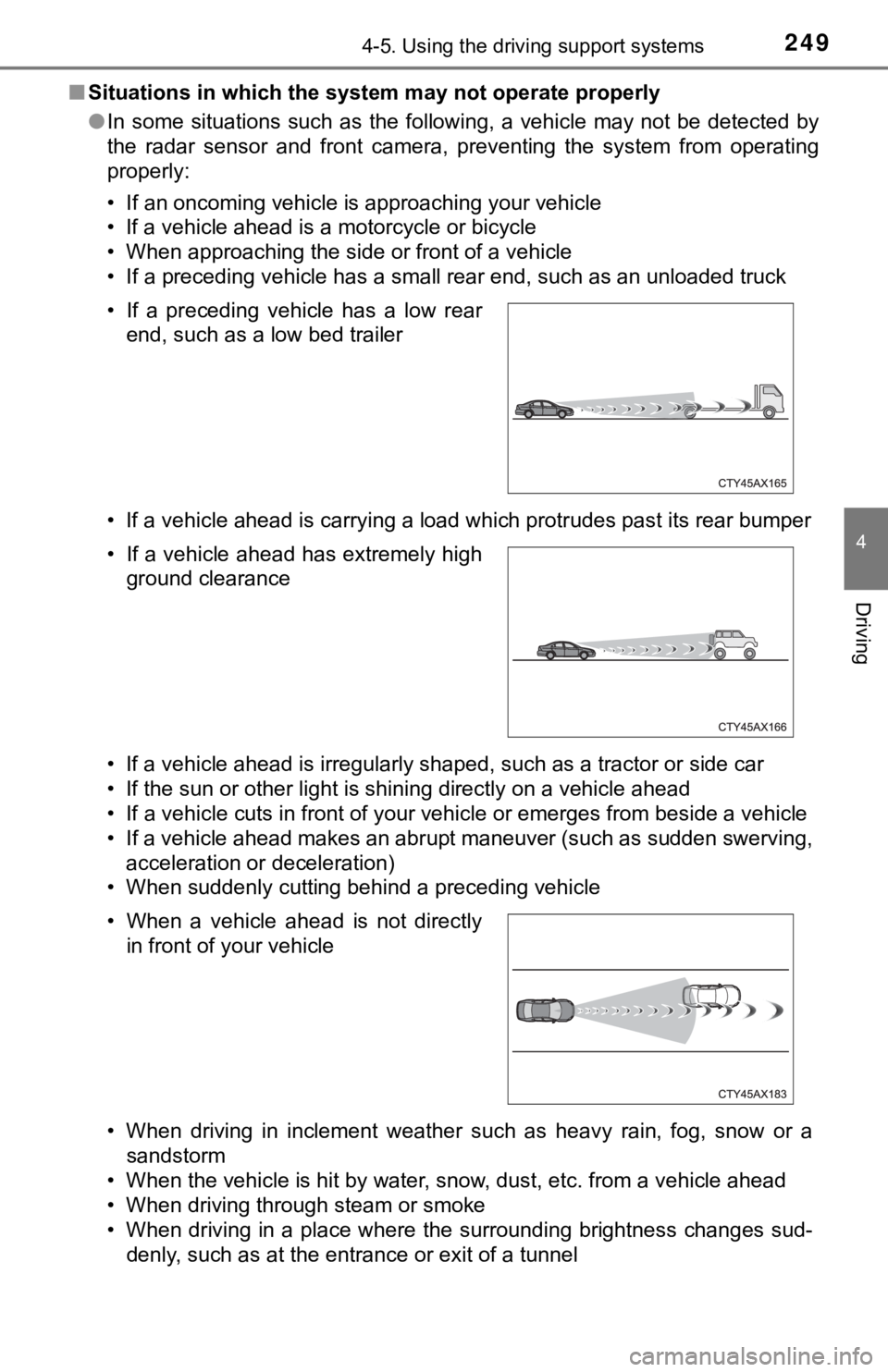
■Situations in which the system may not operate properly
●In some situations such as the following, a vehicle may not be detected by
the radar sensor and front camera, preventing the system from operating
properly:
• If an oncoming vehicle is approaching your vehicle
• If a vehicle ahead is a motorcycle or bicycle
• When approaching the side or front of a vehicle
• If a preceding vehicle has a small rear end, such as an unloaded truck
• If a vehicle ahead is carrying a load which protrudes past its rear bumper
• If a vehicle ahead is irregularly shaped, such as a tractor or side car
• If the sun or other light is shining directly on a vehicle ahead
• If a vehicle cuts in front of your vehicle or emerges from beside a vehicle
• If a vehicle ahead makes an abrupt maneuver (such as sudden swerving,
acceleration or deceleration)
• When suddenly cutting behind a preceding vehicle
• When driving in inclement weather such as heavy rain, fog, snow or a
sandstorm
• When the vehicle is hit by water, snow, dust, etc. from a vehicle ahead
• When driving through steam or smoke
• When driving in a place where the surrounding brightness changes sud-
denly, such as at the entrance or exit of a tunnel • If a preceding vehicle has a low rear
end, such as a low bed trailer
• If a vehicle ahead has extremely high
ground clearance
• When a vehicle ahead is not directly
in front of your vehicle
Page 277 of 560
2774-5. Using the driving support systems
4
Driving
Audio system screen (RCTA function only)
If a vehicle approaching from the right or left at the rear of the vehicle is
detected, the RCTA icon (P. 284) for the detected side will be displayed.
RCTA
buzzer (RCTA function only)
When a vehicle approaching from the right or left rear of the vehicle is
detected, a buzzer sounds from behind the rear seat.
Press / of the meter control switches, select .
Press
/ of the meter control switched, select or .
Press of the meter control switch.
Each time is pressed, the function changes on/off.
■The outside rear view mirror indicators visibility
When under strong sunlight, the outside rear view mirror indicator may be dif-
ficult to see.
■RCTA buzzer hearing
RCTA function may be difficult to hear over loud noises such as high audio
volume.
■When “Blind Spot Monitor Unavailable” or “Rear Cross Traffic Alert
Unavailable” are shown on the multi-information display
Ice, snow, mud, etc., may be attached to the rear bumper around the sensors.
(P. 279)
The system should return to normal operation after removing the ice, snow,
mud, etc., from the rear bumper. Additionally, the sensors may not operate
<00510052005500500044004f004f005c0003005a004b00480051000300470055004c0059004c0051004a0003004c005100030048005b00570055004800500048004f005c0003004b00520057000300520055000300460052004f0047000300480051005900
4c005500520051005000480051005700560011[
■When there is a malfunction in the Blind Spot Monitor
If a system malfunction is detected due to any of the following reasons, a
warning message will be displayed:
●There is a malfunction with the sensors
●The sensors have become dirty
●The outside temperature is extremely high or low
●The sensor voltage has become abnormal
Turning the BSM function/RCTA function on/off
4
5
1
2
3
Page 280 of 560
2804-5. Using the driving support systems
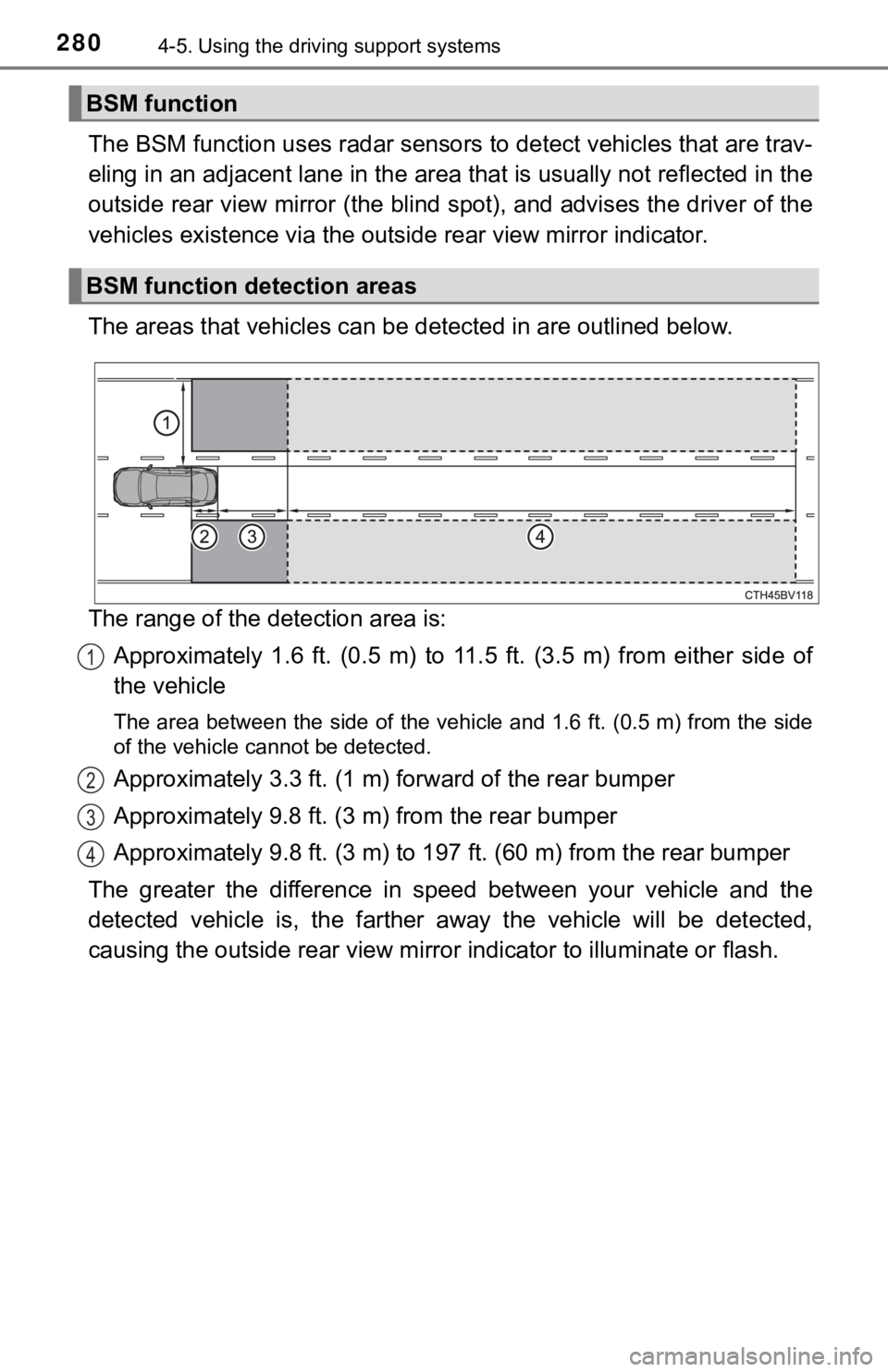
The BSM function uses radar sensors to detect vehicles that are trav-
eling in an adjacent lane in the area that is usually not reflected in the
outside rear view mirror (the blind spot), and advises the driver of the
vehicles existence via the outside rear view mirror indicator.
The areas that vehicles can be detected in are outlined below.
The range of the detection area is:
Approximately 1.6 ft. (0.5 m) to 11.5 ft. (3.5 m) from either side of
the vehicle
The area between the side of the vehicle and 1.6 ft. (0.5 m) from the side
of the vehicle cannot be detected.
Approximately 3.3 ft. (1 m) forward of the rear bumper
Approximately 9.8 ft. (3 m) from the rear bumper
Approximately 9.8 ft. (3 m) to 197 ft. (60 m) from the rear bumper
The greater the difference in speed between your vehicle and the
detected vehicle is, the farther away the vehicle will be detected,
causing the outside rear view mirror indicator to illuminate or flash.
BSM function
BSM function detection areas
1
2
3
4
Page 282 of 560

2824-5. Using the driving support systems
■Conditions under which the BSM function will not detect a vehicle
The BSM function is not designed to detect the following types of vehicles
and/or objects:
●Small motorcycles, bicycles, pedestrians, etc.
*
●Vehicles traveling in the opposite direction
●<002a005800440055004700550044004c004f0056000f0003005a0044004f004f0056000f00030056004c004a00510056000f0003005300440055004e00480047000300590048004b004c0046004f00480056000300440051004700030056004c0050004c00
4f0044005500030056005700440057004c0052005100440055[y objects
*
●Following vehicles that are in the same lane*
●Vehicles driving 2 lanes across from your vehicle*
●Vehicles which are being overtaken rapidly by your vehicle
*: Depending on the conditions, detection of a vehicle and/or object may
occur.
■Conditions under which the BSM function may not function correctly
●The BSM function may not detect vehicles correctly in the following condi-
tions:
• When the sensor is misaligned due to a strong impact to the sensor or its
surrounding area
• During bad weather such as heavy rain, fog, snow, etc.
• When mud, snow, ice, a sticker, etc., is covering the sensor or surround-
ing area on the rear bumper
• When driving on a road surface that is wet due to rain, standing water,
snow, etc.
• When there is a significant difference in speed between your vehicle and
the vehicle that enters the detection area
• When a vehicle is in the detection area from a stop and remains in the
detection area as your vehicle accelerates
• When driving up or down consecutive steep inclines, such as hills, a dip
in the road, etc.
• When driving on roads with sharp bends, consecutive curves, or uneven
surfaces
• When multiple vehicles approach with only a small gap between each
vehicle
• When vehicle lanes are wide, and the vehicle in the next lane is too far
away from your vehicle
• When the vehicle that enters the detection area is traveling at about the
same speed as your vehicle
• When there is a significant difference in height between your vehicle and
the vehicle that enters the detection area
• Immediately after the BSM function is turned on
Page 286 of 560
2864-5. Using the driving support systems
■Conditions under which the RCTA function will not detect a vehicle
The RCTA function is not designed to detect the following types of vehicles
and/or objects:
●Small motorcycles, bicycles, pedestrians, etc.
*
●Vehicles approaching from directly behind
●<002a005800440055004700550044004c004f0056000f0003005a0044004f004f0056000f00030056004c004a00510056000f0003005300440055004e00480047000300590048004b004c0046004f00480056000300440051004700030056004c0050004c00
4f0044005500030056005700440057004c0052005100440055[y objects
*
●Vehicles moving away from your vehicle
●Vehicles approaching from the parking spaces next to your vehicle
*
●Vehicles backing up in the parking space next to your vehicle*
*
: Depending on the conditions, detection of a vehicle and/or object may
occur.
■Conditions under which the RCTA function may not function correctly
●The RCTA function may not detect vehicles correctly in the following condi-
tions:
• When the sensor is misaligned due to a strong impact to the sensor or its
surrounding area
• When mud, snow, ice, a sticker, etc., is covering the sensor or surround-
ing area on the rear bumper
• During bad weather such as heavy rain, fog, snow, etc.
• When multiple vehicles approach continuously
• Shallow angle parking
• When a vehicle is approaching at high speed
• When parking on a steep incline, such as hills, a dip in the road, etc.
• Immediately after the RCTA function is turned on
• Immediately after the hybrid system is started with the RCTA function on.
• When items such as a bicycle carrier are installed on the rear of the vehi-
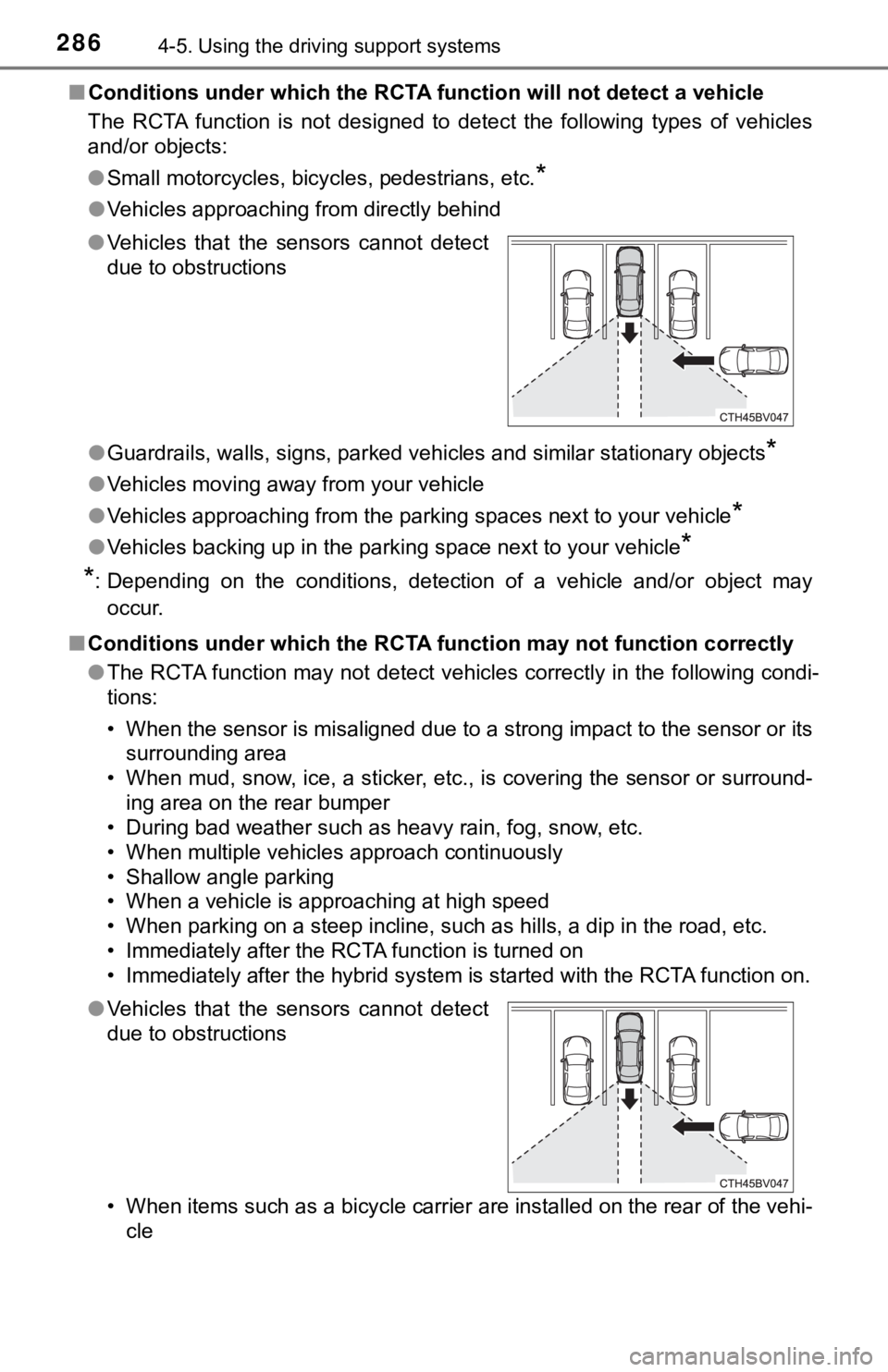
cle ●Vehicles that the sensors cannot detect
due to obstructions
●Vehicles that the sensors cannot detect
due to obstructions
Page 296 of 560
2964-5. Using the driving support systems
■The intuitive parking assist can be operated when
●Front corner sensors:
• The power switch is in ON mode.
• The shift lever is in other than P.
• The vehicle speed is less than about 6 mph (10 km/h).
●Front center sensors:
• The power switch is in ON mode.
• The shift lever is in other than P or R.
• The vehicle speed is less than about 6 mph (10 km/h).
●Rear corner and rear center sensors:
• The power switch is in ON mode.
• The shift lever is in R.
• The vehicle speed is less than about 6 mph (10 km/h).
■Intuitive parking assist display
When an object is detected while the Toyota parking assist monitor or pan-
oramic view monitor is in use, the warning indicator will appear in the upper
part of the screen even if the display setting has been set to off.
■Sensor detection information
●The sensor’s detection areas are limited to the areas around the vehicle’s
bumper.
●Depending on the shape of the object and other factors, the detection dis-
tance may shorten, or detection may be impossible.
●Objects may not be detected if they are too close to the sensor.
●There will be a short delay between object detection and display. Even at
slow speeds, there is a possibility that the object will come within the sen-
<00560052005500b600560003004700480057004800460057004c00520051000300440055004800440056000300450048004900520055004800030057004b004800030047004c00560053004f0044005c0003004c005600030056004b0052005a0051000300
440051004700030057004b0048000300450058005d005d0048[r sounds.
●Thin posts or objects lower than the sensor may not be detected when
approached, even if they have been detected once.
●It might be difficult to hear beeps due to the volume of audio system or air
flow noise of the air conditioning system.
■If a battery terminal has been disconnected and reconnected
The system needs to be initialized.
To initialize the system, drive the vehicle straight ahead for 5 seconds or more
at a speed of approximately 22 mph (35 km/h) or more.
■If “Parking Assist Unavailable Please Clean Parking Assist Sensor” is
displayed on the multi-information display
A sensor may be dirty or covered with snow or ice. In such cases, if it is
removed from the sensor, the system should return to normal.
Also, due to the sensor being frozen at low temperatures, a malfunction dis-
play may appear or an object may not be detected. If the sensor thaws out,
the system should return to normal.
Page 308 of 560
3084-5. Using the driving support systems
■Re-enabling the Intelligent Clearance Sonar system
To re-enable the Intelligent Clearance Sonar system when it is disabled due
to operation of the Intelligent Clearance Sonar function, either enable the sys-
tem again (P. 303), or turn the power switch off and then back to ON mode.
Additionally, if the object becomes no longer in the traveling direction of the
vehicle or if the traveling direction of the vehicle changes (such as changing
from moving forward to backing up, or from backing up to moving forward),
the system will be re-enabled automatically.
■Objects that the Intelligent Clearance Sonar function may not detect
The sensors may not be able to detect certain objects, such as the following.
●Cotton cloth, snow, and other materials that are poor reflectors of ultrasonic
waves.
(People may also not be detected depending on the type of clothing they are
wearing.)
●Objects which are not perpendicular to the ground, are not perpendicular to
<0057004b0048000300570055004400590048004f004c0051004a00030047004c0055004800460057004c0052005100030052004900030057004b0048000300590048004b004c0046004f0048000f0003004400550048000300580051004800590048005100
030052005500030044005500480003005a00440059004c0051[g.
●Low objects
●Thin objects such as wires, fences, ropes and signposts
●Objects that are extremely close to the bumper
■Situations in which the Intelligent Clearance Sonar may not operate
properly
When the shift lever is in N.
■Intuitive parking assist buzzer
Regardless of whether the intuitive parking assist system is enabled or not
(P. 292), if the Intelligent Clearance Sonar system is enabled (P. 303),
the front or rear sensors detect an object and brake control is performed, the
intuitive parking assist buzzer will sound to notify the driver of the approxi-
mate distance to the object.
Page 318 of 560
3184-5. Using the driving support systems
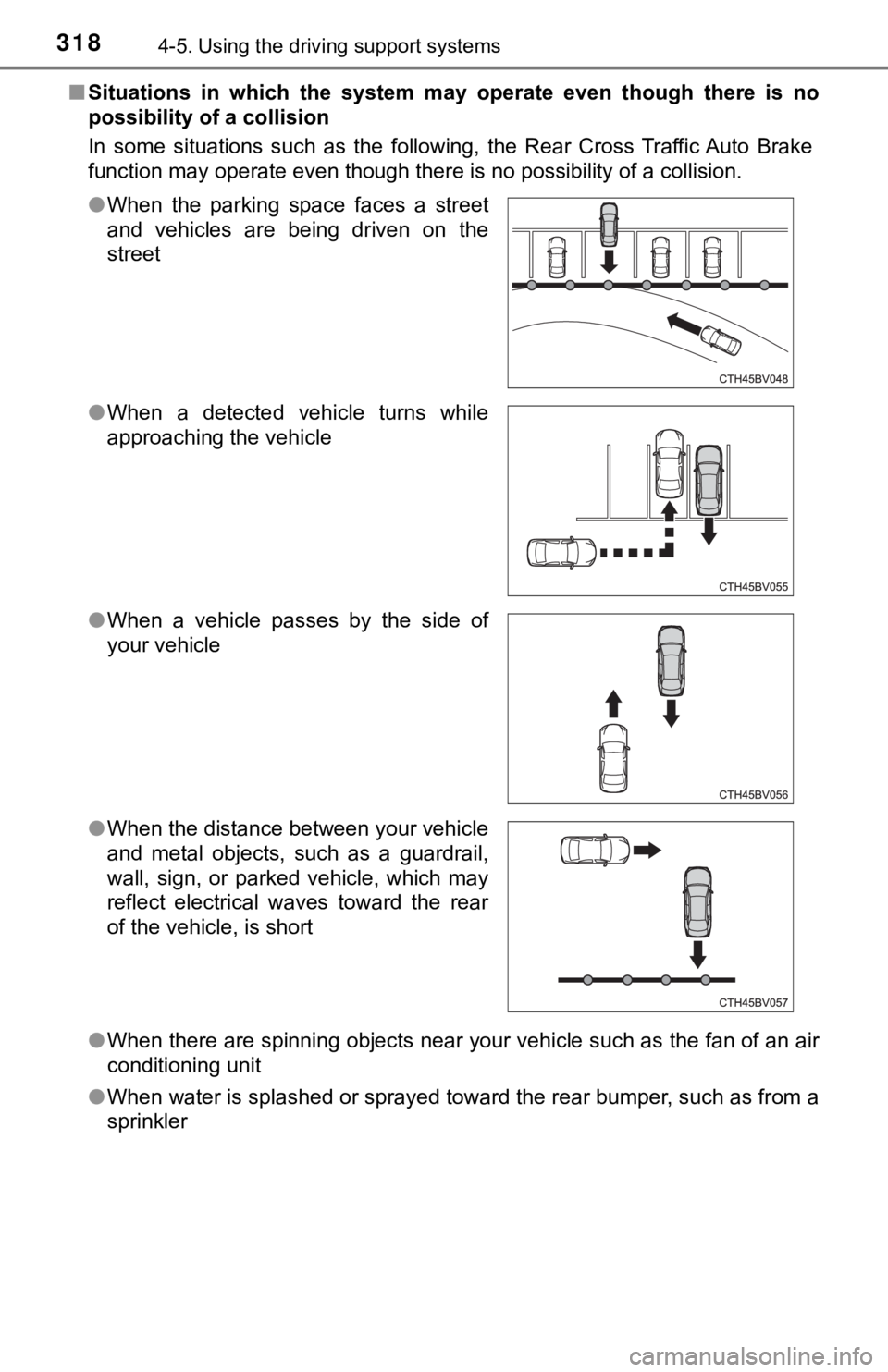
■Situations in which the system may operate even though there is no
possibility of a collision
In some situations such as the following, the Rear Cross Traffic Auto Brake
function may operate even though there is no possibility of a collision.
●When there are spinning objects near your vehicle such as the fan of an air
conditioning unit
●When water is splashed or sprayed toward the rear bumper, such as from a
sprinkler ●When the parking space faces a street
and vehicles are being driven on the
street
●When a detected vehicle turns while
approaching the vehicle
●When a vehicle passes by the side of
your vehicle
●When the distance between your vehicle
and metal objects, such as a guardrail,
wall, sign, or parked vehicle, which may
reflect electrical waves toward the rear
of the vehicle, is short
Page 319 of 560
3194-5. Using the driving support systems
4
Driving
■Situations in which the Rear Cross Traffic Auto Brake function may not
operate properly
In some situations such as the following, this function may not operate prop-
erly.
●Objects and vehicles which the radar sensors are not designed to detect
• Stationary objects
• Vehicles which are moving away from your vehicle
• Pedestrians, motorcycles, bicycles, etc.
*
• Objects which are extremely close to a radar sensor
• Vehicles which are approaching from the right or left at the rear of the
vehicle at a traveling speed of less than approximately 5 mph (8 km/h)
• Vehicles which are approaching from the right or left at the rear of the
vehicle at a traveling speed of more than approximately 15 mph (24 km/h)
*: Depending on conditions, detection of a vehicle and/or object may occur.
●Situations in which the radar sensors may not be able to detect an object
• When a sensor or the area around a sensor is extremely hot or cold
• If the rear bumper is covered with ice, snow, dirt, etc.
• If heavy rain or water strikes the vehicle
• When the detection area of a radar sensor is obstructed by an adjacent
vehicle
• If the vehicle is significantly tilted
• When equipment that may obstruct a sensor is installed, such as a towing
eyelet, bumper protector (an additional trim strip, etc.), bicycle carrier, or
snow plow
• If the suspension has been modified or tires of a size other than specified
are installed
• If the front of the vehicle is raised or lowered due to the carried load
• If a sticker or an electronic component, such as a backlit license plate
(especially fluorescent type), fog lights, a fender pole or wireless antenna
is installed near a radar sensor
• If the orientation of a radar sensor has been changed due to a collision or
other impact or removal and installation
• When multiple vehicles are approaching with only a small gap between
each vehicle
• When a vehicle is approaching at high speed
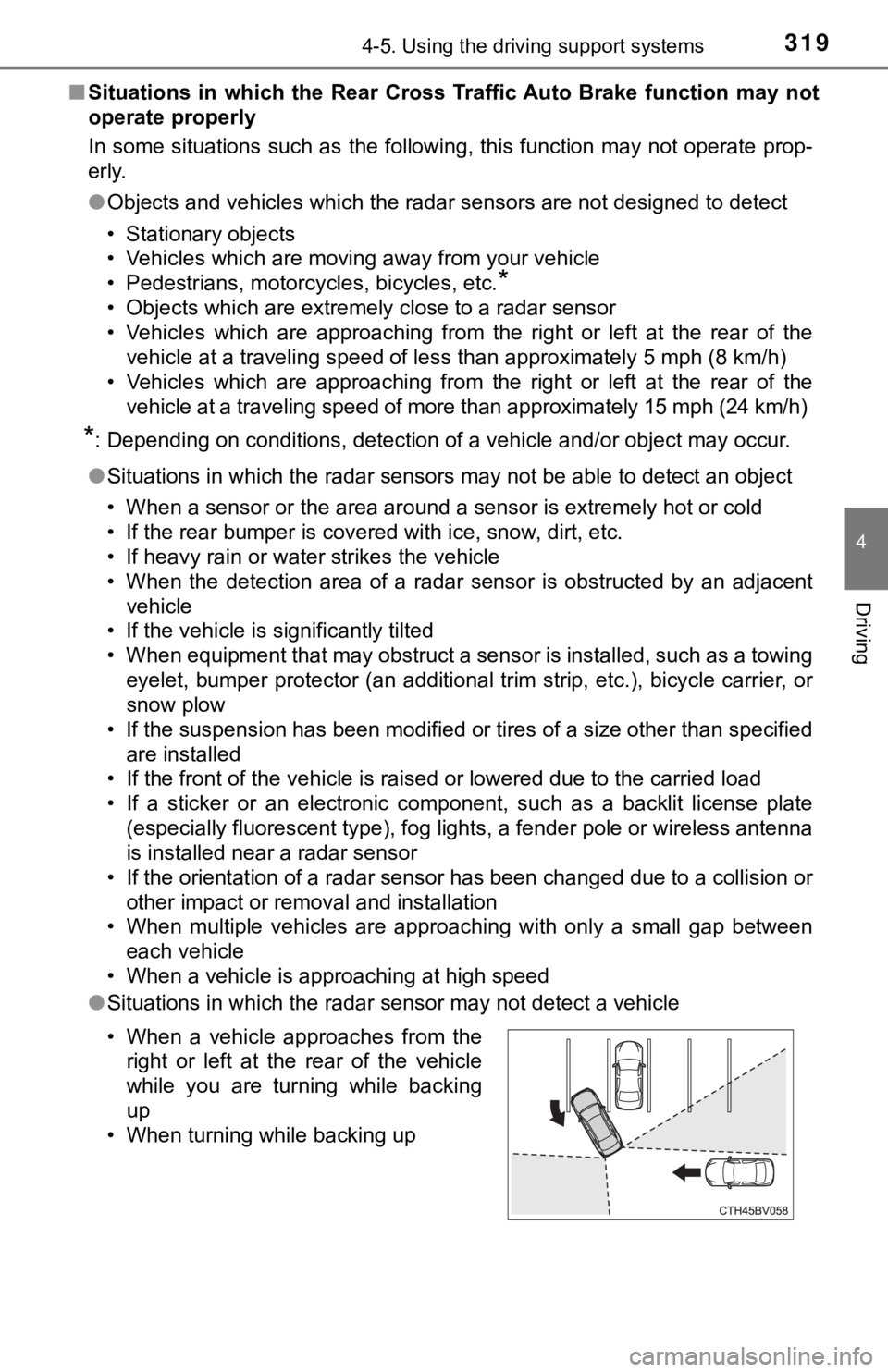
●Situations in which the radar sensor may not detect a vehicle
• When a vehicle approaches from the
right or left at the rear of the vehicle
while you are turning while backing
up
• When turning while backing up