mirror TOYOTA AVALON HYBRID 2021 Owners Manual (in English)
[x] Cancel search | Manufacturer: TOYOTA, Model Year: 2021, Model line: AVALON HYBRID, Model: TOYOTA AVALON HYBRID 2021Pages: 560, PDF Size: 13.21 MB
Page 2 of 560

TABLE OF CONTENTS2
For your information....................... 6
Reading this manual .................... 12
How to search .............................. 13
Pictorial index .............................. 14
1-1. For safe use
Before driving ...................... 24
For safe driving ................... 26
Seat belts ............................ 28
SRS airbags ........................ 34
Front passenger occupant
classification system ......... 48
Safety information for
children ............................. 53
Child restraint systems ........ 54
Installing child restraints ...... 58
Exhaust gas precautions ..... 68
1-2. Emergency assistance
Safety Connect.................... 69
1-3. Hybrid system
Hybrid system features ....... 75
Hybrid system
precautions ....................... 79
1-4. Theft deterrent system
Immobilizer system ............. 86
Alarm ................................... 882. Instrument cluster
Warning lights and
indicators ........................... 92
Gauges and meters ............. 98
Multi-information
display ............................. 102
Head-up display................. 121
Energy monitor/
consumption screen ........ 128
3-1. Key information
Keys................................... 134
3-2. Opening, closing and
locking the doors
Doors ................................. 138
Trunk ................................. 144
Smart key system .............. 148
3-3. Adjusting the seats
Front seats......................... 155
Rear seats ......................... 157
Driving position
memory ........................... 159
Head restraints .................. 164
3-4. Adjusting the steering
wheel and mirrors
Steering wheel ................... 166
Inside rear view mirror ....... 168
Outside rear view
mirrors ............................. 170
3-5. Opening and closing
the windows
Power windows.................. 173
Moon roof .......................... 177
1For safety and security
2Instrument cluster
3Operation of each
component
Page 4 of 560

TABLE OF CONTENTS4
5-1. Using the
air conditioning system
and defogger
Automatic air conditioning
system............................. 338
Heated steering wheel/
seat heaters/
seat ventilators ................ 349
5-2. Using the interior lights
Interior lights list ................ 352
• Interior light ................... 353
• Personal lights .............. 353
• Ambient lights ............... 354
5-3. Using the storage
features
List of storage features...... 355
• Glove box...................... 356
• Console box .................. 356
• Bottle holders ................ 357
• Cup holders .................. 358
• Auxiliary boxes.............. 359
• Open tray ...................... 360
Trunk features ................... 361
5-4. Other interior features
Other interior features ....... 362
• Sun visors ..................... 362
• Vanity mirrors................ 362
• Power outlet .................. 363
• USB charging ports....... 364
• Wireless charger ........... 366
• Armrest ......................... 375
• Assist grips ................... 375
• Coat hooks.................... 376
Garage door opener .......... 3776-1. Maintenance and care
Cleaning and protecting
the vehicle exterior .......... 386
Cleaning and protecting
the vehicle interior ........... 389
6-2. Maintenance
Maintenance
requirements ................... 392
General maintenance ........ 394
Emission inspection and
maintenance (I/M)
programs ......................... 398
6-3. Do-it-yourself
maintenance
Do-it-yourself service
precautions ...................... 399
Hood .................................. 401
Positioning a floor jack....... 402
Engine compartment ......... 403
12-volt battery .................... 411
Tires................................... 415
Tire inflation pressure ........ 427
Wheels............................... 430
Air conditioning filter .......... 432
Cleaning the hybrid
battery (traction battery)
air intake vent and
filter.................................. 434
Electronic key battery ........ 439
Checking and replacing
fuses ................................ 442
Light bulbs ......................... 445
5Interior features6Maintenance and care
Page 14 of 560
14Pictorial index
Pictorial index
■
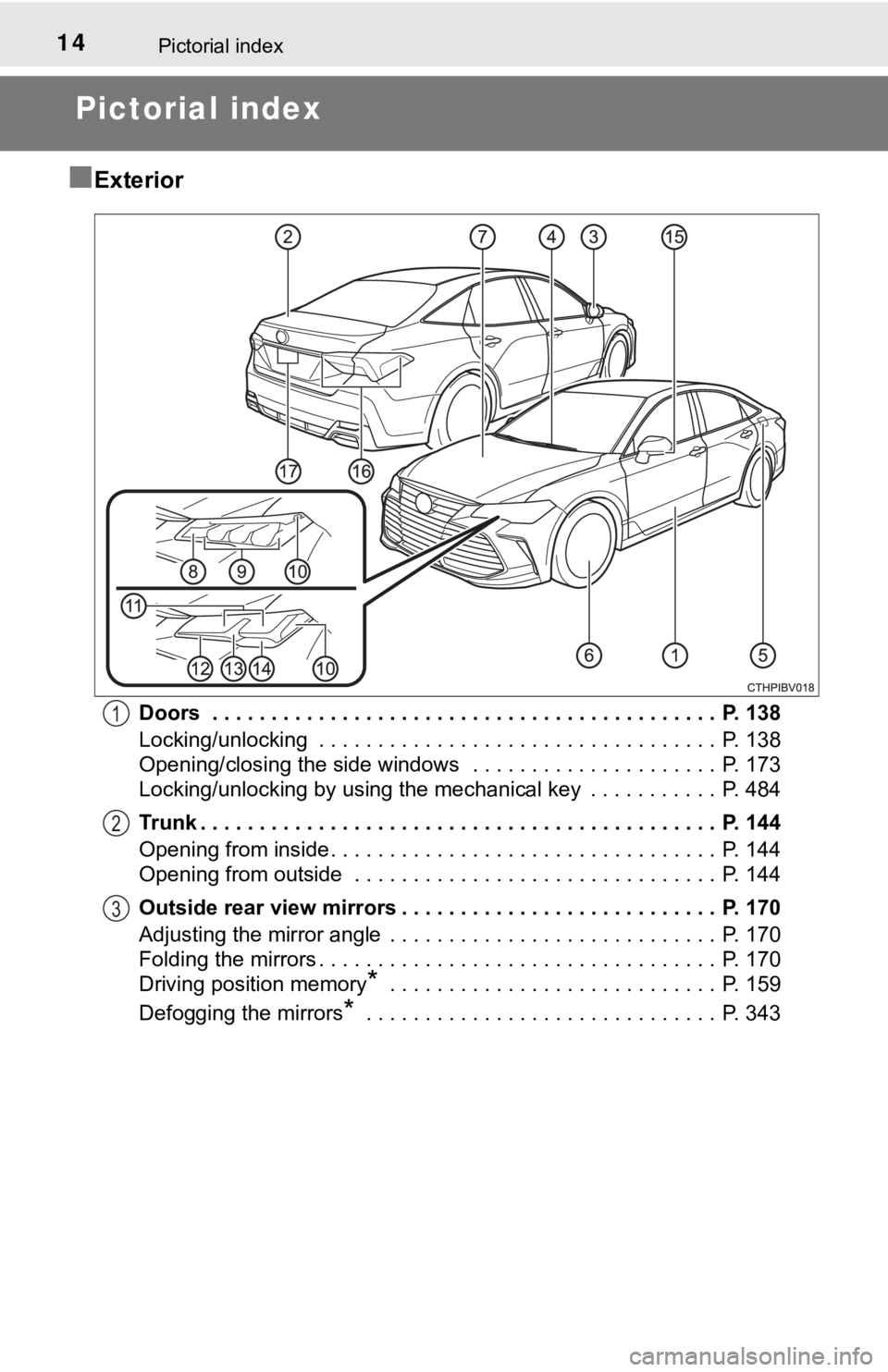
Exterior
Doors . . . . . . . . . . . . . . . . . . . . . . . . . . . . . . . . . . . . . . . . . . . P. 138
Locking/unlocking . . . . . . . . . . . . . . . . . . . . . . . . . . . . . . . . . . P. 138
Opening/closing the side windows . . . . . . . . . . . . . . . . . . . . . P. 173
Locking/unlocking by using the mechanical key . . . . . . . . . . . P. 484
Trunk . . . . . . . . . . . . . . . . . . . . . . . . . . . . . . . . . . . . . . . . . . . . P. 144
Opening from inside. . . . . . . . . . . . . . . . . . . . . . . . . . . . . . . . . P. 144
Opening from outside . . . . . . . . . . . . . . . . . . . . . . . . . . . . . . . P. 144
Outside rear view mirrors . . . . . . . . . . . . . . . . . . . . . . . . . . . P. 170
Adjusting the mirror angle . . . . . . . . . . . . . . . . . . . . . . . . . . . . P. 170
Folding the mirrors . . . . . . . . . . . . . . . . . . . . . . . . . . . . . . . . . . P. 170
Driving position memory
* . . . . . . . . . . . . . . . . . . . . . . . . . . . . P. 159
Defogging the mirrors
* . . . . . . . . . . . . . . . . . . . . . . . . . . . . . . P. 343
1
2
3
Page 19 of 560
19Pictorial index
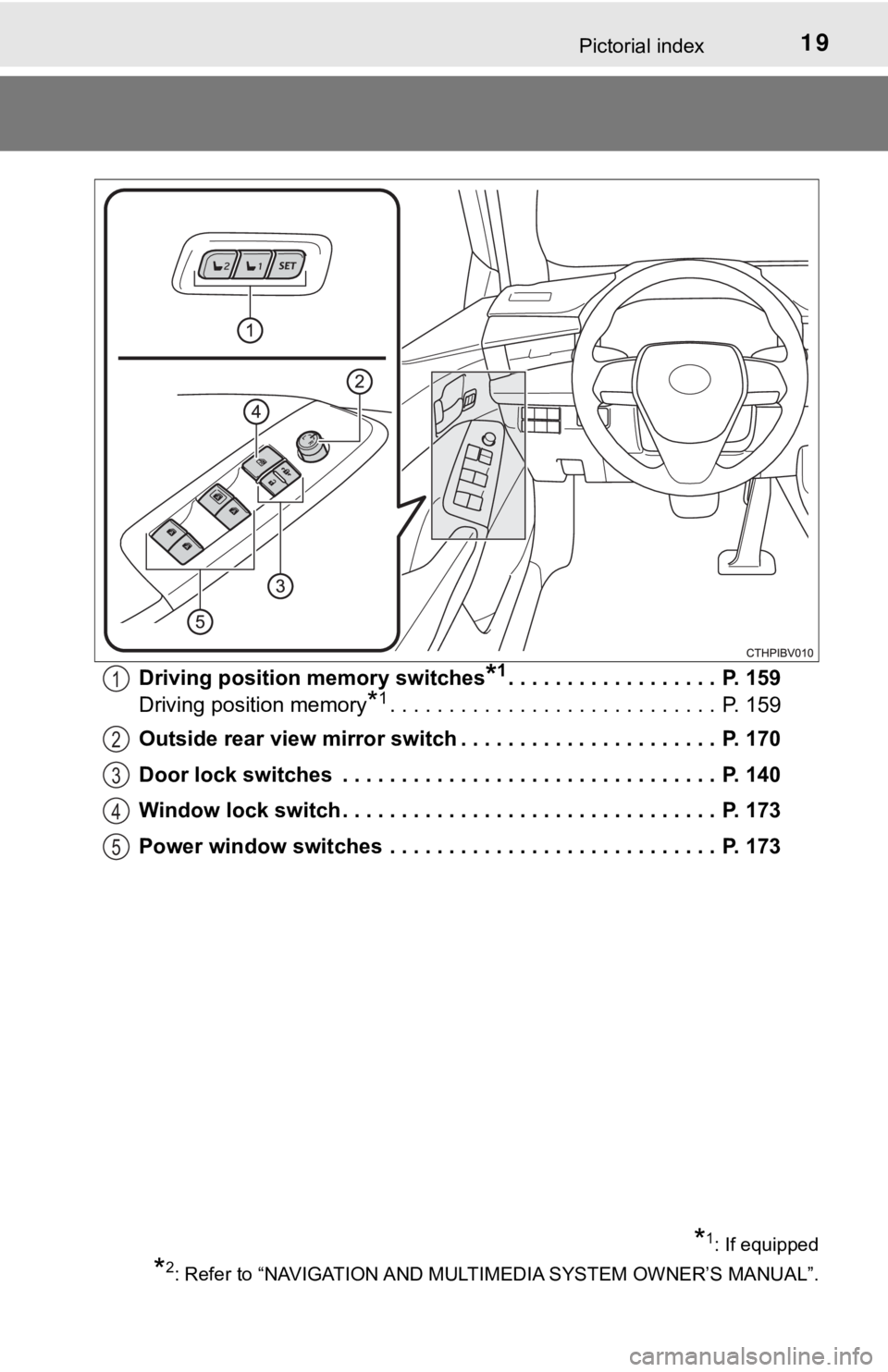
Driving position memory switches*1. . . . . . . . . . . . . . . . . . P. 159
Driving position memory
*1. . . . . . . . . . . . . . . . . . . . . . . . . . . . P. 159
Outside rear view mirror switch . . . . . . . . . . . . . . . . . . . . . . P. 170
Door lock switches . . . . . . . . . . . . . . . . . . . . . . . . . . . . . . . . P. 140
Window lock switch . . . . . . . . . . . . . . . . . . . . . . . . . . . . . . . . P. 173
Power window switches . . . . . . . . . . . . . . . . . . . . . . . . . . . . P. 173
1
2
3
4
5
*1: If equipped
*2: Refer to “NAVIGATION AND MULTIMEDIA SYSTEM OWNER’S MANUAL”.
Page 22 of 560
22Pictorial index
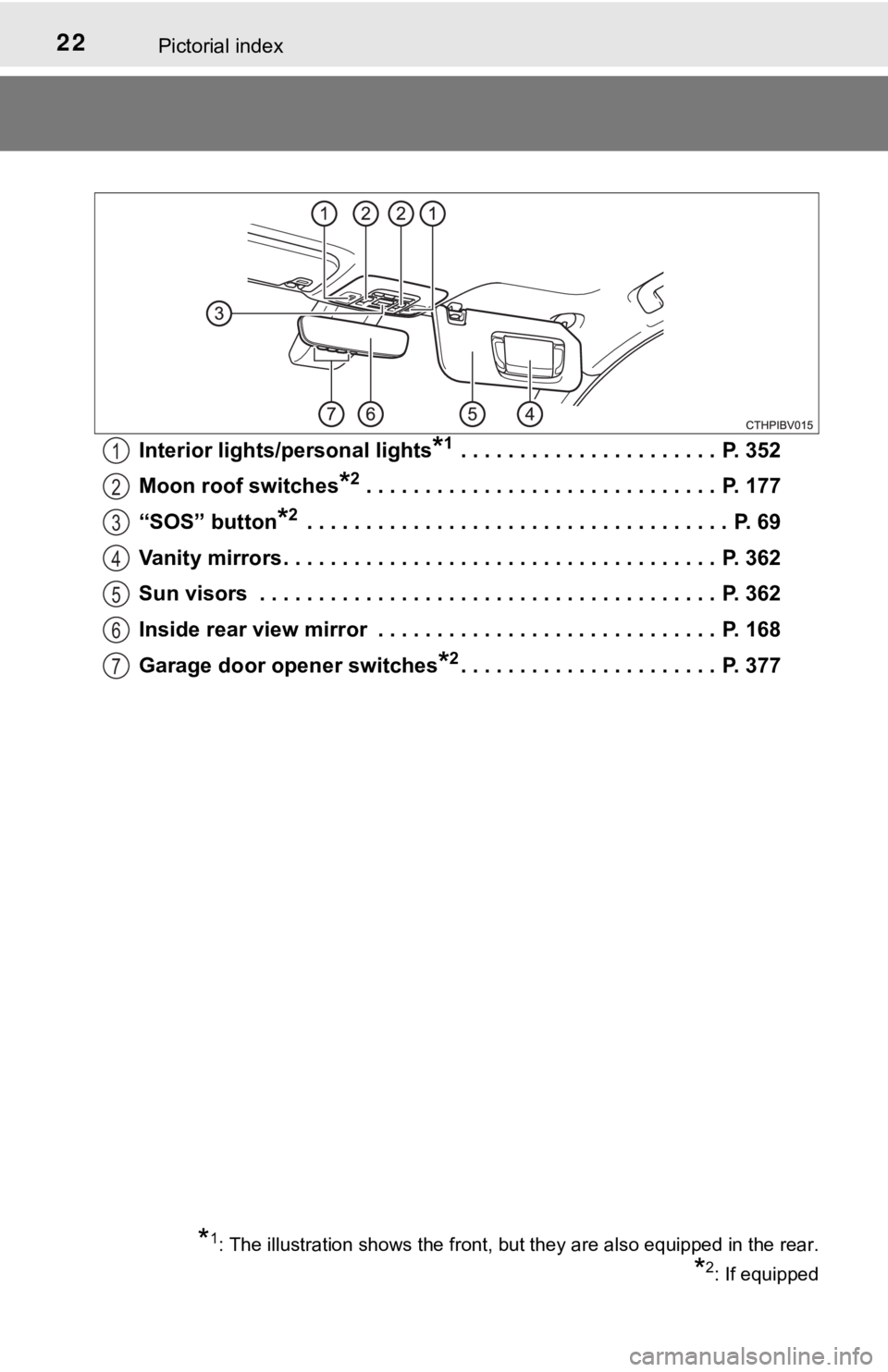
Interior lights/personal lights*1 . . . . . . . . . . . . . . . . . . . . . . P. 352
Moon roof switches
*2 . . . . . . . . . . . . . . . . . . . . . . . . . . . . . . P. 177
“SOS” button
*2 . . . . . . . . . . . . . . . . . . . . . . . . . . . . . . . . . . . . P. 69
Vanity mirrors . . . . . . . . . . . . . . . . . . . . . . . . . . . . . . . . . . . . . P. 362
Sun visors . . . . . . . . . . . . . . . . . . . . . . . . . . . . . . . . . . . . . . . P. 362
Inside rear view mirror . . . . . . . . . . . . . . . . . . . . . . . . . . . . . P. 168
Garage door opener switches
*2. . . . . . . . . . . . . . . . . . . . . . P. 377
1
2
3
4
5
6
7
*1: The illustration shows the front, but they are also equipped in the rear.
*2: If equipped
Page 26 of 560
261-1. For safe use
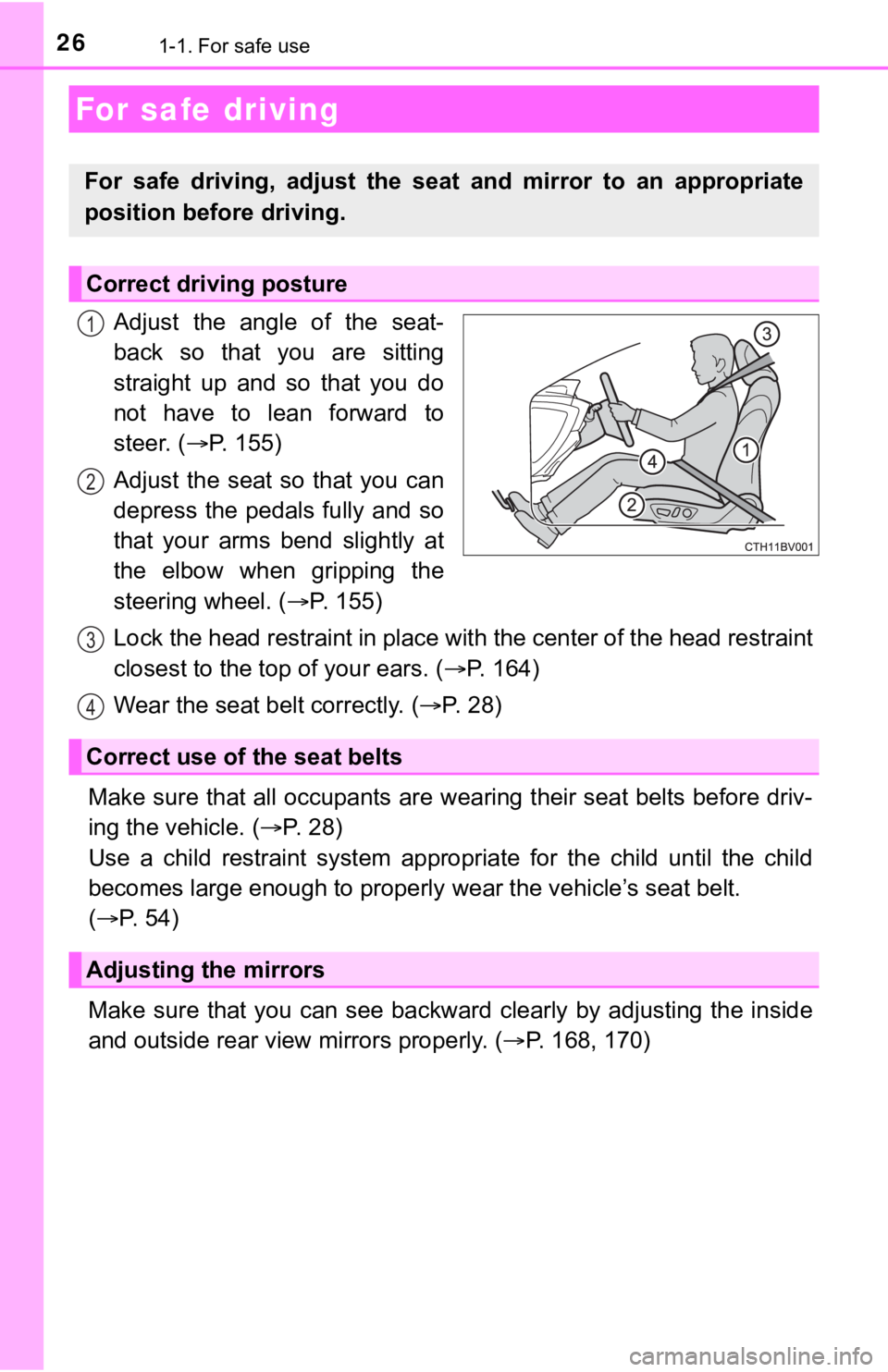
Adjust the angle of the seat-
back so that you are sitting
straight up and so that you do
not have to lean forward to
steer. (P. 1 5 5 )
Adjust the seat so that you can
depress the pedals fully and so
that your arms bend slightly at
the elbow when gripping the
steering wheel. (P. 155)
Lock the head restraint in place with the center of the head restraint
closest to the top of your ears. (P. 1 6 4 )
Wear the seat belt correctly. (P. 2 8 )
Make sure that all occupants are wearing their seat belts before driv-
ing the vehicle. (P. 2 8 )
Use a child restraint system appropriate for the child until the child
becomes large enough to properly wear the vehicle’s seat belt.
(P. 54)
Make sure that you can see backward clearly by adjusting the inside
and outside rear view mirrors properly. (P. 168, 170)
For safe driving
For safe driving, adjust the seat and mirror to an appropriate
position before driving.
Correct driving posture
1
2
Correct use of the seat belts
Adjusting the mirrors
3
4
Page 92 of 560
922. Instrument cluster
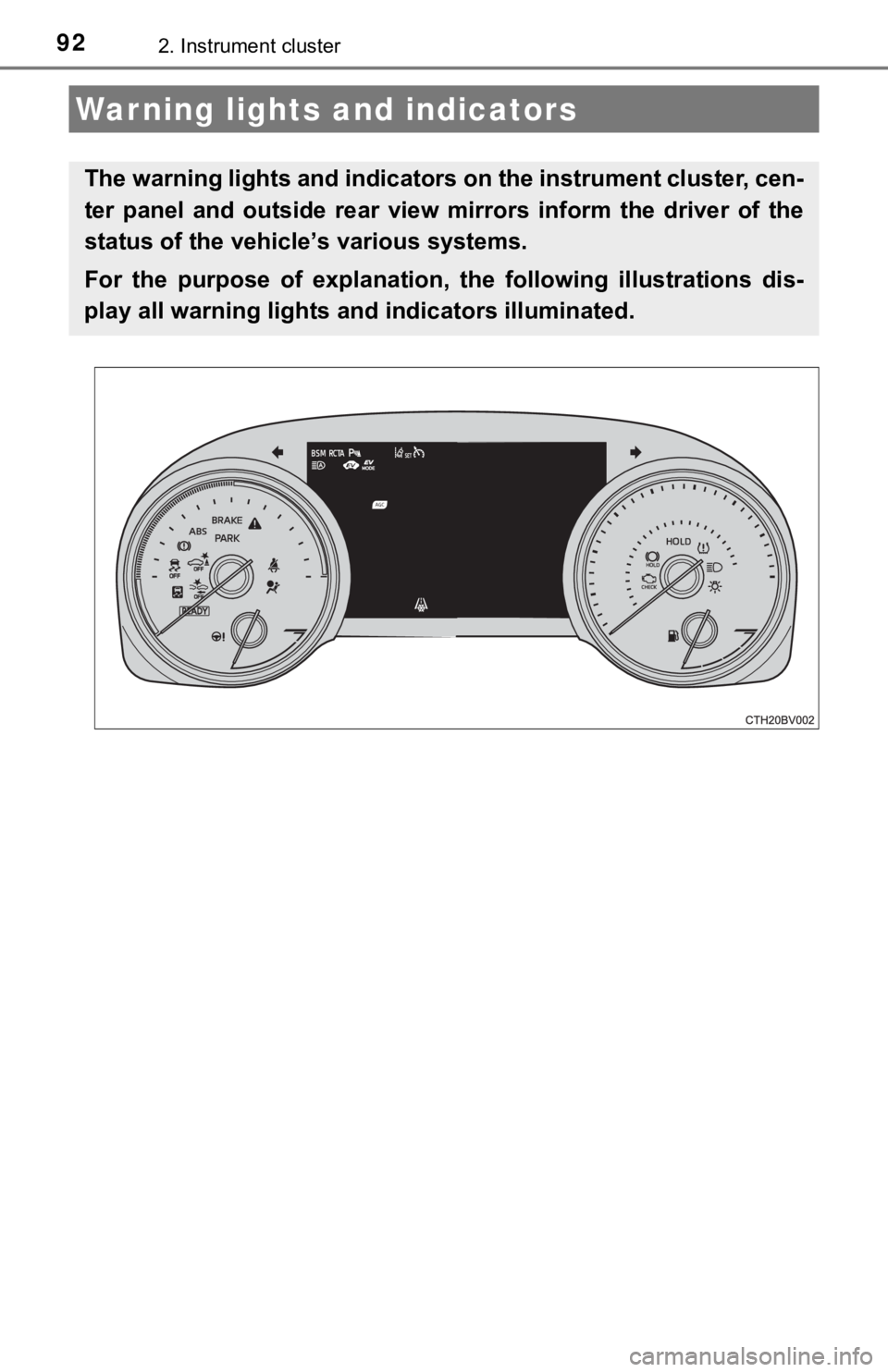
Warning lights and indicators
The warning lights and indicators on the instrument cluster, cen-
ter panel and outside rear view mirrors inform the driver of the
status of the vehicle’s various systems.
For the purpose of explanation, the following illustrations dis-
play all warning lights and indicators illuminated.
Page 96 of 560
962. Instrument cluster
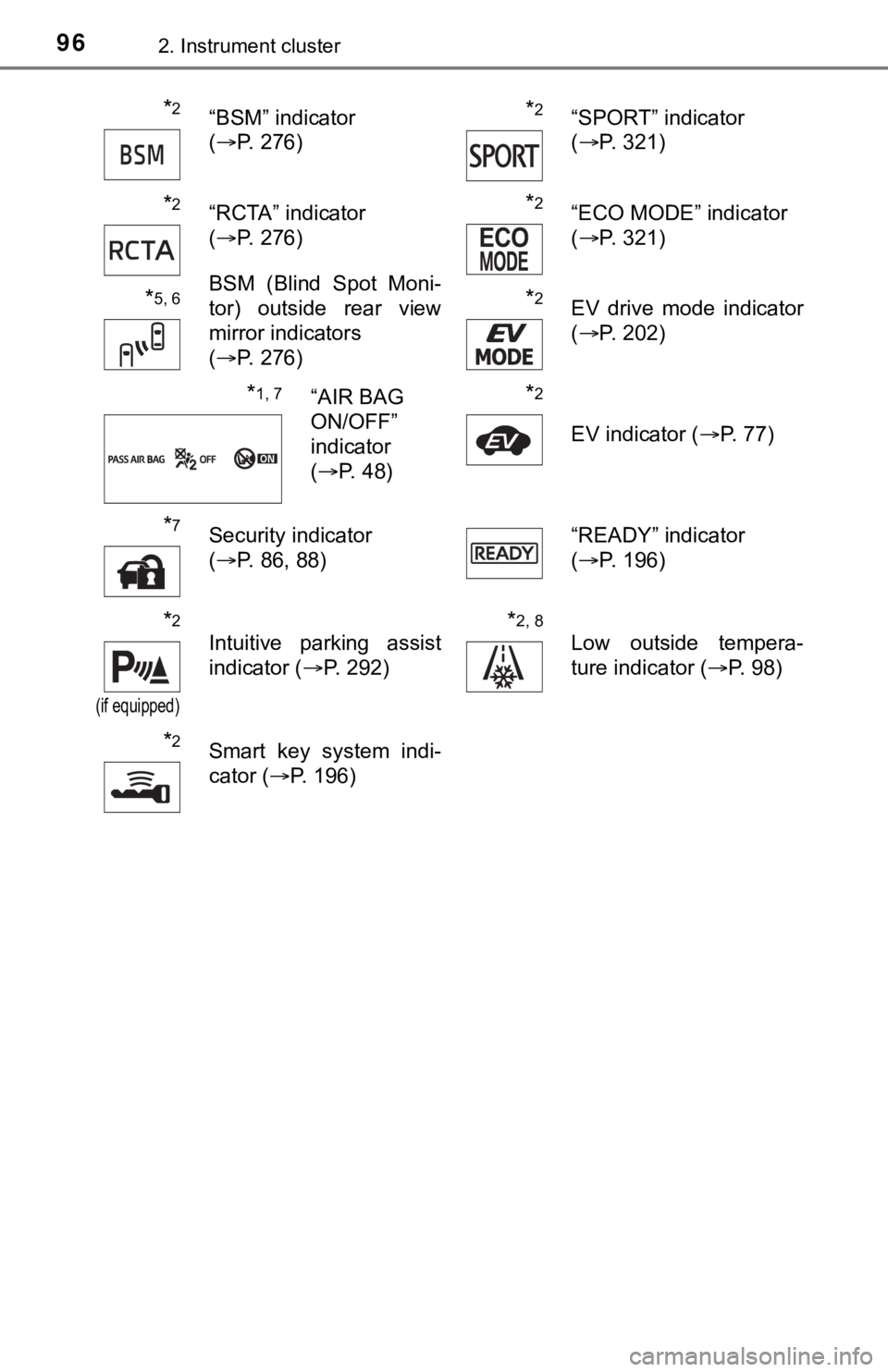
*2“BSM” indicator
(P. 276)*2“SPORT” indicator
(P. 321)
*2“RCTA” indicator
(P. 276)*2“ECO MODE” indicator
(P. 321)
*5, 6BSM (Blind Spot Moni-
tor) outside rear view
mirror indicators
(P. 276)*2EV drive mode indicator
(P. 202)
*1, 7“AIR BAG
ON/OFF”
indicator
(P. 48)*2
EV indicator (P. 77)
*7Security indicator
(P. 86, 88)“READY” indicator
(P. 196)
*2
(if equipped)
Intuitive parking assist
indicator (P. 292)*2, 8
Low outside tempera-
ture indicator (P. 98)
*2Smart key system indi-
cator (P. 196)
Page 97 of 560

972. Instrument cluster
2
Instrument cluster
*1: These lights turn on when the power switch is turned to ON mode to indi-
cate that a system check is being performed. They will turn off after the
hybrid system is on, or after a few seconds. There may be a malfunction in
a system if a light does not come on, or turn off. Have the vehicle
inspected by your Toyota dealer.
*2: This light illuminates on the multi-information display.
*3: This light turns on when the system is off.
*4: This light flashes to indicate that the system is operating.
*5: These indicators will illuminate in the following situations to indicate that
the system initial check is being performed:
• When the BSM function or RCTA function is enabled and the power
switch is turned to ON mode.
• When the power switch is ON mode and the BSM function is enabled.
• When the power switch is ON mode and the RCTA function is enabled.
(At this time, a buzzer will also sound).
The indicators will turn off after a few seconds. If the indicators do not
illuminate or turn off, or if a buzzer does not sound when the RCTA func-
tion is enabled, the system may be malfunctioning. Have the vehicle
inspected by your Toyota dealer.
*6: This light illuminates on the outside rear view mirrors.
*7: This light illuminates on the center panel.
*8: When the outside temperature is approximately 37°F (3°C) or lower, this
indicator will flash for approximately 10 seconds, then stay on.
WARNING
■If a safety system warning light does not come on
Should a safety system light such as the ABS and SRS warning lights not
come on when you start the hybrid system, this could mean that these sys-
tems are not available to help protect you in an accident, which could result
in death or serious injury. Have the vehicle inspected by your Toyota dealer
immediately if this occurs.
Page 112 of 560
1122. Instrument cluster
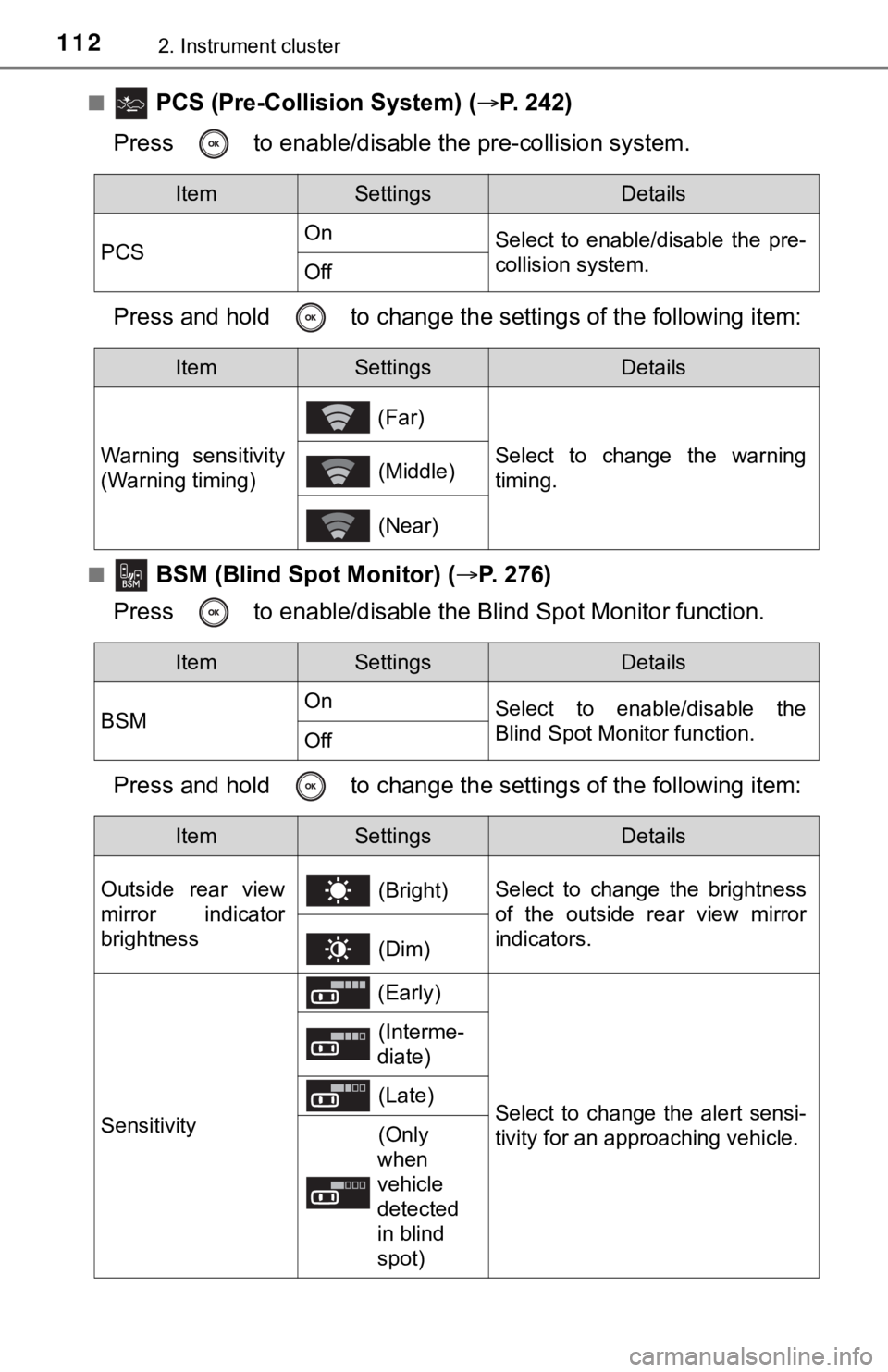
■ PCS (Pre-Collision System) (P. 242)
Press to enable/disable the pre-collision system.
Press and hold to change the settings of the following item:
■ BSM (Blind Spot Monitor) (P. 276)
Press to enable/disable the Blind Spot Monitor function.
Press and hold to change the settings of the following item:
ItemSettingsDetails
PCSOn
Select to enable/disable the pre-
collision system.
Off
ItemSettingsDetails
Warning sensitivity
(Warning timing) (Far)
Select to change the warning
timing. (Middle)
(Near)
ItemSettingsDetails
BSMOn
Select to enable/disable the
Blind Spot Monitor function.
Off
ItemSettingsDetails
Outside rear view
mirror indicator
brightness (Bright)Select to change the brightness
of the outside rear view mirror
indicators.
(Dim)
Sensitivity
(Early)
Select to change the alert sensi-
tivity for an approaching vehicle.
(Interme-
diate)
(Late)
(Only
when
vehicle
detected
in blind
spot)