turn signal TOYOTA AVALON HYBRID 2022 User Guide
[x] Cancel search | Manufacturer: TOYOTA, Model Year: 2022, Model line: AVALON HYBRID, Model: TOYOTA AVALON HYBRID 2022Pages: 584, PDF Size: 9.53 MB
Page 249 of 584
2494-5. Using the driving support systems
4
Driving
WARNING
■Pre-collision braking
● When the pre-collision braking function is operating, a large a mount of
braking force will be applied.
● If the vehicle is stopped by the operation of the pre-collision braking func-
tion, the pre-collision braking function operation will be canceled after
approximately 2 seconds. Depress the brake pedal as necessary.
● The pre-collision braking function may not operate if certain operations are
performed by the driver. If the accelerator pedal is being depressed
strongly or the steering wheel is being turned, the system may determine
that the driver is taking evasive action and possibly prevent the pre-colli-
sion braking function from operating.
● In some situations, while the pre-collision braking function is operating,
operation of the function may be canceled if the accelerator pedal is
depressed strongly or the steering wheel is turned and the syst em deter-
mines that the driver is taking evasive action.
● If the brake pedal is being depressed, the system may determine that the
driver is taking evasive action and possibly delay the operation timing of
the pre-collision braking function.
■ Emergency steering assist
● As emergency steering assist operation will be canceled when th e system
determines that lane departure prevention function has been completed.
● Emergency steering assist may not operate or may be cancel in the follow-
ing cases as the system may determine the driver is taking acti ons.
• If the accelerator pedal is being depressed strongly, the steering wheel is being operated sharply, the brake pedal is being depressed o r the
turn signal lever is being operated. In this case, the system m ay deter-
mine that the driver is taking evasive action and the emergency steering
assist may not operate.
• In some situations, while the emergency steering assist is ope rating,
operation of the function may be canceled if the accelerator pe dal is
depressed strongly, the steeri ng wheel is operated sharply or t he brake
pedal is being depressed and the system determines that the dri ver is
taking evasive action.
• When the emergency steering assist is operating, if the steering wheel
is held firmly or is operated in the opposite direction to that which the
system is generating torque, the function may be canceled.
Page 253 of 584
2534-5. Using the driving support systems
4
Driving
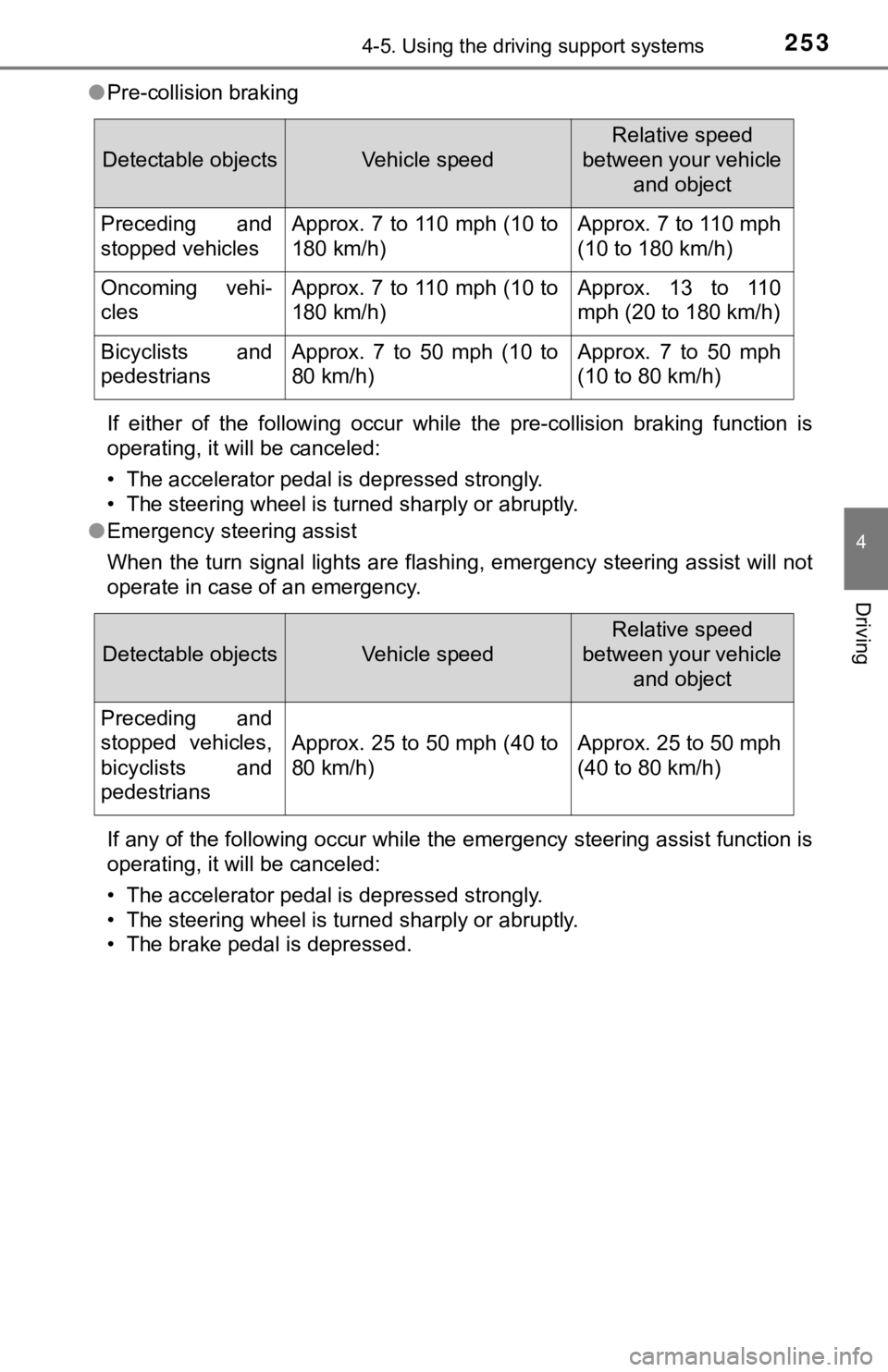
●Pre-collision braking
If either of the following occur while the pre-collision brakin g function is
operating, it will be canceled:
• The accelerator pedal is depressed strongly.
• The steering wheel is turned sharply or abruptly.
● Emergency steering assist
When the turn signal lights are flashing, emergency steering as sist will not
operate in case of an emergency.
If any of the following occur while the emergency steering assi st function is
operating, it will be canceled:
• The accelerator pedal is depressed strongly.
• The steering wheel is turned sharply or abruptly.
• The brake pedal is depressed.
Detectable objectsVehicle speed
Relative speed
between your vehicle and object
Preceding and
stopped vehiclesApprox. 7 to 110 mph (10 to
180 km/h)Approx. 7 to 110 mph
(10 to 180 km/h)
Oncoming vehi-
clesApprox. 7 to 110 mph (10 to
180 km/h)Approx. 13 to 110
mph (20 to 180 km/h)
Bicyclists and
pedestriansApprox. 7 to 50 mph (10 to
80 km/h)Approx. 7 to 50 mph
(10 to 80 km/h)
Detectable objectsVehicle speed
Relative speed
between your vehicle and object
Preceding and
stopped vehicles,
bicyclists and
pedestrians
Approx. 25 to 50 mph (40 to
80 km/h)Approx. 25 to 50 mph
(40 to 80 km/h)
Page 254 of 584
2544-5. Using the driving support systems
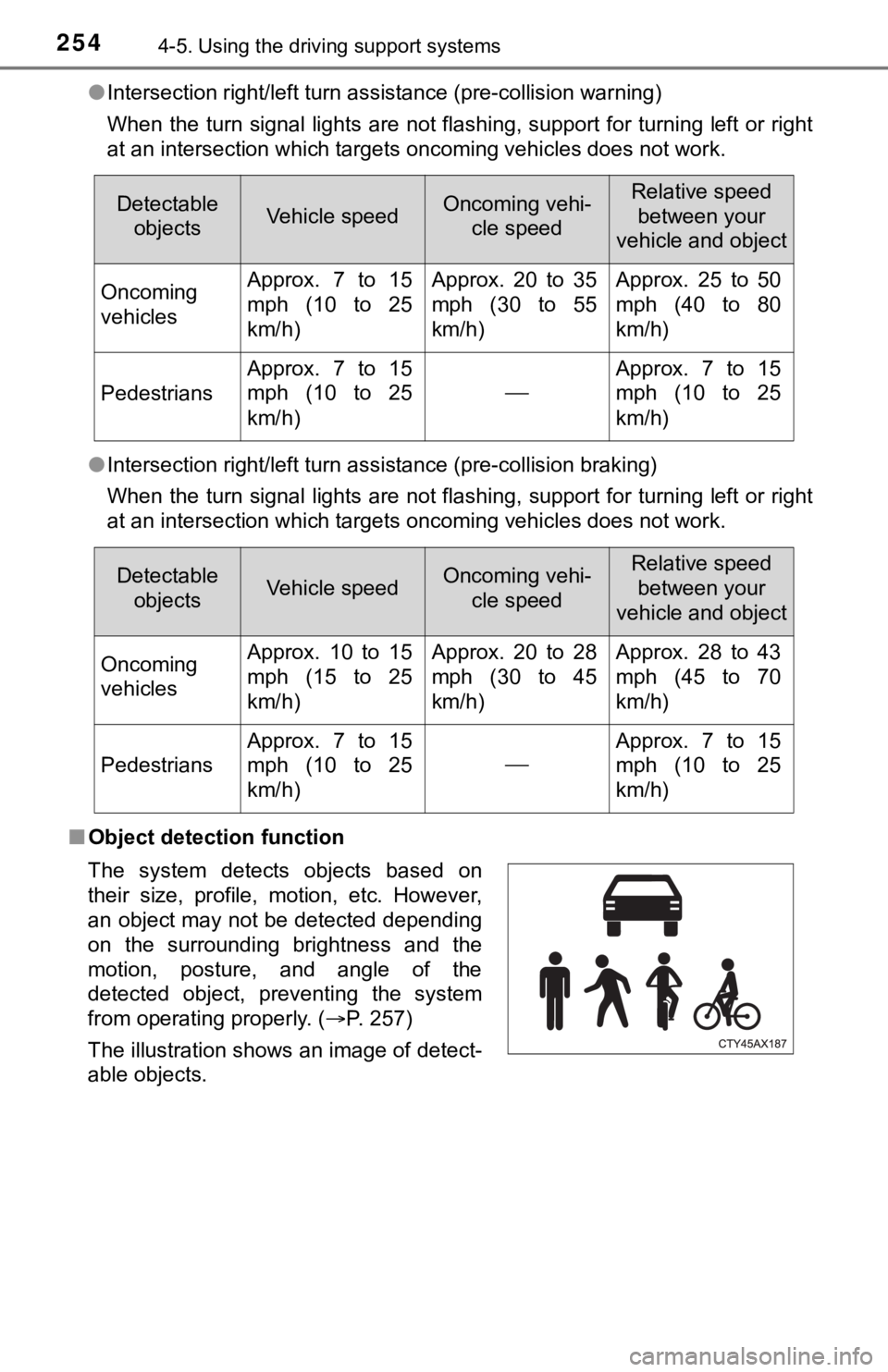
●Intersection right/left turn assistance (pre-collision warning)
When the turn signal lights are not flashing, support for turning left or right
at an intersection which targets oncoming vehicles does not wor k.
● Intersection right/left turn assistance (pre-collision braking)
When the turn signal lights are not flashing, support for turning left or right
at an intersection which targets oncoming vehicles does not wor k.
■ Object detection function
Detectable
objectsVehicle speedOncoming vehi- cle speedRelative speed
between your
vehicle and object
Oncoming
vehiclesApprox. 7 to 15
mph (10 to 25
km/h)Approx. 20 to 35
mph (30 to 55
km/h)Approx. 25 to 50
mph (40 to 80
km/h)
Pedestrians
Approx. 7 to 15
mph (10 to 25
km/h)
Approx. 7 to 15
mph (10 to 25
km/h)
Detectable objectsVehicle speedOncoming vehi- cle speedRelative speed between your
vehicle and object
Oncoming
vehiclesApprox. 10 to 15
mph (15 to 25
km/h)Approx. 20 to 28
mph (30 to 45
km/h)Approx. 28 to 43
mph (45 to 70
km/h)
Pedestrians
Approx. 7 to 15
mph (10 to 25
km/h)
Approx. 7 to 15
mph (10 to 25
km/h)
The system detects objects based on
their size, profile, motion, etc. However,
an object may not be detected depending
on the surrounding brightness and the
motion, posture, and angle of the
detected object, preventing the system
from operating properly. (P. 257)
The illustration shows an image of detect-
able objects.
Page 266 of 584
2664-5. Using the driving support systems
◆Lane departure alert function
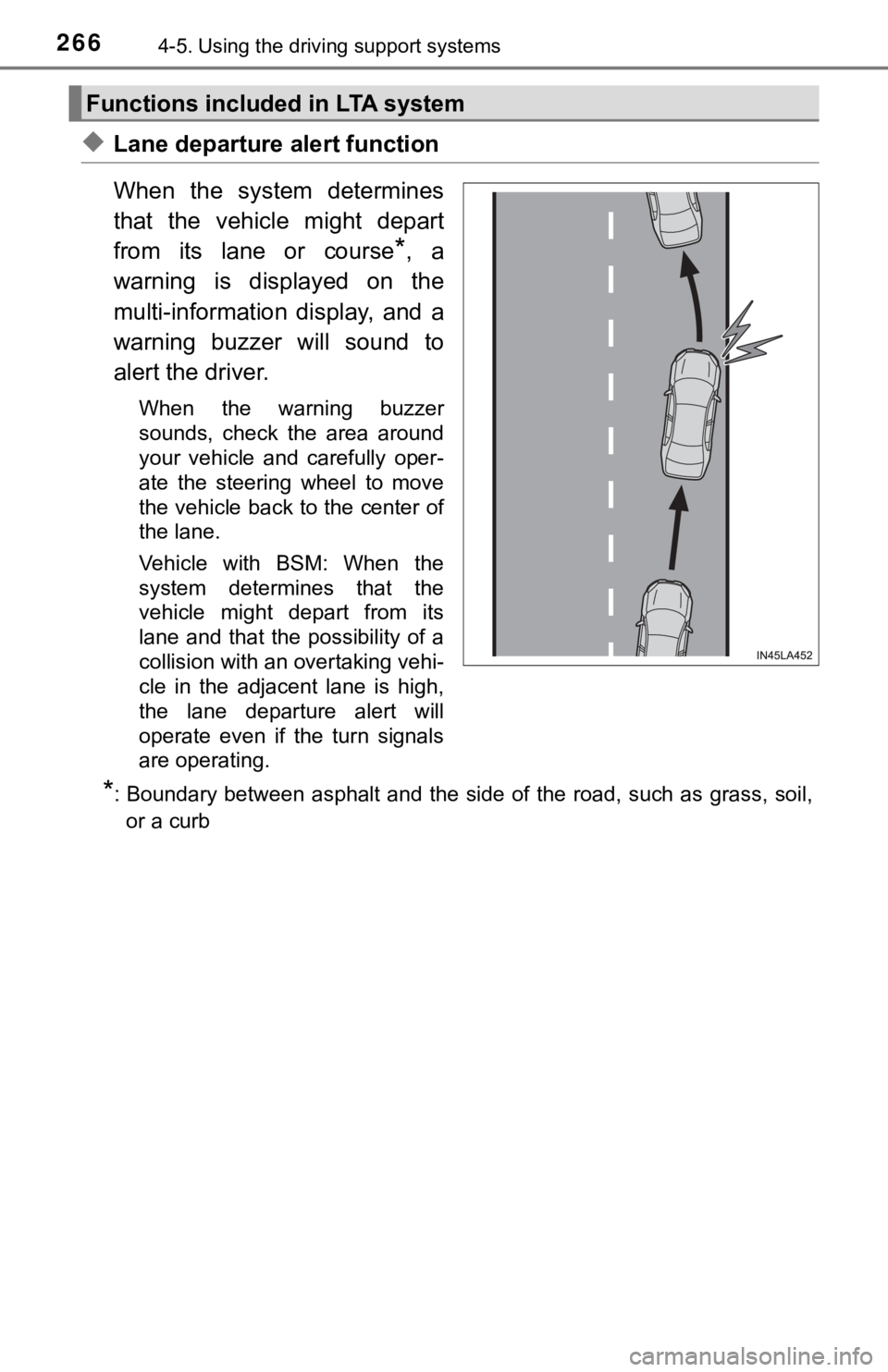
When the system determines
that the vehicle might depart
from its lane or course
*, a
warning is displayed on the
multi-information display, and a
warning buzzer will sound to
alert the driver.
When the warning buzzer
sounds, check the area around
your vehicle and carefully oper-
ate the steering wheel to move
the vehicle back to the center of
the lane.
Vehicle with BSM: When the
system determines that the
vehicle might depart from its
lane and that the possibility of a
collision with an overtaking vehi-
cle in the adjacent lane is high,
the lane departure alert will
operate even if the turn signals
are operating.
*: Boundary between asphalt and the side of the road, such as gra ss, soil,
or a curb
Functions included in LTA system
Page 267 of 584
2674-5. Using the driving support systems
4
Driving
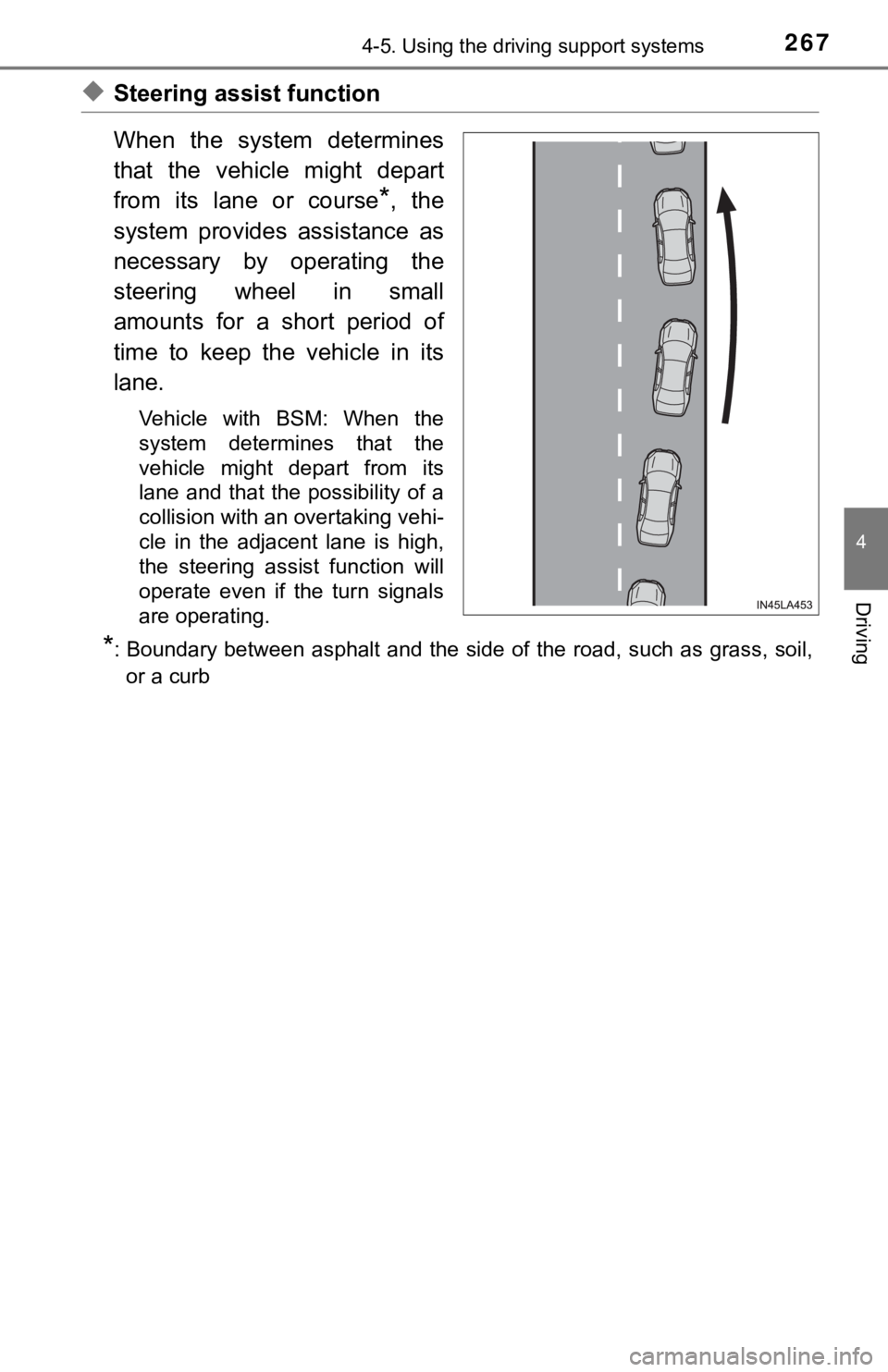
◆Steering assist function
When the system determines
that the vehicle might depart
from its lane or course
*, the
system provides assistance as
necessary by operating the
steering wheel in small
amounts for a short period of
time to keep the vehicle in its
lane.
Vehicle with BSM: When the
system determines that the
vehicle might depart from its
lane and that the possibility of a
collision with an overtaking vehi-
cle in the adjacent lane is high,
the steering assist function will
operate even if the turn signals
are operating.
*: Boundary between asphalt and the side of the road, such as gra ss, soil,
or a curb
Page 272 of 584
2724-5. Using the driving support systems
■Operation conditio ns of each function
● Lane departure alert function
This function operates when all of the following conditions are met.
• LTA is turned on.
• Vehicle speed is approximately 32 mph (50 km/h) or more.
*1
• System recognizes white (yellow) lane lines or a course*2. (When a white
[yellow] line or course
*2 is recognized on only one side, the system will
operate only for the recognized side.)
• Width of traffic lane is approximately 9.8 ft. (3 m) or more.
• Turn signal lever is not operated. (Vehicle with BSM: Except when another vehicle is in the lane on the side where the turn signa l was oper-
ated)
• Vehicle is not being driven around a sharp curve.
• No system malfunctions are detected. ( P. 275)
*1: The function operates even if the vehicle speed is less than a pproxi-
mately 32 mph (50 km/h) when the lane centering function is ope rating.
*2: Boundary between asphalt and the side of the road, such as gra ss, soil,
or a curb
● Steering assist function
This function operates when all of the following conditions are met in addi-
tion to the operation conditions for the lane departure alert function.
• Vehicle is not accelerated or decelerated by a fixed amount or more.
• Steering wheel is not operated with a steering force level suitable for changing lanes.
• ABS, VSC, TRAC and PCS are not operating.
• TRAC or VSC is not turned off.
● Vehicle sway warning function
This function operates when all of the following conditions are met.
• Setting for “Sway Warning” in of the multi-information display is set to “On”. ( P. 102)
• Vehicle speed is approximately 32 mph (50 km/h) or more.
• Width of traffic lane is approximately 9.8 ft. (3 m) or more.
• No system malfunctions are detected. ( P. 275)
● Lane centering function
This function operates when all of the following conditions are met.
• LTA is turned on.
• Setting for “Lane Center” in of the multi-information display is set to
“ON”. ( P. 102)
• This function recognizes white (yellow) lane lines or the posi tion of a pre-
ceding vehicle (except when the preceding vehicle is small, such as a
motorcycle).
Page 273 of 584
2734-5. Using the driving support systems
4
Driving
• The dynamic radar cruise control with full-speed range is operating in
vehicle-to-vehicle distance control mode.
• Width of traffic lane is approximately 10 to 13 ft. (3 to 4 m).
• Turn signal lever is not operated.
• Vehicle is not being driven around a sharp curve.
• No system malfunctions are detected. ( P. 275)
• Vehicle does not accelerate or decelerate by a fixed amount or more.
• Steering wheel is not operated with a steering force level suitable for
changing lanes.
• ABS, VSC, TRAC and PCS are not operating.
• TRAC or VSC is not turned off.
• Hands off steering wheel warning is not displayed. ( P. 2 7 4 )
• The vehicle is being driven in the center of a lane.
• Steering assist function is not operating.
■ Temporary cancelation of functions
●When operation conditions are no longer met, a function may be temporarily
canceled. However, when the operation conditions are met again, operation
of the function is automatically restored. ( P. 272)
● If the operation conditions ( P. 272) are no longer met while the lane cen-
tering function is operating, the buzzer may sound to indicate that the func-
tion has been temporarily canceled.
■ Steering assist function/lane centering function
●Depending on the vehicle speed, lane departure situation, road conditions,
etc., the driver may not feel the function is operating or the function may not
operate at all.
● The steering control of the function is overridden by the drive r’s steering
wheel operation.
● Do not attempt to test the operation of the steering assist fun ction.
■ Lane departure alert function
●The warning buzzer may be difficult to hear due to external noi se, audio
playback, etc.
● If the edge of the course
* is not clear or straight, the lane departure alert
function may not operate.
● Vehicle with BSM: It may not be possible for the system to determine if there
is a danger of a collision with a vehicle in an adjacent lane.
● Do not attempt to test the operation of the lane departure aler t function.
*: Boundary between asphalt and the side of the road, such as gra ss, soil, or
a curb
Page 286 of 584
2864-5. Using the driving support systems
When the turn signal lever is operated and your vehicle moves to an over-
taking lane while driving at 50 mph (80 km/h) or more, the vehi cle will
accelerate to help to overtake a passing vehicle.
The system’s identification of what is an overtaking lane may b e deter-
mined solely based on the location of the steering wheel in the vehicle (left
side driver position versus right side driver position.) If the vehicle is driven
to a region where the overtaking lane is on a different side fr om where the
vehicle is normally driven, the vehicle may accelerate when the turn signal
lever is operated in the opposite direction to the overtaking l ane (e.g., if the
driver normally operates the vehicle in a region where the overtaking lane
is to the right but then drives to a region where the overtaking lane is to the
left, the vehicle may accelerate when the right turn signal is activated).
Example of acceleration
When there are no longer any preceding vehicles driving slower
than the set speed
The system accelerates until the set speed is reached. The syst em then
returns to constant speed cruising.
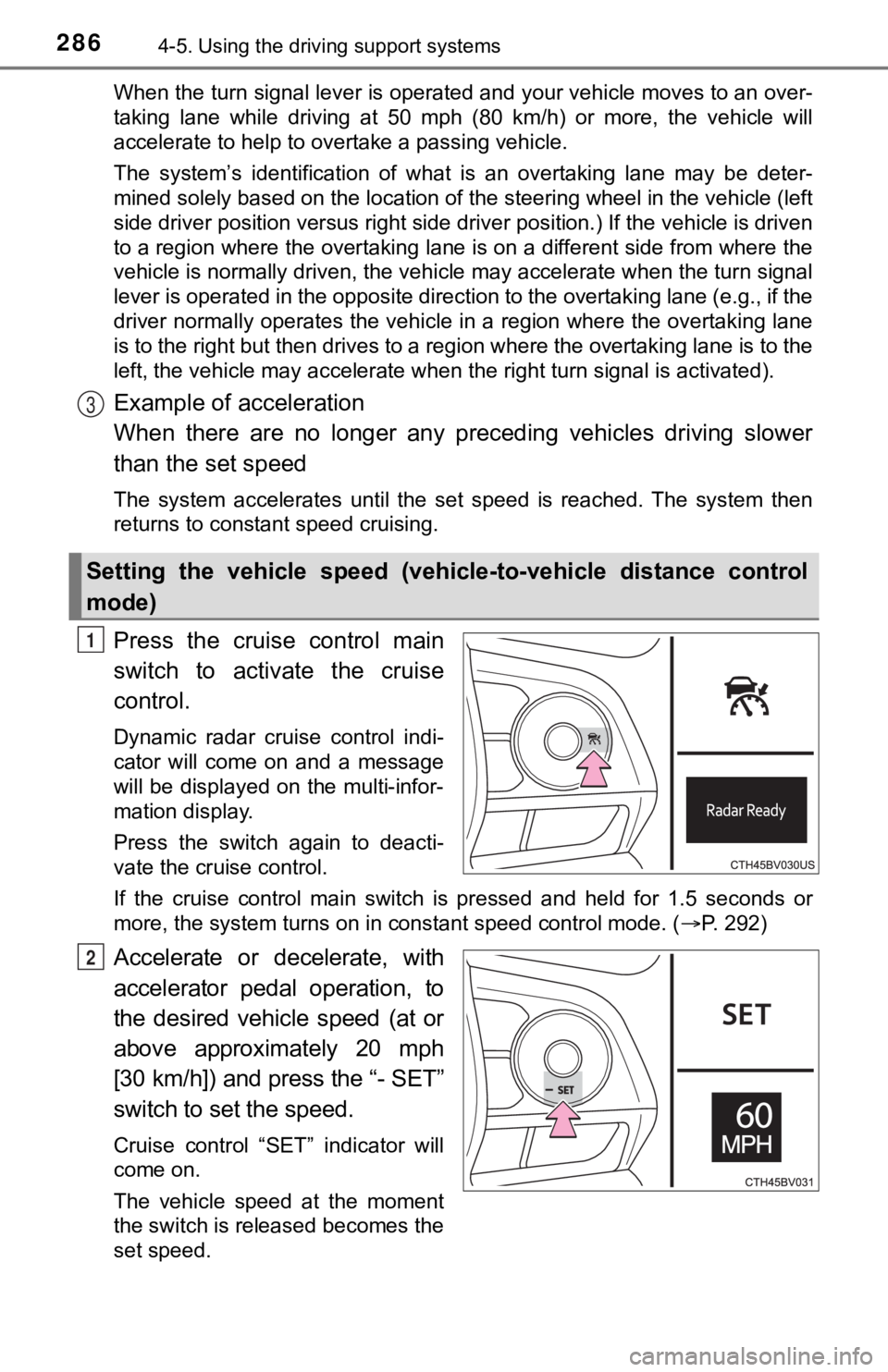
Press the cruise control main
switch to activate the cruise
control.
Dynamic radar cruise control indi-
cator will come on and a message
will be displayed on the multi-infor-
mation display.
Press the switch again to deacti-
vate the cruise control.
If the cruise control main switch is pressed and held for 1.5 seconds or
more, the system turns on in constant speed control mode. ( P. 292)
Accelerate or decelerate, with
accelerator pedal operation, to
the desired vehicle speed (at or
above approximately 20 mph
[30 km/h]) and press the “- SET”
switch to set the speed.
Cruise control “SET” indicator will
come on.
The vehicle speed at the moment
the switch is released becomes the
set speed.
Setting the vehicle speed (vehicle-to-vehicle distance control
mode)
3
1
2
Page 297 of 584
2974-5. Using the driving support systems
4
Driving
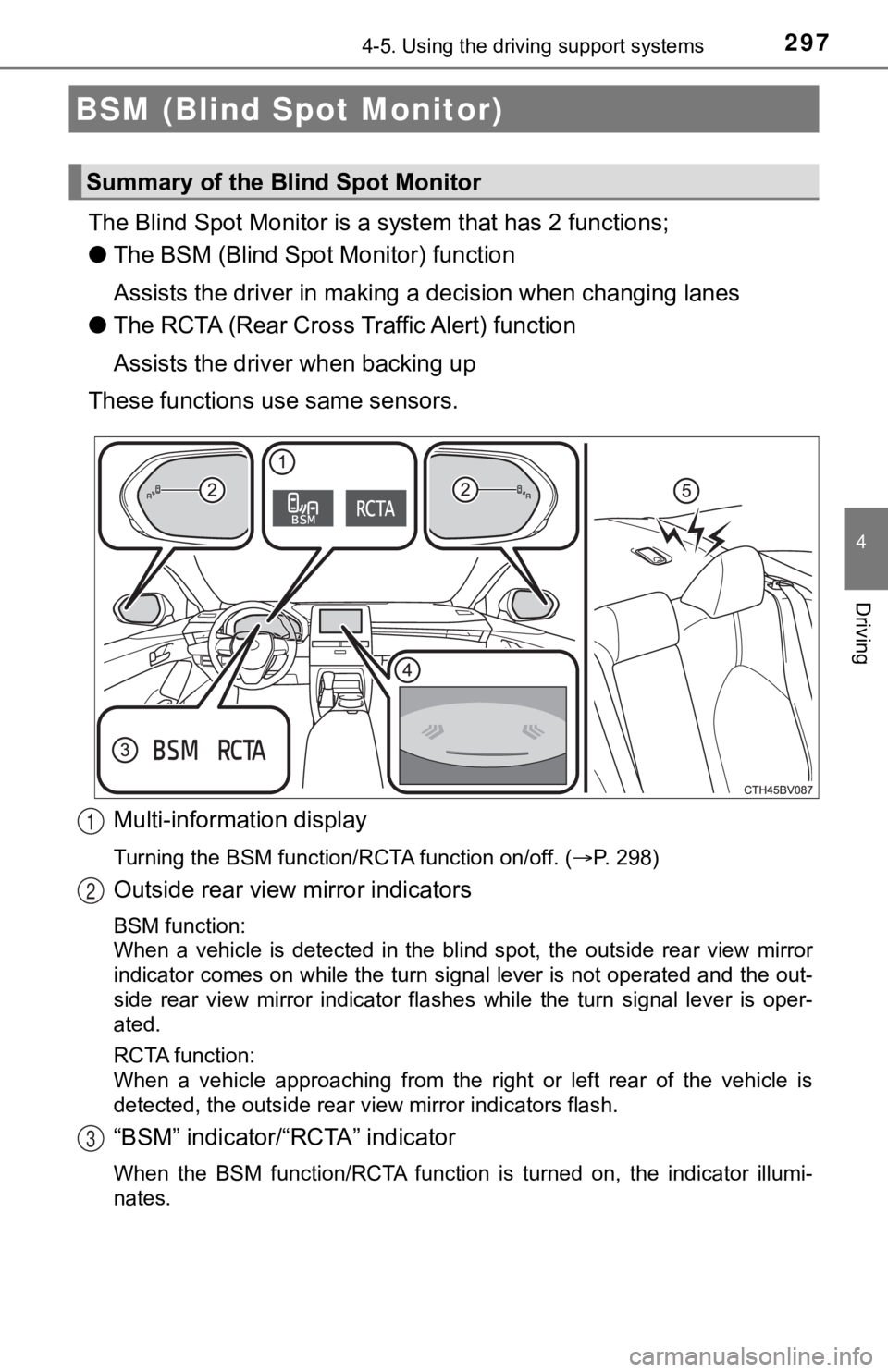
The Blind Spot Monitor is a system that has 2 functions;
● The BSM (Blind Spot Monitor) function
Assists the driver in making a decision when changing lanes
● The RCTA (Rear Cross T raffic Alert) function
Assists the driver when backing up
These functions use same sensors.
Multi-information display
Turning the BSM function/RCTA function on/off. ( P. 298)
Outside rear view mirror indicators
BSM function:
When a vehicle is detected in the blind spot, the outside rear view mirror
indicator comes on while the turn signal lever is not operated and the out-
side rear view mirror indicator flashes while the turn signal l ever is oper-
ated.
RCTA function:
When a vehicle approaching from the right or left rear of the v ehicle is
detected, the outside rear view mirror indicators flash.
“BSM” indicator/“RCTA” indicator
When the BSM function/RCTA function is turned on, the indicator illumi-
nates.
BSM (Blind Spot Monitor)
Summary of the Blind Spot Monitor
1
2
3
Page 404 of 584
4045-4. Other interior features
■Reprogramming a single HomeLink® button
When the following procedure is performed, buttons which alread y
have devices registered to them can be overwritten:
With one hand, press and hold the desired HomeLink
® button.
When the HomeLink
® indicator starts flashing orange, continue
to hold the HomeLink® button and perform “Programming the
HomeLink®” (it takes 20 seconds for the HomeLink® indicator
to start flashing).
Press the appropriate HomeLink
® button. The HomeLink® indicator
light should turn on.
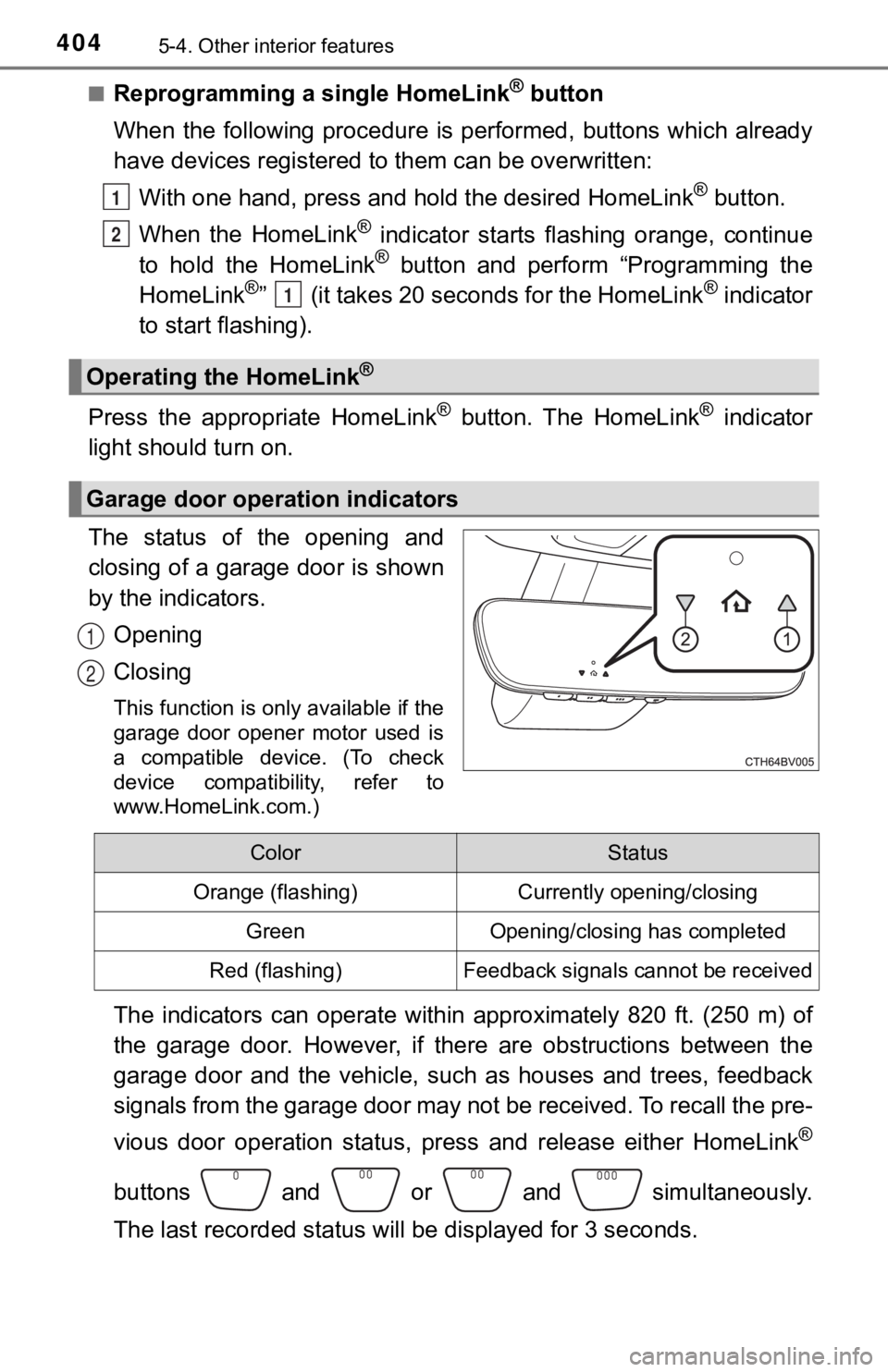
The status of the opening and
closing of a garage door is shown
by the indicators.
Opening
Closing
This function is only available if the
garage door opener motor used is
a compatible device. (To check
device compatibility, refer to
www.HomeLink.com.)
The indicators can operate within approximately 820 ft. (250 m) of
the garage door. However, if there are obstructions between the
garage door and the vehicle, such as houses and trees, feedback
signals from the garage door may not be received. To recall the pre-
vious door operation status, pres s and release either HomeLink
®
buttons and or and simultaneously.
The last recorded status will be displayed for 3 seconds.
Operating the HomeLink®
Garage door operation indicators
1
2
1
1
2
ColorStatus
Orange (flashing)Currently opening/closing
GreenOpening/closing has completed
Red (flashing)Feedback signals cannot be received