stop start TOYOTA AVENSIS 2012 Owners Manual
[x] Cancel search | Manufacturer: TOYOTA, Model Year: 2012, Model line: AVENSIS, Model: TOYOTA AVENSIS 2012Pages: 772, PDF Size: 34.43 MB
Page 640 of 772
640 5-2. Steps to take in an emergency
AVENSIS_EE (OM20B44E)
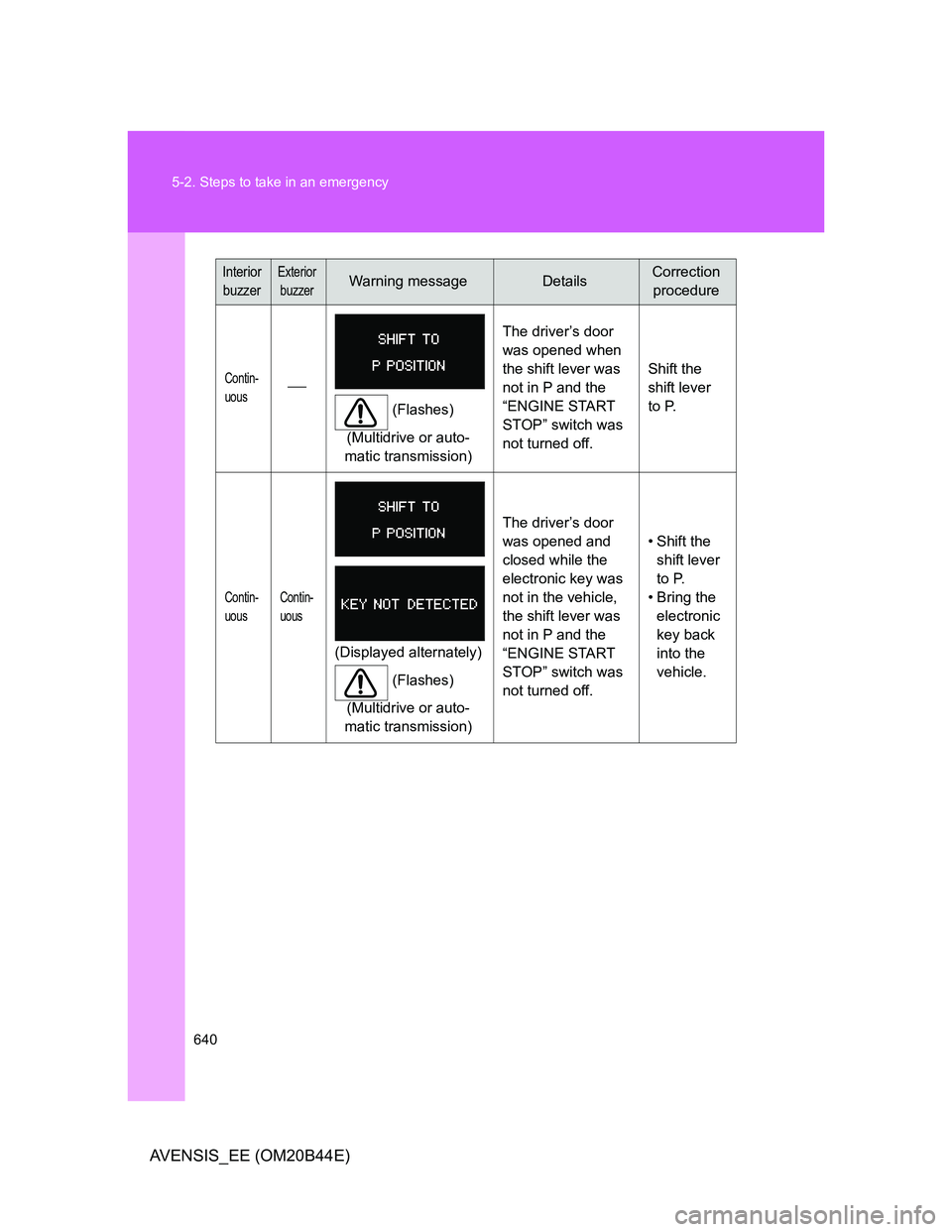
Contin-
uous
(Flashes)
(Multidrive or auto-
matic transmission)The driver’s door
was opened when
the shift lever was
not in P and the
“ENGINE START
STOP” switch was
not turned off.Shift the
shift lever
to P.
Contin-
uousContin-
uous
(Displayed alternately)
(Flashes)
(Multidrive or auto-
matic transmission)The driver’s door
was opened and
closed while the
electronic key was
not in the vehicle,
the shift lever was
not in P and the
“ENGINE START
STOP” switch was
not turned off. • Shift the
shift lever
to P.
• Bring the
electronic
key back
into the
vehicle.
Interior
buzzerExterior
buzzerWarning messageDetailsCorrection
procedure
Page 642 of 772
642 5-2. Steps to take in an emergency
AVENSIS_EE (OM20B44E)
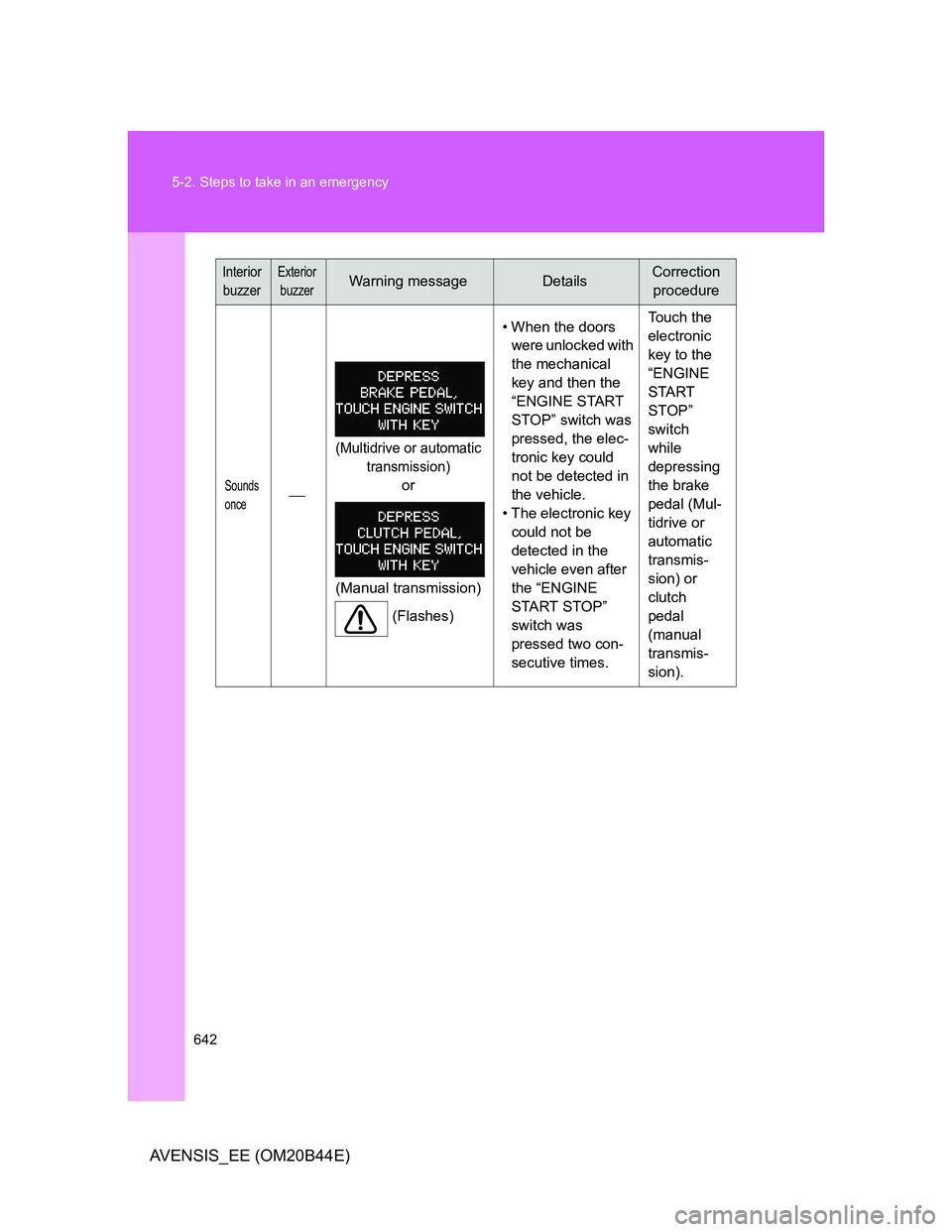
Sounds
once
(Multidrive or automatic
transmission)
or
(Manual transmission)
(Flashes)• When the doors
were unlocked with
the mechanical
key and then the
“ENGINE START
STOP” switch was
pressed, the elec-
tronic key could
not be detected in
the vehicle.
• The electronic key
could not be
detected in the
vehicle even after
the “ENGINE
START STOP”
switch was
pressed two con-
secutive times. Touch the
electronic
key to the
“ENGINE
START
STOP”
switch
while
depressing
the brake
pedal (Mul-
tidrive or
automatic
transmis-
sion) or
clutch
pedal
(manual
transmis-
sion).
Interior
buzzerExterior
buzzerWarning messageDetailsCorrection
procedure
Page 643 of 772
5
643 5-2. Steps to take in an emergency
When trouble arises
AVENSIS_EE (OM20B44E)
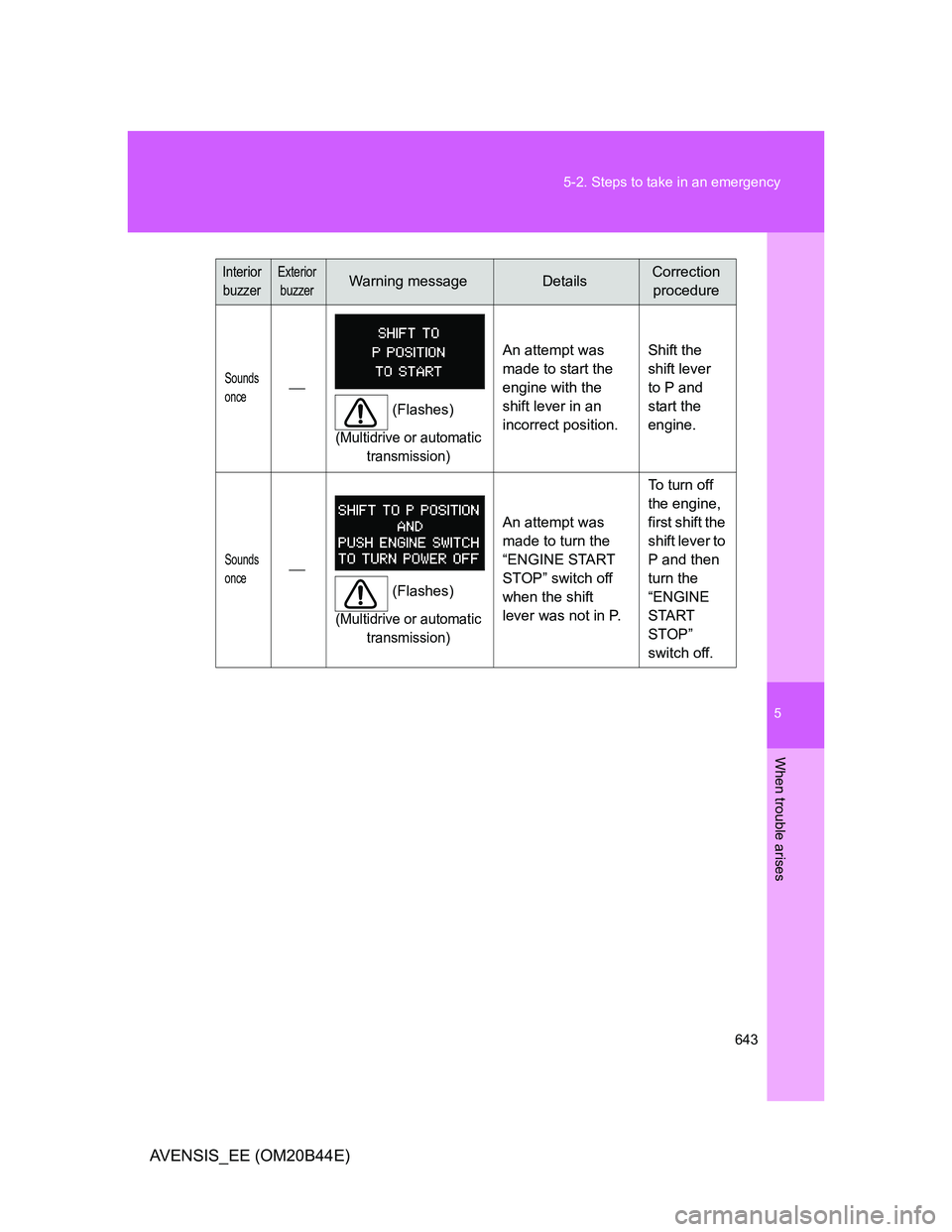
Sounds
once
(Flashes)
(Multidrive or automatic
transmission)
An attempt was
made to start the
engine with the
shift lever in an
incorrect position.Shift the
shift lever
to P and
start the
engine.
Sounds
once
(Flashes)
(Multidrive or automatic
transmission)
An attempt was
made to turn the
“ENGINE START
STOP” switch off
when the shift
lever was not in P.To turn off
the engine,
first shift the
shift lever to
P and then
turn the
“ENGINE
START
STOP”
switch off.
Interior
buzzerExterior
buzzerWarning messageDetailsCorrection
procedure
Page 645 of 772
5
645 5-2. Steps to take in an emergency
When trouble arises
AVENSIS_EE (OM20B44E)
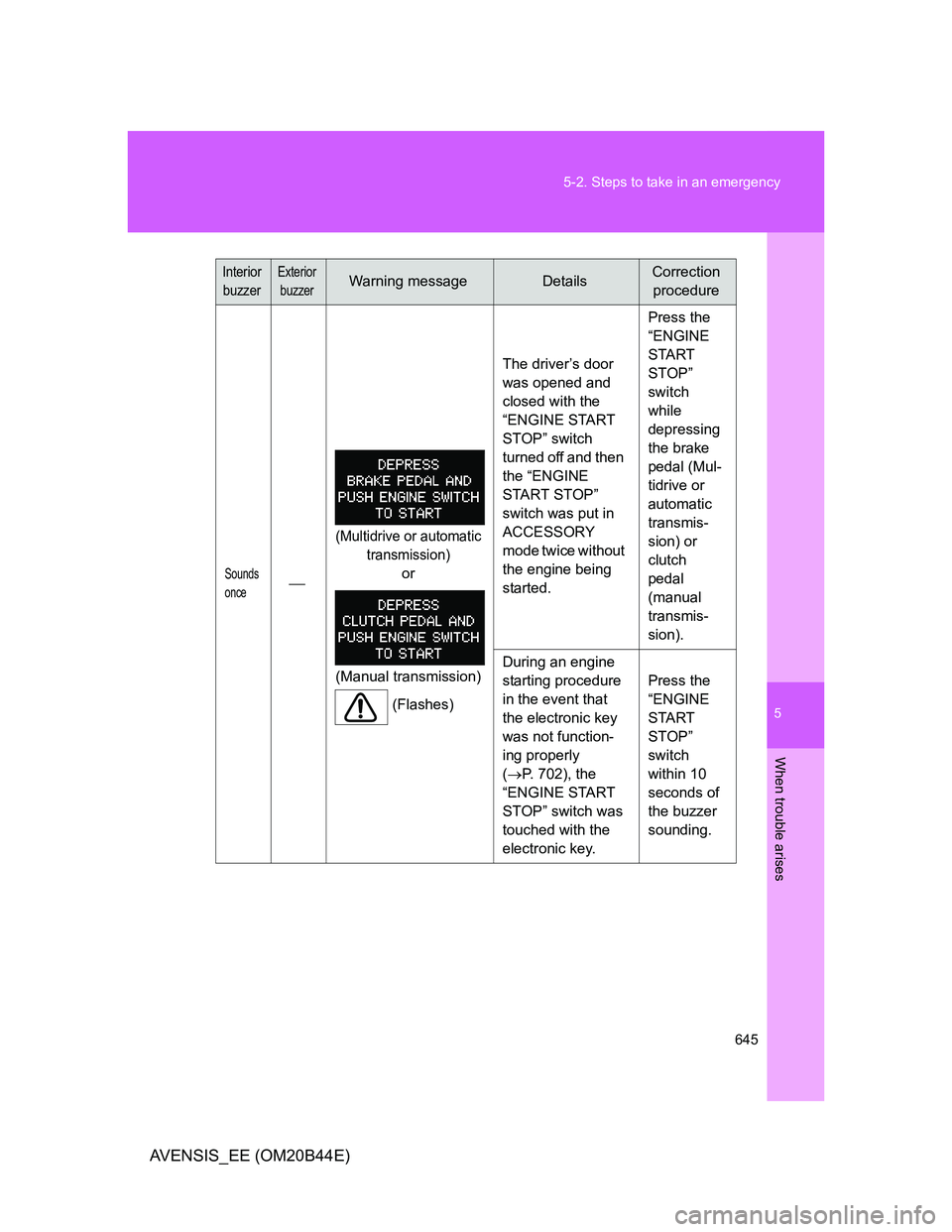
Sounds
once
(Multidrive or automatic
transmission)
or
(Manual transmission)
(Flashes)The driver’s door
was opened and
closed with the
“ENGINE START
STOP” switch
turned off and then
the “ENGINE
START STOP”
switch was put in
ACCESSORY
mode twice without
the engine being
started.Press the
“ENGINE
START
STOP”
switch
while
depressing
the brake
pedal (Mul-
tidrive or
automatic
transmis-
sion) or
clutch
pedal
(manual
transmis-
sion).
During an engine
starting procedure
in the event that
the electronic key
was not function-
ing properly
(P. 702), the
“ENGINE START
STOP” switch was
touched with the
electronic key. Press the
“ENGINE
START
STOP”
switch
within 10
seconds of
the buzzer
sounding.
Interior
buzzerExterior
buzzerWarning messageDetailsCorrection
procedure
Page 646 of 772
646 5-2. Steps to take in an emergency
AVENSIS_EE (OM20B44E)
Sounds
once
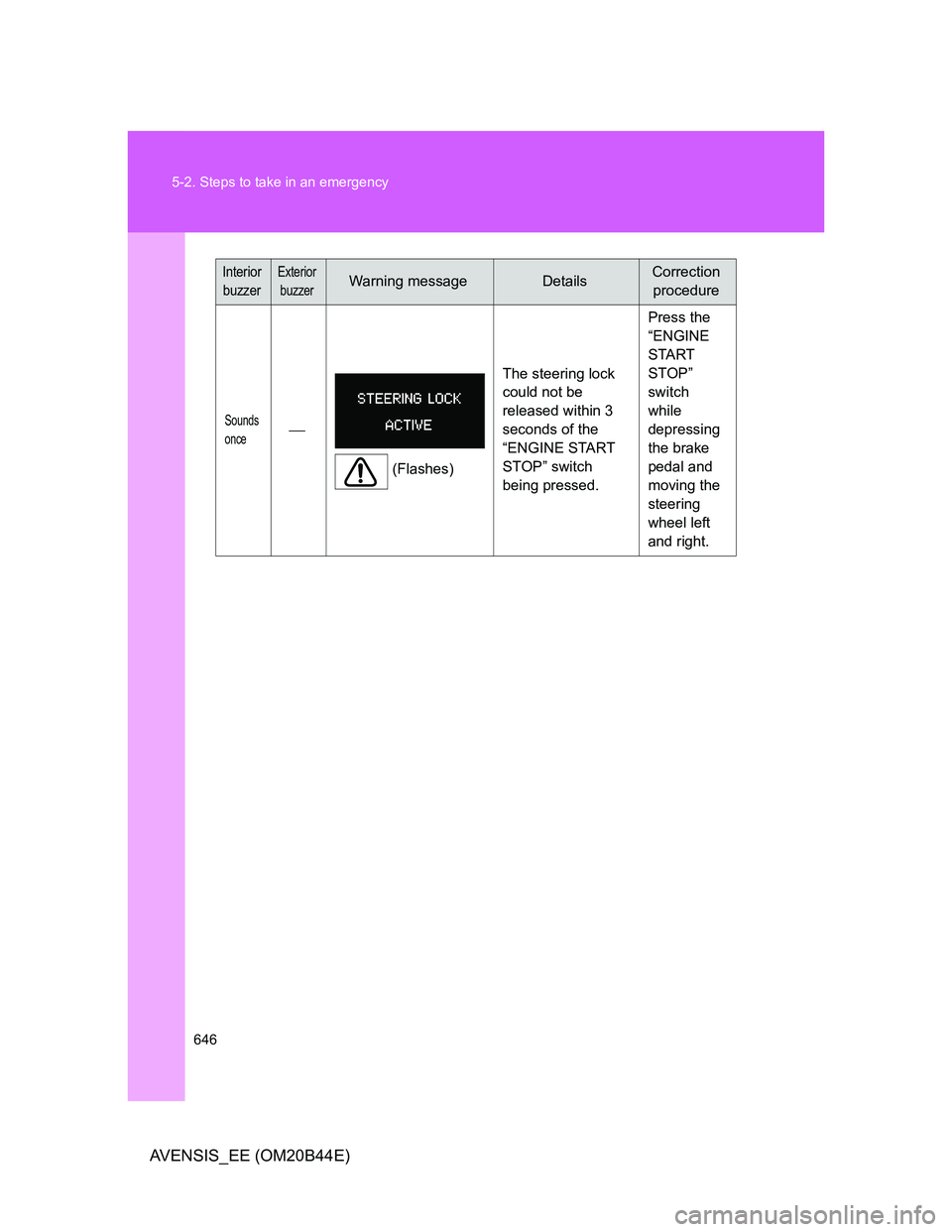
(Flashes)The steering lock
could not be
released within 3
seconds of the
“ENGINE START
STOP” switch
being pressed. Press the
“ENGINE
START
STOP”
switch
while
depressing
the brake
pedal and
moving the
steering
wheel left
and right.
Interior
buzzerExterior
buzzerWarning messageDetailsCorrection
procedure
Page 682 of 772
682 5-2. Steps to take in an emergency
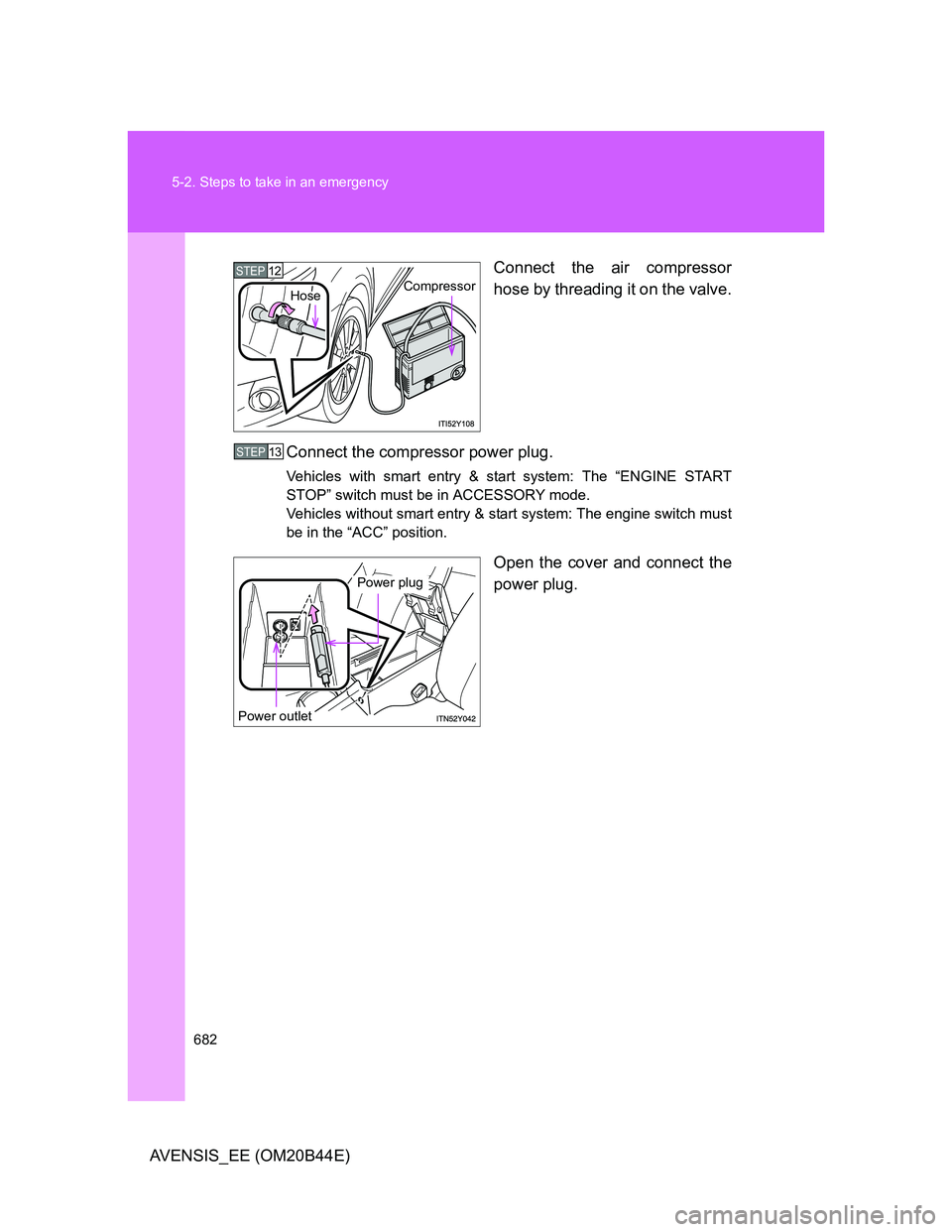
AVENSIS_EE (OM20B44E)Connect the air compressor
hose by threading it on the valve.
Connect the compressor power plug.
Vehicles with smart entry & start system: The “ENGINE START
STOP” switch must be in ACCESSORY mode.
Vehicles without smart entry & start system: The engine switch must
be in the “ACC” position.
Open the cover and connect the
power plug.
STEP12CompressorHose
STEP13
Power plug
Power outlet
Page 691 of 772
5
691 5-2. Steps to take in an emergency
When trouble arises
AVENSIS_EE (OM20B44E)
Emergency start function (Multidrive or automatic transmission
vehicles with smart entry & start system)
When the engine does not start, the following steps can be used as
an interim measure to start the engine if the “ENGINE START STOP”
switch is functioning normally.
Set the parking brake.
Put the shift lever in “P”.
Set the “ENGINE START STOP” switch to ACCESSORY
mode.
Push and hold the “ENGINE START STOP” switch about 15
seconds while depressing the brake pedal firmly.
Even if the engine can be started using the above steps, the system
may be malfunctioning. Have the vehicle checked by any authorized
Toyota dealer or repairer, or another duty qualified and equipped pro-
fessional.
STEP1
STEP2
STEP3
STEP4
Page 692 of 772
692
5-2. Steps to take in an emergency
AVENSIS_EE (OM20B44E)
If the shift lever cannot be shifted from “P”
For vehicles with Multidrive or automatic transmission: If the shift
lever cannot be shifted with your foot on the brake, there may be a
problem with the shift lock system (a system to prevent accidental
operation of the shift lever). Have the vehicle inspected by any
authorized Toyota dealer or repairer, or another duly qualified and
equipped professional, immediately.
The following steps may be used as an emergency measure to
ensure that the shift lever can be shifted.
Set the parking brake.
Vehicles with smart entry & start system: Turn the “ENGINE
START STOP” switch to ACCESSORY mode.
Vehicles without smart entry & start system: Turn the
engine switch to the “ACC” position.
Depress the brake pedal.
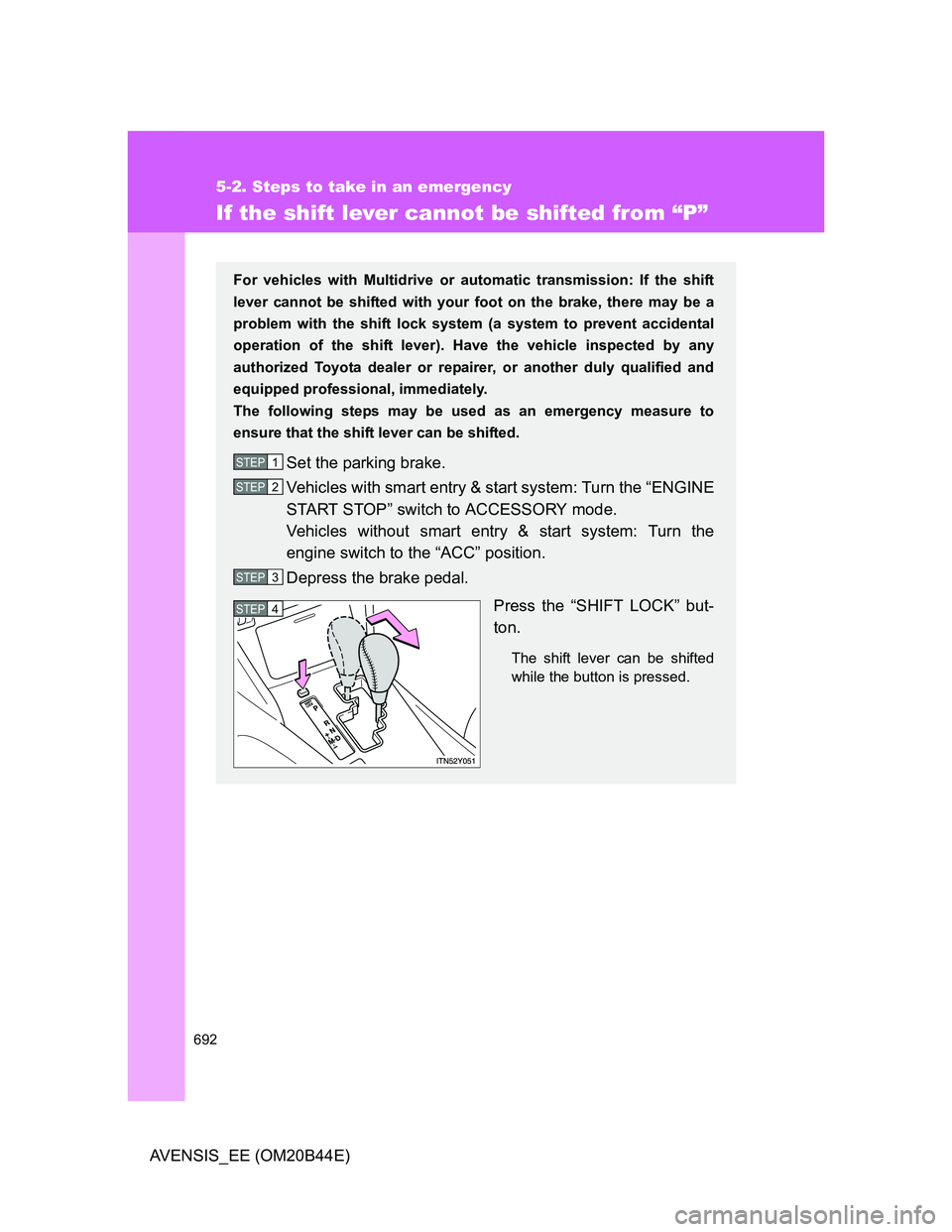
Press the “SHIFT LOCK” but-
ton.
The shift lever can be shifted
while the button is pressed.
STEP1
STEP2
STEP3
STEP4
Page 693 of 772
5
693
5-2. Steps to take in an emergency
When trouble arises
AVENSIS_EE (OM20B44E)
If the parking brake cannot be released
Releasing the parking brake manually (sedan)
Lift the luggage mat. (P. 506)
Take out the parking brake release tool from the trunk.
(P. 648, 676)
In the event that the battery is discharged or switch operation does
not release the parking brake, the parking brake can be released
manually using the procedure below. This procedure should be per-
formed only if necessary, such as in an emergency.
If the switch cannot be operated even when the battery is normal, the
parking brake system may be malfunctioning. Have the vehicle
inspected by any authorized Toyota dealer or repairer, or another
duly qualified and equipped professional immediately.
Before releasing the parking brake manually
Vehicles with a Multidrive or automatic transmission: Shift the
shift lever to “P”.
Vehicles with a manual transmission: Shift the shift lever to “1”
or “R”.
Vehicles with smart entry & start system: Turn the “ENGINE
START STOP” switch OFF.
Vehicles without smart entry & start system: Turn the engine
switch to the “LOCK” position.
Check that the parking brake indicator is off.
Chock the tires.
Stop the vehicle on a hard, flat surface.
STEP1
STEP2
Page 697 of 772
5
697 5-2. Steps to take in an emergency
When trouble arises
AVENSIS_EE (OM20B44E)
CAUTION
When releasing the parking brake manually
Vehicles with smart entry & start system
Shift the shift lever to “P” (Multidrive or automatic transmission) or “1” or
“R” (manual transmission), turn the “ENGINE START STOP” switch
OFF and chock the tires.
Failure to do so may cause the vehicle to move, resulting in an acci-
dent.
Turn the “ENGINE START STOP” switch OFF and check that the park-
ing brake indicator is off.
Failure to do so may cause the system to operate and turn the parking
brake release tool that is inserted, resulting in an injury.
Vehicles without smart entry & start system
Shift the shift lever to “P” (Multidrive or automatic transmission) or “1” or
“R” (manual transmission), turn the engine switch to “LOCK” position
and chock the tires.
Failure to do so may cause the vehicle to move, resulting in an acci-
dent.
Turn the engine switch to “LOCK” position and check that the parking
brake indicator is off.
Failure to do so may cause the system to operate and turn the parking
brake release tool that is inserted, resulting in an injury.