lights TOYOTA AVENSIS 2012 Owner's Guide
[x] Cancel search | Manufacturer: TOYOTA, Model Year: 2012, Model line: AVENSIS, Model: TOYOTA AVENSIS 2012Pages: 772, PDF Size: 34.43 MB
Page 313 of 772
313 2-4. Using other driving systems
2
When driving
AVENSIS_EE (OM20B44E)
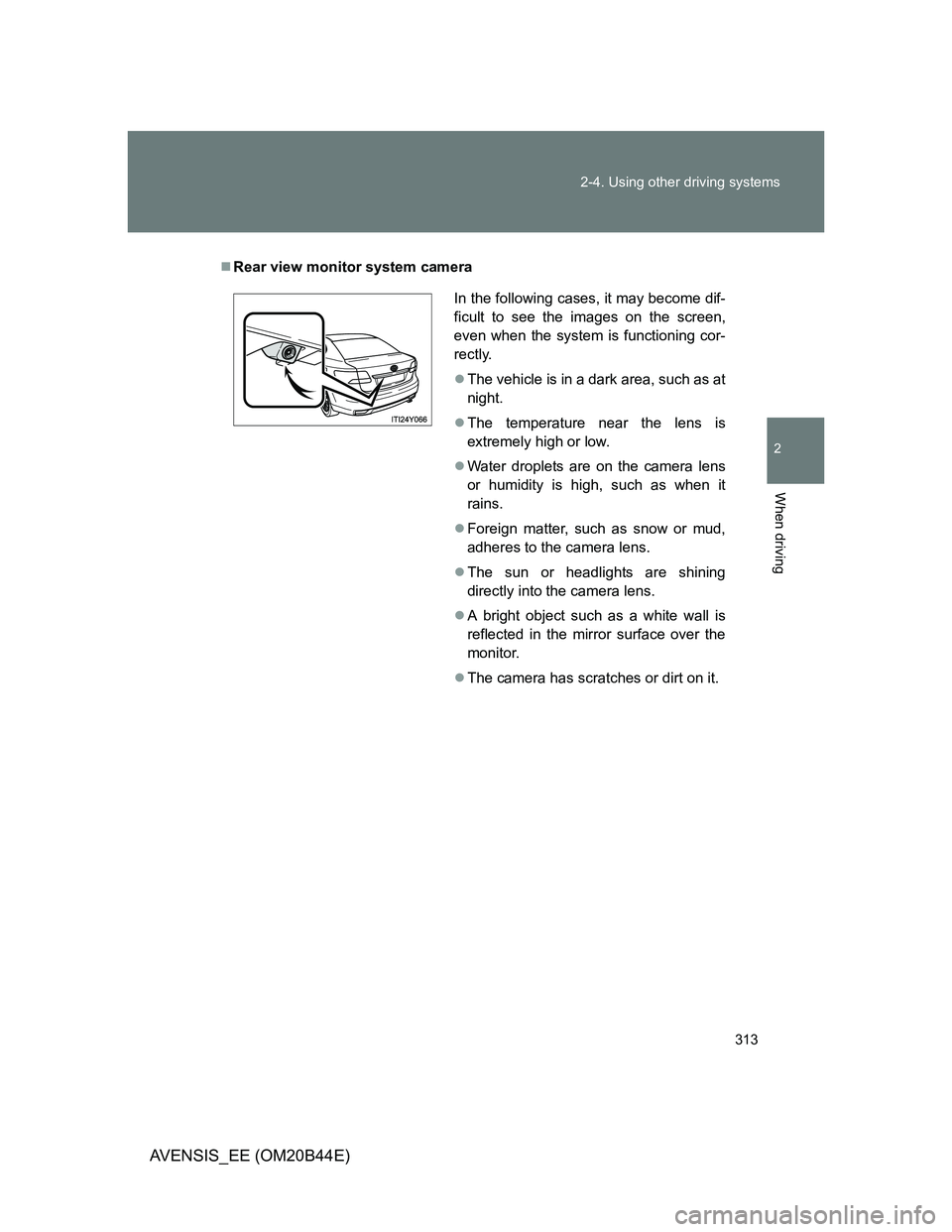
Rear view monitor system camera
In the following cases, it may become dif-
ficult to see the images on the screen,
even when the system is functioning cor-
rectly.
The vehicle is in a dark area, such as at
night.
The temperature near the lens is
extremely high or low.
Water droplets are on the camera lens
or humidity is high, such as when it
rains.
Foreign matter, such as snow or mud,
adheres to the camera lens.
The sun or headlights are shining
directly into the camera lens.
A bright object such as a white wall is
reflected in the mirror surface over the
monitor.
The camera has scratches or dirt on it.
Page 314 of 772
314 2-4. Using other driving systems
AVENSIS_EE (OM20B44E)
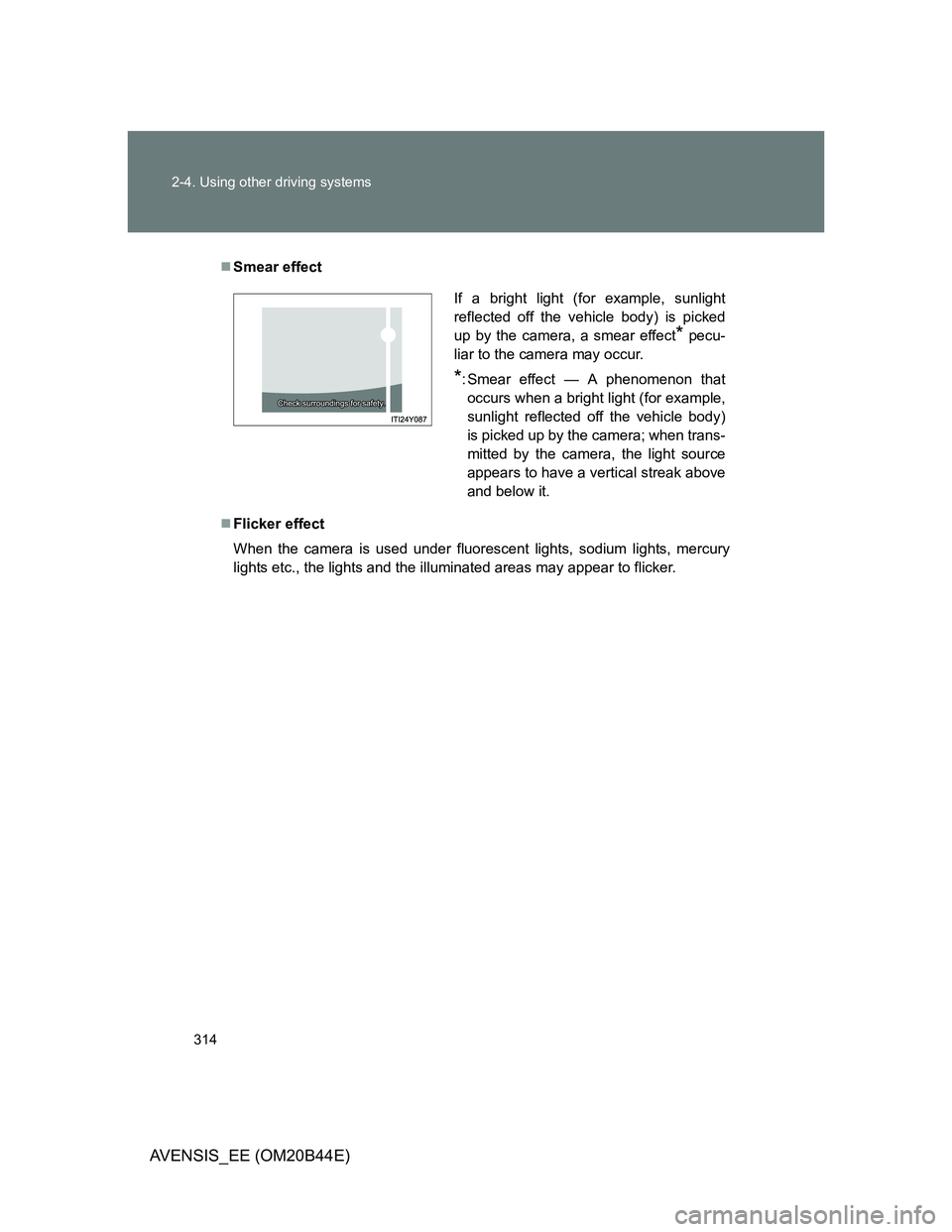
Smear effect
Flicker effect
When the camera is used under fluorescent lights, sodium lights, mercury
lights etc., the lights and the illuminated areas may appear to flicker.
If a bright light (for example, sunlight
reflected off the vehicle body) is picked
up by the camera, a smear effect
* pecu-
liar to the camera may occur.
*: Smear effect — A phenomenon that
occurs when a bright light (for example,
sunlight reflected off the vehicle body)
is picked up by the camera; when trans-
mitted by the camera, the light source
appears to have a vertical streak above
and below it.
Page 323 of 772
323 2-4. Using other driving systems
2
When driving
AVENSIS_EE (OM20B44E)
Hands-free driving warning
If the steering wheel is not operated for about 15 seconds on a straight road
or about 5 seconds on a curve, the buzzer will beep twice, indicators on the
multi-information display will flash, and the lane keeping assist function will
be temporarily canceled. If you drive the vehicle with your hands lightly
touching the steering wheel, this may also be detected as hands-free driv-
ing.
When the vehicle has been parked in the sun
The LKA system functions may not be available for a while after driving has
started. In such cases, turn the LKA system off and turn it on again after nor-
mal temperature returns. When the temperature in the cabin decreases and
the temperature around the camera sensor becomes suitable for its opera-
tion, the functions will begin to operate.
Warning lights and messages for LKA
Warning lights and messages are used to indicate a system malfunction or
to inform the driver of the need for caution while driving. (P. 619)
CAUTION
Before using the LKA system
Do not rely on the LKA system to remain within a selected lane. The LKA
system is not designed to enable inattentive driving. The steering wheel
should be operated by the driver to maintain the vehicle in a suitable position
within its lane. Always drive carefully.
Page 325 of 772
325 2-4. Using other driving systems
2
When driving
AVENSIS_EE (OM20B44E)
NOTICE
In the following situations, the LKA will not work, or will not perform
reliably
When lane markers are interrupted or are not present, such as before a
tollbooth.
When lane markers are only on one side of the road.
When driving on a sharp curve.
When lanes are extremely narrow or extremely wide.
When the vehicle leans to one side an unusual amount due to a heavy
load or improper tire inflation pressure.
When the following distance between your vehicle and the vehicle ahead
is extremely short.
When the lane markers are broken or “Raised pavement marker”.
When lane markers are obscured or partially obscured by sand, dirt, etc.
When driving on a particularly bright road surface, such as concrete.
When driving on a road surface that is bright due to reflected light.
When driving in a location where the light level changes rapidly, such as
the entrance to or exit from a tunnel.
When sunlight or the headlights of oncoming vehicles are shining directly
into the camera lens.
When driving on roads that are branching or merging.
When pavement lane markers are difficult to see due to rain, snow, fog,
etc.
When driving on a road surface that is wet due to rain, previous rainfall,
standing water, etc.
When the vehicle experiences strong up-and-down motion such as when
driving on an extremely rough road or on a seam in the pavement.
When headlight brightness is reduced due to dirt on the lenses, or when
the headlights are misaligned.
When driving with a strong crosswind.
Page 327 of 772
327
2-4. Using other driving systems
2
When driving
AVENSIS_EE (OM20B44E)
Driving assist systems
To help enhance driving safety and performance, the following sys-
tems operate automatically in response to various driving situations.
Be aware, however, that these systems are supplementary and
should not be relied upon too heavily when operating the vehicle.
ABS (Anti-lock Brake System)
Helps to prevent wheel lock when the brakes are applied suddenly, or if
the brakes are applied while driving on a slippery road surface.
Brake assist
Generates an increased level of braking force after the brake pedal is
depressed, when the system detects a panic stop situation.
VSC (Vehicle Stability Control)
Helps the driver to control skidding when swerving suddenly or turning
on slippery road surfaces.
TRC (Traction Control)
Helps to maintain drive power and prevent the front wheels from spin-
ning when starting the vehicle or accelerating on slippery roads.
EPS (Electric Power Steering)
Employs an electric motor to reduce the amount of effort needed to turn
the steering wheel.
VSC+ (Vehicle Stability Control+)
Provides cooperative control of the ABS, TRC, VSC and EPS.
Helps to maintain directional stability when swerving on slippery road
surfaces by controlling steering performance.
PCS (Pre-Crash Safety) (if equipped)
P. 333
Emergency brake signal (if equipped)
When the brakes are applied suddenly, the stop lights automatically
flash to alert the vehicle behind.
Page 337 of 772
337 2-4. Using other driving systems
2
When driving
AVENSIS_EE (OM20B44E)
Situations in which the pre-crash safety system does not function
properly
The system may not function effectively in situations such as the following:
On roads with sharp bends or uneven surfaces
If a vehicle suddenly moves in front of your vehicle, such as at an inter-
section
If a vehicle suddenly cuts in front of your vehicle, such as when overtak-
ing
In inclement weather such as heavy rain, fog, snow or sand storms
When your vehicle is skidding with the VSC system off
When the axis of the radar is out of adjustment
When an extreme change in vehicle height occurs
When there is a malfunction in the system
Warning lights and/or warning messages will turn on or flash. (P. 624)
Page 352 of 772
352 2-5. Driving information
AVENSIS_EE (OM20B44E)
Tire information
Ensure that your vehicle’s tires are properly inflated. (P. 739)
Increase the air pressure of the trailer tires in accordance with the total
trailer weight and according to the values recommended by the manufac-
turer of your trailer.
Trailer lights
Check that the turn signal lights and stoplights are operating correctly every
time you hitch up the trailer. Directly wiring up to your vehicle may damage
the electrical system and stop the lights from functioning correctly.
Break-in schedule
Toyota recommends that vehicles fitted with new power train components
should not be used for towing trailers for the first 800 km (500 miles).
Maintenance
Maintenance must be performed more frequently when using the vehicle
for towing due to the greater weight burden placed on the vehicle com-
pared to normal driving.
Retighten all bolts securing the hitching ball and bracket after towing for
approximately 1000 km (600 miles).
Page 354 of 772
354 2-5. Driving information
AVENSIS_EE (OM20B44E)
Guidance
Your vehicle will handle differently when towing a trailer. In order to
avoid accident, death or serious injury, keep the following in mind
when towing:
Checking connections between trailer and lights
Stop the vehicle and check the operation of the connection
between the trailer and lights after driving for a brief period as well
as before setting off.
Practicing driving with a coupled trailer
Get the feel for turning, stopping and reversing with the trailer
coupled by practicing in an area with no or light traffic.
When reversing with a coupled trailer, hold the section of the
steering wheel nearest to you and rotate clockwise to turn the
trailer left or counterclockwise to turn right. Always rotate gradu-
ally to prevent steering error. Have someone guide you when
reversing to lessen the risk of accident.
Increasing vehicle-to-vehicle distance
At a speed of 10 km/h (6 mph), the distance to the vehicle running
ahead of you should be equivalent to or greater than the combined
length of your vehicle and trailer. Avoid sudden braking that may
cause skidding. Otherwise, the vehicle may spin out of control.
This is especially true when driving on wet or slippery road sur-
faces.
Page 359 of 772
3Interior features
359
AVENSIS_EE (OM20B44E)
3-2. Using the audio system
Audio system types .......... 383
Using the radio ................. 391
Using the CD player ......... 398
Playing back MP3
and WMA discs............... 406
Operating an iPod............. 416
Operating a USB
memory........................... 426
Optimal use of the
audio system .................. 436
Using the AUX port ........... 438
Using the steering
wheel audio switches...... 439
Bluetooth
® audio/phone.... 442
Using the Bluetooth®
audio/phone .................... 449
Operating a Bluetooth
®
enabled portable
player .............................. 455
Making a phone call.......... 459
Using the “SET UP” menu
(“Bluetooth” menu).......... 465
Using the “SET UP”
menu (“TEL” menu) ........ 471
3-3. Using the interior lights
Interior lights list................ 478
• Personal/interior light
main switch ..................... 479
• Personal/interior lights .... 479
• Personal lights ................ 4803-4. Using the storage features
List of storage features ..... 481
• Glove box ....................... 482
• Console box.................... 483
• Overhead console .......... 484
• Cup holders .................... 485
• Bottle holders.................. 486
• Coin box ......................... 488
3-5. Other interior features
Sun visors ......................... 489
Vanity mirror ..................... 490
Ashtray.............................. 491
Cigarette lighter ................ 492
Power outlet ...................... 493
Seat heaters ..................... 494
Armrest ............................. 496
Trunk/luggage
compartment storage
extension ........................ 497
Panoramic roof shade
(wagon)........................... 498
Rear sunshade
(sedan) ........................... 501
Rear side sunshades
(sedan) ........................... 502
Floor mats ......................... 503
Trunk features (sedan) ..... 505
Luggage compartment
features (wagon)............. 507
Page 478 of 772
478
AVENSIS_EE (OM20B44E)
3-3. Using the interior lights
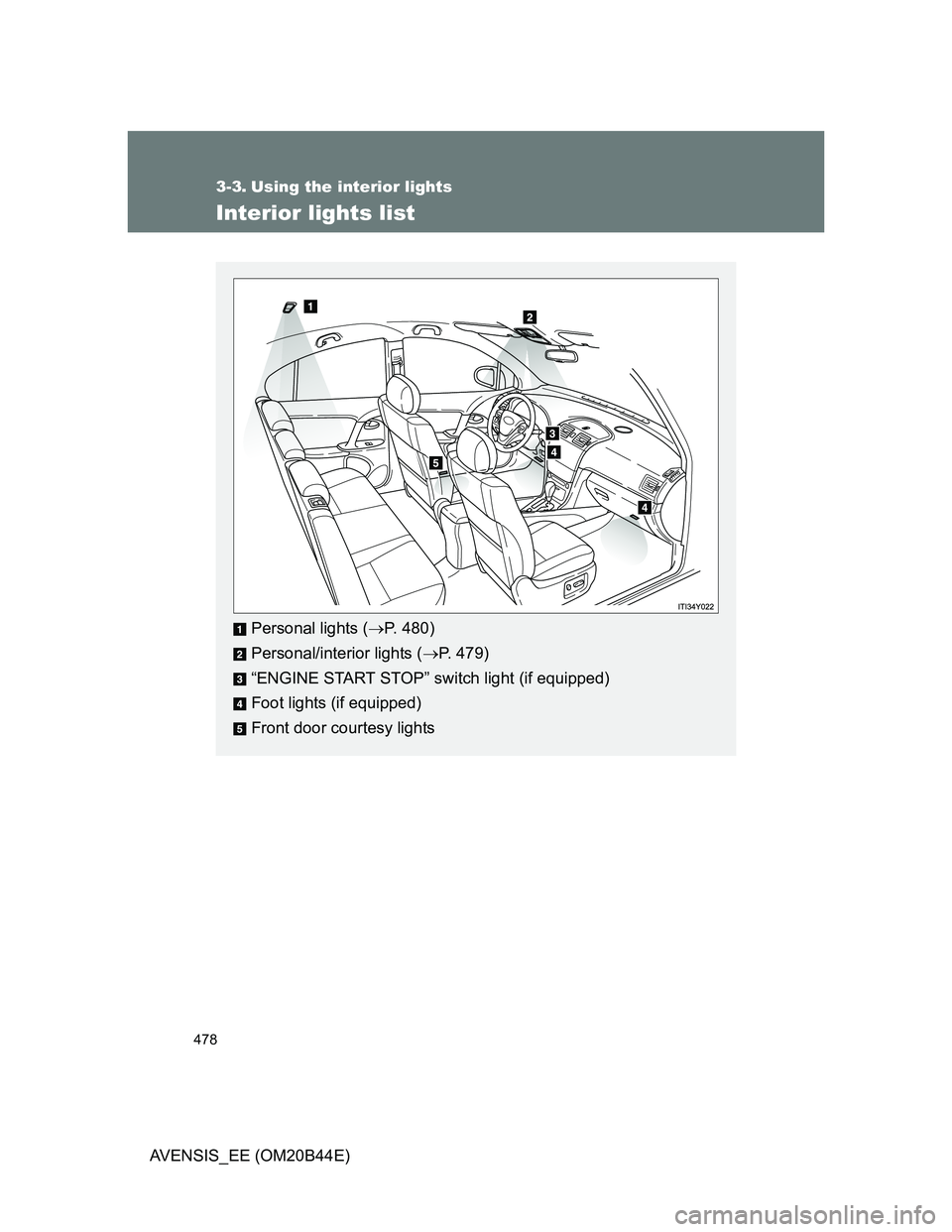
Interior lights list
Personal lights (P. 480)
Personal/interior lights (P. 479)
“ENGINE START STOP” switch light (if equipped)
Foot lights (if equipped)
Front door courtesy lights