steering TOYOTA AVENSIS 2012 Workshop Manual
[x] Cancel search | Manufacturer: TOYOTA, Model Year: 2012, Model line: AVENSIS, Model: TOYOTA AVENSIS 2012Pages: 772, PDF Size: 34.43 MB
Page 315 of 772
315 2-4. Using other driving systems
2
When driving
AVENSIS_EE (OM20B44E)
CAUTION
When using the rear view monitor system
Observe the following precautions to avoid an accident that could result in
death or serious injuries.
Never depend solely on the monitor system when reversing.
Always check visually and with the mirrors to confirm your intended path is
clear.
Use your own eyes to confirm the vehicle’s surroundings, as the displayed
image may become faint or dark, and moving images will be distorted, or
not entirely visible when the outside temperature is low. When backing up,
be sure to check behind and all around the vehicle visually and with the
mirrors before proceeding.
Always check the vehicle surrounding area, because the guide lines are
ancillary lines.
The guide lines are ancillary lines and do not change even if the steering
wheel is turned.
Depicted distances between objects and flat surfaces differ from actual
distances.
Do not use the system if the trunk/back door is not completely closed.
Page 318 of 772
318
2-4. Using other driving systems
AVENSIS_EE (OM20B44E)
LKA (Lane-Keeping Assist)
: If equipped
While driving on a freeway or motor highway that has lane markers,
this system recognizes the lanes using a camera as a sensor to
assist the driver with staying in the lane. The LKA system has two
functions.
Lane departure warning function
If the system judges that the vehicle may deviate from its lane, it
alerts the driver using rapid beeping, indications on the multi-
information display, and a sensory warning
* given via the steer-
ing wheel.
*: A slight steering torque is applied for a short period of time in
the direction of the center of the lane.
Lane keeping assist function
This function will be active when the vehicle-to-vehicle distance
control mode of the cruise control (P. 281) is set with vehicle
speed above approx. 72 km/h (approx. 45 mph) and while the
lane departure warning function is active. When the lane keep-
ing assist function is active, a slight steering torque will be
applied, to help the driver maintain the vehicle in a central posi-
tion within the lane.
While the lane keeping assist function is active, sensory warnings
will not occur.
Page 321 of 772
321 2-4. Using other driving systems
2
When driving
AVENSIS_EE (OM20B44E)
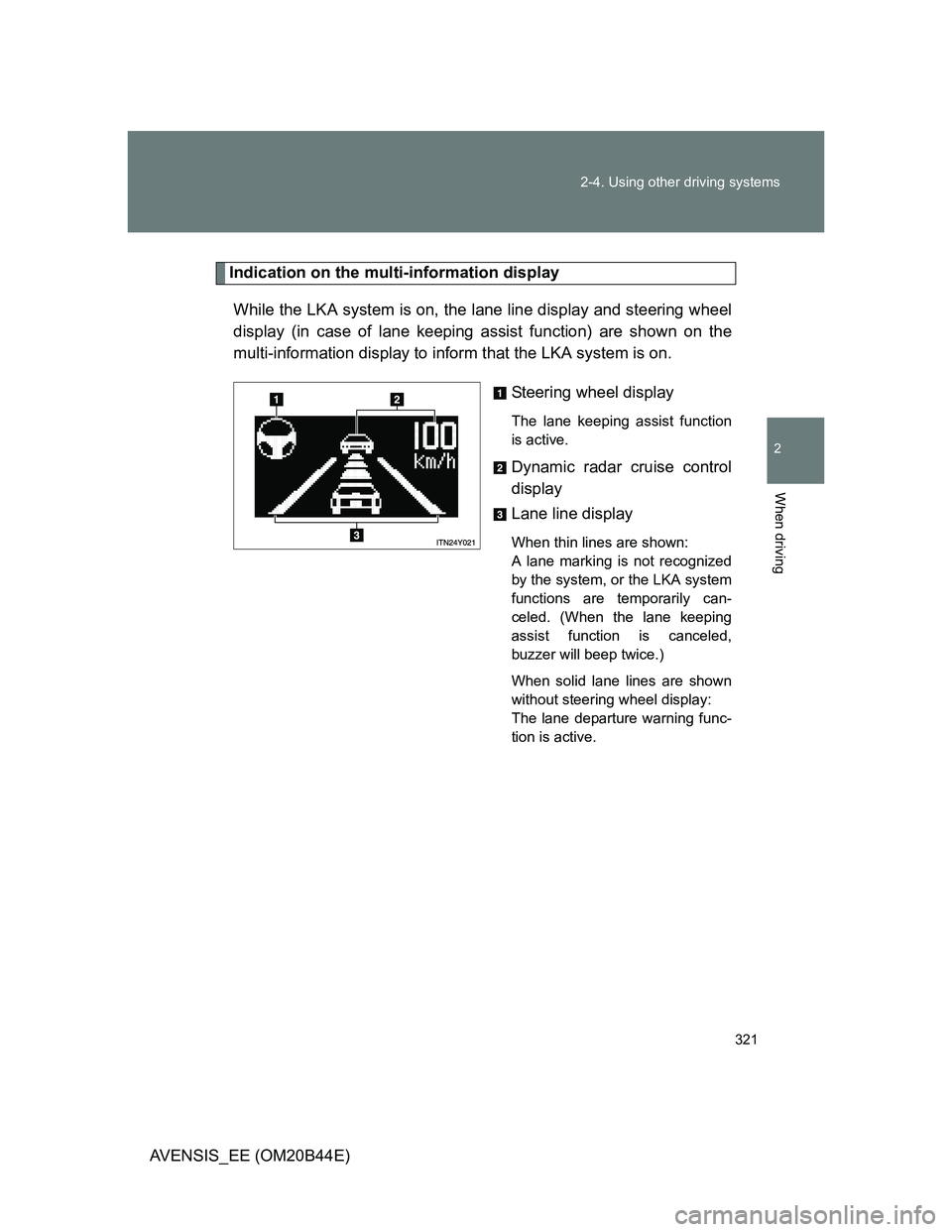
Indication on the multi-information display
While the LKA system is on, the lane line display and steering wheel
display (in case of lane keeping assist function) are shown on the
multi-information display to inform that the LKA system is on.
Steering wheel display
The lane keeping assist function
is active.
Dynamic radar cruise control
display
Lane line display
When thin lines are shown:
A lane marking is not recognized
by the system, or the LKA system
functions are temporarily can-
celed. (When the lane keeping
assist function is canceled,
buzzer will beep twice.)
When solid lane lines are shown
without steering wheel display:
The lane departure warning func-
tion is active.
Page 322 of 772
322 2-4. Using other driving systems
AVENSIS_EE (OM20B44E)
Temporary cancellation of the LKA system functions
If any of the following occurs, the LKA system functions will be temporarily
canceled. The functions will resume after the necessary operating conditions
have returned.
The turn signal lever is operated.
The steering wheel is turned as far as necessary to cause the vehicle to
change lanes.
The brake pedal is depressed.
However, the lane keeping assist function will not resume even after the
brake pedal is released because depressing the brake pedal also can-
cels the dynamic radar cruise control (only lane departure warning func-
tion will resume).
The vehicle speed deviates from the operating range of the LKA system
functions. (The buzzer will beep twice when the lane keeping assist func-
tion is being canceled.)
When the lane lines cannot be recognized while driving. (The buzzer will
beep twice when the lane keeping assist function is being canceled.)
The wiper operates continuously. (The buzzer will beep twice when the
lane keeping assist function is being canceled.)
The buzzer may not beep when the LKA system functions are canceled
because the notification of dynamic radar cruise control cancellation
takes priority over the LKA system and cancels the function.
When the lane departure warning function is activated
The lane departure warning function will be temporarily canceled and will not
resume until a few seconds elapse after it is activated.
Page 323 of 772
323 2-4. Using other driving systems
2
When driving
AVENSIS_EE (OM20B44E)
Hands-free driving warning
If the steering wheel is not operated for about 15 seconds on a straight road
or about 5 seconds on a curve, the buzzer will beep twice, indicators on the
multi-information display will flash, and the lane keeping assist function will
be temporarily canceled. If you drive the vehicle with your hands lightly
touching the steering wheel, this may also be detected as hands-free driv-
ing.
When the vehicle has been parked in the sun
The LKA system functions may not be available for a while after driving has
started. In such cases, turn the LKA system off and turn it on again after nor-
mal temperature returns. When the temperature in the cabin decreases and
the temperature around the camera sensor becomes suitable for its opera-
tion, the functions will begin to operate.
Warning lights and messages for LKA
Warning lights and messages are used to indicate a system malfunction or
to inform the driver of the need for caution while driving. (P. 619)
CAUTION
Before using the LKA system
Do not rely on the LKA system to remain within a selected lane. The LKA
system is not designed to enable inattentive driving. The steering wheel
should be operated by the driver to maintain the vehicle in a suitable position
within its lane. Always drive carefully.
Page 327 of 772
327
2-4. Using other driving systems
2
When driving
AVENSIS_EE (OM20B44E)
Driving assist systems
To help enhance driving safety and performance, the following sys-
tems operate automatically in response to various driving situations.
Be aware, however, that these systems are supplementary and
should not be relied upon too heavily when operating the vehicle.
ABS (Anti-lock Brake System)
Helps to prevent wheel lock when the brakes are applied suddenly, or if
the brakes are applied while driving on a slippery road surface.
Brake assist
Generates an increased level of braking force after the brake pedal is
depressed, when the system detects a panic stop situation.
VSC (Vehicle Stability Control)
Helps the driver to control skidding when swerving suddenly or turning
on slippery road surfaces.
TRC (Traction Control)
Helps to maintain drive power and prevent the front wheels from spin-
ning when starting the vehicle or accelerating on slippery roads.
EPS (Electric Power Steering)
Employs an electric motor to reduce the amount of effort needed to turn
the steering wheel.
VSC+ (Vehicle Stability Control+)
Provides cooperative control of the ABS, TRC, VSC and EPS.
Helps to maintain directional stability when swerving on slippery road
surfaces by controlling steering performance.
PCS (Pre-Crash Safety) (if equipped)
P. 333
Emergency brake signal (if equipped)
When the brakes are applied suddenly, the stop lights automatically
flash to alert the vehicle behind.
Page 330 of 772
330 2-4. Using other driving systems
AVENSIS_EE (OM20B44E)
Sounds and vibrations caused by the ABS, brake assist, TRC and VSC
A sound may be heard from the engine compartment when the engine is
started or just after the vehicle begins to move. This sound does not indi-
cate that a malfunction has occurred in any of these systems.
Any of the following conditions may occur when the above systems are
operating. None of these indicates that a malfunction has occurred.
• Vibrations may be felt through the vehicle body and steering.
• A motor sound may be heard after the vehicle comes to a stop.
• The brake pedal may pulsate slightly after the ABS is activated.
• The brake pedal may move down slightly after the ABS is activated.
EPS operation sound
When the steering wheel operates, a motor sound (whirring sound) may be
heard. This does not indicate a malfunction.
Reduced effectiveness of EPS
The effectiveness of EPS is reduced to prevent the system from overheating
when there is frequent steering input over an extended period of time. The
steering wheel may feel heavy as a result. Should this occur, refrain from
excessive steering input or stop the vehicle and turn the engine off. The sys-
tem should return to normal after about 10 minutes.
Page 354 of 772
354 2-5. Driving information
AVENSIS_EE (OM20B44E)
Guidance
Your vehicle will handle differently when towing a trailer. In order to
avoid accident, death or serious injury, keep the following in mind
when towing:
Checking connections between trailer and lights
Stop the vehicle and check the operation of the connection
between the trailer and lights after driving for a brief period as well
as before setting off.
Practicing driving with a coupled trailer
Get the feel for turning, stopping and reversing with the trailer
coupled by practicing in an area with no or light traffic.
When reversing with a coupled trailer, hold the section of the
steering wheel nearest to you and rotate clockwise to turn the
trailer left or counterclockwise to turn right. Always rotate gradu-
ally to prevent steering error. Have someone guide you when
reversing to lessen the risk of accident.
Increasing vehicle-to-vehicle distance
At a speed of 10 km/h (6 mph), the distance to the vehicle running
ahead of you should be equivalent to or greater than the combined
length of your vehicle and trailer. Avoid sudden braking that may
cause skidding. Otherwise, the vehicle may spin out of control.
This is especially true when driving on wet or slippery road sur-
faces.
Page 355 of 772
355 2-5. Driving information
2
When driving
AVENSIS_EE (OM20B44E)Sudden acceleration/steering input/cornering
Executing sharp turns when towing may result in the trailer collid-
ing with your vehicle. Decelerate well in advance when approach-
ing turns and take them slowly and carefully to avoid sudden
braking.
Important points regarding turning
The wheels of the trailer will travel closer to the inside of the curve
than the wheels of the vehicle. To make allowance for this, take the
turns wider than you would normally.
Important points regarding stability
Vehicle movement resulting from uneven road surfaces and strong
crosswinds will affect handling. The vehicle may also be rocked by
passing buses or large trucks. Frequently check behind when mov-
ing alongside such vehicles. As soon as such vehicle movement
occurs, immediately start to decelerate smoothly by slowly apply-
ing the brakes. Always steer the vehicle straight ahead while brak-
ing.
Passing other vehicles
Consider the total combined length of your vehicle and trailer, and
ensure that the vehicle-to-vehicle distance is sufficient before exe-
cuting lane changes.
Page 359 of 772
3Interior features
359
AVENSIS_EE (OM20B44E)
3-2. Using the audio system
Audio system types .......... 383
Using the radio ................. 391
Using the CD player ......... 398
Playing back MP3
and WMA discs............... 406
Operating an iPod............. 416
Operating a USB
memory........................... 426
Optimal use of the
audio system .................. 436
Using the AUX port ........... 438
Using the steering
wheel audio switches...... 439
Bluetooth
® audio/phone.... 442
Using the Bluetooth®
audio/phone .................... 449
Operating a Bluetooth
®
enabled portable
player .............................. 455
Making a phone call.......... 459
Using the “SET UP” menu
(“Bluetooth” menu).......... 465
Using the “SET UP”
menu (“TEL” menu) ........ 471
3-3. Using the interior lights
Interior lights list................ 478
• Personal/interior light
main switch ..................... 479
• Personal/interior lights .... 479
• Personal lights ................ 4803-4. Using the storage features
List of storage features ..... 481
• Glove box ....................... 482
• Console box.................... 483
• Overhead console .......... 484
• Cup holders .................... 485
• Bottle holders.................. 486
• Coin box ......................... 488
3-5. Other interior features
Sun visors ......................... 489
Vanity mirror ..................... 490
Ashtray.............................. 491
Cigarette lighter ................ 492
Power outlet ...................... 493
Seat heaters ..................... 494
Armrest ............................. 496
Trunk/luggage
compartment storage
extension ........................ 497
Panoramic roof shade
(wagon)........................... 498
Rear sunshade
(sedan) ........................... 501
Rear side sunshades
(sedan) ........................... 502
Floor mats ......................... 503
Trunk features (sedan) ..... 505
Luggage compartment
features (wagon)............. 507