steering TOYOTA AVENSIS 2012 Repair Manual
[x] Cancel search | Manufacturer: TOYOTA, Model Year: 2012, Model line: AVENSIS, Model: TOYOTA AVENSIS 2012Pages: 772, PDF Size: 34.43 MB
Page 386 of 772
386 3-2. Using the audio system
AVENSIS_EE (OM20B44E)
Using cellular phones
Interference may be heard through the audio system’s speakers if a cellular
phone is being used inside or close to the vehicle while the audio system is
operating.
TitlePage
Using the radioP. 391
Using the CD playerP. 398
Playing back MP3 and WMA discsP. 406
Operating an iPodP. 416
Operating a USB memoryP. 426
Optimal use of the audio systemP. 436
Using the AUX portP. 438
Using the steering wheel audio switchesP. 439
Page 439 of 772
439
3-2. Using the audio system
3
Interior features
AVENSIS_EE (OM20B44E)
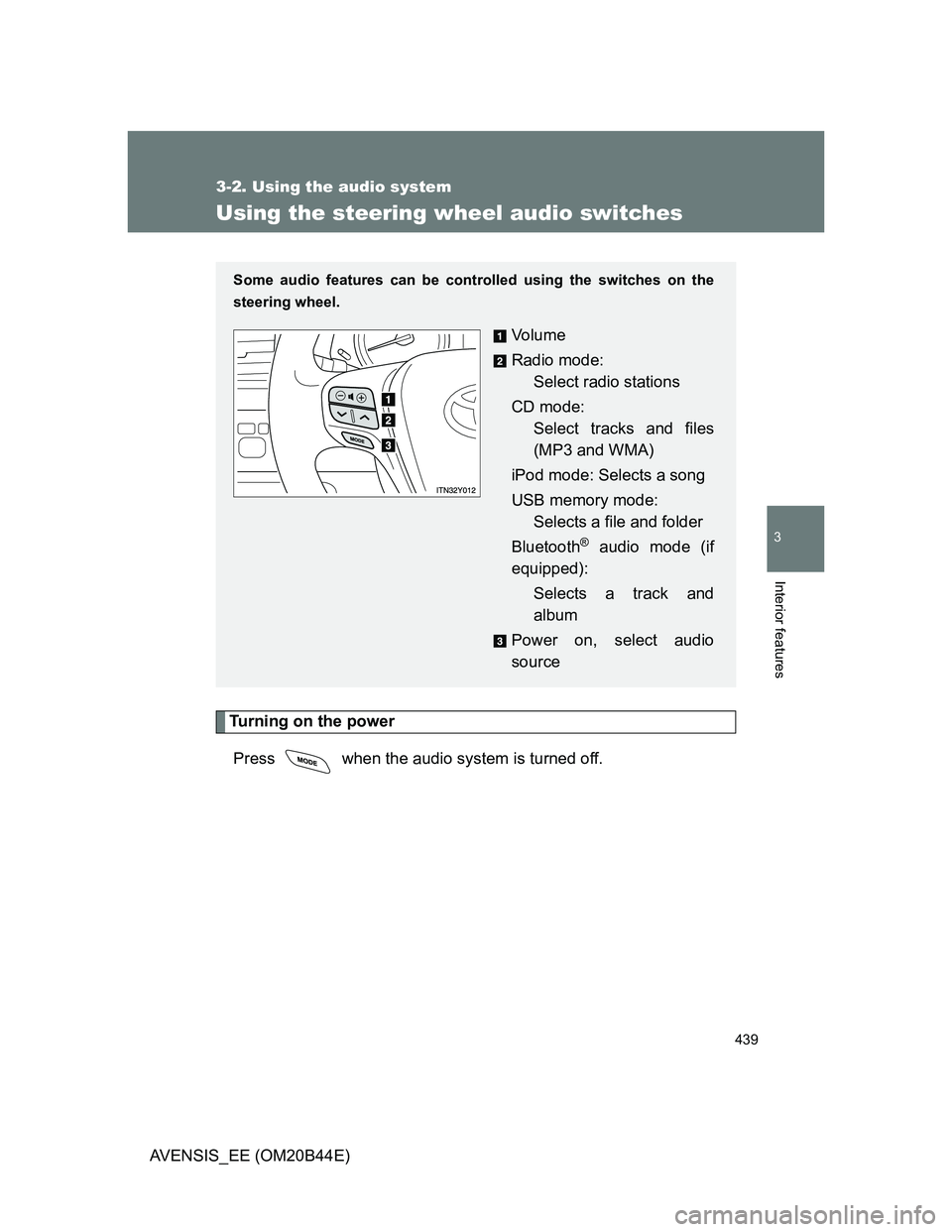
Using the steering wheel audio switches
Turning on the power
Press when the audio system is turned off.
Some audio features can be controlled using the switches on the
steering wheel.
Vo l u m e
Radio mode:
Select radio stations
CD mode:
Select tracks and files
(MP3 and WMA)
iPod mode: Selects a song
USB memory mode:
Selects a file and folder
Bluetooth
® audio mode (if
equipped):
Selects a track and
album
Power on, select audio
source
Page 441 of 772
441 3-2. Using the audio system
3
Interior features
AVENSIS_EE (OM20B44E)
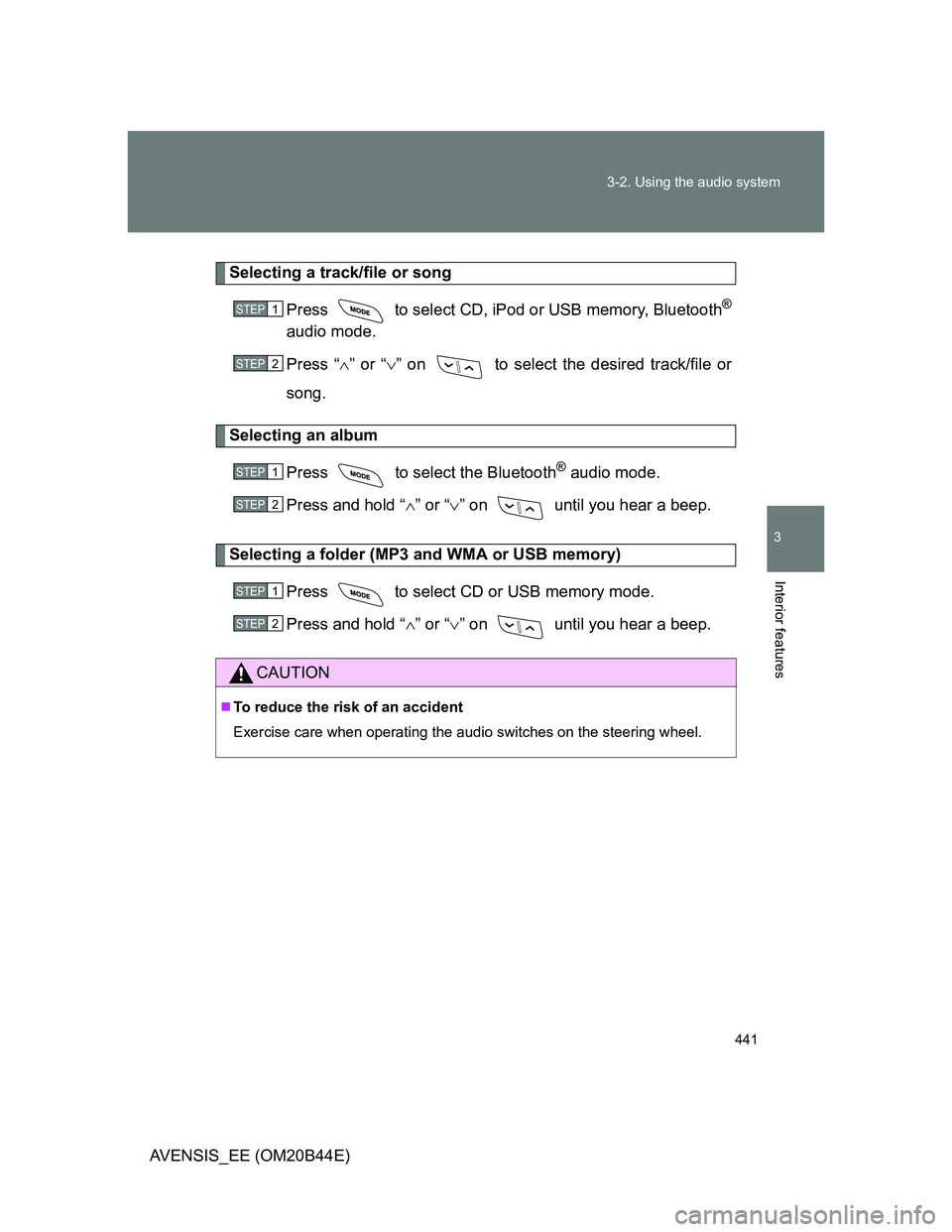
Selecting a track/file or song
Press to select CD, iPod or USB memory, Bluetooth
®
audio mode.
Press “” or “” on to select the desired track/file or
song.
Selecting an album
Press to select the Bluetooth
® audio mode.
Press and hold “” or “” on until you hear a beep.
Selecting a folder (MP3 and WMA or USB memory)
Press to select CD or USB memory mode.
Press and hold “” or “” on until you hear a beep.
CAUTION
To reduce the risk of an accident
Exercise care when operating the audio switches on the steering wheel.
STEP1
STEP2
STEP1
STEP2
STEP1
STEP2
Page 451 of 772
451 3-2. Using the audio system
3
Interior features
AVENSIS_EE (OM20B44E)
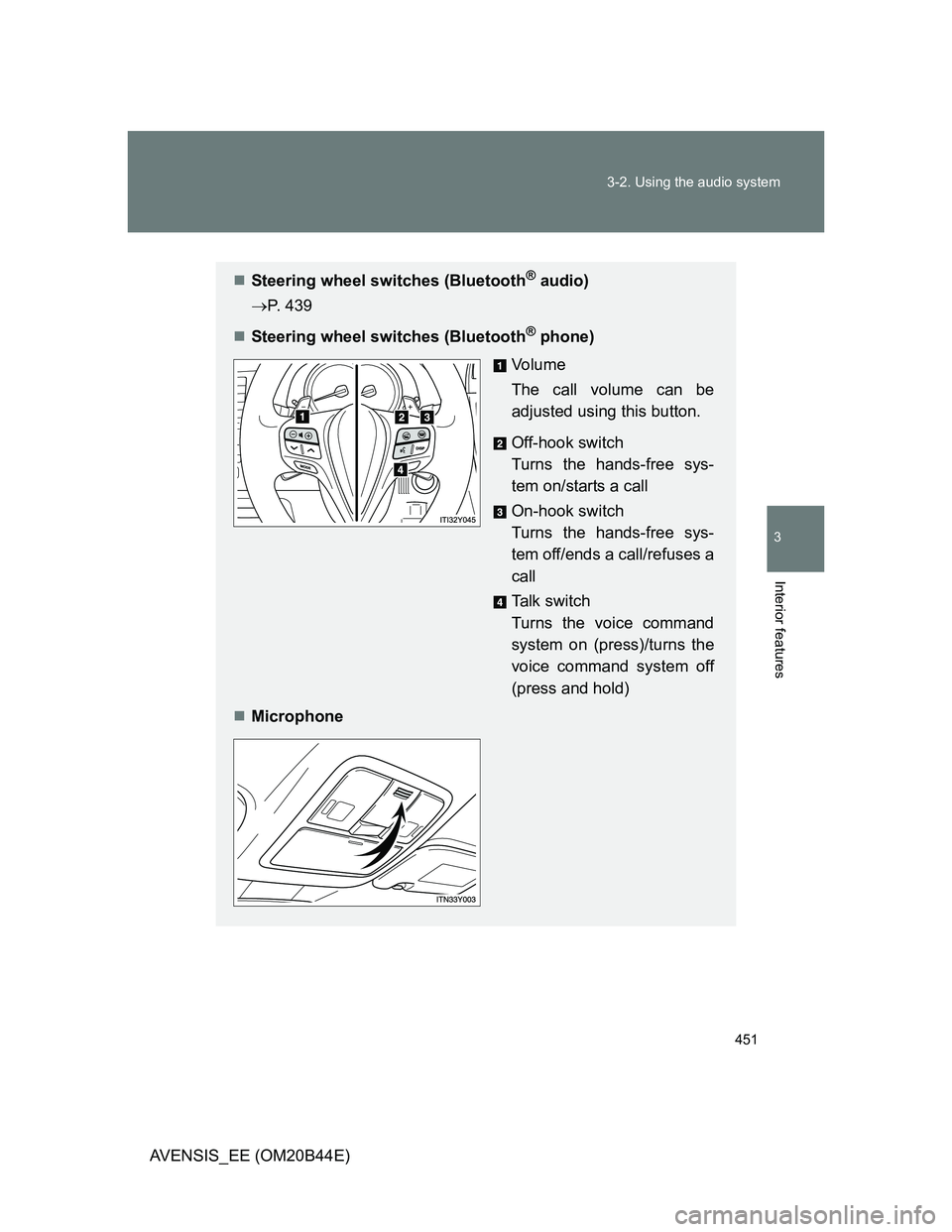
Steering wheel switches (Bluetooth® audio)
P. 439
Steering wheel switches (Bluetooth
® phone)
Vo l u m e
The call volume can be
adjusted using this button.
Off-hook switch
Turns the hands-free sys-
tem on/starts a call
On-hook switch
Turns the hands-free sys-
tem off/ends a call/refuses a
call
Talk switch
Turns the voice command
system on (press)/turns the
voice command system off
(press and hold)
Microphone
Page 575 of 772
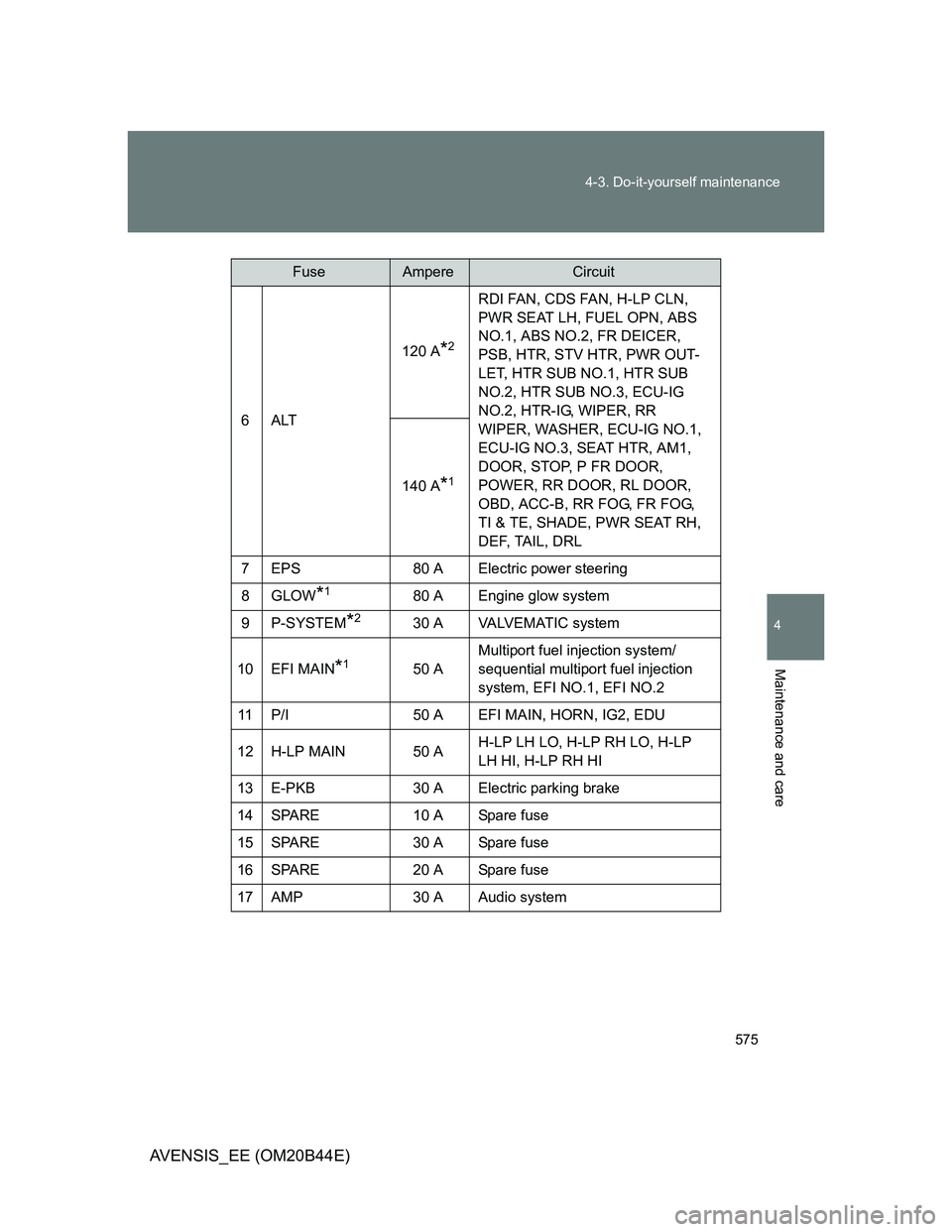
575 4-3. Do-it-yourself maintenance
4
Maintenance and care
AVENSIS_EE (OM20B44E)
6ALT120 A
*2
RDI FAN, CDS FAN, H-LP CLN,
PWR SEAT LH, FUEL OPN, ABS
NO.1, ABS NO.2, FR DEICER,
PSB, HTR, STV HTR, PWR OUT-
LET, HTR SUB NO.1, HTR SUB
NO.2, HTR SUB NO.3, ECU-IG
NO.2, HTR-IG, WIPER, RR
WIPER, WASHER, ECU-IG NO.1,
ECU-IG NO.3, SEAT HTR, AM1,
DOOR, STOP, P FR DOOR,
POWER, RR DOOR, RL DOOR,
OBD, ACC-B, RR FOG, FR FOG,
TI & TE, SHADE, PWR SEAT RH,
DEF, TAIL, DRL 140 A
*1
7 EPS 80 A Electric power steering
8GLOW
*180 A Engine glow system
9P-SYSTEM
*230 A VALVEMATIC system
10 EFI MAIN
*150 AMultiport fuel injection system/
sequential multiport fuel injection
system, EFI NO.1, EFI NO.2
11 P/I 50 A EFI MAIN, HORN, IG2, EDU
12 H-LP MAIN 50 AH-LP LH LO, H-LP RH LO, H-LP
LH HI, H-LP RH HI
13 E-PKB 30 A Electric parking brake
14 SPARE 10 A Spare fuse
15 SPARE 30 A Spare fuse
16 SPARE 20 A Spare fuse
17 AMP 30 A Audio system
FuseAmpereCircuit
Page 576 of 772
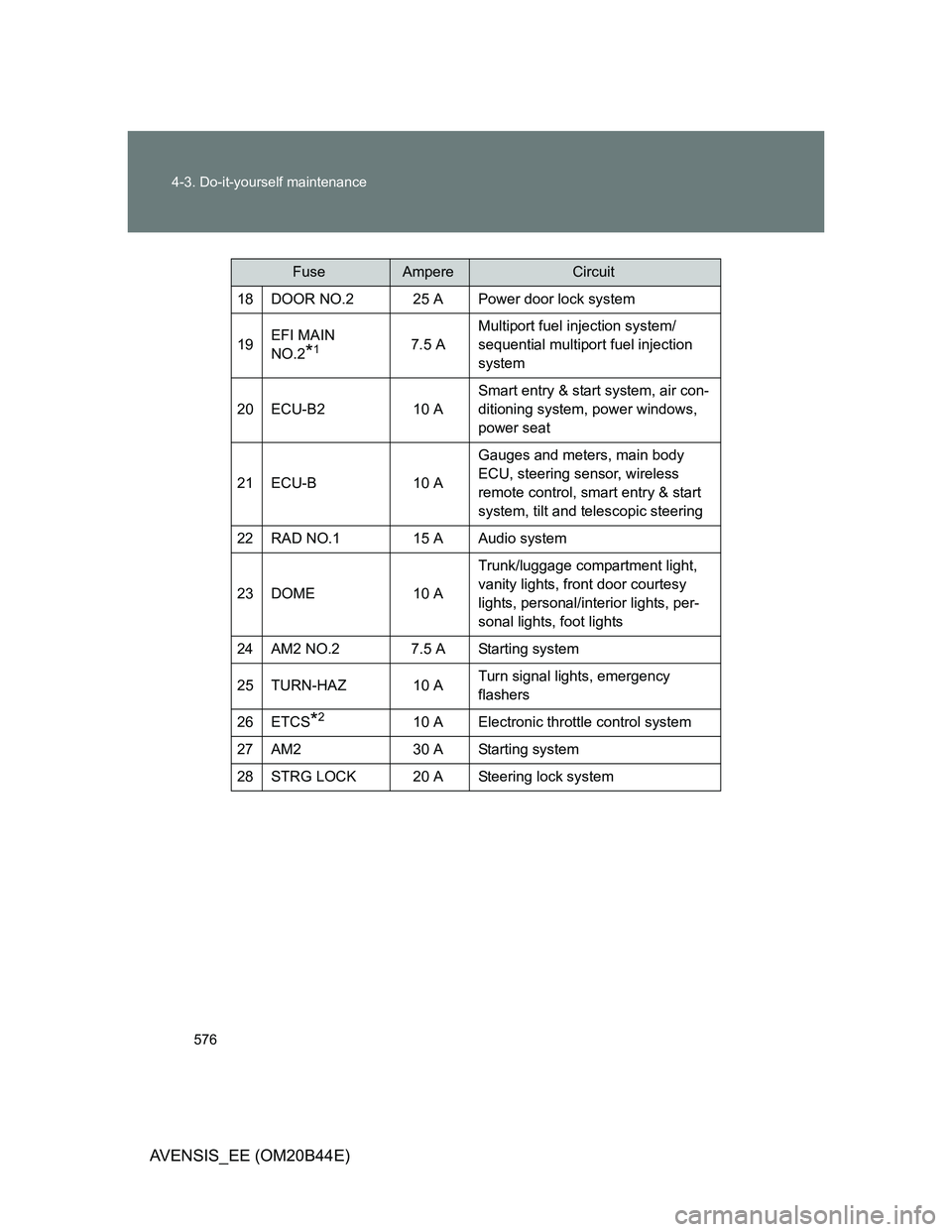
576 4-3. Do-it-yourself maintenance
AVENSIS_EE (OM20B44E)
18 DOOR NO.2 25 A Power door lock system
19EFI MAIN
NO.2
*17.5 AMultiport fuel injection system/
sequential multiport fuel injection
system
20 ECU-B2 10 ASmart entry & start system, air con-
ditioning system, power windows,
power seat
21 ECU-B 10 AGauges and meters, main body
ECU, steering sensor, wireless
remote control, smart entry & start
system, tilt and telescopic steering
22 RAD NO.1 15 A Audio system
23 DOME 10 ATrunk/luggage compartment light,
vanity lights, front door courtesy
lights, personal/interior lights, per-
sonal lights, foot lights
24 AM2 NO.2 7.5 A Starting system
25 TURN-HAZ 10 ATurn signal lights, emergency
flashers
26 ETCS
*210 A Electronic throttle control system
27 AM2 30 A Starting system
28 STRG LOCK 20 A Steering lock system
FuseAmpereCircuit
Page 580 of 772
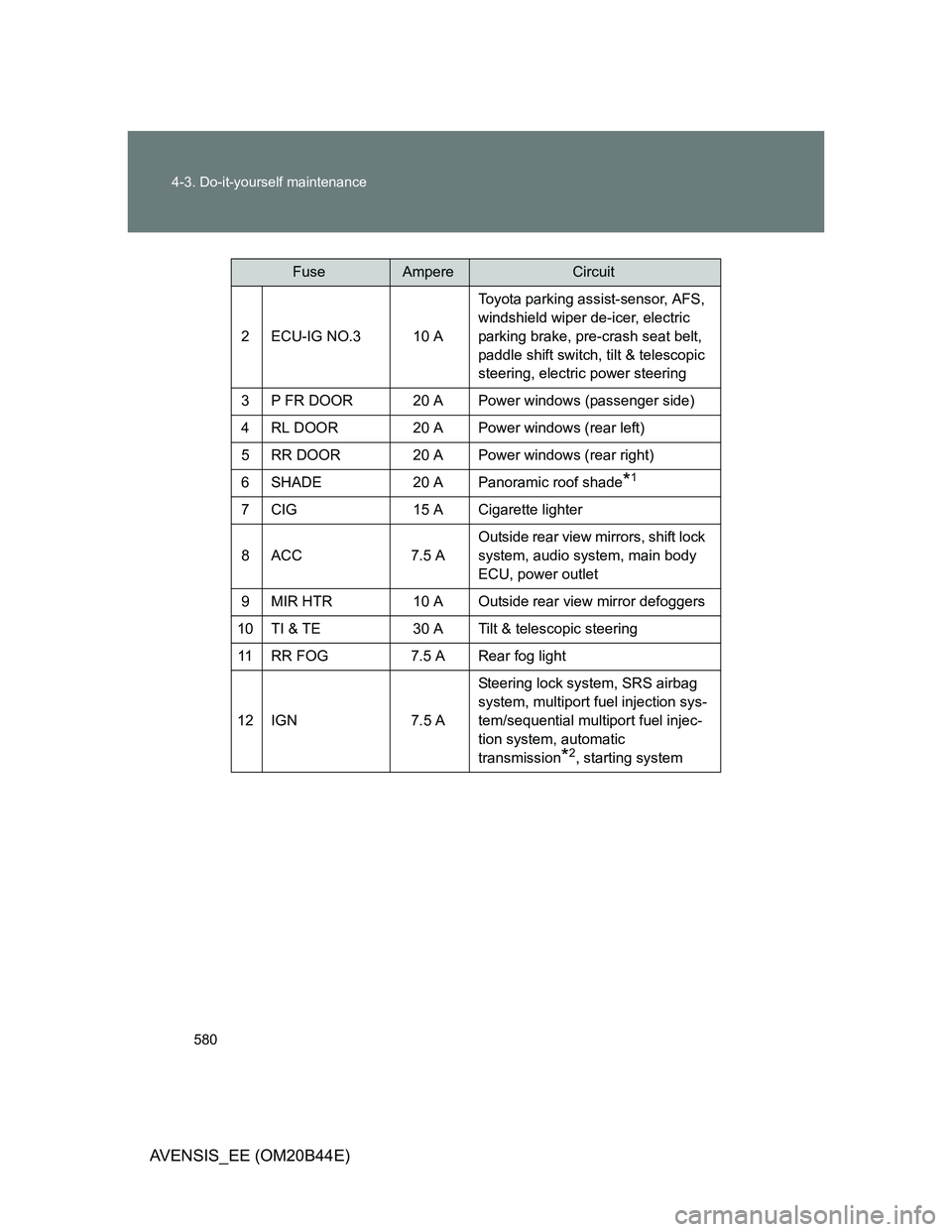
580 4-3. Do-it-yourself maintenance
AVENSIS_EE (OM20B44E)
2 ECU-IG NO.3 10 AToyota parking assist-sensor, AFS,
windshield wiper de-icer, electric
parking brake, pre-crash seat belt,
paddle shift switch, tilt & telescopic
steering, electric power steering
3 P FR DOOR 20 A Power windows (passenger side)
4 RL DOOR 20 A Power windows (rear left)
5 RR DOOR 20 A Power windows (rear right)
6 SHADE 20 A Panoramic roof shade
*1
7 CIG 15 A Cigarette lighter
8ACC 7.5 AOutside rear view mirrors, shift lock
system, audio system, main body
ECU, power outlet
9 MIR HTR 10 A Outside rear view mirror defoggers
10 TI & TE 30 A Tilt & telescopic steering
11 RR FOG 7.5 A Rear fog light
12 IGN 7.5 ASteering lock system, SRS airbag
system, multiport fuel injection sys-
tem/sequential multiport fuel injec-
tion system, automatic
transmission
*2, starting system
FuseAmpereCircuit
Page 581 of 772
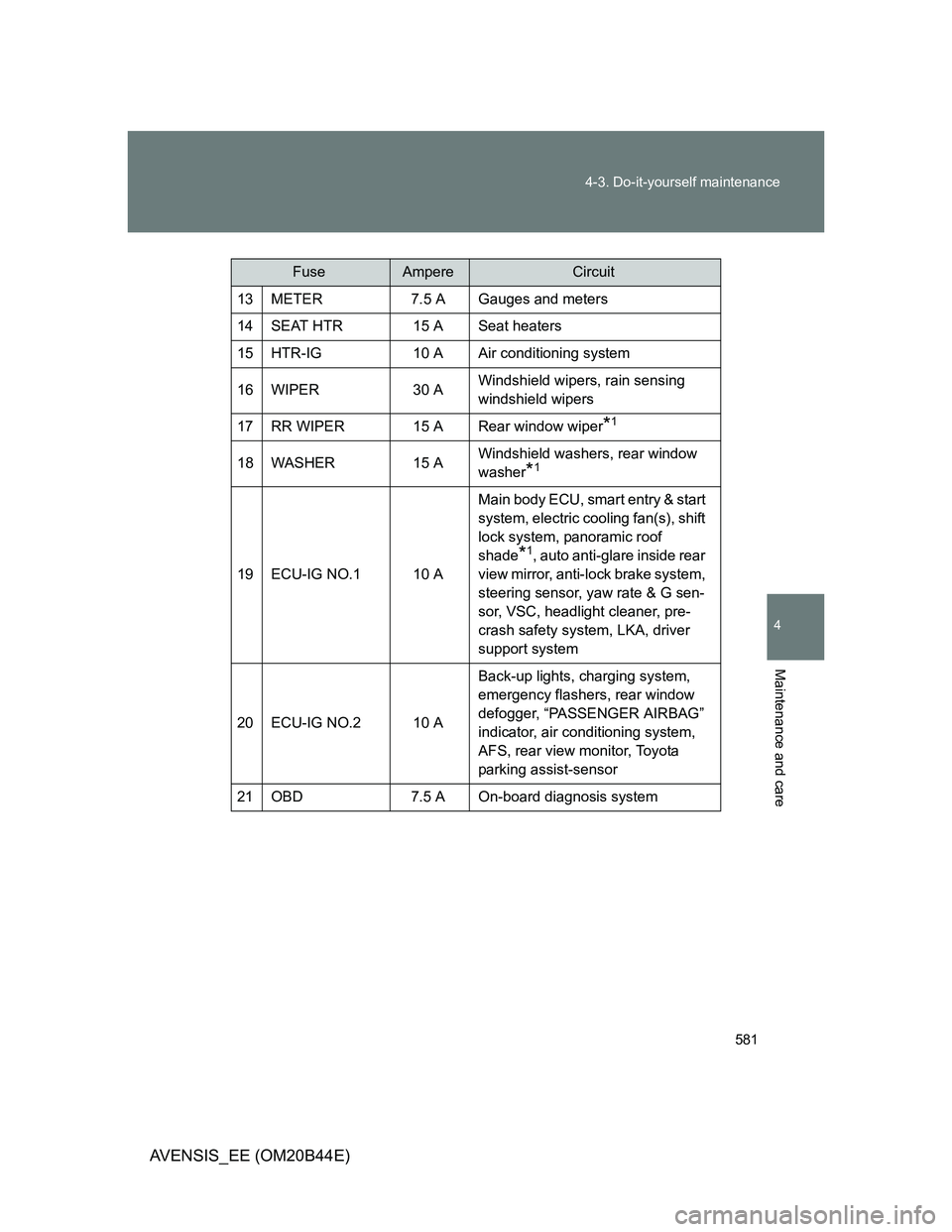
581 4-3. Do-it-yourself maintenance
4
Maintenance and care
AVENSIS_EE (OM20B44E)
13 METER 7.5 A Gauges and meters
14 SEAT HTR 15 A Seat heaters
15 HTR-IG 10 A Air conditioning system
16 WIPER 30 AWindshield wipers, rain sensing
windshield wipers
17 RR WIPER 15 A Rear window wiper
*1
18 WASHER 15 AWindshield washers, rear window
washer*1
19 ECU-IG NO.1 10 AMain body ECU, smart entry & start
system, electric cooling fan(s), shift
lock system, panoramic roof
shade
*1, auto anti-glare inside rear
view mirror, anti-lock brake system,
steering sensor, yaw rate & G sen-
sor, VSC, headlight cleaner, pre-
crash safety system, LKA, driver
support system
20 ECU-IG NO.2 10 ABack-up lights, charging system,
emergency flashers, rear window
defogger, “PASSENGER AIRBAG”
indicator, air conditioning system,
AFS, rear view monitor, Toyota
parking assist-sensor
21 OBD 7.5 A On-board diagnosis system
FuseAmpereCircuit
Page 606 of 772
606 5-1. Essential information
AVENSIS_EE (OM20B44E)
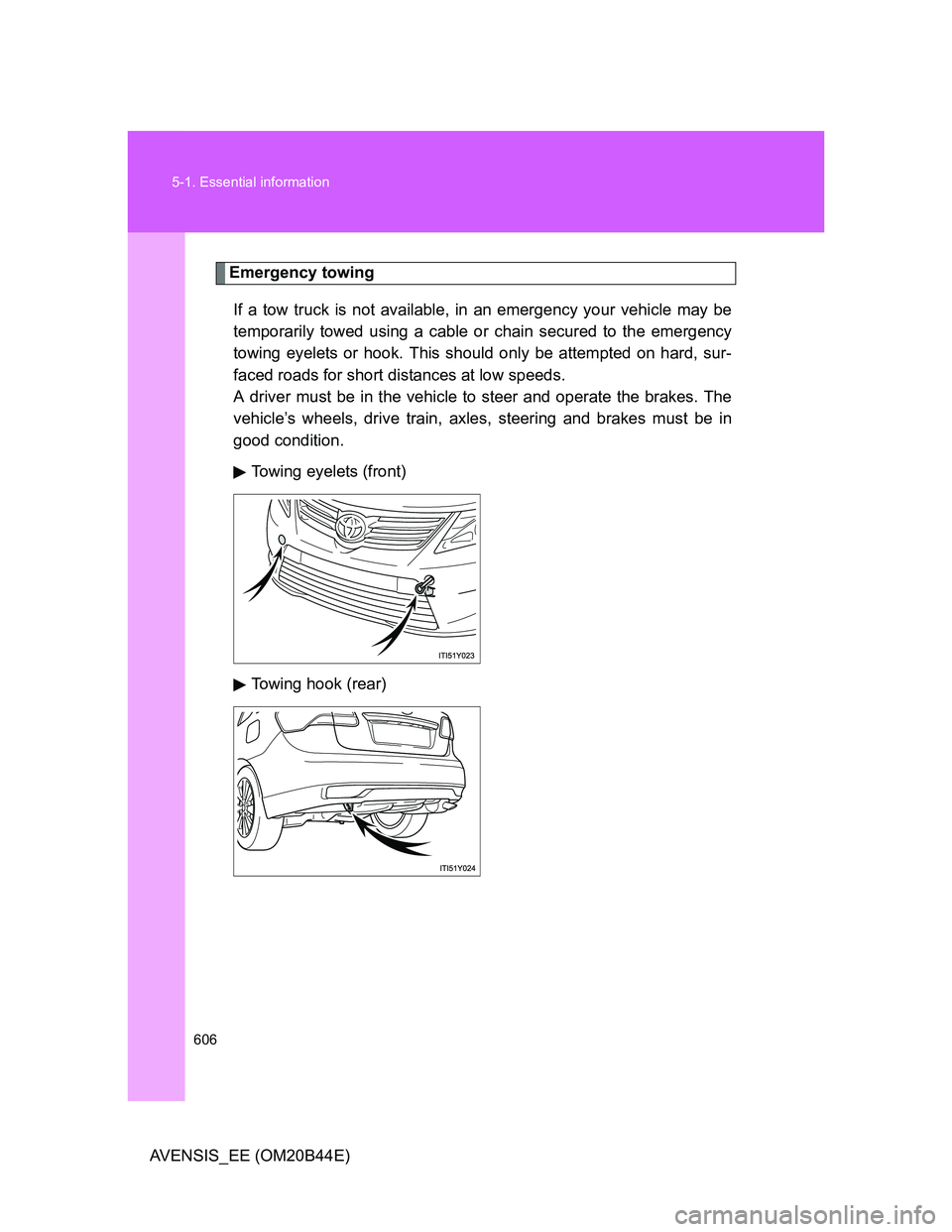
Emergency towing
If a tow truck is not available, in an emergency your vehicle may be
temporarily towed using a cable or chain secured to the emergency
towing eyelets or hook. This should only be attempted on hard, sur-
faced roads for short distances at low speeds.
A driver must be in the vehicle to steer and operate the brakes. The
vehicle’s wheels, drive train, axles, steering and brakes must be in
good condition.
Towing eyelets (front)
Towing hook (rear)
Page 607 of 772
5
607 5-1. Essential information
When trouble arises
AVENSIS_EE (OM20B44E)
Emergency towing procedure
Vehicles with smart entry & start system
Release the parking brake.
Put the shift lever in “N”.
The “ENGINE START STOP” switch must be in ACCESSORY
mode (engine off) or IGNITION ON mode (engine running).
Vehicles without smart entry & start system
Release the parking brake.
Put the shift lever in “N”.
Put the engine switch in the “ACC” (engine off) or “ON” position
(engine running).
CAUTION
While towing
Use extreme caution when towing the vehicle.
Avoid sudden starts or erratic driving maneuvers which place excessive
stress on the emergency towing eyelets and the cables or chains. Always
be cautious of the surroundings and other vehicles while towing.
If the engine is not running, the power assist for the brakes and steering
will not function, making steering and braking more difficult.
STEP1
STEP2
STEP3
STEP1
STEP2
STEP3