light TOYOTA AVENSIS 2012 Manual Online
[x] Cancel search | Manufacturer: TOYOTA, Model Year: 2012, Model line: AVENSIS, Model: TOYOTA AVENSIS 2012Pages: 772, PDF Size: 34.43 MB
Page 314 of 772
314 2-4. Using other driving systems
AVENSIS_EE (OM20B44E)
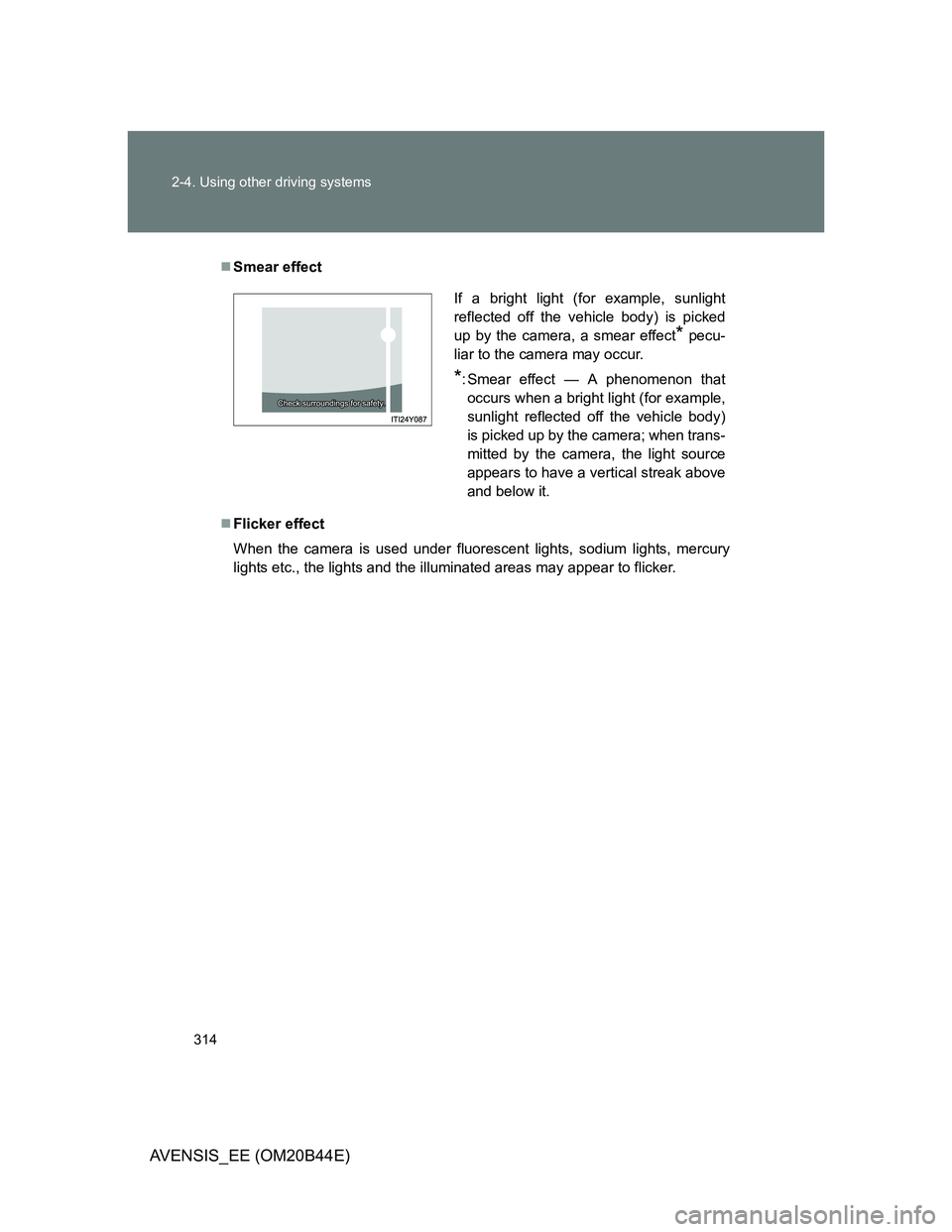
Smear effect
Flicker effect
When the camera is used under fluorescent lights, sodium lights, mercury
lights etc., the lights and the illuminated areas may appear to flicker.
If a bright light (for example, sunlight
reflected off the vehicle body) is picked
up by the camera, a smear effect
* pecu-
liar to the camera may occur.
*: Smear effect — A phenomenon that
occurs when a bright light (for example,
sunlight reflected off the vehicle body)
is picked up by the camera; when trans-
mitted by the camera, the light source
appears to have a vertical streak above
and below it.
Page 316 of 772
316 2-4. Using other driving systems
AVENSIS_EE (OM20B44E)
NOTICE
Conditions which may affect the rear view monitor system
If the back of the vehicle has been hit, the camera’s position and mounting
angle may have been changed. Contact any authorized Toyota dealer or
repairer, or another duly qualified and equipped professional.
Rapid temperature changes, such as when hot water is poured on the
vehicle in cold weather, may cause the system to function abnormally.
If the camera lens is dirty, it cannot transmit a clear image. Rinse with
water and wipe with a soft cloth. If extremely dirty, wash with a mild
cleanser and rinse.
The displayed image may be darker and moving images may be slightly
distorted when the system is cold.
Page 318 of 772
318
2-4. Using other driving systems
AVENSIS_EE (OM20B44E)
LKA (Lane-Keeping Assist)
: If equipped
While driving on a freeway or motor highway that has lane markers,
this system recognizes the lanes using a camera as a sensor to
assist the driver with staying in the lane. The LKA system has two
functions.
Lane departure warning function
If the system judges that the vehicle may deviate from its lane, it
alerts the driver using rapid beeping, indications on the multi-
information display, and a sensory warning
* given via the steer-
ing wheel.
*: A slight steering torque is applied for a short period of time in
the direction of the center of the lane.
Lane keeping assist function
This function will be active when the vehicle-to-vehicle distance
control mode of the cruise control (P. 281) is set with vehicle
speed above approx. 72 km/h (approx. 45 mph) and while the
lane departure warning function is active. When the lane keep-
ing assist function is active, a slight steering torque will be
applied, to help the driver maintain the vehicle in a central posi-
tion within the lane.
While the lane keeping assist function is active, sensory warnings
will not occur.
Page 323 of 772
323 2-4. Using other driving systems
2
When driving
AVENSIS_EE (OM20B44E)
Hands-free driving warning
If the steering wheel is not operated for about 15 seconds on a straight road
or about 5 seconds on a curve, the buzzer will beep twice, indicators on the
multi-information display will flash, and the lane keeping assist function will
be temporarily canceled. If you drive the vehicle with your hands lightly
touching the steering wheel, this may also be detected as hands-free driv-
ing.
When the vehicle has been parked in the sun
The LKA system functions may not be available for a while after driving has
started. In such cases, turn the LKA system off and turn it on again after nor-
mal temperature returns. When the temperature in the cabin decreases and
the temperature around the camera sensor becomes suitable for its opera-
tion, the functions will begin to operate.
Warning lights and messages for LKA
Warning lights and messages are used to indicate a system malfunction or
to inform the driver of the need for caution while driving. (P. 619)
CAUTION
Before using the LKA system
Do not rely on the LKA system to remain within a selected lane. The LKA
system is not designed to enable inattentive driving. The steering wheel
should be operated by the driver to maintain the vehicle in a suitable position
within its lane. Always drive carefully.
Page 325 of 772
325 2-4. Using other driving systems
2
When driving
AVENSIS_EE (OM20B44E)
NOTICE
In the following situations, the LKA will not work, or will not perform
reliably
When lane markers are interrupted or are not present, such as before a
tollbooth.
When lane markers are only on one side of the road.
When driving on a sharp curve.
When lanes are extremely narrow or extremely wide.
When the vehicle leans to one side an unusual amount due to a heavy
load or improper tire inflation pressure.
When the following distance between your vehicle and the vehicle ahead
is extremely short.
When the lane markers are broken or “Raised pavement marker”.
When lane markers are obscured or partially obscured by sand, dirt, etc.
When driving on a particularly bright road surface, such as concrete.
When driving on a road surface that is bright due to reflected light.
When driving in a location where the light level changes rapidly, such as
the entrance to or exit from a tunnel.
When sunlight or the headlights of oncoming vehicles are shining directly
into the camera lens.
When driving on roads that are branching or merging.
When pavement lane markers are difficult to see due to rain, snow, fog,
etc.
When driving on a road surface that is wet due to rain, previous rainfall,
standing water, etc.
When the vehicle experiences strong up-and-down motion such as when
driving on an extremely rough road or on a seam in the pavement.
When headlight brightness is reduced due to dirt on the lenses, or when
the headlights are misaligned.
When driving with a strong crosswind.
Page 327 of 772
327
2-4. Using other driving systems
2
When driving
AVENSIS_EE (OM20B44E)
Driving assist systems
To help enhance driving safety and performance, the following sys-
tems operate automatically in response to various driving situations.
Be aware, however, that these systems are supplementary and
should not be relied upon too heavily when operating the vehicle.
ABS (Anti-lock Brake System)
Helps to prevent wheel lock when the brakes are applied suddenly, or if
the brakes are applied while driving on a slippery road surface.
Brake assist
Generates an increased level of braking force after the brake pedal is
depressed, when the system detects a panic stop situation.
VSC (Vehicle Stability Control)
Helps the driver to control skidding when swerving suddenly or turning
on slippery road surfaces.
TRC (Traction Control)
Helps to maintain drive power and prevent the front wheels from spin-
ning when starting the vehicle or accelerating on slippery roads.
EPS (Electric Power Steering)
Employs an electric motor to reduce the amount of effort needed to turn
the steering wheel.
VSC+ (Vehicle Stability Control+)
Provides cooperative control of the ABS, TRC, VSC and EPS.
Helps to maintain directional stability when swerving on slippery road
surfaces by controlling steering performance.
PCS (Pre-Crash Safety) (if equipped)
P. 333
Emergency brake signal (if equipped)
When the brakes are applied suddenly, the stop lights automatically
flash to alert the vehicle behind.
Page 328 of 772
328 2-4. Using other driving systems
AVENSIS_EE (OM20B44E)
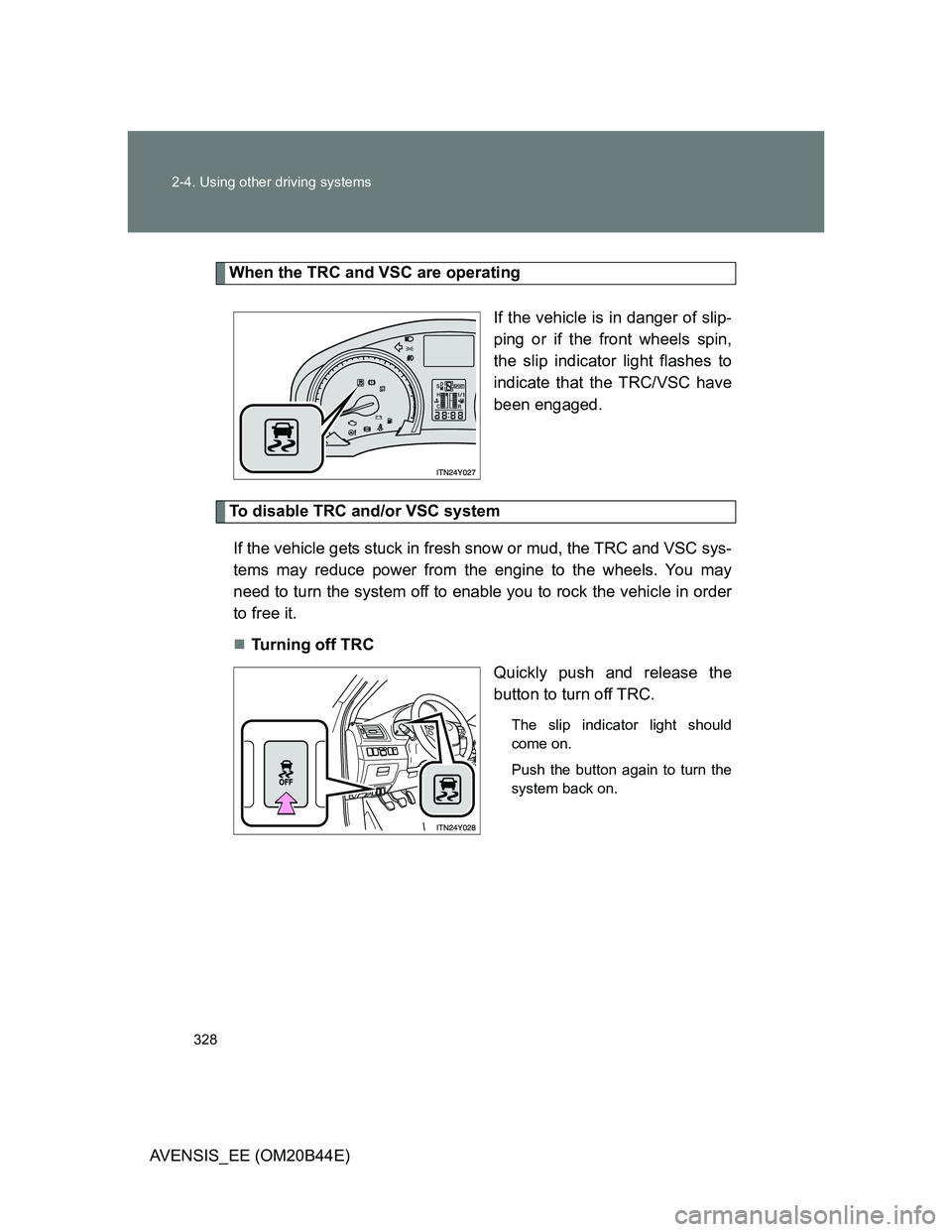
When the TRC and VSC are operating
If the vehicle is in danger of slip-
ping or if the front wheels spin,
the slip indicator light flashes to
indicate that the TRC/VSC have
been engaged.
To disable TRC and/or VSC system
If the vehicle gets stuck in fresh snow or mud, the TRC and VSC sys-
tems may reduce power from the engine to the wheels. You may
need to turn the system off to enable you to rock the vehicle in order
to free it.
Turning off TRC
Quickly push and release the
button to turn off TRC.
The slip indicator light should
come on.
Push the button again to turn the
system back on.
Page 329 of 772
329 2-4. Using other driving systems
2
When driving
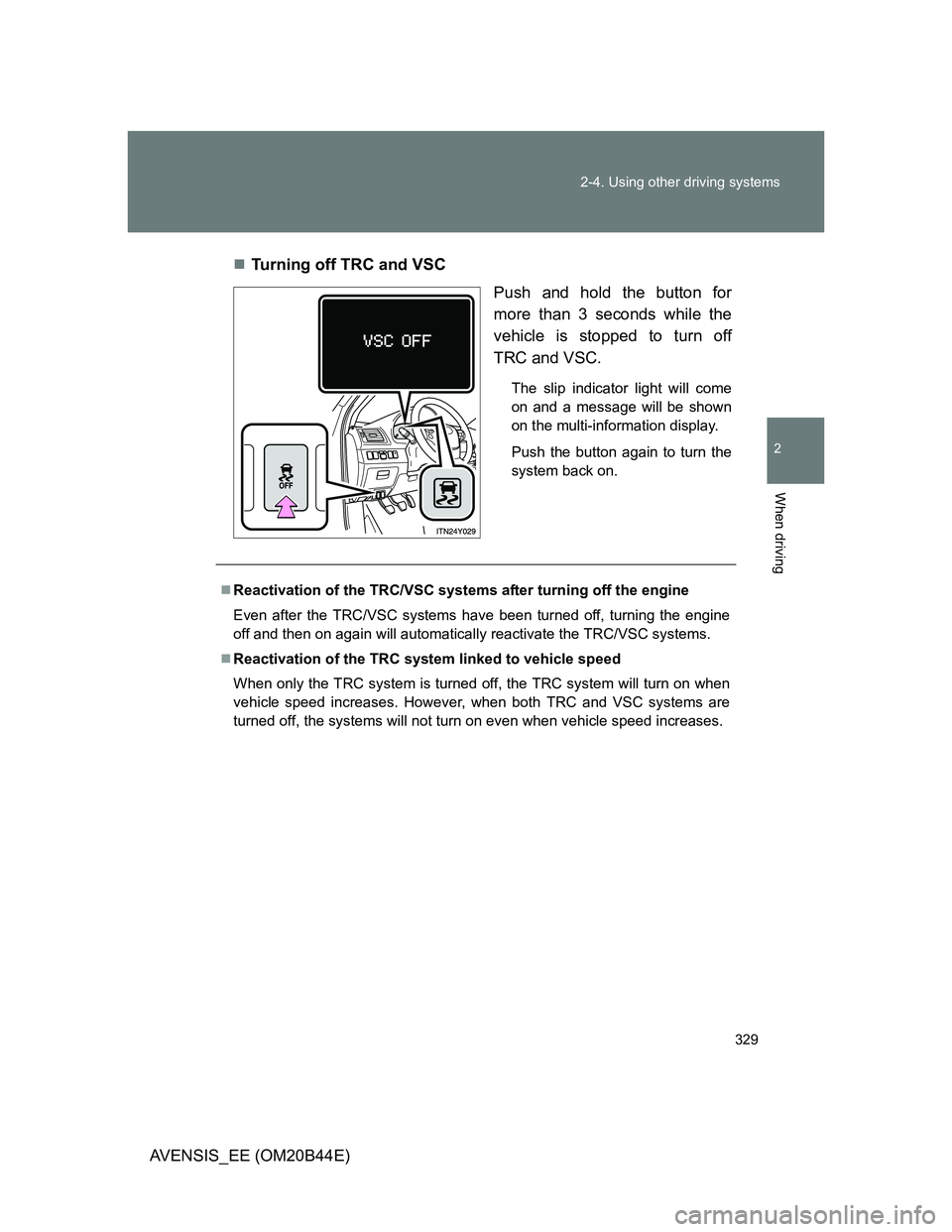
AVENSIS_EE (OM20B44E)Turning off TRC and VSC
Push and hold the button for
more than 3 seconds while the
vehicle is stopped to turn off
TRC and VSC.
The slip indicator light will come
on and a message will be shown
on the multi-information display.
Push the button again to turn the
system back on.
Reactivation of the TRC/VSC systems after turning off the engine
Even after the TRC/VSC systems have been turned off, turning the engine
off and then on again will automatically reactivate the TRC/VSC systems.
Reactivation of the TRC system linked to vehicle speed
When only the TRC system is turned off, the TRC system will turn on when
vehicle speed increases. However, when both TRC and VSC systems are
turned off, the systems will not turn on even when vehicle speed increases.
Page 330 of 772
330 2-4. Using other driving systems
AVENSIS_EE (OM20B44E)
Sounds and vibrations caused by the ABS, brake assist, TRC and VSC
A sound may be heard from the engine compartment when the engine is
started or just after the vehicle begins to move. This sound does not indi-
cate that a malfunction has occurred in any of these systems.
Any of the following conditions may occur when the above systems are
operating. None of these indicates that a malfunction has occurred.
• Vibrations may be felt through the vehicle body and steering.
• A motor sound may be heard after the vehicle comes to a stop.
• The brake pedal may pulsate slightly after the ABS is activated.
• The brake pedal may move down slightly after the ABS is activated.
EPS operation sound
When the steering wheel operates, a motor sound (whirring sound) may be
heard. This does not indicate a malfunction.
Reduced effectiveness of EPS
The effectiveness of EPS is reduced to prevent the system from overheating
when there is frequent steering input over an extended period of time. The
steering wheel may feel heavy as a result. Should this occur, refrain from
excessive steering input or stop the vehicle and turn the engine off. The sys-
tem should return to normal after about 10 minutes.
Page 331 of 772
331 2-4. Using other driving systems
2
When driving
AVENSIS_EE (OM20B44E)
CAUTION
Any of the following conditions may result in an accident which could cause
death or serious injury:
The ABS does not operate effectively when
The limits of tire gripping performance have been exceeded.
The vehicle hydroplanes while driving at high speed on a wet or slick road.
Stopping distance when the ABS is operating may exceed that of nor-
mal conditions
The ABS is not designed to shorten the vehicle’s stopping distance. Always
maintain a safe distance from the vehicle in front of you in the following situ-
ations:
When driving on dirt, gravel or snow-covered roads
When driving with tire chains
When driving over bumps in the road
When driving over roads with potholes or roads with uneven roads
TRC may not operate effectively when
Directional control and power may not be achievable while driving on slip-
pery road surfaces, even if the TRC is operating.
Do not drive the vehicle in conditions where stability and power may be lost.
When the VSC is activated
The slip indicator light flashes. Always drive carefully.
Reckless driving may cause an accident. Exercise particular care when the
indicator light flashes.