lock TOYOTA AVENSIS 2015 Owners Manual
[x] Cancel search | Manufacturer: TOYOTA, Model Year: 2015, Model line: AVENSIS, Model: TOYOTA AVENSIS 2015Pages: 648, PDF Size: 39.64 MB
Page 580 of 648
5808-2. Steps to take in an emergency
AVENSIS_OM_OM20C20E_(EE)
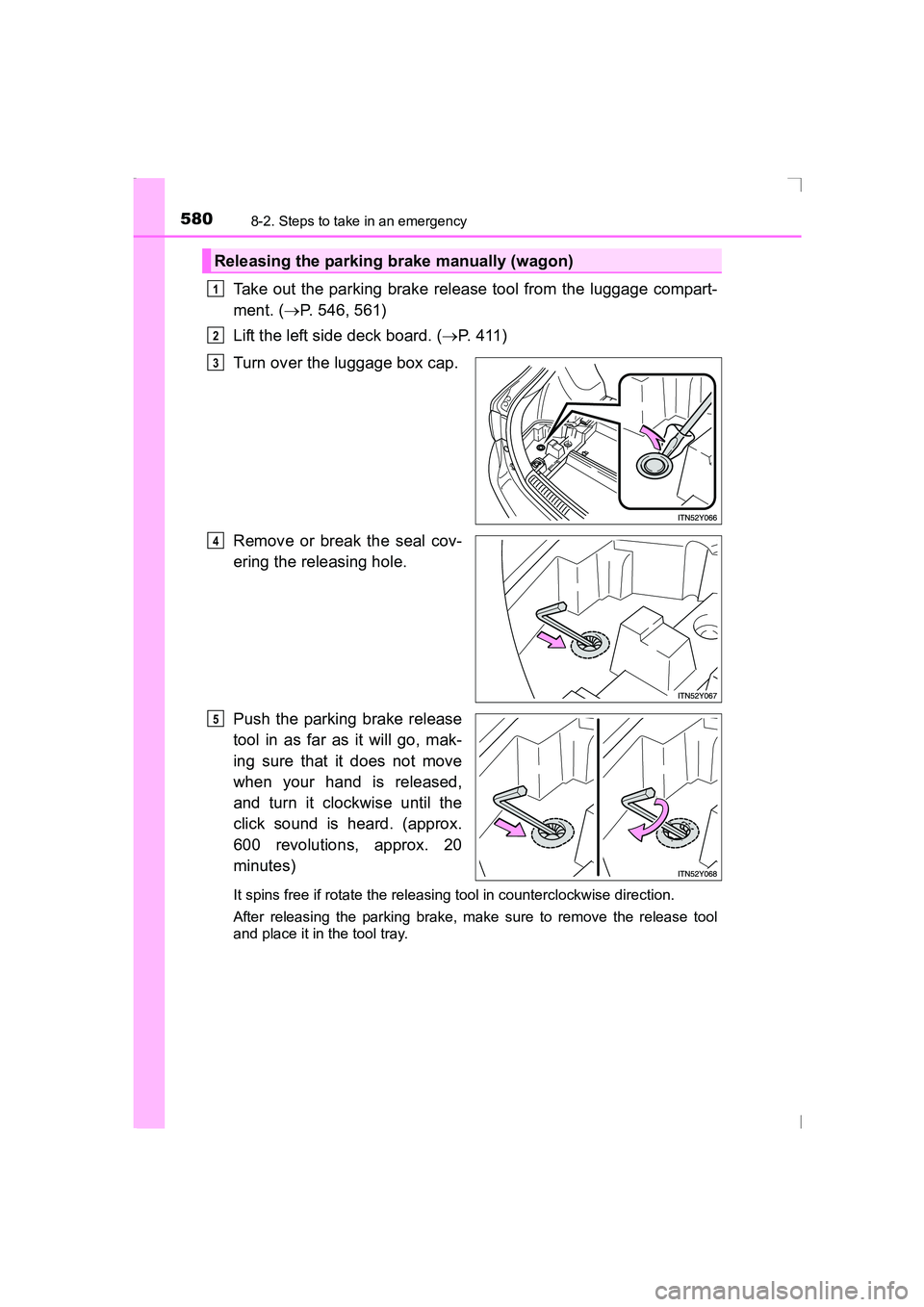
Take out the parking brake release tool from the luggage compart-
ment. (→P. 546, 561)
Lift the left side deck board. ( →P. 411)
Turn over the luggage box cap.
Remove or break the seal cov-
ering the releasing hole.
Push the parking brake release
tool in as far as it will go, mak-
ing sure that it does not move
when your hand is released,
and turn it clockwise until the
click sound is heard. (approx.
600 revolutions, approx. 20
minutes)
It spins free if rotate the releasing tool in counterclockwise direction.
After releasing the parking brake, make sure to remove the release tool
and place it in the tool tray.
Releasing the parking brake manually (wagon)
1
2
3
4
5
AVENSIS_OM_OM20C20E_(EE).book Page 580 Thursday, January 29, 2015 1:47 PM
Page 581 of 648
5818-2. Steps to take in an emergency
AVENSIS_OM_OM20C20E_(EE)
8
When trouble arises
■When the seal is damaged
The seal needs to replace by any aut horized Toyota dealer or repairer, or
another duly qualified and equipped professional.
If the trunk/luggage compartment has flooded with water when the seal has
been broken or is missing (for example, if the vehicle has been left outside in
the rain with the trunk lid open or removed), the parking brake system will
need to be replaced.
■ Manual operation of the parking brake
The parking brake cannot be set manually.
WARNING
■ When releasing the parking brake manually
XVehicles without smart entry & start system
● Shift the shift lever to P (Multidrive) or 1 or R (manual transmission), turn
the engine switch to “LOCK” position and chock the tires.
Failure to do so may cause the vehicle to move, resulting in an accident.
● Turn the engine switch to “LOCK” position and check that the parking
brake indicator is off.
Failure to do so may cause the system to operate and turn the parking
brake release tool that is inserted, resulting in an injury.
XVehicles with smart entry & start system
● Shift the shift lever to P (Multidrive) or 1 or R (manual transmission), turn
the engine switch off and chock the tires.
Failure to do so may cause the vehicle to move, resulting in an accident.
● Turn the engine switch off and check that the parking brake indicator is off.
Failure to do so may cause the system to operate and turn the parking
brake release tool that is inserted, resulting in an injury.
NOTICE
■ When releasing the parking brake manually
●Be sure to turn the tool as far as it will go.
Stopping midway will cause switch operation to cancel and will cause the
parking brake system to fail.
● Use designated releasing tool only.
Using commercially available tool may damage the releasing hole and
unable to remove the hole.
AVENSIS_OM_OM20C20E_(EE).book Page 581 Thursday, January 29, 2015 1:47 PM
Page 582 of 648
5828-2. Steps to take in an emergency
AVENSIS_OM_OM20C20E_(EE)
If the electronic key does not operate properly
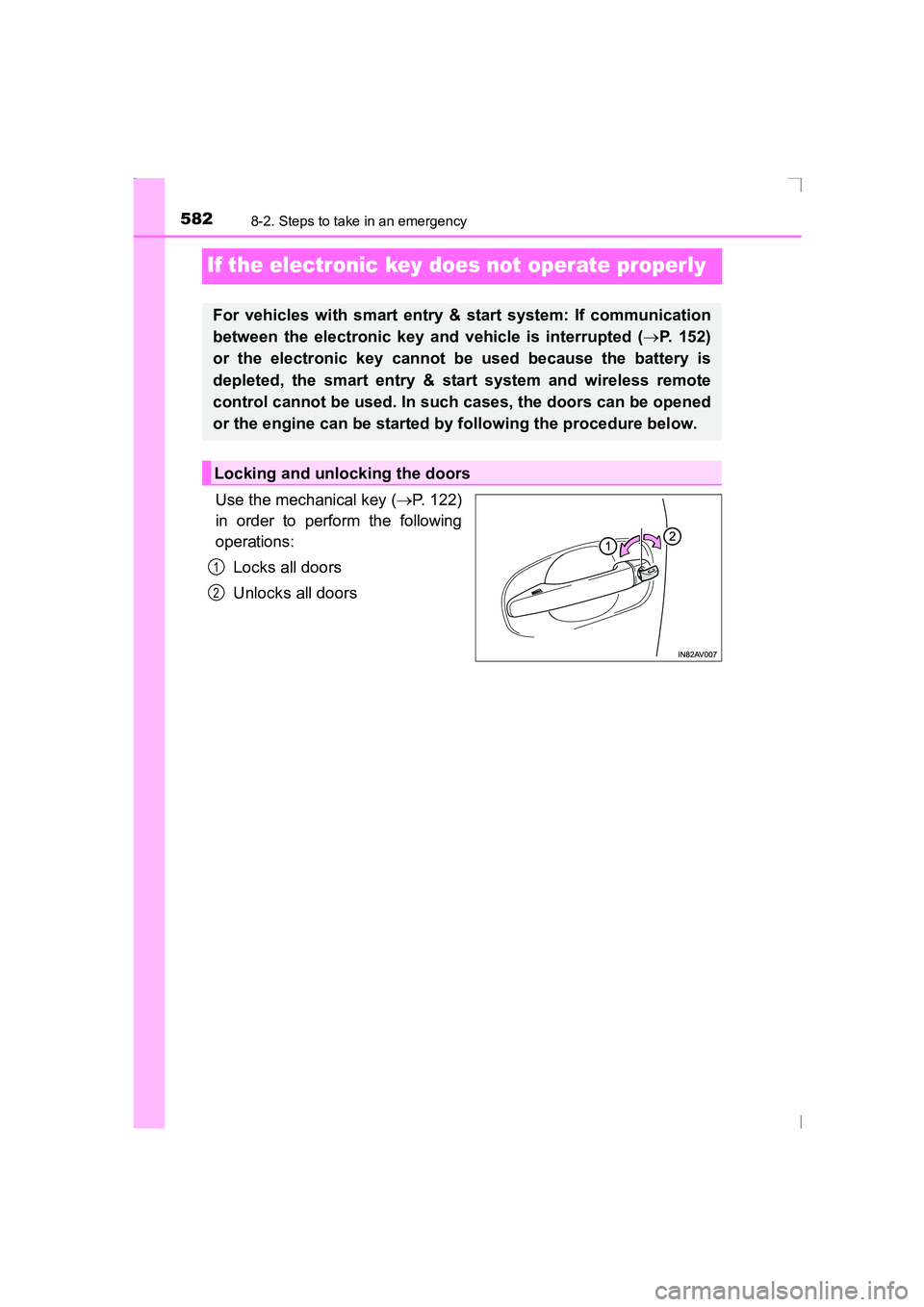
Use the mechanical key (→P. 122)
in order to perform the following
operations:
Locks all doors
Unlocks all doors
For vehicles with smart entry & start system: If communication
between the electronic key and vehicle is interrupted ( →P. 152)
or the electronic key cannot be used because the battery is
depleted, the smart entry & start system and wireless remote
control cannot be used. In such cases, the doors can be opened
or the engine can be started by following the procedure below.
Locking and unlocking the doors
1
2
AVENSIS_OM_OM20C20E_(EE).book Page 582 Thursday, January 29, 2015 1:47 PM
Page 583 of 648
5838-2. Steps to take in an emergency
AVENSIS_OM_OM20C20E_(EE)
8
When trouble arises
Vehicles with Multidrive: Ensure that the shift lever is in P and apply
the brakes.
Vehicles with manual transmission: Ensure that the shift lever is in
N and depress the clutch pedal.
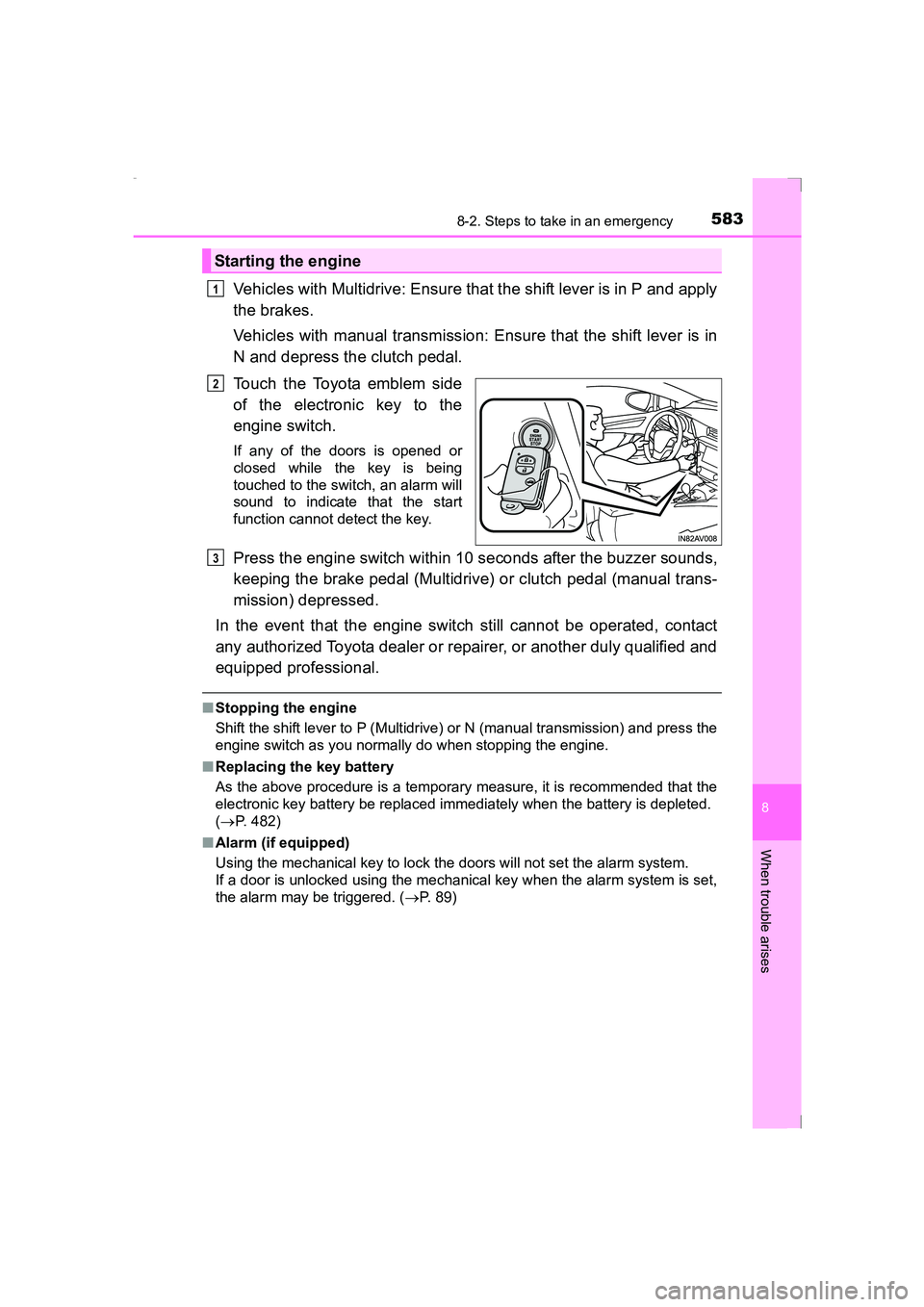
Touch the Toyota emblem side
of the electronic key to the
engine switch.
If any of the doors is opened or
closed while the key is being
touched to the switch, an alarm will
sound to indicate that the start
function cannot detect the key.
Press the engine switch within 10 seconds after the buzzer sounds,
keeping the brake pedal (Multidrive) or clutch pedal (manual trans-
mission) depressed.
In the event that the engine switch still cannot be operated, contact
any authorized Toyota dealer or repairer, or another duly qualified and
equipped professional.
■ Stopping the engine
Shift the shift lever to P (Multidrive) or N (manual transmission) and press the
engine switch as you normally do when stopping the engine.
■ Replacing the key battery
As the above procedure is a temporary measure, it is recommended that the
electronic key battery be replaced imm ediately when the battery is depleted.
( → P. 482)
■ Alarm (if equipped)
Using the mechanical key to lock the doors will not set the alarm system.
If a door is unlocked using the mechanical key when the alarm system is set,
the alarm may be triggered. ( →P. 89)
Starting the engine
1
2
3
AVENSIS_OM_OM20C20E_(EE).book Page 583 Thursday, January 29, 2015 1:47 PM
Page 587 of 648
5878-2. Steps to take in an emergency
AVENSIS_OM_OM20C20E_(EE)
8
When trouble arises
■Starting the engine when the battery is discharged (vehicles with Multid-
rive)
The engine cannot be started by push-starting.
■ To prevent battery discharge
●Turn off the headlights and the audio system while the engine is turned off.
● Turn off any unnecessary electrical components when the vehicle is running
at a low speed for an extended period, such as in heavy traffic, etc.
■ Charging the battery
The electricity stored in the battery will discharge gradually even when the
vehicle is not in use, due to natural discharge and the draining effects of cer-
tain electrical appliances. If the vehicle is left for a long time, the battery may
discharge, and the engine may be unable to start. (The battery recharges
automatically during driving.)
■ When the battery is removed or discharged
●Make sure that the key is not inside the vehicle when recharging or replac-
ing the battery. The key may be locked in the vehicle if the alarm is acti-
vated. ( →P. 90)
● Vehicles with smart entry & start system: In some cases, it may not be pos-
sible to unlock the doors using the smart entry & start system when the bat-
tery is discharged. Use the wireless remote control or the mechanical key to
lock or unlock the doors.
● Vehicles with smart entry & start system: The engine may not start on the
first attempt after the battery has recharged but will start normally after the
second attempt. This is not a malfunction.
● Vehicles with smart entry & start system: The engine switch mode is memo-
rized by the vehicle. When the battery is reconnected, the system will return
to the mode it was in before the battery was discharged. Before disconnect-
ing the battery, turn the engine switch off. If you are unsure what mode the
engine switch was in before the battery discharged, be especially careful
when reconnecting the battery.
● Vehicles with Stop & Start system:
After charging the battery or reconnecting the battery terminals, the Stop &
Start system may not automatically stop the engine for approximately 5 to
40 minutes.
■ When exchanging the battery
●Use a battery with the same case size as the previous battery and an equiv-
alent 20 hour rate capacity (20HR) or greater.
• If the sizes differ, the battery cannot be properly secured.
• If the 20 hour rate capacity is low, even if the time period where the vehi-
cle is not used is a short time, the battery may discharge and the engine
may not be able to start.
AVENSIS_OM_OM20C20E_(EE).book Page 587 Thursday, January 29, 2015 1:47 PM
Page 599 of 648
5999-1. Specifications
AVENSIS_OM_OM20C20E_(EE)
9
Vehicle specifications
■Engine number
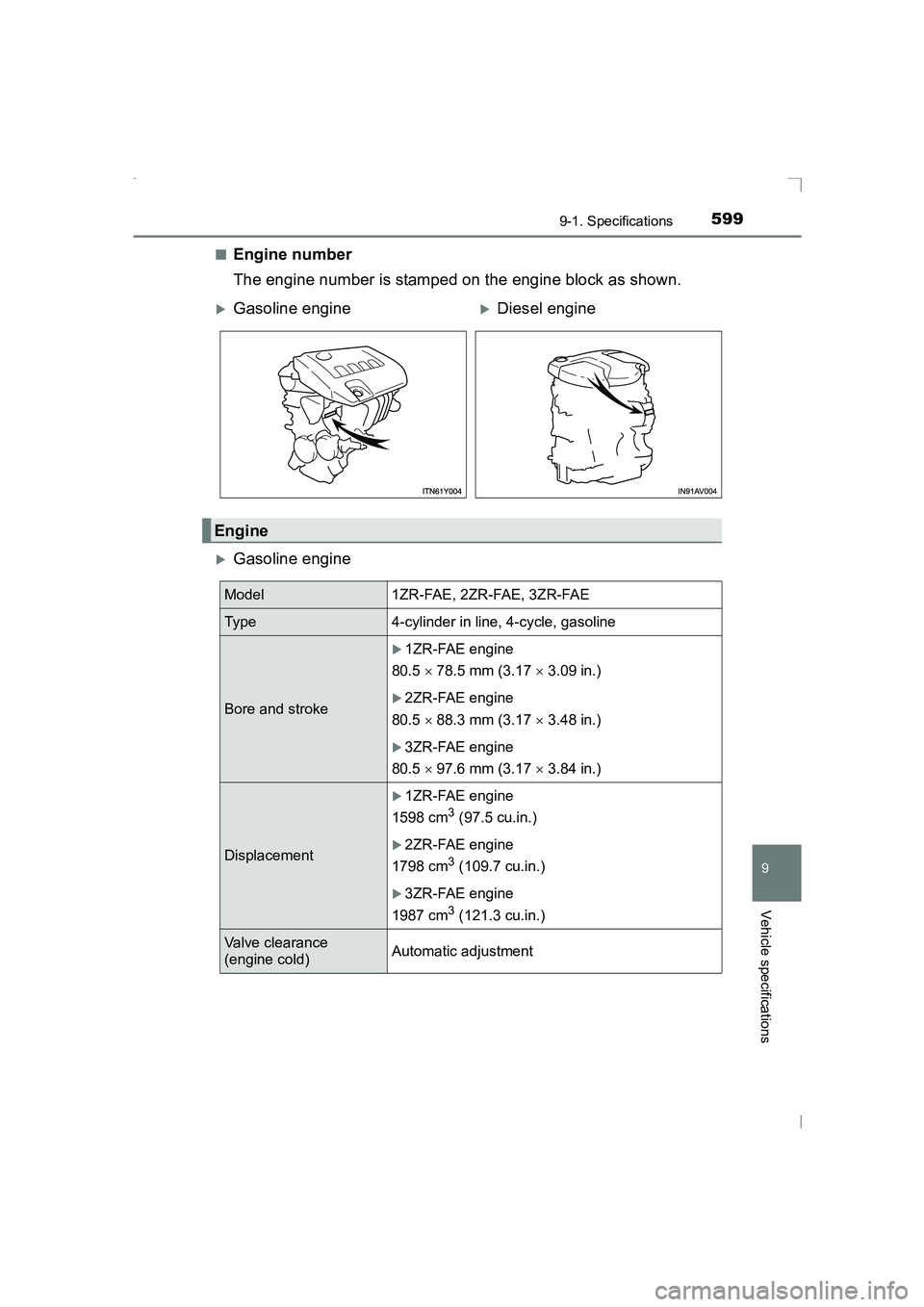
The engine number is stamped on the engine block as shown.
XGasoline engine
XGasoline engineXDiesel engine
Engine
Model 1ZR-FAE, 2ZR-FAE, 3ZR-FAE
Type 4-cylinder in line, 4-cycle, gasoline
Bore and stroke
X1ZR-FAE engine
80.5 × 78.5 mm (3.17 × 3.09 in.)
X2ZR-FAE engine
80.5 × 88.3 mm (3.17 × 3.48 in.)
X3ZR-FAE engine
80.5 × 97.6 mm (3.17 × 3.84 in.)
Displacement
X1ZR-FAE engine
1598 cm
3 (97.5 cu.in.)
X2ZR-FAE engine
1798 cm
3 (109.7 cu.in.)
X3ZR-FAE engine
1987 cm
3 (121.3 cu.in.)
Valve clearance
(engine cold) Automatic adjustment
AVENSIS_OM_OM20C20E_(EE).book Page 599 Thursday, January 29,
2015 1:47 PM
Page 610 of 648
6109-1. Specifications
AVENSIS_OM_OM20C20E_(EE)
The fluid capacity is the quantity of reference. If replacement is neces-
sary, contact any authorized Toyota dealer or repairer, or another duly
qualified and equipped professional.
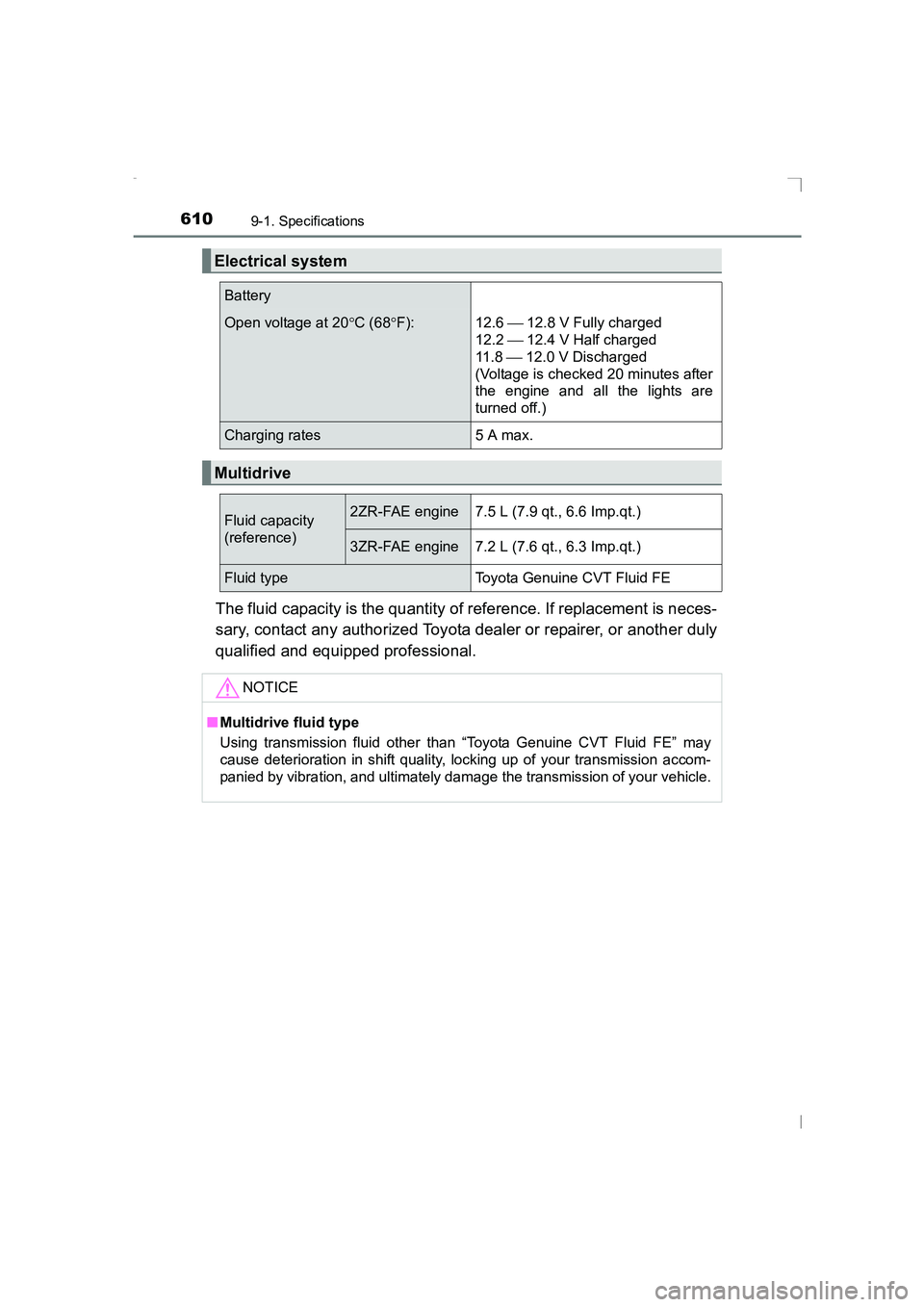
Electrical system
Battery
Open voltage at 20°C (68 °F): 12.6 12.8 V Fully charged
12.2 12.4 V Half charged
11 . 8 12.0 V Discharged
(Voltage is checked 20 minutes after
the engine and all the lights are
turned off.)
Charging rates 5 A max.
Multidrive
Fluid capacity
(reference)2ZR-FAE engine7.5 L (7.9 qt., 6.6 Imp.qt.)
3ZR-FAE engine7.2 L (7.6 qt., 6.3 Imp.qt.)
Fluid typeToyota Genuine CVT Fluid FE
NOTICE
■ Multidrive fluid type
Using transmission fluid other than “Toyota Genuine CVT Fluid FE” may
cause deterioration in shift quality, locking up of your transmission accom-
panied by vibration, and ultimately dam age the transmission of your vehicle.
sec_09-01.fm Page 610 Friday, February 20, 2015 3:48 PM
Page 625 of 648
6259-2. Customization
AVENSIS_OM_OM20C20E_(EE)
9
Vehicle specifications
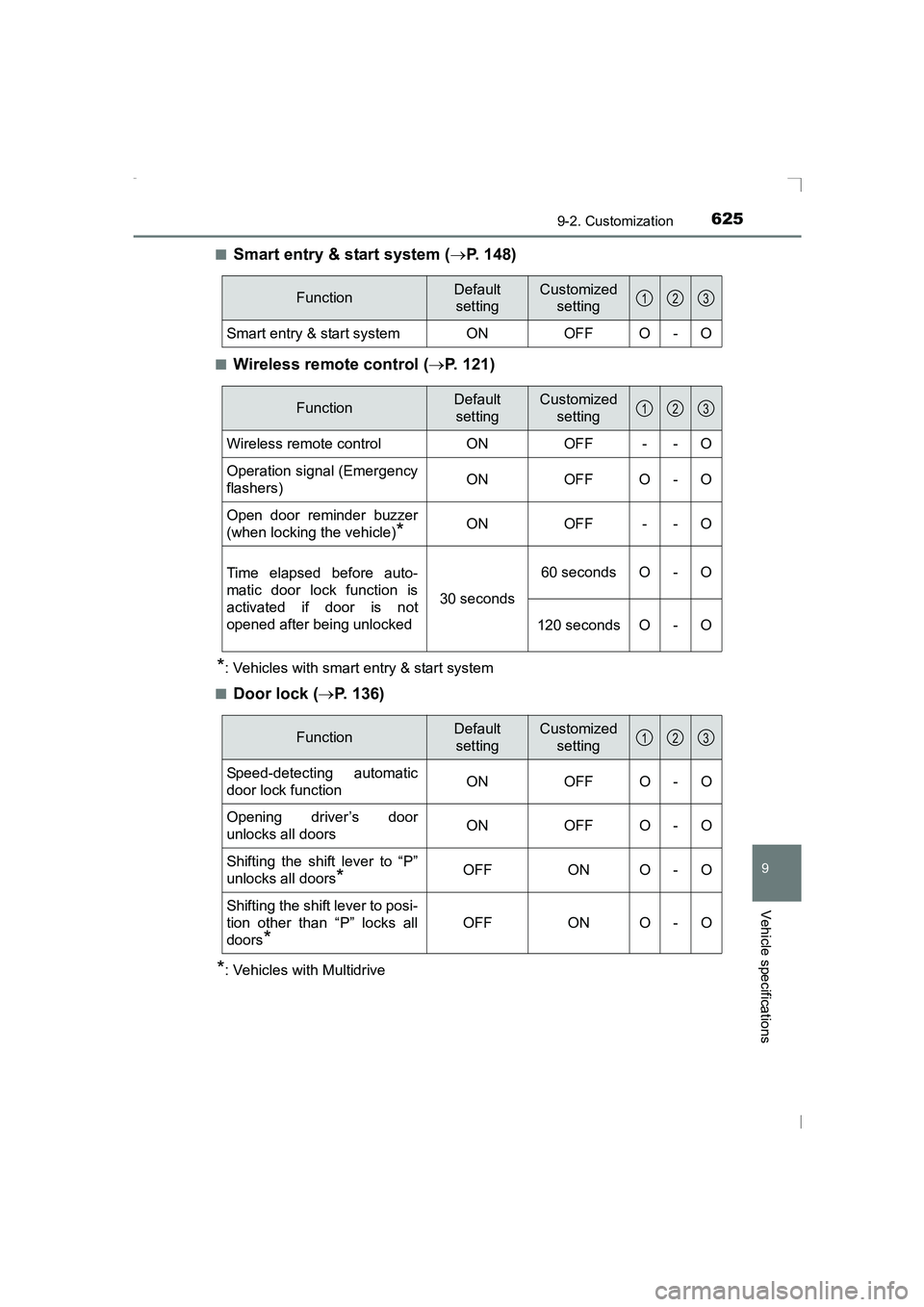
■Smart entry & start system (→P. 148)
■Wireless remote control ( →P. 121)
*: Vehicles with smart entry & start system
■
Door lock ( →P. 136)
*: Vehicles with Multidrive
FunctionDefault
settingCustomized setting
Smart entry & start system ON OFF O - O
123
FunctionDefault
settingCustomized setting
Wireless remote control ON OFF - - O
Operation signal (Emergency
flashers) ON OFF O - O
Open door reminder buzzer
(when locking the vehicle)
*ON OFF - - O
Time elapsed before auto-
matic door lock function is
activated if door is not
opened after being unlocked 30 seconds60 seconds O - O
120 seconds O - O
123
FunctionDefault settingCustomized setting
Speed-detecting automatic
door lock functionONOFFO-O
Opening driver’s door
unlocks all doorsONOFF O -O
Shifting the shift lever to “P”
unlocks all doors
*OFFONO-O
Shifting the shift lever to posi-
tion other than “P” locks all
doors
*
OFFONO-O
123
AVENSIS_OM_OM20C20E_(EE).book Page 625 Thursday, January 29, 2015 1:47 PM
Page 626 of 648
6269-2. Customization
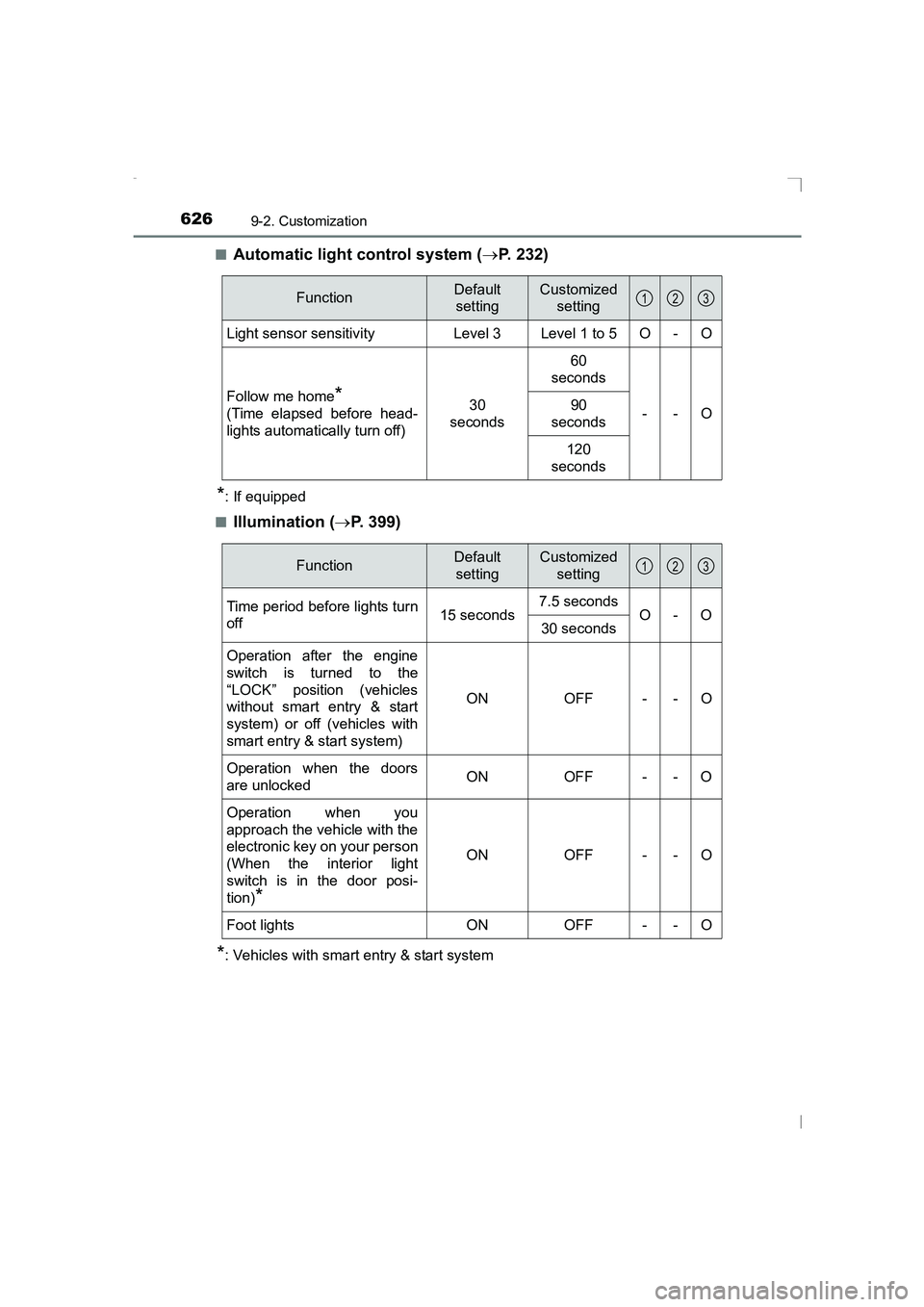
AVENSIS_OM_OM20C20E_(EE)■
Automatic light control system (
→P. 232)
*: If equipped
■
Illumination ( →P. 399)
*: Vehicles with smart entry & start system
FunctionDefault
settingCustomized setting
Light sensor sensitivityLevel 3Level 1 to 5O-O
Follow me home*
(Time elapsed before head-
lights automatically turn off)30
seconds
60
seconds
--
O90
seconds
120
seconds
123
FunctionDefault settingCustomized setting
Time period before lights turn
off 15 seconds7.5 seconds
O-O
30 seconds
Operation after the engine
switch is turned to the
“LOCK” position (vehicles
without smart entry & start
system) or off (vehicles with
smart entry & start system)
ONOFF - - O
Operation when the doors
are unlocked ON OFF - - O
Operation when you
approach the vehicle with the
electronic key on your person
(When the interior light
switch is in the door posi-
tion)
*
ONOFF - - O
Foot lightsONOFF - - O
123
AVENSIS_OM_OM20C20E_(EE).book Page 626 Thursday, January 29,
2015 1:47 PM
Page 630 of 648
630What to do if... (Troubleshooting)
AVENSIS_OM_OM20C20E_(EE)
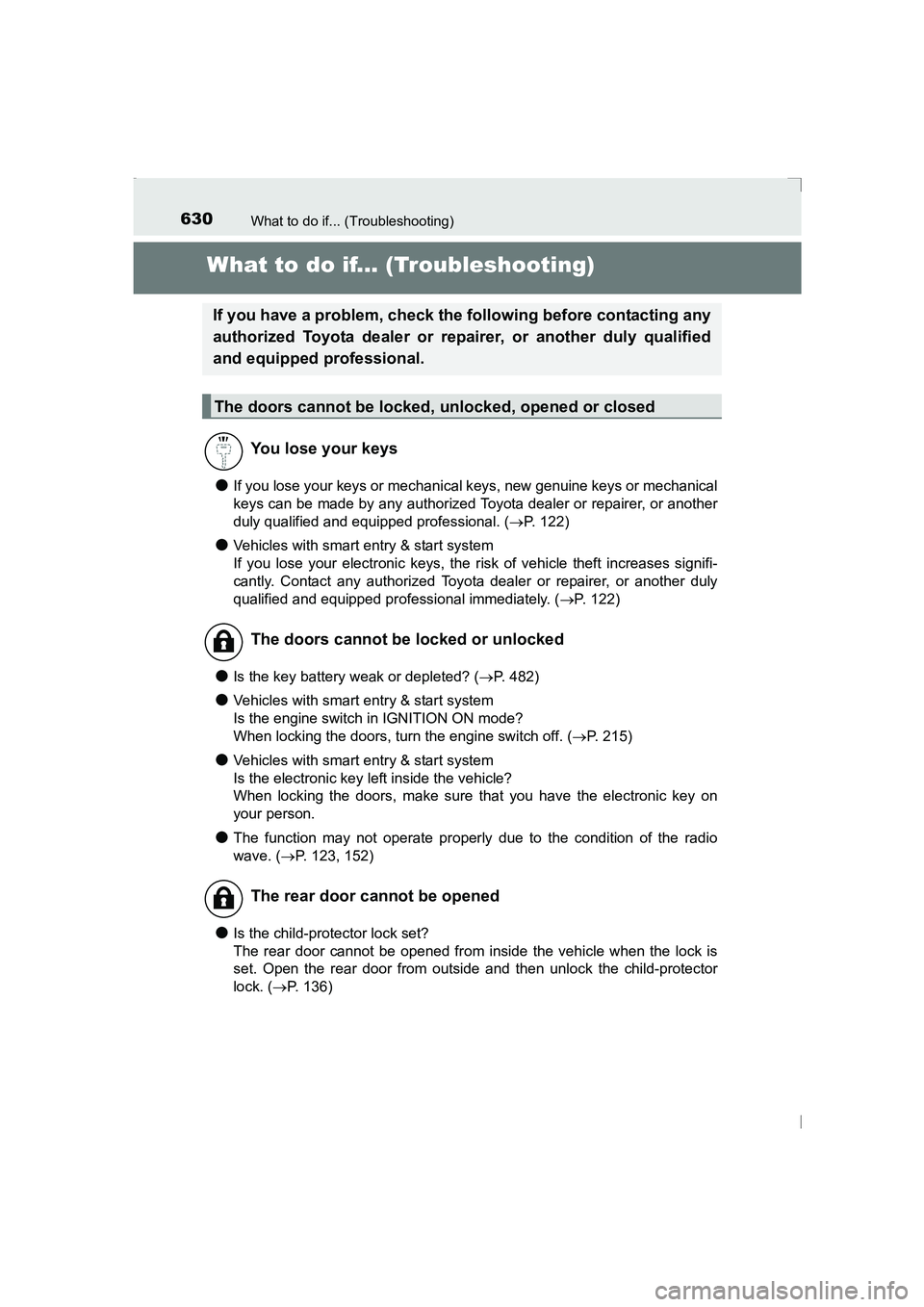
What to do if... (Troubleshooting)
●If you lose your keys or mechanical keys, new genuine keys or mechanical
keys can be made by any authorized Toyota dealer or repairer, or another
duly qualified and equipped professional. (→P. 122)
●Vehicles with smart entry & start system
If you lose your electronic keys, the risk of vehicle theft increases signifi-
cantly. Contact any authorized Toyota dealer or repairer, or another duly
qualified and equipped professional immediately. ( →P. 122)
●Is the key battery weak or depleted? ( →P. 482)
●Vehicles with smart entry & start system
Is the engine switch in IGNITION ON mode?
When locking the doors, turn the engine switch off. ( →P. 215)
●Vehicles with smart entry & start system
Is the electronic key left inside the vehicle?
When locking the doors, make sure that you have the electronic key on
your person.
●The function may not operate properly due to the condition of the radio
wave. ( →P. 123, 152)
●Is the child-protector lock set?
The rear door cannot be opened from inside the vehicle when the lock is
set. Open the rear door from outside and then unlock the child-protector
lock. ( →P. 136)
If you have a problem, check the following before contacting any
authorized Toyota dealer or repairer, or another duly qualified
and equipped professional.
The doors cannot be locked, unlocked, opened or closed
You lose your keys
The doors cannot be locked or unlocked
The rear door cannot be opened
AVENSIS_OM_OM20C20E_(EE).book Page 630 Thursday, January 29, 2015 1:47 PM