display TOYOTA AVENSIS 2015 Owner's Manual
[x] Cancel search | Manufacturer: TOYOTA, Model Year: 2015, Model line: AVENSIS, Model: TOYOTA AVENSIS 2015Pages: 648, PDF Size: 39.64 MB
Page 115 of 648
1152. Instrument cluster
2
Instrument cluster
AVENSIS_OM_OM20C20E_(EE)
• Drive information 1 through 3
Select to select up to 2 items that will be displayed on a Drive informa-
tion screen, up to 3 Drive information screens can be set.
• Pop-up display
Select to set the pop-up displays*2, which may appear in some situa-
tions, on/off.
• Initialization
Registered or changed meter settings will be deleted or returned to their
default setting.
● Language
Select to change the language on the display.
*1: If equipped
*2: Stop & Start system operation time display (if equipped), route guidance
display of the navigation system-linked system (if equipped) and incom-
ing call display of the hands-free phone system (if equipped).
■ Pop-up display
In some situations, such as when a switch operation is performed, a pop-up
display will be temporarily display ed on the multi-information display.
The pop-up display function can be set on/off.
■ Setting display automatic cancelation
In the following situations, setting display in which the settings can be
changed through the meter control switch will automatically be turned off.
●If a warning message appears while the setting display is displayed
● When the vehicle begins to move while the setting display is displayed
■ Liquid crystal display
Small spots or light spots may appear on the display. This phenomenon is
characteristic of liquid crystal displays, and there is no problem continuing to
use the display.
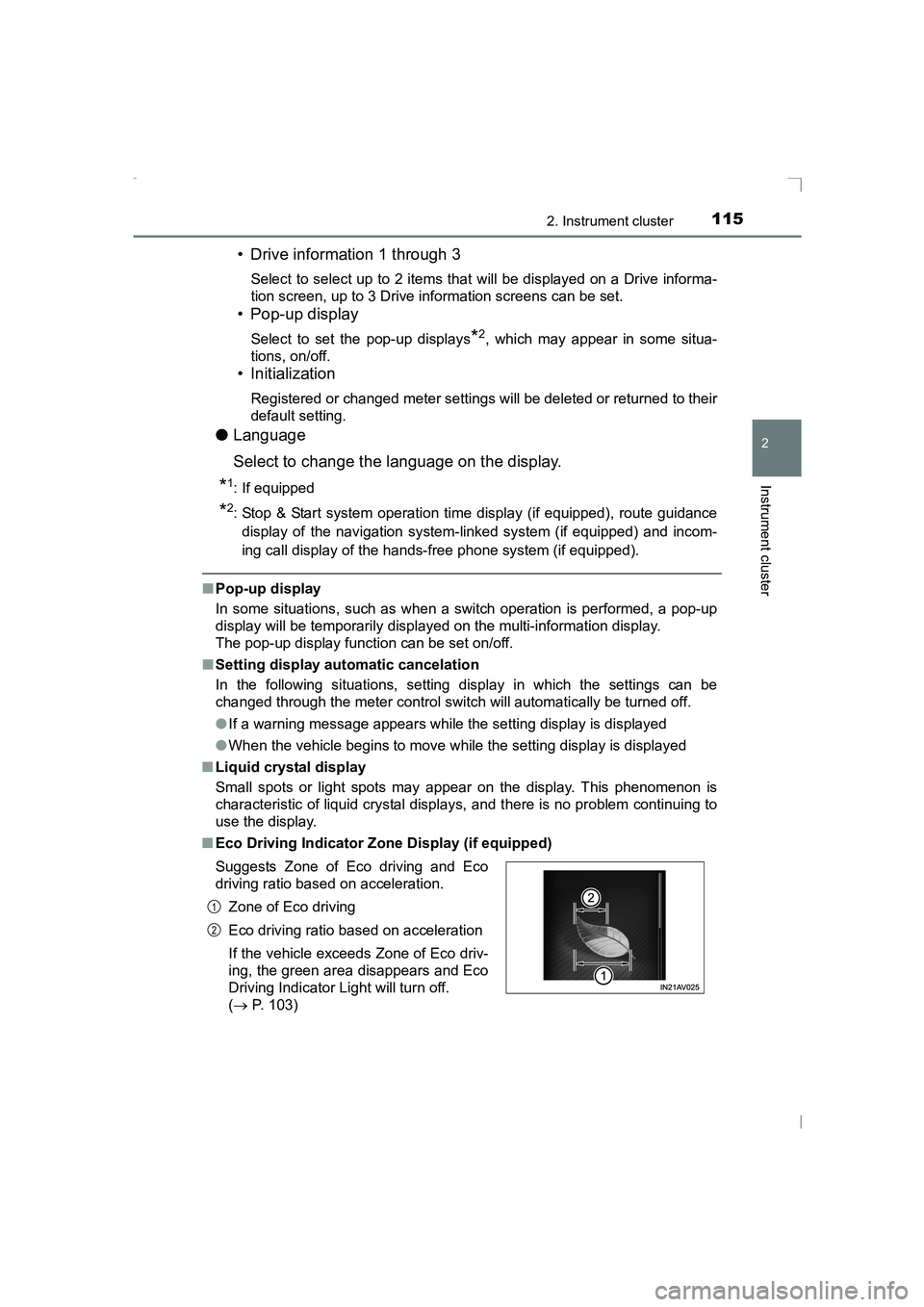
■ Eco Driving Indicator Zone Display (if equipped)
Suggests Zone of Eco driving and Eco
driving ratio based on acceleration.
Zone of Eco driving
Eco driving ratio based on acceleration
If the vehicle exceeds Zone of Eco driv-
ing, the green area disappears and Eco
Driving Indicator Light will turn off.
(→ P. 103)
1
2
AVENSIS_OM_OM20C20E_(EE).book Page 115 Thursday, January 29, 2015 1:47 PM
Page 116 of 648
1162. Instrument cluster
AVENSIS_OM_OM20C20E_(EE)
WARNING
■ The information display at low temperatures
Allow the interior of the vehicle to warm up before using the liquid crystal
information display. At extremely low temperatures, the display monitor may
respond slowly, and display changes may be delayed.
For example, there is a lag between the driver’s shifting and the new gear
number appearing on the display. This lag could cause the driver to down-
shift again, causing rapid and excessive engine braking and possibly an
accident resulting in death or injury.
■ Cautions during setting up the display
As the engine needs to be running during setting up the display, ensure that
the vehicle is parked in a place with adequate ventilation. In a closed area
such as a garage, exhaust gases including harmful carbon monoxide (CO)
may collect and enter the vehicle. This may lead to death or a serious
health hazard.
AVENSIS_OM_OM20C20E_(EE).book Page 116 Thursday, January 29, 2015 1:47 PM
Page 117 of 648
117
2
2. Instrument cluster
Instrument cluster
AVENSIS_OM_OM20C20E_(EE)
Fuel consumption infor mation∗
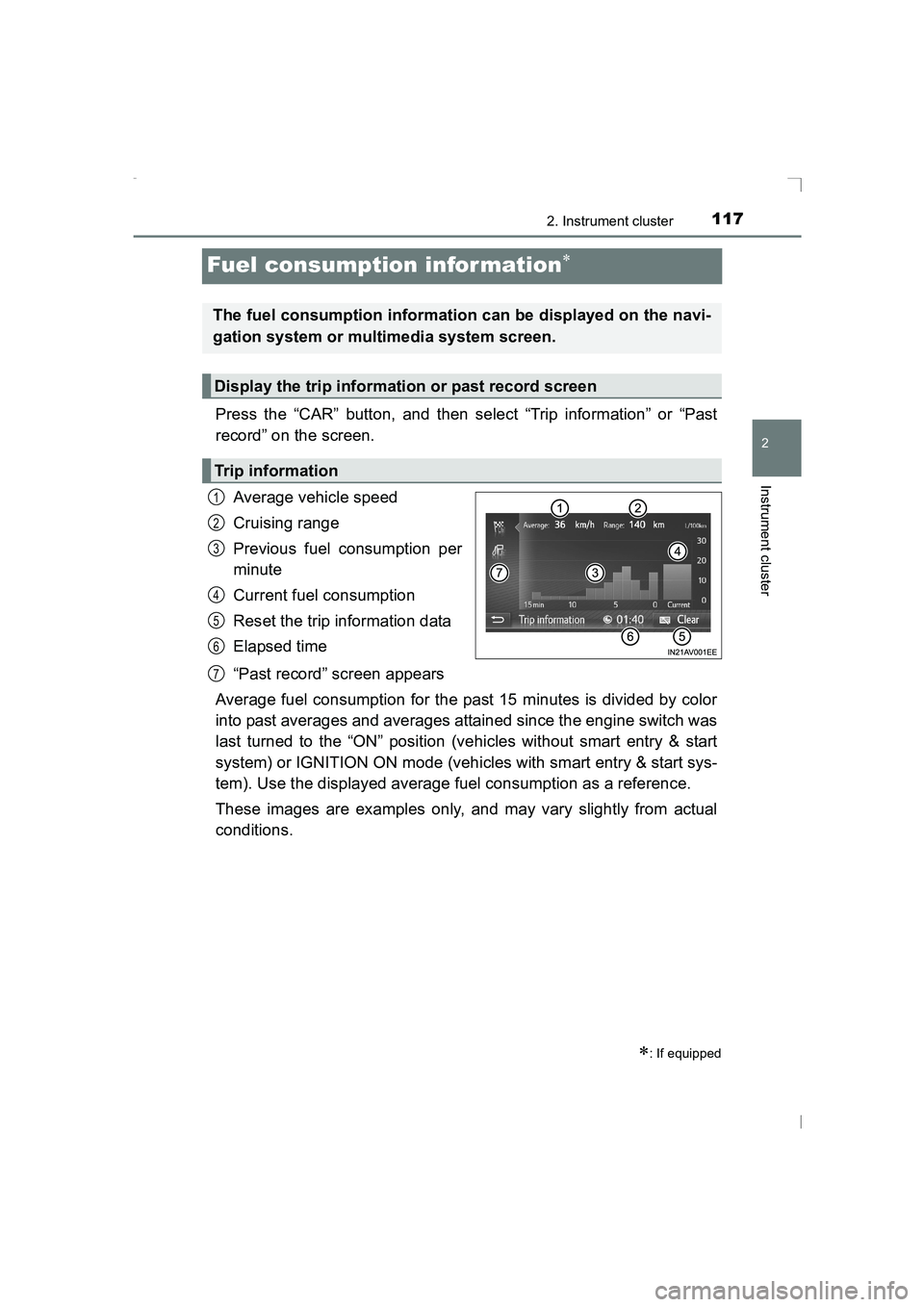
Press the “CAR” button, and then select “Trip information” or “Past
record” on the screen.Average vehicle speed
Cruising range
Previous fuel consumption per
minute
Current fuel consumption
Reset the trip information data
Elapsed time
“Past record” screen appears
Average fuel consumption for the past 15 minutes is divided by color
into past averages and averages attained since the engine switch was
last turned to the “ON” position (vehicles without smart entry & start
system) or IGNITION ON mode (vehicles with smart entry & start sys-
tem). Use the displayed average fuel consumption as a reference.
These images are examples only, and may vary slightly from actual
conditions.
∗: If equipped
The fuel consumption information can be displayed on the navi-
gation system or multimedia system screen.
Display the trip information or past record screen
Trip information
1
2
3
4
5
6
7
AVENSIS_OM_OM20C20E_(EE).book Page 117 Thursday, January 29, 2015 1:47 PM
Page 118 of 648
1182. Instrument cluster
AVENSIS_OM_OM20C20E_(EE)
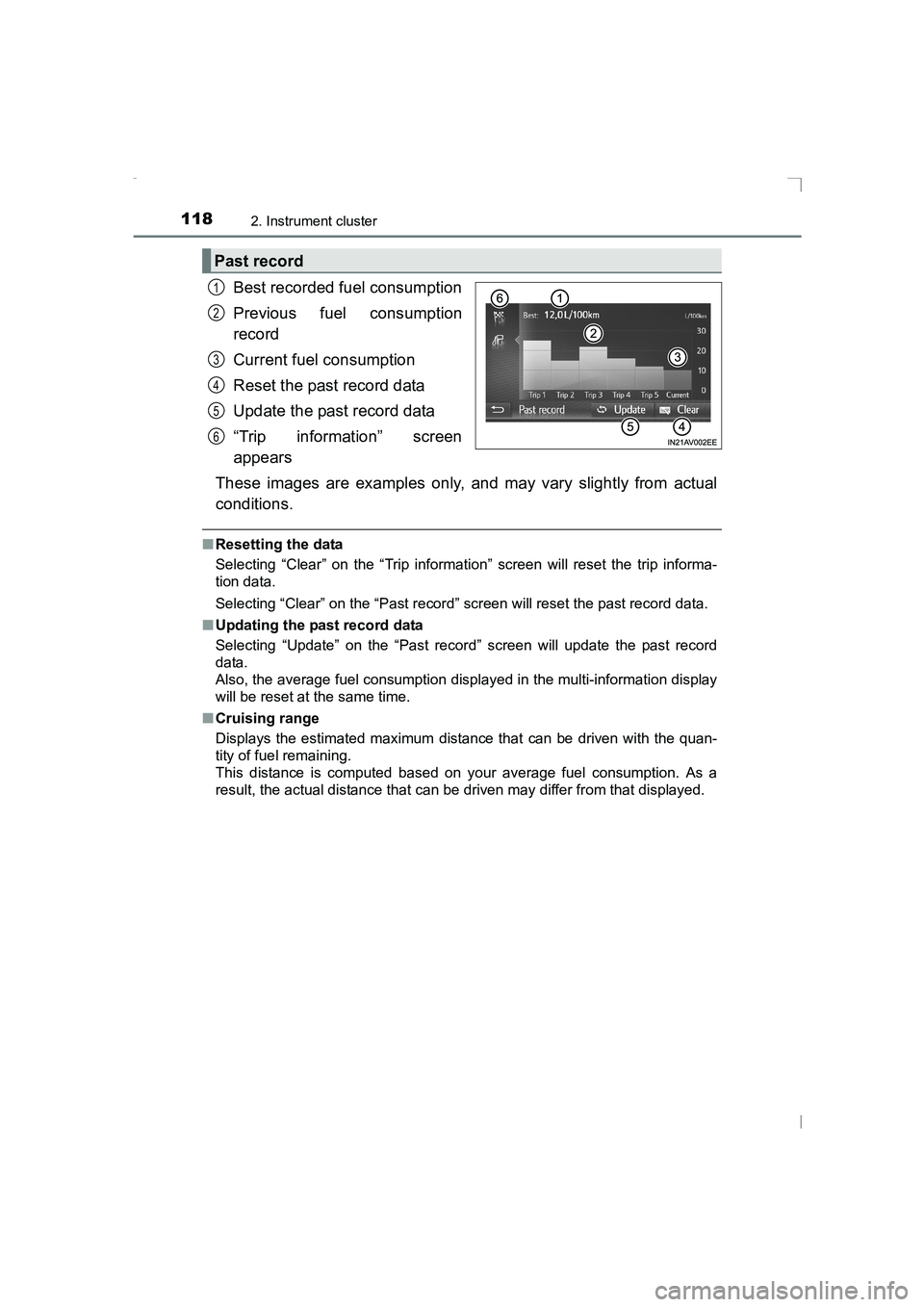
Best recorded fuel consumption
Previous fuel consumption
record
Current fuel consumption
Reset the past record data
Update the past record data
“Trip information” screen
appears
These images are examples only, and may vary slightly from actual
conditions.
■ Resetting the data
Selecting “Clear” on the “Trip information” screen will reset the trip informa-
tion data.
Selecting “Clear” on the “Past record” screen will reset the past record data.
■ Updating the past record data
Selecting “Update” on the “Past record” screen will update the past record
data.
Also, the average fuel consumption displayed in the multi-information display
will be reset at the same time.
■ Cruising range
Displays the estimated maximum distance that can be driven with the quan-
tity of fuel remaining.
This distance is computed based on your average fuel consumption. As a
result, the actual distance that can be driven may differ from that displayed.
Past record
1
2
3
4
5
6
AVENSIS_OM_OM20C20E_(EE).book Page 118 Thursday, January 29, 2015 1:47 PM
Page 150 of 648
1503-2. Opening, closing and locking the doors
AVENSIS_OM_OM20C20E_(EE)■
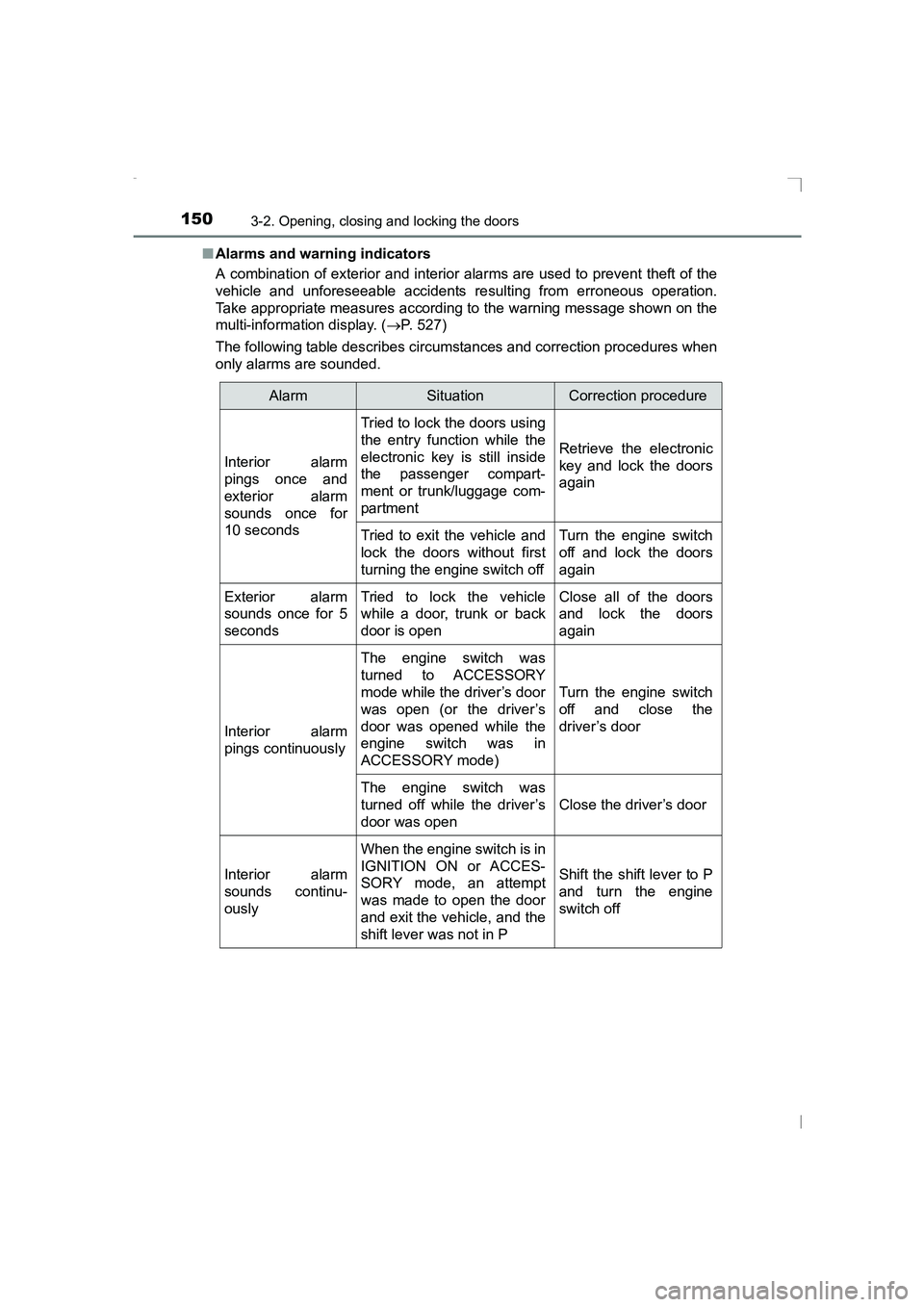
Alarms and warning indicators
A combination of exterior and interior alarms are used to prevent theft of the
vehicle and unforeseeable accidents re sulting from erroneous operation.
Take appropriate measures according to the warning message shown on the
multi-information display. ( →P. 527)
The following table describes circumstances and correction procedures when
only alarms are sounded.
AlarmSituationCorrection procedure
Interior alarm
pings once and
exterior alarm
sounds once for
10 seconds
Tried to lock the doors using
the entry function while the
electronic key is still inside
the passenger compart-
ment or trunk/luggage com-
partment
Retrieve the electronic
key and lock the doors
again
Tried to exit the vehicle and
lock the doors without first
turning the engine switch offTurn the engine switch
off and lock the doors
again
Exterior alarm
sounds once for 5
secondsTried to lock the vehicle
while a door, trunk or back
door is openClose all of the doors
and lock the doors
again
Interior alarm
pings continuously
The engine switch was
turned to ACCESSORY
mode while the driver’s door
was open (or the driver’s
door was opened while the
engine switch was in
ACCESSORY mode)
Turn the engine switch
off and close the
driver’s door
The engine switch was
turned off while the driver’s
door was open
Close the driver’s door
Interior alarm
sounds continu-
ously
When the engine switch is in
IGNITION ON or ACCES-
SORY mode, an attempt
was made to open the door
and exit the vehicle, and the
shift lever was not in P
Shift the shift lever to P
and turn the engine
switch off
AVENSIS_OM_OM20C20E_(EE).book Page 150 Thursday, January 29, 2015 1:47 PM
Page 153 of 648
1533-2. Opening, closing and locking the doors
3
Operation of each component
AVENSIS_OM_OM20C20E_(EE)■
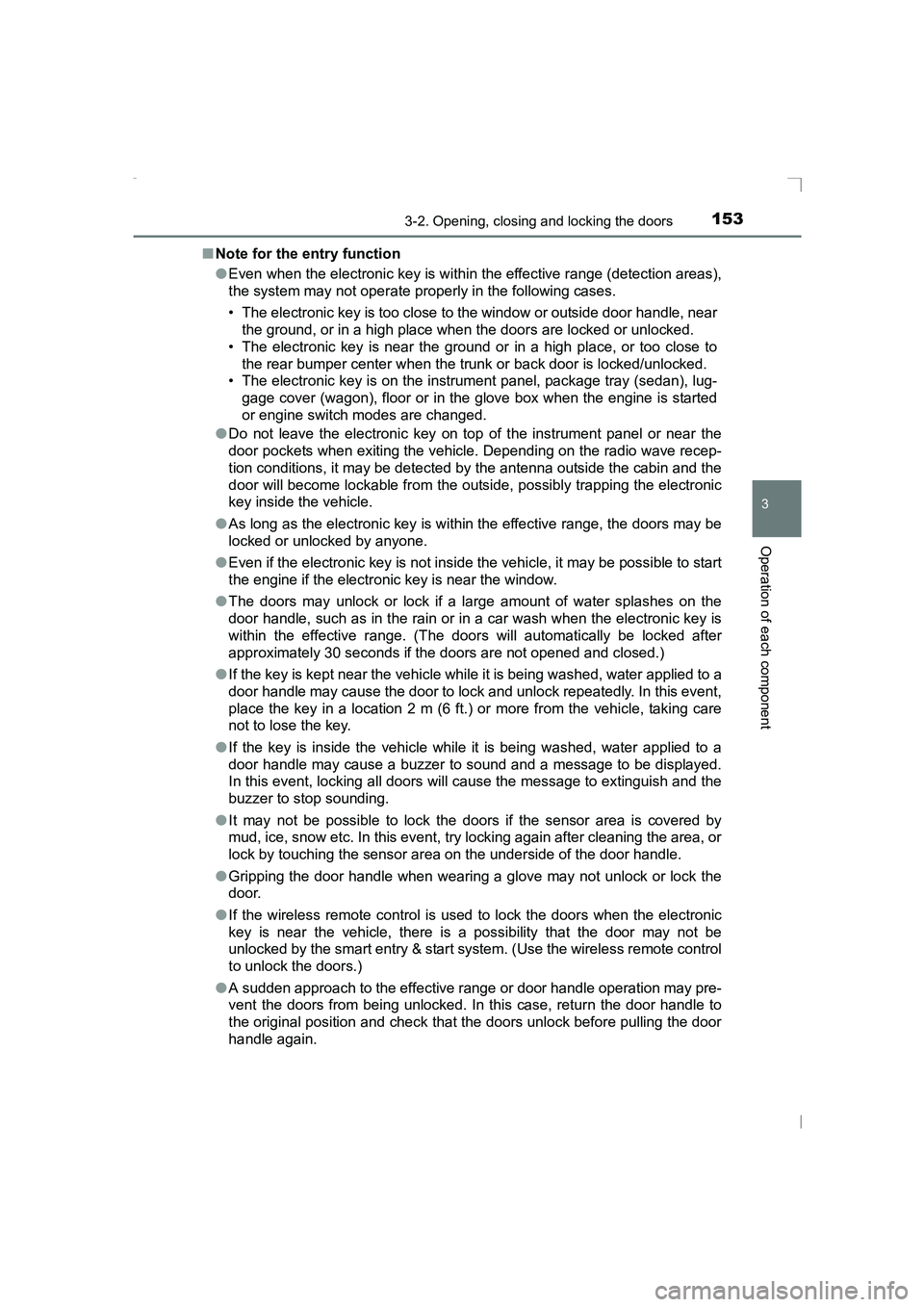
Note for the entry function
●Even when the electronic key is within the effective range (detection areas),
the system may not operate properly in the following cases.
• The electronic key is too close to the window or outside door handle, near
the ground, or in a high place w hen the doors are locked or unlocked.
• The electronic key is near the ground or in a high place, or too close to the rear bumper center when the tr unk or back door is locked/unlocked.
• The electronic key is on the instrument panel, package tray (sedan), lug-
gage cover (wagon), floor or in the glove box when the engine is started
or engine switch modes are changed.
● Do not leave the electronic key on top of the instrument panel or near the
door pockets when exiting the vehicle. Depending on the radio wave recep-
tion conditions, it may be detected by the antenna outside the cabin and the
door will become lockable from the outside, possibly trapping the electronic
key inside the vehicle.
● As long as the electronic key is within the effective range, the doors may be
locked or unlocked by anyone.
● Even if the electronic key is not inside the vehicle, it may be possible to start
the engine if the electronic key is near the window.
● The doors may unlock or lock if a large amount of water splashes on the
door handle, such as in the rain or in a car wash when the electronic key is
within the effective range. (The doors will automatically be locked after
approximately 30 seconds if the doors are not opened and closed.)
● If the key is kept near the vehicle while it is being washed, water applied to a
door handle may cause the door to lock and unlock repeatedly. In this event,
place the key in a location 2 m (6 ft.) or more from the vehicle, taking care
not to lose the key.
● If the key is inside the vehicle while it is being washed, water applied to a
door handle may cause a buzzer to sound and a message to be displayed.
In this event, locking all doors will cause the message to extinguish and the
buzzer to stop sounding.
● It may not be possible to lock the doors if the sensor area is covered by
mud, ice, snow etc. In this event, try locking again after cleaning the area, or
lock by touching the sensor area on the underside of the door handle.
● Gripping the door handle when wearing a glove may not unlock or lock the
door.
● If the wireless remote control is used to lock the doors when the electronic
key is near the vehicle, there is a possibility that the door may not be
unlocked by the smart entry & start system. (Use the wireless remote control
to unlock the doors.)
● A sudden approach to the effective ra nge or door handle operation may pre-
vent the doors from being unlocked. In this case, return the door handle to
the original position and check that the doors unlock before pulling the door
handle again.
AVENSIS_OM_OM20C20E_(EE).book Page 153 Thursday, January 29, 2015 1:47 PM
Page 216 of 648
2164-2. Driving procedures
AVENSIS_OM_OM20C20E_(EE)
■Auto power off function
XVehicles with Multidrive
If the vehicle is left in ACCESSORY mode for more than 20 minutes or IGNI-
TION ON mode (the engine is not running) for more than an hour with the
shift lever in P, the engine switch will automatically turn off. However, this
function cannot entirely prevent battery discharge. Do not leave the vehicle
with the engine switch in ACCESSORY or IGNITION ON mode for long peri-
ods of time when the engine is not running.
XVehicles with manual transmission
If the vehicle is left in ACCESSORY mode for more than 20 minutes or IGNI-
TION ON mode (the engine is not running) for more than an hour, the engine
switch will automatically turn off. However, this function cannot entirely pre-
vent battery discharge. Do not leave the vehicle with the engine switch in
ACCESSORY or IGNITION ON mode for long periods of time when the
engine is not running.
■ Operation of the engine switch
When operating the engine switch, one short, firm press is enough. If the
switch is pressed improperly, the engi ne may not start or the engine switch
mode may not change. It is not necessary to press and hold the switch.
■ Electronic key battery depletion
→ P. 124
■ Conditions affecting operation
→ P. 152
■ Note for the smart entry & start system
→ P. 153
■ If the engine does not start
The engine immobilizer system may not have been deactivated. ( →P. 78)
Contact any authorized Toyota dealer or repairer, or another duly qualified
and equipped professional.
■ Steering lock
After turning the engine switch off and opening and closing the doors, the
steering wheel will be locked due to the steering lock function. Operating the
engine switch again automatically cancels the steering lock.
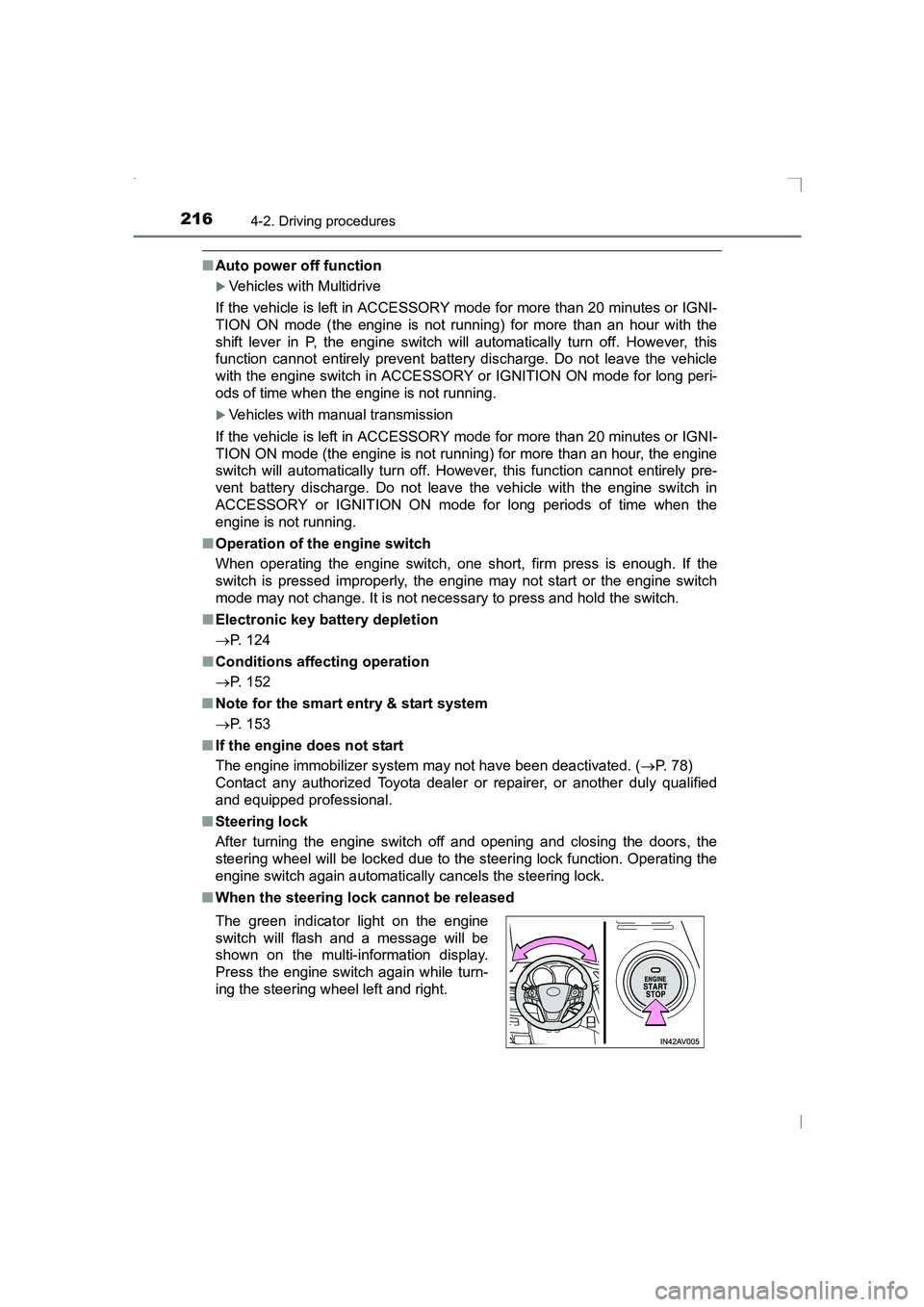
■ When the steering lock cannot be released
The green indicator light on the engine
switch will flash and a message will be
shown on the multi-information display.
Press the engine switch again while turn-
ing the steering wheel left and right.
AVENSIS_OM_OM20C20E_(EE).book Page 216 Thursday, January 29, 2015 1:47 PM
Page 221 of 648
2214-2. Driving procedures
4
Driving
AVENSIS_OM_OM20C20E_(EE)
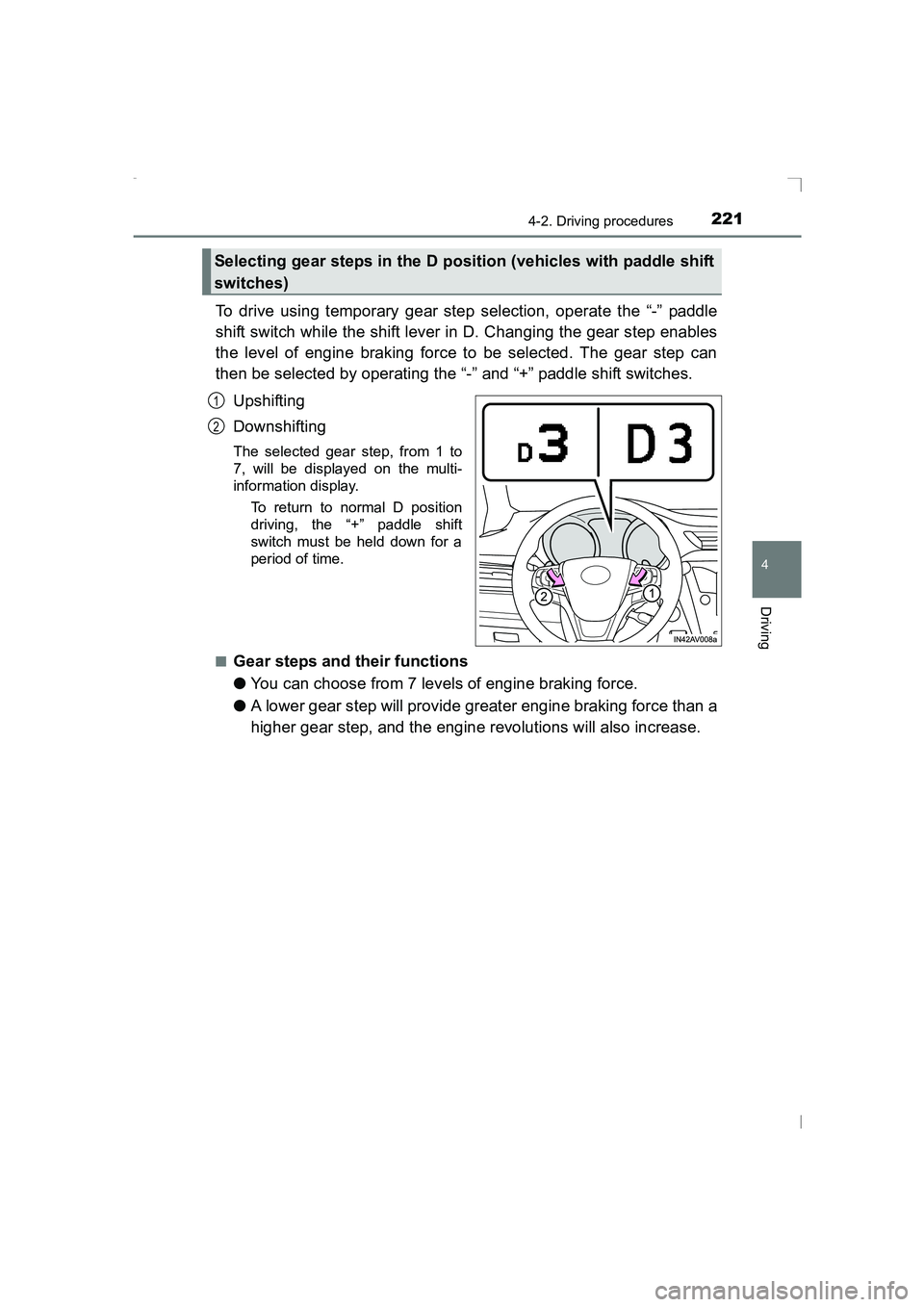
To drive using temporary gear step selection, operate the “-” paddle
shift switch while the shift lever in D. Changing the gear step enables
the level of engine braking force to be selected. The gear step can
then be selected by operating the “-” and “+” paddle shift switches.Upshifting
Downshifting
The selected gear step, from 1 to
7, will be displayed on the multi-
information display. To return to normal D position
driving, the “+” paddle shift
switch must be held down for a
period of time.
■
Gear steps and their functions
● You can choose from 7 levels of engine braking force.
● A lower gear step will provide greater engine braking force than a
higher gear step, and the engine revolutions will also increase.
Selecting gear steps in the D position (vehicles with paddle shift
switches)
1
2
AVENSIS_OM_OM20C20E_(EE).book Page 221 Thursday, January 29, 2015 1:47 PM
Page 222 of 648
2224-2. Driving procedures
AVENSIS_OM_OM20C20E_(EE)
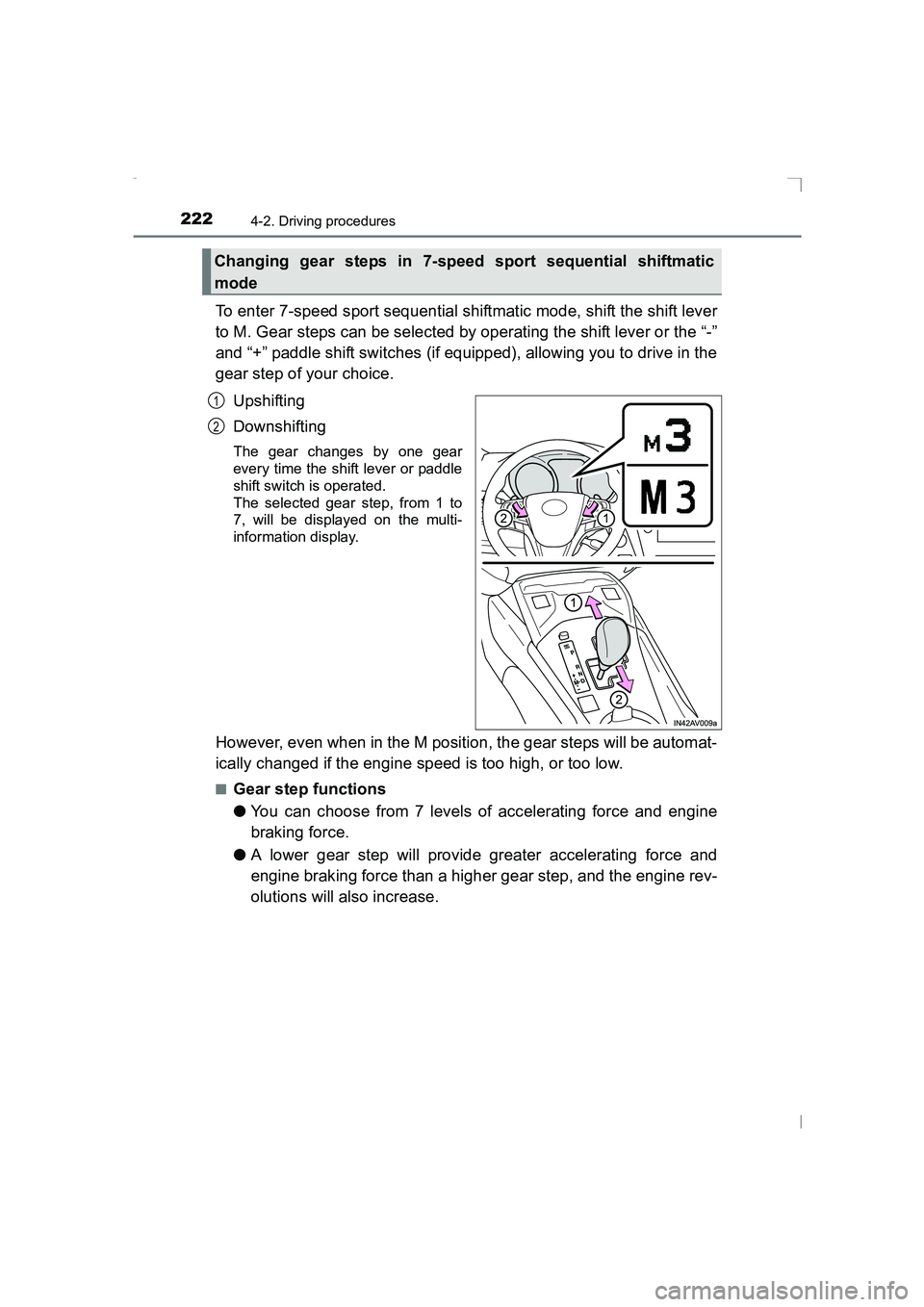
To enter 7-speed sport sequential shiftmatic mode, shift the shift lever
to M. Gear steps can be selected by operating the shift lever or the “-”
and “+” paddle shift switches (if equipped), allowing you to drive in the
gear step of your choice.Upshifting
Downshifting
The gear changes by one gear
every time the shift lever or paddle
shift switch is operated.
The selected gear step, from 1 to
7, will be displayed on the multi-
information display.
However, even when in the M position, the gear steps will be automat-
ically changed if the engine speed is too high, or too low.
■Gear step functions
●You can choose from 7 levels of accelerating force and engine
braking force.
● A lower gear step will provide greater accelerating force and
engine braking force than a higher gear step, and the engine rev-
olutions will also increase.
Changing gear steps in 7-speed sport sequential shiftmatic
mode
1
2
AVENSIS_OM_OM20C20E_(EE).book Page 222 Thursday, January 29, 2015 1:47 PM
Page 223 of 648
2234-2. Driving procedures
4
Driving
AVENSIS_OM_OM20C20E_(EE)
■When the vehicle comes to a stop with the shift lever in the M position
● The transmission will automatically downshift to M1 once the vehicle is
stopped.
● After a stop, the vehicle will start off in M1.
● When the vehicle is stopped, the transmission is set at M1.
■ Paddle shift switch (if equipped)
●When the paddle shift switch is operated with the shift lever in the D posi-
tion, a gear step will be automatically selected according to the vehicle
speed and driving conditions.
● Automatic deactivation of gear step selection with the shift lever in the D
position
Gear step selection in the D position wi ll be deactivated in the following situ-
ations:
• When the vehicle comes to a stop
• If the accelerator pedal is depressed for longer than a certain period of time in one gear step
• When the shift lever is shifted to a position other than D
■ Downshifting restrictions warning buzzer
To help ensure safety and driving performance, downshifting operation may
sometimes be restricted. In some circumstances, downshifting may not be
possible even when the shift lever or paddle shift switch (if equipped) is oper-
ated. (The warning buzzer will sound twice.)
■ When driving with cruise cont rol activated (if equipped)
Even when performing the following actions with the intent of enabling engine
braking, engine braking will not activate because cruise control will not be
canceled.
● While driving in D or 7-speed sport sequential shiftmatic mode, downshifting
to 6, 5 or 4. ( →P. 280)
● When switching the driving mode to sport mode while driving in D position.
(→ P. 221)
■ Automatic deactivation of sport mode
If the engine switch is turned to the “LOCK” position (vehicles without smart
entry & start system) or off (vehicles with smart entry & start system) after
driving in sport mode, the mode is automatically deactivated.
■ If the shift lever cannot be shifted from P
→ P. 577
■ If the M indicator is not displayed af ter shifting the shift lever to the M
position
This may indicate a malfunction in the transmission system. Have your vehi-
cle inspected by any authorized Toyota dealer or repairer, or another duly
qualified and equipped prof essional immediately.
AVENSIS_OM_OM20C20E_(EE).book Page 223 Thursday, January 29, 2015 1:47 PM