lock TOYOTA AVENSIS 2018 Owners Manual
[x] Cancel search | Manufacturer: TOYOTA, Model Year: 2018, Model line: AVENSIS, Model: TOYOTA AVENSIS 2018Pages: 660, PDF Size: 63.16 MB
Page 450 of 660
4507-3. Do-it-yourself maintenance
AVENSIS_OM_OM20C79E_(EE)
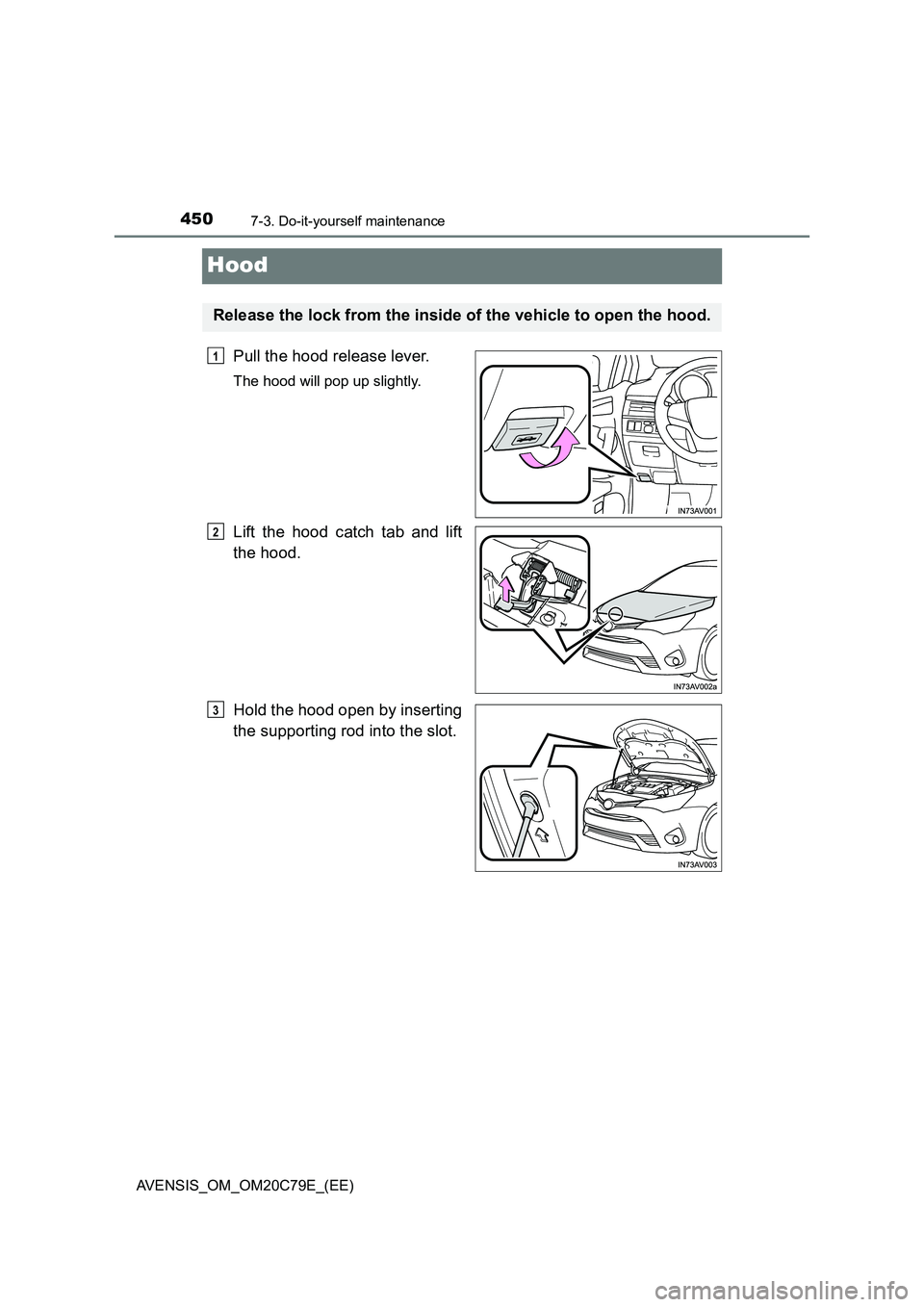
Hood
Pull the hood release lever.
The hood will pop up slightly.
Lift the hood catch tab and lift
the hood.
Hold the hood open by inserting
the supporting rod into the slot.
Release the lock from the inside of the vehicle to open the hood.
1
2
3
Page 451 of 660
4517-3. Do-it-yourself maintenance
AVENSIS_OM_OM20C79E_(EE)
7
Maintenance and care
WARNING
■Pre-driving check
Check that the hood is fully closed and locked.
If the hood is not locked properly, it may open while the vehicle is in motion
and cause an accident, which may result in death or serious injury.
■ After installing the support rod into the slot
Make sure the rod supports the hood securely from falling down on to your
head or body.
NOTICE
■ When closing the hood
Be sure to return the support rod to its clip before closing the hood. Closing
the hood with the support rod up could cause the hood to bend.
Page 458 of 660
4587-3. Do-it-yourself maintenance
AVENSIS_OM_OM20C79E_(EE)■
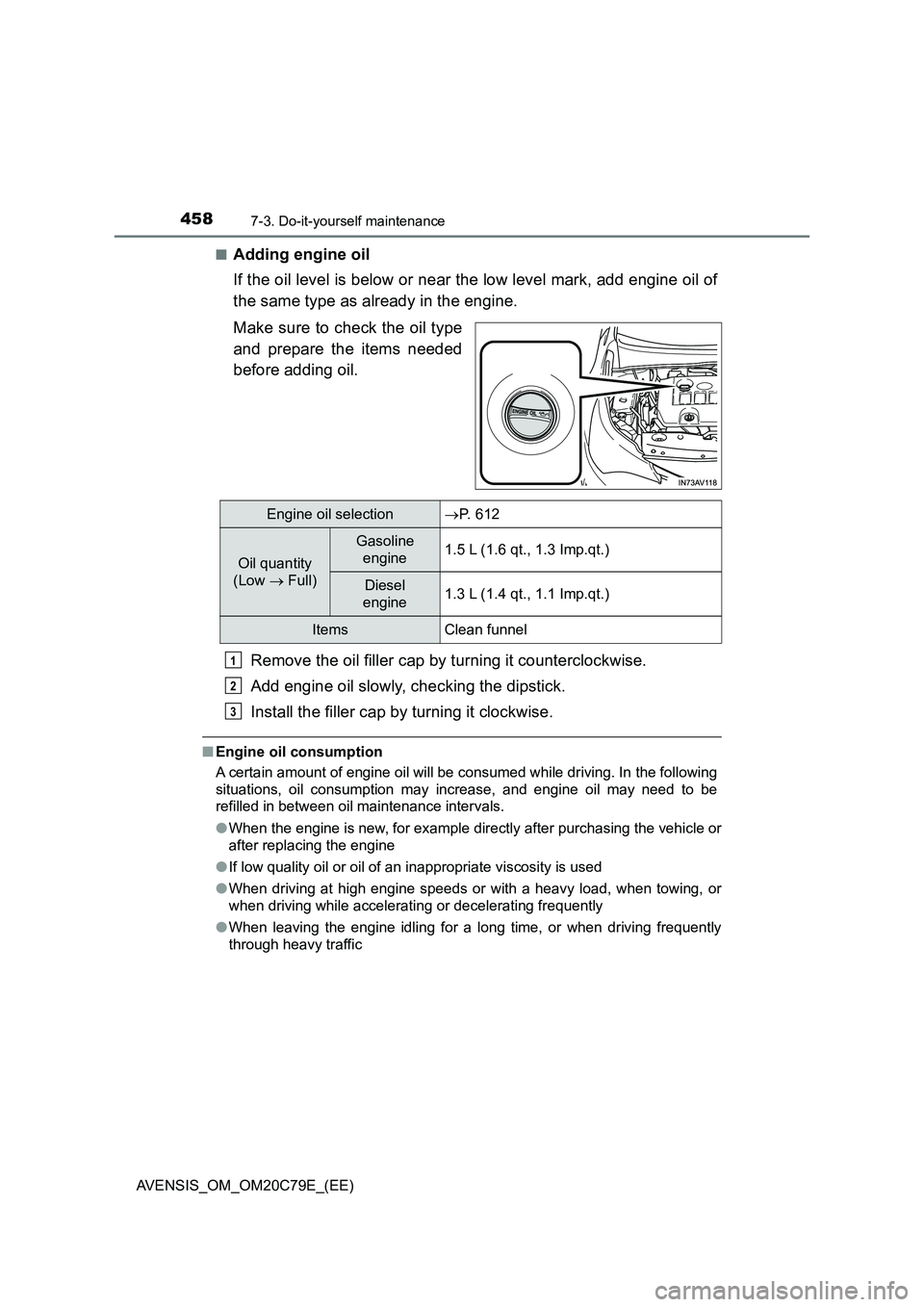
Adding engine oil
If the oil level is below or near the low level mark, add engine oil of
the same type as already in the engine.
Make sure to check the oil type
and prepare the items needed
before adding oil.
Remove the oil filler cap by turning it counterclockwise.
Add engine oil slowly, checking the dipstick.
Install the filler cap by turning it clockwise.
■Engine oil consumption
A certain amount of engine oil will be consumed while driving. In the following
situations, oil consumption may increase, and engine oil may need to be
refilled in between oil maintenance intervals.
●When the engine is new, for example directly after purchasing the vehicle or
after replacing the engine
●If low quality oil or oil of an inappropriate viscosity is used
●When driving at high engine speeds or with a heavy load, when towing, or
when driving while accelerating or decelerating frequently
●When leaving the engine idling for a long time, or when driving frequently
through heavy traffic
Engine oil selectionP. 612
Oil quantity
(Low Full)
Gasoline
engine1.5 L (1.6 qt., 1.3 Imp.qt.)
Diesel
engine1.3 L (1.4 qt., 1.1 Imp.qt.)
Items Clean funnel
1
2
3
Page 459 of 660
4597-3. Do-it-yourself maintenance
AVENSIS_OM_OM20C79E_(EE)
7
Maintenance and care
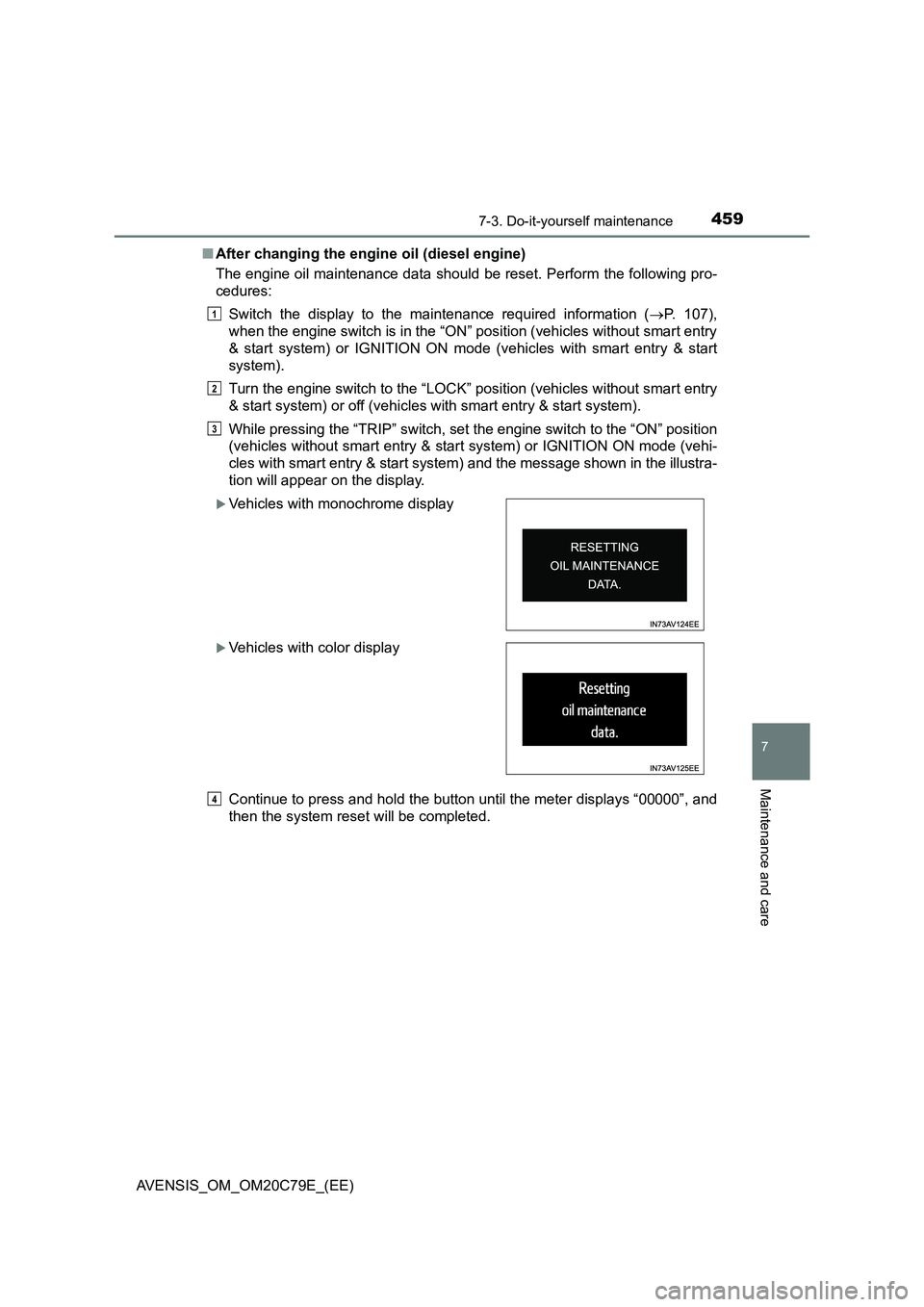
■After changing the engine oil (diesel engine)
The engine oil maintenance data should be reset. Perform the following pro-
cedures:
Switch the display to the maintenance required information (P. 107),
when the engine switch is in the “ON” position (vehicles without smart entry
& start system) or IGNITION ON mode (vehicles with smart entry & start
system).
Turn the engine switch to the “LOCK” position (vehicles without smart entry
& start system) or off (vehicles with smart entry & start system).
While pressing the “TRIP” switch, set the engine switch to the “ON” position
(vehicles without smart entry & start system) or IGNITION ON mode (vehi-
cles with smart entry & start system) and the message shown in the illustra-
tion will appear on the display.
Continue to press and hold the button until the meter displays “00000”, and
then the system reset will be completed.
Vehicles with monochrome display
Vehicles with color display
1
2
3
4
Page 471 of 660
4717-3. Do-it-yourself maintenance
AVENSIS_OM_OM20C79E_(EE)
7
Maintenance and care
■How to initialize the tire pressure warning system
Park the vehicle in a safe place and turn the engine switch to the
“LOCK” position (vehicles without smart entry & start system) or
off (vehicles with smart entry & start system).
Initialization cannot be performed while the vehicle is moving.
Adjust the tire inflation pressure to the specified cold tire inflation
pressure level. (P. 623)
Make sure to adjust the tire pressure to the specified cold tire inflation
pressure level. The tire pressure warning system will operate based on
this pressure level.
Turn the engine switch to the “ON” position (vehicles without
smart entry & start system) or IGNITION ON mode (vehicles with
smart entry & start system).
Vehicles with monochrome display
Press the “DISP” switch until the settings screen appears.
(P. 108)
Press and hold the “DISP” switch to enter the adjustment mode.
Press the “DISP” switch until the menu of tire pressure warning
system appears.
Press and hold the “DISP” switch to display the menu.
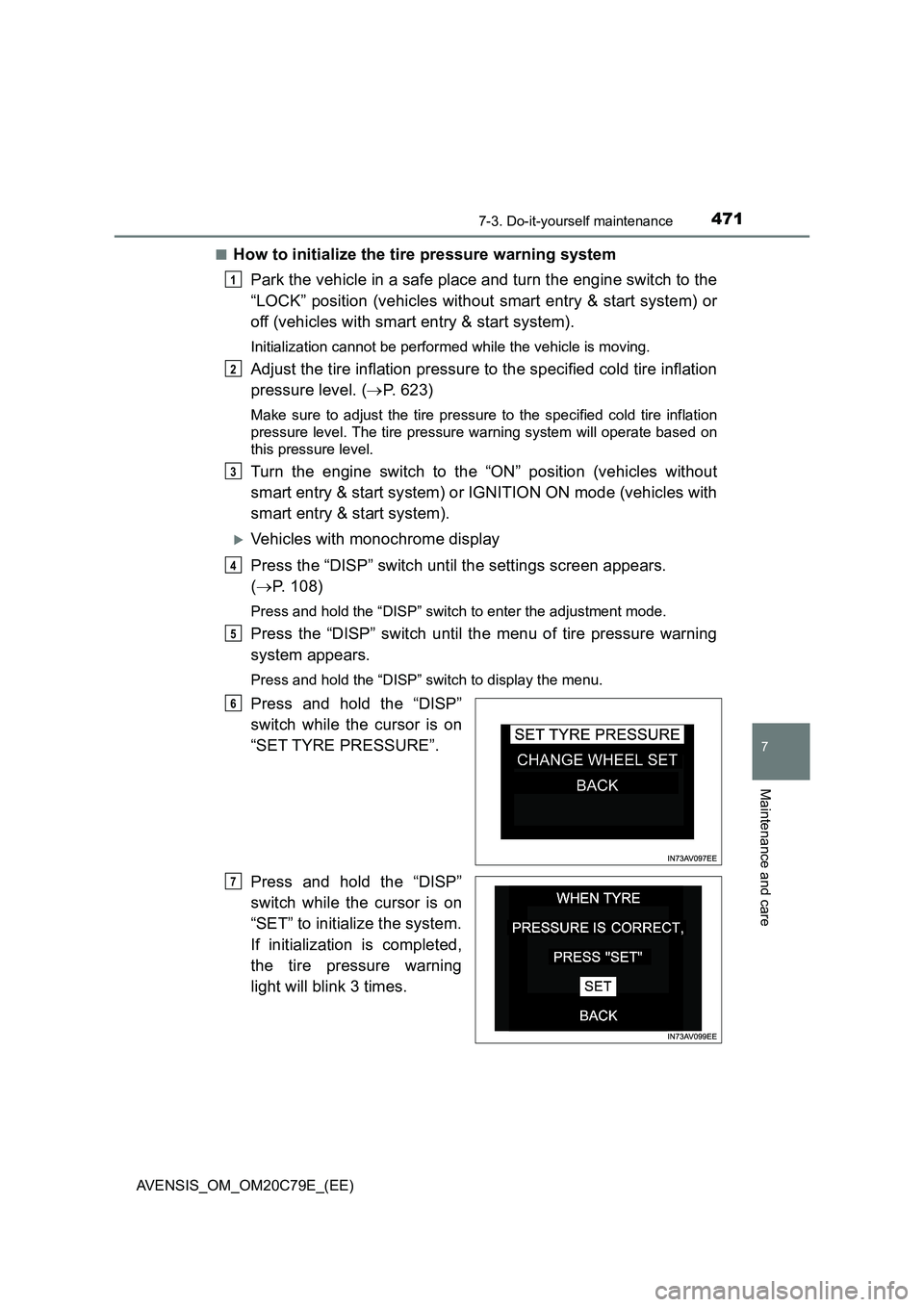
Press and hold the “DISP”
switch while the cursor is on
“SET TYRE PRESSURE”.
Press and hold the “DISP”
switch while the cursor is on
“SET” to initialize the system.
If initialization is completed,
the tire pressure warning
light will blink 3 times.
1
2
3
4
5
6
7
Page 476 of 660
4767-3. Do-it-yourself maintenance
AVENSIS_OM_OM20C79E_(EE)■Situations in which the tire pressure warning system may not operate
properly (if equipped)
●In the following cases, the tire pressure warning system may not operate
properly.
• If non-genuine Toyota wheels are used.
• A tire has been replaced with a tire that is not an OE (Original Equipment)
tire.
• A tire has been replaced with a tire that is not of the specified size.
• Tire chains etc. are equipped.
• An auxiliary-supported run-flat tire is equipped.
• If a window tint that affects the radio wave signals is installed.
• If there is a lot of snow or ice on the vehicle, particularly around the
wheels or wheel housings.
• If the tire inflation pressure is extremely higher than the specified level.
• If tires not equipped with the tire pressure warning valves and transmit-
ters are used.
• If the ID code on the tire pressure warning valves and transmitters is not
registered in the tire pressure warning computer.
• If the wheel set selected does not match the wheel set fitted to the vehi-
cle, in case a second wheel set has been registered.
●Performance may be affected in the following situations.
• Near a TV tower, electric power plant, gas station, radio station, large dis-
play, airport or other facility that generates strong radio waves or electri-
cal noise
• When carrying a portable radio, cellular phone, cordless phone or other
wireless communication device
●When the vehicle is parked, the time taken for the warning to start or go off
could be extended.
●When tire inflation pressure declines rapidly for example when a tire has
burst, the warning may not function.
■The initialization operation (vehicles with the tire pressure warning sys-
tem)
●Make sure to carry out initialization after adjusting the tire inflation pressure.
Also, make sure the tires are cold before carrying out initialization or tire
inflation pressure adjustment.
●If you have accidentally turned the engine switch to the “LOCK” position
(vehicles without a smart entry & start system) or off (vehicles with a smart
entry & start system) during initialization, it is not necessary to restart the ini-
tialization again as initialization will restart automatically when the engine
switch has been turned to the “ON” position (vehicles without a smart entry
& start system) or IGNITION ON mode (vehicles with a smart entry & start
system) for the next time.
●If you accidentally start the initialization when initialization is not necessary,
adjust the tire inflation pressure to the specified level when the tires are
cold, and conduct initialization again.
Page 491 of 660
4917-3. Do-it-yourself maintenance
AVENSIS_OM_OM20C79E_(EE)
7
Maintenance and care
Air conditioning filter
Turn the engine switch to the “LOCK” position (vehicles without
smart entry & start system) or off (vehicles with smart entry & start
system).
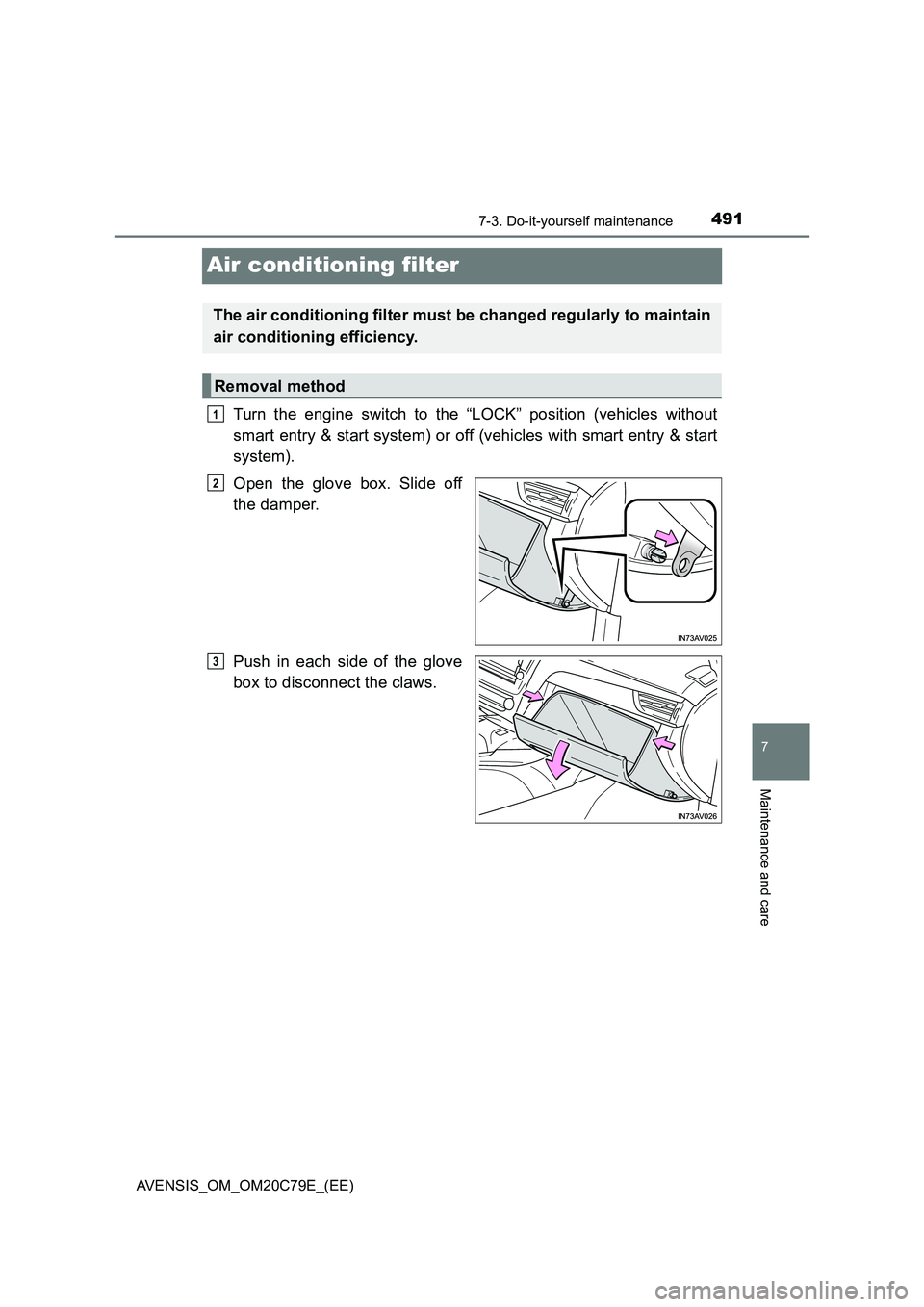
Open the glove box. Slide off
the damper.
Push in each side of the glove
box to disconnect the claws.
The air conditioning filter must be changed regularly to maintain
air conditioning efficiency.
Removal method
1
2
3
Page 496 of 660
4967-3. Do-it-yourself maintenance
AVENSIS_OM_OM20C79E_(EE)
Checking and replacing fuses
Turn the engine switch to the “LOCK” position (vehicles without
smart entry & start system) or off (vehicles with smart entry & start
system).
Open the fuse box cover.
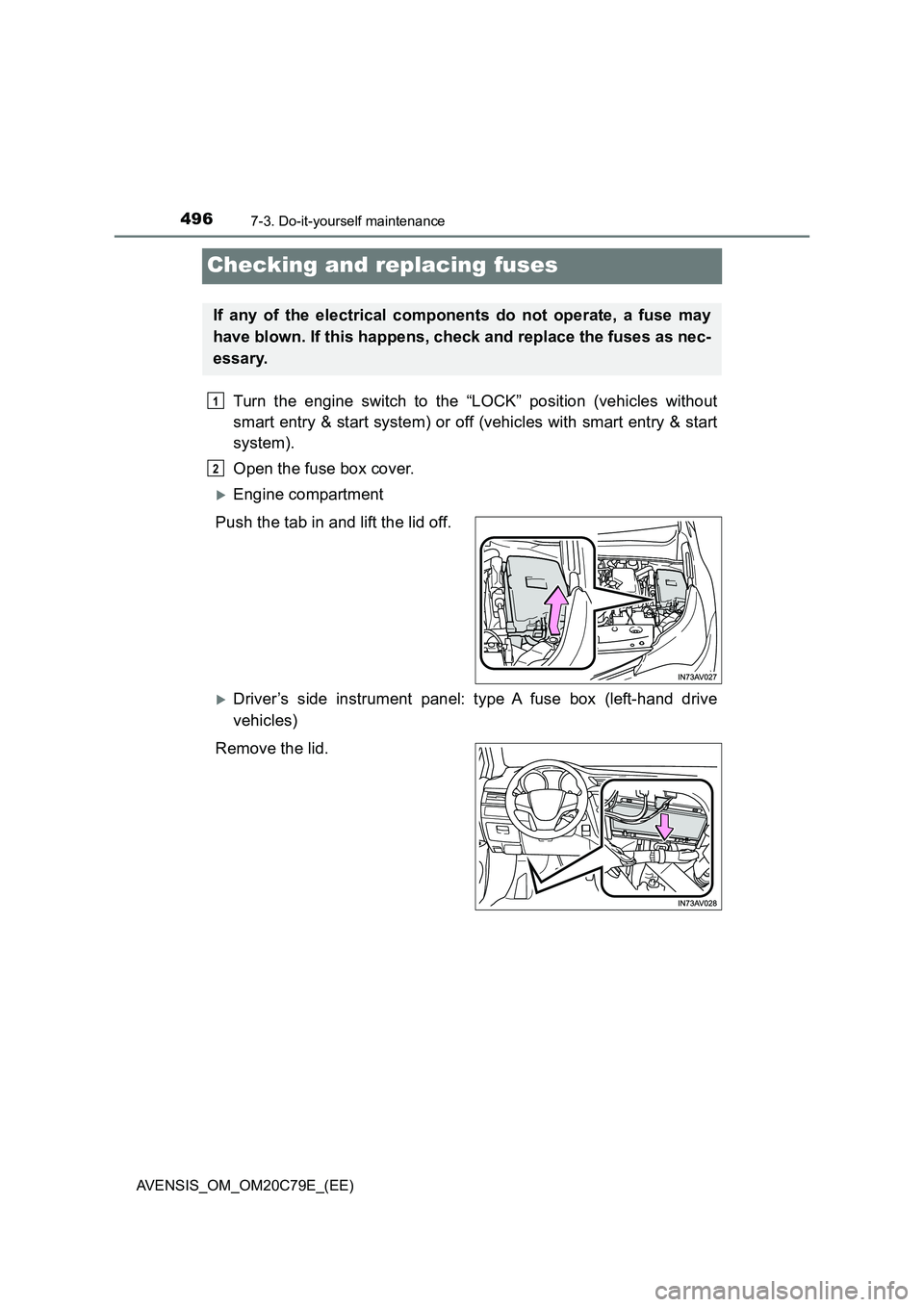
Engine compartment
Push the tab in and lift the lid off.
Driver’s side instrument panel: type A fuse box (left-hand drive
vehicles)
Remove the lid.
If any of the electrical components do not operate, a fuse may
have blown. If this happens, check and replace the fuses as nec-
essary.
1
2
Page 503 of 660
5037-3. Do-it-yourself maintenance
AVENSIS_OM_OM20C79E_(EE)
7
Maintenance and care
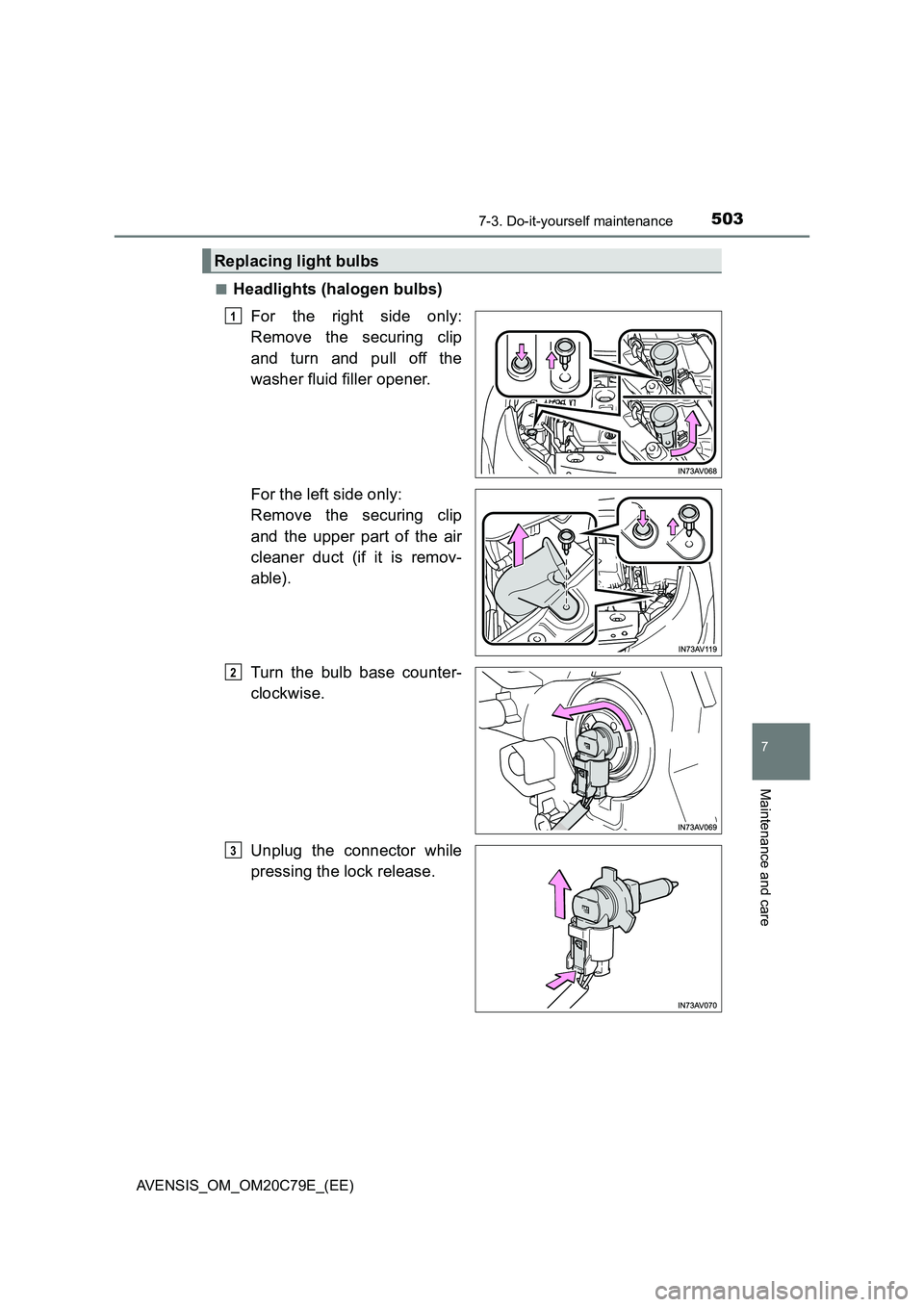
■Headlights (halogen bulbs)
For the right side only:
Remove the securing clip
and turn and pull off the
washer fluid filler opener.
For the left side only:
Remove the securing clip
and the upper part of the air
cleaner duct (if it is remov-
able).
Turn the bulb base counter-
clockwise.
Unplug the connector while
pressing the lock release.
Replacing light bulbs
1
2
3
Page 505 of 660
5057-3. Do-it-yourself maintenance
AVENSIS_OM_OM20C79E_(EE)
7
Maintenance and care
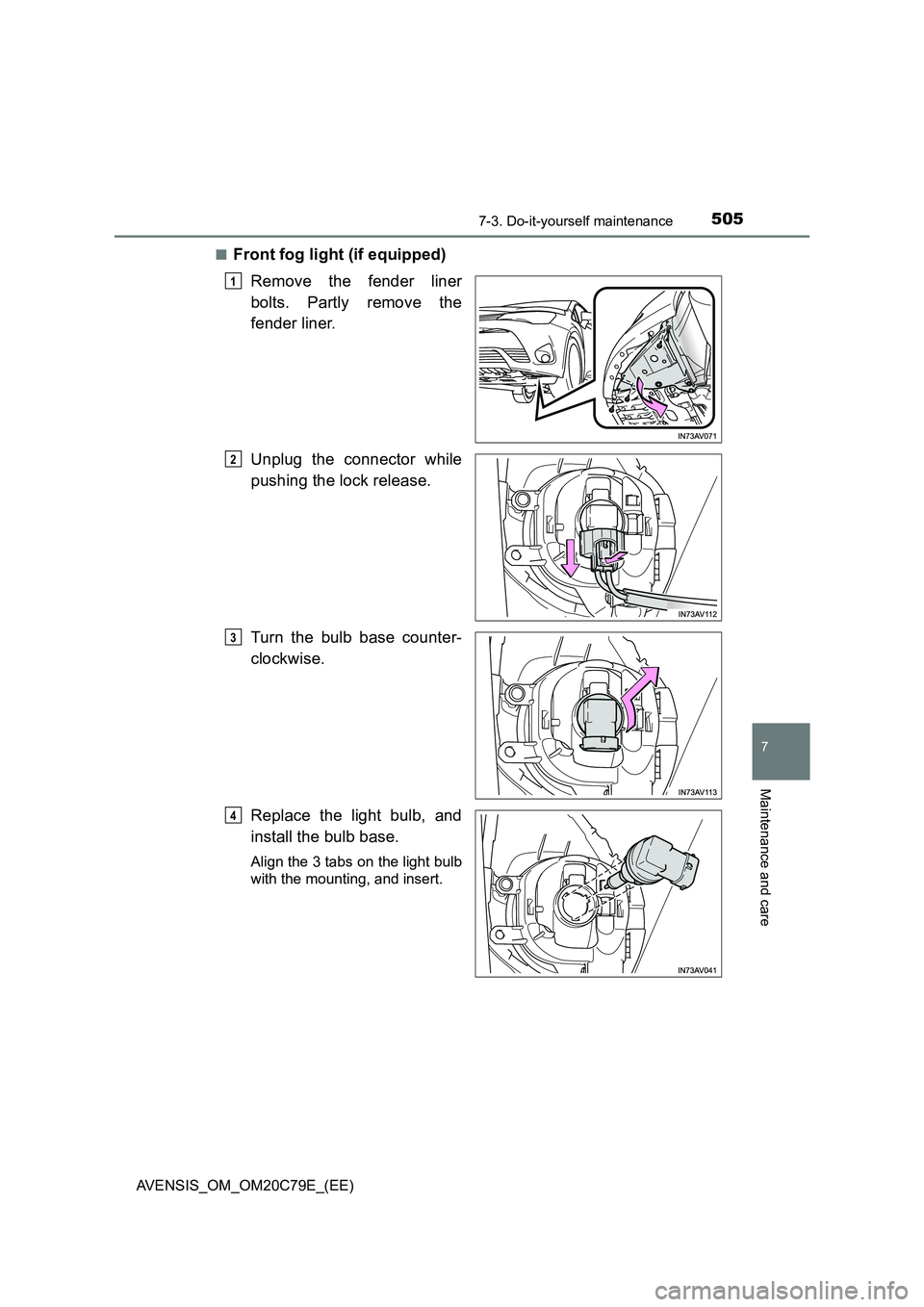
■Front fog light (if equipped)
Remove the fender liner
bolts. Partly remove the
fender liner.
Unplug the connector while
pushing the lock release.
Turn the bulb base counter-
clockwise.
Replace the light bulb, and
install the bulb base.
Align the 3 tabs on the light bulb
with the mounting, and insert.
1
2
3
4