warning TOYOTA AVENSIS 2018 Owners Manual
[x] Cancel search | Manufacturer: TOYOTA, Model Year: 2018, Model line: AVENSIS, Model: TOYOTA AVENSIS 2018Pages: 660, PDF Size: 63.16 MB
Page 322 of 660
3225-1. Basic Operations
AVENSIS_OM_OM20C79E_(EE)
AUX port/USB port
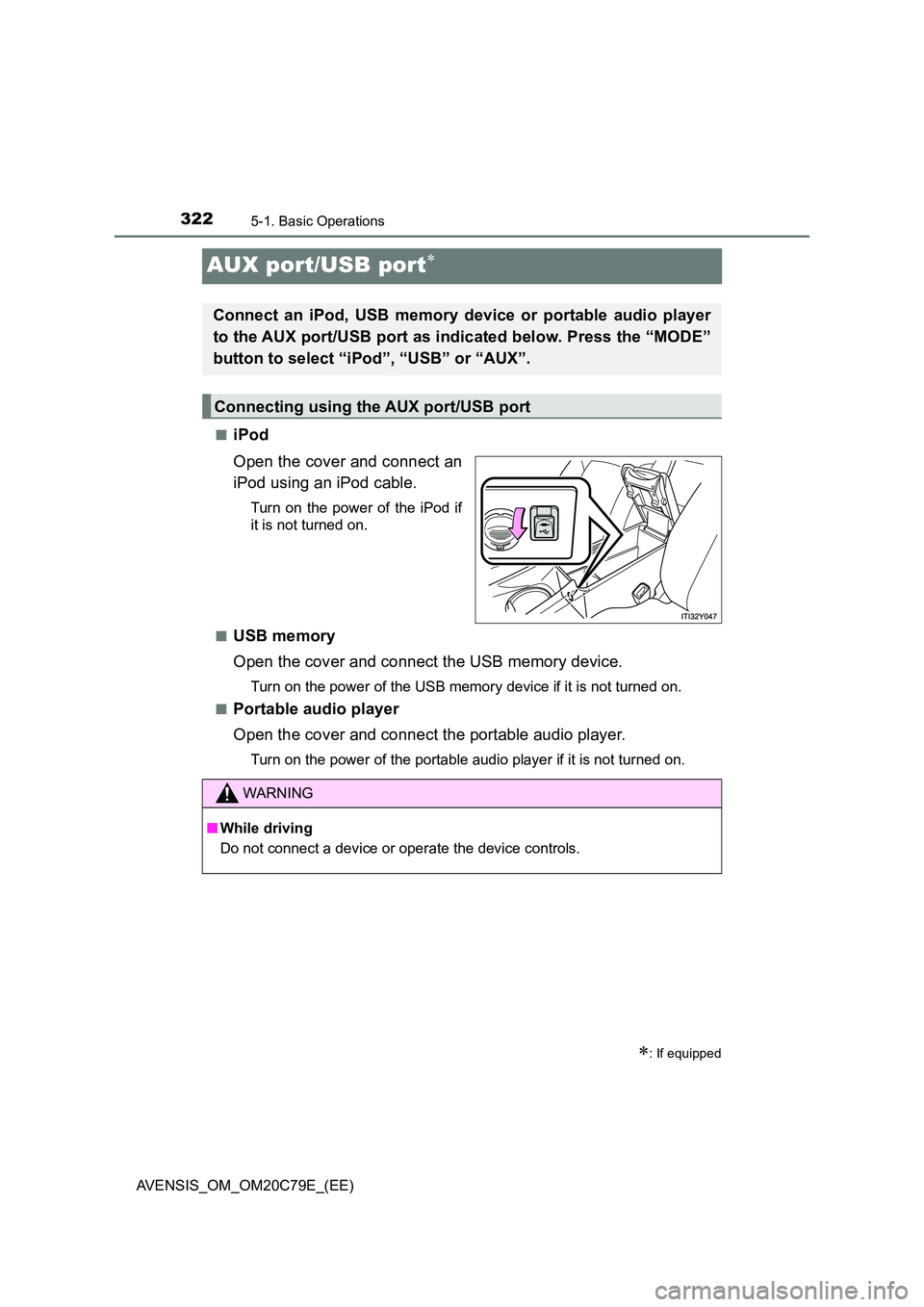
■iPod
Open the cover and connect an
iPod using an iPod cable.
Turn on the power of the iPod if
it is not turned on.
■USB memory
Open the cover and connect the USB memory device.
Turn on the power of the USB memory device if it is not turned on.
■Portable audio player
Open the cover and connect the portable audio player.
Turn on the power of the portable audio player if it is not turned on.
: If equipped
Connect an iPod, USB memory device or portable audio player
to the AUX port/USB port as indicated below. Press the “MODE”
button to select “iPod”, “USB” or “AUX”.
Connecting using the AUX port/USB port
WARNING
■ While driving
Do not connect a device or operate the device controls.
Page 350 of 660
3505-5. Using an external device
AVENSIS_OM_OM20C79E_(EE)
WARNING
■Caution while driving
Do not connect iPod or operate the controls.
Doing so may cause an accident, resulting in death or serious injury.
NOTICE
■ To prevent damage to iPod or its terminal
● Do not leave iPod in the vehicle. The temperature inside the vehicle may
become high.
● Do not push down on or apply unnecessary pressure to the iPod while it is
connected.
● Do not insert foreign objects into the port.
Page 358 of 660
3585-5. Using an external device
AVENSIS_OM_OM20C79E_(EE)
● MP3 and WMA playback
• When a device containing MP3 or WMA files is connected, all files in the
USB memory are checked. Once the file check is finished, the first MP3
or WMA file is played. To make the file check finish more quickly, we rec-
ommend that you do not include any files other than MP3 or WMA files or
create any unnecessary folders.
• When the USB memory is connected and the audio source is changed to
USB memory mode, the USB memory will start playing the first file in the
first folder.
If the same device is removed and reinserted (and the contents have not
been changed), the USB memory will resume play from the same point in
which it was last used.
● Extensions
If the file extensions .mp3 and .wma are used for files other than MP3 and
WMA files, they will be skipped (not played).
● Playback
• To play MP3 files with steady s ound quality, we recommend a fixed bit
rate of at least 128 kbps and a sampling frequency of 44.1 kHz.
• There is a wide variety of freewar e and other encoding software for MP3
and WMA files on the market, and depending on the status of the encod-
ing and the file format, poor sound quality or noise at the start of playback
may result.
In some cases, playback may not be possible at all.
• Microsoft, Windows, and Windows Media are registered trademarks of
Microsoft Corporation in the U.S.A. and other countries.
WARNING
■ Caution while driving
Do not connect USB memory or operate the controls.
Doing so may cause an accident, resulting in death or serious injury.
NOTICE
■ To prevent damage to USB memory or its terminal
● Do not leave USB memory in the vehicle. The temperature inside the vehi-
cle may become high.
● Do not push down on or apply unnecessary pressure to the USB memory
while it is connected.
● Do not insert foreign objects into the port.
Page 389 of 660
3895-10. Bluetooth®
5
Audio system
AVENSIS_OM_OM20C79E_(EE)
WARNING
■Caution while driving
Observe the following precautions to avoid an accident that could result in
death or serious injuries.
● Do not use a cellular phone.
● Do not connect Bluetooth® device or operate the controls.
■ Caution regarding interference with electronic devices
● Your audio unit is fitted with Bluetooth® antennas. People with implantable
cardiac pacemakers, cardiac resynchronization therapy-pacemakers or
implantable cardioverter defibrillators should maintain a reasonable dis-
tance between themselves and the Bluetooth® antennas.
The radio waves may affect the operation of such devices.
● Before using Bluetooth® devices, users of any electrical medical device
other than implantable cardiac pacemakers, cardiac resynchronization
therapy-pacemakers or implantable cardioverter defibrillators should con-
sult the manufacturer of the device for information about its operation
under the influence of radio waves. Radio waves could have unexpected
effects on the operation of such medical devices.
NOTICE
■ To prevent damage to Bluetooth® device
Do not leave Bluetooth® device in the vehicle. The temperature inside the
vehicle may become high, resulting in damage to the device.
Page 397 of 660
3976-1. Using the air conditioning system and defogger
AVENSIS_OM_OM20C79E_(EE)
6
Interior features
■When an odor comes from the air conditioning system while the engine
is stopped due to the Stop & Start system (vehicles with Stop & Start
system)
Press the Stop & Start cancel switch to restart the engine.
■ Air conditioning filter
P. 491
WARNING
■To prevent the windshield from fogging up
● Do not use during cool air operation in extremely humid
weather. The difference between the temperature of the outside air and
that of the windshield can cause the outer surface of the windshield to fog
up, blocking your vision.
■ To prevent burns
● Do not touch the rear view mirror surfaces when the outside rear view mir-
ror defoggers are on.
● Do not touch the glass at the lower part of the windshield or to the side of
the front pillars when the windshield wiper de-icer is on. (vehicles with
windshield wiper de-icer)
NOTICE
■ To prevent battery discharge
Do not leave the air conditioning syst em on longer than necessary when the
engine is stopped.
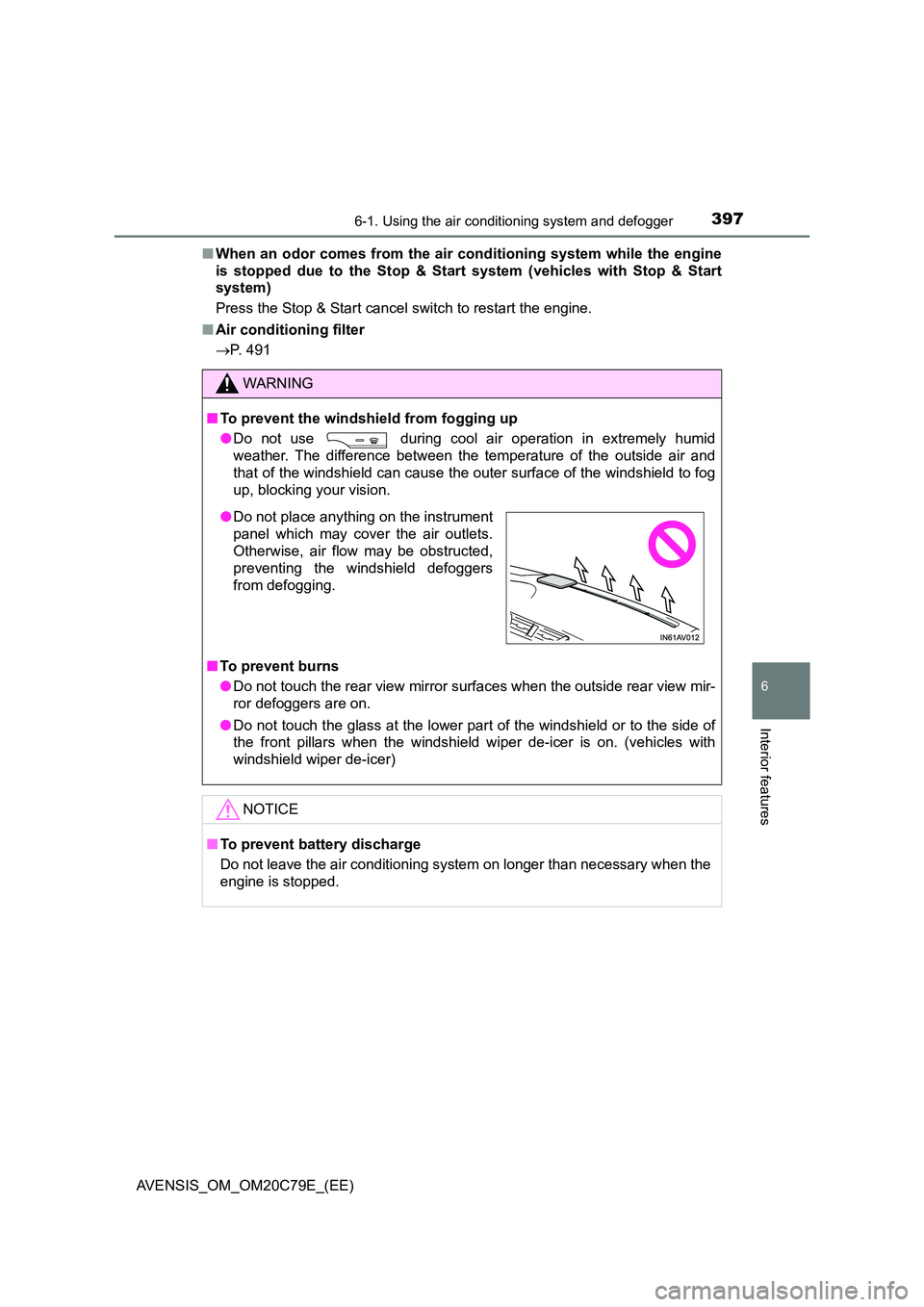
● Do not place anything on the instrument
panel which may cover the air outlets.
Otherwise, air flow may be obstructed,
preventing the windshield defoggers
from defogging.
Page 404 of 660
4046-1. Using the air conditioning system and defogger
AVENSIS_OM_OM20C79E_(EE)
■ When an odor comes from the air conditioning system while the engine
is stopped due to the Stop & Start system (vehicles with Stop & Start
system)
Press the Stop & Start cancel switch to restart the engine.
■ Air conditioning filter
P. 491
WARNING
■To prevent the windshield from fogging up
● Do not use during cool air operation in extremely humid
weather. The difference between the temperature of the outside air and
that of the windshield can cause the outer surface of the windshield to fog
up, blocking your vision.
■ To prevent burns
● Do not touch the rear view mirror surfaces when the outside rear view mir-
ror defoggers are on.
● Do not touch the glass at the lower part of the windshield or to the side of
the front pillars when the windshield wiper de-icer is on. (vehicles with
windshield wiper de-icer)
NOTICE
■ To prevent battery discharge
Do not leave the air conditioning syst em on longer than necessary when the
engine is stopped.
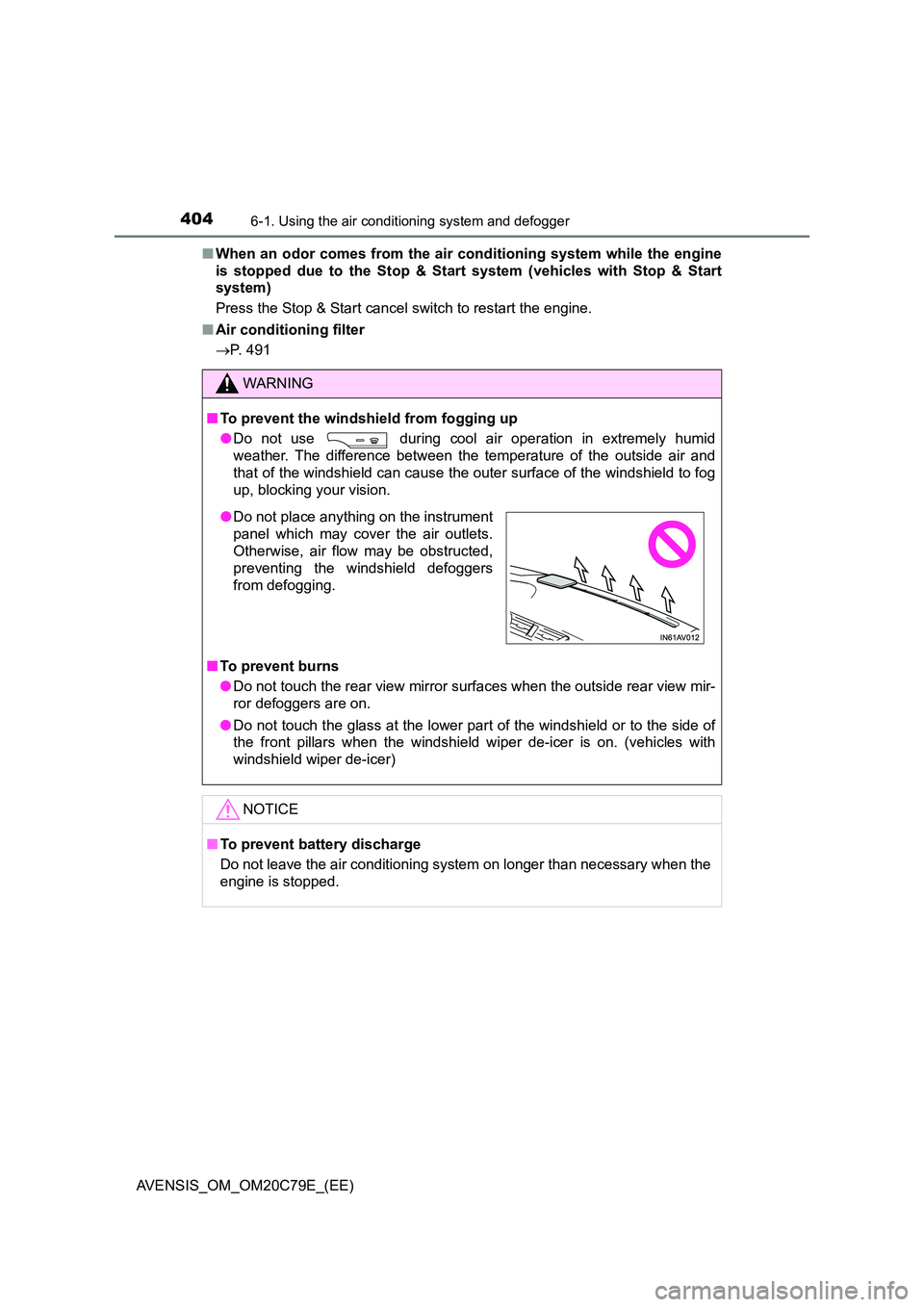
● Do not place anything on the instrument
panel which may cover the air outlets.
Otherwise, air flow may be obstructed,
preventing the windshield defoggers
from defogging.
Page 406 of 660
4066-1. Using the air conditioning system and defogger
AVENSIS_OM_OM20C79E_(EE)
WARNING
■To prevent burns or damage on your vehicle
NOTICE
■To prevent damage to your vehicle
● Do not turn the heater on and off repeatedly in 5 minute intervals as this
can shorten the life of the heater components. If the engine must be turned
on and off repeatedly within short intervals (such as when the vehicle is
being used for delivery purposes), turn the heater off.
● Do not modify or open the heater without consulting any authorized Toyota
retailer or Toyota authorized repairer, or any reliable repairer. This may
cause a heater malfunction or a fire.
● Be careful not to splash water or spill liquid directly on the heater or on the
heater fuel pump. This may cause the heater to malfunction.
● Keep the intake and exhaust pipes of the heater free from water, snow,
ice, mud, etc. If the pipes become clogged, this can cause the heater to
malfunction.
● If you notice anything unusual, such as a fluid leak, smoke or poor opera-
tion, turn off the heater and have your vehicle checked by any authorized
Toyota retailer or Toyota authorized repairer, or any reliable repairer.
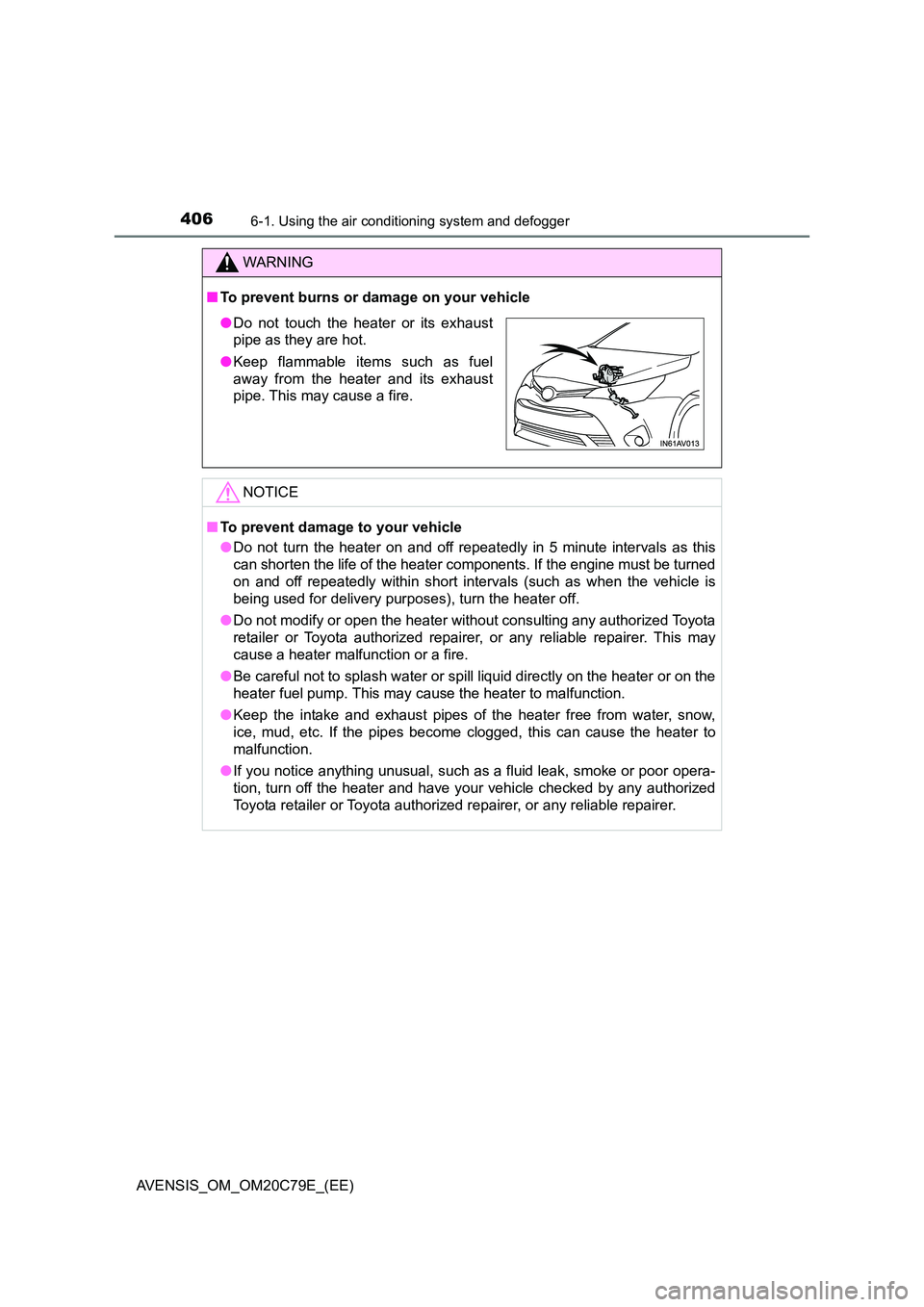
● Do not touch the heater or its exhaust
pipe as they are hot.
● Keep flammable items such as fuel
away from the heater and its exhaust
pipe. This may cause a fire.
Page 407 of 660
4076-1. Using the air conditioning system and defogger
AVENSIS_OM_OM20C79E_(EE)
6
Interior features
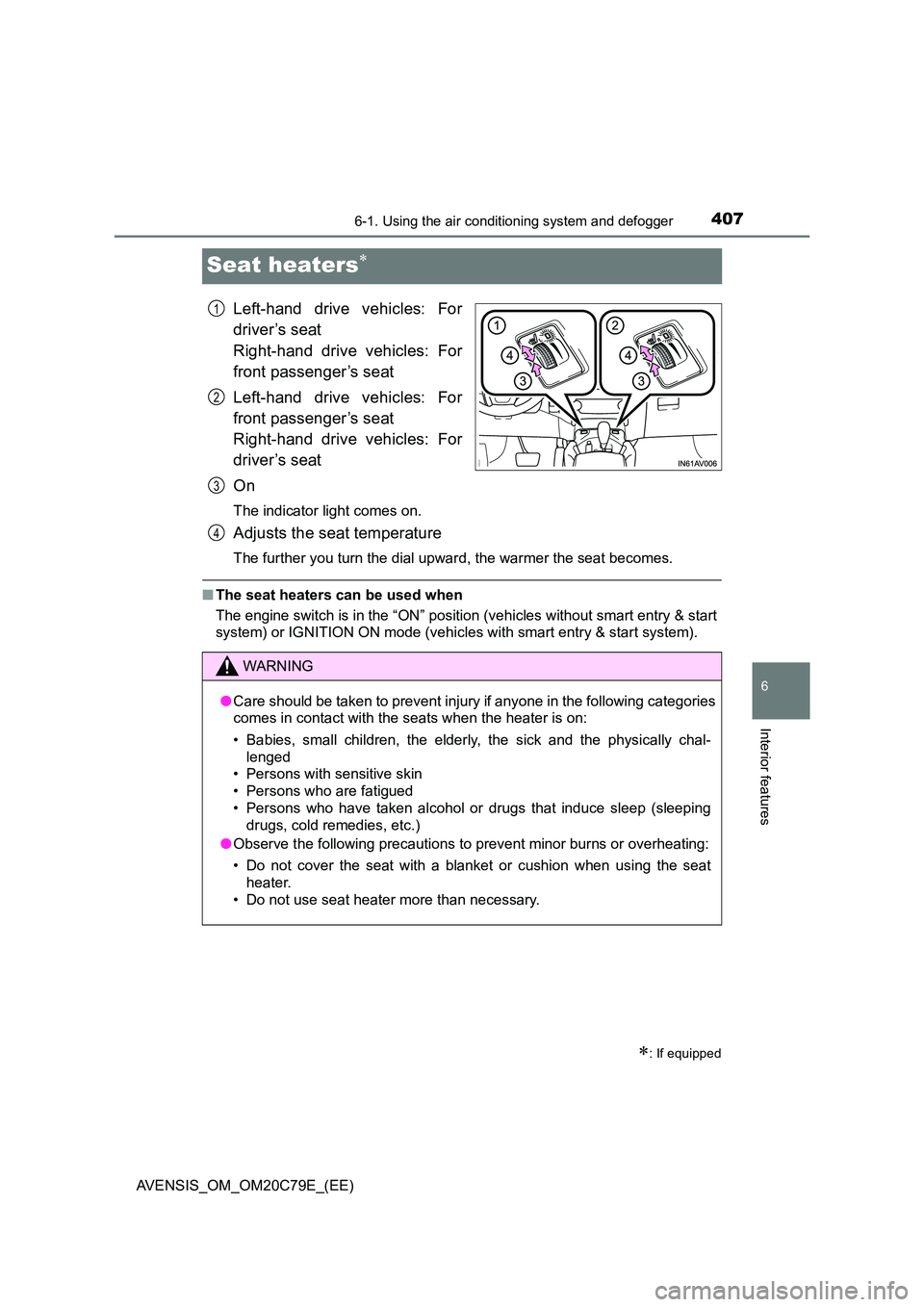
Seat heaters
Left-hand drive vehicles: For
driver’s seat
Right-hand drive vehicles: For
front passenger’s seat
Left-hand drive vehicles: For
front passenger’s seat
Right-hand drive vehicles: For
driver’s seat
On
The indicator light comes on.
Adjusts the seat temperature
The further you turn the dial upward, the warmer the seat becomes.
■ The seat heaters can be used when
The engine switch is in the “ON” position (vehicles without smart entry & start
system) or IGNITION ON mode (vehicles with smart entry & start system).
: If equipped
1
2
3
WARNING
● Care should be taken to prevent injury if anyone in the following categories
comes in contact with the seats when the heater is on:
• Babies, small children, the elderly, the sick and the physically chal-
lenged
• Persons with sensitive skin
• Persons who are fatigued
• Persons who have taken alcohol or drugs that induce sleep (sleeping
drugs, cold remedies, etc.)
● Observe the following precautions to prevent minor burns or overheating:
• Do not cover the seat with a blanket or cushion when using the seat
heater.
• Do not use seat heater more than necessary.
4
Page 412 of 660
4126-3. Using the storage features
AVENSIS_OM_OM20C79E_(EE)
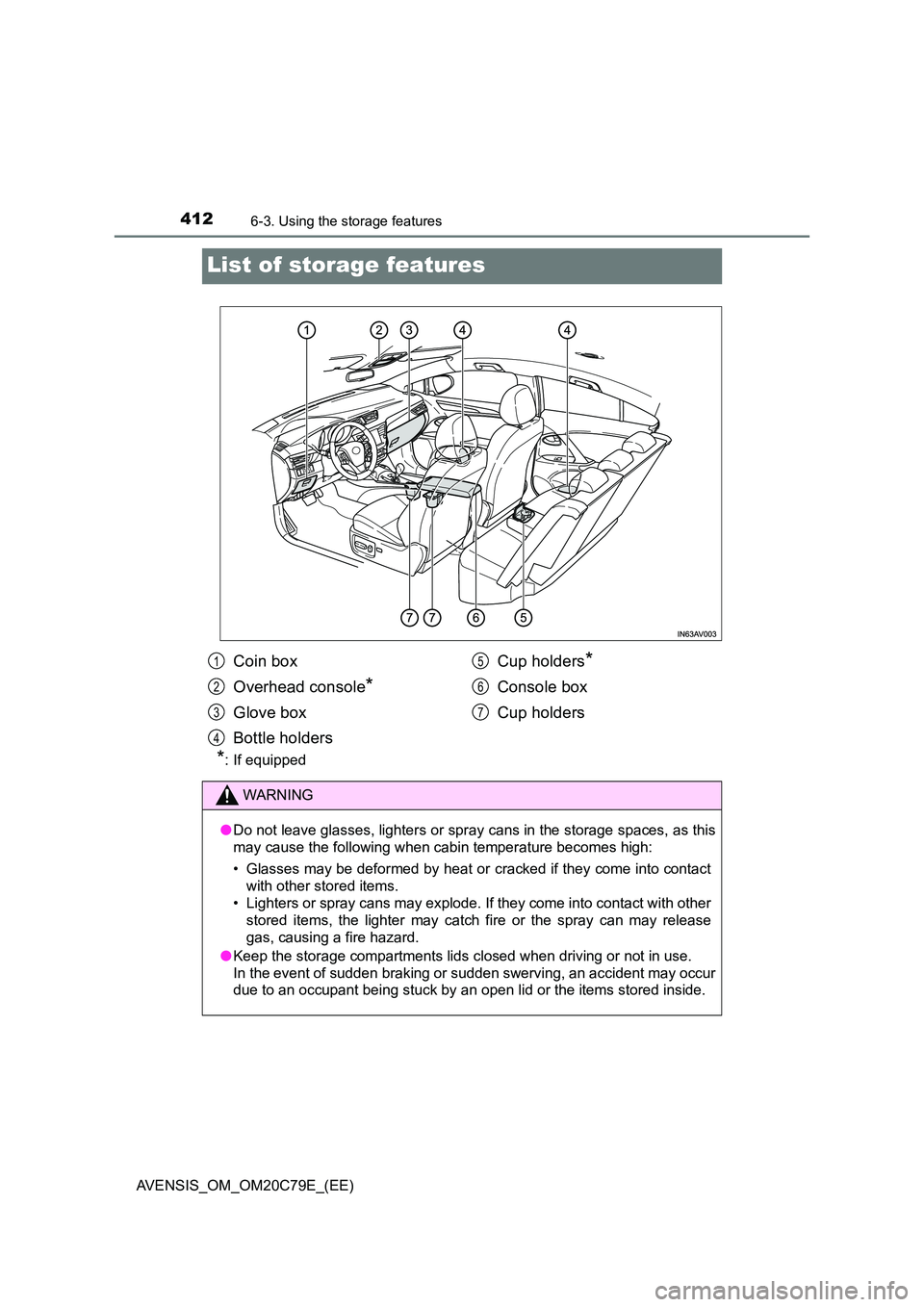
List of storage features
*: If equipped
Coin box
Overhead console*
Glove box
Bottle holders
Cup holders*
Console box
Cup holders
WARNING
● Do not leave glasses, lighters or spray cans in the storage spaces, as this
may cause the following when cabin temperature becomes high:
• Glasses may be deformed by heat or cracked if they come into contact
with other stored items.
• Lighters or spray cans may explode. If they come into contact with other
stored items, the lighter may catch fire or the spray can may release
gas, causing a fire hazard.
● Keep the storage compartments lids closed when driving or not in use.
In the event of sudden braking or sudden swerving, an accident may occur
due to an occupant being stuck by an open lid or the items stored inside.
1
2
3
4
5
6
7
Page 416 of 660
4166-3. Using the storage features
AVENSIS_OM_OM20C79E_(EE)
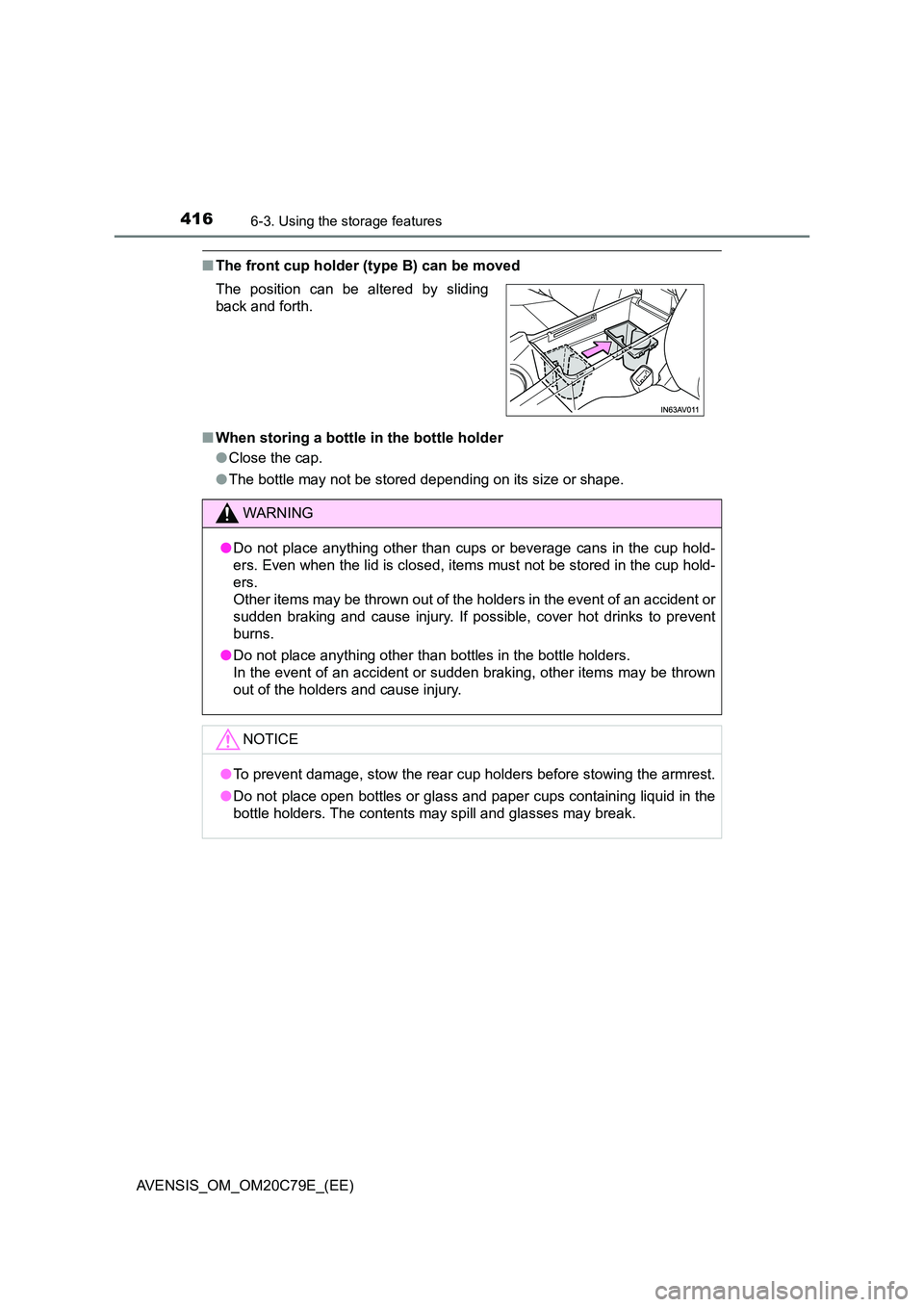
■The front cup holder (type B) can be moved
■ When storing a bottle in the bottle holder
● Close the cap.
● The bottle may not be stored depending on its size or shape.
The position can be altered by sliding
back and forth.
WARNING
● Do not place anything other than cups or beverage cans in the cup hold-
ers. Even when the lid is closed, items must not be stored in the cup hold-
ers.
Other items may be thrown out of the holders in the event of an accident or
sudden braking and cause injury. If possible, cover hot drinks to prevent
burns.
● Do not place anything other than bottles in the bottle holders.
In the event of an accident or sudden braking, other items may be thrown
out of the holders and cause injury.
NOTICE
● To prevent damage, stow the rear cup holders before stowing the armrest.
● Do not place open bottles or glass and paper cups containing liquid in the
bottle holders. The contents may spill and glasses may break.