check engine light TOYOTA AVENSIS 2018 User Guide
[x] Cancel search | Manufacturer: TOYOTA, Model Year: 2018, Model line: AVENSIS, Model: TOYOTA AVENSIS 2018Pages: 660, PDF Size: 63.16 MB
Page 209 of 660
209
4
4-2. Driving procedures
Driving
AVENSIS_OM_OM20C79E_(EE)
Engine (ignition) switch (vehicles without
smart entry & start system)
Multidrive
Push the parking brake switch to check that the parking brake is
set. (P. 230)
Parking brake indicator will come on.
Check that the shift lever is set in P.
Firmly depress the brake pedal.
Turn the engine switch to the “START” position to start the engine.
Manual transmission (gasoline engine)
Push the parking brake switch to check that the parking brake is
set. (P. 230)
Parking brake indicator will come on.
Check that the shift lever is set in N.
Firmly depress the clutch pedal.
Turn the engine switch to the “START” position to start the engine.
Manual transmission (diesel engine)
Push the parking brake switch to check that the parking brake is
set. (P. 230)
Parking brake indicator will come on.
Check that the shift lever is set in N.
Firmly depress the clutch pedal.
Turn the engine switch to the “ON” position.
indicator light turns on.
After indicator light goes out, turn the engine switch to the
“START” position to start the engine.
Starting the engine
1
2
3
4
1
2
3
4
1
2
3
4
5
Page 213 of 660
2134-2. Driving procedures
4
Driving
AVENSIS_OM_OM20C79E_(EE)
Manual transmission
Push the parking brake switch to check that the parking brake is
set. (P. 230)
Parking brake indicator will come on.
Check that the shift lever is set in N.
Firmly depress the clutch pedal.
The engine switch indicator will turn green. If the indicator does not turn
green, the engine cannot be started.
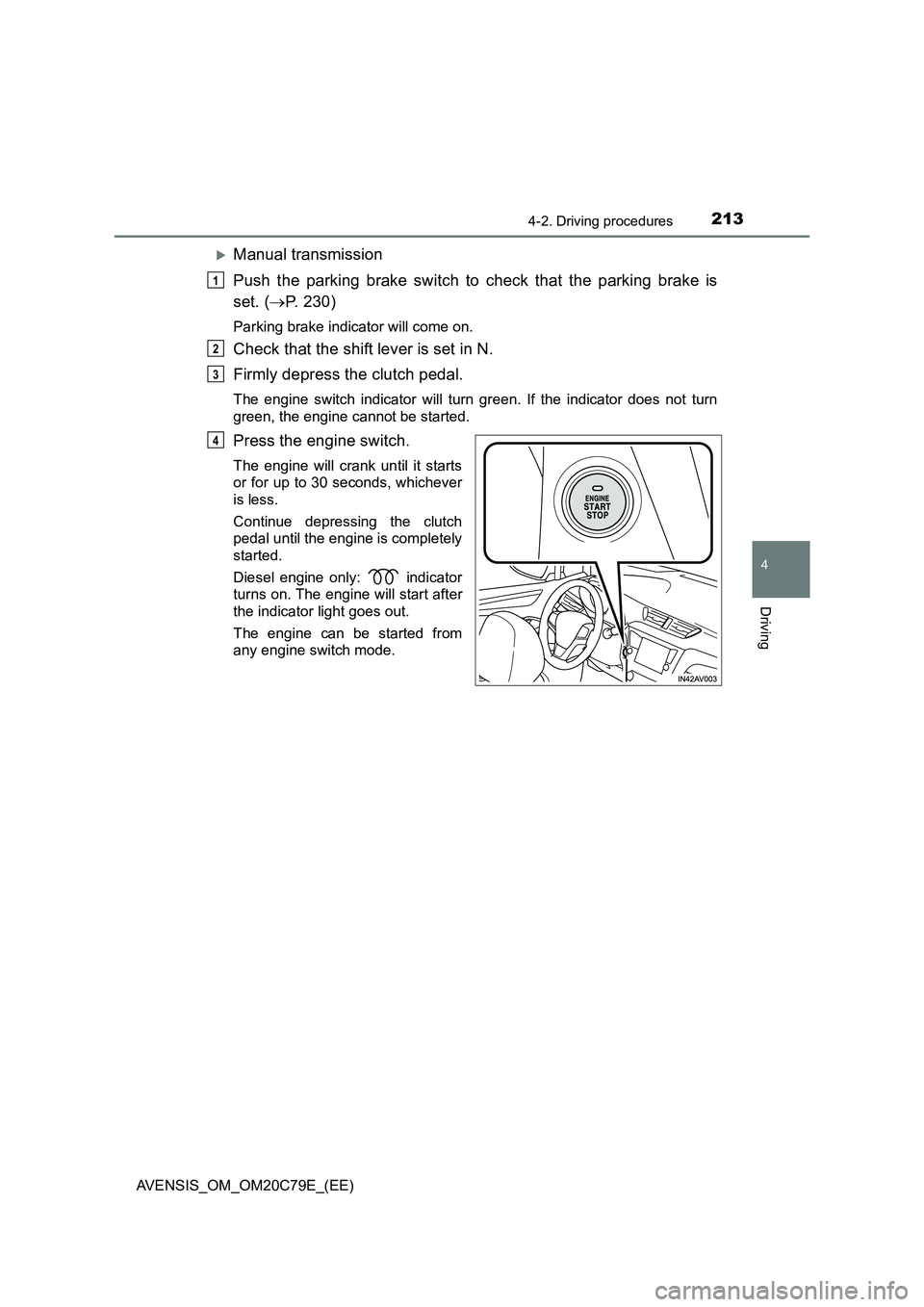
Press the engine switch.
The engine will crank until it starts
or for up to 30 seconds, whichever
is less.
Continue depressing the clutch
pedal until the engine is completely
started.
Diesel engine only: indicator
turns on. The engine will start after
the indicator light goes out.
The engine can be started from
any engine switch mode.
1
2
3
4
Page 218 of 660
2184-2. Driving procedures
AVENSIS_OM_OM20C79E_(EE)
NOTICE
■To prevent battery discharge
● Do not leave the engine switch in ACCESSORY or IGNITION ON mode
for long periods of time without the engine running.
● If the indicator on the engine switch is illuminated, the engine switch is not
off. When exiting the vehicle, always check that the engine switch is off.
● On vehicles with Multidrive, do not stop the engine when the shift lever is
in a position other than P. If the engine is stopped in another shift lever
position, the engine switch will not be turned off but instead be turned to
ACCESSORY mode. If the vehicle is left in ACCESSORY mode, battery
discharge may occur.
■ When starting the engine
● Do not race a cold engine.
● If the engine becomes difficult to start or stalls frequently, have your vehi-
cle checked by any authorized Toyota retailer or Toyota authorized
repairer, or any reliable repairer immediately.
■ Symptoms indicating a malfunction with the engine switch
If the engine switch seems to be operating somewhat differently than usual,
such as the switch sticking slightly, there may be a malfunction. Contact any
authorized Toyota retailer or Toyota authorized repairer, or any reliable
repairer immediately.
Page 229 of 660
229
4
4-2. Driving procedures
Driving
AVENSIS_OM_OM20C79E_(EE)
Turn signal lever
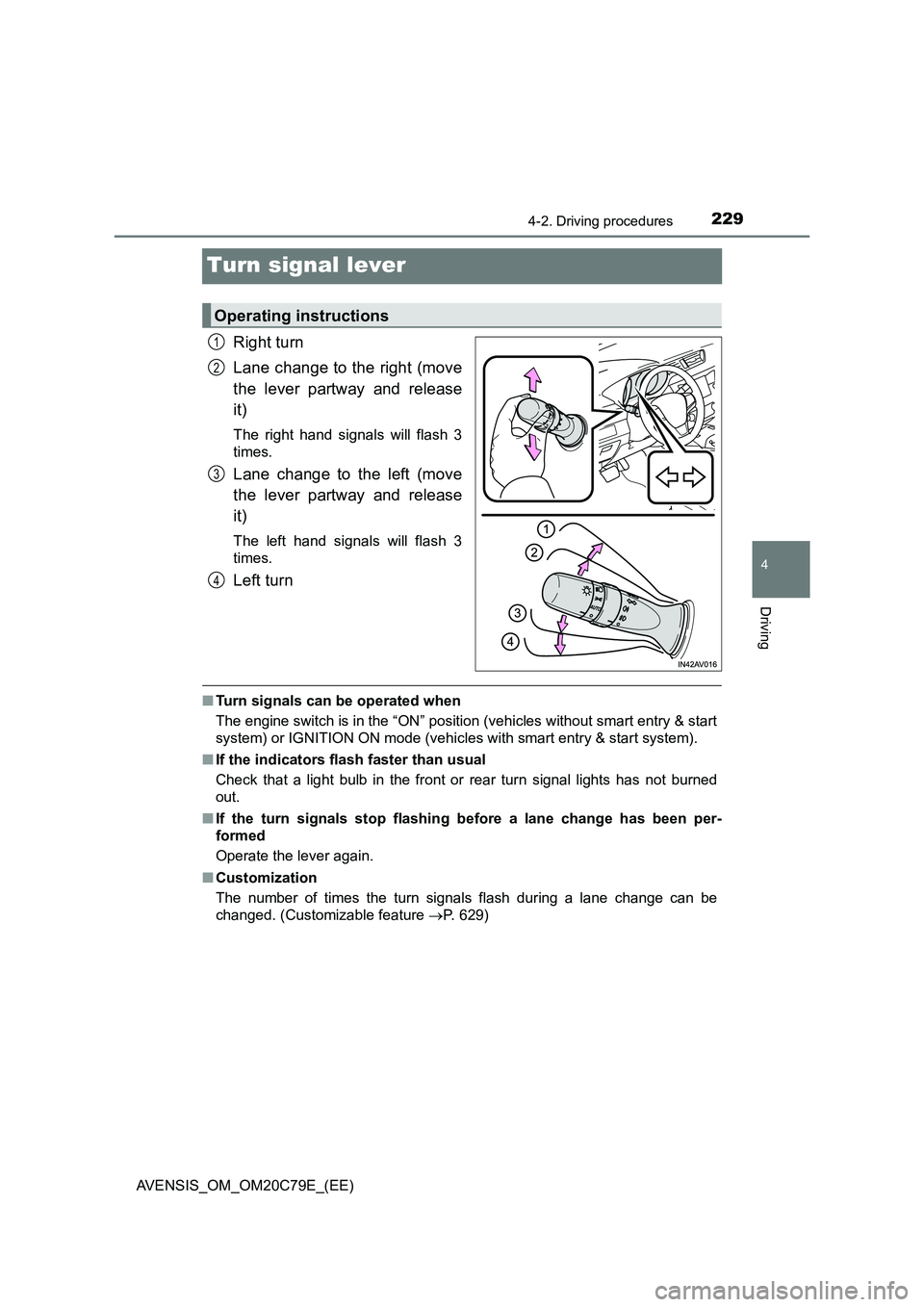
Right turn
Lane change to the right (move
the lever partway and release
it)
The right hand signals will flash 3
times.
Lane change to the left (move
the lever partway and release
it)
The left hand signals will flash 3
times.
Left turn
■ Turn signals can be operated when
The engine switch is in the “ON” position (vehicles without smart entry & start
system) or IGNITION ON mode (vehicles with smart entry & start system).
■ If the indicators flash faster than usual
Check that a light bulb in the front or rear turn signal lights has not burned
out.
■ If the turn signals stop flashing before a lane change has been per-
formed
Operate the lever again.
■ Customization
The number of times the turn signals flash during a lane change can be
changed. (Customizable feature P. 629)
Operating instructions
1
2
3
4
Page 245 of 660
2454-3. Operating the lights and wipers
4
Driving
AVENSIS_OM_OM20C79E_(EE)
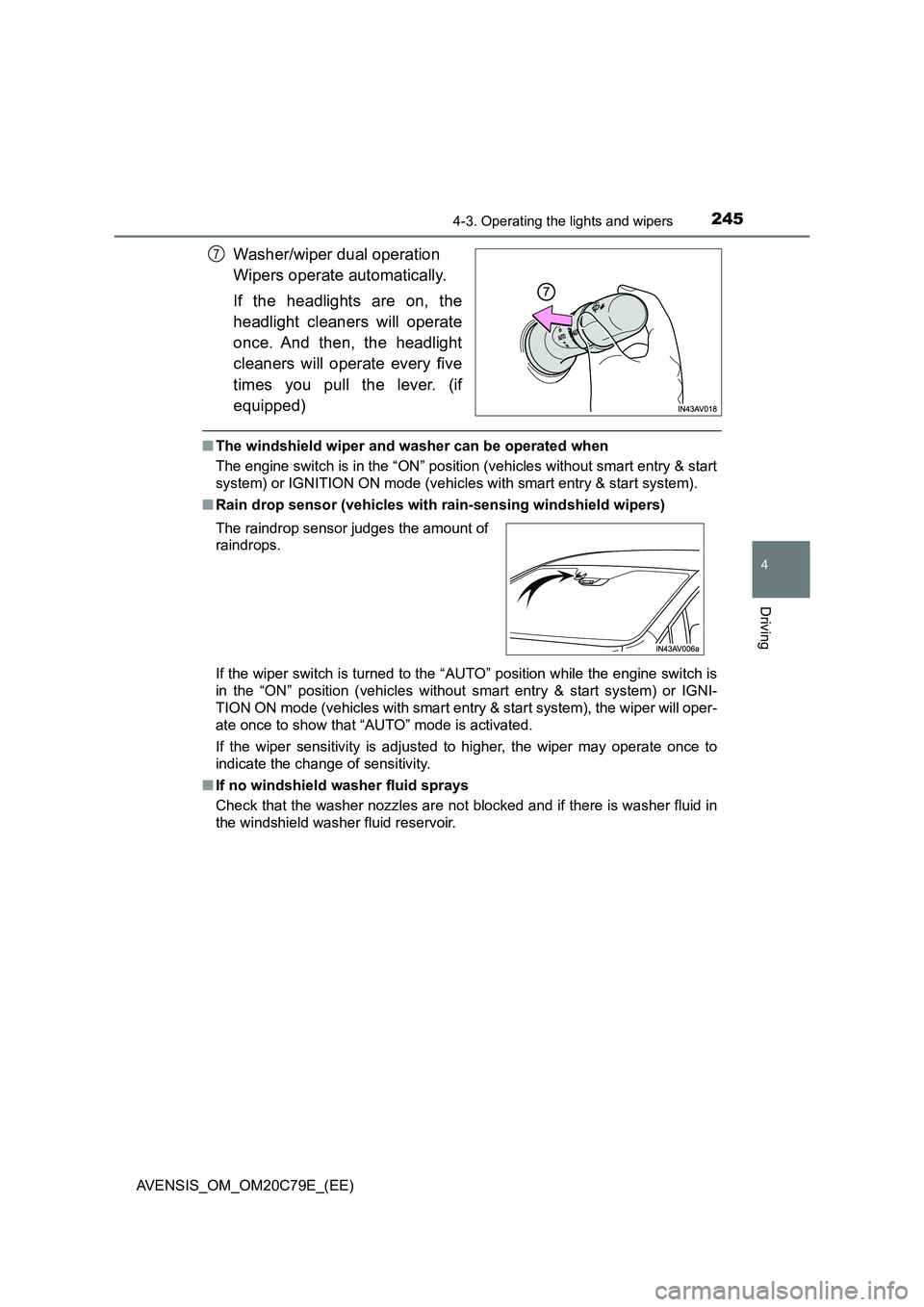
Washer/wiper dual operation
Wipers operate automatically.
If the headlights are on, the
headlight cleaners will operate
once. And then, the headlight
cleaners will operate every five
times you pull the lever. (if
equipped)
■The windshield wiper and washer can be operated when
The engine switch is in the “ON” position (vehicles without smart entry & start
system) or IGNITION ON mode (vehicles with smart entry & start system).
■Rain drop sensor (vehicles with rain-sensing windshield wipers)
If the wiper switch is turned to the “AUTO” position while the engine switch is
in the “ON” position (vehicles without smart entry & start system) or IGNI-
TION ON mode (vehicles with smart entry & start system), the wiper will oper-
ate once to show that “AUTO” mode is activated.
If the wiper sensitivity is adjusted to higher, the wiper may operate once to
indicate the change of sensitivity.
■If no windshield washer fluid sprays
Check that the washer nozzles are not blocked and if there is washer fluid in
the windshield washer fluid reservoir.
7
The raindrop sensor judges the amount of
raindrops.
Page 305 of 660
3054-6. Using the driving support systems
4
Driving
AVENSIS_OM_OM20C79E_(EE)
■ If the Stop & Start cancel indicator continues to flash
The Stop & Start system may be malfunctioning. Contact any authorized
Toyota retailer or Toyota authorized repairer, or any reliable repairer.
WARNING
■ When the Stop & Start system is operating
● Keep the shift lever in N and apply the brake pedal or parking brake for
safety while the engine is stopped due to the Stop & Start system (while
the Stop & Start indicator is on).
Unexpected accidents may occur due to the automatic engine start func-
tion.
● Do not leave the vehicle while the engine is stopped due to the Stop &
Start system (while the Stop & Start indicator is on).
Unexpected accidents may occur due to the automatic engine start func-
tion.
● Ensure that the engine is not stopped by the Stop & Start system while the
vehicle is in a poorly ventilated area. The engine may restart due to the
automatic engine start function, causing exhaust gases to collect and
enter the vehicle and resulting in death or a serious health hazard.
NOTICE
■ To ensure the system operates correctly
If any one of the following situations occurs, the Stop & Start system may
not operate correctly, thus, please have your vehicle checked by any autho-
rized Toyota retailer or Toyota authorized repairer, or any reliable repairer.
● While the driver’s seat belt is fastened, the seat belt reminder light flashes.
● Even when the driver’s seat belt is not fastened, the seat belt reminder
light remains off.
● Even when the driver’s door is closed, the open door warning is displayed
on the multi-information display, or the interior light comes on when the
interior light switch is in the door position.
● Even when the driver’s door is opened, the open door warning is not dis-
played on the multi-information display, or the interior light does not come
on when the interior light switch is in the door position.
Page 312 of 660
3124-7. Driving tips
AVENSIS_OM_OM20C79E_(EE)
Winter driving tips
●Use fluids that are appropriate to the prevailing outside tempera-
tures.
• Engine oil
• Engine coolant
• Washer fluid
●Have a service technician inspect the condition of the battery.
●Have the vehicle fitted with four snow tires or purchase a set of tire
chains for the front tires.
Ensure that all tires are the same size and brand, and that chains match
the size of the tires.
Perform the following according to the driving conditions.
●Do not try to forcibly open a window or move a wiper that is frozen.
Pour warm water over the frozen area to melt the ice. Wipe away
the water immediately to prevent it from freezing.
●To ensure proper operation of the climate control system fan,
remove any snow that has accumulated on the air inlet vents in
front of the windshield.
●Check for and remove any excess ice or snow that may have accu-
mulated on the exterior lights, vehicle’s roof, chassis, around the
tires or on the brakes.
●Remove any snow or mud from the bottom of your shoes before
getting in the vehicle.
Carry out the necessary preparations and inspections before
driving the vehicle in winter. Always drive the vehicle in a man-
ner appropriate to the prevailing weather conditions.
Preparation for winter
Before driving the vehicle
Page 435 of 660
435
7Maintenance and care
AVENSIS_OM_OM20C79E_(EE)7-1. Maintenance and care
Cleaning and
protecting the
vehicle exterior ................ 436
Cleaning and
protecting the
vehicle interior ................. 440
7-2. Maintenance
Maintenance
requirements.................... 443
7-3. Do-it-yourself maintenance
Do-it-yourself service
precautions ...................... 446
Hood .................................. 450
Positioning a floor jack ....... 452
Engine compartment.......... 453
Tires ................................... 468
Tire inflation pressure ........ 486
Wheels ............................... 488
Air conditioning filter .......... 491
Wireless remote control/
electronic key battery....... 493
Checking and replacing
fuses ................................ 496
Light bulbs ......................... 501
Page 501 of 660
5017-3. Do-it-yourself maintenance
AVENSIS_OM_OM20C79E_(EE)
7
Maintenance and care
Light bulbs
Check the wattage of the light bulb to be replaced. (P. 625)
P. 4 5 5
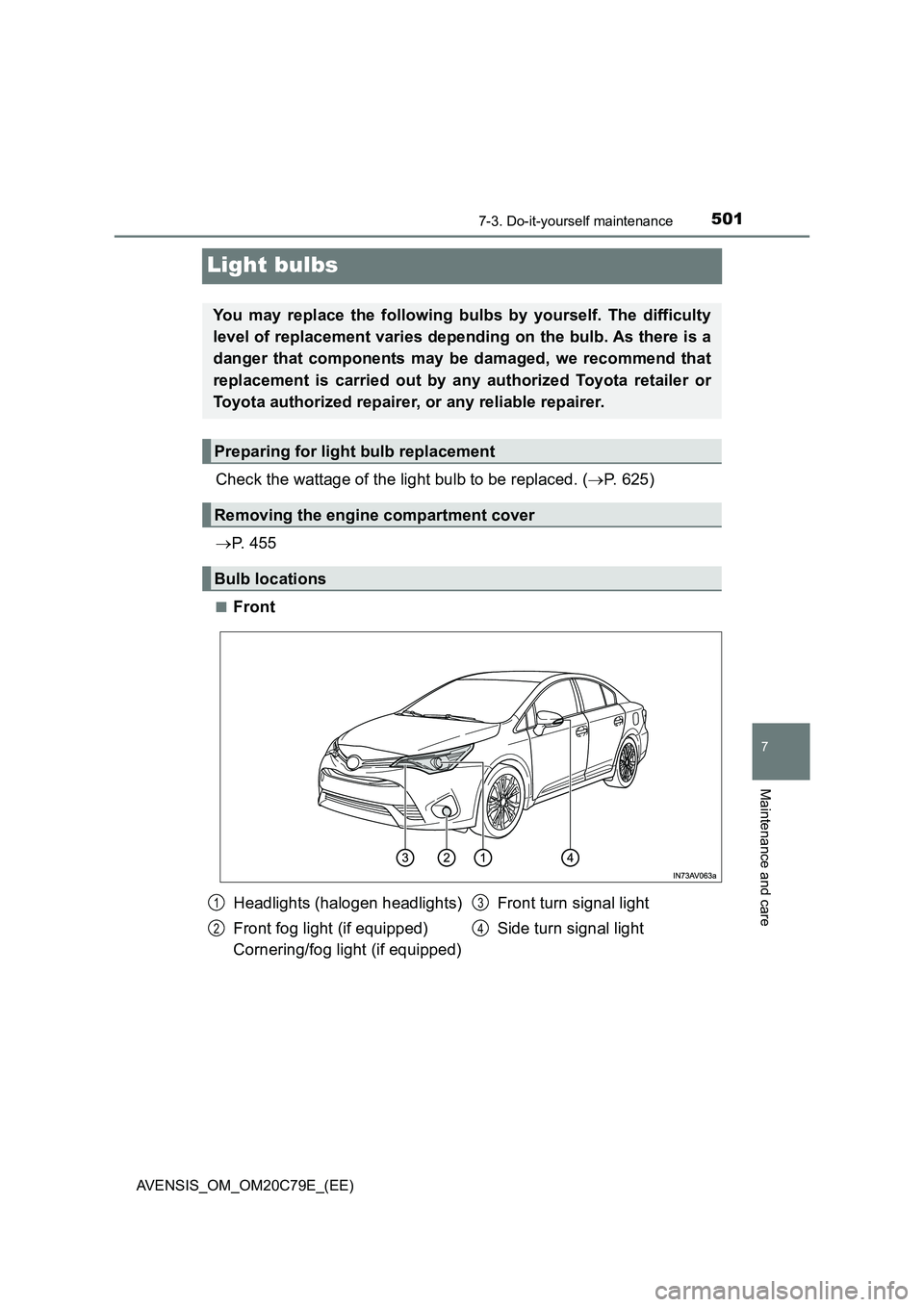
■Front
You may replace the following bulbs by yourself. The difficulty
level of replacement varies depending on the bulb. As there is a
danger that components may be damaged, we recommend that
replacement is carried out by any authorized Toyota retailer or
Toyota authorized repairer, or any reliable repairer.
Preparing for light bulb replacement
Removing the engine compartment cover
Bulb locations
Headlights (halogen headlights)
Front fog light (if equipped)
Cornering/fog light (if equipped)Front turn signal light
Side turn signal light1
2
3
4
Page 535 of 660
5358-2. Steps to take in an emergency
AVENSIS_OM_OM20C79E_(EE)
8
When trouble arises
■If the tire pressure warning light frequently comes on after blinking for 1
minute (vehicles with tire pressure warning system)
If the tire pressure warning light frequently comes on after blinking for 1 min-
ute when the engine switch is turned to the “ON” position (vehicles without
smart entry & start system) or IGNITION ON mode (vehicles with smart entry
& start system), have it checked by any authorized Toyota retailer or Toyota
authorized repairer, or any reliable repairer.
If the tire pressure warning light frequently comes on after blinking for 1 min-
ute when you change between registered wheel sets, confirm the correct
wheel set has been selected.
■ If the malfunction indicator lamp comes on while driving
For some models, the malfunction indicator lamp will come on if the fuel tank
becomes completely empty. If the fuel tank is empty, refuel the vehicle imme-
diately. The malfunction indicator lamp will go off after several trips.
If the malfunction indicator lamp does not go off, contact any authorized
Toyota retailer or Toyota authorized repairer, or any reliable repairer.
■ Front passenger detection sensor, seat belt reminder and warning
buzzer
● If luggage is placed on the front passenger seat, the front passenger detec-
tion sensor may cause the warning light to flash and the warning buzzer to
sound even if a passenger is not sitting in the seat.
● If a cushion is placed on the seat, the sensor may not detect a passenger,
and the warning light may not operate properly.