remote control TOYOTA AVENSIS 2018 User Guide
[x] Cancel search | Manufacturer: TOYOTA, Model Year: 2018, Model line: AVENSIS, Model: TOYOTA AVENSIS 2018Pages: 660, PDF Size: 63.16 MB
Page 125 of 660
1253-1. Key information
3
Operation of each component
AVENSIS_OM_OM20C79E_(EE)■Certification for wireless remote control (vehicles without smart entry &
start system)
Page 131 of 660
1313-1. Key information
3
Operation of each component
AVENSIS_OM_OM20C79E_(EE)
NOTICE
■To prevent key damage
● Do not drop the keys, subject them to strong shocks or bend them.
● Do not expose the keys to high temperatures for long periods of time.
● Do not get the keys wet or wash them in an ultrasonic washer etc.
● Do not attach metallic or magnetic materials to the keys or place the keys
close to such materials.
● Do not disassemble the keys.
● Do not attach a sticker or anything else to the surface of the key with wire-
less remote control function.
● Do not place the keys near objects that produce magnetic fields, such as
TVs, audio systems and induction cookers, or medical electrical equip-
ment, such as low-frequency therapy equipment.
■ Carrying the electronic key on your person (vehicles with smart entry
& start system)
Carry the electronic key 10 cm (3.9 in.) or more away from electric appli-
ances that are turned on. Radio wave s emitted from electric appliances
within 10 cm (3.9 in.) of the electronic key may interfere with the key, caus-
ing the key to not function properly.
■ In case of a smart entry & start system malfunction or other key-related
problems (vehicles with smart entry & start system)
Take your vehicle with all the electronic keys provided with your vehicle to
any authorized Toyota retailer or Toyota authorized repairer, or any reliable
repairer.
■ When an electronic key is lost (vehicles with smart entry & start sys-
tem)
If the electronic key remains lost, the risk of vehicle theft increases signifi-
cantly. Visit any authorized Toyota reta iler or Toyota authorized repairer, or
any reliable repairer imm ediately with all remaining electronic keys that
were provided with your vehicle.
Page 132 of 660
1323-2. Opening, closing and locking the doors
AVENSIS_OM_OM20C79E_(EE)
Side doors
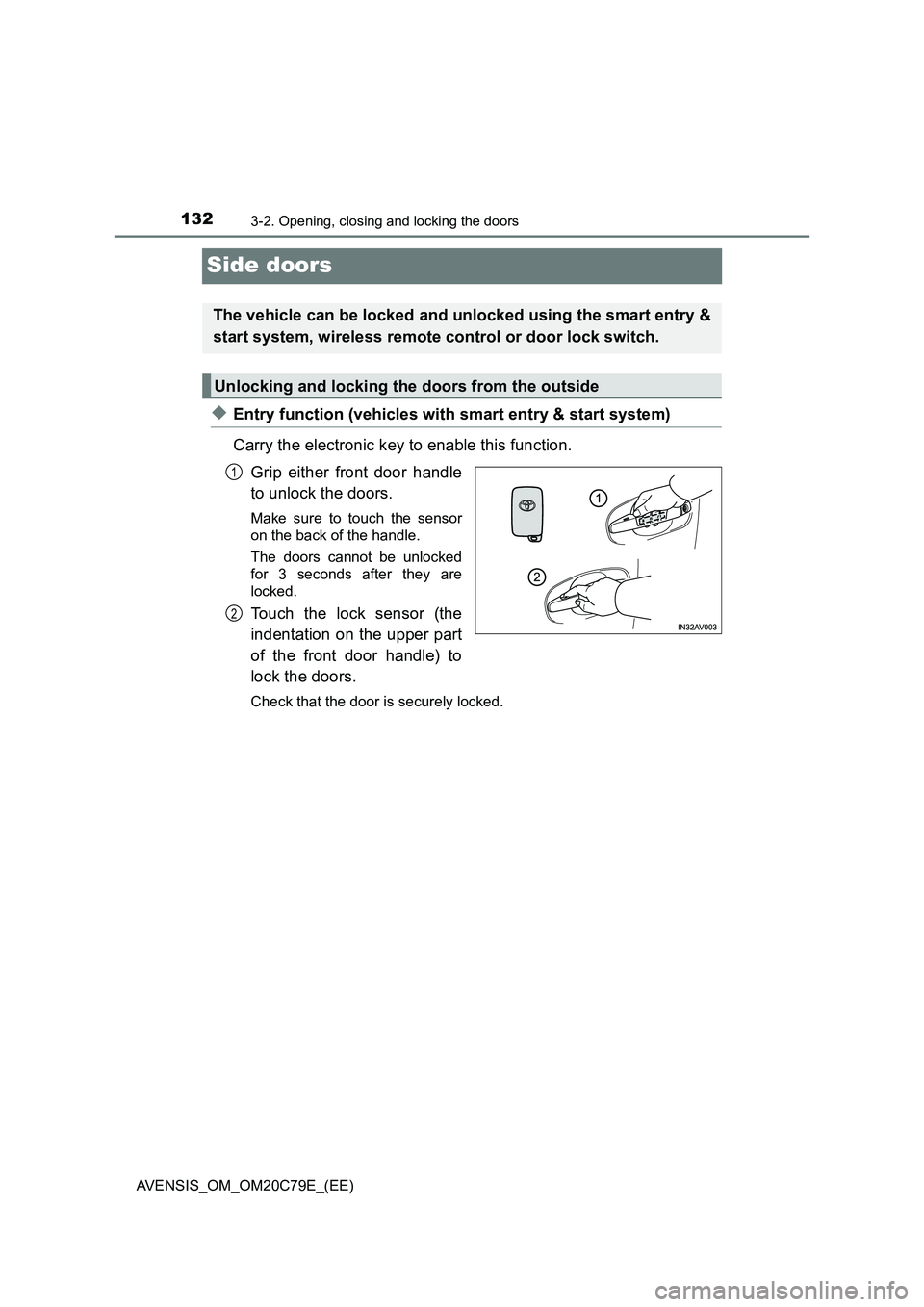
◆Entry function (vehicles with smart entry & start system)
Carry the electronic key to enable this function.
Grip either front door handle
to unlock the doors.
Make sure to touch the sensor
on the back of the handle.
The doors cannot be unlocked
for 3 seconds after they are
locked.
Touch the lock sensor (the
indentation on the upper part
of the front door handle) to
lock the doors.
Check that the door is securely locked.
The vehicle can be locked and unlocked using the smart entry &
start system, wireless remote control or door lock switch.
Unlocking and locking the doors from the outside
1
2
Page 133 of 660
1333-2. Opening, closing and locking the doors
3
Operation of each component
AVENSIS_OM_OM20C79E_(EE)
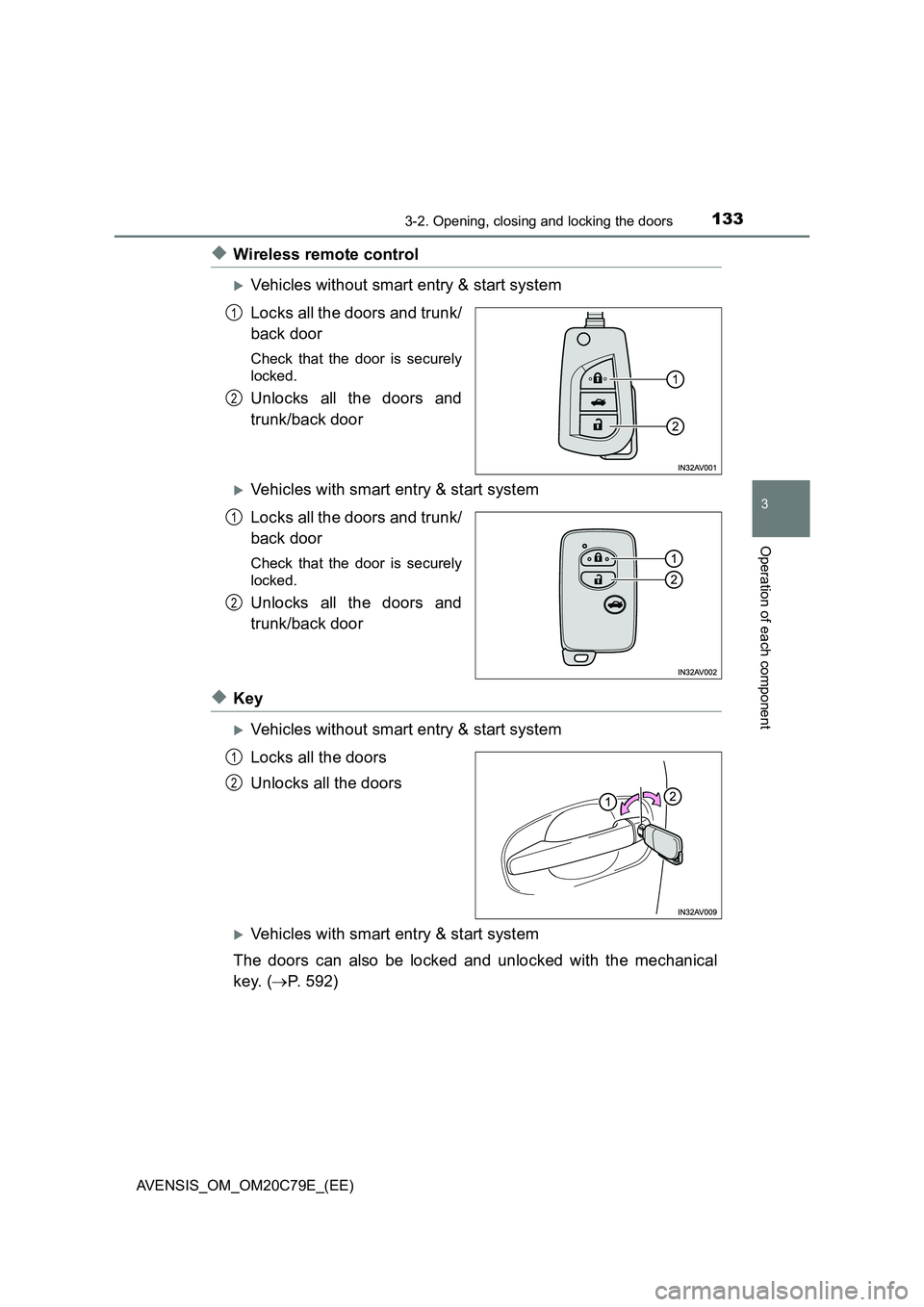
◆Wireless remote control
Vehicles without smart entry & start system
Locks all the doors and trunk/
back door
Check that the door is securely
locked.
Unlocks all the doors and
trunk/back door
Vehicles with smart entry & start system
Locks all the doors and trunk/
back door
Check that the door is securely
locked.
Unlocks all the doors and
trunk/back door
◆Key
Vehicles without smart entry & start system
Locks all the doors
Unlocks all the doors
Vehicles with smart entry & start system
The doors can also be locked and unlocked with the mechanical
key. (P. 592)
1
2
1
2
1
2
Page 134 of 660
1343-2. Opening, closing and locking the doors
AVENSIS_OM_OM20C79E_(EE)
■Operation signals
The emergency flashers flash to indicate that the doors and trunk/back door
have been locked/unlocked. (Locked: Once; Unlocked: Twice)
■Security feature
If a door is not opened within approximately 30 seconds after the vehicle is
unlocked, the security feature automatically locks the vehicle again.
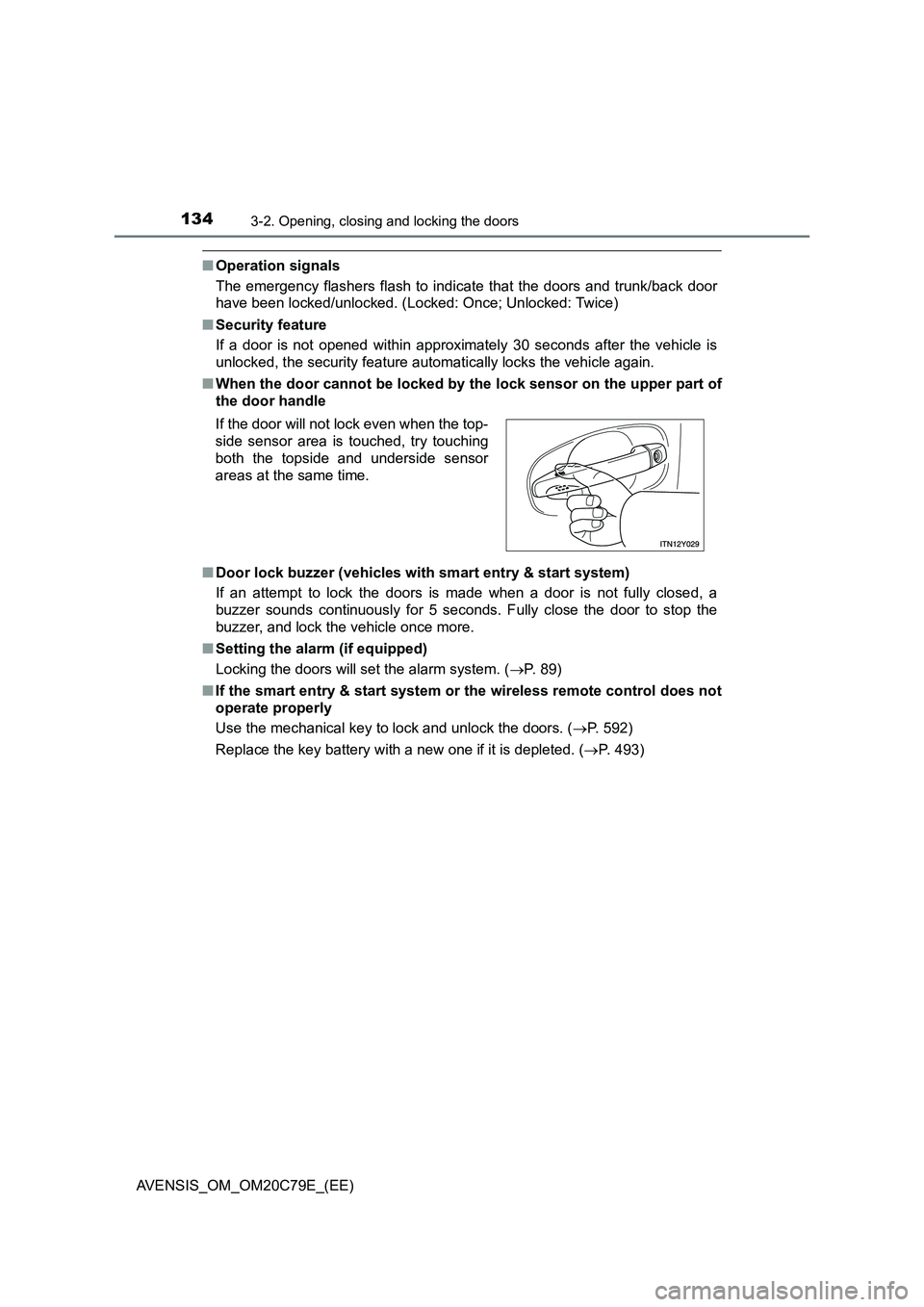
■When the door cannot be locked by the lock sensor on the upper part of
the door handle
■Door lock buzzer (vehicles with smart entry & start system)
If an attempt to lock the doors is made when a door is not fully closed, a
buzzer sounds continuously for 5 seconds. Fully close the door to stop the
buzzer, and lock the vehicle once more.
■Setting the alarm (if equipped)
Locking the doors will set the alarm system. (P. 89)
■If the smart entry & start system or the wireless remote control does not
operate properly
Use the mechanical key to lock and unlock the doors. (P. 592)
Replace the key battery with a new one if it is depleted. (P. 493) If the door will not lock even when the top-
side sensor area is touched, try touching
both the topside and underside sensor
areas at the same time.
Page 139 of 660
139
3
3-2. Opening, closing and locking the doors
Operation of each component
AVENSIS_OM_OM20C79E_(EE)
Trunk (sedan)
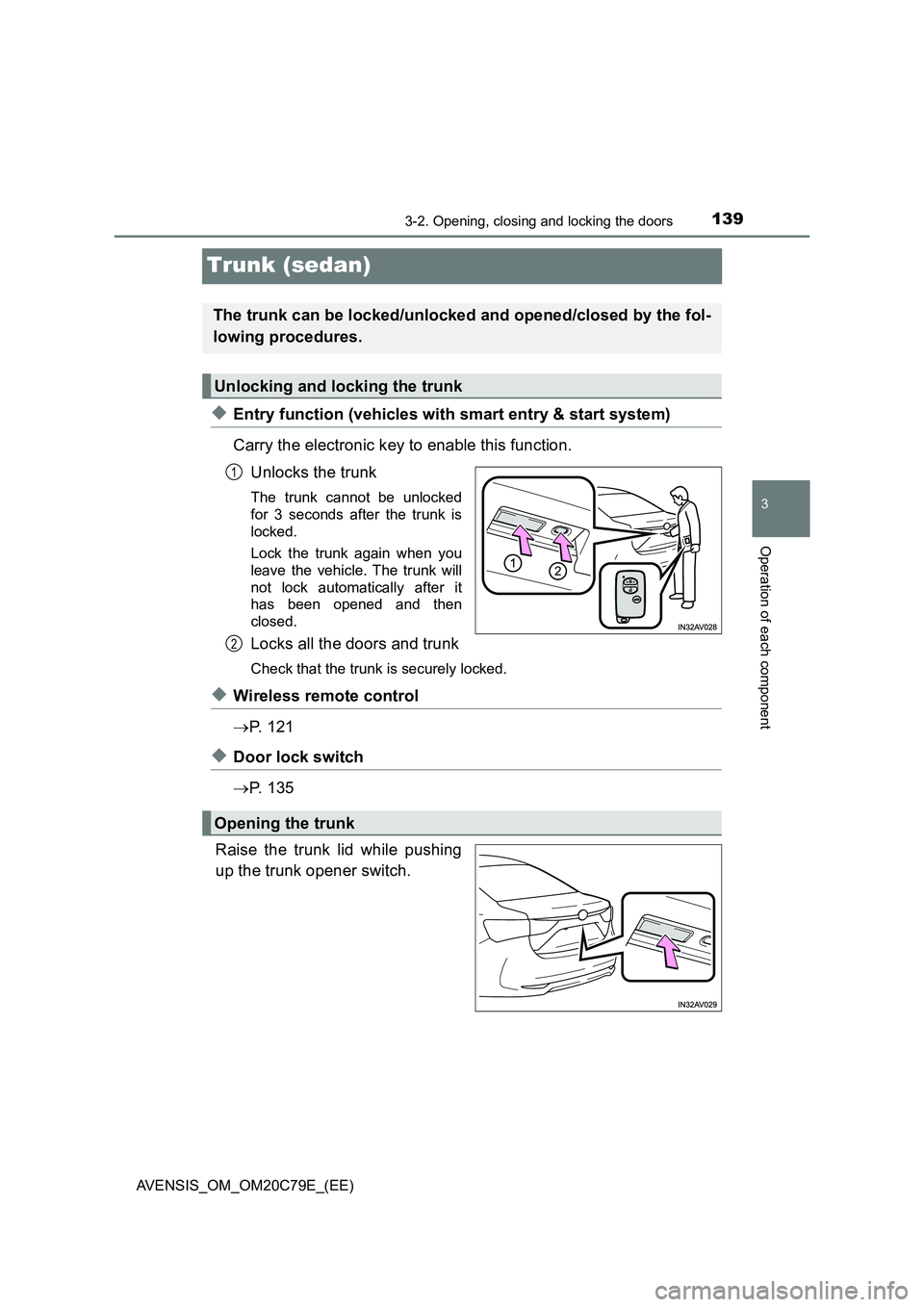
◆Entry function (vehicles with smart entry & start system)
Carry the electronic key to enable this function.
Unlocks the trunk
The trunk cannot be unlocked
for 3 seconds after the trunk is
locked.
Lock the trunk again when you
leave the vehicle. The trunk will
not lock automatically after it
has been opened and then
closed.
Locks all the doors and trunk
Check that the trunk is securely locked.
◆Wireless remote control
P. 1 2 1
◆Door lock switch
P. 1 3 5
Raise the trunk lid while pushing
up the trunk opener switch.
The trunk can be locked/unlocked and opened/closed by the fol-
lowing procedures.
Unlocking and locking the trunk
1
2
Opening the trunk
Page 140 of 660
1403-2. Opening, closing and locking the doors
AVENSIS_OM_OM20C79E_(EE)
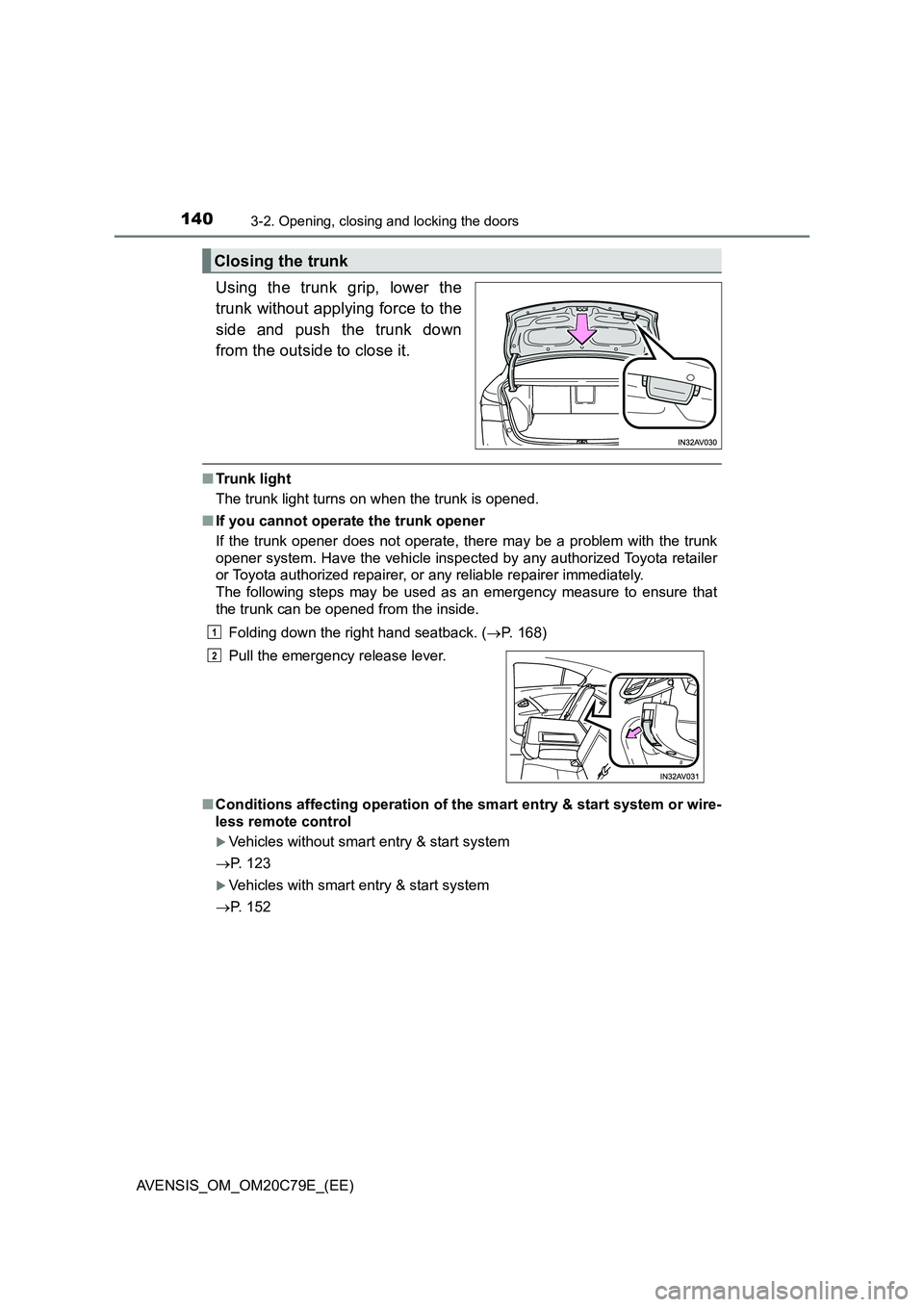
Using the trunk grip, lower the
trunk without applying force to the
side and push the trunk down
from the outside to close it.
■Trunk light
The trunk light turns on when the trunk is opened.
■If you cannot operate the trunk opener
If the trunk opener does not operate, there may be a problem with the trunk
opener system. Have the vehicle inspected by any authorized Toyota retailer
or Toyota authorized repairer, or any reliable repairer immediately.
The following steps may be used as an emergency measure to ensure that
the trunk can be opened from the inside.
Folding down the right hand seatback. (P. 168)
■Conditions affecting operation of the smart entry & start system or wire-
less remote control
Vehicles without smart entry & start system
P. 123
Vehicles with smart entry & start system
P. 152
Closing the trunk
Pull the emergency release lever.
1
2
Page 143 of 660
143
3
3-2. Opening, closing and locking the doors
Operation of each component
AVENSIS_OM_OM20C79E_(EE)
Back door (wagon)
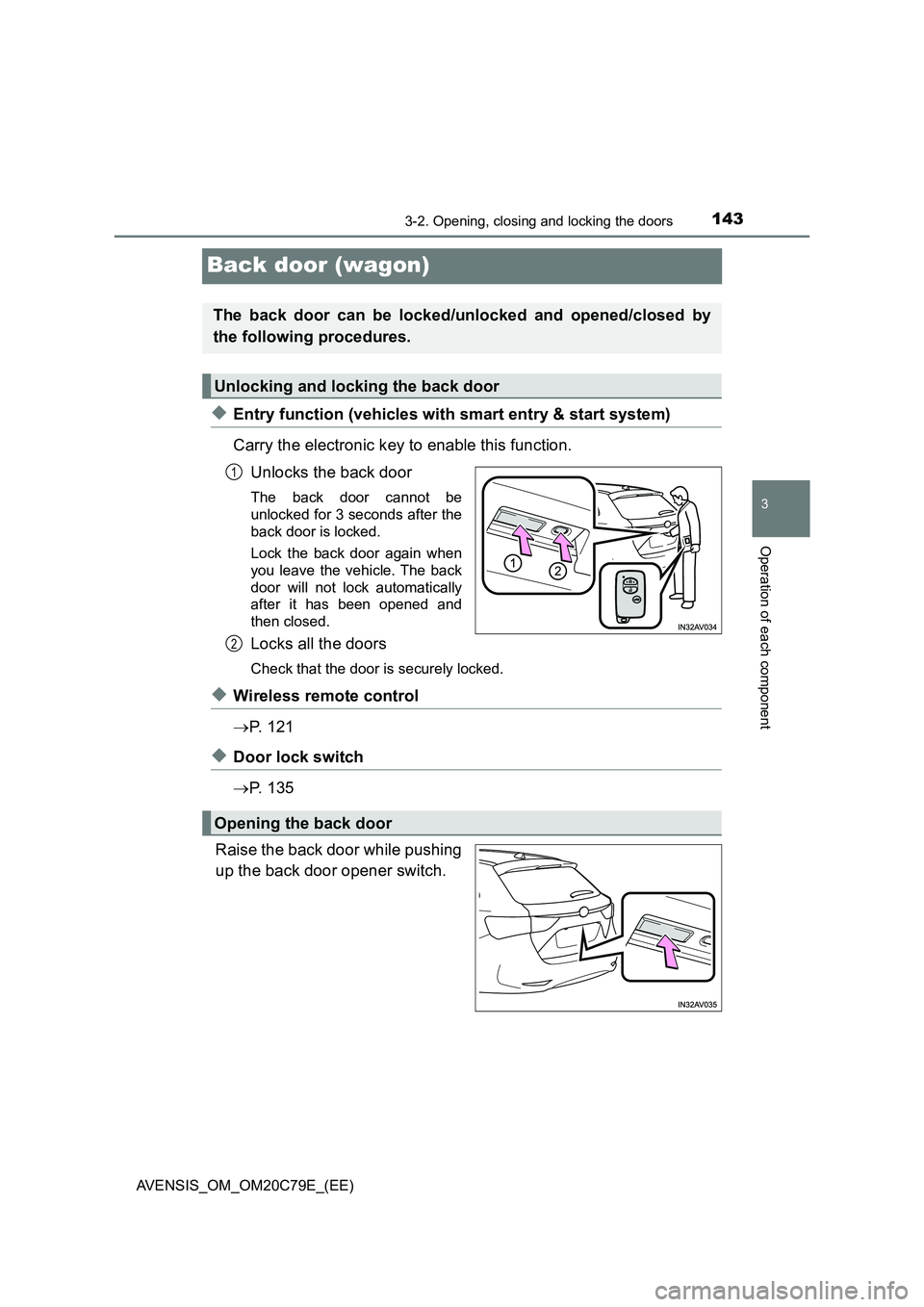
◆Entry function (vehicles with smart entry & start system)
Carry the electronic key to enable this function.
Unlocks the back door
The back door cannot be
unlocked for 3 seconds after the
back door is locked.
Lock the back door again when
you leave the vehicle. The back
door will not lock automatically
after it has been opened and
then closed.
Locks all the doors
Check that the door is securely locked.
◆Wireless remote control
P. 1 2 1
◆Door lock switch
P. 1 3 5
Raise the back door while pushing
up the back door opener switch.
The back door can be locked/unlocked and opened/closed by
the following procedures.
Unlocking and locking the back door
1
2
Opening the back door
Page 144 of 660
1443-2. Opening, closing and locking the doors
AVENSIS_OM_OM20C79E_(EE)
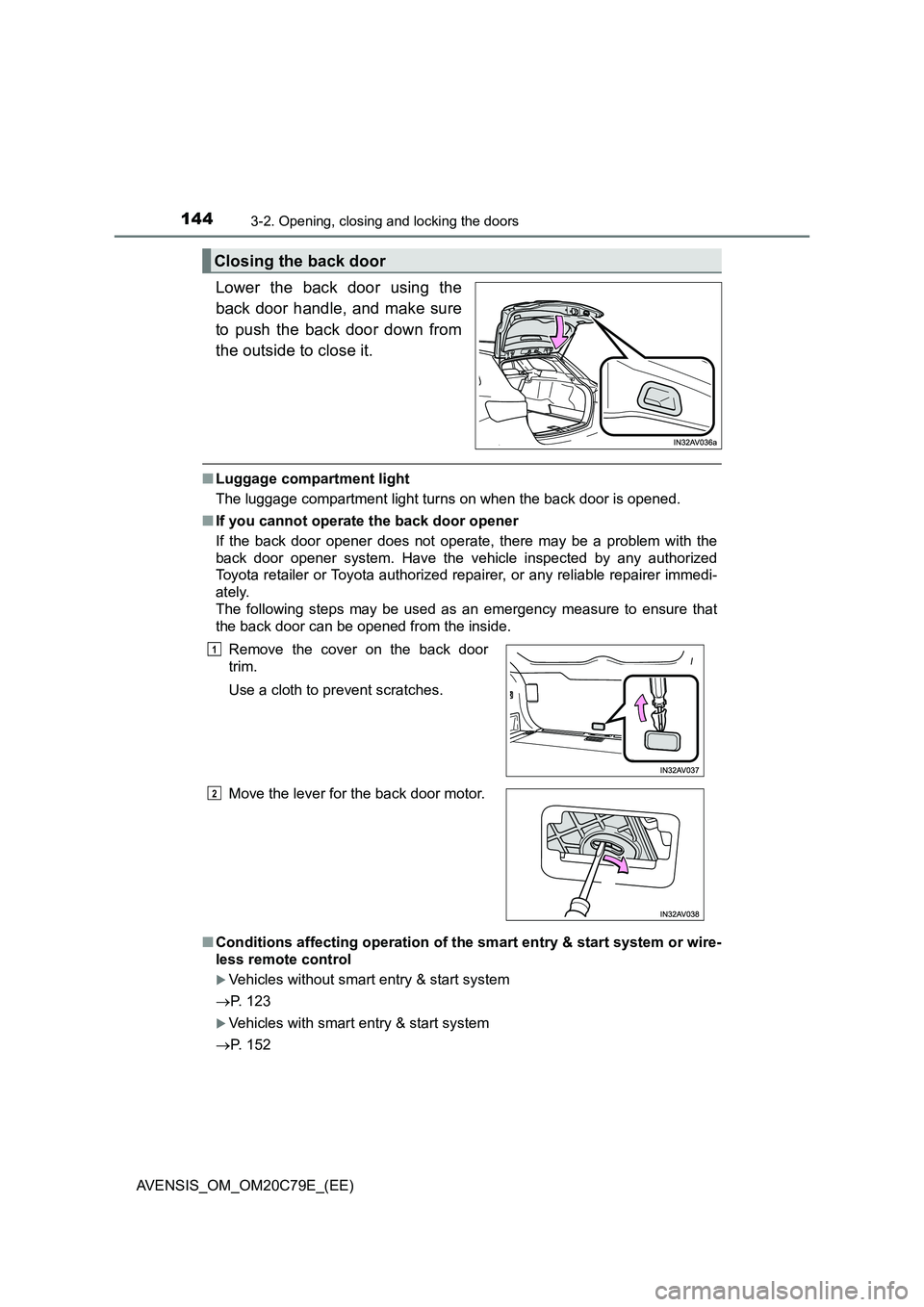
Lower the back door using the
back door handle, and make sure
to push the back door down from
the outside to close it.
■Luggage compartment light
The luggage compartment light turns on when the back door is opened.
■If you cannot operate the back door opener
If the back door opener does not operate, there may be a problem with the
back door opener system. Have the vehicle inspected by any authorized
Toyota retailer or Toyota authorized repairer, or any reliable repairer immedi-
ately.
The following steps may be used as an emergency measure to ensure that
the back door can be opened from the inside.
■Conditions affecting operation of the smart entry & start system or wire-
less remote control
Vehicles without smart entry & start system
P. 123
Vehicles with smart entry & start system
P. 152
Closing the back door
Remove the cover on the back door
trim.
Use a cloth to prevent scratches.
Move the lever for the back door motor.1
2
Page 152 of 660
1523-2. Opening, closing and locking the doors
AVENSIS_OM_OM20C79E_(EE)■Battery-saving function
In the following circumstances, the smart entry & start system is disabled in
order to prevent the vehicle and electronic key batteries from discharging.
●When the smart entry & start system has not been used for 5 days or more
●When the electronic key has been left within approximately 1 m (3 ft.) of the
vehicle for 10 minutes or more
The system will resume operation when...
●The vehicle is locked touching the door handle lock sensor area.
●The vehicle is locked/unlocked using the wireless remote control function.
(P. 133)
●The vehicle is locked/unlocked using the mechanical key. (P. 592)
■Conditions affecting operation
The smart entry & start system uses weak radio waves. In the following situa-
tions, the communication between the electronic key and the vehicle may be
affected, preventing the smart entry & start system and wireless remote con-
trol from operating properly. (Ways of coping: P. 592)
●When the electronic key battery is depleted
●Near a TV tower, electric power plant, gas station, radio station, large dis-
play, airport or other facility that generates strong radio waves or electrical
noise
●When carrying a portable radio, cellular phone, cordless phone or other
wireless communication devices
●When the electronic key is in contact with, or is covered by the following
metallic objects
• Cards to which aluminum foil is attached
• Cigarette boxes that have aluminum foil inside
• Metallic wallets or bags
• Coins
• Hand warmers made of metal
• Media such as CDs and DVDs
●When multiple electronic keys are in the vicinity
●When another wireless key (that emits radio waves) is being used nearby
●When carrying or using the electronic key together with the following
devices that emit radio waves
• Another vehicle’s electronic key or a wireless key that emits radio waves
• Personal computer or personal digital assistants (PDAs)
• Digital audio players
• Portable game systems
●If window tint with a metallic content or metallic objects are attached to the
rear window
●Sedan: If a metallic object is placed on the package tray