remote control TOYOTA AVENSIS 2018 Owner's Manual
[x] Cancel search | Manufacturer: TOYOTA, Model Year: 2018, Model line: AVENSIS, Model: TOYOTA AVENSIS 2018Pages: 660, PDF Size: 63.16 MB
Page 153 of 660
1533-2. Opening, closing and locking the doors
3
Operation of each component
AVENSIS_OM_OM20C79E_(EE)■Note for the entry function
●Even when the electronic key is within the effective range (detection areas),
the system may not operate properly in the following cases.
• The electronic key is too close to the window or outside door handle, near
the ground, or in a high place when the doors are locked or unlocked.
• The electronic key is near the ground or in a high place, or too close to
the rear bumper center when the trunk or back door is locked/unlocked.
• The electronic key is on the instrument panel, package tray (sedan), lug-
gage cover (wagon), floor or in the glove box when the engine is started
or engine switch modes are changed.
●Do not leave the electronic key on top of the instrument panel or near the
door pockets when exiting the vehicle. Depending on the radio wave recep-
tion conditions, it may be detected by the antenna outside the cabin and the
door will become lockable from the outside, possibly trapping the electronic
key inside the vehicle.
●As long as the electronic key is within the effective range, the doors may be
locked or unlocked by anyone.
●Even if the electronic key is not inside the vehicle, it may be possible to start
the engine if the electronic key is near the window.
●The doors may unlock or lock if a large amount of water splashes on the
door handle, such as in the rain or in a car wash when the electronic key is
within the effective range. (The doors will automatically be locked after
approximately 30 seconds if the doors are not opened and closed.)
●If the key is kept near the vehicle while it is being washed, water applied to a
door handle may cause the door to lock and unlock repeatedly. In this event,
place the key in a location 2 m (6 ft.) or more from the vehicle, taking care
not to lose the key.
●If the key is inside the vehicle while it is being washed, water applied to a
door handle may cause a buzzer to sound and a message to be displayed.
In this event, locking all doors will cause the message to extinguish and the
buzzer to stop sounding.
●It may not be possible to lock the doors if the sensor area is covered by
mud, ice, snow etc. In this event, try locking again after cleaning the area, or
lock by touching the sensor area on the underside of the door handle.
●Gripping the door handle when wearing a glove may not unlock or lock the
door.
●If the wireless remote control is used to lock the doors when the electronic
key is near the vehicle, there is a possibility that the door may not be
unlocked by the smart entry & start system. (Use the wireless remote control
to unlock the doors.)
●A sudden approach to the effective range or door handle operation may pre-
vent the doors from being unlocked. In this case, return the door handle to
the original position and check that the doors unlock before pulling the door
handle again.
Page 154 of 660
1543-2. Opening, closing and locking the doors
AVENSIS_OM_OM20C79E_(EE)■When the vehicle is not driven for extended periods
To prevent theft of the vehicle, do not leave the electronic key within 2 m (6 ft.)
of the vehicle.
■To operate the system properly
Make sure to carry the electronic key when operating the system. Do not get
the electronic key too close to the vehicle when operating the system from the
outside of the vehicle.
Depending on the position and holding condition of the electronic key, the key
may not be detected correctly and the system may not operate properly. (The
alarm may go off accidentally, or the door lock prevention may not function.)
■If the smart entry & start system does not operate properly
●Locking and unlocking the doors: Use the mechanical key. (P. 592)
●Starting the engine: P. 593
■Customization
Settings (e.g. smart entry & start system) can be changed.
(Customizable features P. 629)
■If the smart entry & start system has been deactivated in a customized
setting
●Locking and unlocking the doors:
Use the wireless remote control or mechanical key. (P. 121, 592)
●Starting the engine and changing engine switch modes: P. 593
●Stopping the engine: P. 214
Page 384 of 660
3845-10. Bluetooth®
AVENSIS_OM_OM20C79E_(EE)■
About Bluetooth®
Bluetooth is a registered trade-
mark of Bluetooth SIG, Inc.
■Compatible models
●Bluetooth
® specifications:
Ver. 1.1, or higher (recommended: Ver. 2.1 + EDR or higher)
●Following Profiles:
• A2DP (Advanced Audio Distribution Profile) Ver. 1.0, or higher
(recommended: Ver. 1.2 or higher)
• AVRCP (Audio/Video Remote Control Profile) Ver. 1.0 or
higher (recommended: Ver. 1.3 or higher)
Portable players must correspond to the above specifications in
order to be connected to the Bluetooth
® audio system. However,
please note that some functions may be limited depending on the
type of portable player.
●Cellular phone
• HFP (Hands Free Profile) Ver. 1.0 or higher (Recommended:
Ver. 1.5)
• OPP (Object Push Profile) Ver. 1.1
• PBAP (Phone Book Access Profile) Ver. 1.0
Page 435 of 660
435
7Maintenance and care
AVENSIS_OM_OM20C79E_(EE)7-1. Maintenance and care
Cleaning and
protecting the
vehicle exterior ................ 436
Cleaning and
protecting the
vehicle interior ................. 440
7-2. Maintenance
Maintenance
requirements.................... 443
7-3. Do-it-yourself maintenance
Do-it-yourself service
precautions ...................... 446
Hood .................................. 450
Positioning a floor jack ....... 452
Engine compartment.......... 453
Tires ................................... 468
Tire inflation pressure ........ 486
Wheels ............................... 488
Air conditioning filter .......... 491
Wireless remote control/
electronic key battery....... 493
Checking and replacing
fuses ................................ 496
Light bulbs ......................... 501
Page 493 of 660
4937-3. Do-it-yourself maintenance
AVENSIS_OM_OM20C79E_(EE)
7
Maintenance and care
Wireless remote control/electronic key battery
●Flathead screwdriver
●Small Phillips-head screwdriver
●Lithium battery
Vehicles without smart entry & start system: CR2016
Vehicles with smart entry & start system: CR1632
Vehicles without smart entry & start system
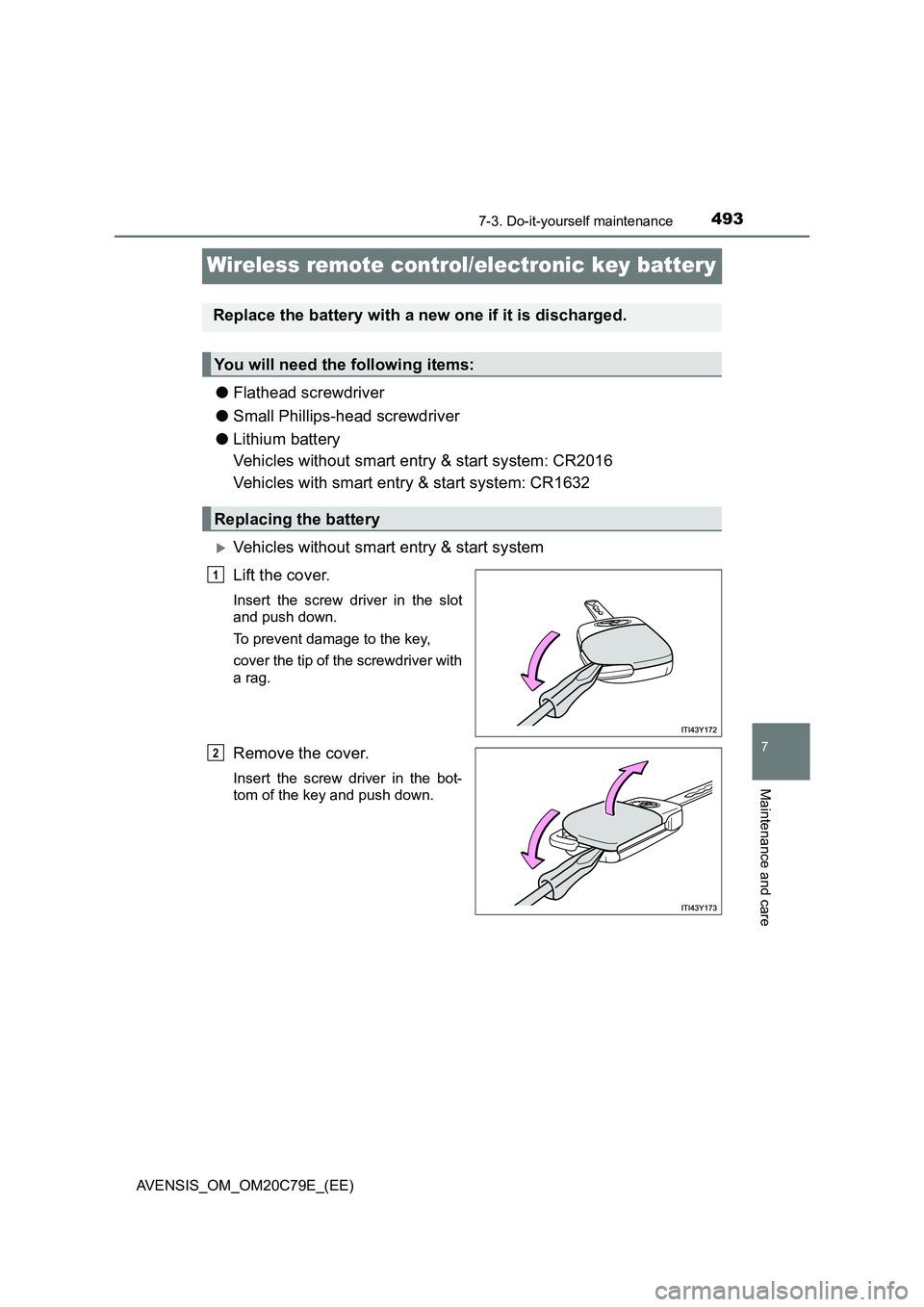
Lift the cover.
Insert the screw driver in the slot
and push down.
To prevent damage to the key,
cover the tip of the screwdriver with
a rag.
Remove the cover.
Insert the screw driver in the bot-
tom of the key and push down.
Replace the battery with a new one if it is discharged.
You will need the following items:
Replacing the battery
1
2
Page 495 of 660
4957-3. Do-it-yourself maintenance
AVENSIS_OM_OM20C79E_(EE)
7
Maintenance and care
■If the key battery is discharged
The following symptoms may occur.
● The smart entry & start system and wireless remote control will not function
properly.
● The operational range is reduced.
■ Use the following types of lithium battery
Vehicles without smart entry & start system: CR2016
Vehicles with smart entry & start system: CR1632
● Batteries can be purchased at any authorized Toyota retailer or Toyota
authorized repairer, or any reliable repairer, local electrical appliance shops
or camera stores.
● Replace only with the same or equivalent type recommended by the manu-
facturer.
● Dispose of used batteries according to the local laws.
WARNING
■Removed battery and other parts
These parts are small and if swallowed by a child, they can cause choking.
Keep away from children. Failure to do so could result in death or serious
injury.
■ Certification for the smart entry & start system
CAUTION
RISK OF EXPLOSION IF BATTERY IS REPLACED BY AN INCORRECT
TYPE. DISPOSE OF USED BATTERIES ACCORDING TO THE INSTRUC-
TIONS
NOTICE
■ For normal operation after replacing the battery
Observe the following precautions to prevent accidents.
● Always work with dry hands.
Moisture may cause the battery to rust.
● Do not touch or move any other components inside the remote control.
● Do not bend the battery terminals.
● Please perform this operation in a clean environment to avoid garbage, oil,
etc. insertion in the key.
Page 592 of 660
5928-2. Steps to take in an emergency
AVENSIS_OM_OM20C79E_(EE)
If the electronic key does not operate properly
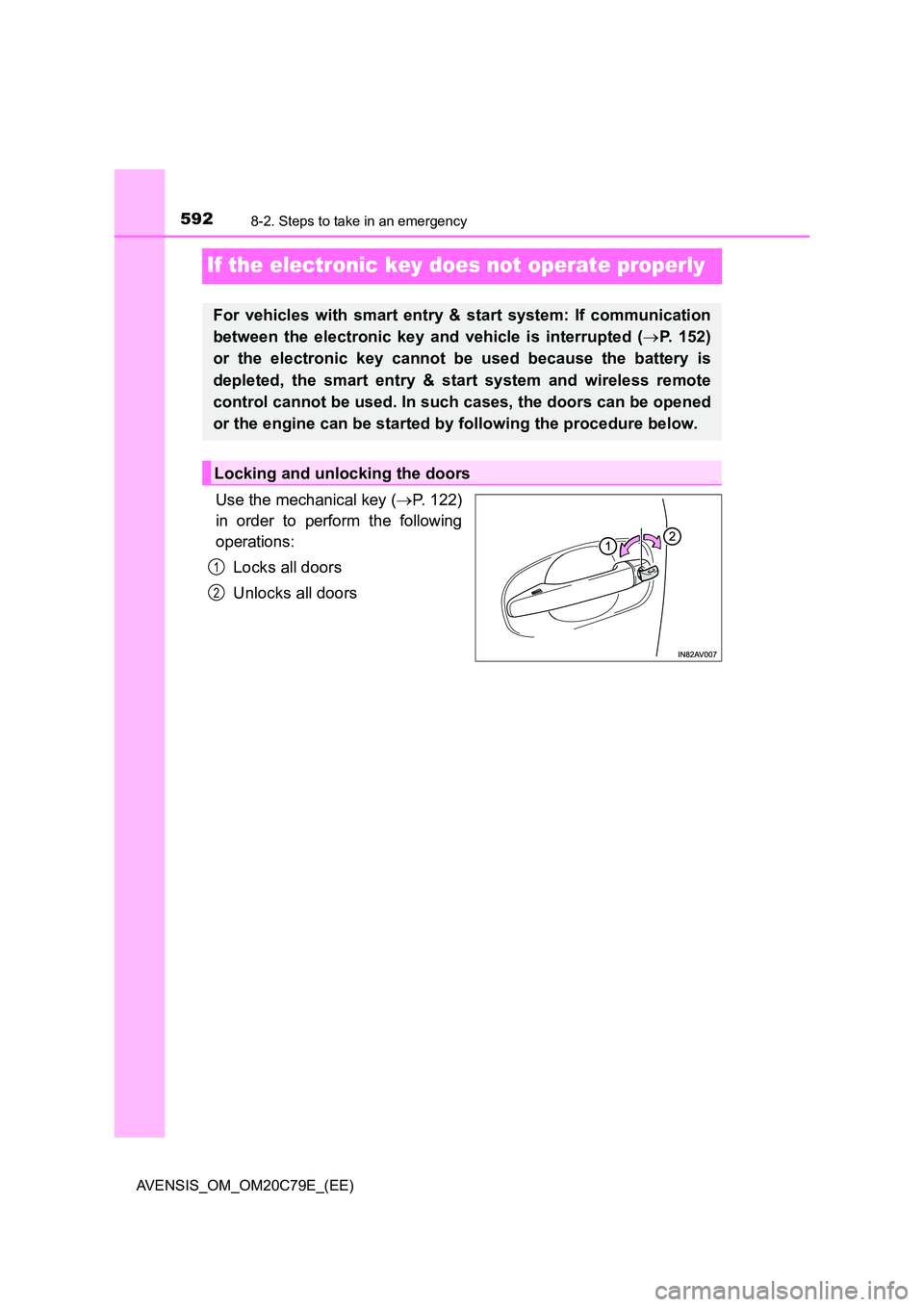
Use the mechanical key (P. 122)
in order to perform the following
operations:
Locks all doors
Unlocks all doors
For vehicles with smart entry & start system: If communication
between the electronic key and vehicle is interrupted ( P. 152)
or the electronic key cannot be used because the battery is
depleted, the smart entry & start system and wireless remote
control cannot be used. In such cases, the doors can be opened
or the engine can be started by following the procedure below.
Locking and unlocking the doors
1
2
Page 597 of 660
5978-2. Steps to take in an emergency
AVENSIS_OM_OM20C79E_(EE)
8
When trouble arises
■Starting the engine when the battery is discharged (vehicles with Multid-
rive)
The engine cannot be started by push-starting.
■ To prevent battery discharge
● Turn off the headlights and the audio system while the engine is turned off.
● Turn off any unnecessary electrical components when the vehicle is running
at a low speed for an extended period, such as in heavy traffic, etc.
■ Charging the battery
The electricity stored in the battery will discharge gradually even when the
vehicle is not in use, due to natural discharge and the draining effects of cer-
tain electrical appliances. If the vehicle is left for a long time, the battery may
discharge, and the engine may be unable to start. (The battery recharges
automatically during driving.)
■ When the battery is removed or discharged
● Vehicles with smart entry & start system: In some cases, it may not be pos-
sible to unlock the doors using the smart entry & start system when the bat-
tery is discharged. Use the wireless remote control or the mechanical key to
lock or unlock the doors.
● Vehicles with smart entry & start system: The engine may not start on the
first attempt after the battery has recharged but will start normally after the
second attempt. This is not a malfunction.
● Vehicles with smart entry & start system: The engine switch mode is memo-
rized by the vehicle. When the battery is reconnected, the system will return
to the mode it was in before the battery was discharged. Before disconnect-
ing the battery, turn the engine switch off. If you are unsure what mode the
engine switch was in before the battery discharged, be especially careful
when reconnecting the battery.
● Vehicles with Stop & Start system:
After charging the battery or reconnecti ng the battery terminals, the Stop &
Start system may not automatically stop the engine for approximately 5 to
40 minutes.
■ When replacing the battery
● Use a battery that the case size is same as the previous one (LN2), 20 hour
rate capacity (20HR) is equivalent (60Ah) or greater, and performance rating
(CCA) is equivalent (356A) or greater.
• If the sizes differ, the battery cannot be properly secured.
• If the 20 hour rate capacity is low, even if the time period where the vehi-
cle is not used is a short time, the battery may discharge and the engine
may not be able to start.
Page 635 of 660
6359-2. Customization
AVENSIS_OM_OM20C79E_(EE)
9
Vehicle specifications
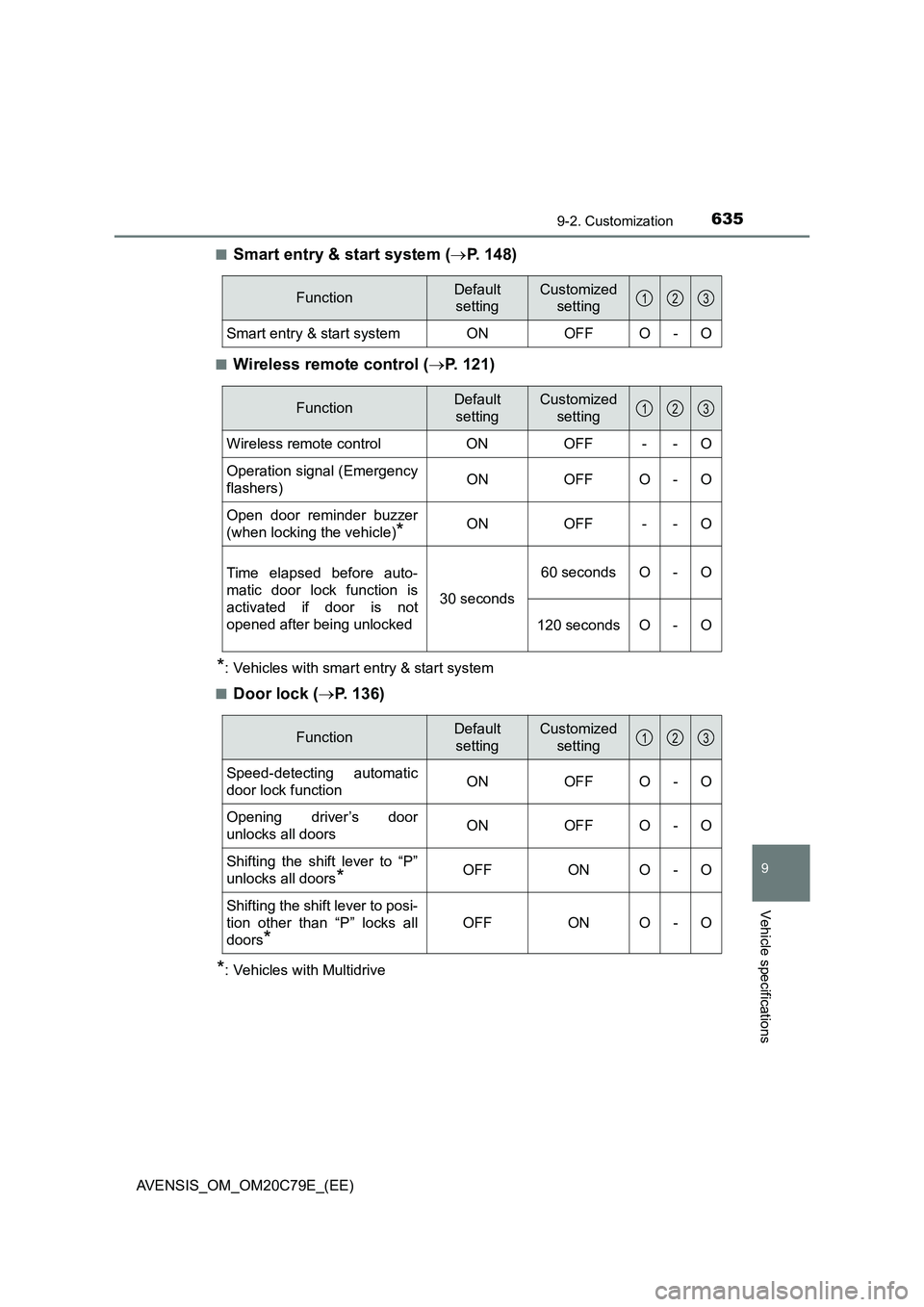
■Smart entry & start system (P. 148)
■Wireless remote control (P. 121)
*: Vehicles with smart entry & start system
■
Door lock (P. 136)
*: Vehicles with Multidrive
FunctionDefault
settingCustomized
setting
Smart entry & start system ON OFF O - O
123
FunctionDefault
settingCustomized
setting
Wireless remote control ON OFF - - O
Operation signal (Emergency
flashers)ON OFF O - O
Open door reminder buzzer
(when locking the vehicle)
*ON OFF - - O
Time elapsed before auto-
matic door lock function is
activated if door is not
opened after being unlocked30 seconds60 seconds O - O
120 seconds O - O
123
FunctionDefault
settingCustomized
setting
Speed-detecting automatic
door lock functionONOFFO-O
Opening driver’s door
unlocks all doorsONOFF O -O
Shifting the shift lever to “P”
unlocks all doors
*OFFONO-O
Shifting the shift lever to posi-
tion other than “P” locks all
doors
*
OFFONO-O
123
Page 645 of 660
645Alphabetical index
AVENSIS_OM_OM20C79E_(EE)
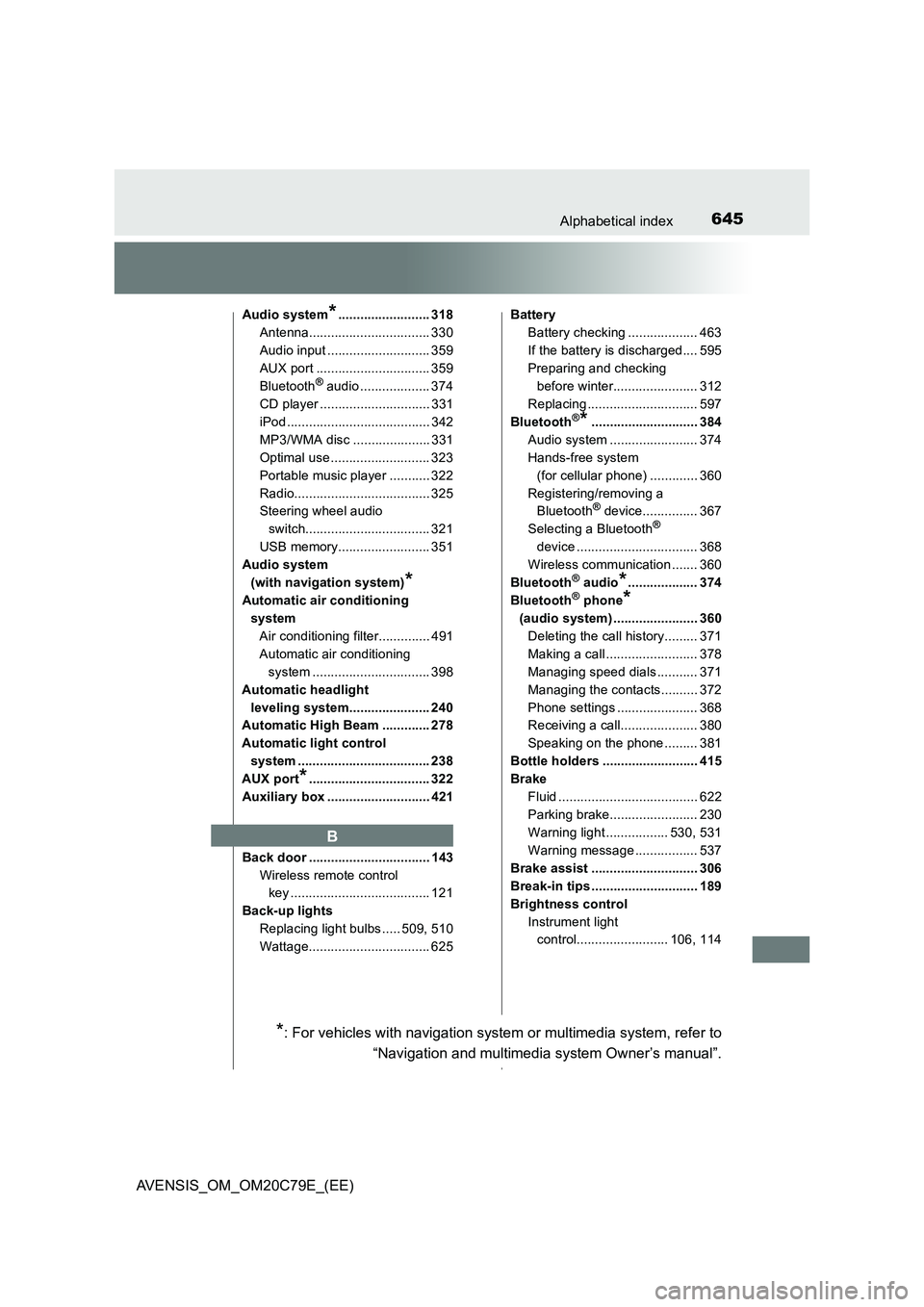
Audio system*......................... 318
Antenna................................. 330
Audio input ............................ 359
AUX port ............................... 359
Bluetooth
® audio ................... 374
CD player .............................. 331
iPod ....................................... 342
MP3/WMA disc ..................... 331
Optimal use ........................... 323
Portable music player ........... 322
Radio..................................... 325
Steering wheel audio
switch.................................. 321
USB memory......................... 351
Audio system
(with navigation system)
*
Automatic air conditioning
system
Air conditioning filter.............. 491
Automatic air conditioning
system ................................ 398
Automatic headlight
leveling system...................... 240
Automatic High Beam ............. 278
Automatic light control
system .................................... 238
AUX port
*................................. 322
Auxiliary box ............................ 421
Back door ................................. 143
Wireless remote control
key ...................................... 121
Back-up lights
Replacing light bulbs ..... 509, 510
Wattage................................. 625Battery
Battery checking ................... 463
If the battery is discharged.... 595
Preparing and checking
before winter....................... 312
Replacing .............................. 597
Bluetooth
®*............................. 384
Audio system ........................ 374
Hands-free system
(for cellular phone) ............. 360
Registering/removing a
Bluetooth
® device............... 367
Selecting a Bluetooth®
device ................................. 368
Wireless communication ....... 360
Bluetooth
® audio*................... 374
Bluetooth® phone*
(audio system) ....................... 360
Deleting the call history......... 371
Making a call ......................... 378
Managing speed dials ........... 371
Managing the contacts.......... 372
Phone settings ...................... 368
Receiving a call..................... 380
Speaking on the phone ......... 381
Bottle holders .......................... 415
Brake
Fluid ...................................... 622
Parking brake........................ 230
Warning light ................. 530, 531
Warning message ................. 537
Brake assist ............................. 306
Break-in tips ............................. 189
Brightness control
Instrument light
control......................... 106, 114
B
*: For vehicles with navigation system or multimedia system, refer to
“Navigation and multimedia system Owner’s manual”.