ECU TOYOTA AVENSIS 2018 Repair Manual
[x] Cancel search | Manufacturer: TOYOTA, Model Year: 2018, Model line: AVENSIS, Model: TOYOTA AVENSIS 2018Pages: 660, PDF Size: 63.16 MB
Page 241 of 660
241
4
4-3. Operating the lights and wipers
Driving
AVENSIS_OM_OM20C79E_(EE)
Fog light switch
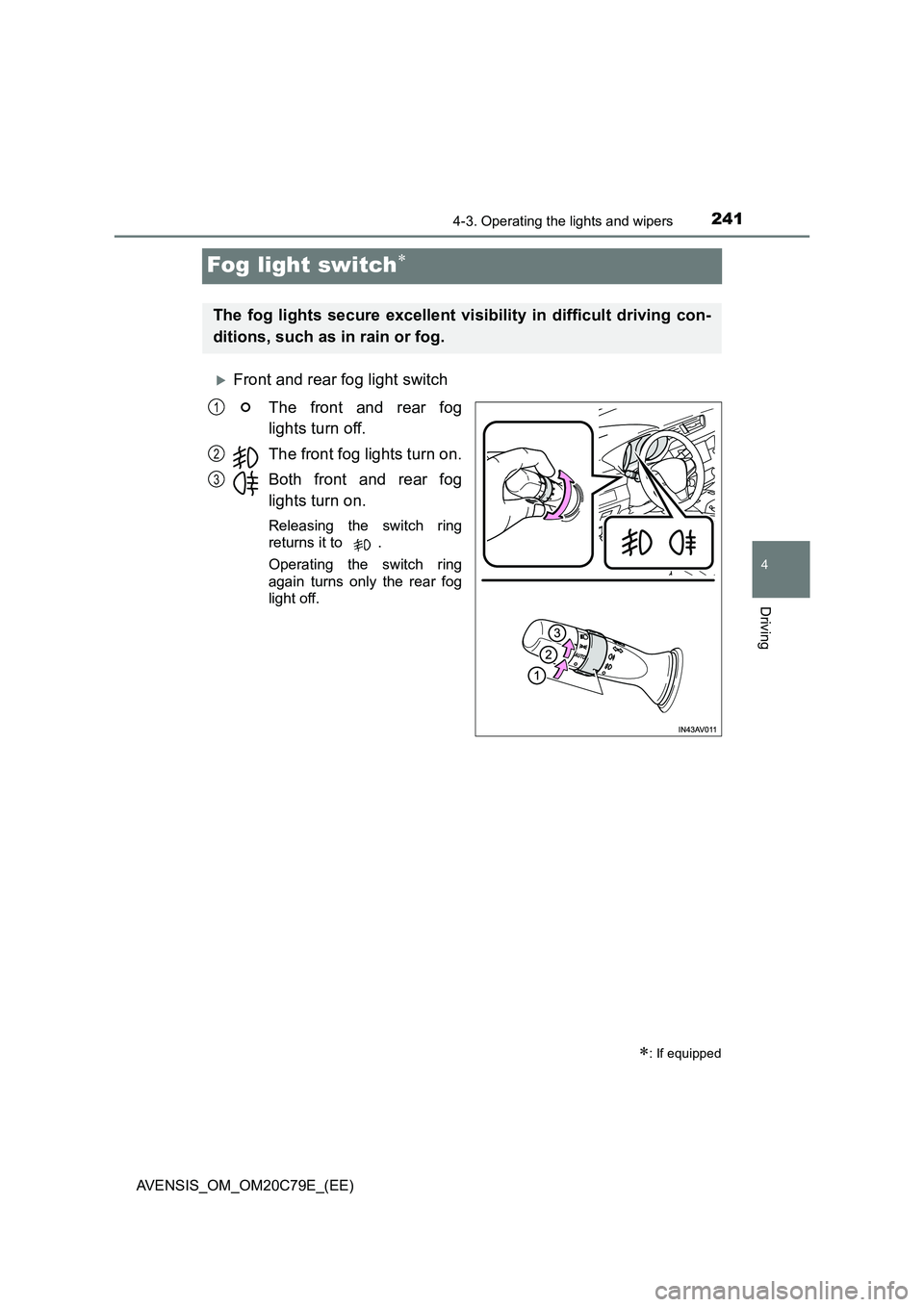
Front and rear fog light switch
The front and rear fog
lights turn off.
The front fog lights turn on.
Both front and rear fog
lights turn on.
Releasing the switch ring
returns it to .
Operating the switch ring
again turns only the rear fog
light off.
: If equipped
The fog lights secure excellent visibility in difficult driving con-
ditions, such as in rain or fog.
1
2
3
Page 249 of 660
2494-4. Refueling
4
Driving
AVENSIS_OM_OM20C79E_(EE)
WARNING
■Refueling the vehicle
Observe the following precautions while refueling the vehicle.
Failure to do so may result in death or serious injury.
● After exiting the vehicle and before opening the fuel door, touch an
unpainted metal surface to discharge any stat ic electricity. It is important to
discharge static electricity before re fueling because sparks resulting from
static electricity can cause fuel vapors to ignite while refueling.
● Always hold the grips on the fuel tank cap and turn it slowly to remove it.
A whooshing sound may be heard when the fuel tank cap is loosened.
Wait until the sound cannot be heard before fully removing the cap.
In hot weather, pressurized fuel may spray out of the filler neck and cause
injury.
● Do not allow anyone that has not discharged static electricity from their
bodies to come close to an open fuel tank.
● Do not inhale vaporized fuel.
Fuel contains substances that are harmful if inhaled.
● Do not smoke while refueling the vehicle.
Doing so may cause the fuel to ignite and cause a fire.
● Do not return to the vehicle or touch any person or object that is statically
charged.
This may cause static electricity to build up, resulting in a possible ignition
hazard.
■ When refueling
Observe the following precautions to pr event fuel overflowing from the fuel
tank:
● Securely insert the fuel nozzle into the fuel filler neck.
● Stop filling the tank after the fuel nozzle automatically clicks off.
● Do not top off the fuel tank.
NOTICE
■Refueling
Do not spill fuel during refueling.
Failure to do so may damage the vehicle, such as causing the exhaust sys-
tems to operate abnormally or damaging fuel system components or the
vehicle’s painted surface.
Page 367 of 660
367
5
5-6. Using Bluetooth® devices
Audio system
AVENSIS_OM_OM20C79E_(EE)
Registering a Bluetooth® device
Press the “SETUP” button and select “Bluetooth*” using the tune/
scroll knob.
Press the knob and select “Pairing” using the knob.
A passkey will be displayed.
SSP (Secure Simple Pairing) incompatible Bluetooth
® devices:
Input the passkey into the device.
SSP (Secure Simple Pairing) compatible Bluetooth
® devices:
Select “Yes” to register the device. Depending on the type of
device, it may register automatically.
If a Bluetooth
® device has both music player and cellular phone func-
tions, both functions will be registered at the same time. When delet-
ing the device, both functions will be deleted at the same time.
If the off-hook switch is pressed and the “TEL” mode is entered when
no phones have been registered, the registration screen will be auto-
matically displayed.
*: Bluetooth is a registered trademark of Bluetooth SIG, Inc.
Before using the Bluetooth® audio/phone, it is necessary to reg-
ister a Bluetooth® device in the system. Follow the procedure
below to register (pair) a device:
How to register a Bluetooth® device
1
2
3
Page 418 of 660
4186-3. Using the storage features
AVENSIS_OM_OM20C79E_(EE)
Trunk features (sedan)
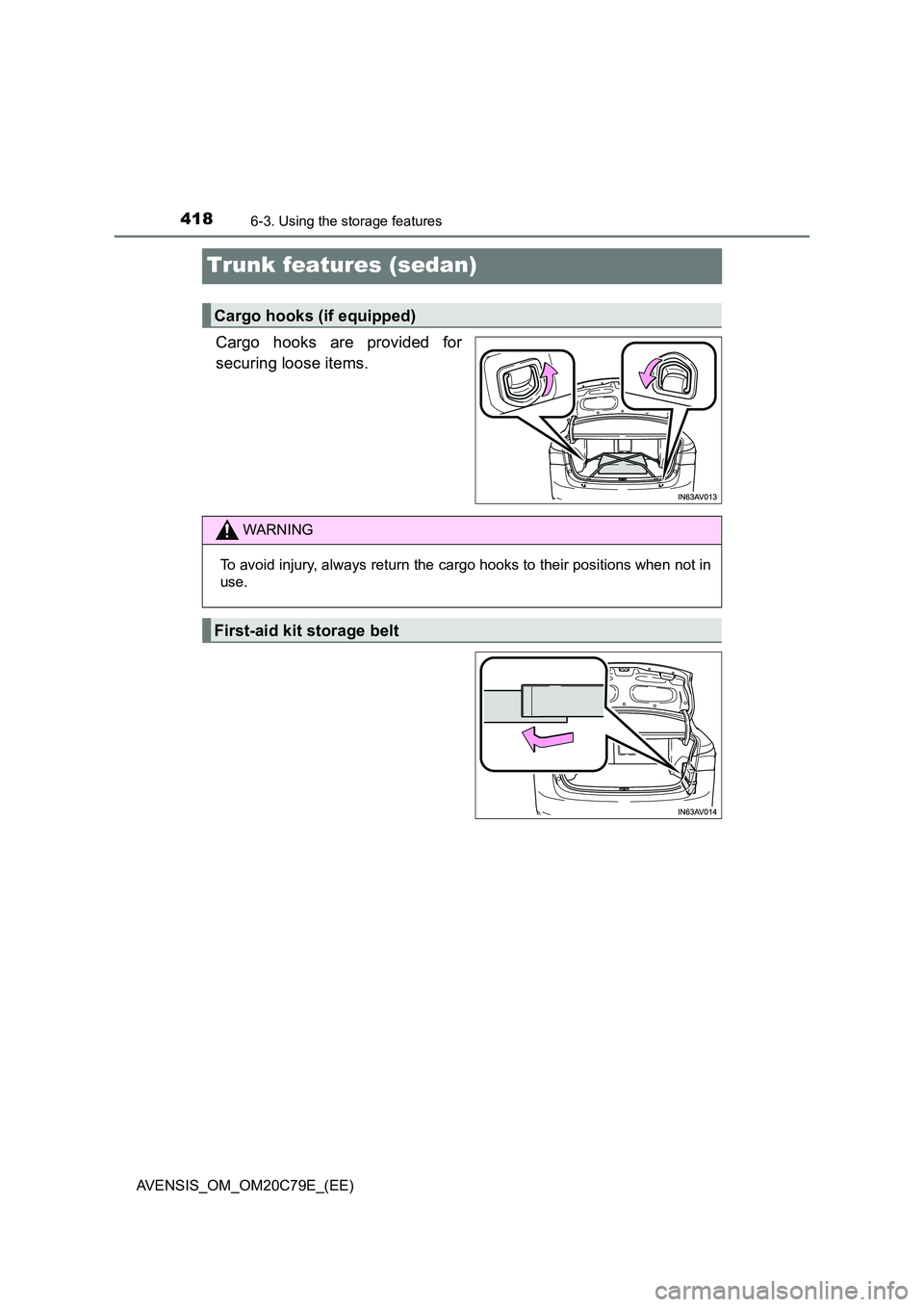
Cargo hooks are provided for
securing loose items.
Cargo hooks (if equipped)
WARNING
To avoid injury, always return the cargo hooks to their positions when not in
use.
First-aid kit storage belt
Page 420 of 660
4206-3. Using the storage features
AVENSIS_OM_OM20C79E_(EE)
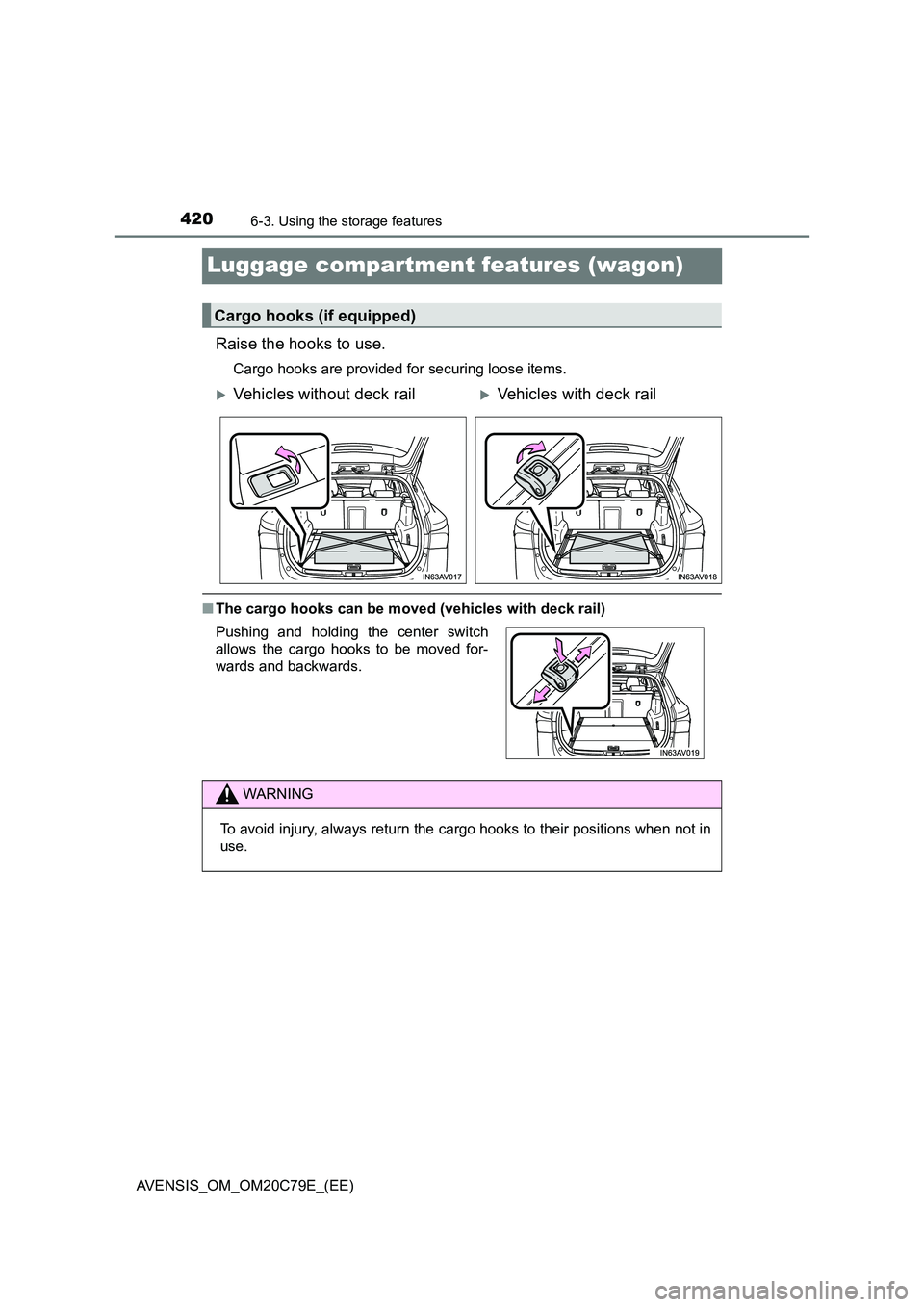
Luggage compartment features (wagon)
Raise the hooks to use.
Cargo hooks are provided for securing loose items.
■The cargo hooks can be moved (vehicles with deck rail)
Cargo hooks (if equipped)
Vehicles without deck railVehicles with deck rail
Pushing and holding the center switch
allows the cargo hooks to be moved for-
wards and backwards.
WARNING
To avoid injury, always return the cargo hooks to their positions when not in
use.
Page 424 of 660
4246-3. Using the storage features
AVENSIS_OM_OM20C79E_(EE)
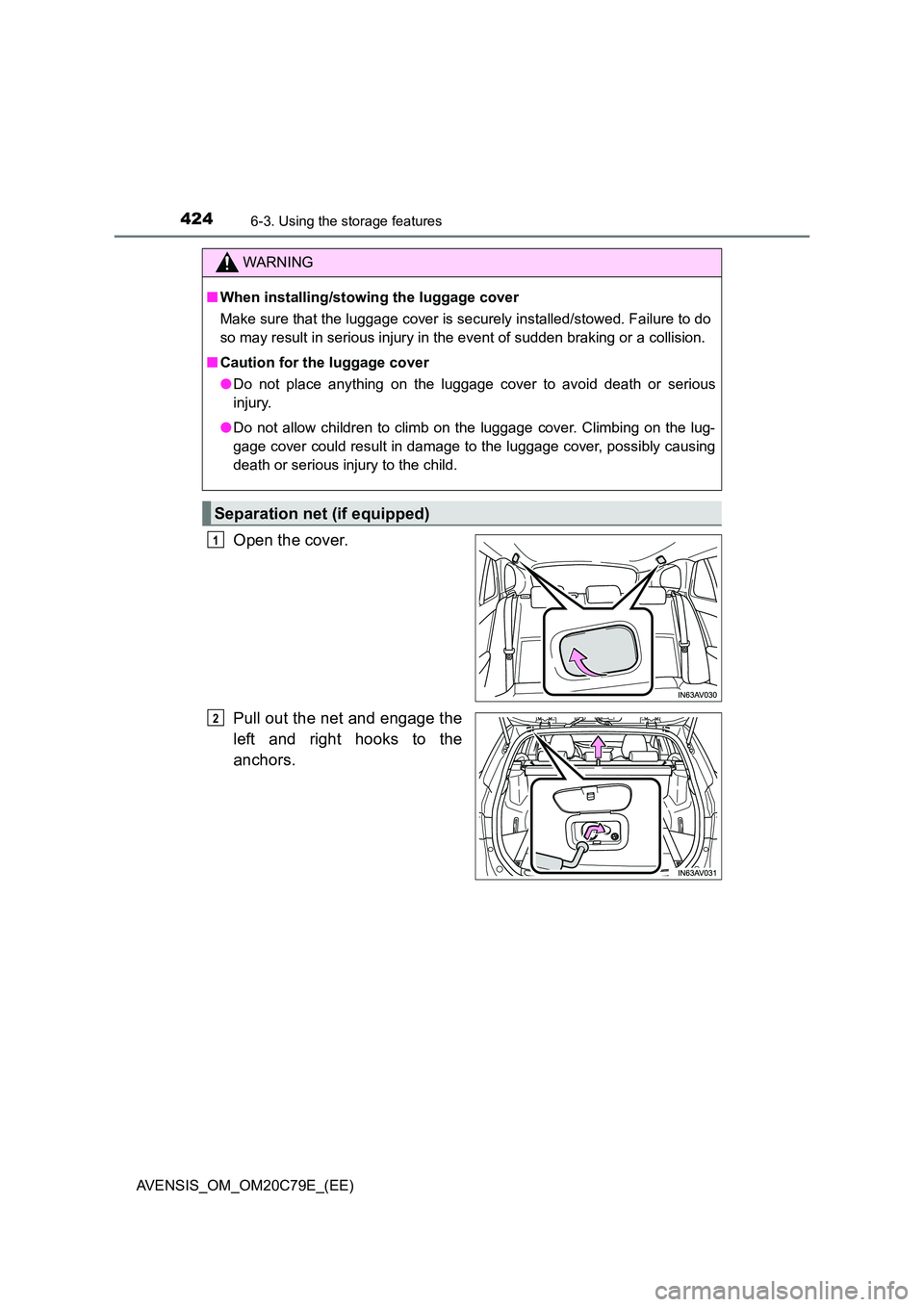
Open the cover.
Pull out the net and engage the
left and right hooks to the
anchors.
WARNING
■ When installing/stowing the luggage cover
Make sure that the luggage cover is securely installed/stowed. Failure to do
so may result in serious injury in the event of sudden braking or a collision.
■ Caution for the luggage cover
● Do not place anything on the luggage cover to avoid death or serious
injury.
● Do not allow children to climb on the luggage cover. Climbing on the lug-
gage cover could result in damage to the luggage cover, possibly causing
death or serious injury to the child.
Separation net (if equipped)
1
2
Page 426 of 660
4266-3. Using the storage features
AVENSIS_OM_OM20C79E_(EE)
WARNING
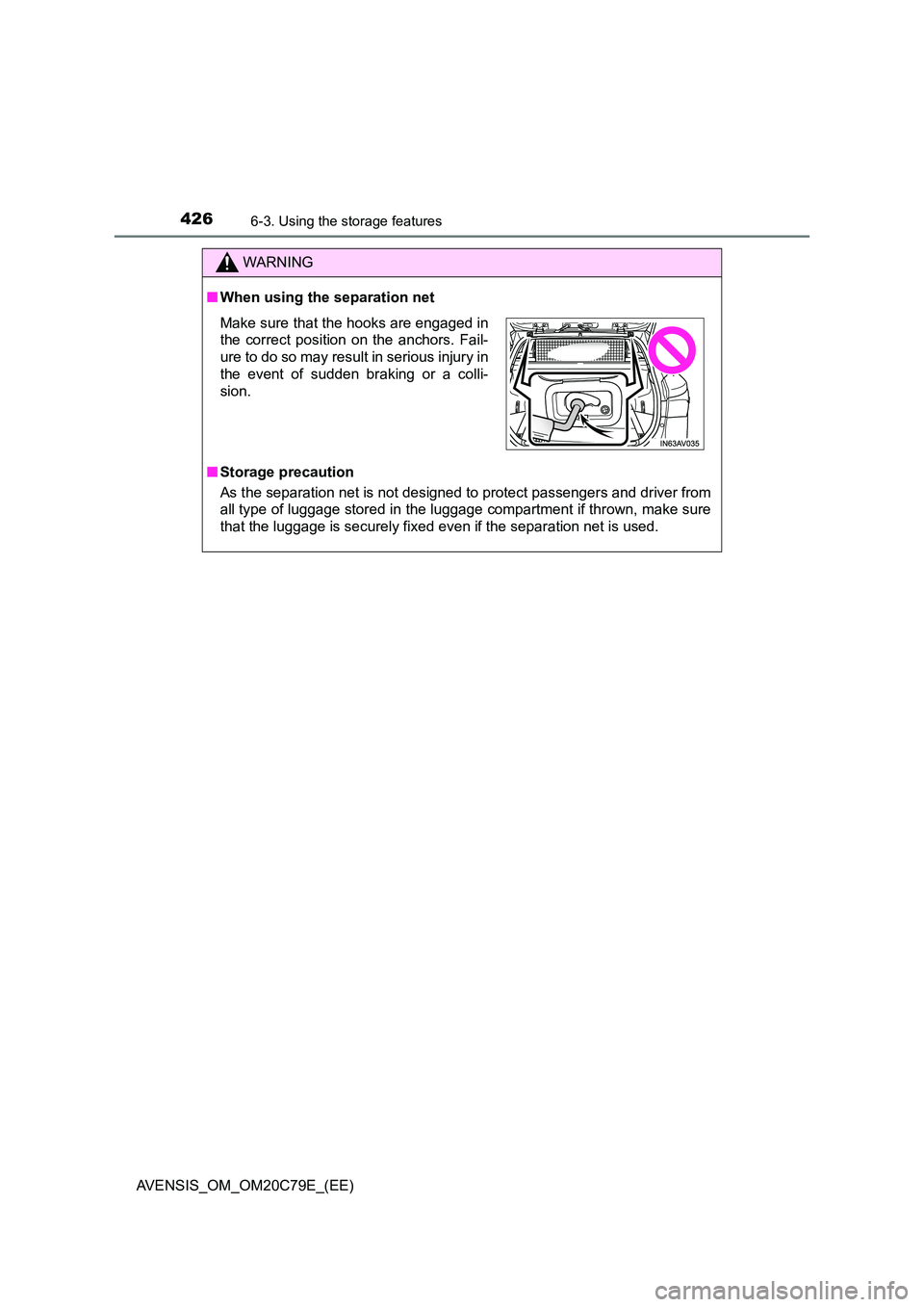
■When using the separation net
■ Storage precaution
As the separation net is not designed to protect passengers and driver from
all type of luggage stored in the luggage compartment if thrown, make sure
that the luggage is securely fixed even if the separation net is used.
Make sure that the hooks are engaged in
the correct position on the anchors. Fail-
ure to do so may result in serious injury in
the event of sudden braking or a colli-
sion.
Page 451 of 660
4517-3. Do-it-yourself maintenance
AVENSIS_OM_OM20C79E_(EE)
7
Maintenance and care
WARNING
■Pre-driving check
Check that the hood is fully closed and locked.
If the hood is not locked properly, it may open while the vehicle is in motion
and cause an accident, which may result in death or serious injury.
■ After installing the support rod into the slot
Make sure the rod supports the hood securely from falling down on to your
head or body.
NOTICE
■ When closing the hood
Be sure to return the support rod to its clip before closing the hood. Closing
the hood with the support rod up could cause the hood to bend.
Page 455 of 660
4557-3. Do-it-yourself maintenance
AVENSIS_OM_OM20C79E_(EE)
7
Maintenance and care
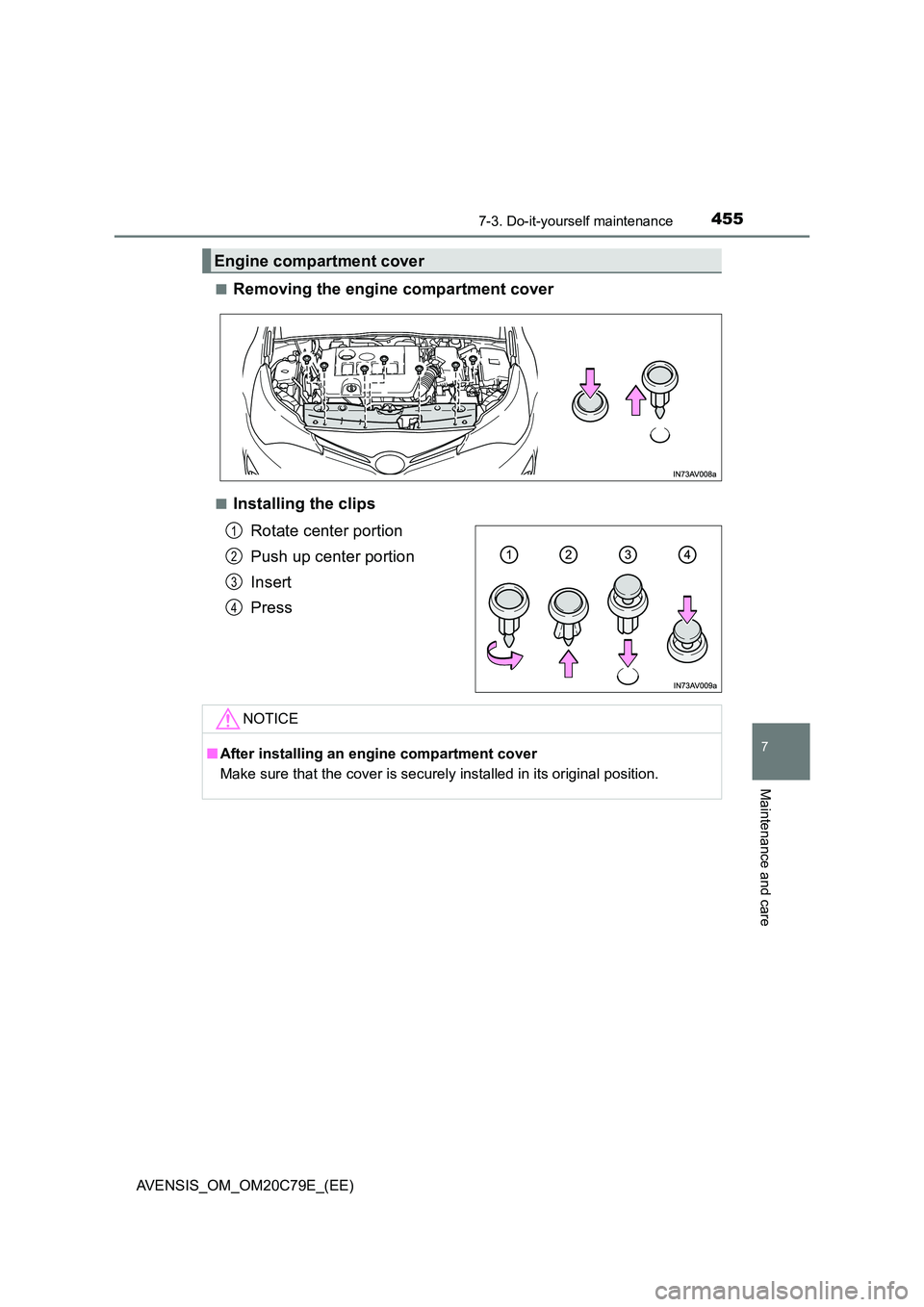
■Removing the engine compartment cover
■Installing the clips
Rotate center portion
Push up center portion
Insert
Press
Engine compartment cover
1
2
3
4
NOTICE
■ After installing an engine compartment cover
Make sure that the cover is securely installed in its original position.
Page 503 of 660
5037-3. Do-it-yourself maintenance
AVENSIS_OM_OM20C79E_(EE)
7
Maintenance and care
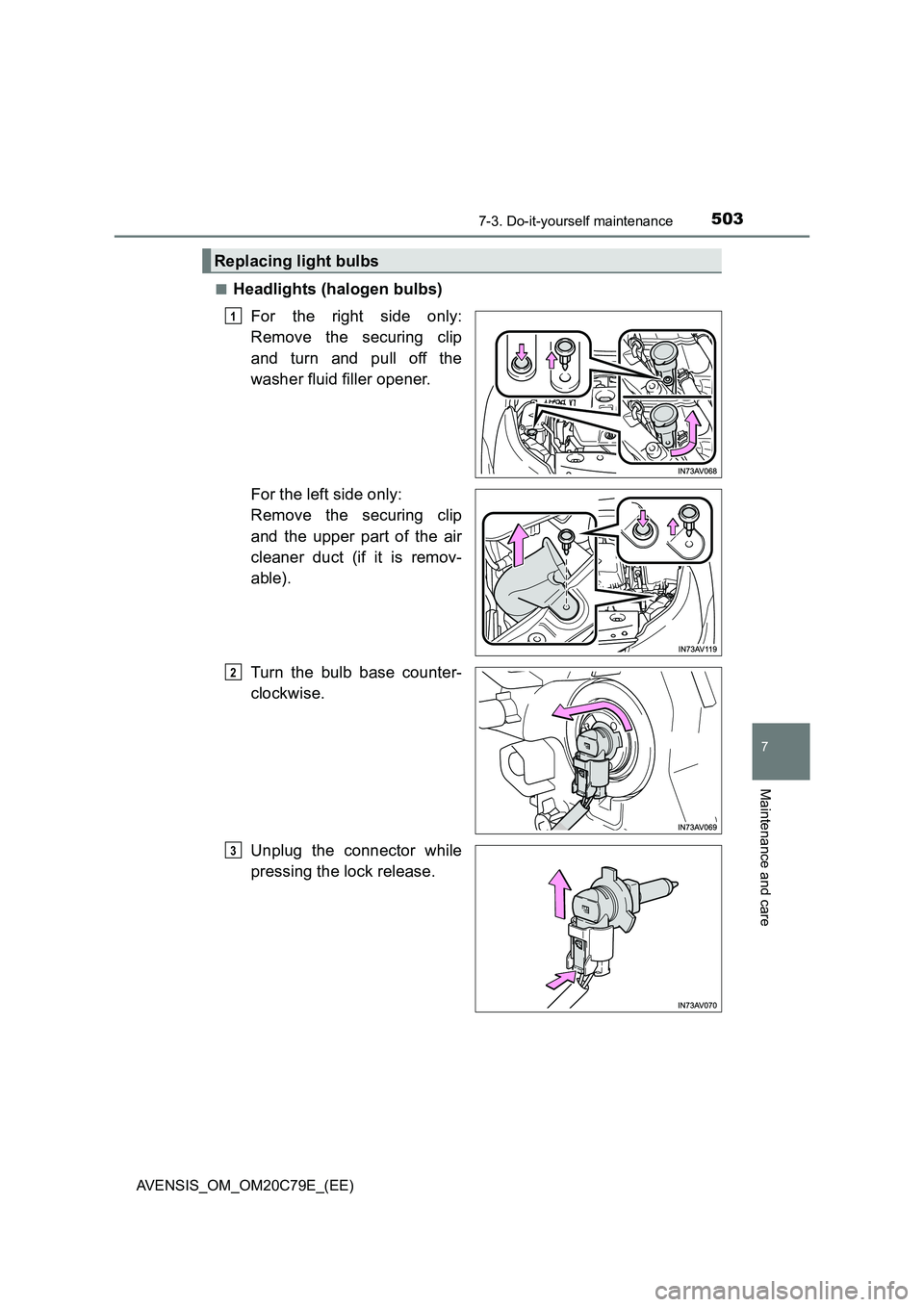
■Headlights (halogen bulbs)
For the right side only:
Remove the securing clip
and turn and pull off the
washer fluid filler opener.
For the left side only:
Remove the securing clip
and the upper part of the air
cleaner duct (if it is remov-
able).
Turn the bulb base counter-
clockwise.
Unplug the connector while
pressing the lock release.
Replacing light bulbs
1
2
3