AUX TOYOTA AVENSIS 2018 Owners Manual
[x] Cancel search | Manufacturer: TOYOTA, Model Year: 2018, Model line: AVENSIS, Model: TOYOTA AVENSIS 2018Pages: 660, PDF Size: 63.16 MB
Page 4 of 660
TABLE OF CONTENTS4
AVENSIS_OM_OM20C79E_(EE)5-1. Basic Operations
Audio system types............318
Steering wheel audio
switches ...........................321
AUX port/USB port.............322
5-2. Using the audio system
Optimal use of the audio
system .............................323
5-3. Using the radio
Radio operation .................325
5-4. Playing an audio CD and
MP3/WMA discs
CD player operation ...........331
5-5. Using an external device
Listening to an iPod ...........342
Listening USB memory
device ..............................351
Using the AUX port ............359
5-6. Using Bluetooth
® devices
Bluetooth® audio/phone .....360
Using the steering
wheel switches ................366
Registering a Bluetooth
®
device ..............................367
5-7. “SETUP” menu
Using the “SETUP” menu
(“Bluetooth
*” menu) .........368
Using the “SETUP” menu
(“TEL” menu) ...................3715-8. Bluetooth
® Audio
Operating a Bluetooth®
enabled portable
player .............................. 374
5-9. Bluetooth
® Phone
Making a phone call .......... 378
Receiving a phone call ...... 380
Speaking on the phone ..... 381
5-10. Bluetooth
®
Bluetooth®......................... 383
6-1. Using the air conditioning
system and defogger
Manual air conditioning
system............................. 392
Automatic air conditioning
system............................. 398
Power heater ..................... 405
Seat heaters ...................... 407
6-2. Using the interior lights
Interior lights list ................ 409
• Personal/interior light
main switch ................... 410
• Personal/interior
lights ............................. 410
• Personal lights .............. 410
5Audio system
*: Bluetooth is a registered trademark of Bluetooth SIG, Inc.
6Interior features
Page 198 of 660
1984-1. Before driving
AVENSIS_OM_OM20C79E_(EE)
Cargo and luggage
Take notice of the following information about storage precau-
tions, cargo capacity and load.
WARNING
■ Things that must not be carried in the trunk/luggage compartment
The following things may cause a fire if loaded in the trunk/luggage com-
partment.
● Receptacles containing gasoline
● Aerosol cans
■ Storage precautions
Observe the following precautions.
Failing to do so may prevent the pedals from being depressed properly,
may block the driver’s vision, or may re sult in items hitting the driver or pas-
sengers, possibly causing an accident.
● Stow cargo and luggage in the trunk/luggage compartment whenever pos-
sible.
● Sedan: To prevent cargo and luggage from sliding forward during braking,
do not stack anything in the enlarged trunk. Keep cargo and luggage low,
as close to the floor as possible.
● Wagon: Do not stack cargo and luggage in the luggage compartment
higher than the seatbacks.
● When you fold down the rear seats, long items should not be placed
directly behind the front seats.
● Never allow anyone to ride in the enlarged trunk or luggage compartment.
It is not designed for passengers. They should ride in their seats with their
seat belts properly fastened.
● Do not place cargo or luggage in or on the following locations.
• Driver’s feet
• Front passenger or rear seats (when stacking items)
• Package tray (sedan)
• Luggage cover (wagon)
• Instrument panel
• Dashboard
• Auxiliary box or tray that has no lid
● Secure all items in the occupant compartment.
Page 317 of 660
317
5Audio system
AVENSIS_OM_OM20C79E_(EE)5-1. Basic Operations
Audio system types ........... 318
Steering wheel audio
switches ........................... 321
AUX port/USB port ............ 322
5-2. Using the audio system
Optimal use of the audio
system ............................. 323
5-3. Using the radio
Radio operation ................. 325
5-4. Playing an audio CD and
MP3/WMA discs
CD player operation........... 331
5-5. Using an external device
Listening to an iPod ........... 342
Listening USB memory
device .............................. 351
Using the AUX port ............ 3595-6. Using Bluetooth
® devices
Bluetooth® audio/phone..... 360
Using the steering
wheel switches ................ 366
Registering a Bluetooth
®
device .............................. 367
5-7. “SETUP” menu
Using the “SETUP” menu
(“Bluetooth
*” menu)......... 368
Using the “SETUP” menu
(“TEL” menu) ................... 371
5-8. Bluetooth
® Audio
Operating a Bluetooth®
enabled portable
player ............................... 374
5-9. Bluetooth
® Phone
Making a phone call ........... 378
Receiving a phone call....... 380
Speaking on the phone ...... 381
5-10. Bluetooth
®
Bluetooth®......................... 383
*: Bluetooth is a registered trademark of Bluetooth SIG, Inc.
Page 322 of 660
3225-1. Basic Operations
AVENSIS_OM_OM20C79E_(EE)
AUX port/USB port
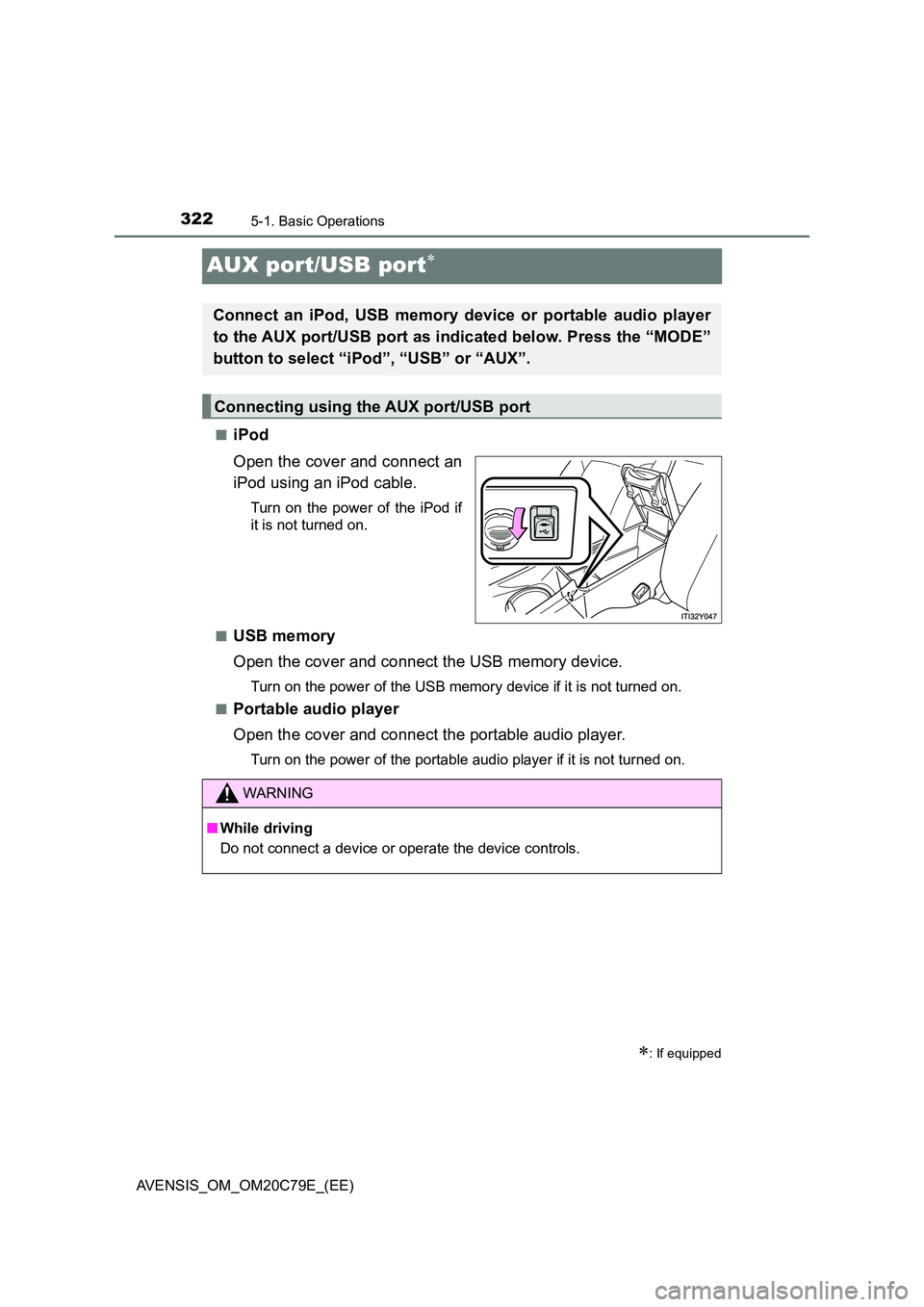
■iPod
Open the cover and connect an
iPod using an iPod cable.
Turn on the power of the iPod if
it is not turned on.
■USB memory
Open the cover and connect the USB memory device.
Turn on the power of the USB memory device if it is not turned on.
■Portable audio player
Open the cover and connect the portable audio player.
Turn on the power of the portable audio player if it is not turned on.
: If equipped
Connect an iPod, USB memory device or portable audio player
to the AUX port/USB port as indicated below. Press the “MODE”
button to select “iPod”, “USB” or “AUX”.
Connecting using the AUX port/USB port
WARNING
■ While driving
Do not connect a device or operate the device controls.
Page 359 of 660
359
5
5-5. Using an external device
Audio system
AVENSIS_OM_OM20C79E_(EE)
Using the AUX port
P. 3 2 2
■Operating portable audio devices connected to the audio system
The volume can be adjusted using the vehicle’s audio controls. All other
adjustments must be made on the portable audio device itself.
■When using a portable audio device connected to the power outlet
Noise may occur during playback. Use the power source of the portable
audio device.
: If equipped
This port can be used to connect a portable audio device and lis-
ten to it through the vehicle’s speakers. Press the “MODE” but-
ton until “AUX” is displayed.
Connecting a portable player
Page 421 of 660
4216-3. Using the storage features
AVENSIS_OM_OM20C79E_(EE)
6
Interior features
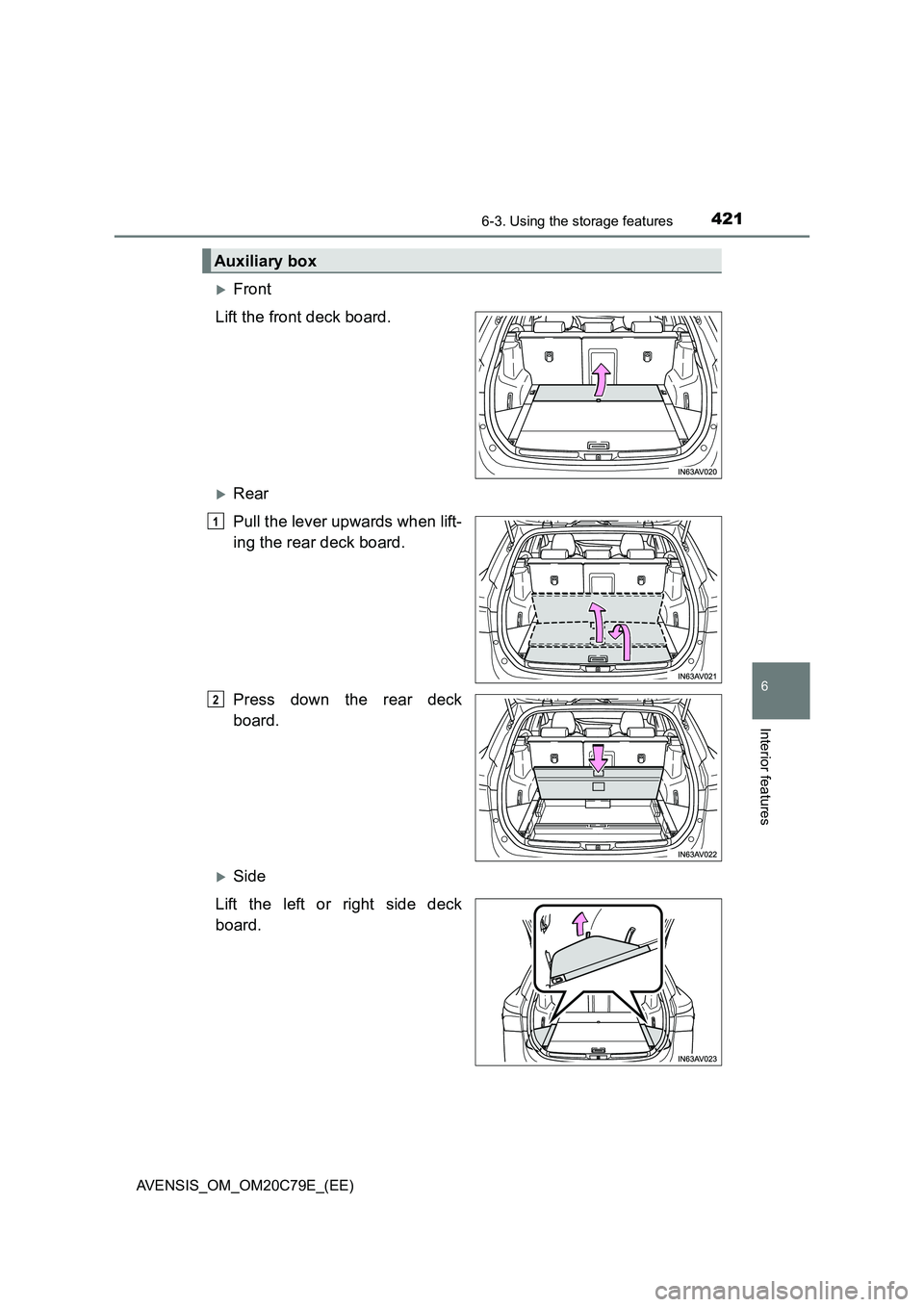
Front
Lift the front deck board.
Rear
Pull the lever upwards when lift-
ing the rear deck board.
Press down the rear deck
board.
Side
Lift the left or right side deck
board.
Auxiliary box
1
2
Page 423 of 660
4236-3. Using the storage features
AVENSIS_OM_OM20C79E_(EE)
6
Interior features
■Removing the luggage cover
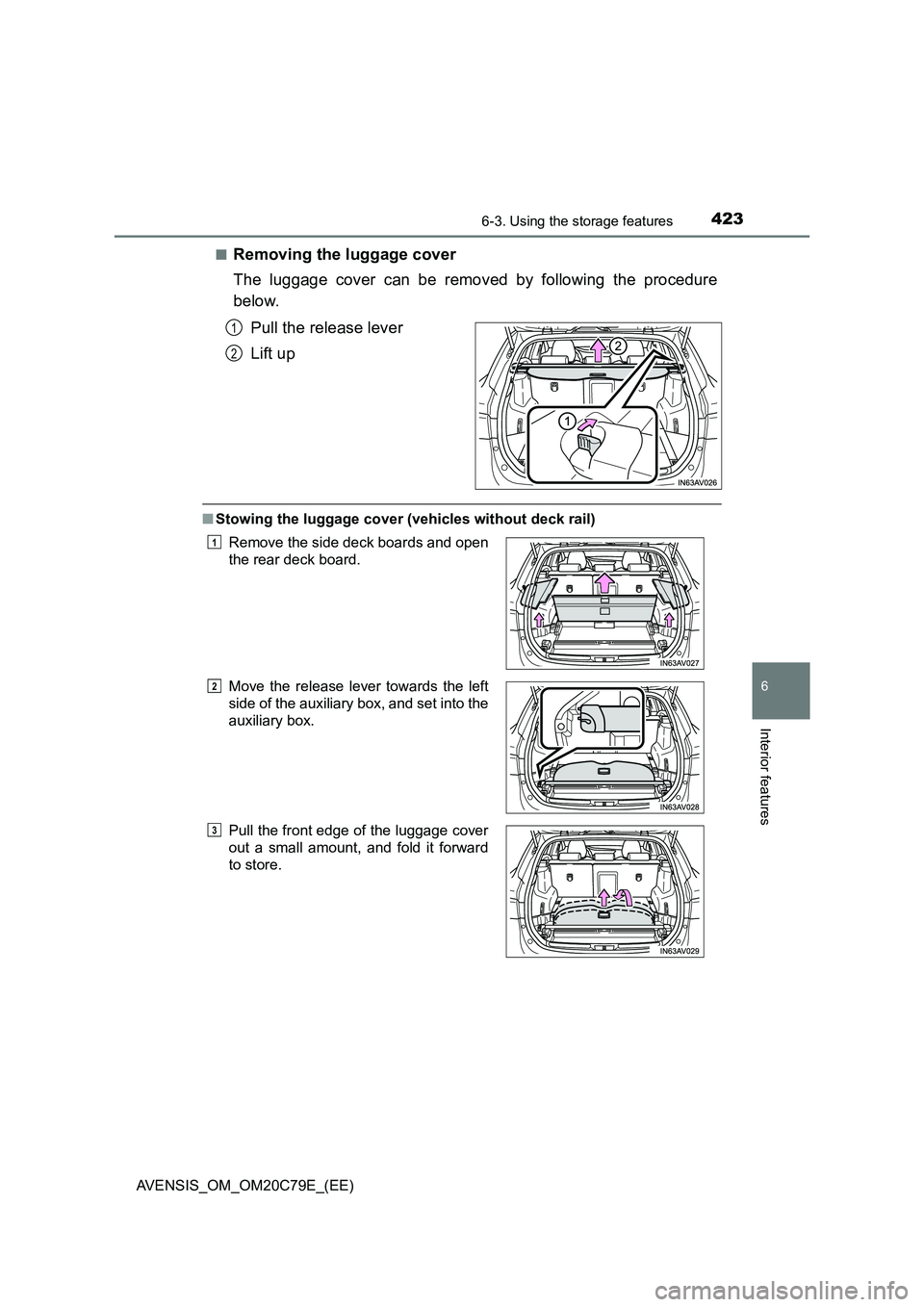
The luggage cover can be removed by following the procedure
below.
Pull the release lever
Lift up
■Stowing the luggage cover (vehicles without deck rail)
1
2
Remove the side deck boards and open
the rear deck board.
Move the release lever towards the left
side of the auxiliary box, and set into the
auxiliary box.
Pull the front edge of the luggage cover
out a small amount, and fold it forward
to store.1
2
3
Page 425 of 660
4256-3. Using the storage features
AVENSIS_OM_OM20C79E_(EE)
6
Interior features
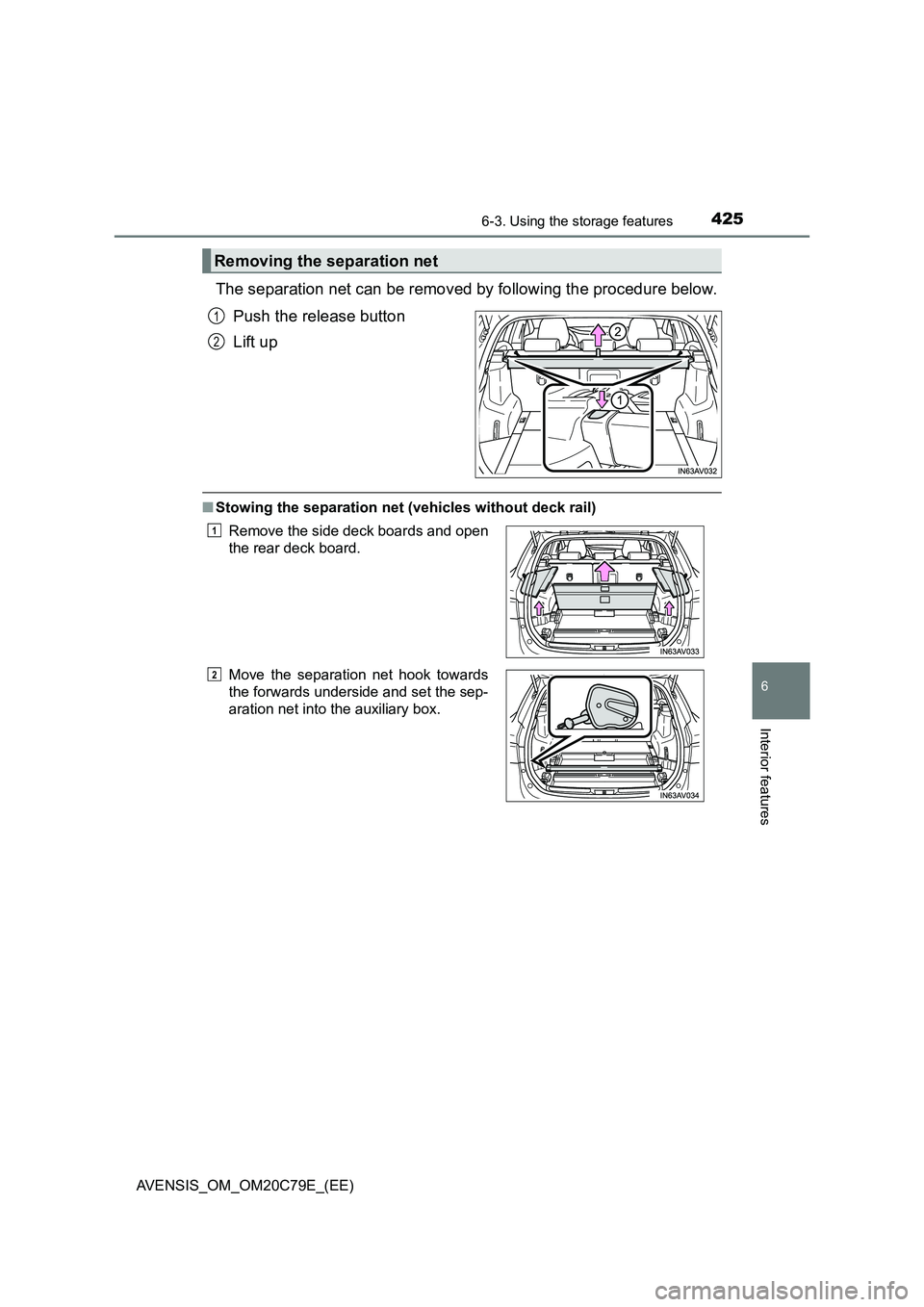
The separation net can be removed by following the procedure below.
Push the release button
Lift up
■Stowing the separation net (vehicles without deck rail)
Removing the separation net
1
2
Remove the side deck boards and open
the rear deck board.
Move the separation net hook towards
the forwards underside and set the sep-
aration net into the auxiliary box.1
2
Page 476 of 660
4767-3. Do-it-yourself maintenance
AVENSIS_OM_OM20C79E_(EE)■Situations in which the tire pressure warning system may not operate
properly (if equipped)
●In the following cases, the tire pressure warning system may not operate
properly.
• If non-genuine Toyota wheels are used.
• A tire has been replaced with a tire that is not an OE (Original Equipment)
tire.
• A tire has been replaced with a tire that is not of the specified size.
• Tire chains etc. are equipped.
• An auxiliary-supported run-flat tire is equipped.
• If a window tint that affects the radio wave signals is installed.
• If there is a lot of snow or ice on the vehicle, particularly around the
wheels or wheel housings.
• If the tire inflation pressure is extremely higher than the specified level.
• If tires not equipped with the tire pressure warning valves and transmit-
ters are used.
• If the ID code on the tire pressure warning valves and transmitters is not
registered in the tire pressure warning computer.
• If the wheel set selected does not match the wheel set fitted to the vehi-
cle, in case a second wheel set has been registered.
●Performance may be affected in the following situations.
• Near a TV tower, electric power plant, gas station, radio station, large dis-
play, airport or other facility that generates strong radio waves or electri-
cal noise
• When carrying a portable radio, cellular phone, cordless phone or other
wireless communication device
●When the vehicle is parked, the time taken for the warning to start or go off
could be extended.
●When tire inflation pressure declines rapidly for example when a tire has
burst, the warning may not function.
■The initialization operation (vehicles with the tire pressure warning sys-
tem)
●Make sure to carry out initialization after adjusting the tire inflation pressure.
Also, make sure the tires are cold before carrying out initialization or tire
inflation pressure adjustment.
●If you have accidentally turned the engine switch to the “LOCK” position
(vehicles without a smart entry & start system) or off (vehicles with a smart
entry & start system) during initialization, it is not necessary to restart the ini-
tialization again as initialization will restart automatically when the engine
switch has been turned to the “ON” position (vehicles without a smart entry
& start system) or IGNITION ON mode (vehicles with a smart entry & start
system) for the next time.
●If you accidentally start the initialization when initialization is not necessary,
adjust the tire inflation pressure to the specified level when the tires are
cold, and conduct initialization again.
Page 557 of 660
5578-2. Steps to take in an emergency
AVENSIS_OM_OM20C79E_(EE)
8
When trouble arises
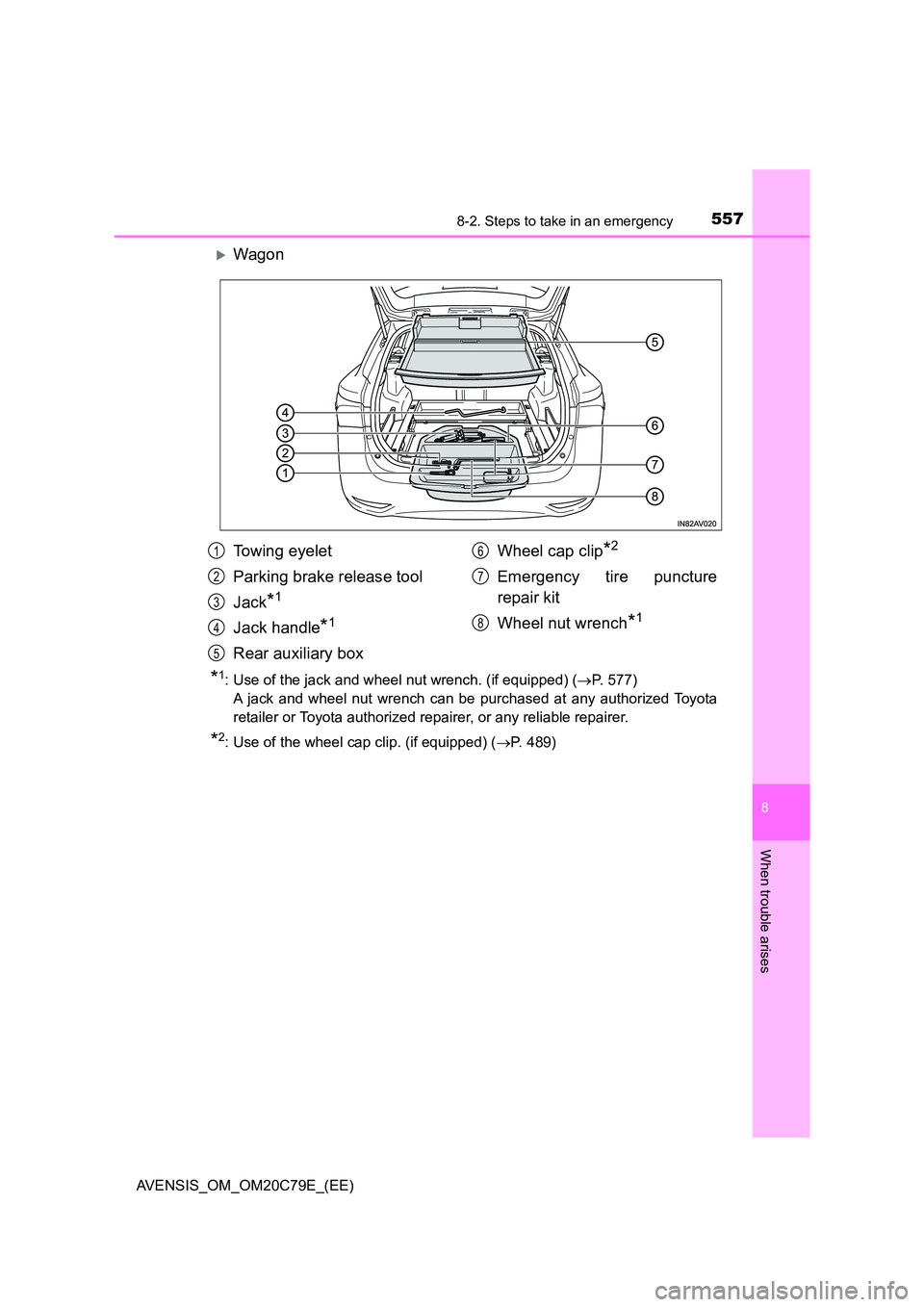
Wagon
*1: Use of the jack and wheel nut wrench. (if equipped) (P. 577)
A jack and wheel nut wrench can be purchased at any authorized Toyota
retailer or Toyota authorized repairer, or any reliable repairer.
*2: Use of the wheel cap clip. (if equipped) ( P. 489)
Towing eyelet
Parking brake release tool
Jack*1
Jack handle*1
Rear auxiliary box
Wheel cap clip*2
Emergency tire puncture
repair kit
Wheel nut wrench*1
1
2
3
4
5
6
7
8