audio TOYOTA AYGO 2017 (in English) User Guide
[x] Cancel search | Manufacturer: TOYOTA, Model Year: 2017, Model line: AYGO, Model: TOYOTA AYGO 2017Pages: 480, PDF Size: 40.72 MB
Page 160 of 480
1604-2. Driving procedures
AYGO_OM_Europe_OM99Q24E
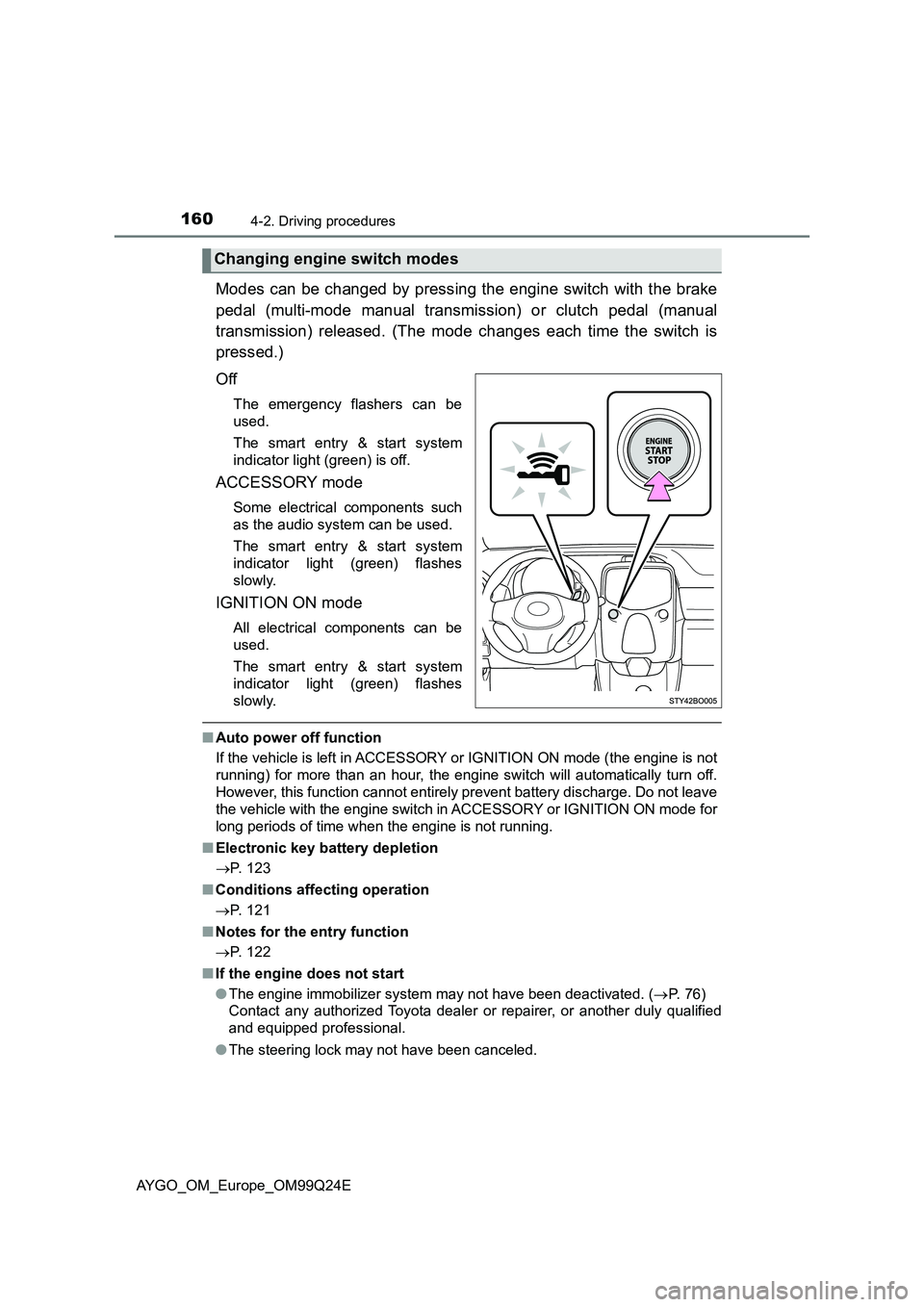
Modes can be changed by pressing the engine switch with the brake
pedal (multi-mode manual transmission) or clutch pedal (manual
transmission) released. (The mode changes each time the switch is
pressed.)
Off
The emergency flashers can be
used.
The smart entry & start system
indicator light (green) is off.
ACCESSORY mode
Some electrical components such
as the audio system can be used.
The smart entry & start system
indicator light (green) flashes
slowly.
IGNITION ON mode
All electrical components can be
used.
The smart entry & start system
indicator light (green) flashes
slowly.
■ Auto power off function
If the vehicle is left in ACCESSORY or IGNITION ON mode (the engine is not
running) for more than an hour, the engine switch will automatically turn off.
However, this function cannot entirely prevent battery discharge. Do not leave
the vehicle with the engine switch in ACCESSORY or IGNITION ON mode for
long periods of time when the engine is not running.
■ Electronic key battery depletion
P. 123
■ Conditions affecting operation
P. 121
■ Notes for the entry function
P. 122
■ If the engine does not start
● The engine immobilizer system may not have been deactivated. (P. 7 6 )
Contact any authorized Toyota dealer or repairer, or another duly qualified
and equipped professional.
● The steering lock may not have been canceled.
Changing engine switch modes
Page 208 of 480
2084-5. Toyota Safety Sense
AYGO_OM_Europe_OM99Q24E
■Temporary cancelation of the LDA system functions
If any of the following occurs, the LDA system functions will be temporarily
canceled. The functions will resume after the necessary operating conditions
have returned.
● The turn signal lever is operated.
● The vehicle speed deviates from the operating range of the LDA system
functions.
● When the lane lines cannot be recognized while driving.
● When the lane departure warning sounds.
The lane departure warning function will not operate again for a several sec-
onds after it has been activated, even if the vehicle leaves the lane again.
■ The lane departure warning
Depending on the audio system sound level or air conditioning fan noise
while the audio system or air conditioning sy stem is in use, it may be difficult
to hear the warning sound.
■ After the vehicle has been parked in the sun
The LDA system may not be immediately available. When the temperature in
the cabin decreases and the temperature around the front sensor ( P. 188)
becomes suitable for its operation, the functions will begin to operate.
■ If there are lane markers on only one side of the vehicle
The lane departure warning will not oper ate for the side on which lane mark-
ers could not be recognized.
Page 220 of 480
2204-6. Using the driving support systems
AYGO_OM_Europe_OM99Q24E
■ The Stop & Start system protection feature
Vehicles without a smart entry & start system: When an excessively loud
sound is being projected by the audio system, the audio system may be auto-
matically cut off in order to maintain power for the Stop & Start system func-
tion.
If this occurs, turning the engine switch to the “LOCK” position then to the
“ACC” or “ON” position re -enables the audio system.
Vehicles with a smart entry & star t system: When an excessively loud sound
is being projected by the audio system, the audio system may be automati-
cally cut off in order to maintain pow er for the Stop & Start system function.
If this occurs, turning the engine switch off then to ACCESSORY mode or
IGNITION ON mode re-enables the audio system.
■ Steering wheel operation
When the engine is stopped by the Stop & Start system, the steering wheel
may become heavier than when driving.
■ Hood
If the hood is opened while the engine is stopped by the Stop & Start system,
the engine cannot be restarted by the Stop & Start system or the automatic
engine start function. Restart the engine with the engine switch operation.
( P. 155, 158)
■ When to use the Stop & Start system
Use the Stop & Start system when stopping the vehicle temporarily at red
lights, intersections, etc. When stopping the vehicle for a longer period of
time, turn off the engine completely.
Page 233 of 480
233
5Audio system
AYGO_OM_Europe_OM99Q24E
5-1. Basic Operations
Audio system types ........... 234
Steering wheel audio
switches ........................... 236
AUX port/USB port ............ 237
5-2. Using the audio system
Optimal use of the
audio system ................... 238
5-3. Using the radio
Radio operation ................. 240
5-4. Using an external device
Listening to an iPod ........... 245
Listening USB memory
device .............................. 253
Using the AUX port ............ 260
5-5. Using Bluetooth® devices
Bluetooth® audio/phone..... 261
Using the steering
wheel switches ................ 267
Registering a
Bluetooth® device ............ 268
5-6. “SETUP” menu
Using the “SETUP” menu
(“Bluetooth*” menu) ......... 269
Using the “SETUP” menu
(“TEL” menu) ................... 273
5-7. Bluetooth® Audio
Operating a Bluetooth®
enabled portable
player ............................... 276
5-8. Bluetooth® Phone
Making a phone call ........... 278
Receiving a phone call....... 280
Speaking on the phone ...... 281
5-9. Bluetooth®
Bluetooth®......................... 283
*: Bluetooth is a registered trademark of Bluetooth SIG, Inc.
Page 234 of 480
2345-1. Basic Operations
AYGO_OM_Europe_OM99Q24E
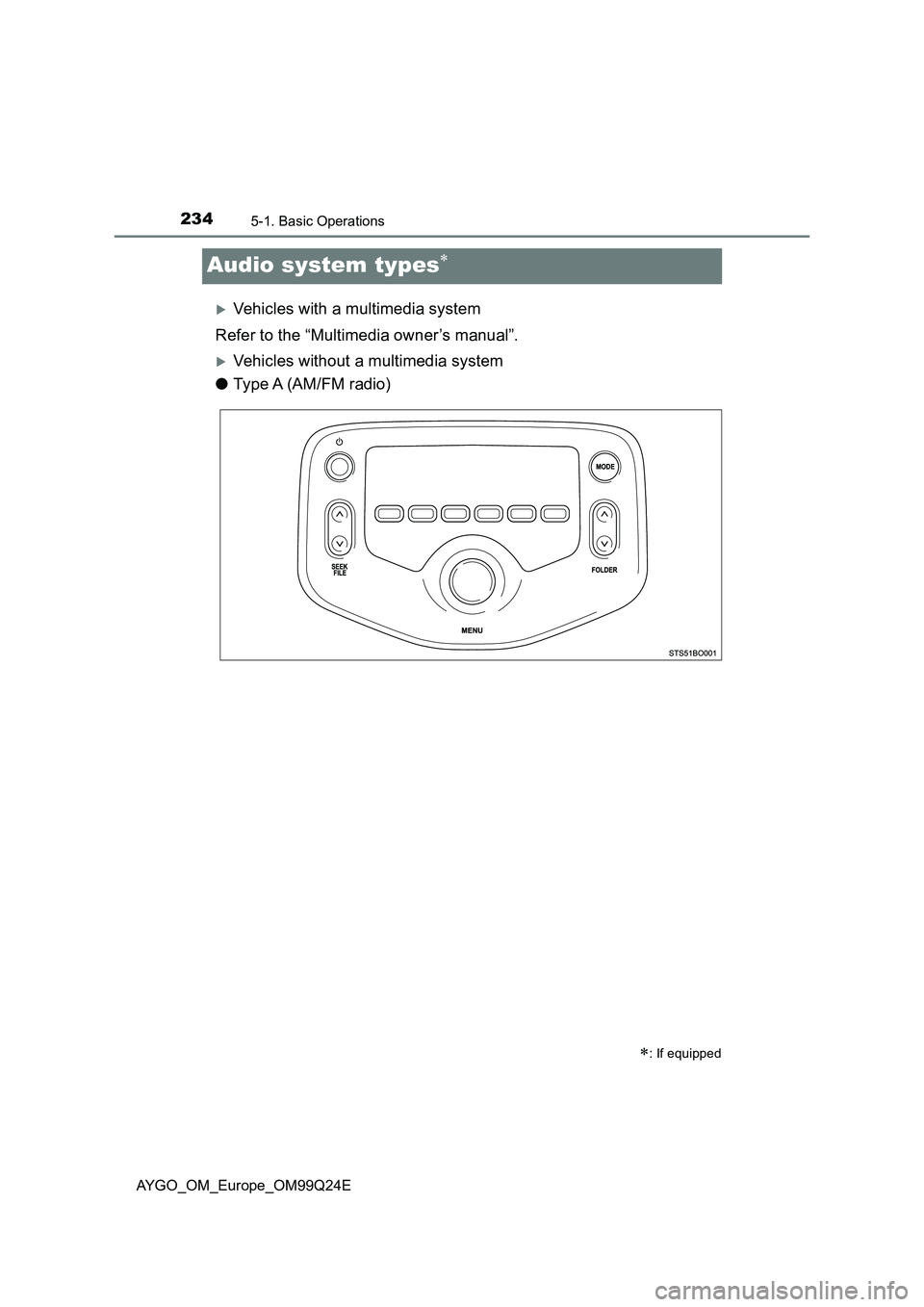
Audio system types
Vehicles with a multimedia system
Refer to the “Multimedia owner’s manual”.
Vehicles without a multimedia system
● Type A (AM/FM radio)
: If equipped
Page 235 of 480
2355-1. Basic Operations
5
Audio system
AYGO_OM_Europe_OM99Q24E
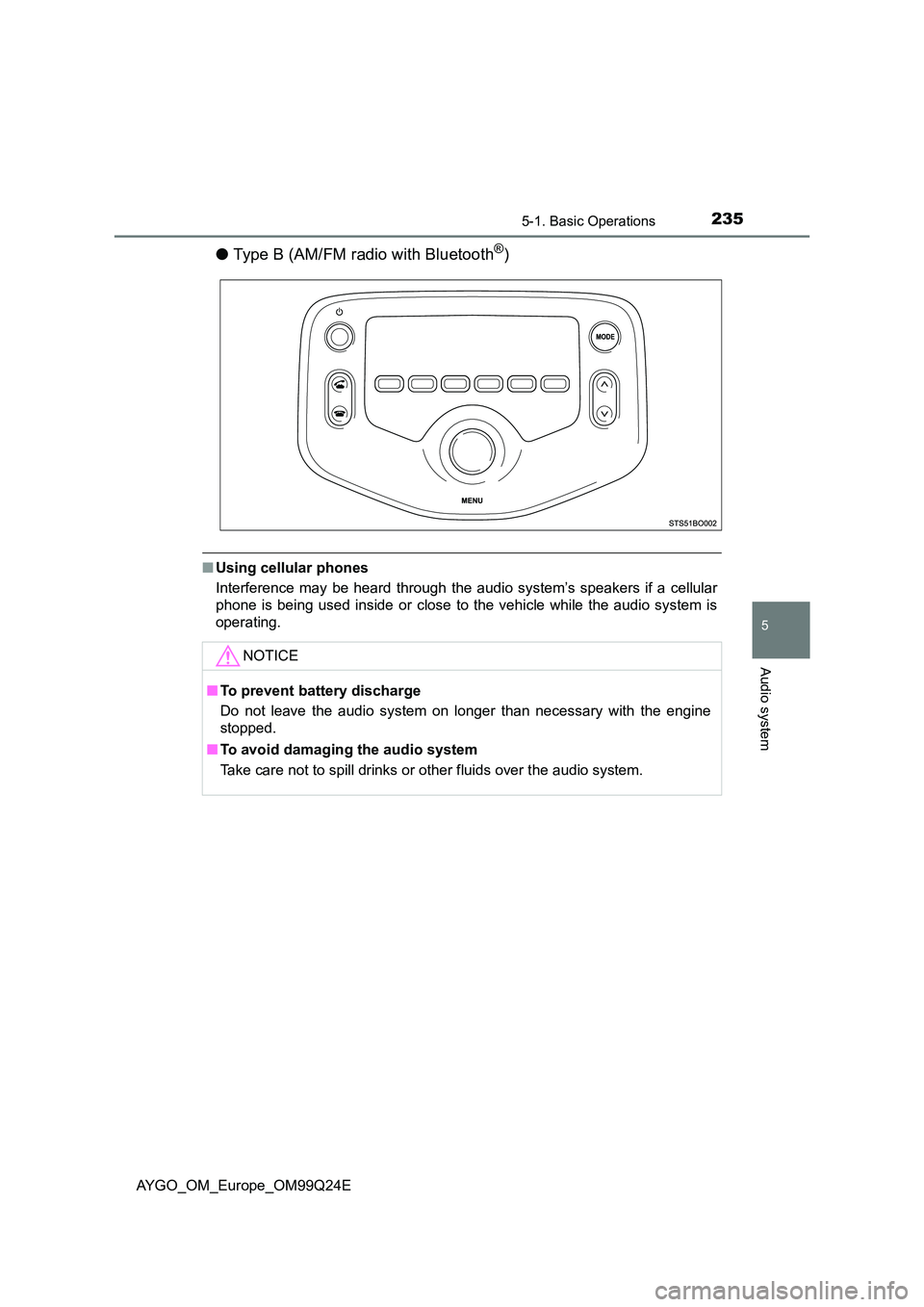
●Type B (AM/FM radio with Bluetooth®)
■Using cellular phones
Interference may be heard through the audio system’s speakers if a cellular
phone is being used inside or close to the vehicle while the audio system is
operating.
NOTICE
■ To prevent battery discharge
Do not leave the audio system on longer than necessary with the engine
stopped.
■ To avoid damaging the audio system
Take care not to spill drinks or other fluids over the audio system.
Page 236 of 480
2365-1. Basic Operations
AYGO_OM_Europe_OM99Q24E
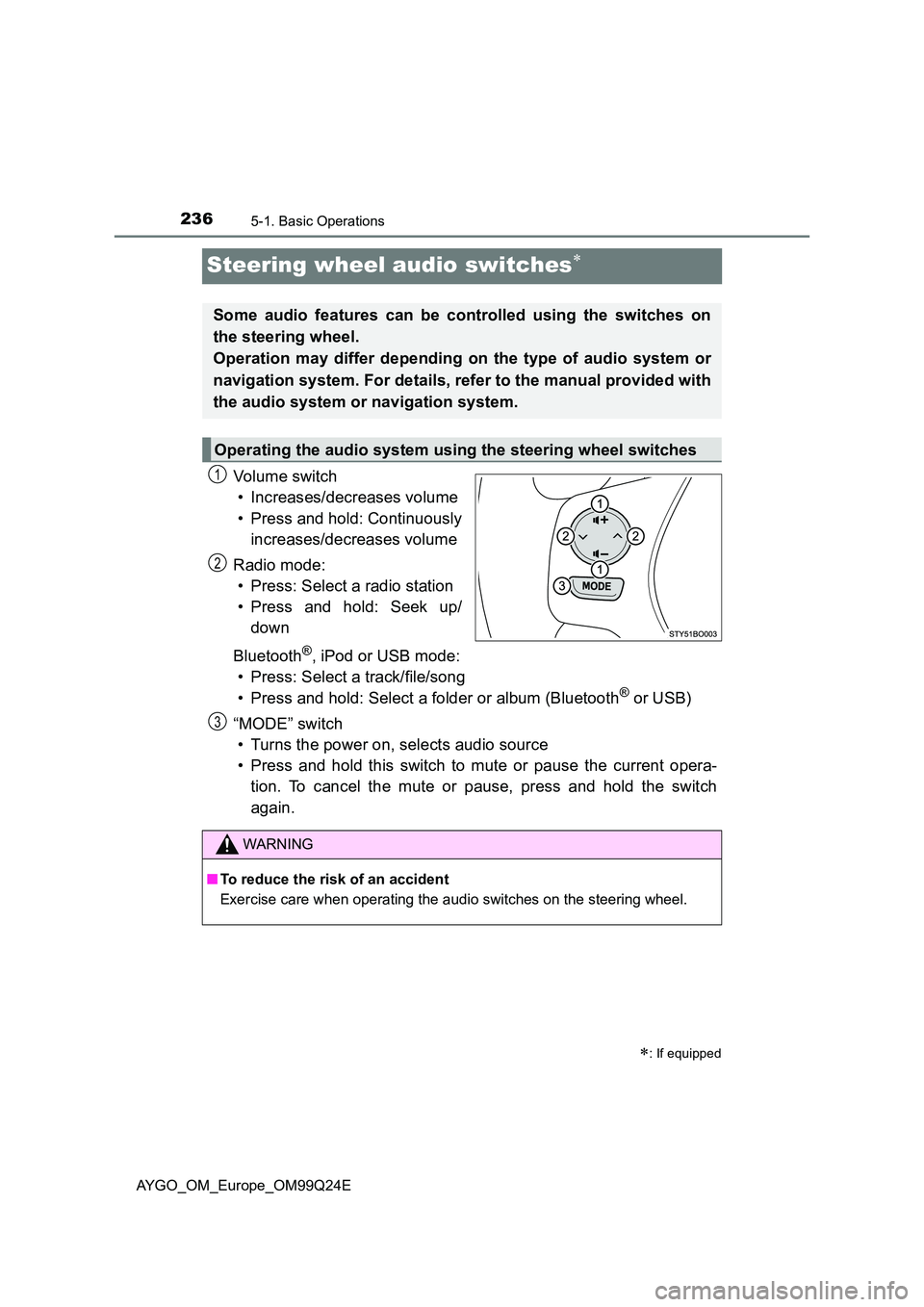
Steering wheel audio switches
Vo lu m e swi tc h
• Increases/decreases volume
• Press and hold: Continuously
increases/decreases volume
Radio mode:
• Press: Select a radio station
• Press and hold: Seek up/
down
Bluetooth®, iPod or USB mode:
• Press: Select a track/file/song
• Press and hold: Select a folder or album (Bluetooth® or USB)
“MODE” switch
• Turns the power on, selects audio source
• Press and hold this switch to mute or pause the current opera-
tion. To cancel the mute or pause, press and hold the switch
again.
: If equipped
Some audio features can be controlled using the switches on
the steering wheel.
Operation may differ depending on the type of audio system or
navigation system. For details, refer to the manual provided with
the audio system or navigation system.
Operating the audio system using the steering wheel switches
1
2
WARNING
■ To reduce the risk of an accident
Exercise care when operating the audio switches on the steering wheel.
3
Page 237 of 480
237
5
5-1. Basic Operations
Audio system
AYGO_OM_Europe_OM99Q24E
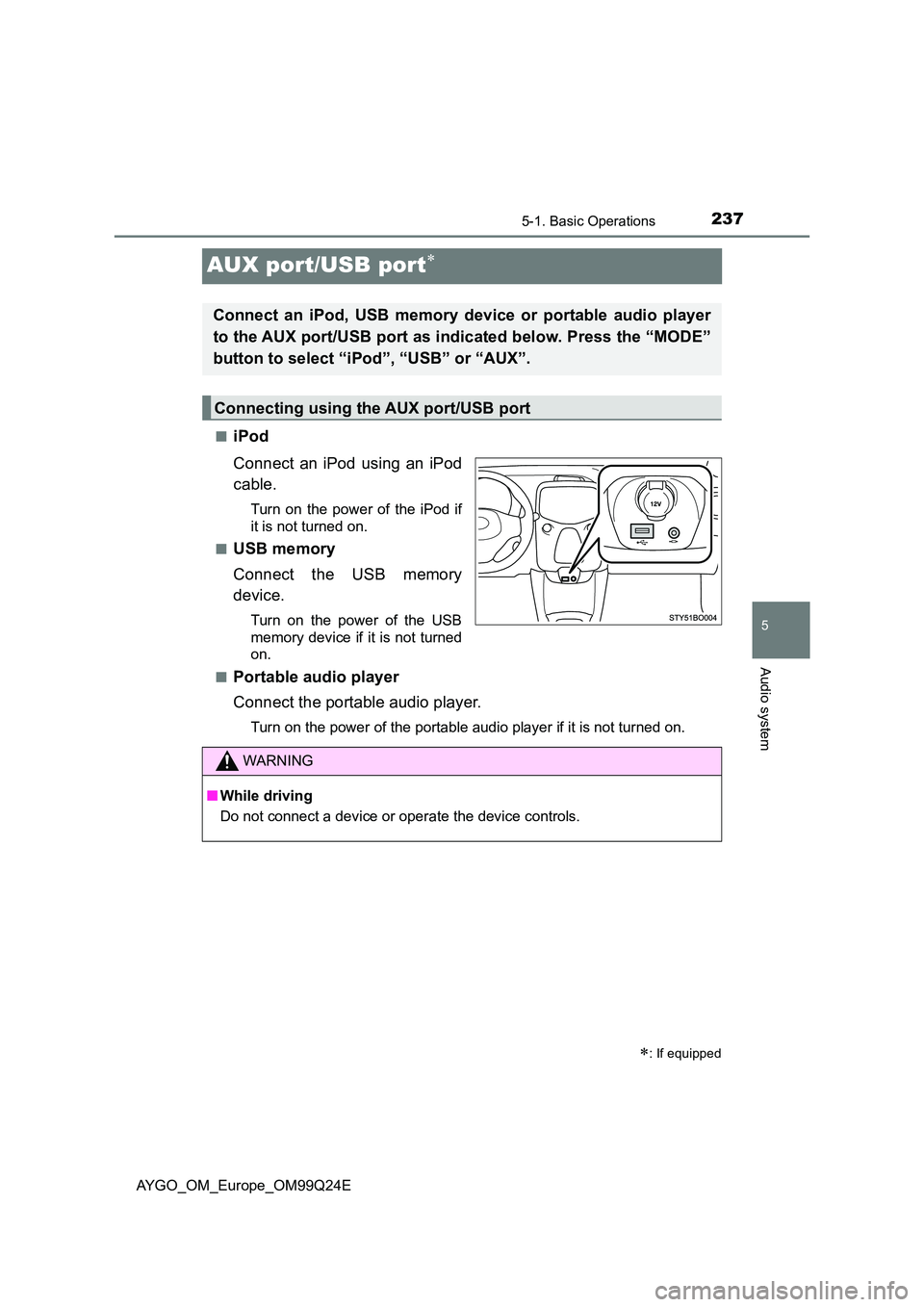
AUX port/USB port
■iPod
Connect an iPod using an iPod
cable.
Turn on the power of the iPod if
it is not turned on.
■USB memory
Connect the USB memory
device.
Turn on the power of the USB
memory device if it is not turned
on.
■Portable audio player
Connect the portable audio player.
Turn on the power of the portable audio player if it is not turned on.
: If equipped
Connect an iPod, USB memory device or portable audio player
to the AUX port/USB port as indicated below. Press the “MODE”
button to select “iPod”, “USB” or “AUX”.
Connecting using the AUX port/USB port
WARNING
■ While driving
Do not connect a device or operate the device controls.
Page 238 of 480
2385-2. Using the audio system
AYGO_OM_Europe_OM99Q24E
Optimal use of the audio system
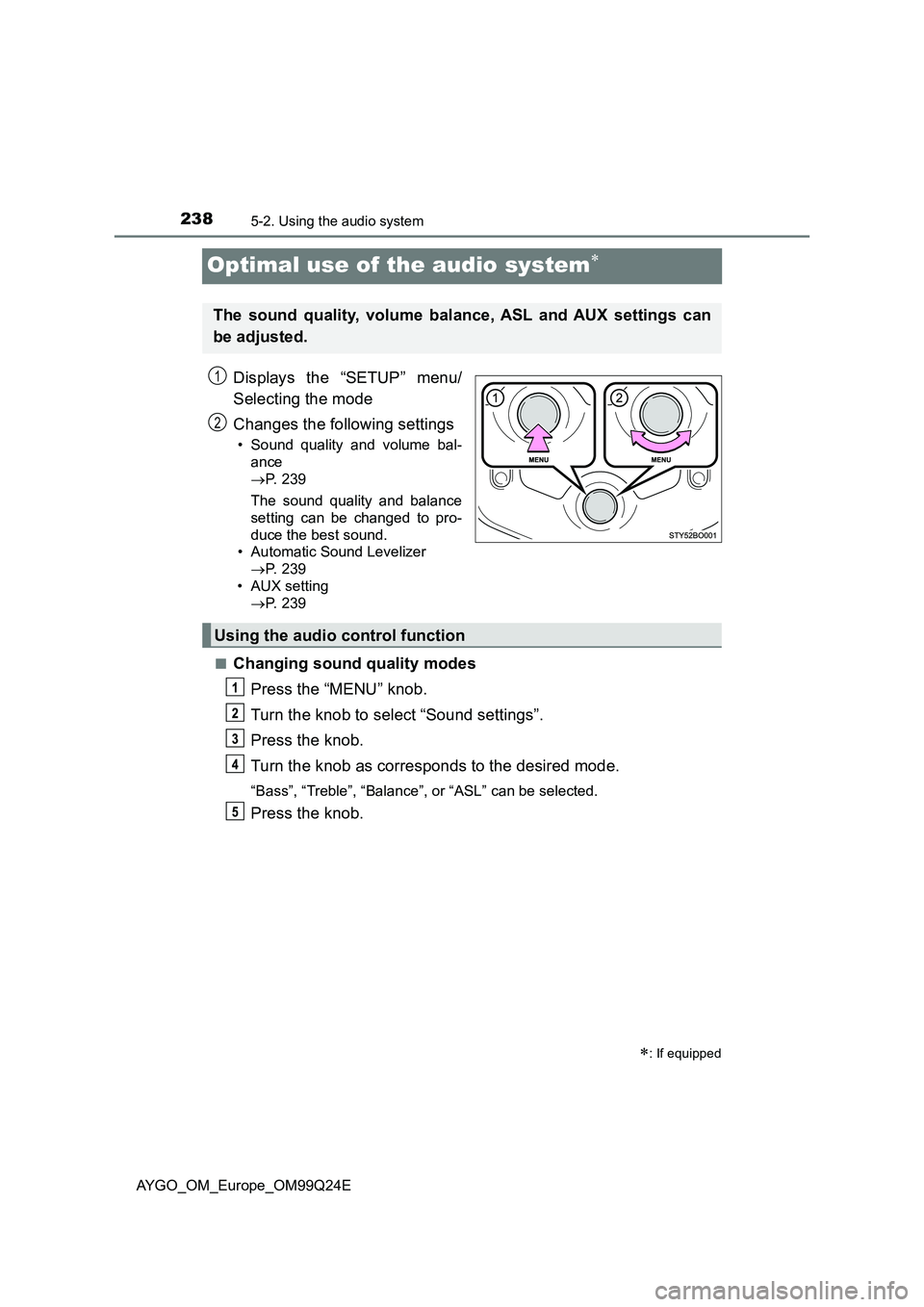
Displays the “SETUP” menu/
Selecting the mode
Changes the following settings
• Sound quality and volume bal-
ance
P. 2 3 9
The sound quality and balance
setting can be changed to pro-
duce the best sound.
• Automatic Sound Levelizer
P. 2 3 9
• AUX setting
P. 2 3 9
■Changing sound quality modes
Press the “MENU” knob.
Turn the knob to select “Sound settings”.
Press the knob.
Turn the knob as corresponds to the desired mode.
“Bass”, “Treble”, “Balance”, or “ASL” can be selected.
Press the knob.
: If equipped
The sound quality, volume balance, ASL and AUX settings can
be adjusted.
1
2
Using the audio control function
Page 239 of 480
2395-2. Using the audio system
5
Audio system
AYGO_OM_Europe_OM99Q24E
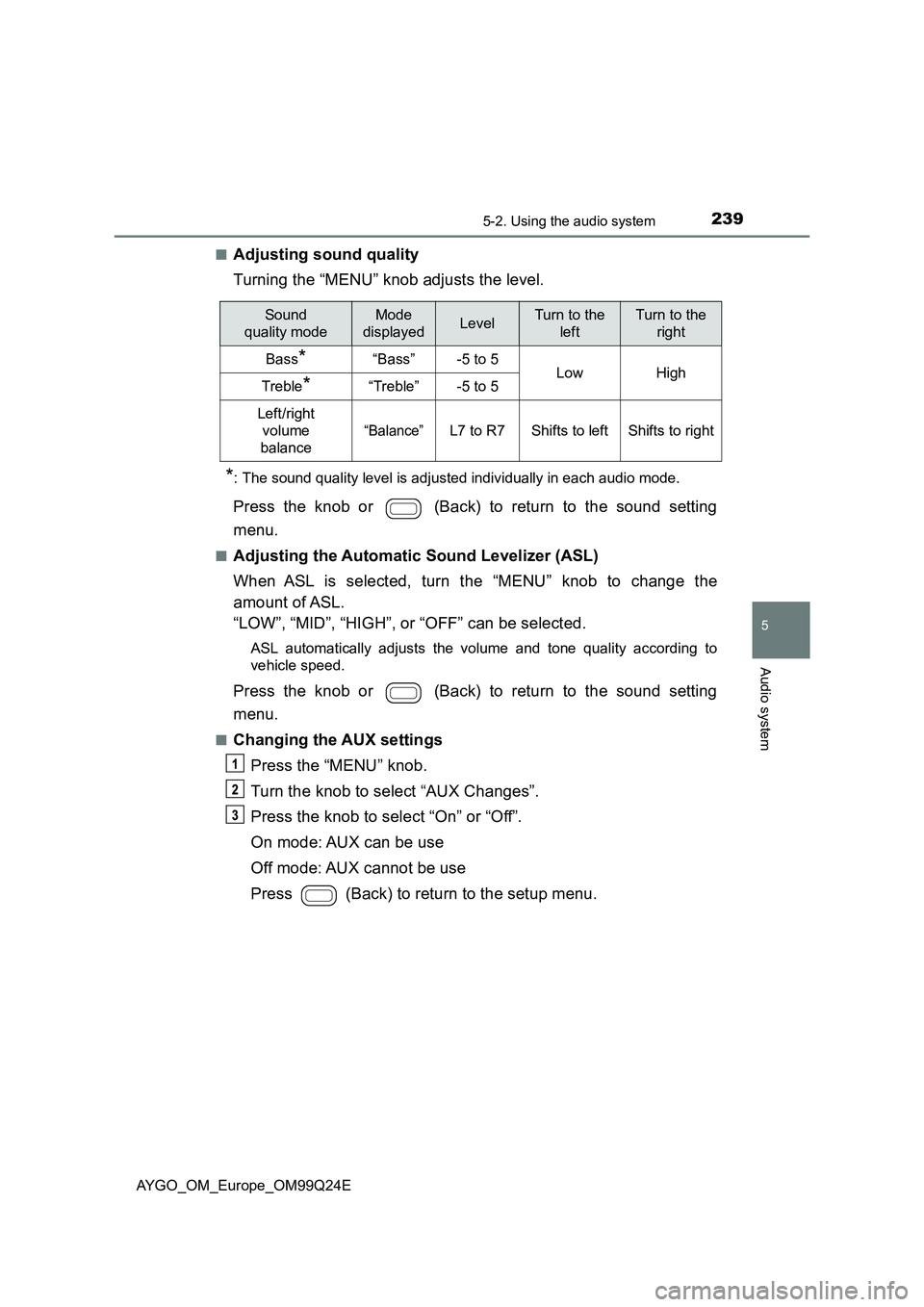
■Adjusting sound quality
Turning the “MENU” knob adjusts the level.
*: The sound quality level is adjusted individually in each audio mode.
Press the knob or (Back) to return to the sound setting
menu.
■Adjusting the Automatic Sound Levelizer (ASL)
When ASL is selected, turn the “MENU” knob to change the
amount of ASL.
“LOW”, “MID”, “HIGH”, or “OFF” can be selected.
ASL automatically adjusts the volume and tone quality according to
vehicle speed.
Press the knob or (Back) to return to the sound setting
menu.
■Changing the AUX settings
Press the “MENU” knob.
Turn the knob to select “AUX Changes”.
Press the knob to select “On” or “Off”.
On mode: AUX can be use
Off mode: AUX cannot be use
Press (Back) to return to the setup menu.
Sound
quality mode
Mode
displayedLevelTurn to the
left
Turn to the
right
Bass*“Bass”-5 to 5LowHighTreble*“Treble”-5 to 5
Left/right
volume
balance
“Balance”L7 to R7Shifts to leftShifts to right