key TOYOTA AYGO 2019 (in English) Owner's Manual
[x] Cancel search | Manufacturer: TOYOTA, Model Year: 2019, Model line: AYGO, Model: TOYOTA AYGO 2019Pages: 504, PDF Size: 67.32 MB
Page 118 of 504
1183-2. Opening, closing and locking the doors
AYGO_OM_Europe_OM99R19E
Side doors
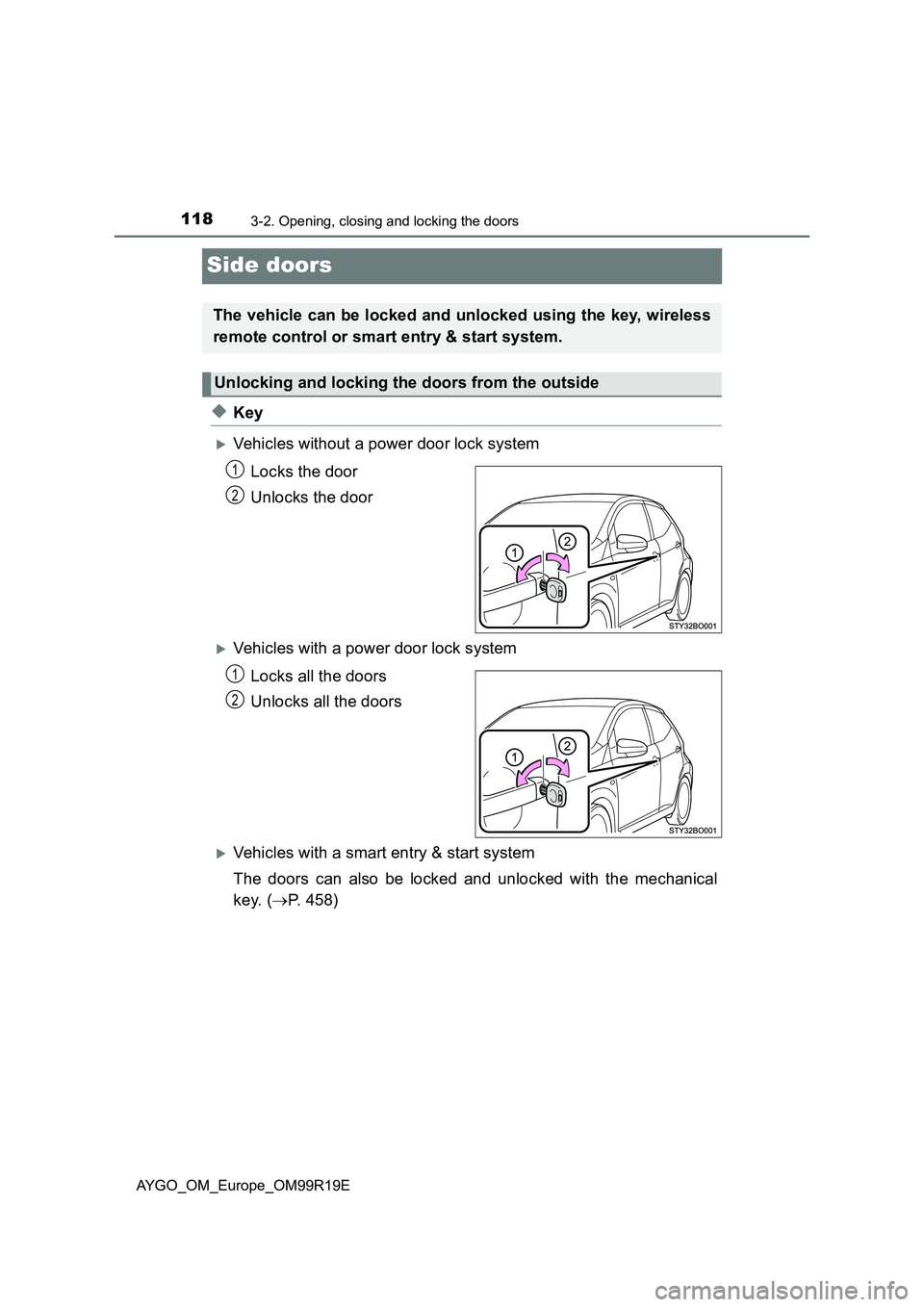
◆Key
Vehicles without a power door lock system
Locks the door
Unlocks the door
Vehicles with a power door lock system
Locks all the doors
Unlocks all the doors
Vehicles with a smart entry & start system
The doors can also be locked and unlocked with the mechanical
key. ( P. 458)
The vehicle can be locked and unlocked using the key, wireless
remote control or smart entry & start system.
Unlocking and locking the doors from the outside
1
2
1
2
Page 119 of 504
1193-2. Opening, closing and locking the doors
3
Operation of each component
AYGO_OM_Europe_OM99R19E
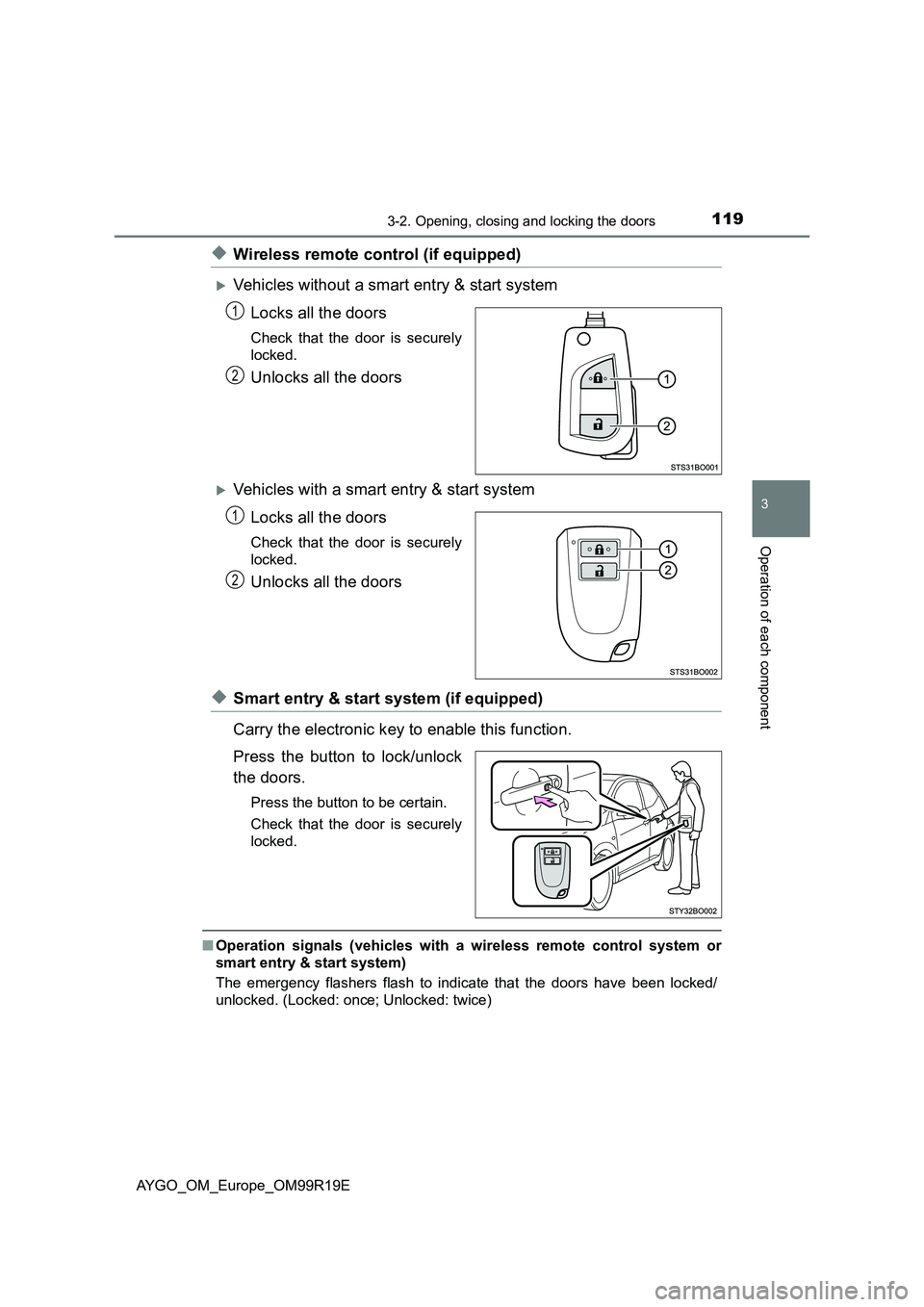
◆Wireless remote control (if equipped)
Vehicles without a smart entry & start system
Locks all the doors
Check that the door is securely
locked.
Unlocks all the doors
Vehicles with a smart entry & start system
Locks all the doors
Check that the door is securely
locked.
Unlocks all the doors
◆Smart entry & start system (if equipped)
Carry the electronic key to enable this function.
Press the button to lock/unlock
the doors.
Press the button to be certain.
Check that the door is securely
locked.
■ Operation signals (vehicles with a wireless remote control system or
smart entry & start system)
The emergency flashers flash to indicate that the doors have been locked/
unlocked. (Locked: once; Unlocked: twice)
1
2
1
2
Page 120 of 504
1203-2. Opening, closing and locking the doors
AYGO_OM_Europe_OM99R19E■
Security feature (vehicles with a smart entry & start system)
If a door is not opened within approximately 30 seconds after the vehicle is
unlocked, the security feature automatically locks the vehicle again.
■ Door lock buzzer (vehicles with a smart entry & start system)
If an attempt to lock the doors is made when a door is not fully closed, a
buzzer sounds continuously for 5 seconds. Fully close the door to stop the
buzzer, and lock the vehicle once more.
■ If the smart entry & start system do es not operate properly (if equipped)
● Use the mechanical key to lock and unlock the doors. ( P. 458)
● Replace the battery with a new one if it is depleted. ( P. 383)
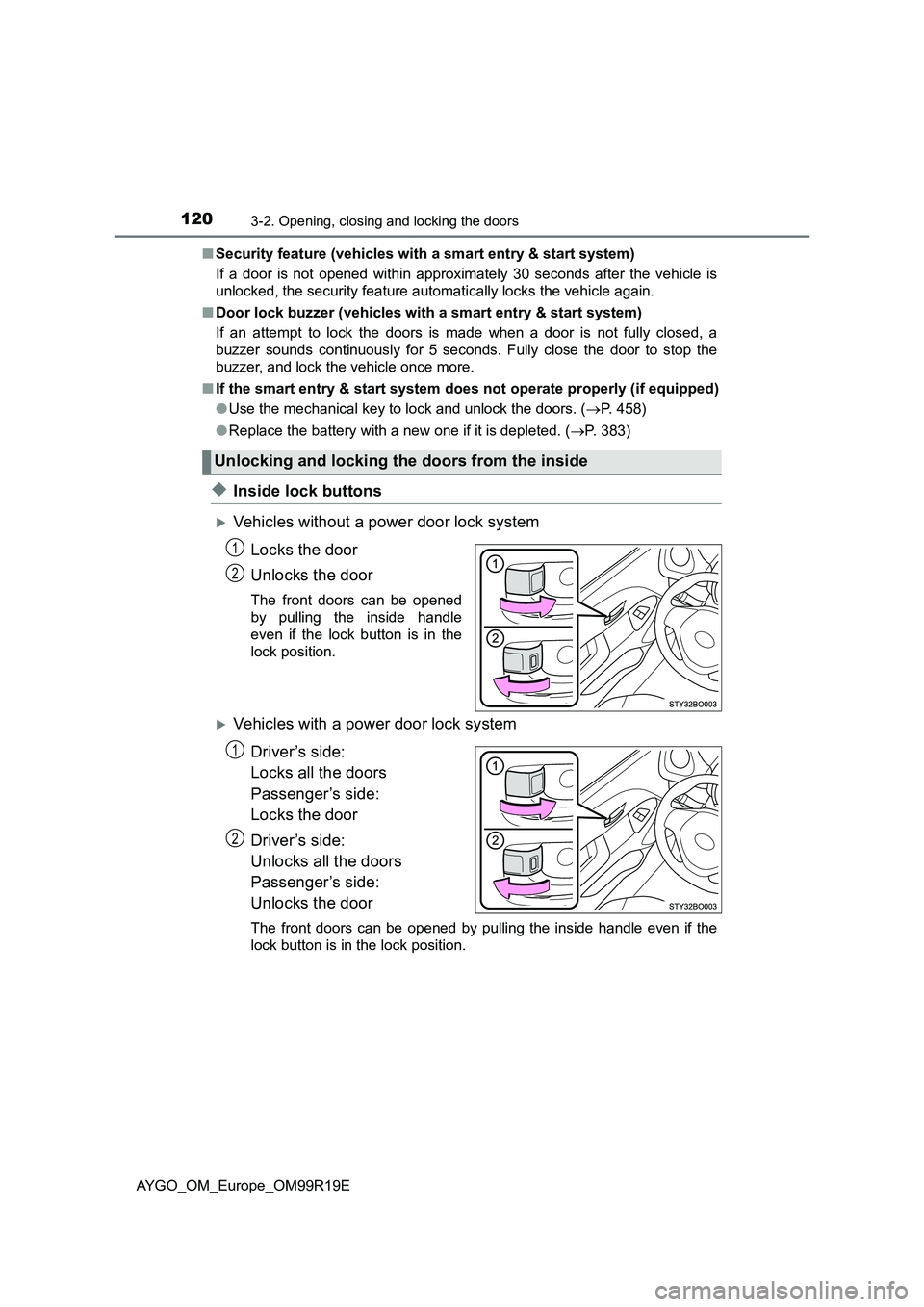
◆Inside lock buttons
Vehicles without a power door lock system
Locks the door
Unlocks the door
The front doors can be opened
by pulling the inside handle
even if the lock button is in the
lock position.
Vehicles with a power door lock systemDriver’s side:
Locks all the doors
Passenger’s side:
Locks the door
Driver’s side:
Unlocks all the doors
Passenger’s side:
Unlocks the door
The front doors can be opened by pulling the inside handle even if the
lock button is in the lock position.
Unlocking and locking the doors from the inside
1
2
1
2
Page 121 of 504
1213-2. Opening, closing and locking the doors
3
Operation of each component
AYGO_OM_Europe_OM99R19E
Move the inside lock button to the lock position.
Close the door while pulling the door handle.
Vehicles with a power door lock system
Vehicles without a smart entry & start system:
The door cannot be locked if the key is in the engine switch.
Vehicles with a smart entry & start system:
The door cannot be locked if the engine switch is in ACCESSORY or
IGNITION ON mode, or the electronic key is left inside the vehicle.
The key may not be detected correctly and the door may be locked.
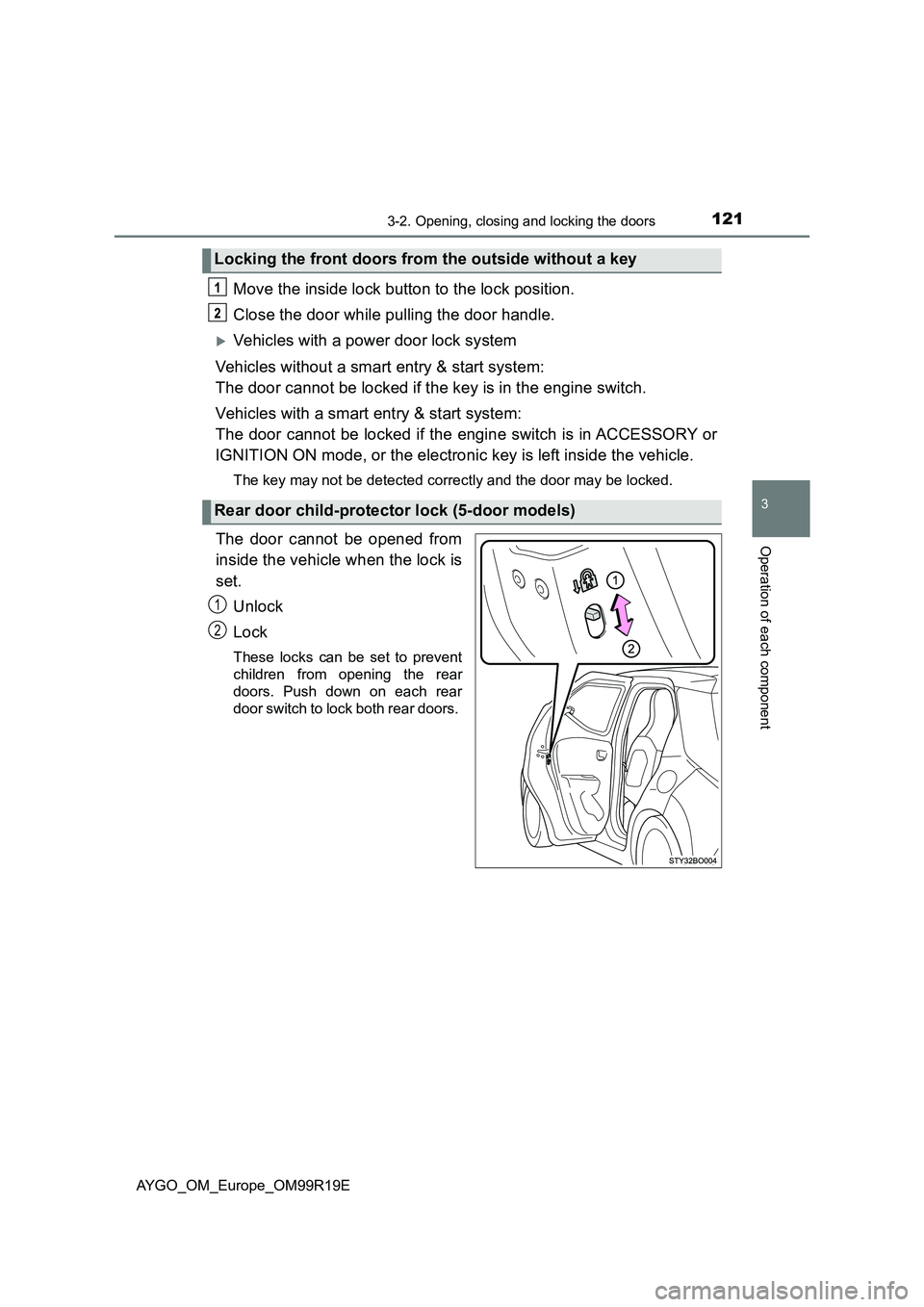
The door cannot be opened from
inside the vehicle when the lock is
set. Unlock
Lock
These locks can be set to prevent
children from opening the rear
doors. Push down on each rear
door switch to lock both rear doors.
Locking the front doors from the outside without a key
Rear door child-protector lock (5-door models)
1
2
Page 122 of 504
1223-2. Opening, closing and locking the doors
AYGO_OM_Europe_OM99R19E
■Conditions affecting operation of the wireless remote control (if
equipped)
The wireless remote control function may not operate normally in the follow-
ing situations.
● When the wireless key battery is depleted
● Near a TV tower, radio station, electric power plant, airport or other facility
that generates strong radio waves
● When carrying a portable radio, cellular phone or other wireless communi-
cation device
● When multiple wireless keys are in the vicinity
● When the wireless key has come into contact with, or is covered by a metal-
lic object
● When a wireless key (that emits radio waves) is being used nearby
● When the wireless key has been left near an electrical appliance such as a
personal computer
● If window tint with a metallic content or metallic objects are attached to the
rear window
■ Conditions affecting operation of the smart entry & start system (if
equipped)
P. 132
WARNING
■To prevent an accident
Observe the following precautions while driving the vehicle.
Failure to do so may result in a door opening and an occupant throwing out
of the vehicle, resulting in death or serious injury.
● Ensure that all doors are properly closed.
● Do not pull the inside handle of the doors while driving.
Be especially careful for the front doors, as the doors may be opened even
if the inside lock buttons are in locked position.
● 5-door models: Set the rear door child-protector locks when children are
seated in the rear seats.
Page 123 of 504
123
3
3-2. Opening, closing and locking the doors
Operation of each component
AYGO_OM_Europe_OM99R19E
Back door
◆Wireless remote control (if equipped)
P. 1 1 9
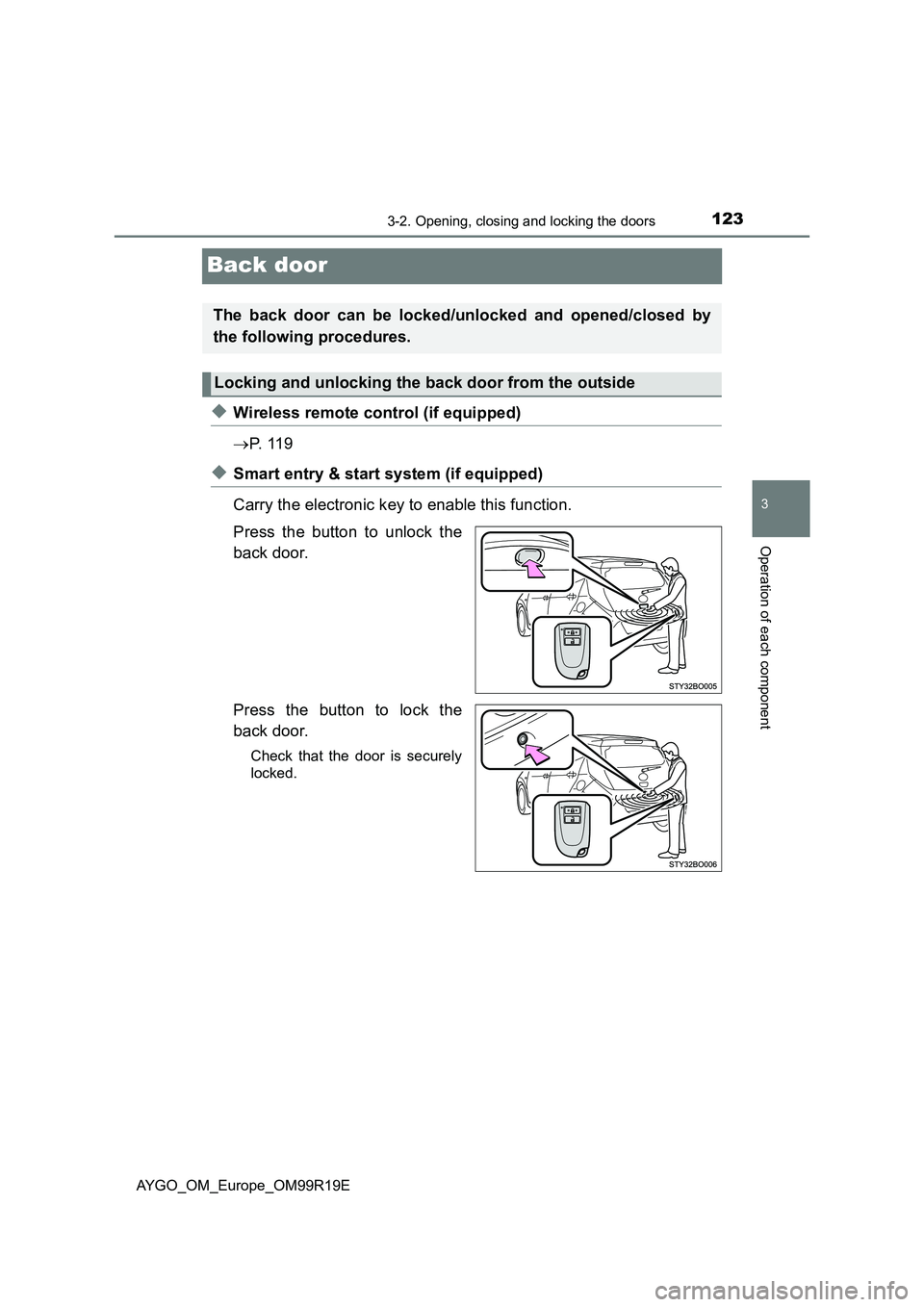
◆Smart entry & start system (if equipped)
Carry the electronic key to enable this function.
Press the button to unlock the
back door.
Press the button to lock the
back door.
Check that the door is securely
locked.
The back door can be locked/unlocked and opened/closed by
the following procedures.
Locking and unlocking the back door from the outside
Page 124 of 504
1243-2. Opening, closing and locking the doors
AYGO_OM_Europe_OM99R19E
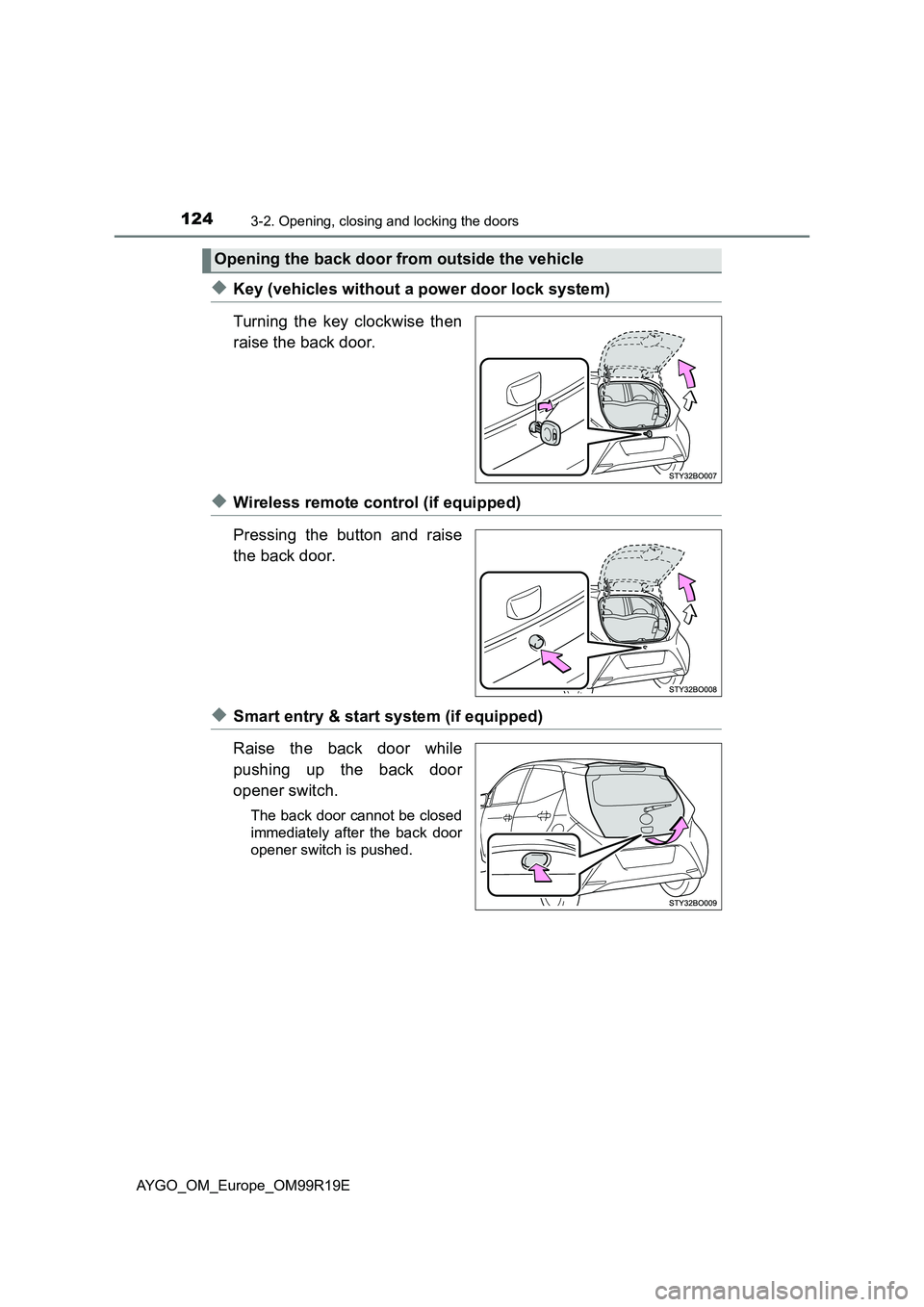
◆Key (vehicles without a power door lock system)
Turning the key clockwise then
raise the back door.
◆Wireless remote control (if equipped)
Pressing the button and raise
the back door.
◆Smart entry & start system (if equipped)
Raise the back door while
pushing up the back door
opener switch.
The back door cannot be closed
immediately after the back door
opener switch is pushed.
Opening the back door from outside the vehicle
Page 129 of 504
129
3
3-2. Opening, closing and locking the doors
Operation of each component
AYGO_OM_Europe_OM99R19E
Smart entry & start system
●Locks and unlocks the side doors ( P. 1 1 9 )
● Locks and unlocks the back door ( P. 123)
● Starts the engine ( P. 185)
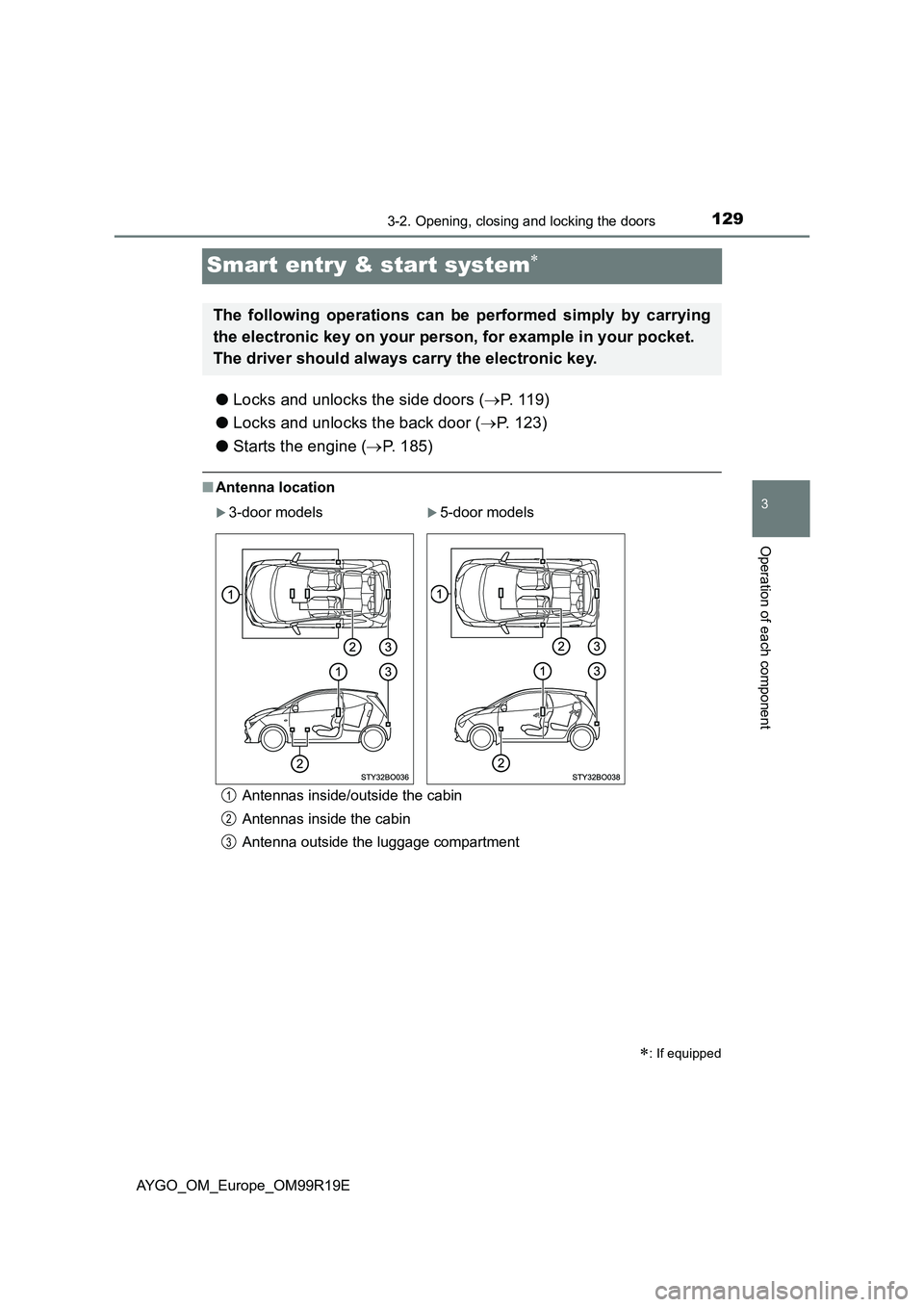
■Antenna location
Antennas inside/outside the cabin
Antennas inside the cabin
Antenna outside the luggage compartment
: If equipped
The following operations can be performed simply by carrying
the electronic key on your person, for example in your pocket.
The driver should always carry the electronic key.
3-door models5-door models
1
2
3
Page 130 of 504
1303-2. Opening, closing and locking the doors
AYGO_OM_Europe_OM99R19E■
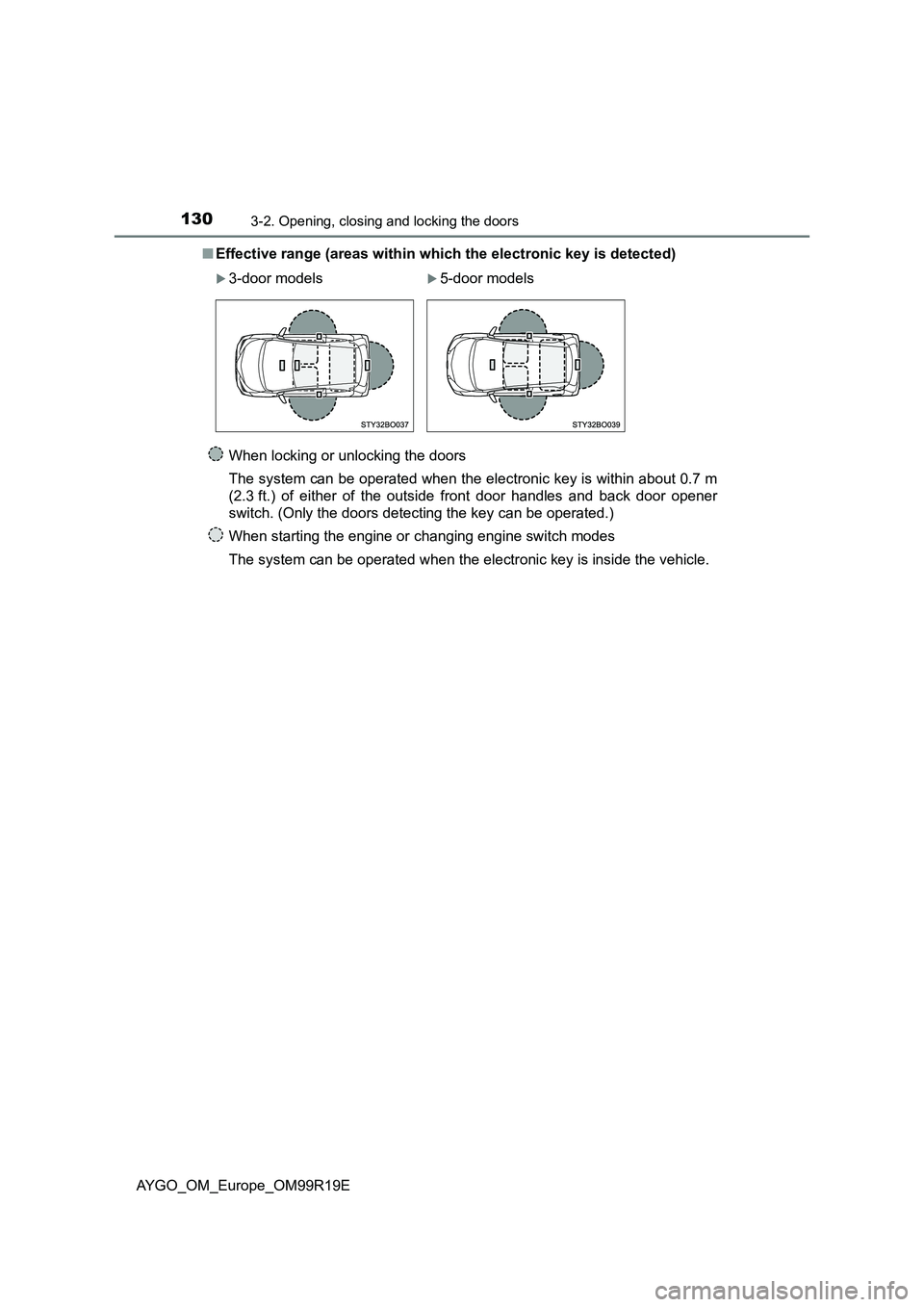
Effective range (areas within which the electronic key is detected)
When locking or unlocking the doors
The system can be operated when the electronic key is within about 0.7 m
(2.3 ft.) of either of the outside front door handles and back door opener
switch. (Only the doors detecting the key can be operated.)
When starting the engine or changing engine switch modes
The system can be operated when the electronic key is inside the vehicle.
3-door models5-door models
Page 131 of 504
1313-2. Opening, closing and locking the doors
3
Operation of each component
AYGO_OM_Europe_OM99R19E
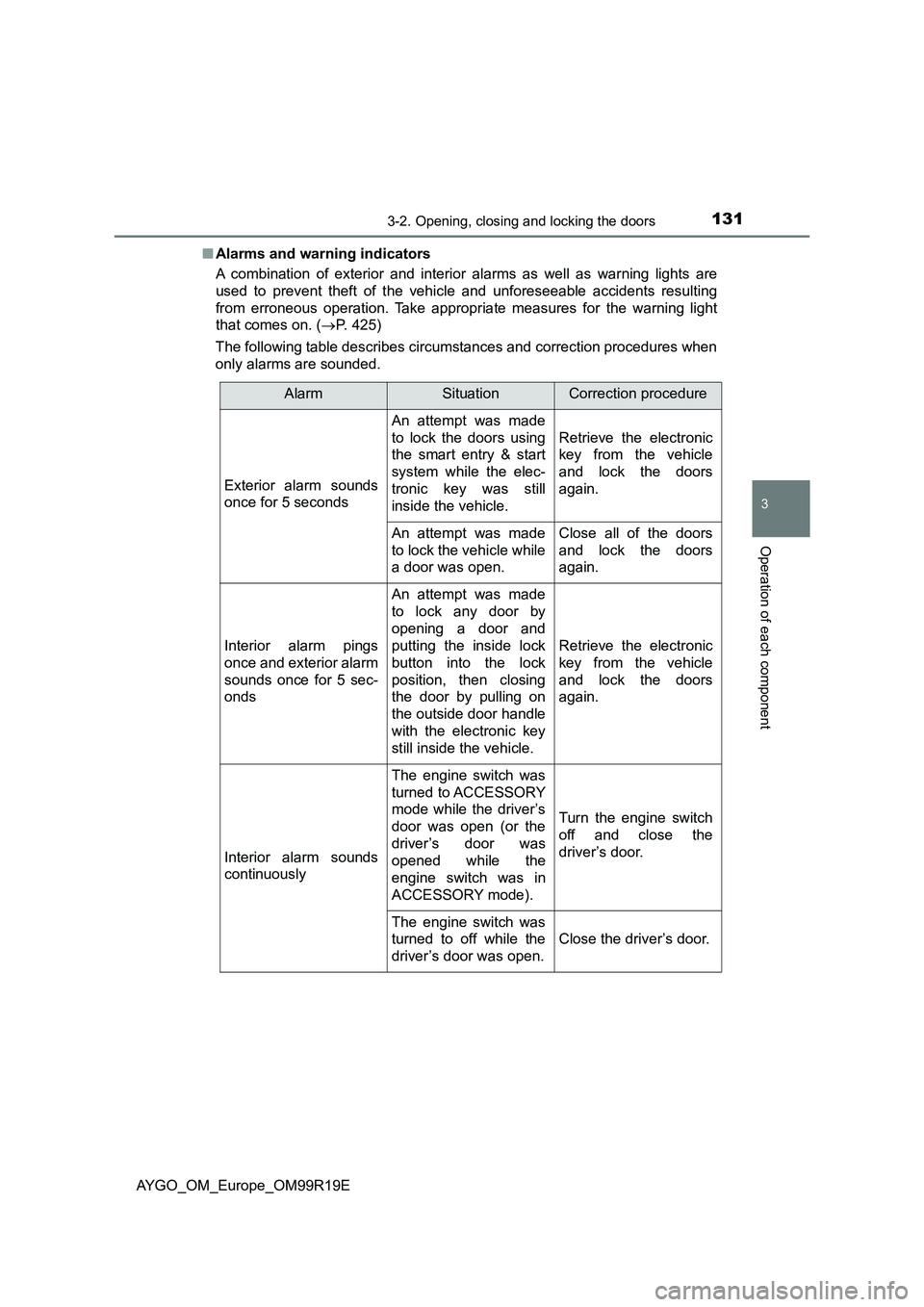
■ Alarms and warning indicators
A combination of exterior and interior alarms as well as warning lights are
used to prevent theft of the vehicle and unforeseeable accidents resulting
from erroneous operation. Take appropria te measures for the warning light
that comes on. ( P. 425)
The following table describes circumstances and correction procedures when
only alarms are sounded.
AlarmSituationCorrection procedure
Exterior alarm sounds
once for 5 seconds
An attempt was made
to lock the doors using
the smart entry & start
system while the elec-
tronic key was still
inside the vehicle.
Retrieve the electronic
key from the vehicle
and lock the doors
again.
An attempt was made
to lock the vehicle while
a door was open.
Close all of the doors
and lock the doors
again.
Interior alarm pings
once and exterior alarm
sounds once for 5 sec-
onds
An attempt was made
to lock any door by
opening a door and
putting the inside lock
button into the lock
position, then closing
the door by pulling on
the outside door handle
with the electronic key
still inside the vehicle.
Retrieve the electronic
key from the vehicle
and lock the doors
again.
Interior alarm sounds
continuously
The engine switch was
turned to ACCESSORY
mode while the driver’s
door was open (or the
driver’s door was
opened while the
engine switch was in
ACCESSORY mode).
Turn the engine switch
off and close the
driver’s door.
The engine switch was
turned to off while the
driver’s door was open.
Close the driver’s door.