weight TOYOTA BZ4X 2022 (in English) User Guide
[x] Cancel search | Manufacturer: TOYOTA, Model Year: 2022, Model line: BZ4X, Model: TOYOTA BZ4X 2022Pages: 674, PDF Size: 120.02 MB
Page 242 of 674
240
Owners Manual_Europe_M42D76_en
5-1. Before driving
If you make no extreme correction with
the steering or brakes, your vehicle and
trailer should stabilize.
●After the trailer swaying has stopped: • Stop in a safe place. Get all occupants out of the vehicle.
• Check the tires of the vehicle and the trailer.• Check the load in the trailer.
Make sure the load has not shifted. Make sure the tongue weight is appro-priate, if possible.
• Check the load in the vehicle. Make sure the vehicle is not over-loaded after occupants get in.
If you cannot find any problems, the
speed at which trailer swaying occurred
is beyond the limit of your particular
vehicle-trailer combination. Drive at a
lower speed to prevent instability.
Remember that swaying of the towing
vehicle-trailer increases as speed
increases.
Your vehicle will handle differently
when towing a trailer. In order to
avoid accident, death or serious
injury, keep the following in mind
when towing:
■Checking connections
between trailer and lights
Stop the vehicle and check the
operation of the connection
between the trailer and lights after
driving for a brief period as well as
before starting off.
■Practicing driving with a cou-
pled trailer
Get the feel for turning, stopping
and reversing with the trailer
coupled by practicing in an area
with no or light traffic.
When reversing with a coupled
trailer, hold the section of the
steering wheel nearest to you
and rotate clockwise to turn the
trailer left or counterclockwise to
turn it right. Always rotate a little
at a time to prevent steering
error. Have someone guide you
when reversing to lessen the risk
of an accident.
■Increasing vehicle-to-vehicle
distance
At a speed of 10 km/h (6 mph), the
distance to the vehicle running
ahead of you should be equivalent
to or greater than the combined
length of your vehicle and trailer.
Avoid sudden braking that may
cause skidding. Otherwise, the
vehicle may spin out of control. This
NOTICE
■When the rear bumper strength- ening material is aluminum
Ensure the steel bracket part does not
come directly in contact with that area.When steel and aluminum come into
contact, there is a reaction similar to corrosion, which will weaken the sec-tion concerned and may result in
damage. Apply a rust inhibitor to parts that will come in contact when attach-ing a steel bracket.
■Do not directly splice trailer lights
Directly splicing trailer lights may damage your vehicle’s electrical sys-tem and cause a malfunction.
Guidance
Page 243 of 674
241
5
Owners Manual_Europe_M42D76_en
5-1. Before driving
Driving
is especially true when driving on
wet or slippery road surfaces.
■Sudden acceleration/steering
input/cornering
Executing sharp turns when towing
may result in the trailer colliding
with your vehicle. Decelerate well in
advance when approaching turns
and take them slowly and carefully
to avoid sudden braking.
■Important points regarding
turning
The wheels of the trailer will travel
closer to the inside of the curve
than the wheels of the vehicle. To
make allowance for this, take the
turns wider than you would nor-
mally do.
■Important points regarding
stability
Vehicle movement resulting from
uneven road surfaces and strong
crosswinds will affect handling. The
vehicle may also be rocked by
passing buses or large trucks. Fre-
quently check behind when moving
alongside such vehicles. As soon
as such vehicle movement occurs,
immediately start to decelerate
smoothly by slowly applying the
brakes. Always steer the vehicle
straight ahead while braking.
■Passing other vehicles
Consider the total combined length
of your vehicle and trailer and
ensure that the vehicle-to-vehicle
distance is sufficient before execut-
ing lane changes.
■If the EV system overheats
Towing a loaded trailer up a long,
steep incline in temperatures
exceeding 30°C (85°F) may result
in the EV system overheating. If the
EV system coolant temperature
gauge indicates that the EV system
is overheating, turn the air condi-
tioning off immediately, leave the
road and stop the vehicle in a safe
place. ( P.549)
■When parking the vehicle
Always place wheel chocks under
the wheels of both the vehicle and
trailer. Firmly set the parking brake
and shift the shift position to P.
WARNING
F o l l o w a l l t h e i n s t r u c t i o n s d e s c r i b e d i n this section. Failure to do so could cause an accident resulting in death
or serious injury.
■Trailer towing precautions
When towing, make sure that none of the weight limits are exceeded. ( P.554)
■Vehicle speed in towing
Observe the legal maximum speeds
for trailer towing.
■Before descending hills or long
declines
Reduce speed and downshift. How- ever, never downshift suddenly while
descending steep or long downhill grades.
Page 452 of 674
450
Owners Manual_Europe_M42D76_en
6-4. Using the other interior features
standard is not guaranteed.
●The wireless charger is designed to supply low power electricity (5 W or
less) to a cellular phone, smartphone, or other portable device.
●Failure to do so may result in the pos-sibility of fire, However, portable devices, such as the following, can be
charged with more than 5 W. • 7.5 W charging compatible iPhones can be charged at 7.5 W or less.
• Portable devices which conform to WPC Ver 1.2.4 (Extended Power pro-file) can be charged at 10 W or less.
■When covers and accessories are
attached to portable devices
Do not charge in situations where cover and accessories not able to handle Qi
are attached to the portable device. Depending on the type of cover (includ-ing for certain genuine manufacturer
parts) and accessory, it may not be pos- sible to charge.When charging is not performed even
with the portable device placed on the charge area, remove the cover and accessories.
■Charging precautions
●If the electronic key cannot be detected in the cabin, charging cannot
be performed. When a door is opened and closed, charging may be tempo-rarily suspended.
●While charging, the wireless charger and the portable device will become
warm. This is not a malfunction. If a portable device becomes warm while charging and charging stops
due to the protection function of the portable device, wait until the portable device cools down and charge it
again.
●Depending on usage of the portable
device, it may not be fully charged. This is not a malfunction.
■Important points of the wireless charger
●If the electronic key cannot be
detected within the vehicle interior,
charging can not be done. When the door is opened and closed, charging may be temporarily suspended.
●When charging, the wireless charging device and portable device will get
warmer, however this is not a mal- function. When a portable device gets warm while charging may stop due to
the protection function on the portable device side. In this case, when the temperature of the portable drops sig-
nificantly, charge again. The fan may start operating to lower the temperature inside the wireless
charger, however this is not a mal- function.
■Sound generated during operation
When the power supply switch is turned
on or while a portable device is being identified, operation sounds may be heard. This is not a malfunction.
■Cleaning the wireless charger
P. 4 6 0
■Certification
P. 6 6 2
WARNING
■Caution while driving
When charging a portable device, for safety reasons, the driver should not operate the main part of the portable
device while driving.
■Caution while in motion
Do not charge lightweight devices such as wireless headphones while in motion. These devices are very light
and may be ejected from the charging tray, which may lead to unforeseen accidents.
Page 461 of 674
459
7
Owners Manual_Europe_M42D76_en
7-1. Maintenance and care
Maintenance and care
Remove dirt and dust using a
vacuum cleaner. Wipe dirty sur-
faces with a cloth dampened with
lukewarm water.
If dirt cannot be removed, wipe it
off with a soft cloth dampened
with neutral detergent diluted to
approximately 1%.
Wring out any excess water from
the cloth and thoroughly wipe off
remaining traces of detergent
and water.
■Shampooing the carpets
There are several commercial foaming-
type cleaners available. Use a sponge or brush to apply the foam. Rub in over-lapping circles. Do not use water. Wipe
dirty surfaces and let them dry. Excellent results are obtained by keeping the car-pet as dry as possible.
■Handling the seat belts
Clean with mild soap and lukewarm water using a cloth or sponge. Also check the belts periodically for exces-
sive wear, fraying or cuts.
■Front side windows with IR protec- tive coating (vehicles with IR pro-tective coating)
The front side windows have IR protec- tive coating. To prevent any damage to the IR protective coating, observe the
NOTICE
●Keep the cleaning nozzle at least 30 cm (11.9 in.) away from the vehi-
cle body. Otherwise resin section, such as moldings and bumpers, may be deformed and damaged.
Also, do not continuously hold the nozzle in the same place.
●Do not spray the lower part of the windshield continuously. If water enters the air conditioning
system intake located near the lower part of the windshield, the air conditioning system may not oper-
ate correctly.
●Do not wash the underside of the
vehicle using a high pressure car washer. If water enters the traction battery, the EV system may mal-
function.
●Do not use the washer on the area
around the charging port lid. Water could get into the charging inlet and could damage the vehicle.
■Cleaning aluminum parts
When cleaning the hood, do not push
hard or put weight on it. The aluminum part may be dented.
Cleaning and protecting
the vehicle interior
Perform cleaning in a manner
appropriate to each compo-
nent and its material.
Protecting the vehicle inte-
rior
Page 496 of 674
494
Owners Manual_Europe_M42D76_en
7-3. Do-it-yourself maintenance
■Effects of incorrect tire inflation
pressure
Driving with incorrect tire inflation pres- sure may result in the following:
●Reduced electricity consumption effi-ciency
●Reduced driving comfort and poor handling
●Reduced tire life due to wear
●Reduced safety
●Damage to the drive train
If a tire needs frequent inflating, have it checked by any authorized Toyota retailer or Toyota authorized repairer, or
any reliable repairer.
■Instructions for checking tire infla- tion pressure
When checking tire inflation pressure,
observe the following:
●Check only when the tires are cold.
If your vehicle has been parked for at least 3 hours or has not been driven for more than 1.5 km or 1 mile, you
will get an accurate cold tire inflation pressure reading.
●Always use a tire pressure gauge.It is difficult to judge if a tire is properly inflated based only on its appearance.
●It is normal for the tire inflation pres-sure to be higher after driving as heat
is generated in the tire. Do not reduce tire inflation pressure after driving.
●Passengers and luggage weight
should be placed so that the vehicle is balanced.
Tire inflation pressure
Make sure to maintain proper
tire inflation pressure. Tire
inflation pressure should be
checked at least once per
month. However, Toyota rec-
ommends that tire inflation
pressure be checked once
every two weeks.
WARNING
■Proper inflation is critical to save
tire performance
Keep your tires properly inflated. If the tires are not properly inflated,
the following conditions may occur which could lead to an accident resulting in death or serious injury:
●Excessive wear
●Uneven wear
●Poor handling
●Possibility of blowouts resulting from overheated tires
●Air leaking from between tire and wheel
●Wheel deformation and/or tire dam-age
●Greater possibility of tire damage while driving (due to road hazards, expansion joints, sharp edges in the
road, etc.)
NOTICE
■When inspecting and adjusting tire inflation pressure
Be sure to put the tire valve caps back
on. If a valve cap is not installed, dirt or moisture may get into the valve and
cause an air leak, resulting in decreased tire inflation pressure.
Page 498 of 674
496
Owners Manual_Europe_M42D76_en
7-3. Do-it-yourself maintenance
Use only Toyota wheel bolts and
wrenches designed for use with
your aluminum wheels.
When rotating, repairing or
changing your tires, check that
the wheel bolts are still tight after
driving 1600 km (1000 miles).
Be careful not to damage the
aluminum wheels when using
tire chains.
Use only Toyota genuine balance
weights or equivalent and a plas-
tic or rubber hammer when bal-
ancing your wheels.
1 Turn the power switch off.
Confirm that the charging connector is
not connected. Also, do not use the Remote Air Conditioning System during the procedure.
2 Open the front passenger’s
door.
By keeping the door open, unexpected operation of the Remote Air Condition-
ing System can be prevent. ( P.427)
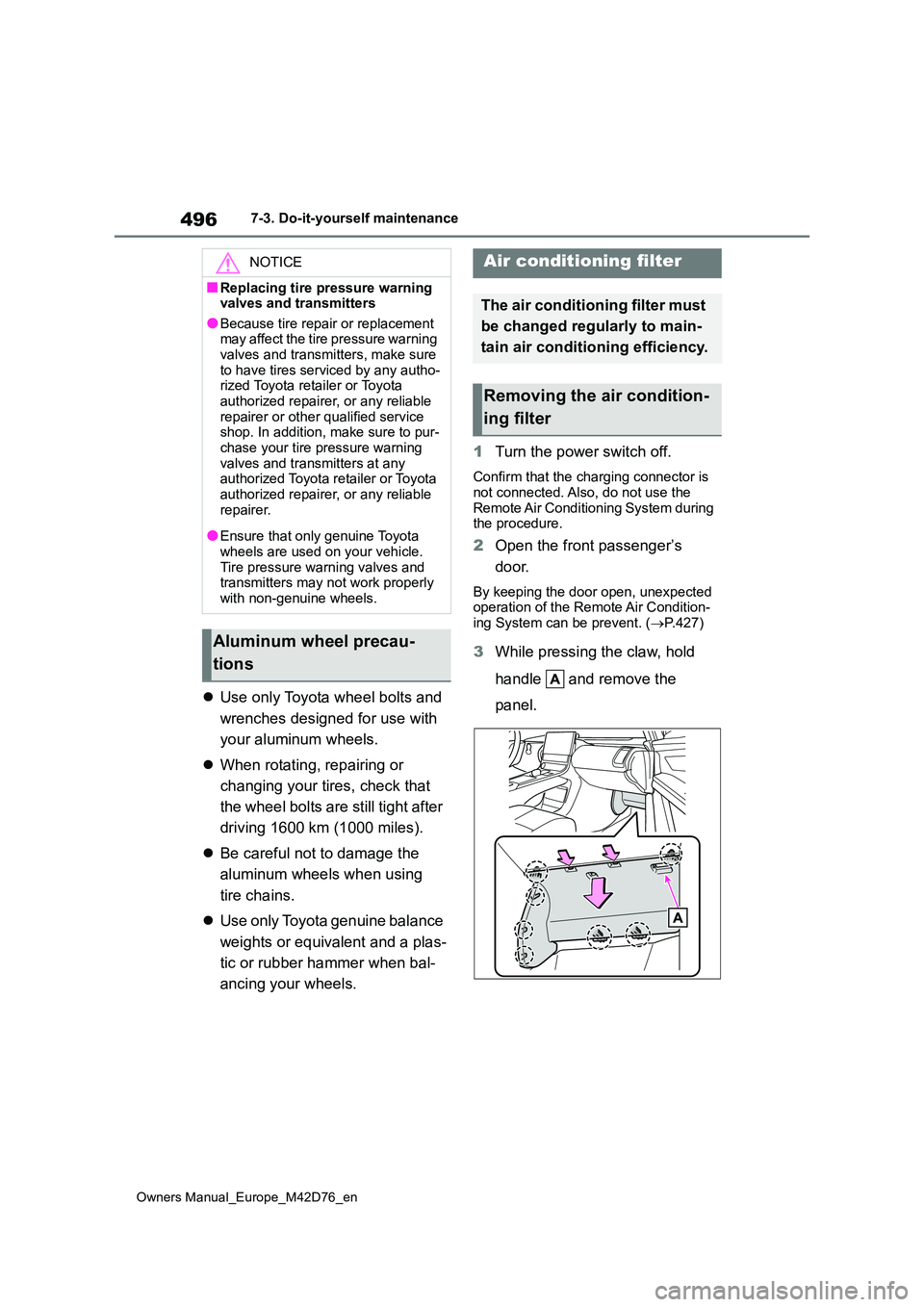
3While pressing the claw, hold
handle and remove the
panel.
NOTICE
■Replacing tire pressure warning valves and transmitters
●Because tire repair or replacement may affect the tire pressure warning valves and transmitters, make sure
to have tires serviced by any autho- rized Toyota retailer or Toyota authorized repairer, or any reliable
repairer or other qualified service shop. In addition, make sure to pur-chase your tire pressure warning
valves and transmitters at any authorized Toyota retailer or Toyota authorized repairer, or any reliable
repairer.
●Ensure that only genuine Toyota
wheels are used on your vehicle. Tire pressure warning valves and transmitters may not work properly
with non-genuine wheels.
Aluminum wheel precau-
tions
Air conditioning filter
The air conditioning filter must
be changed regularly to main-
tain air conditioning efficiency.
Removing the air condition-
ing filter
Page 556 of 674
554
Owners Manual_Europe_M42D76_en
9-1. Specifications
9-1.Spec ific ations
*1: Unladen vehicle
*2: 2WD models
*3: AWD models
*4: Vehicles with towing packages
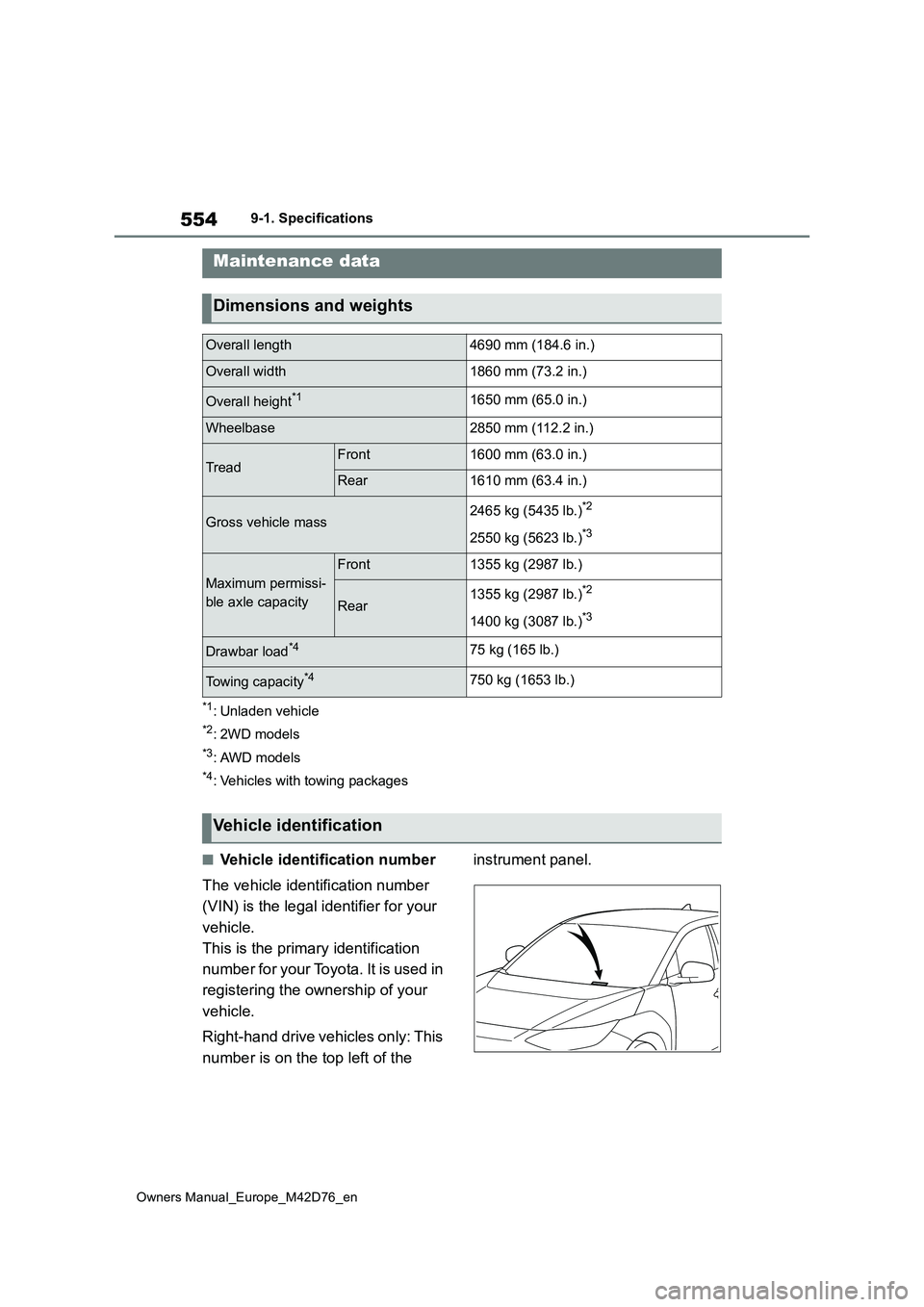
■Vehicle identification number
The vehicle identification number
(VIN) is the legal identifier for your
vehicle.
This is the primary identification
number for your Toyota. It is used in
registering the ownership of your
vehicle.
Right-hand drive vehicles only: This
number is on the top left of the
instrument panel.
Maintenance data
Dimensions and weights
Overall length4690 mm (184.6 in.)
Overall width1860 mm (73.2 in.)
Overall height*11650 mm (65.0 in.)
Wheelbase2850 mm (112.2 in.)
TreadFront1600 mm (63.0 in.)
Rear1610 mm (63.4 in.)
Gross vehicle mass2465 kg (5435 lb.)*2
2550 kg (5623 lb.)*3
Maximum permissi-
ble axle capacity
Front1355 kg (2987 lb.)
Rear1355 kg (2987 lb.)*2
1400 kg (3087 lb.)*3
Drawbar load*475 kg (165 lb.)
Towing capacity*4750 kg (1653 lb.)
Vehicle identification
Page 595 of 674
593
Owners Manual_Europe_M42D76_en
Alphabetical Index
ter ............................................ 411
Switch ........................................ 269
Washing and waxing ............ 456, 459
Weights.......................................... 554
Wheel bolt wrench ................ 489, 530
Wheels ........................................... 495
Replacing wheels ....................... 495
Size ............................................ 559
Window glasses
Power windows .......................... 219
Window lock switch ..................... 221
Windows
Power windows .......................... 219
Rear window defogger ............... 422
Washer ....................................... 269
Windshield defogger .................... 422
Windshield wiper deicer .............. 422
Windshield wipers ........................ 269
Intermittent windshield wipers .... 269
Rain-sensing windshield wipers . 269
Windshield wipers and washer ... 269
Winter driving tips ........................ 411
Wireless charger........................... 446
Wireless charger tray lights ........ 431
Wireless remote control............... 183
Battery-saving function .............. 204
Locking/Unlocking ...................... 183
Remote Air Conditioning System427
Replacing the battery ................. 499
X
X-MODE ......................................... 401
Grip Control................................ 401
For infor mation regarding the
equipment listed below, refer
to the “Multimedia owner’s
manual”.
· Audio/video system
· Navigation system
· Toyota parking assist monitor
· Panoramic view monitor
Toyota Motor Europe NV/SA,
Avenue du Bourget 60 - 1140
Brussels, Belgium
www.toyota-europe.com
Toyota (GB) PLC Great Burgh,
Burgh Heath, Epsom, Surrey,
KT18 5UX, UK