Charger TOYOTA BZ4X 2022 (in English) Owner's Manual
[x] Cancel search | Manufacturer: TOYOTA, Model Year: 2022, Model line: BZ4X, Model: TOYOTA BZ4X 2022Pages: 674, PDF Size: 120.02 MB
Page 155 of 674
153
2
Owners Manual_Europe_M42D76_en
2-2. Charging
Electric Vehicle system
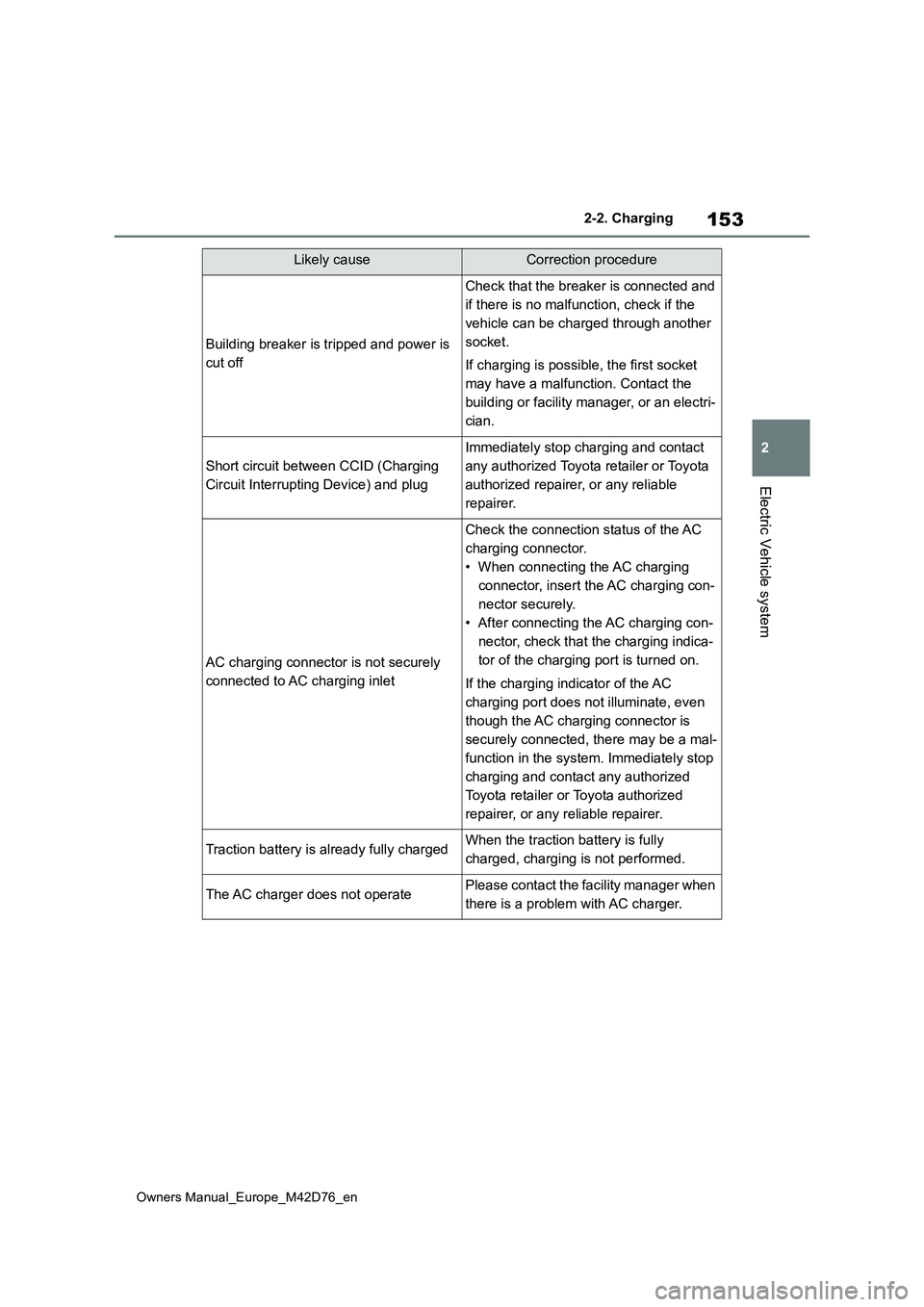
Building breaker is tripped and power is
cut off
Check that the breaker is connected and
if there is no malfunction, check if the
vehicle can be charged through another
socket.
If charging is possible, the first socket
may have a malfunction. Contact the
building or facility manager, or an electri-
cian.
Short circuit between CCID (Charging
Circuit Interrupting Device) and plug
Immediately stop charging and contact
any authorized Toyota retailer or Toyota
authorized repairer, or any reliable
repairer.
AC charging connector is not securely
connected to AC charging inlet
Check the connection status of the AC
charging connector.
• When connecting the AC charging
connector, insert the AC charging con-
nector securely.
• After connecting the AC charging con-
nector, check that the charging indica-
tor of the charging port is turned on.
If the charging indicator of the AC
charging port does not illuminate, even
though the AC charging connector is
securely connected, there may be a mal-
function in the system. Immediately stop
charging and contact any authorized
Toyota retailer or Toyota authorized
repairer, or any reliable repairer.
Traction battery is already fully chargedWhen the traction battery is fully
charged, charging is not performed.
The AC charger does not operatePlease contact the facility manager when
there is a problem with AC charger.
Likely causeCorrection procedure
Page 157 of 674
155
2
Owners Manual_Europe_M42D76_en
2-2. Charging
Electric Vehicle system
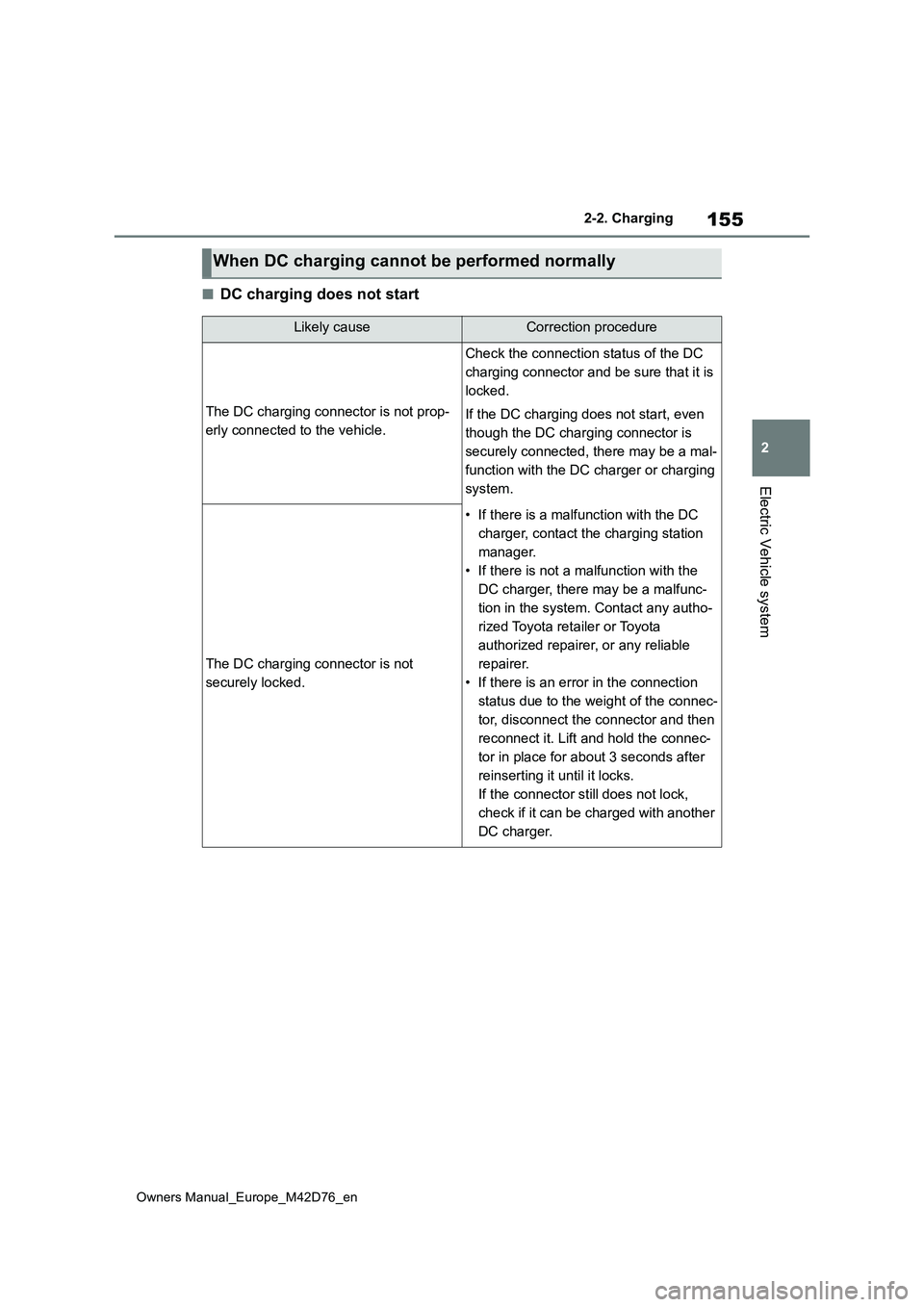
■DC charging does not start
When DC charging cannot be performed normally
Likely causeCorrection procedure
The DC charging connector is not prop-
erly connected to the vehicle.
Check the connection status of the DC
charging connector and be sure that it is
locked.
If the DC charging does not start, even
though the DC charging connector is
securely connected, there may be a mal-
function with the DC charger or charging
system.
The DC charging connector is not
securely locked.
• If there is a malfunction with the DC
charger, contact the charging station
manager.
• If there is not a malfunction with the
DC charger, there may be a malfunc-
tion in the system. Contact any autho-
rized Toyota retailer or Toyota
authorized repairer, or any reliable
repairer.
• If there is an error in the connection
status due to the weight of the connec-
tor, disconnect the connector and then
reconnect it. Lift and hold the connec-
tor in place for about 3 seconds after
reinserting it until it locks.
If the connector still does not lock,
check if it can be charged with another
DC charger.
Page 158 of 674
156
Owners Manual_Europe_M42D76_en
2-2. Charging
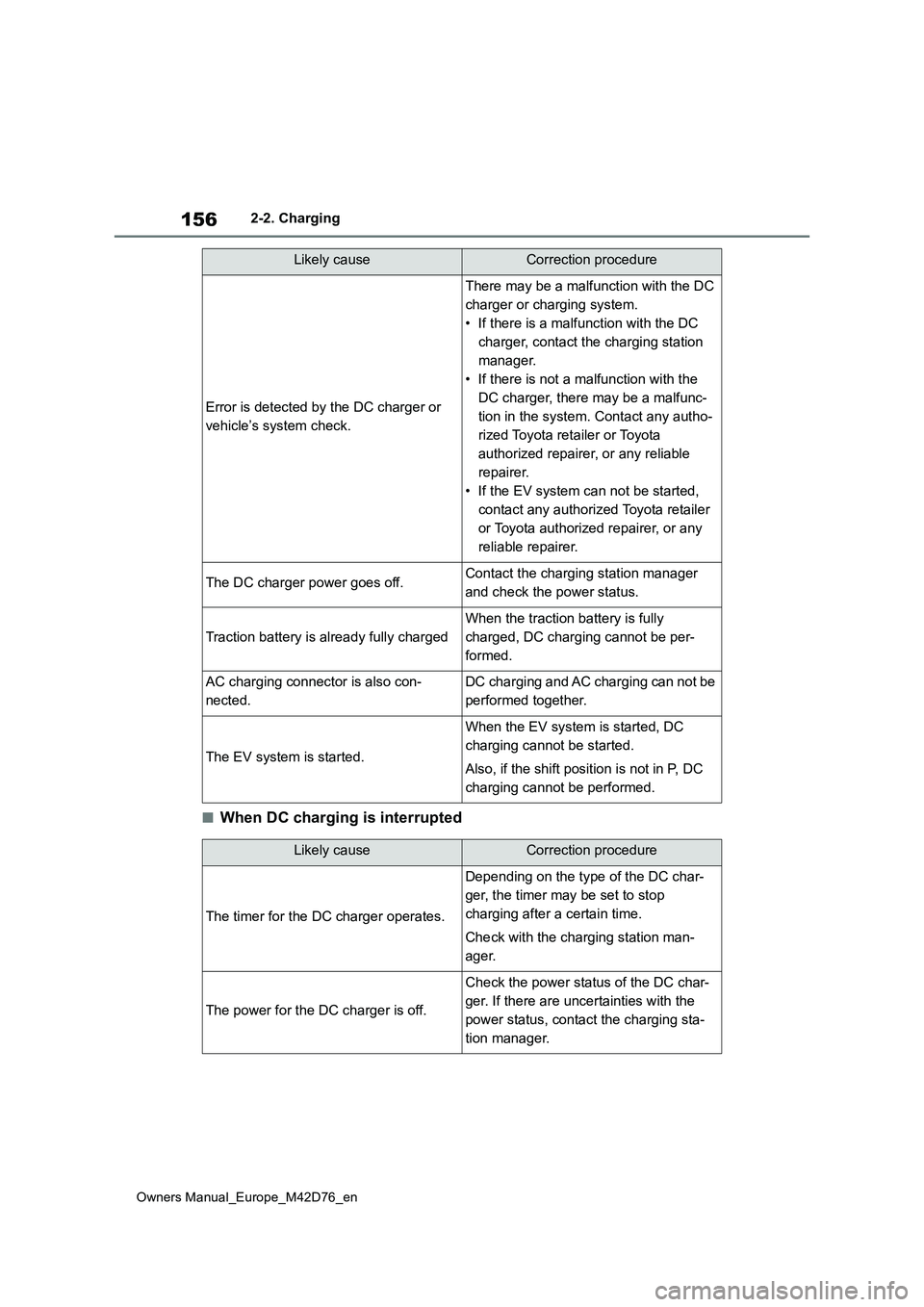
■When DC charging is interrupted
Error is detected by the DC charger or
vehicle’s system check.
There may be a malfunction with the DC
charger or charging system.
• If there is a malfunction with the DC
charger, contact the charging station
manager.
• If there is not a malfunction with the
DC charger, there may be a malfunc-
tion in the system. Contact any autho-
rized Toyota retailer or Toyota
authorized repairer, or any reliable
repairer.
• If the EV system can not be started,
contact any authorized Toyota retailer
or Toyota authorized repairer, or any
reliable repairer.
The DC charger power goes off.Contact the charging station manager
and check the power status.
Traction battery is already fully charged
When the traction battery is fully
charged, DC charging cannot be per-
formed.
AC charging connector is also con-
nected.
DC charging and AC charging can not be
performed together.
The EV system is started.
When the EV system is started, DC
charging cannot be started.
Also, if the shift position is not in P, DC
charging cannot be performed.
Likely causeCorrection procedure
Likely causeCorrection procedure
The timer for the DC charger operates.
Depending on the type of the DC char-
ger, the timer may be set to stop
charging after a certain time.
Check with the charging station man-
ager.
The power for the DC charger is off.
Check the power status of the DC char-
ger. If there are uncertainties with the
power status, contact the charging sta-
tion manager.
Page 159 of 674
157
2
Owners Manual_Europe_M42D76_en
2-2. Charging
Electric Vehicle system
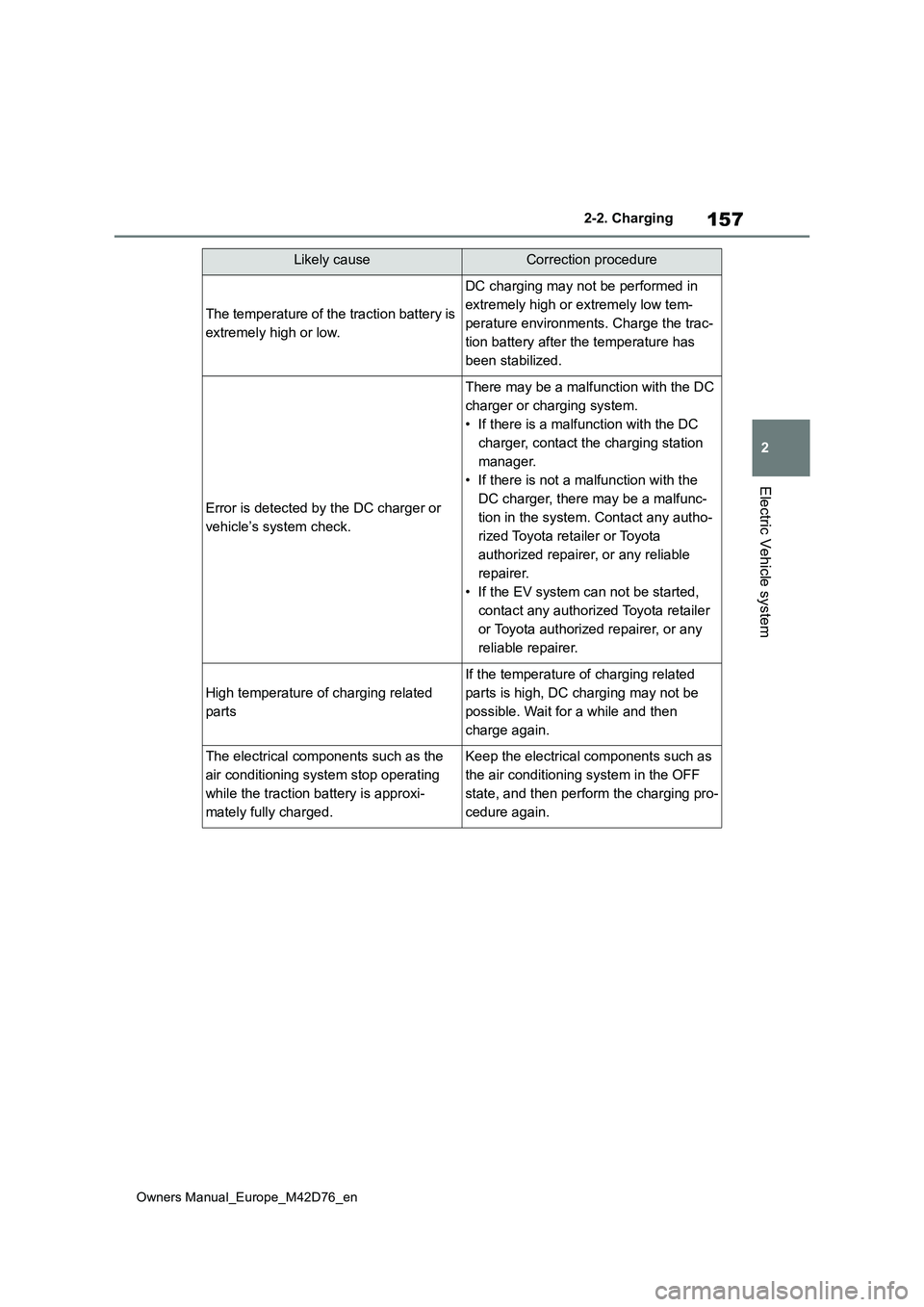
The temperature of the traction battery is
extremely high or low.
DC charging may not be performed in
extremely high or extremely low tem-
perature environments. Charge the trac-
tion battery after the temperature has
been stabilized.
Error is detected by the DC charger or
vehicle’s system check.
There may be a malfunction with the DC
charger or charging system.
• If there is a malfunction with the DC
charger, contact the charging station
manager.
• If there is not a malfunction with the
DC charger, there may be a malfunc-
tion in the system. Contact any autho-
rized Toyota retailer or Toyota
authorized repairer, or any reliable
repairer.
• If the EV system can not be started,
contact any authorized Toyota retailer
or Toyota authorized repairer, or any
reliable repairer.
High temperature of charging related
parts
If the temperature of charging related
parts is high, DC charging may not be
possible. Wait for a while and then
charge again.
The electrical components such as the
air conditioning system stop operating
while the traction battery is approxi-
mately fully charged.
Keep the electrical components such as
the air conditioning system in the OFF
state, and then perform the charging pro-
cedure again.
Likely causeCorrection procedure
Page 164 of 674
162
Owners Manual_Europe_M42D76_en
2-2. Charging
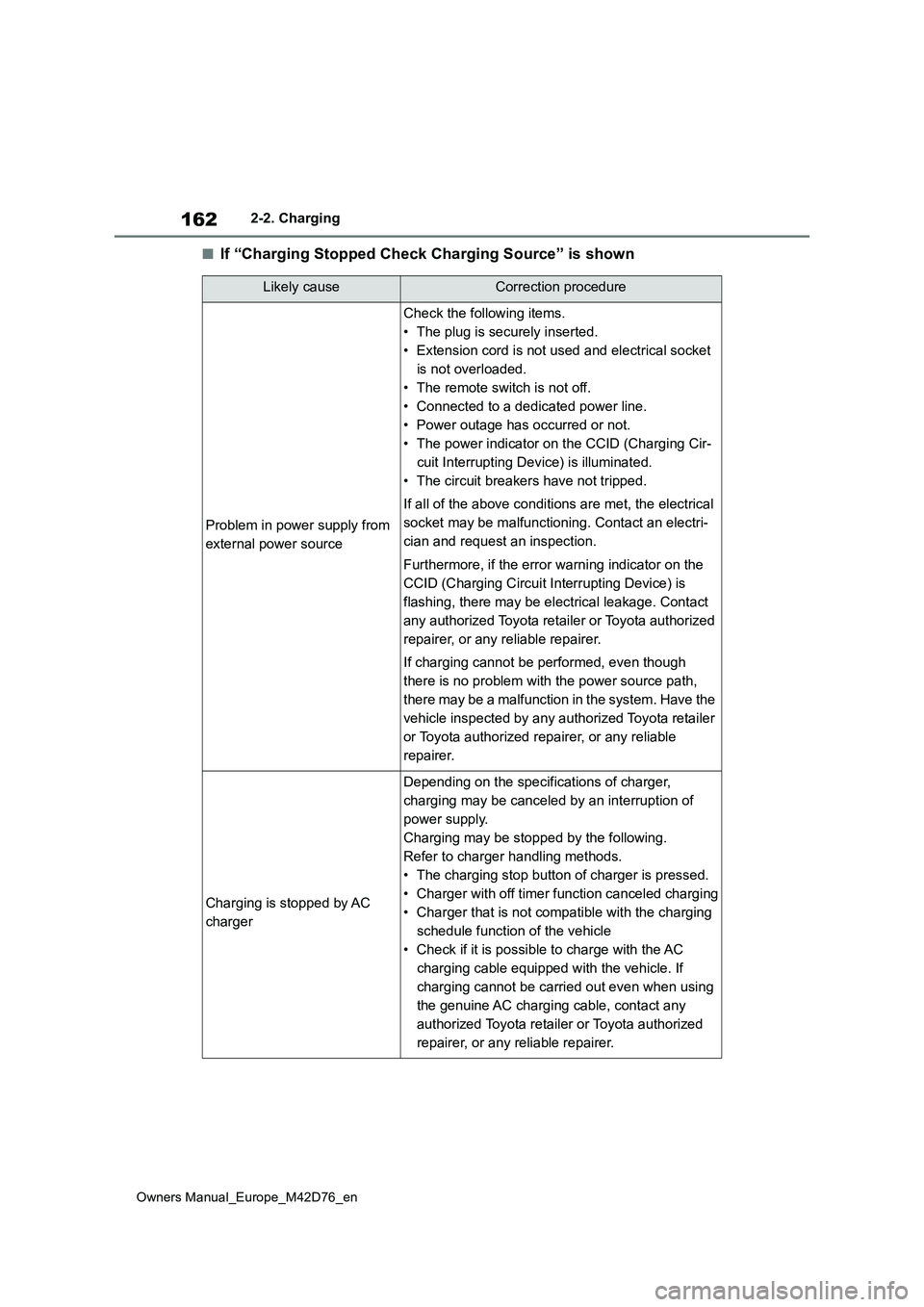
■If “Charging Stopped Check Charging Source” is shown
Likely causeCorrection procedure
Problem in power supply from
external power source
Check the following items.
• The plug is securely inserted.
• Extension cord is not used and electrical socket
is not overloaded.
• The remote switch is not off.
• Connected to a dedicated power line.
• Power outage has occurred or not.
• The power indicator on the CCID (Charging Cir-
cuit Interrupting Device) is illuminated.
• The circuit breakers have not tripped.
If all of the above conditions are met, the electrical
socket may be malfunctioning. Contact an electri-
cian and request an inspection.
Furthermore, if the error warning indicator on the
CCID (Charging Circuit In terrupting Device) is
flashing, there may be electrical leakage. Contact
any authorized Toyota retailer or Toyota authorized
repairer, or any reliable repairer.
If charging cannot be performed, even though
there is no problem with the power source path,
there may be a malfunction in the system. Have the
vehicle inspected by any authorized Toyota retailer
or Toyota authorized repairer, or any reliable
repairer.
Charging is stopped by AC
charger
Depending on the specifications of charger,
charging may be canceled by an interruption of
power supply.
Charging may be stopped by the following.
Refer to charger handling methods.
• The charging stop button of charger is pressed.
• Charger with off timer function canceled charging
• Charger that is not compatible with the charging
schedule function of the vehicle
• Check if it is possible to charge with the AC
charging cable equipped with the vehicle. If
charging cannot be carried out even when using
the genuine AC charging cable, contact any
authorized Toyota retailer or Toyota authorized
repairer, or any reliable repairer.
Page 165 of 674
163
2
Owners Manual_Europe_M42D76_en
2-2. Charging
Electric Vehicle system
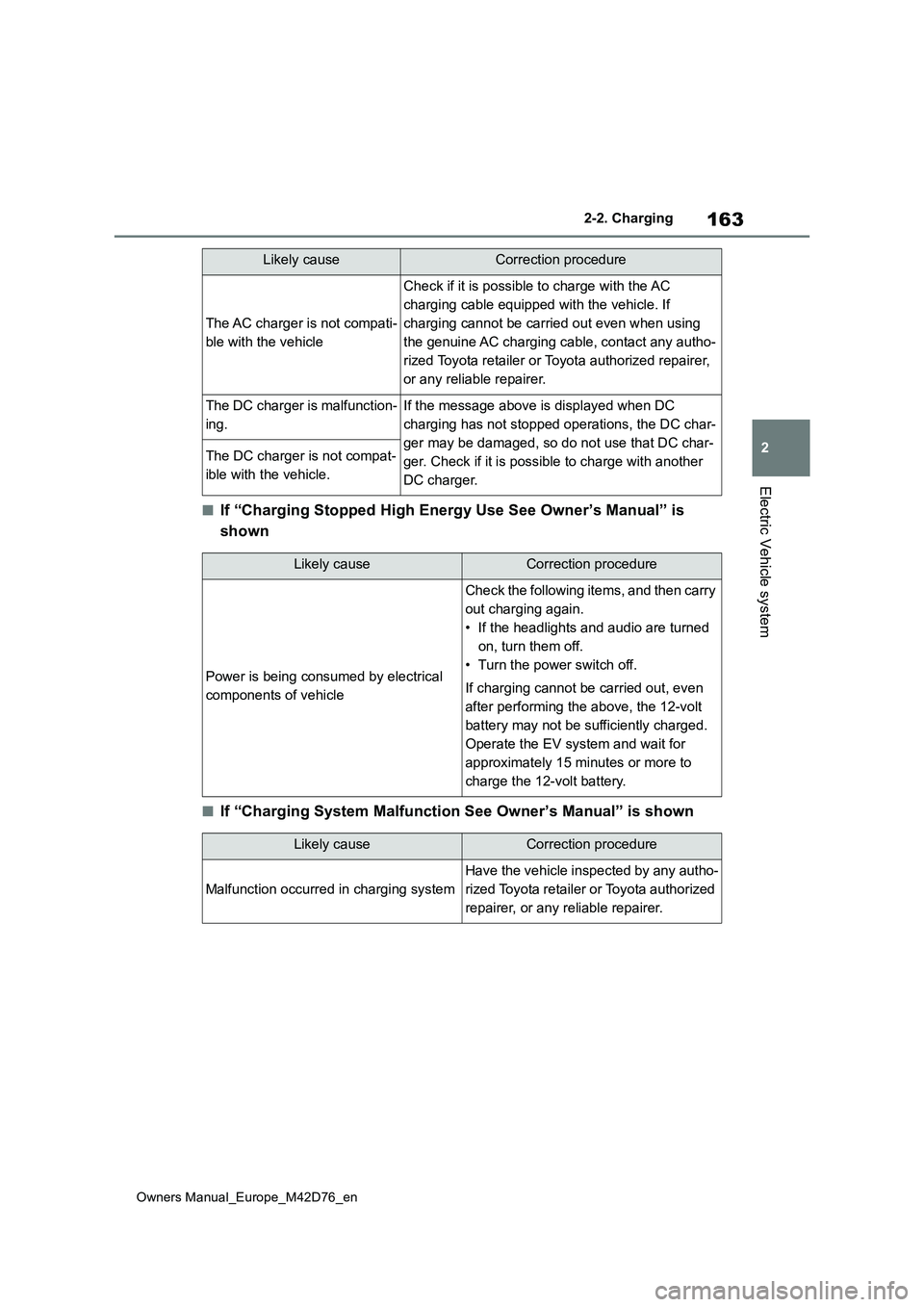
■If “Charging Stopped High Energy Use See Owner’s Manual” is
shown
■If “Charging System Malfunction See Owner’s Manual” is shown
The AC charger is not compati-
ble with the vehicle
Check if it is possible to charge with the AC
charging cable equipped with the vehicle. If
charging cannot be carried out even when using
the genuine AC charging cable, contact any autho-
rized Toyota retailer or Toyota authorized repairer,
or any reliable repairer.
The DC charger is malfunction-
ing.
If the message above is displayed when DC
charging has not stopped operations, the DC char-
ger may be damaged, so do not use that DC char-
ger. Check if it is possible to charge with another
DC charger.
The DC charger is not compat-
ible with the vehicle.
Likely causeCorrection procedure
Likely causeCorrection procedure
Power is being consumed by electrical
components of vehicle
Check the following items, and then carry
out charging again.
• If the headlights and audio are turned
on, turn them off.
• Turn the power switch off.
If charging cannot be carried out, even
after performing the above, the 12-volt
battery may not be sufficiently charged.
Operate the EV system and wait for
approximately 15 minutes or more to
charge the 12-volt battery.
Likely causeCorrection procedure
Malfunction occurred in charging system
Have the vehicle inspected by any autho-
rized Toyota retailer or Toyota authorized
repairer, or any reliable repairer.
Page 166 of 674
164
Owners Manual_Europe_M42D76_en
2-2. Charging
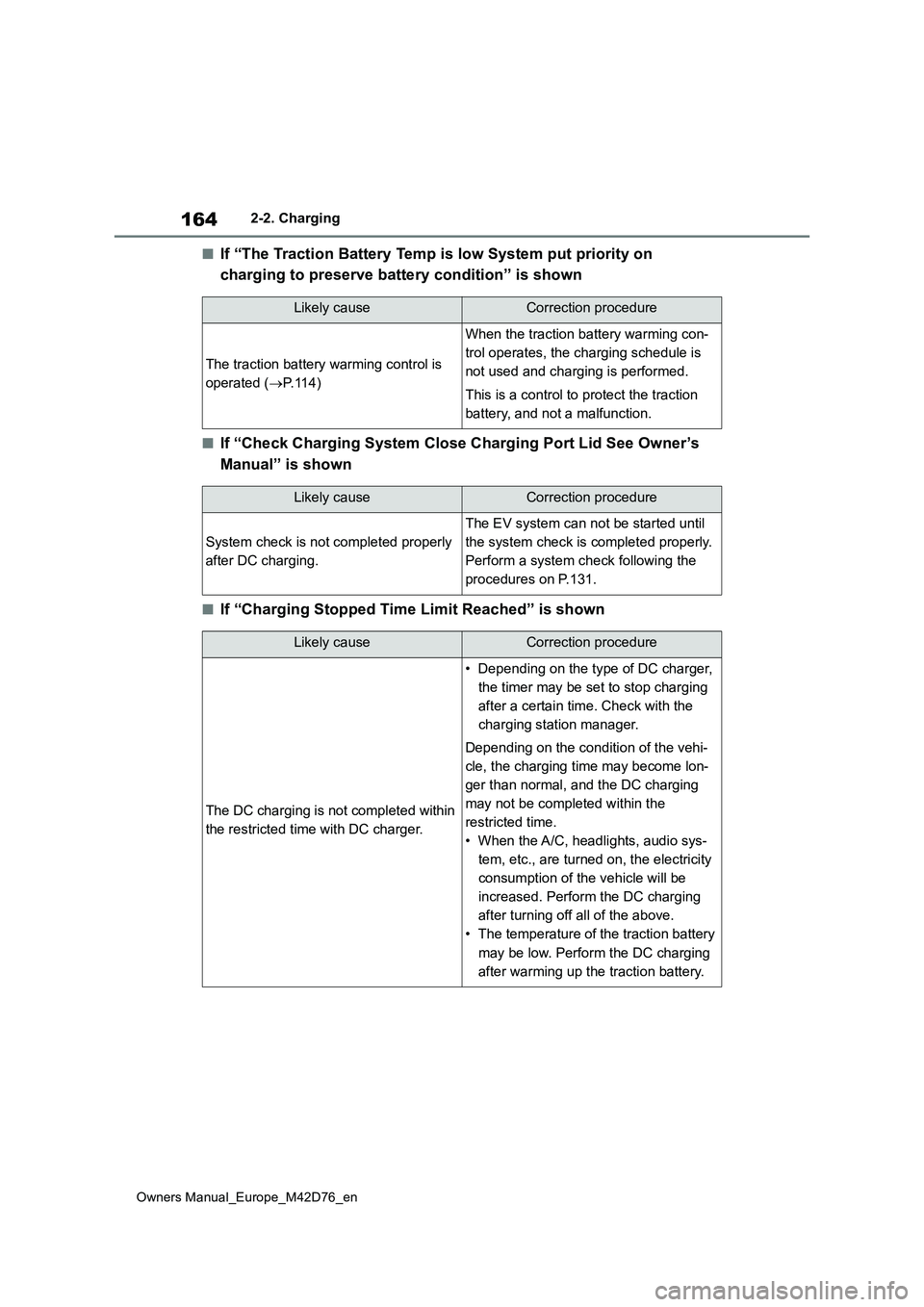
■If “The Traction Battery Temp is low System put priority on
charging to preserve battery condition” is shown
■If “Check Charging System Close Charging Port Lid See Owner’s
Manual” is shown
■If “Charging Stopped Time Limit Reached” is shown
Likely causeCorrection procedure
The traction battery warming control is
operated ( P.114)
When the traction battery warming con-
trol operates, the charging schedule is
not used and charging is performed.
This is a control to protect the traction
battery, and not a malfunction.
Likely causeCorrection procedure
System check is not completed properly
after DC charging.
The EV system can not be started until
the system check is completed properly.
Perform a system check following the
procedures on P.131.
Likely causeCorrection procedure
The DC charging is not completed within
the restricted time with DC charger.
• Depending on the type of DC charger,
the timer may be set to stop charging
after a certain time. Check with the
charging station manager.
Depending on the condition of the vehi-
cle, the charging time may become lon-
ger than normal, and the DC charging
may not be completed within the
restricted time.
• When the A/C, headlights, audio sys-
tem, etc., are turned on, the electricity
consumption of the vehicle will be
increased. Perform the DC charging
after turning off all of the above.
• The temperature of the traction battery
may be low. Perform the DC charging
after warming up the traction battery.
Page 184 of 674
182
Owners Manual_Europe_M42D76_en
4-1. Key information
4-1.Key info rmation
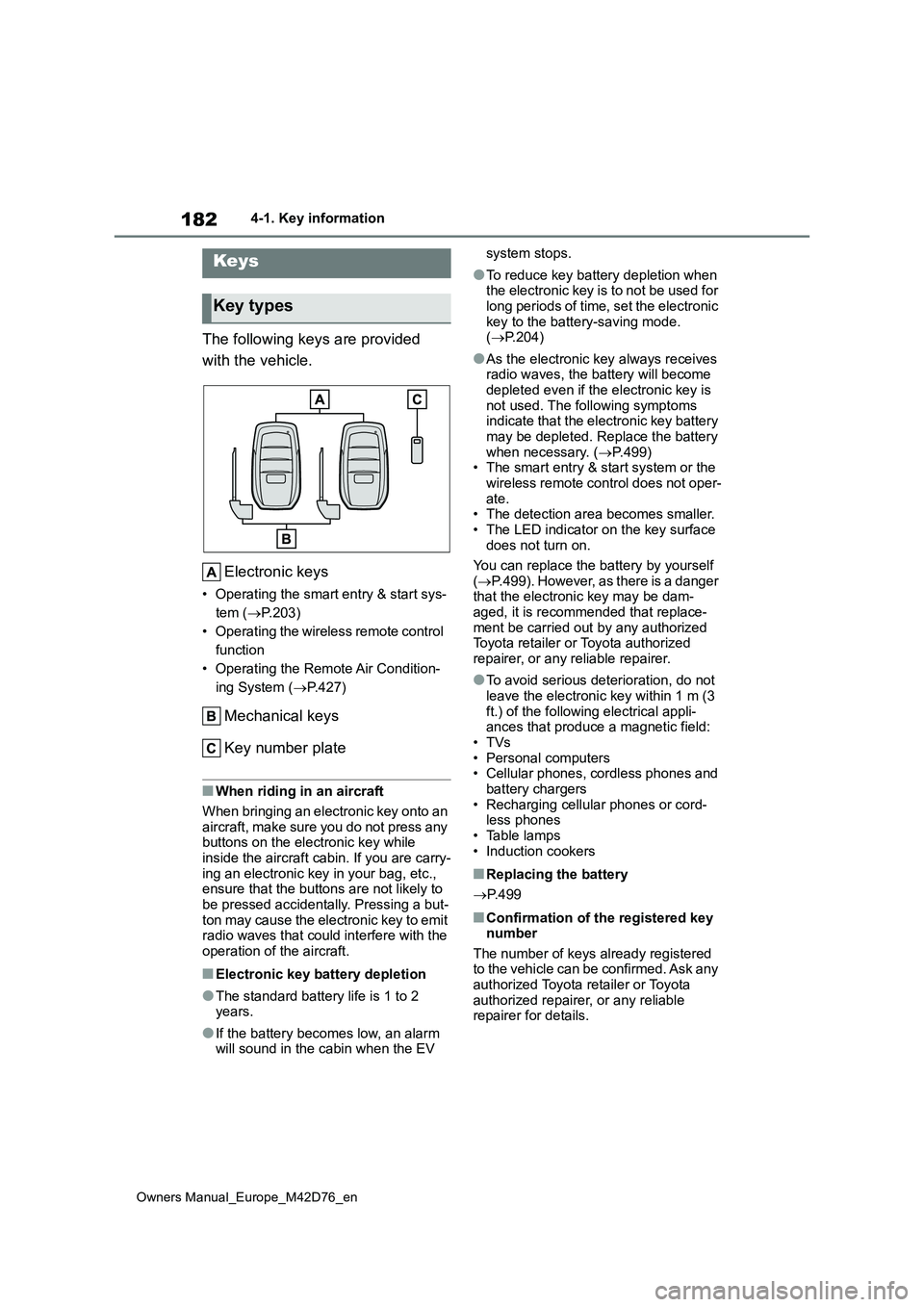
The following keys are provided
with the vehicle.
Electronic keys
• Operating the smart entry & start sys-
tem ( P.203)
• Operating the wireless remote control
function
• Operating the Remote Air Condition-
ing System ( P.427)
Mechanical keys
Key number plate
■When riding in an aircraft
When bringing an electronic key onto an
aircraft, make sure you do not press any buttons on the electronic key while inside the aircraft cabin. If you are carry-
ing an electronic key in your bag, etc., ensure that the buttons are not likely to be pressed accidentally. Pressing a but-
ton may cause the electronic key to emit radio waves that could interfere with the operation of the aircraft.
■Electronic key battery depletion
●The standard battery life is 1 to 2 years.
●If the battery becomes low, an alarm will sound in the cabin when the EV
system stops.
●To reduce key battery depletion when the electronic key is to not be used for
long periods of time, set the electronic key to the battery-saving mode. ( P.204)
●As the electronic key always receives radio waves, the battery will become
depleted even if the electronic key is not used. The following symptoms indicate that the electronic key battery
may be depleted. Replace the battery when necessary. ( P.499) • The smart entry & start system or the
wireless remote control does not oper- ate.• The detection area becomes smaller.
• The LED indicator on the key surface does not turn on.
You can replace the battery by yourself
( P.499). However, as there is a danger that the electronic key may be dam-aged, it is recommended that replace-
ment be carried out by any authorized Toyota retailer or Toyota authorized repairer, or any reliable repairer.
●To avoid serious deterioration, do not leave the electronic key within 1 m (3
ft.) of the following electrical appli- ances that produce a magnetic field:•TVs
• Personal computers • Cellular phones, cordless phones and battery chargers
• Recharging cellular phones or cord- less phones• Table lamps
• Induction cookers
■Replacing the battery
P. 4 9 9
■Confirmation of the registered key number
The number of keys already registered to the vehicle can be confirmed. Ask any authorized Toyota retailer or Toyota
authorized repairer, or any reliable repairer for details.
Keys
Key types
Page 207 of 674
205
4
Owners Manual_Europe_M42D76_en
4-2. Opening, closing and locking the doors
Before driving
and immobilizer system from operating
properly. (Ways of coping: P.542)
●When the electronic key battery is
depleted
●Near a TV tower, electric power plant,
gas station, radio station, large dis- play, airport or other facility that gen-erates strong radio waves or electrical
noise
●When carrying a portable radio, cellu-
lar phone, cordless phone or other wireless communication device
●When the electronic key is in contact with, or is covered by the following metallic objects
• Cards to which aluminum foil is attached• Cigarette boxes that have aluminum
foil inside • Metallic wallets or bags• Coins
• Hand warmers made of metal • Media such as CDs and DVDs
●When other wireless keys (that emit radio waves) are being used nearby
●When carrying the electronic key together with the following devices that emit radio waves
• Another vehicle’s electronic key or a wireless key that emits radio waves• Personal computers or personal digi-
tal assistants (PDAs) • Digital audio players• Portable game systems
●If window tint with a metallic content or metallic objects are attached to the
rear window
●When the electronic key is placed
near a battery charger or electronic devices
●When the vehicle is parked in a pay parking spot where radio waves are emitted
■Note for the entry function
●Even when the electronic key is within the effective range (detection areas),
the system may not operate properly in the following cases:
• The electronic key is too close to the
window or outside door handle, near the ground, or in a high place when the doors are locked or unlocked.
• The electronic key is on the instru- ment panel, luggage room, floor, or in the door pockets or glove box when
the EV system is started or power switch modes are changed.
●Do not leave the electronic key on top of the instrument panel or near the door pockets when exiting the vehicle.
Depending on the radio wave recep- tion conditions, it may be detected by the antenna outside the cabin and the
door will become lockable from the outside, possibly trapping the elec-tronic key inside the vehicle.
●As long as the electronic key is within the effective range, the doors may be
locked or unlocked by anyone. How- ever, only the doors detecting the electronic key can be used to unlock
the vehicle.
●Even if the electronic key is not inside
the vehicle, it may be possible to start the EV system if the electronic key is near the window.
●The doors may unlock if a large amount of water splashes on the door
handle, such as in the rain or in a car wash when the electronic key is within the effective range. (The doors will
automatically be locked after approxi- mately 30 seconds if the doors are not opened and closed.)
●When the lock operation is performed using the lock sensor, recognition sig-
nals will be shown up to two consecu- tive times. After this, no recognition signals will be given.
●If the wireless remote control is used to lock the doors when the electronic
key is near the vehicle, there is a pos- sibility that the door may not be unlocked by the entry function. (Use
the wireless remote control to unlock the doors.)
●Touching the door lock sensor while wearing gloves may delay or prevent
Page 433 of 674
431
6
Owners Manual_Europe_M42D76_en
6-2. Using the interior lights
Interior features
6-2.Using the interior lights
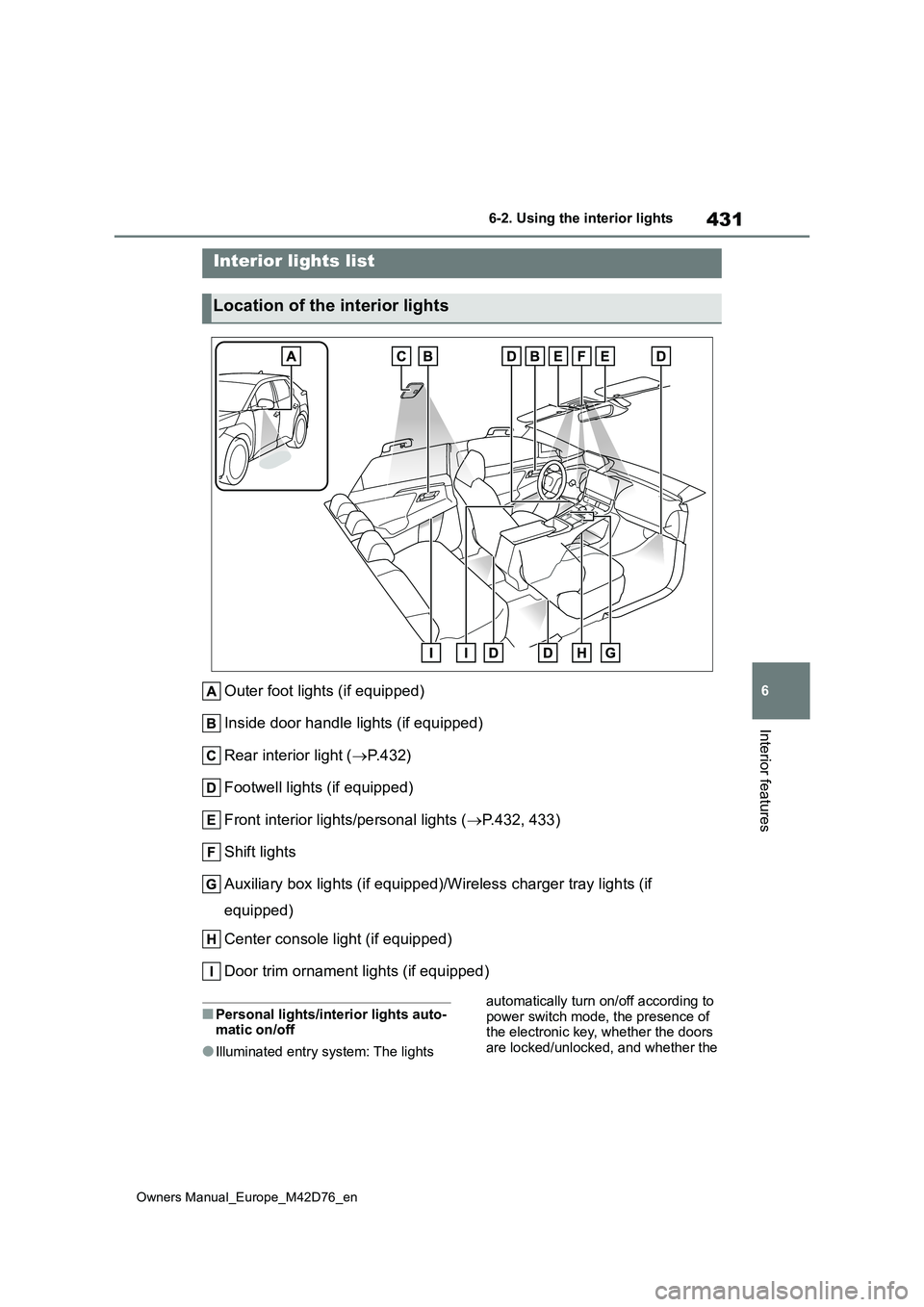
Outer foot lights (if equipped)
Inside door handle lights (if equipped)
Rear interior light ( P. 4 3 2 )
Footwell lights (if equipped)
Front interior lights/personal lights ( P.432, 433)
Shift lights
Auxiliary box lights (if equipped)/Wireless charger tray lights (if
equipped)
Center console light (if equipped)
Door trim ornament lights (if equipped)
■Personal lights/interior lights auto- matic on/off
●Illuminated entry system: The lights
automatically turn on/off according to power switch mode, the presence of the electronic key, whether the doors
are locked/unlocked, and whether the
Interior lights list
Location of the interior lights