air condition TOYOTA BZ4X 2022 (in English) Owner's Guide
[x] Cancel search | Manufacturer: TOYOTA, Model Year: 2022, Model line: BZ4X, Model: TOYOTA BZ4X 2022Pages: 674, PDF Size: 120.02 MB
Page 185 of 674
183
4
Owners Manual_Europe_M42D76_en
4-1. Key information
Before driving
■If “A New Key has been Registered
Contact Your Dealer for Details” is shown on the multi-information display
This message will be displayed each time the driver’s door is opened when the doors are unlocked from the outside
for approximately 10 days after a new electronic key has been registered.
If this message is displayed but you
have not had a new electronic key regis- tered, ask any authorized Toyota retailer or Toyota authorized repairer, or any reli-
able repairer to check if an unknown electronic key (other than those in your possession) has been registered.
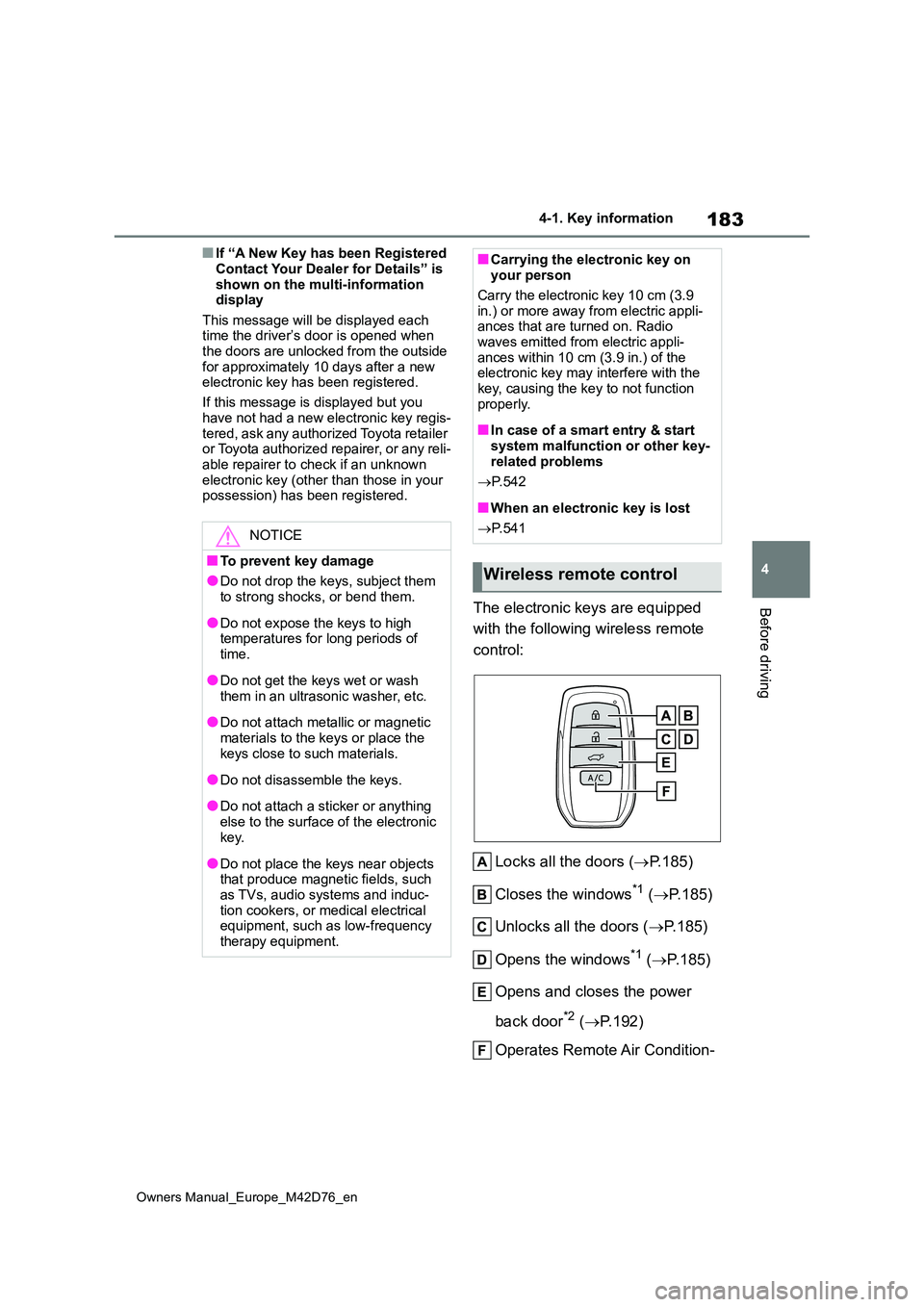
The electronic keys are equipped
with the following wireless remote
control:
Locks all the doors ( P.185)
Closes the windows*1 ( P.185)
Unlocks all the doors ( P.185)
Opens the windows*1 ( P.185)
Opens and closes the power
back door*2 ( P.192)
Operates Remote Air Condition-
NOTICE
■To prevent key damage
●Do not drop the keys, subject them to strong shocks, or bend them.
●Do not expose the keys to high temperatures for long periods of
time.
●Do not get the keys wet or wash
them in an ultrasonic washer, etc.
●Do not attach metallic or magnetic
materials to the keys or place the keys close to such materials.
●Do not disassemble the keys.
●Do not attach a sticker or anything
else to the surface of the electronic key.
●Do not place the keys near objects that produce magnetic fields, such as TVs, audio systems and induc-
tion cookers, or medical electrical equipment, such as low-frequency therapy equipment.
■Carrying the electronic key on your person
Carry the electronic key 10 cm (3.9
in.) or more away from electric appli- ances that are turned on. Radio waves emitted from electric appli-
ances within 10 cm (3.9 in.) of the electronic key may interfere with the key, causing the key to not function
properly.
■In case of a smart entry & start
system malfunction or other key- related problems
P. 5 4 2
■When an electronic key is lost
P. 5 4 1
Wireless remote control
Page 199 of 674
197
4
Owners Manual_Europe_M42D76_en
4-2. Opening, closing and locking the doors
Before driving
electronic key
●If the switch on the lower part of
the power back door ( P.193) is
pressed when the electronic key is in
a bag, etc., that is placed on the
ground
●If the switch on the lower part of
the power back door ( P.193) is
pressed with the electronic key not
near the vehicle.
■Hands Free Power Back Door oper- ating conditions (vehicles with Hands Free Power Back Door)
The Hands Free Power Back Door will open/close automatically when the fol-lowing conditions are met:
●The Hands Free Power Back Door operation is enabled ( P.202)
●The power switch is in OFF.
●The electronic key is within the opera- tional range. ( P.197)
●A foot is put near the lower center part of the rear bumper and moved away from the rear bumper.
The power back door may also be operated by putting a hand, an elbow,
a knee, etc. near the lower center part of the rear bumper and moving it away from the rear bumper. Make sure to
put it close enough to the center part of the rear bumper.
■Situations in which the Hands Free Power Back Door may not operate
properly (vehicles with Hands Free Power Back Door)
In the following situations, the Hands
Free Power Back Door may not operate properly:
●When a foot remains under the rear bumper
●If the rear bumper is strongly hit with a foot or is touched for a while
If the rear bumper has been touched for
a while, wait for a short time before
attempting to operate the Hands Free
Power Back Door again.
●When operated while a person is too close to the rear bumper
●When an external radio wave source interferes with the communication between the electronic key and the
vehicle ( P.204)
●When charging from an external
power source or connecting the AC charging cable
●When the vehicle is parked near an electrical noise source which affects the sensitivity of the Hands Free
Power Back Door, such as a pay park- ing spot, gas station, electrically heated road, or fluorescent light
●When the vehicle is near a TV tower, electric power plant, radio station,
large display, airport or other facility that generates strong radio waves or electrical noise
●When a large amount of water is applied to the rear bumper, such as
when the vehicle is being washed or in heavy rain
●When mud, snow, ice, etc. is attached to the rear bumper
●When the vehicle has been parked for a while near objects that may move and contact the rear bumper, such as
plants
●When an accessory is installed to the
rear bumper
If an accessory has been installed, turn
the Hands Free Power Back Door oper-
ation setting off.
■Preventing unintentional operation of the Hands Free Power Back Door (vehicles with Hands Free Power
Back Door)
When an electronic key is in the opera- tion range, the Hands Free Power Back
Door may operate unintentionally, so be careful in the following situations.
●When a large amount of water is applied to the rear bumper, such as
Page 201 of 674
199
4
Owners Manual_Europe_M42D76_en
4-2. Opening, closing and locking the doors
Before driving
WARNING
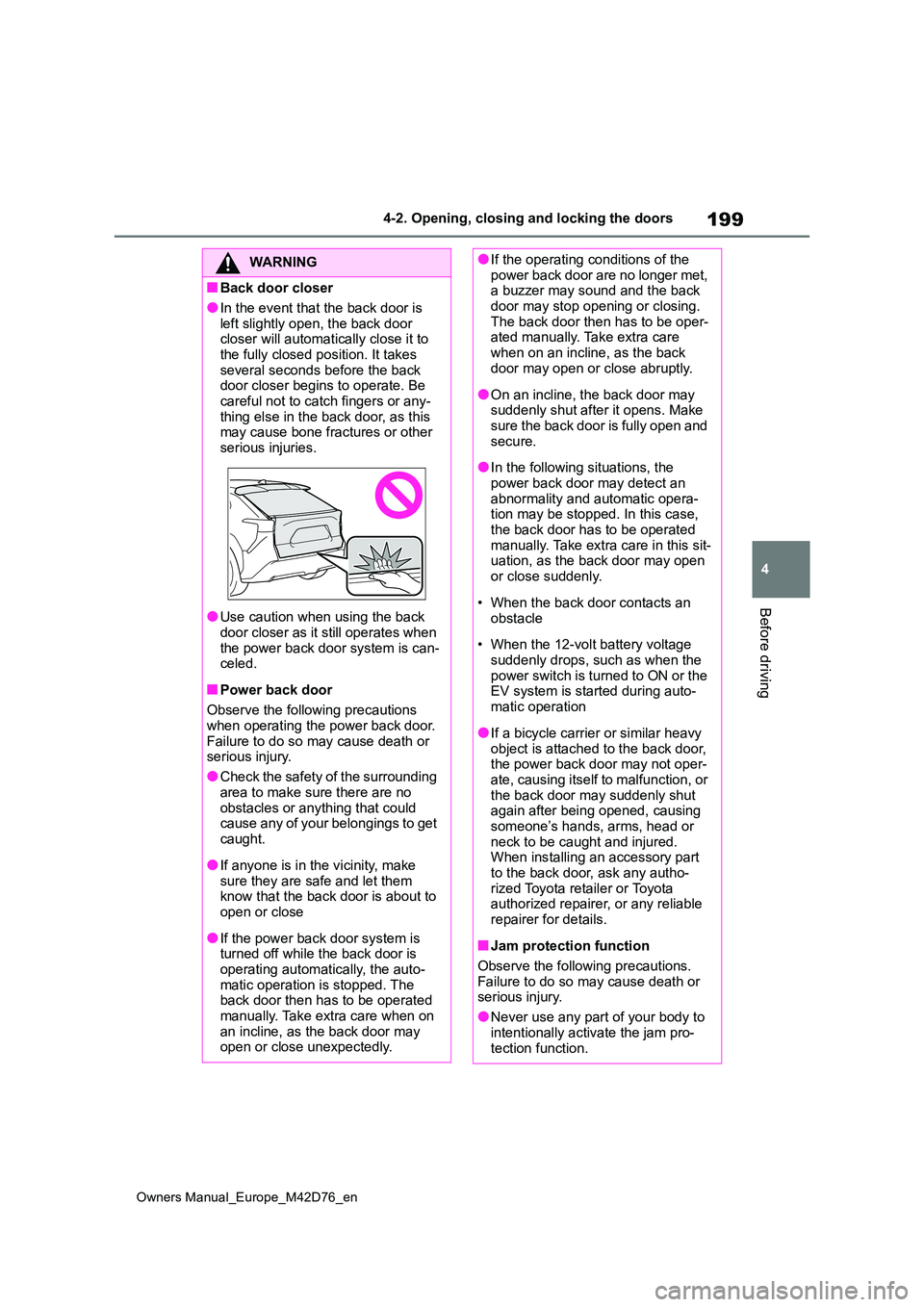
■Back door closer
●In the event that the back door is
left slightly open, the back door closer will automatically close it to the fully closed position. It takes
several seconds before the back door closer begins to operate. Be careful not to catch fingers or any-
thing else in the back door, as this may cause bone fractures or other serious injuries.
●Use caution when using the back door closer as it still operates when
the power back door system is can- celed.
■Power back door
Observe the following precautions when operating the power back door.
Failure to do so may cause death or serious injury.
●Check the safety of the surrounding
area to make sure there are no obstacles or anything that could cause any of your belongings to get
caught.
●If anyone is in the vicinity, make
sure they are safe and let them know that the back door is about to open or close
●If the power back door system is turned off while the back door is
operating automatically, the auto- matic operation is stopped. The back door then has to be operated
manually. Take extra care when on an incline, as the back door may open or close unexpectedly.
●If the operating conditions of the power back door are no longer met, a buzzer may sound and the back
door may stop opening or closing. The back door then has to be oper-ated manually. Take extra care
when on an incline, as the back door may open or close abruptly.
●On an incline, the back door may suddenly shut after it opens. Make sure the back door is fully open and
secure.
●In the following situations, the
power back door may detect an abnormality and automatic opera-tion may be stopped. In this case,
the back door has to be operated manually. Take extra care in this sit-uation, as the back door may open
or close suddenly.
• When the back door contacts an
obstacle
• When the 12-volt battery voltage
suddenly drops, such as when the power switch is turned to ON or the EV system is started during auto-
matic operation
●If a bicycle carrier or similar heavy
object is attached to the back door, the power back door may not oper-ate, causing itself to malfunction, or
the back door may suddenly shut again after being opened, causing someone’s hands, arms, head or
neck to be caught and injured. When installing an accessory part to the back door, ask any autho-
rized Toyota retailer or Toyota authorized repairer, or any reliable repairer for details.
■Jam protection function
Observe the following precautions.
Failure to do so may cause death or serious injury.
●Never use any part of your body to
intentionally activate the jam pro- tection function.
Page 207 of 674
205
4
Owners Manual_Europe_M42D76_en
4-2. Opening, closing and locking the doors
Before driving
and immobilizer system from operating
properly. (Ways of coping: P.542)
●When the electronic key battery is
depleted
●Near a TV tower, electric power plant,
gas station, radio station, large dis- play, airport or other facility that gen-erates strong radio waves or electrical
noise
●When carrying a portable radio, cellu-
lar phone, cordless phone or other wireless communication device
●When the electronic key is in contact with, or is covered by the following metallic objects
• Cards to which aluminum foil is attached• Cigarette boxes that have aluminum
foil inside • Metallic wallets or bags• Coins
• Hand warmers made of metal • Media such as CDs and DVDs
●When other wireless keys (that emit radio waves) are being used nearby
●When carrying the electronic key together with the following devices that emit radio waves
• Another vehicle’s electronic key or a wireless key that emits radio waves• Personal computers or personal digi-
tal assistants (PDAs) • Digital audio players• Portable game systems
●If window tint with a metallic content or metallic objects are attached to the
rear window
●When the electronic key is placed
near a battery charger or electronic devices
●When the vehicle is parked in a pay parking spot where radio waves are emitted
■Note for the entry function
●Even when the electronic key is within the effective range (detection areas),
the system may not operate properly in the following cases:
• The electronic key is too close to the
window or outside door handle, near the ground, or in a high place when the doors are locked or unlocked.
• The electronic key is on the instru- ment panel, luggage room, floor, or in the door pockets or glove box when
the EV system is started or power switch modes are changed.
●Do not leave the electronic key on top of the instrument panel or near the door pockets when exiting the vehicle.
Depending on the radio wave recep- tion conditions, it may be detected by the antenna outside the cabin and the
door will become lockable from the outside, possibly trapping the elec-tronic key inside the vehicle.
●As long as the electronic key is within the effective range, the doors may be
locked or unlocked by anyone. How- ever, only the doors detecting the electronic key can be used to unlock
the vehicle.
●Even if the electronic key is not inside
the vehicle, it may be possible to start the EV system if the electronic key is near the window.
●The doors may unlock if a large amount of water splashes on the door
handle, such as in the rain or in a car wash when the electronic key is within the effective range. (The doors will
automatically be locked after approxi- mately 30 seconds if the doors are not opened and closed.)
●When the lock operation is performed using the lock sensor, recognition sig-
nals will be shown up to two consecu- tive times. After this, no recognition signals will be given.
●If the wireless remote control is used to lock the doors when the electronic
key is near the vehicle, there is a pos- sibility that the door may not be unlocked by the entry function. (Use
the wireless remote control to unlock the doors.)
●Touching the door lock sensor while wearing gloves may delay or prevent
Page 236 of 674
234
Owners Manual_Europe_M42D76_en
5-1. Before driving
When the following unusual opera-
tion is performed with the accelera-
tor pedal depressed, the EV system
output may be restrained.
• When the shift position to R*.
• When the shift position is shifted
from P or R to forward drive shift
position such as D*.
When the system operates, a mes-
sage appears on the multi-informa-
tion display. Read the message and
follow the instruction.
NOTICE
■If you get a flat tire while driving
A flat or damaged tire may cause the
following situations. Hold the steering wheel firmly and gradually depress the brake pedal to slow down the
vehicle.
●It may be difficult to control your vehicle.
●The vehicle will make abnormal sounds or vibrations.
●The vehicle will lean abnormally.
Information on what to do in case of a
flat tire ( P.528)
■When encountering flooded
roads
Do not drive on a road that has flooded after heavy rain, etc. Doing so
may cause the following serious dam- age to the vehicle:
●Short in electrical components
●Traction battery damage caused by
water immersion
In the event that you drive on a
flooded road and the vehicle is flooded, be sure to have any autho-rized Toyota retailer or Toyota autho-
rized repairer, or any reliable repairer check the following:
●Brake function
●Changes in quantity and quality of transmission fluid, etc.
●Lubricant condition for the bearings and suspension joints (where possi-
ble), and the function of all joints, bearings, etc.
●Components connected to the trac-tion battery.
If the shift control system is damaged
by flooding, it may not be possible to
shift the shift position to P, or from P
to other positions. In this case, con-
tact any authorized Toyota retailer or
Toyota authorized repairer, or any reli-
able repairer.
■When parking the vehicle
Always set the parking brake, and
shift the shift position to P. Failure to do so may cause the vehicle to move or the vehicle may accelerate sud-
denly if the accelerator pedal is acci- dentally depressed.
■When involved in a minor acci-dent
Damage to the traction battery or bat-
tery peripheral components could cause malfunctions. Even if it is a minor accident, have the vehicle
inspected by any authorized Toyota retailer or Toyota authorized repairer, or any reliable repairer.
Sudden start restraint con-
trol (Drive-Start Control
[DSC])
Page 239 of 674
237
5
Owners Manual_Europe_M42D76_en
5-1. Before driving
Driving
Check the allowable towing capac-
ity, GVM (Gross Vehicle Mass),
MPAC (Maximum Permissible Axle
Capacity), and permissible draw-
bar load before towing. ( P. 5 5 4 )
Toyota recommends the use of the
Toyota hitch/bracket for your vehi-
cle. Other products of a suitable
nature and comparable quality may
also be used.
For vehicle where the towing
device blocks any of the lights or
license plate, the following shall be
observed:
Do not use towing devices that
cannot be easily removed or
repositioned.
Towing devices must be
removed or repositioned when
not in use.
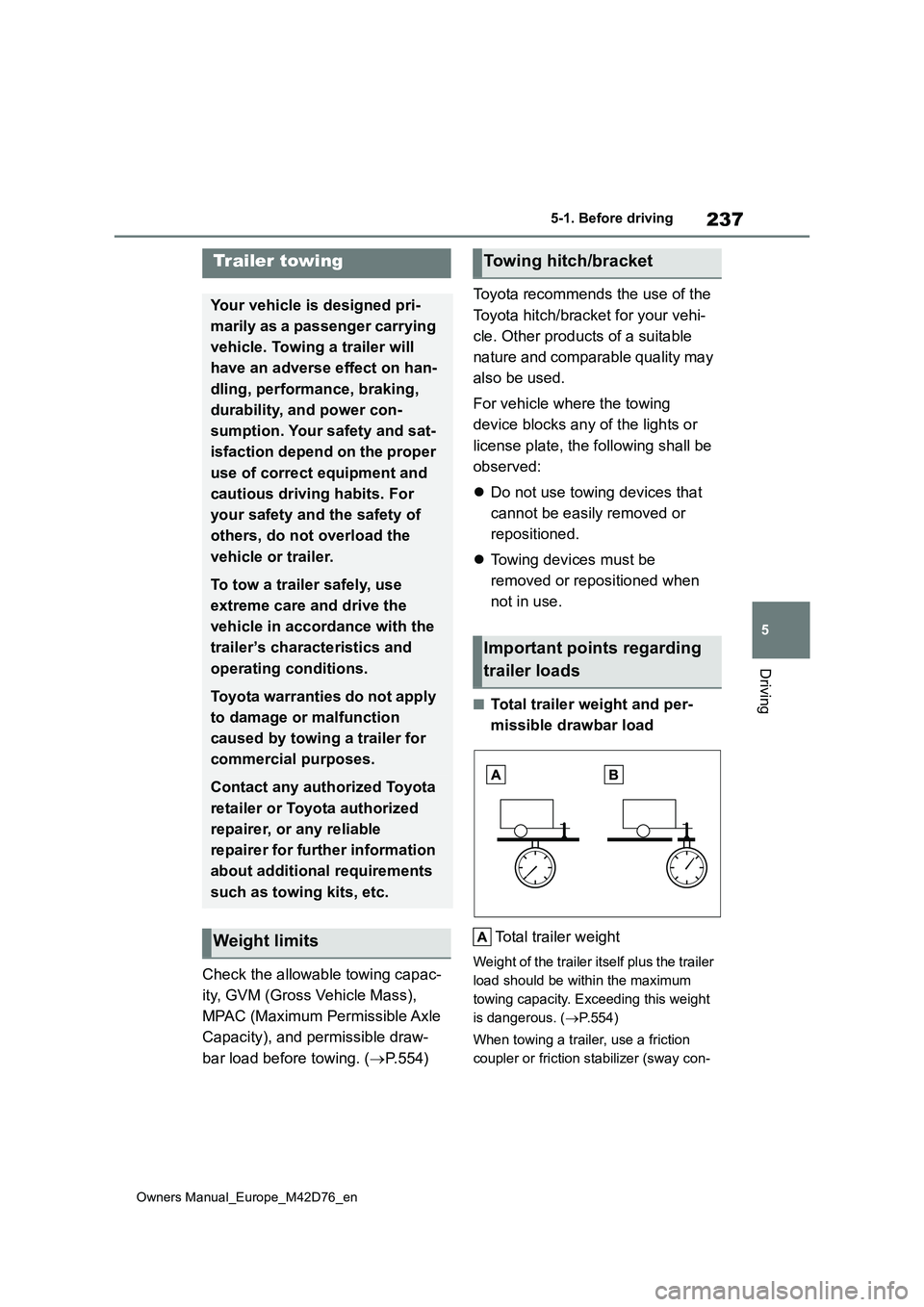
■Total trailer weight and per-
missible drawbar load
Total trailer weight
Weight of the trailer itself plus the trailer
load should be within the maximum
towing capacity. Exceeding this weight
is dangerous. ( P.554)
When towing a trailer, use a friction
coupler or friction stabilizer (sway con-
Trailer towing
Your vehicle is designed pri-
marily as a passenger carrying
vehicle. Towing a trailer will
have an adverse effect on han-
dling, performance, braking,
durability, and power con-
sumption. Your safety and sat-
isfaction depend on the proper
use of correct equipment and
cautious driving habits. For
your safety and the safety of
others, do not overload the
vehicle or trailer.
To tow a trailer safely, use
extreme care and drive the
vehicle in accordance with the
trailer’s characteristics and
operating conditions.
Toyota warranties do not apply
to damage or malfunction
caused by towing a trailer for
commercial purposes.
Contact any authorized Toyota
retailer or Toyota authorized
repairer, or any reliable
repairer for further information
about additional requirements
such as towing kits, etc.
Weight limits
Towing hitch/bracket
Important points regarding
trailer loads
Page 246 of 674
244
Owners Manual_Europe_M42D76_en
5-2. Driving procedures
mechanical key, the EV system can-
not be started using the smart entry & start system. However, if the elec-tronic key is carried inside the vehicle
and the doors are locked ( P.188), the EV system can be started.
■When the ambient temperature is low, such as during winter driving
conditions
●When starting the EV system, the
flashing time of the “READY” indicator may be long. Leave the vehicle as it is until the “READY” indicator is steady
on, as steady means the vehicle is able to move.
●When the traction battery is extremely cold (below approximately -30°C [-22°F]) under the influence of the out-
side temperature, it may not be possi- ble to start the EV system. In this case, try to start the EV system again
after the temperature of the traction battery increases due to the outside temperature increase, etc.
■Sounds and vibrations specific to
an battery electric vehicle
P. 8 4
■If the 12-volt battery is discharged
The EV system cannot be started using
the smart entry & start system. Refer to P.544 to restart the EV system.
■Electronic key battery depletion
P. 1 8 2
■Conditions affecting operation
P. 2 0 4
■Note for the entry function
P. 2 0 5
■Steering lock function (if equipped)
●After turning the power switch off and opening and closing the doors, the steering wheel will be locked due to
the steering lock function. Operating the power switch again automatically cancels the steering lock.
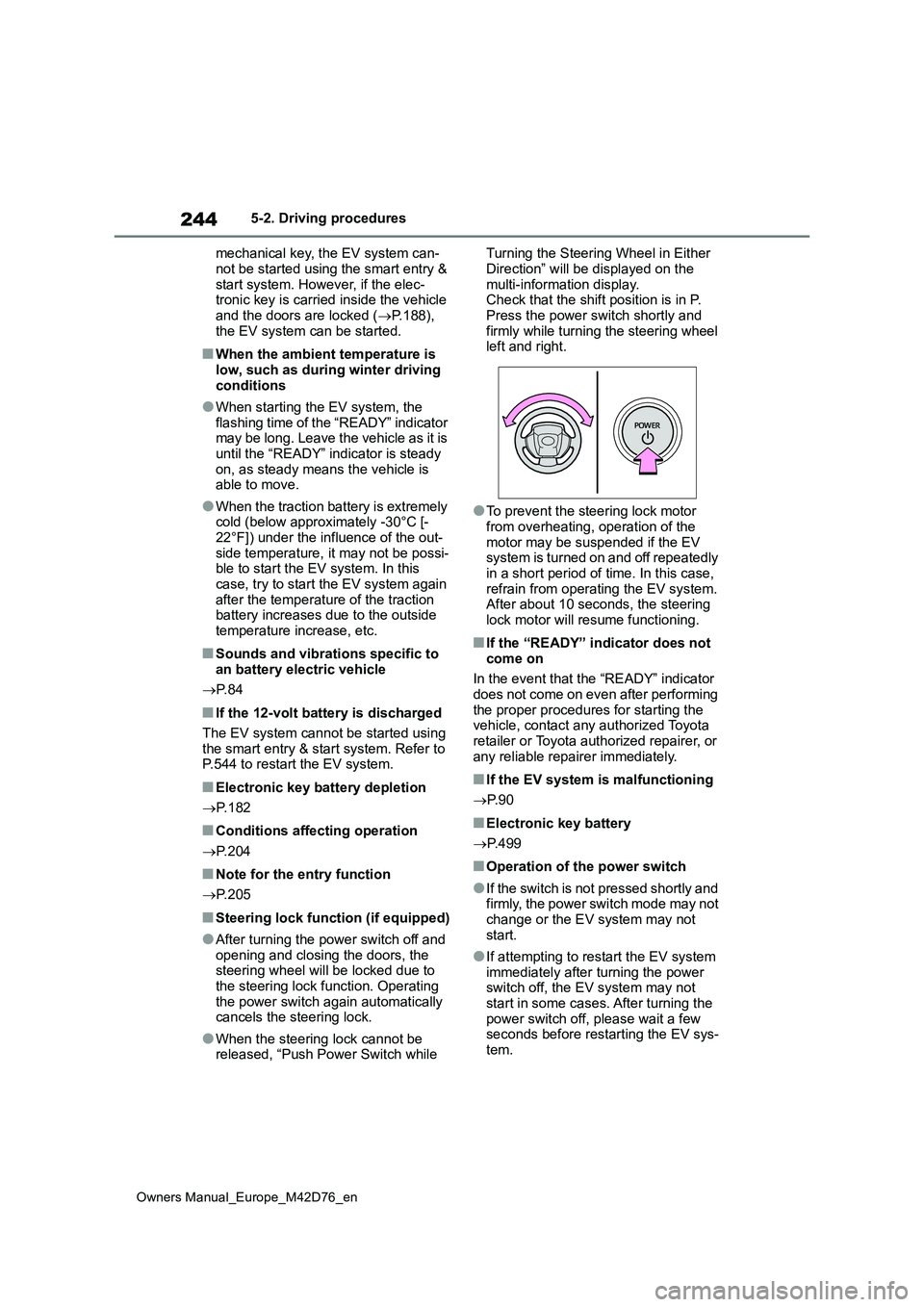
●When the steering lock cannot be released, “Push Power Switch while
Turning the Steering Wheel in Either
Direction” will be displayed on the multi-information display.Check that the shift position is in P.
Press the power switch shortly and firmly while turning the steering wheel left and right.
●To prevent the steering lock motor from overheating, operation of the
motor may be suspended if the EV system is turned on and off repeatedly in a short period of time. In this case,
refrain from operating the EV system. After about 10 seconds, the steering lock motor will resume functioning.
■If the “READY” indicator does not
come on
In the event that the “READY” indicator does not come on even after performing
the proper procedures for starting the vehicle, contact any authorized Toyota retailer or Toyota authorized repairer, or
any reliable repairer immediately.
■If the EV system is malfunctioning
P. 9 0
■Electronic key battery
P. 4 9 9
■Operation of the power switch
●If the switch is not pressed shortly and firmly, the power switch mode may not
change or the EV system may not start.
●If attempting to restart the EV system immediately after turning the power switch off, the EV system may not
start in some cases. After turning the power switch off, please wait a few seconds before restarting the EV sys-
tem.
Page 257 of 674
255
5
Owners Manual_Europe_M42D76_en
5-2. Driving procedures
Driving
ing brake manually. (P.254)
■Turning the automatic mode
off
While the vehicle is stopped and
depressing the brake pedal, press
and hold the parking brake switch
until a buzzer sounds and message
is shown on the multi-information
display.
■Parking brake operation
●When the power switch is not in ON, the parking brake cannot be released using the parking brake switch.
●When the power switch is not in ON, automatic mode (automatic brake set-
ting and releasing) is not available.
■Parking brake automatic release function
When all of the following conditions are
met in manual mode, the parking brake can be released by depressing the accelerator pedal.
●The driver’s door is closed
●The driver is wearing the seat belt
●The shift position is in a forward driv-
ing position or reverse driving position
●The malfunction indicator lamp or brake system warning light is not illu-minated.
When depressing the accelerator pedal, depress it slowly.
If the parking brake is not released when
the accelerator pedal is depressed, release the parking brake manually.
■Parking brake automatic lock func-tion
The parking brake will be set automati- cally under the following conditions:
●The brake pedal is not depressed
●The driver’s door is open
●The driver’s seat belt is not fastened
●The shift position is in a position other
than P or N (The shift position is in P during advanced park operation.) (If
equipped)
●The malfunction indicator lamp or
brake system warning light are not illuminated
■If “Parking Brake Temporarily Unavailable” is displayed on the
multi-information display
If the parking brake is operated repeat- edly over a short period of time, the sys-
tem may restrict operation to prevent overheating. If this happens, refrain from operating the parking brake. Normal
operation will return after about 1 min- ute.
■If “Parking Brake Unavailable” is displayed on the multi-information
display
Operate the parking brake switch. If the message does not disappear after oper-
ating the switch several times, the sys- tem may be malfunctioning. Have the vehicle inspected by any authorized
Toyota retailer or Toyota authorized repairer, or any reliable repairer.
■Parking brake operation sound
When the parking brake operates, a
motor sound (whirring sound) may be heard.
This does not indicate a malfunction.
■Parking brake indicator light
●Depending on the power switch mode, the parking brake indicator light will
turn on and stay on as described below:ON: Comes on until the parking brake
is released. Not in ON: Stays on for approximately 15 seconds.
●When the power switch is turned off with the parking brake set, the parking
brake indicator light will stay on for about 15 seconds.This does not indicate a malfunction.
Page 260 of 674
258
Owners Manual_Europe_M42D76_en
5-2. Driving procedures
■When an inspection at any autho-
rized Toyota retailer or Toyota authorized repairer, or any reliable repairer is necessary
When the brake hold standby indicator (green) does not illuminate even when the brake hold switch is pressed with the
brake hold system operating conditions met, the system may be malfunctioning. Have the vehicle inspected at any
authorized Toyota retailer or Toyota authorized repairer, or any reliable repairer.
■If “Brake Hold Malfunction Press
Brake to Deactivate Visit Your Dealer” or “Brake Hold Malfunction Visit Your Dealer” is displayed on
the multi-information display
The system may be malfunctioning. Have the vehicle inspected by any
authorized Toyota retailer or Toyota authorized repairer, or any reliable repairer immediately.
■Warning messages and buzzers
Warning messages and buzzers are used to indicate a system malfunction or to inform the driver of the need for cau-
tion. If a warning message is shown on the multi-information display, read the message and follow the instructions.
■If the brake hold operated indicator
flashes
P. 5 2 1
WARNING
■When the vehicle is on a steep
incline
When using the brake hold system on a steep incline, exercise caution. The
brake hold function may not hold the vehicle in such a situation.
■When stopped on a slippery road
The system cannot stop the vehicle when the gripping ability of the tires
has been exceeded. Do not use the system when stopped on a slippery road.
NOTICE
■When parking the vehicle
The brake hold system is not
designed for use when parking the vehicle for a long period of time. Turn-ing the power switch off while the sys-
tem is holding the brake may release the brake, which would cause the vehicle to move. When operating the
power switch, depress the brake pedal, shift the shift position to P and set the parking brake.
Page 278 of 674
276
Owners Manual_Europe_M42D76_en
5-4. Using the driving support systems
■AHS (Adaptive High-beam
System) (if equipped)
P. 2 6 2
■AHB (Automatic High Beam)
(if equipped)
P. 2 6 5
■PCS (Pre-Collision System)
P. 2 8 3
■LTA (Lane Tracing Assist)
P. 2 9 4
■LDA (Lane Departure Alert)
P. 2 9 9
■RSA (Road Sign Assist)
P. 3 0 4
■Dynamic radar cruise control
P. 3 0 7
■Speed limiter (if equipped)
P. 3 1 8
■Emergency Driving Stop Sys-
tem
P. 3 2 1
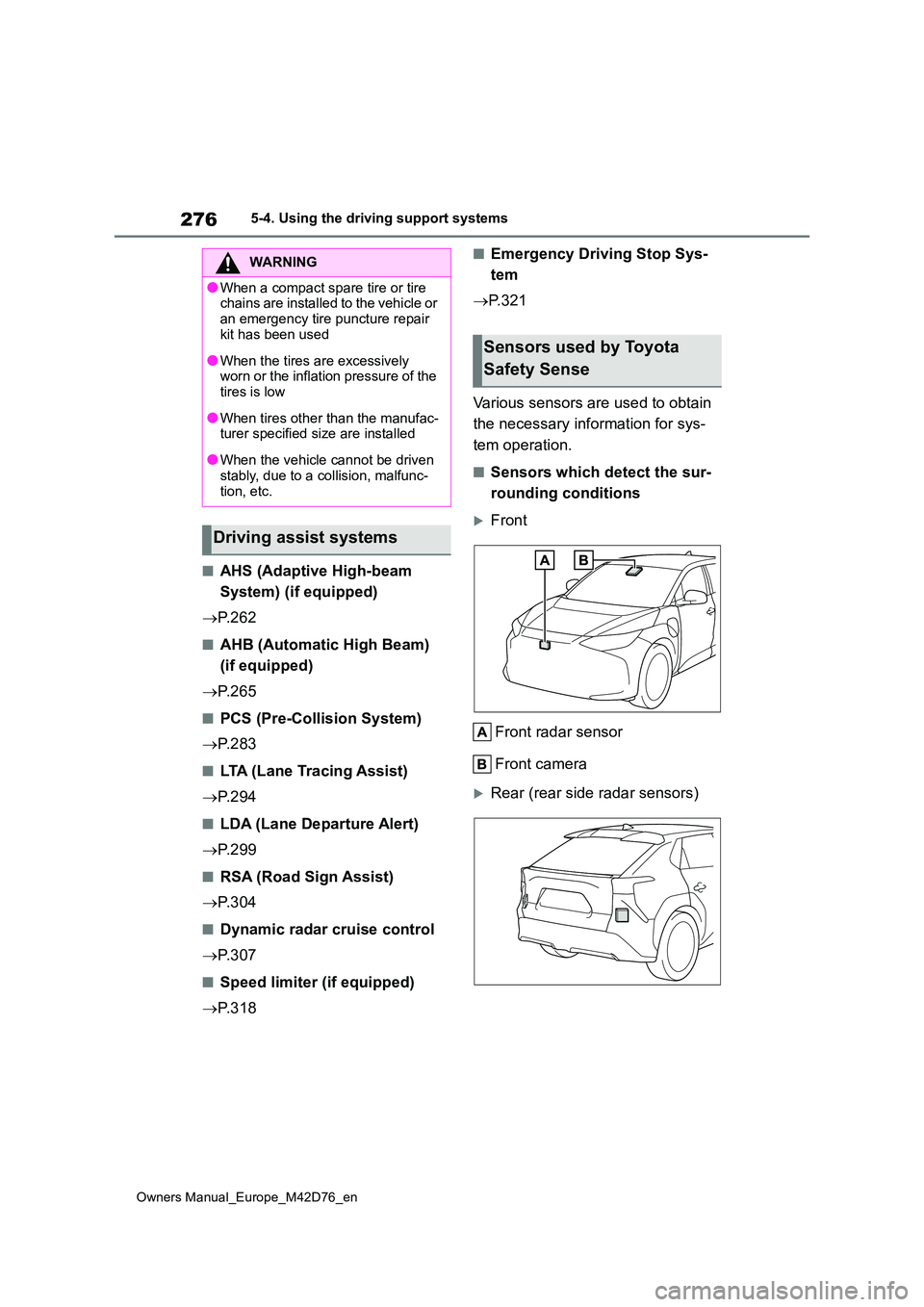
Various sensors are used to obtain
the necessary information for sys-
tem operation.
■Sensors which detect the sur-
rounding conditions
Front
Front radar sensor
Front camera
Rear (rear side radar sensors)
WARNING
●When a compact spare tire or tire chains are installed to the vehicle or
an emergency tire puncture repair kit has been used
●When the tires are excessively worn or the inflation pressure of the tires is low
●When tires other than the manufac-turer specified size are installed
●When the vehicle cannot be driven stably, due to a collision, malfunc-
tion, etc.
Driving assist systems
Sensors used by Toyota
Safety Sense