Lift TOYOTA BZ4X 2022 Owners Manual (in English)
[x] Cancel search | Manufacturer: TOYOTA, Model Year: 2022, Model line: BZ4X, Model: TOYOTA BZ4X 2022Pages: 674, PDF Size: 120.02 MB
Page 99 of 674
97
2
Owners Manual_Europe_M42D76_en
2-2. Charging
Electric Vehicle system
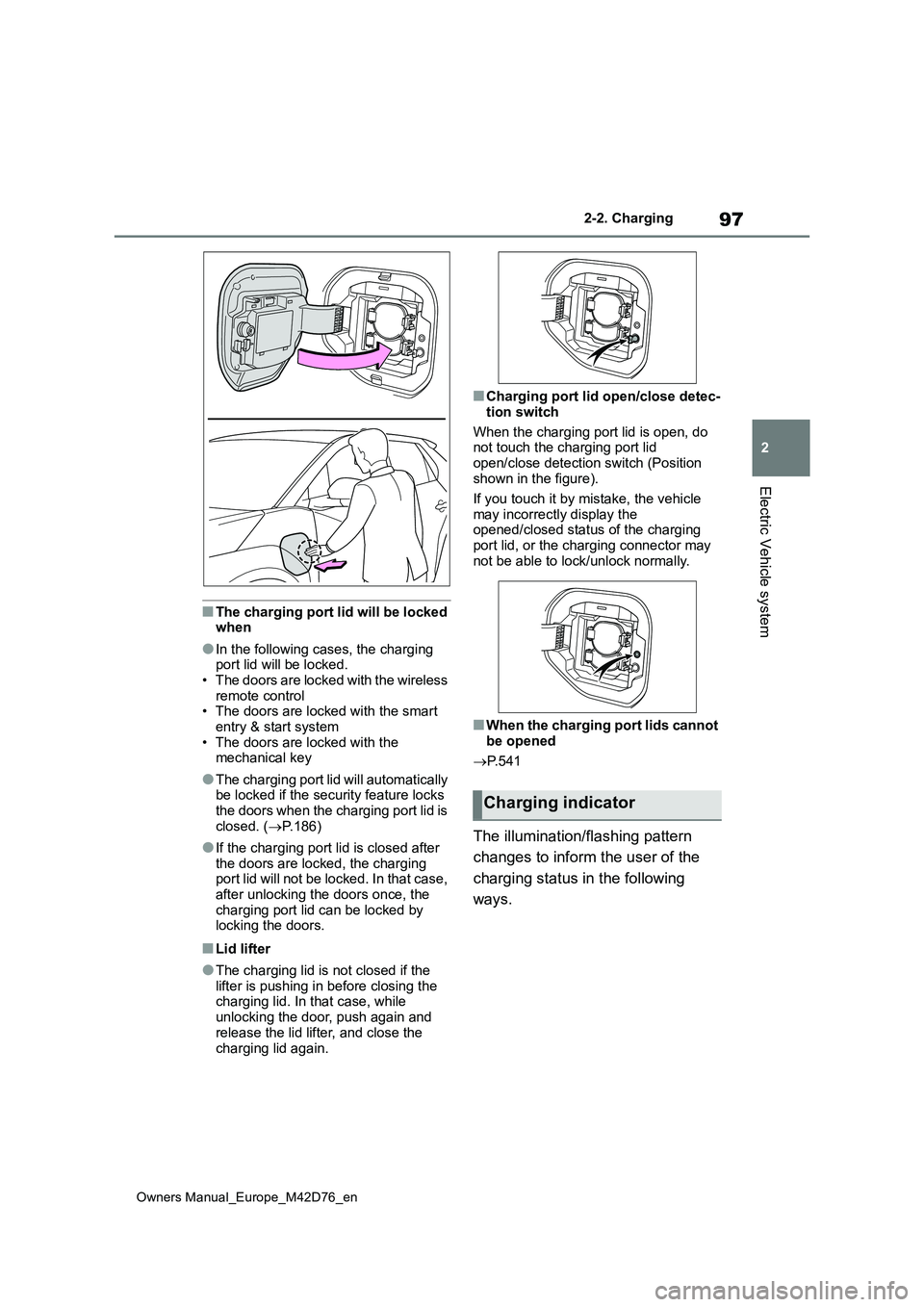
■The charging port lid will be locked when
●In the following cases, the charging port lid will be locked.• The doors are locked with the wireless
remote control • The doors are locked with the smart entry & start system
• The doors are locked with the mechanical key
●The charging port lid will automatically be locked if the security feature locks the doors when the charging port lid is
closed. ( P.186)
●If the charging port lid is closed after
the doors are locked, the charging port lid will not be locked. In that case, after unlocking the doors once, the
charging port lid can be locked by locking the doors.
■Lid lifter
●The charging lid is not closed if the lifter is pushing in before closing the charging lid. In that case, while
unlocking the door, push again and release the lid lifter, and close the
charging lid again.
■Charging port lid open/close detec-
tion switch
When the charging port lid is open, do not touch the charging port lid
open/close detection switch (Position shown in the figure).
If you touch it by mistake, the vehicle
may incorrectly display the opened/closed status of the charging port lid, or the charging connector may
not be able to lock/unlock normally.
■When the charging port lids cannot
be opened
P. 5 4 1
The illumination/flashing pattern
changes to inform the user of the
charging status in the following
ways.
Charging indicator
Page 157 of 674
155
2
Owners Manual_Europe_M42D76_en
2-2. Charging
Electric Vehicle system
■DC charging does not start
When DC charging cannot be performed normally
Likely causeCorrection procedure
The DC charging connector is not prop-
erly connected to the vehicle.
Check the connection status of the DC
charging connector and be sure that it is
locked.
If the DC charging does not start, even
though the DC charging connector is
securely connected, there may be a mal-
function with the DC charger or charging
system.
The DC charging connector is not
securely locked.
• If there is a malfunction with the DC
charger, contact the charging station
manager.
• If there is not a malfunction with the
DC charger, there may be a malfunc-
tion in the system. Contact any autho-
rized Toyota retailer or Toyota
authorized repairer, or any reliable
repairer.
• If there is an error in the connection
status due to the weight of the connec-
tor, disconnect the connector and then
reconnect it. Lift and hold the connec-
tor in place for about 3 seconds after
reinserting it until it locks.
If the connector still does not lock,
check if it can be charged with another
DC charger.
Page 277 of 674
275
5
Owners Manual_Europe_M42D76_en
5-4. Using the driving support systems
Driving
Toyota Safety Sense
The Toyota Safety Sense con-
sists of the driving assist sys-
tems and contributes to a safe
and comfortable driving expe-
rience:
WARNING
■Toyota Safety Sense
The Toyota Safety Sense operates under the assumption that the driver will drive safely, and is designed to
help reduce the impact to the occu- pants in a collision and assist the driver under normal driving condi-
tions. As there is a limit to the degree of recognition accuracy and control performance that this system can pro-
vide, do not overly rely on this sys- tem. The driver is solely responsible for paying attention to the vehicle’s
surroundings and driving safely.
■For safe use
●Do not overly rely on this system. The driver is solely responsible for paying attention to the vehicle’s sur-
roundings and driving safely. This system may not operate in all situa-tions and provided assistance is
limited. Over-reliance on this sys- tem to drive the vehicle safely may lead to an accident resulting in
death or serious injury.
●Do not attempt to test the operation
of the system, as it may not operate properly, possibly leading to an accident.
●If attention is necessary while per-forming driving operations or a sys-
tem malfunction occurs, a warning message or warning buzzer will be operated. If a warning message is
displayed on the display, follow the instructions displayed.
●Depending on external noise, the volume of the audio system, etc., it may be difficult to hear the warning
buzzer. Also, depending on the road conditions, it may be difficult to recognize the operation of the sys-
tem.
■When it is necessary to disable
the system
In the following situations, make sure to disable the system.
Failure to do so may lead to the sys- tem not operating properly, possibly leading to an accident resulting in
death or serious injury.
●When the vehicle is tilted due to
being overloaded or having a flat tire
●When driving at extremely high speeds
●When towing another vehicle
●When the vehicle is being trans-
ported by a truck, ship, train, etc.
●When the vehicle is raised on a lift
and the tires are allowed to rotate freely
●When inspecting the vehicle using a drum tester such as a chassis dynamometer or speedometer tes-
ter, or when using an on vehicle wheel balancer
●When the vehicle is driven in a sporty manner or off-road
●When using an automatic car wash
●When a sensor is misaligned or
deformed due to a strong impact being applied to the sensor or the area around the sensor
●When accessories which obstruct a sensor or light are temporarily
installed to the vehicle
Page 437 of 674
435
6
Owners Manual_Europe_M42D76_en
6-3. Using the storage features
Interior features
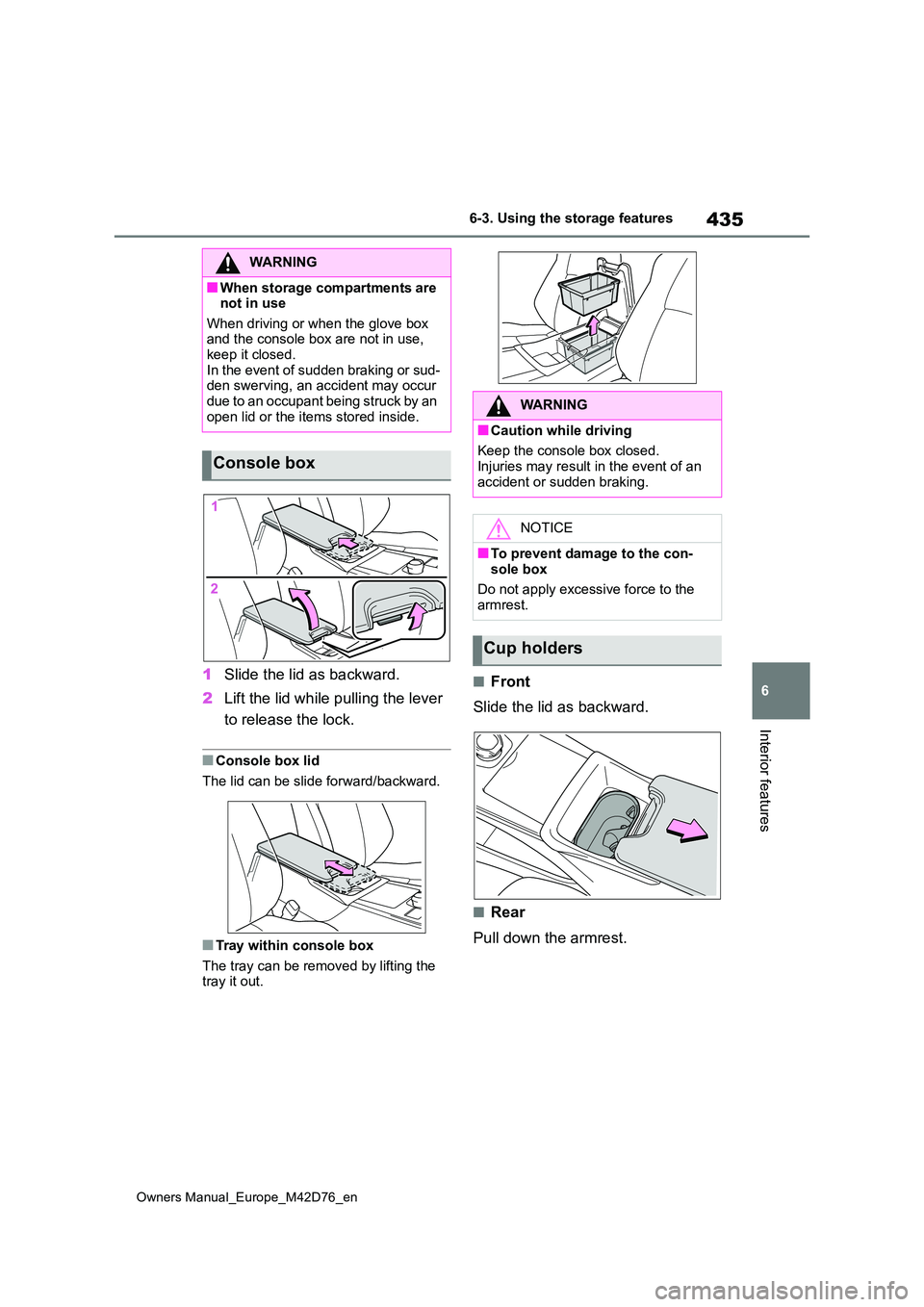
1Slide the lid as backward.
2 Lift the lid while pulling the lever
to release the lock.
■Console box lid
The lid can be slide forward/backward.
■Tray within console box
The tray can be removed by lifting the tray it out.
■Front
Slide the lid as backward.
■Rear
Pull down the armrest.
WARNING
■When storage compartments are not in use
When driving or when the glove box and the console box are not in use, keep it closed.
In the event of sudden braking or sud- den swerving, an accident may occur due to an occupant being struck by an
open lid or the items stored inside.
Console box
WARNING
■Caution while driving
Keep the console box closed.
Injuries may result in the event of an accident or sudden braking.
NOTICE
■To prevent damage to the con-sole box
Do not apply excessive force to the
armrest.
Cup holders
Page 442 of 674
440
Owners Manual_Europe_M42D76_en
6-3. Using the storage features
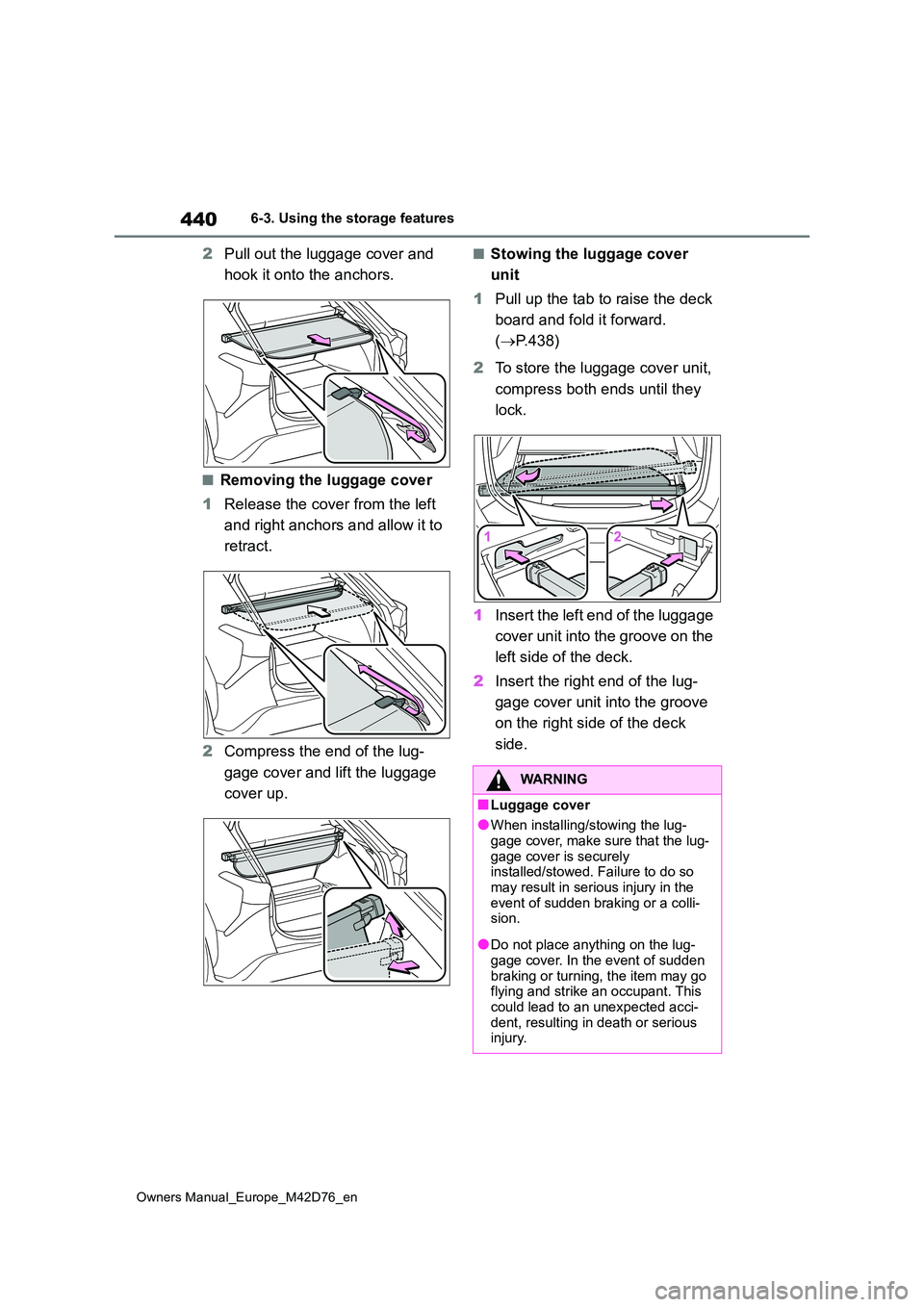
2Pull out the luggage cover and
hook it onto the anchors.
■Removing the luggage cover
1 Release the cover from the left
and right anchors and allow it to
retract.
2 Compress the end of the lug-
gage cover and lift the luggage
cover up.
■Stowing the luggage cover
unit
1 Pull up the tab to raise the deck
board and fold it forward.
( P.438)
2 To store the luggage cover unit,
compress both ends until they
lock.
1 Insert the left end of the luggage
cover unit into the groove on the
left side of the deck.
2 Insert the right end of the lug-
gage cover unit into the groove
on the right side of the deck
side.
WARNING
■Luggage cover
●When installing/stowing the lug-
gage cover, make sure that the lug- gage cover is securely installed/stowed. Failure to do so
may result in serious injury in the event of sudden braking or a colli-sion.
●Do not place anything on the lug-gage cover. In the event of sudden
braking or turning, the item may go flying and strike an occupant. This could lead to an unexpected acci-
dent, resulting in death or serious injury.
Page 469 of 674
467
7
Owners Manual_Europe_M42D76_en
7-3. Do-it-yourself maintenance
Maintenance and care
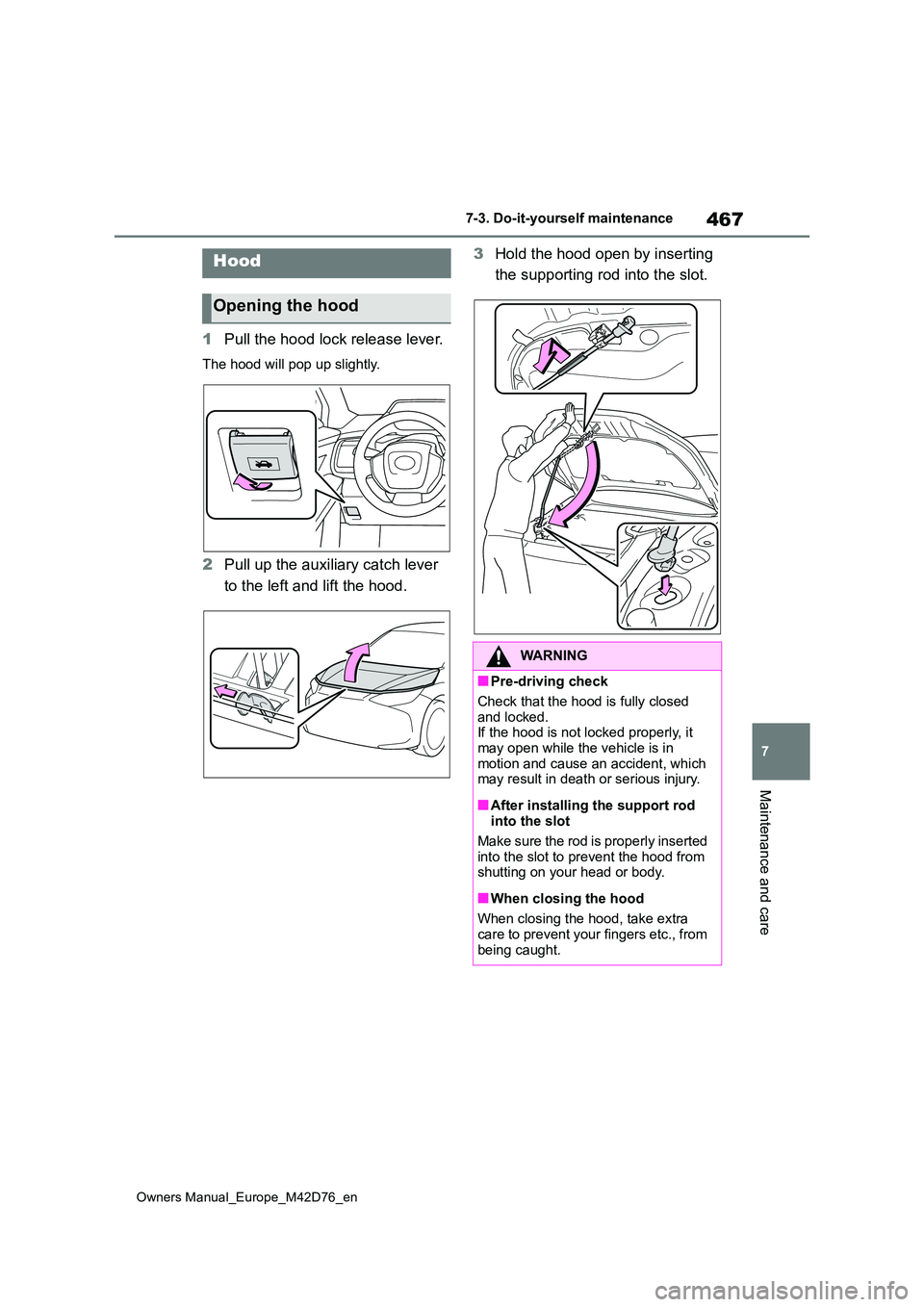
1Pull the hood lock release lever.
The hood will pop up slightly.
2Pull up the auxiliary catch lever
to the left and lift the hood.
3 Hold the hood open by inserting
the supporting rod into the slot.Hood
Opening the hood
WARNING
■Pre-driving check
Check that the hood is fully closed
and locked. If the hood is not locked properly, it may open while the vehicle is in
motion and cause an accident, which may result in death or serious injury.
■After installing the support rod into the slot
Make sure the rod is properly inserted
into the slot to prevent the hood from shutting on your head or body.
■When closing the hood
When closing the hood, take extra care to prevent your fingers etc., from
being caught.
Page 500 of 674
498
Owners Manual_Europe_M42D76_en
7-3. Do-it-yourself maintenance
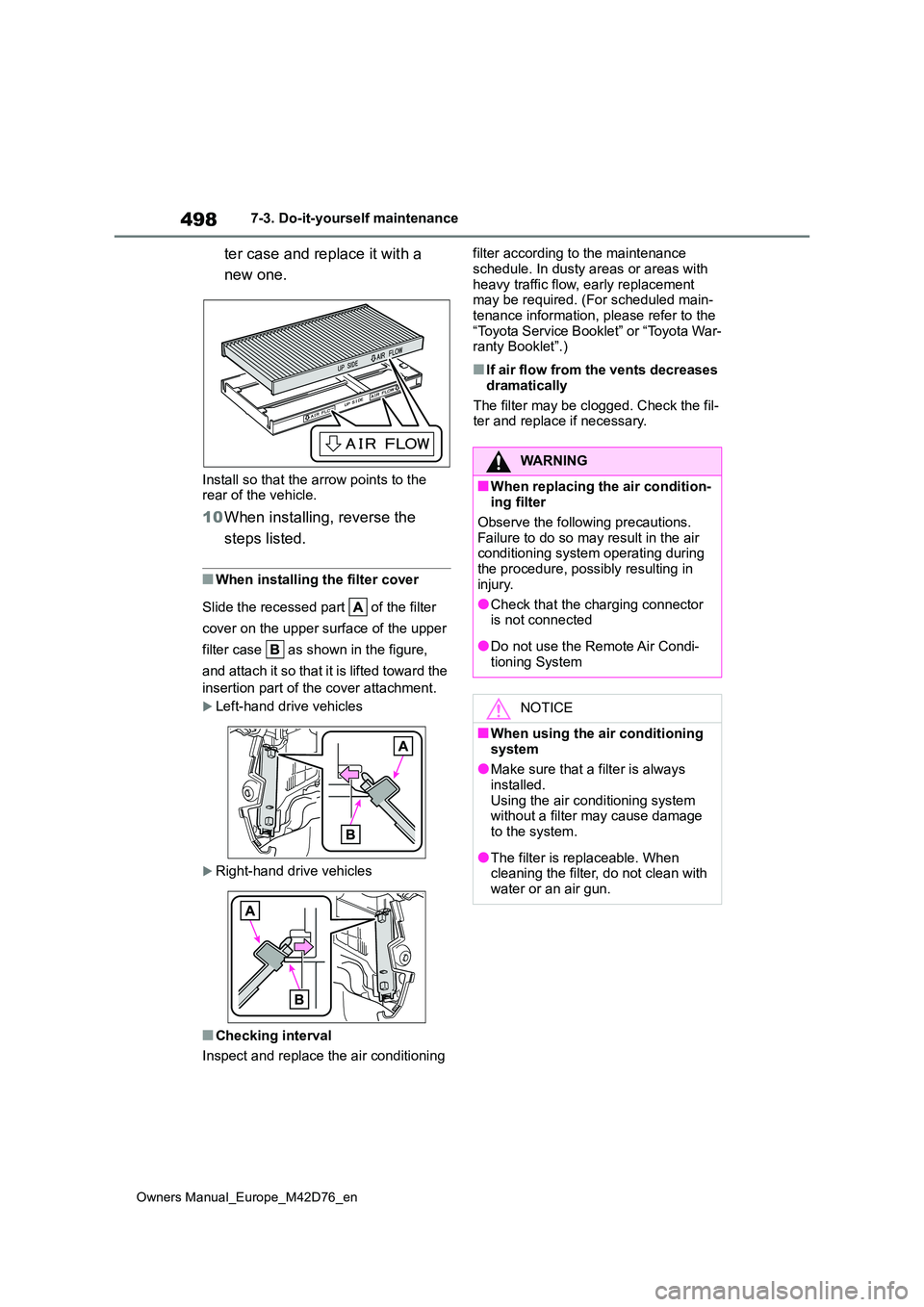
ter case and replace it with a
new one.
Install so that the arrow points to the rear of the vehicle.
10 When installing, reverse the
steps listed.
■When installing the filter cover
Slide the recessed part of the filter
cover on the upper surface of the upper
filter case as shown in the figure,
and attach it so that it is lifted toward the
insertion part of the cover attachment.
Left-hand drive vehicles
Right-hand drive vehicles
■Checking interval
Inspect and replace the air conditioning
filter according to the maintenance
schedule. In dusty areas or areas with heavy traffic flow, early replacement may be required. (For scheduled main-
tenance information, please refer to the “Toyota Service Booklet” or “Toyota War-ranty Booklet”.)
■If air flow from the vents decreases
dramatically
The filter may be clogged. Check the fil- ter and replace if necessary.
WARNING
■When replacing the air condition-ing filter
Observe the following precautions.
Failure to do so may result in the air conditioning system operating during the procedure, possibly resulting in
injury.
●Check that the charging connector is not connected
●Do not use the Remote Air Condi-tioning System
NOTICE
■When using the air conditioning
system
●Make sure that a filter is always installed.
Using the air conditioning system without a filter may cause damage to the system.
●The filter is replaceable. When cleaning the filter, do not clean with
water or an air gun.
Page 503 of 674
501
7
Owners Manual_Europe_M42D76_en
7-3. Do-it-yourself maintenance
Maintenance and care
1Turn the power switch off.
Confirm that the charging connector is not connected. Also, do not use the
Remote Air Conditioning System during the procedure.
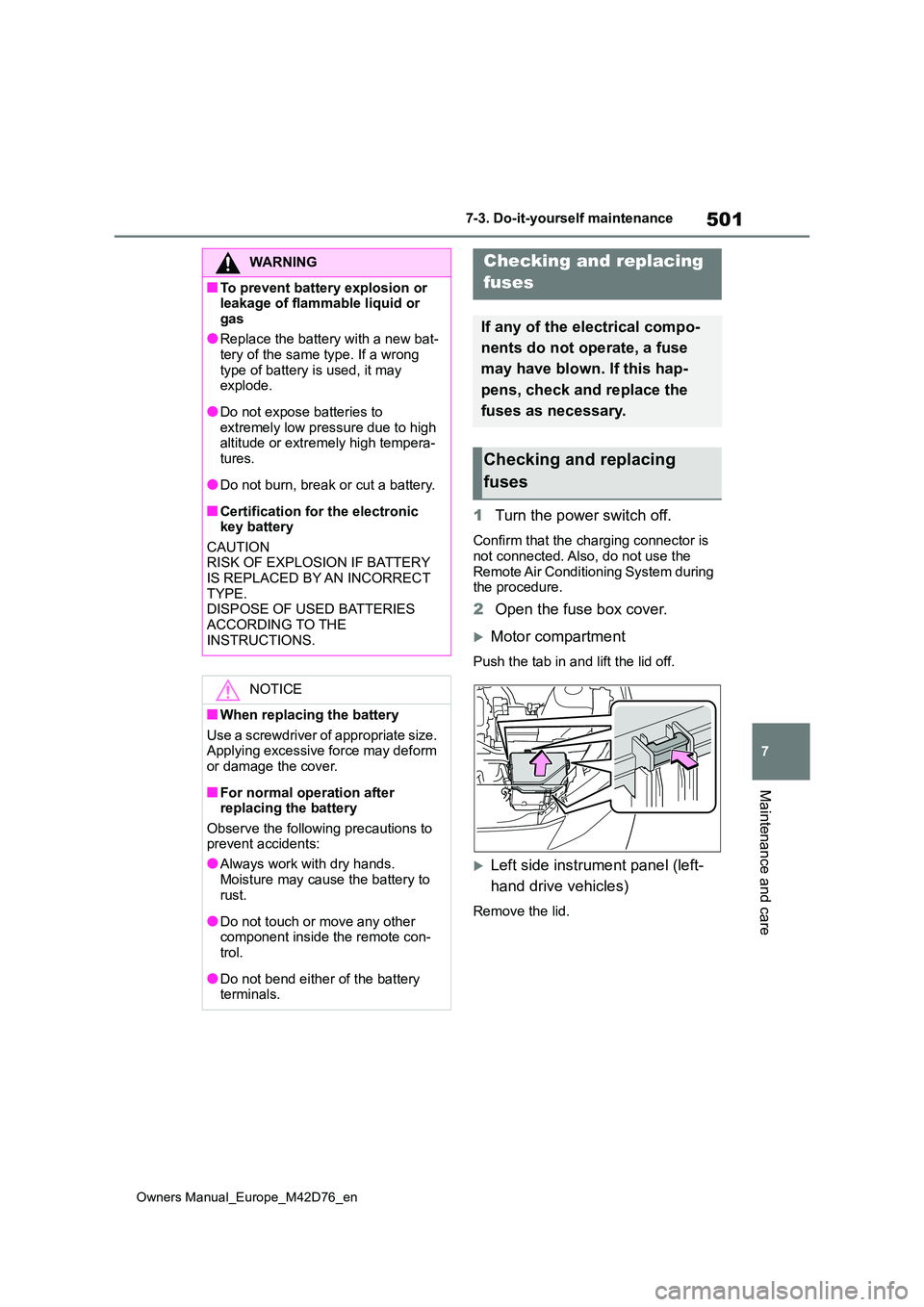
2 Open the fuse box cover.
Motor compartment
Push the tab in and lift the lid off.
Left side instrument panel (left-
hand drive vehicles)
Remove the lid.
WARNING
■To prevent battery explosion or leakage of flammable liquid or
gas
●Replace the battery with a new bat- tery of the same type. If a wrong
type of battery is used, it may explode.
●Do not expose batteries to extremely low pressure due to high altitude or extremely high tempera-
tures.
●Do not burn, break or cut a battery.
■Certification for the electronic key battery
CAUTION RISK OF EXPLOSION IF BATTERY IS REPLACED BY AN INCORRECT
TYPE. DISPOSE OF USED BATTERIES ACCORDING TO THE
INSTRUCTIONS.
NOTICE
■When replacing the battery
Use a screwdriver of appropriate size. Applying excessive force may deform or damage the cover.
■For normal operation after replacing the battery
Observe the following precautions to prevent accidents:
●Always work with dry hands.
Moisture may cause the battery to rust.
●Do not touch or move any other component inside the remote con-trol.
●Do not bend either of the battery terminals.
Checking and replacing
fuses
If any of the electrical compo-
nents do not operate, a fuse
may have blown. If this hap-
pens, check and replace the
fuses as necessary.
Checking and replacing
fuses
Page 511 of 674
509
8
Owners Manual_Europe_M42D76_en
8-2. Steps to take in an emergency
When trouble arises
8-2.Ste ps to take in an emerg ency
In the following situations, it is not
possible to be towed by another
vehicle using cables or chains, as
the front wheels may be locked due
to the parking lock. Contact any
authorized Toyota retailer or Toyota
authorized repairer, or any reliable
repairer or commercial towing ser-
vice.
There is a malfunction in the shift
control system. ( P.245, 527)
There is a malfunction in the
immobilizer system. ( P. 7 5 )
There is a malfunction in the
smart entry & start system.
( P.542)
The 12-volt battery is dis-
charged. ( P.544)
The following may indicate a prob-
lem with your transmission. Contact
any authorized Toyota retailer or
Toyota authorized repairer, or any
reliable repairer or commercial tow-
ing service before towing.
The EV system warning mes-
sage is shown on the multi-infor-
mation display and the vehicle
does not move.
The vehicle makes an abnormal
sound.
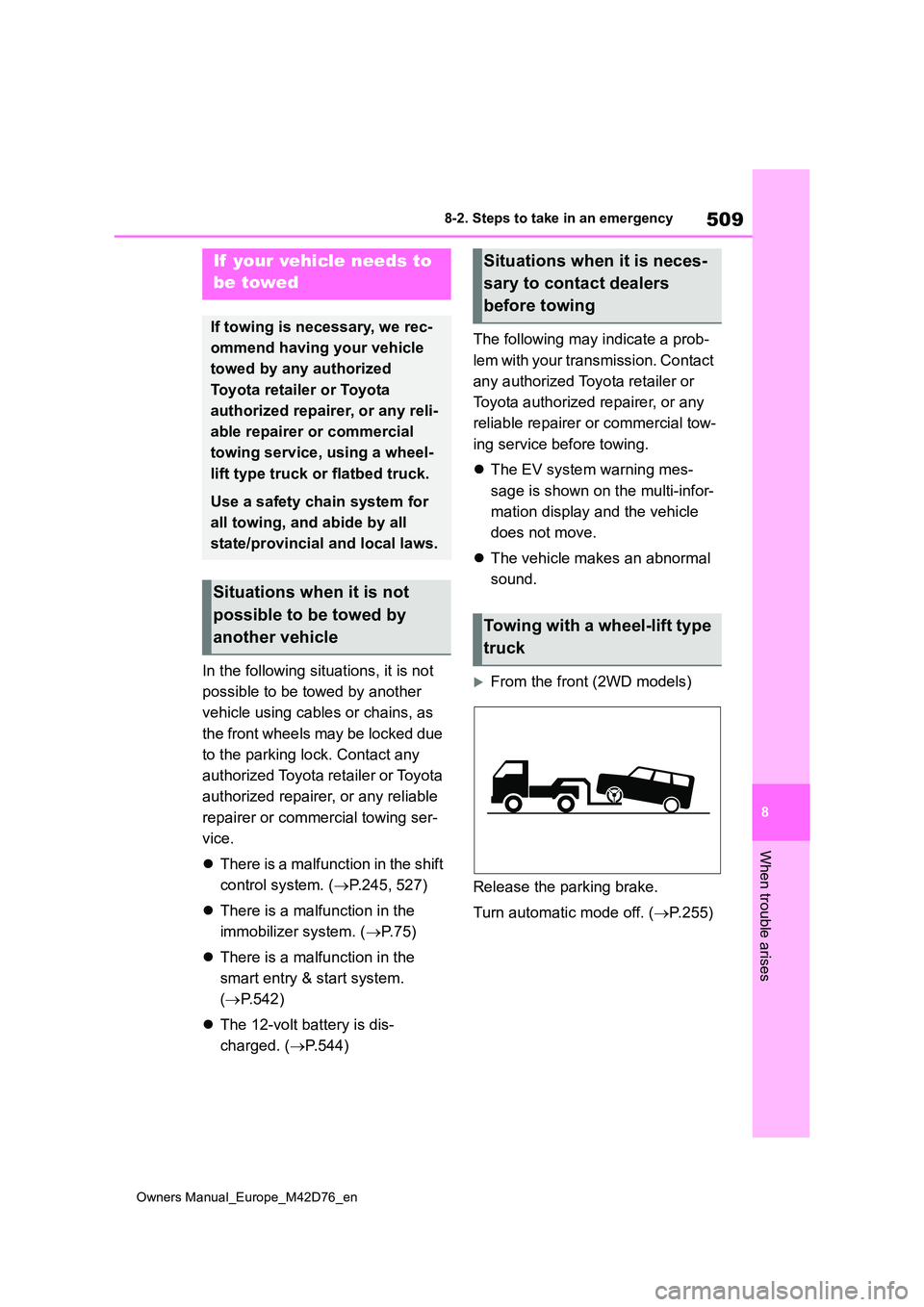
From the front (2WD models)
Release the parking brake.
Turn automatic mode off. ( P.255)
If your vehicle needs to
be towed
If towing is necessary, we rec-
ommend having your vehicle
towed by any authorized
Toyota retailer or Toyota
authorized repairer, or any reli-
able repairer or commercial
towing service, using a wheel-
lift type truck or flatbed truck.
Use a safety chain system for
all towing, and abide by all
state/provincial and local laws.
Situations when it is not
possible to be towed by
another vehicle
Situations when it is neces-
sary to contact dealers
before towing
Towing with a wheel-lift type
truck
Page 513 of 674
511
8
Owners Manual_Europe_M42D76_en
8-2. Steps to take in an emergency
When trouble arises
When using a flat-bed truck to
transport the vehicle, use tire strap-
ping belts. Refer to the owner’s
manual of the flat-bed truck for the
tire strapping method.
In order to suppress vehicle move-
ment during transportation, set the
parking brake and turn the power
switch off.
If a tow truck is not available in an
emergency, your vehicle may be
temporarily towed using cables or
chains secured to the emergency
towing eyelets. This should only be
attempted on hard surfaced roads
for short distances at under 30
km/h (18 mph).
A driver must be in the vehicle to
steer and operate the brakes. The
vehicle’s wheels, drive train, axles,
steering and brakes must be in
good condition.
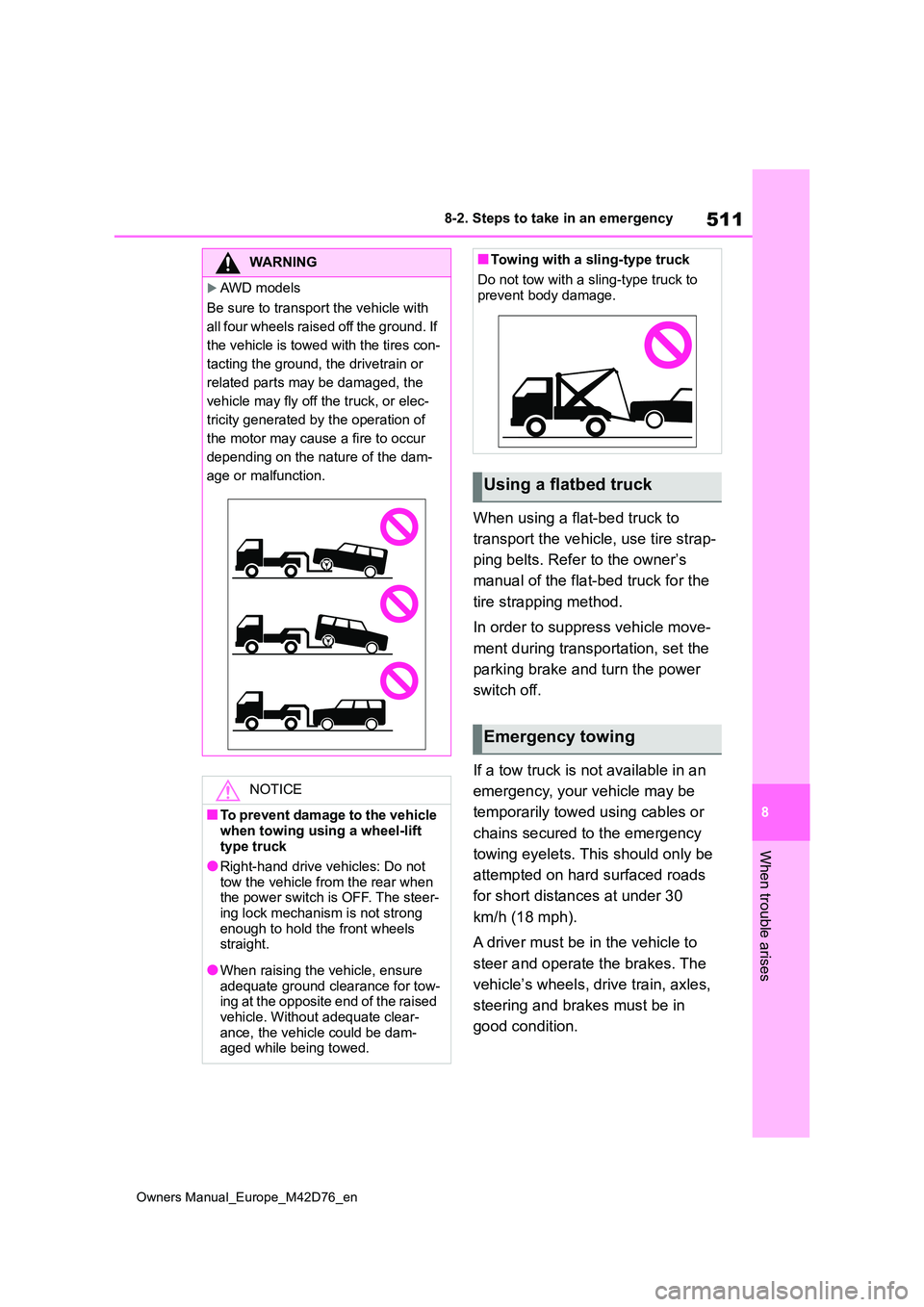
WARNING
AWD models
Be sure to transport the vehicle with
all four wheels raised off the ground. If
the vehicle is towed with the tires con-
tacting the ground, the drivetrain or
related parts may be damaged, the
vehicle may fly off the truck, or elec-
tricity generated by the operation of
the motor may cause a fire to occur
depending on the nature of the dam-
age or malfunction.
NOTICE
■To prevent damage to the vehicle
when towing using a wheel-lift type truck
●Right-hand drive vehicles: Do not
tow the vehicle from the rear when the power switch is OFF. The steer-ing lock mechanism is not strong
enough to hold the front wheels straight.
●When raising the vehicle, ensure adequate ground clearance for tow-ing at the opposite end of the raised
vehicle. Without adequate clear- ance, the vehicle could be dam-aged while being towed.
■Towing with a sling-type truck
Do not tow with a sling-type truck to prevent body damage.
Using a flatbed truck
Emergency towing