hood TOYOTA BZ4X 2022 Owners Manual (in English)
[x] Cancel search | Manufacturer: TOYOTA, Model Year: 2022, Model line: BZ4X, Model: TOYOTA BZ4X 2022Pages: 674, PDF Size: 120.02 MB
Page 7 of 674
5
Owners Manual_Europe_M42D76_en
TABLE OF CONTENTS
1
6
5
4
3
2
8
7
9
Maintenance requirements . 463
7-3. Do-it-yourself maintenance
Do-it-yourself service precau-
tions .................................. 465
Hood ................................... 467
Positioning a floor jack ........ 468
Motor compartment............. 470
Tires .................................... 476
Replacing the tire ................ 488
Tire inflation pressure ......... 494
Wheels ................................ 495
Air conditioning filter ........... 496
Electronic key battery ......... 499
Checking and replacing fuses
.......................................... 501
Light bulbs .......................... 504
8-1. Essential information
Emergency flashers ............ 506
If your vehicle has to be stopped
in an emergency ............... 506
If the vehicle is submerged or
water on the road is rising 507
8-2. Steps to take in an emergency
If your vehicle needs to be towed
.......................................... 509
If you think something is wrong
.......................................... 513
If a warning light turns on or a
warning buzzer sounds..... 515
If a warning message is dis-
played ............................... 523
If you have a flat tire ........... 528
If the EV system will not start
.......................................... 539
If you lose your keys ........... 541
If the charging port lids cannot
be opened......................... 541
If the electronic key does not
operate properly ............... 542
If the 12-volt battery is dis-
charged............................. 544
If your vehicle overheats ..... 549
If the vehicle becomes stuck
.......................................... 551
9-1. Specifications
Maintenance data ............... 554
9-2. Customization
Customizable features ........ 561
9-3. Initialization
Items to initialize ................. 574
What to do if... (Troubleshooting)
.......................................... 576
Alphabetical Index .............. 579
8When trouble arises
9Vehicle specifications
Index
Page 15 of 674
13
Owners Manual_Europe_M42D76_en
Pictorial index
Windshield wipers .........................................................................P.269
Precautions against winter season .............................. .................... P.411
To prevent freezing (windshield wiper de-icer)*1..............................P.422
Precautions against car wash (rain-sensing windshield wipers)*1...P.457
Charging port lids ............................................. ...............................P.95
Charging methods............................................... ............................. P.114
Tires .......................................................... ......................................P.476
Tire size/inflation pressure ................................... ............................P.559
Winter tires/tire chain ........................................ ............................... P.411
Checking/rotation/tire pressure warning system ................. .............P.476
Coping with flat tires......................................... ................................P.528
Hood ........................................................... .....................................P.467
Opening ........................................................ ...................................P.467
Coping with overheat ........................................... ............................P.549
Warning messages ............................................... ...........................P.523
Headlights/front position lights/daytime running lights ........ ....P.259
Turn signal lights ............................................. ..............................P.253
Tail lights .................................................... ....................................P.259
Turn signal lights ............................................. ..............................P.253
Stop lights
Emergency brake signal ......................................... .........................P.406
Tail lights .................................................... ....................................P.259
Rear fog light*1, 2............................................................... .............P.268
Back-up light
Shifting the shift position to R ............................... ...........................P.247
License plate lights........................................... .............................P.259
Light bulbs of the exterior lights for driving
(Replacing method: P.504)
Page 18 of 674
16
Owners Manual_Europe_M42D76_en
Pictorial index
When the warning messages are displayed ........................ ............P.523
Turn signal lever .............................................. ..............................P.253
Headlight switch ............................................... .............................P.259
Headlights/front position lights/tail lights/license plate ligh ts/
daytime running lights ......................................... .............................P.259
Rear fog light................................................. ...................................P.268
Windshield wiper and washer switch ............................. .............P.269
Usage.......................................................... .....................................P.269
Adding washer fluid............................................ ..............................P.475
Headlight cleaners*1............................................................... .........P.269
Warning messages ............................................... ...........................P.523
Emergency flasher switch....................................... ......................P.506
Hood lock release lever ........................................ .........................P.467
Tilt and telescopic steering lock release lever................ ............P.215
Adjustment ..................................................... ..................................P.215
Air conditioning system ........................................ ........................P.420
Usage.......................................................... .....................................P.420
Rear window defogger ........................................... ..........................P.422
Multimedia system*2
*1: If equipped
*2: Refer to “Multimedia owner’s manual”.
Page 26 of 674
24
Owners Manual_Europe_M42D76_en
Pictorial index
When the warning messages are displayed ........................ ............P.523
Turn signal lever .............................................. ..............................P.253
Headlight switch ............................................... .............................P.259
Headlights/front position lights/tail lights/license plate ligh ts/
daytime running lights ......................................... .............................P.259
Rear fog light................................................. ...................................P.268
Windshield wiper and washer switch ............................. .............P.269
Usage.......................................................... .....................................P.269
Adding washer fluid............................................ ..............................P.475
Headlight cleaners ............................................. ..............................P.269
Warning messages ............................................... ...........................P.523
Emergency flasher switch....................................... ......................P.506
Hood lock release lever ........................................ .........................P.467
Tilt and telescopic steering lock release lever................ ............P.215
Adjustment ..................................................... ..................................P.215
Air conditioning system ........................................ ........................P.420
Usage.......................................................... .....................................P.420
Rear window defogger ........................................... ..........................P.422
Multimedia system*
*: Refer to “Multimedia owner’s manual”.
Page 50 of 674

48
Owners Manual_Europe_M42D76_en
1-2. Child safety
WARNING
■When installing a child restraint system
For safety reasons, always install a child restraint system in a rear seat. In the event that the rear seat cannot be
used, the front seat can be used as long as the airbag manual on-off sys-tem is set to “OFF”.
If the airbag manual on-off system is left on, the strong impact of the airbag deployment (inflation) may cause
serious injury or even death.
■When a child restraint system is
not installed on the front passen- ger seat
Ensure that the airbag manual on-off
system is set to “ON”. If it is left off, the airbag may not deploy in the event of an accident,
which may result in serious injury or even death.
Riding with children
Observe the following precau-
tions when children are in the
vehicle.
Use a child restraint system
appropriate for the child, until
the child becomes large
enough to properly wear the
vehicle’s seat belt.
It is recommended that chil-
dren sit in the rear seats to
avoid accidental contact with
the steering wheel, wiper
switch, etc.
Use the rear door child-protec-
tor lock or the window lock
switch to avoid children open-
ing the door while driving or
operating the power window
accidentally. ( P.188, 221)
Do not let small children oper-
ate equipment which may
catch or pinch body parts,
such as the power window,
hood, back door, seats, etc.
WARNING
■When children are in the vehicle
Never leave children unattended in the vehicle, and never allow children to have or use the key.
Children may be able to start the vehi- cle or shift the vehicle into neutral. There is also a danger that children
may injure themselves by playing with the windows or other features of the vehicle. In addition, heat build-up or
extremely cold temperatures inside the vehicle can be fatal to children.
Page 79 of 674
77
1
Owners Manual_Europe_M42D76_en
1-4. Theft deterrent system
For safety and security
*: If equipped
■Items to check before locking
the vehicle
To prevent unexpected triggering of
the alarm and vehicle theft, make
sure of the following.
Nobody is in the vehicle.
The windows are closed before
the alarm is set.
No valuables or other personal
items are left in the vehicle.
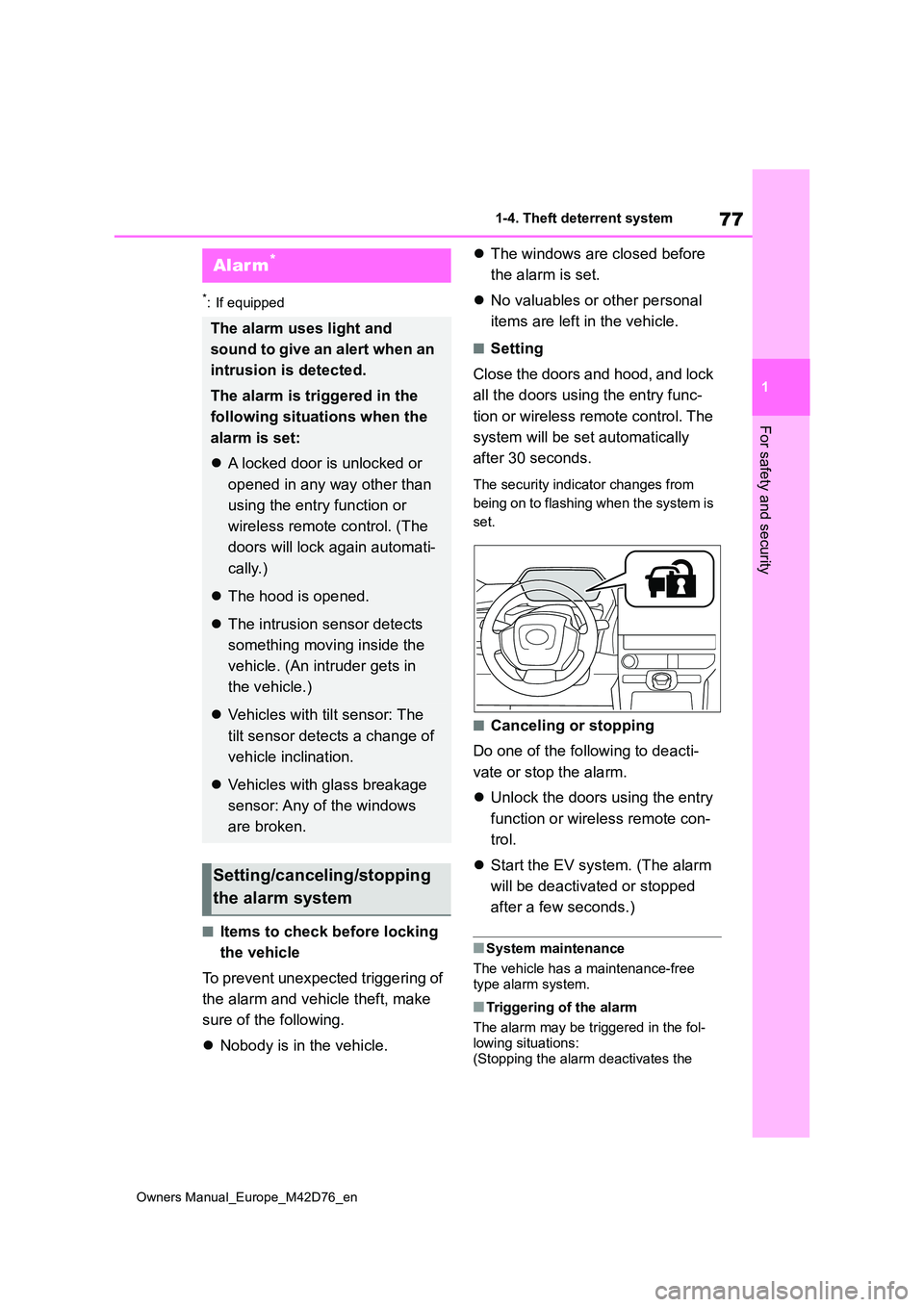
■Setting
Close the doors and hood, and lock
all the doors using the entry func-
tion or wireless remote control. The
system will be set automatically
after 30 seconds.
The security indicator changes from
being on to flashing when the system is
set.
■Canceling or stopping
Do one of the following to deacti-
vate or stop the alarm.
Unlock the doors using the entry
function or wireless remote con-
trol.
Start the EV system. (The alarm
will be deactivated or stopped
after a few seconds.)
■System maintenance
The vehicle has a maintenance-free type alarm system.
■Triggering of the alarm
The alarm may be triggered in the fol-
lowing situations: (Stopping the alarm deactivates the
Alarm*
The alarm uses light and
sound to give an alert when an
intrusion is detected.
The alarm is triggered in the
following situations when the
alarm is set:
A locked door is unlocked or
opened in any way other than
using the entry function or
wireless remote control. (The
doors will lock again automati-
cally.)
The hood is opened.
The intrusion sensor detects
something moving inside the
vehicle. (An intruder gets in
the vehicle.)
Vehicles with tilt sensor: The
tilt sensor detects a change of
vehicle inclination.
Vehicles with glass breakage
sensor: Any of the windows
are broken.
Setting/canceling/stopping
the alarm system
Page 80 of 674
78
Owners Manual_Europe_M42D76_en
1-4. Theft deterrent system
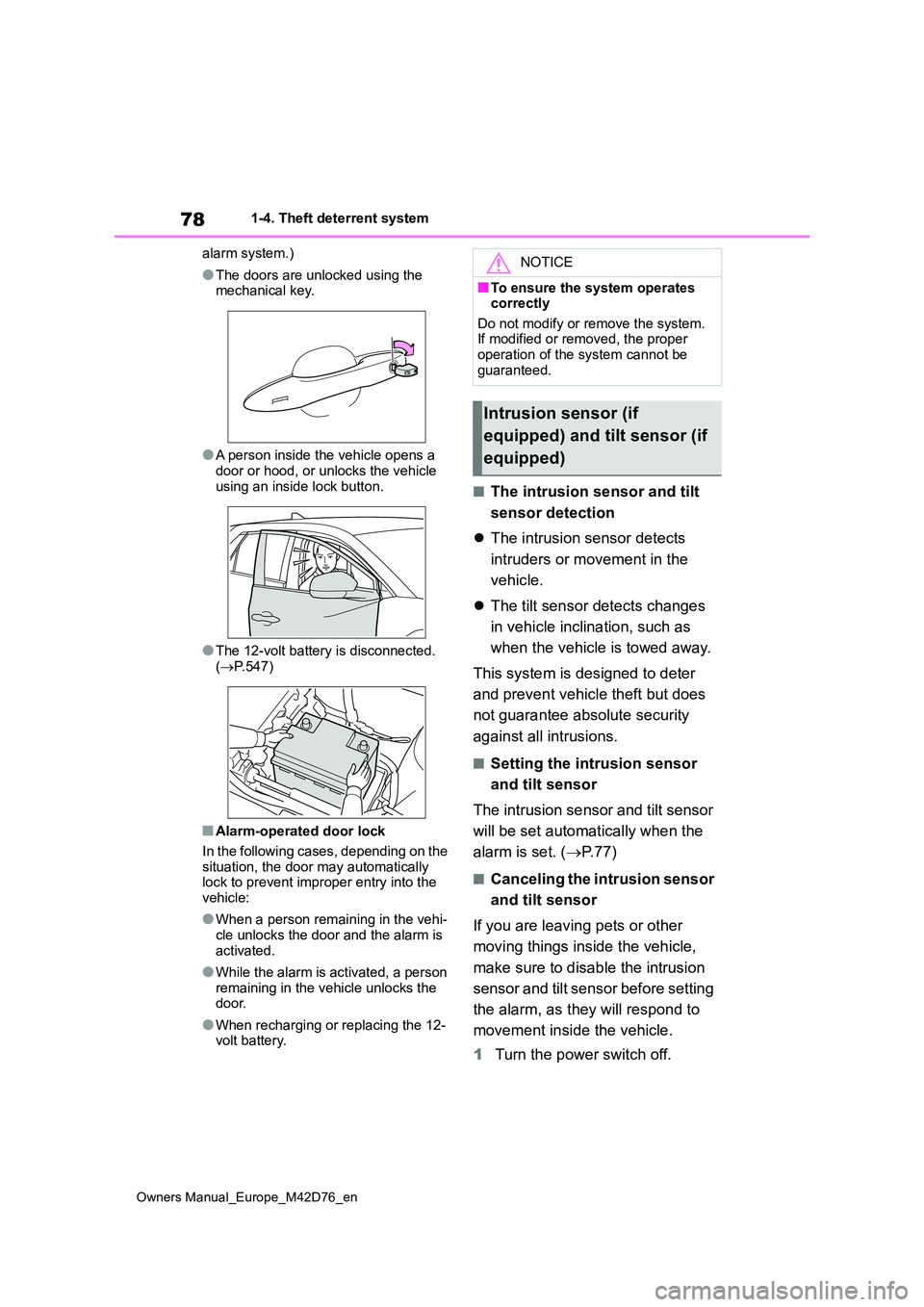
alarm system.)
●The doors are unlocked using the mechanical key.
●A person inside the vehicle opens a door or hood, or unlocks the vehicle
using an inside lock button.
●The 12-volt battery is disconnected.
( P.547)
■Alarm-operated door lock
In the following cases, depending on the situation, the door may automatically lock to prevent improper entry into the
vehicle:
●When a person remaining in the vehi-
cle unlocks the door and the alarm is activated.
●While the alarm is activated, a person remaining in the vehicle unlocks the door.
●When recharging or replacing the 12-volt battery.
■The intrusion sensor and tilt
sensor detection
The intrusion sensor detects
intruders or movement in the
vehicle.
The tilt sensor detects changes
in vehicle inclination, such as
when the vehicle is towed away.
This system is designed to deter
and prevent vehicle theft but does
not guarantee absolute security
against all intrusions.
■Setting the intrusion sensor
and tilt sensor
The intrusion sensor and tilt sensor
will be set automatically when the
alarm is set. ( P. 7 7 )
■Canceling the intrusion sensor
and tilt sensor
If you are leaving pets or other
moving things inside the vehicle,
make sure to disable the intrusion
sensor and tilt sensor before setting
the alarm, as they will respond to
movement inside the vehicle.
1 Turn the power switch off.
NOTICE
■To ensure the system operates correctly
Do not modify or remove the system. If modified or removed, the proper operation of the system cannot be
guaranteed.
Intrusion sensor (if
equipped) and tilt sensor (if
equipped)
Page 113 of 674
111
2
Owners Manual_Europe_M42D76_en
2-2. Charging
Electric Vehicle system
tem or wireless remote control and
unlock the AC charging connector lock and check that the connector lock pin is not lowered.
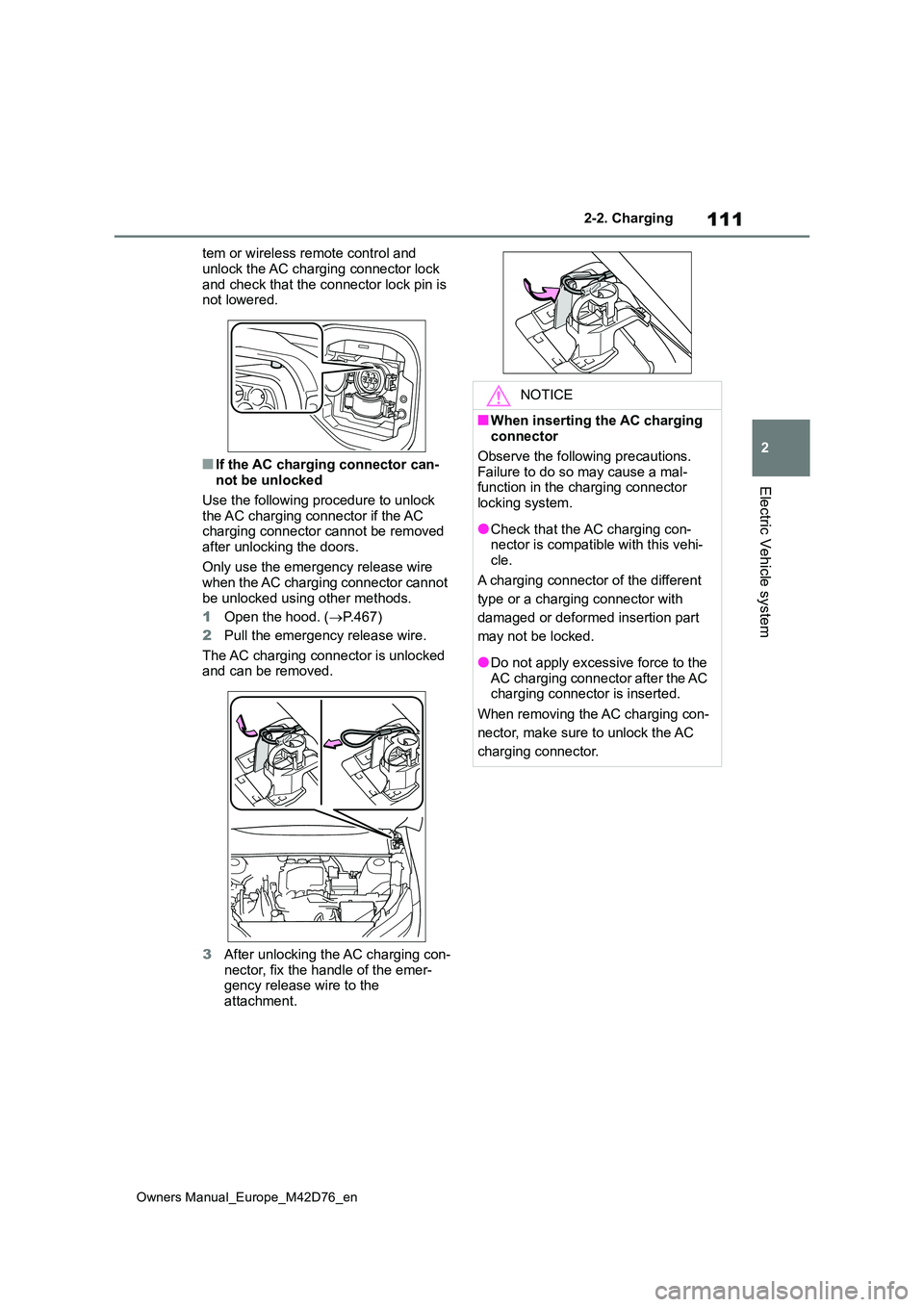
■If the AC charging connector can-not be unlocked
Use the following procedure to unlock the AC charging connector if the AC charging connector cannot be removed
after unlocking the doors.
Only use the emergency release wire when the AC charging connector cannot
be unlocked using other methods.
1 Open the hood. (P.467)
2 Pull the emergency release wire.
The AC charging connector is unlocked and can be removed.
3 After unlocking the AC charging con- nector, fix the handle of the emer-gency release wire to the
attachment.
NOTICE
■When inserting the AC charging connector
Observe the following precautions.
Failure to do so may cause a mal- function in the charging connector locking system.
●Check that the AC charging con-nector is compatible with this vehi-
cle.
A charging connector of the different
type or a charging connector with
damaged or deformed insertion part
may not be locked.
●Do not apply excessive force to the AC charging connector after the AC charging connector is inserted.
When removing the AC charging con-
nector, make sure to unlock the AC
charging connector.
Page 117 of 674
115
2
Owners Manual_Europe_M42D76_en
2-2. Charging
Electric Vehicle system
days and the traction battery heater
automatically stops. It automatically
insulates the traction battery in
extremely low temperatures.
This control stops 31 days after
the charging cable is connected,
even if it is still connected to the
vehicle.
When this control operates,
charging schedule settings are
ignored and charging starts
immediately.
■Traction battery cooler
When the traction battery is hot and
the AC charging cable is connected
to the vehicle, this function cools
the traction battery to protect it.
The function may operate when
continuously driving at high speeds
such as driving on highways or
freeways, or during DC charging.
■Using My Room Mode during DC charging
P. 1 4 6
■Traction battery heater
●Traction battery heater may operate when charging is not being performed.
●When Traction battery heater is oper-ating, the charging indicator will illumi-
nate.
●When Traction battery heater is oper-
ating during charging, the charging may take longer than normal.
●The remaining charge of the traction battery declines when the traction bat-tery heater operates, it might be nec-
essary to recharge the traction battery again in order to supplement the remaining charge.
■Traction battery cooler
●For AC charging: Traction battery cooler settings can be changed on the
multi-information display. ( P.115)
●The charging indicator will illuminate
when the traction battery cooler is on standby or operating.
●When the charge level of the traction battery is low, the traction battery cooler may not operate, even if the
temperature of the traction battery is high.
●When the following conditions are met while the traction battery cooler is operating, the cooling operation will
stop. • The hood is opened• The power switch is turned to ACC or
ON. • The shift position is changed to any position other than P
• The Remote Air Conditioning System is operated ( P.427) • The remaining charge of the traction
battery drops below a certain amount
●The traction battery cooler operates
using power supplied by the traction battery and an external power source.• While the traction battery cooler is
operating, the charge of the traction battery will increase and decrease within a certain range, and will not
increase as during AC charging. • When the traction battery cooler oper-ates, charger will recognize it as the
battery being charged. If this function operates while a charger which charges a charging fee is connected
to the vehicle, AC charging fees will apply.
■Changing of the traction battery cooler setting
Setting can be changed on the
multi-information display.
Use the meter control switches
( P.176) and select “Vehicle Settings”, “Charging Settings”, “Battery Cooler”, and change the setting.
Page 128 of 674
126
Owners Manual_Europe_M42D76_en
2-2. Charging
WARNING
●When charging outdoors, make sure to connect to a rain-tight
socket for outdoor use. Ensure the rain-tight socket cover closes completely. If the rain-tight
socket cover cannot be closed, install a rain-tight socket cover that will close.
●In order to stop charging at the charging station, follow the instruc-
tions of the charger.
●If any heat, smoke, odors, noise or
other abnormalities are noticed during charging, stop charging immediately.
●Do not insert the plug if the socket is submerged in water or snow.
●When charging while it is raining or snowing, do not connect or discon-
nect the plug if your hands are wet. Also, do not get the plug or socket wet.
●Do not charge the vehicle during a lightning storm.
●Prevent the AC charging cable from being caught in the door or back
door.
●Do not let the wheels on the AC
charging cable, plug, charging con- nector and CCID (Charging Circuit Interrupting Device).
●Firmly insert the plug into the socket.
●Do not use an extension cord and converting adaptor.
●Close the hood before using the charging system.The cooling fan may start operating
suddenly. Touching or getting close to rotating parts such as the fan may cause your hands or clothes
(especially a necktie or scarf) to become caught and result in a seri-ous injury.
●After connecting the charging cable, confirm that it is not wound
around anything.
●If the power indicator on the CCID
(Charging Circuit Interrupting Device) does not illuminate after plugging the AC charging cable into
the socket, unplug it immediately.
■If the error warning indicator on
the CCID (Charging Circuit Inter- rupting Device) illuminates or flashes during charging
There may be an electrical leakage in the power source path, or there may be a malfunction in the AC charging
cable or CCID (Charging Circuit Inter- rupting Device).
Refer to P.102 and follow the correc-
tion procedure. If the error warning indicator does not turn off even after performing the correction procedure,
immediately stop charging, remove the AC charging cable and contact any authorized Toyota retailer or
Toyota authorized repairer, or any reli- able repairer. Continuing to charge the vehicle in that condition may lead
to unforeseen accidents or serious injury.
■Onboard traction battery charger
The onboard traction battery charger is located in the motor compartment.
Make sure to observe the following precautions regarding the onboard traction battery charger. Failure to
observe these precautions may result in death or serious injury such as burns and electric shocks.