specifications TOYOTA BZ4X 2022 Owners Manual (in English)
[x] Cancel search | Manufacturer: TOYOTA, Model Year: 2022, Model line: BZ4X, Model: TOYOTA BZ4X 2022Pages: 674, PDF Size: 120.02 MB
Page 3 of 674
1
6
5
4
3
2
8
7
9
Owners Manual_Europe_M42D76_en
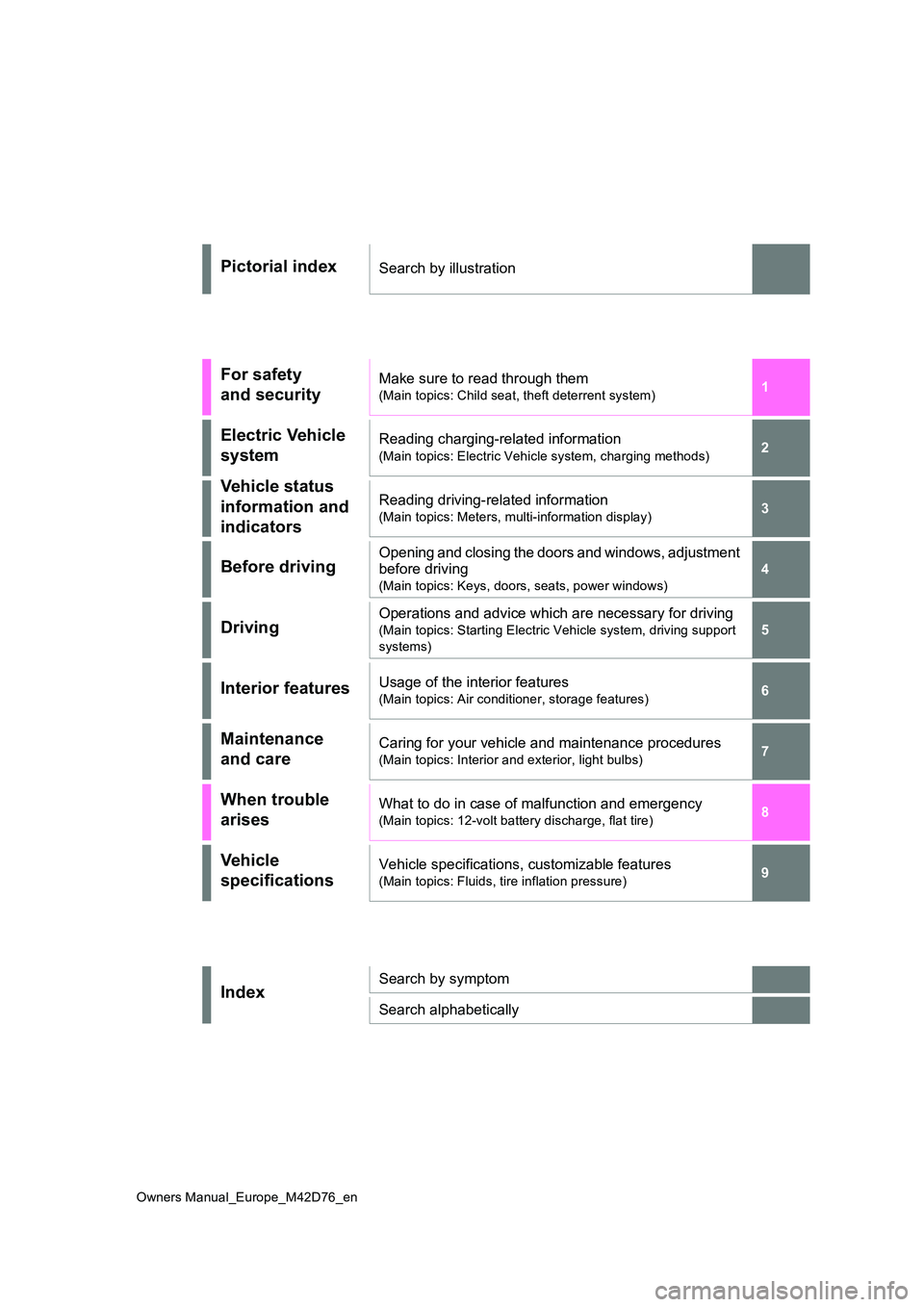
Pictorial indexSearch by illustration
For safety
and security
Make sure to read through them
(Main topics: Child seat, theft deterrent system)
Electric Vehicle
system
Reading charging-related information
(Main topics: Electric Vehicle system, charging methods)
Vehicle status
information and
indicators
Reading driving-related information
(Main topics: Meters, multi-information display)
Before drivingOpening and closing the doors and windows, adjustment
before driving
(Main topics: Keys, doors, seats, power windows)
DrivingOperations and advice which are necessary for driving
(Main topics: Starting Electric Vehicle system, driving support
systems)
Interior featuresUsage of the interior features
(Main topics: Air conditioner, storage features)
Maintenance
and care
Caring for your vehicle and maintenance procedures
(Main topics: Interior and exterior, light bulbs)
When trouble
arises
What to do in case of malfunction and emergency
(Main topics: 12-volt battery discharge, flat tire)
Vehicle
specifications
Vehicle specifications, customizable features
(Main topics: Fluids, tire inflation pressure)
IndexSearch by symptom
Search alphabetically
Page 7 of 674
5
Owners Manual_Europe_M42D76_en
TABLE OF CONTENTS
1
6
5
4
3
2
8
7
9
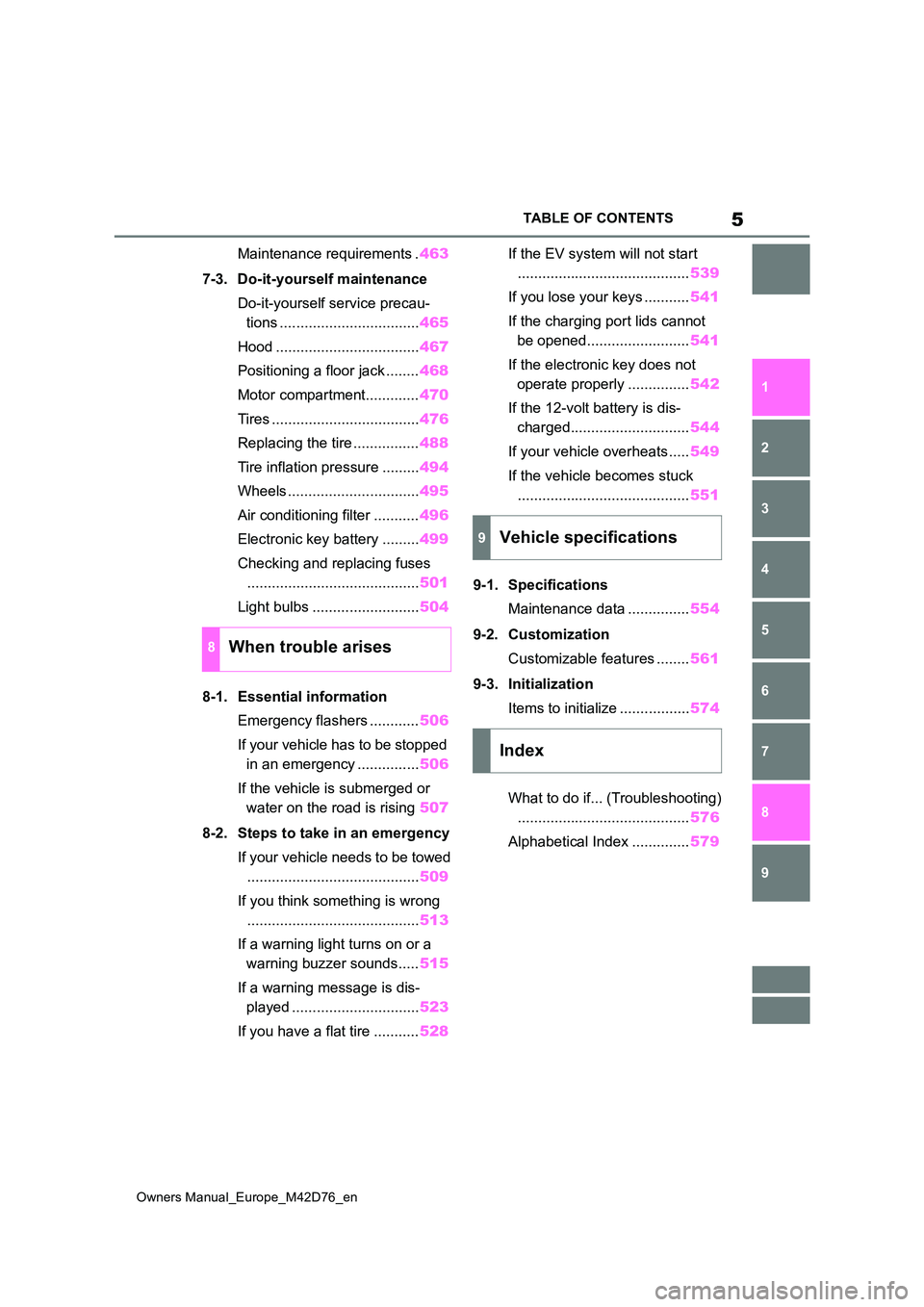
Maintenance requirements . 463
7-3. Do-it-yourself maintenance
Do-it-yourself service precau-
tions .................................. 465
Hood ................................... 467
Positioning a floor jack ........ 468
Motor compartment............. 470
Tires .................................... 476
Replacing the tire ................ 488
Tire inflation pressure ......... 494
Wheels ................................ 495
Air conditioning filter ........... 496
Electronic key battery ......... 499
Checking and replacing fuses
.......................................... 501
Light bulbs .......................... 504
8-1. Essential information
Emergency flashers ............ 506
If your vehicle has to be stopped
in an emergency ............... 506
If the vehicle is submerged or
water on the road is rising 507
8-2. Steps to take in an emergency
If your vehicle needs to be towed
.......................................... 509
If you think something is wrong
.......................................... 513
If a warning light turns on or a
warning buzzer sounds..... 515
If a warning message is dis-
played ............................... 523
If you have a flat tire ........... 528
If the EV system will not start
.......................................... 539
If you lose your keys ........... 541
If the charging port lids cannot
be opened......................... 541
If the electronic key does not
operate properly ............... 542
If the 12-volt battery is dis-
charged............................. 544
If your vehicle overheats ..... 549
If the vehicle becomes stuck
.......................................... 551
9-1. Specifications
Maintenance data ............... 554
9-2. Customization
Customizable features ........ 561
9-3. Initialization
Items to initialize ................. 574
What to do if... (Troubleshooting)
.......................................... 576
Alphabetical Index .............. 579
8When trouble arises
9Vehicle specifications
Index
Page 8 of 674
6
Owners Manual_Europe_M42D76_en
Please note that this manual
applies to all models and explains
all equipment, including options.
Therefore, you may find some
explanations for equipment not
installed on your vehicle.
All specifications provided in this
manual are current at the time of
printing. However, because of the
Toyota policy of continual product
improvement, we reserve the right
to make changes at any time with-
out notice.
Depending on specifications, the
vehicle shown in the illustrations
may differ from your vehicle in
terms of color and equipment.
Both genuine Toyota and a wide
variety of other spare parts and
accessories for Toyota vehicles are
currently available in the market.
Should it be determined that any of
the genuine Toyota parts or acces-
sories supplied with the vehicle
need to be replaced, Toyota recom-
mends that genuine Toyota parts or
accessories, be used to replace
them. Other parts or accessories of
matching quality can also be used.
Toyota cannot accept any liability or
guarantee spare parts and acces-
sories which are not genuine
Toyota products, nor for replace-
ment or installation involving such
parts. In addition, damage or per-
formance problems resulting from
the use of non-genuine Toyota
spare parts or accessories may not
be covered under warranty.
Also, remodeling like this will have
an effect on advanced safety equip-
ment such as Toyota Safety Sense
and there is a danger that it will not
work properly or the danger that it
may work in situations where it
should not be working.
The installation of an RF-transmit-
ter system in your vehicle could
affect electronic systems such as:
EV system
Toyota Safety Sense
Cruise control system
Anti-lock brake system
SRS airbag system
Seat belt pretensioner system
Be sure to check with any autho-
rized Toyota retailer or Toyota
authorized repairer, or any reliable
repairer for precautionary mea-
sures or special instructions regard-
ing installation of an RF-transmitter
system.
For your information
Main Owner’s Manual
Accessories, spare parts
and modification of your
To y o t a
Installation of an RF-trans-
mitter system
Page 119 of 674
117
2
Owners Manual_Europe_M42D76_en
2-2. Charging
Electric Vehicle system
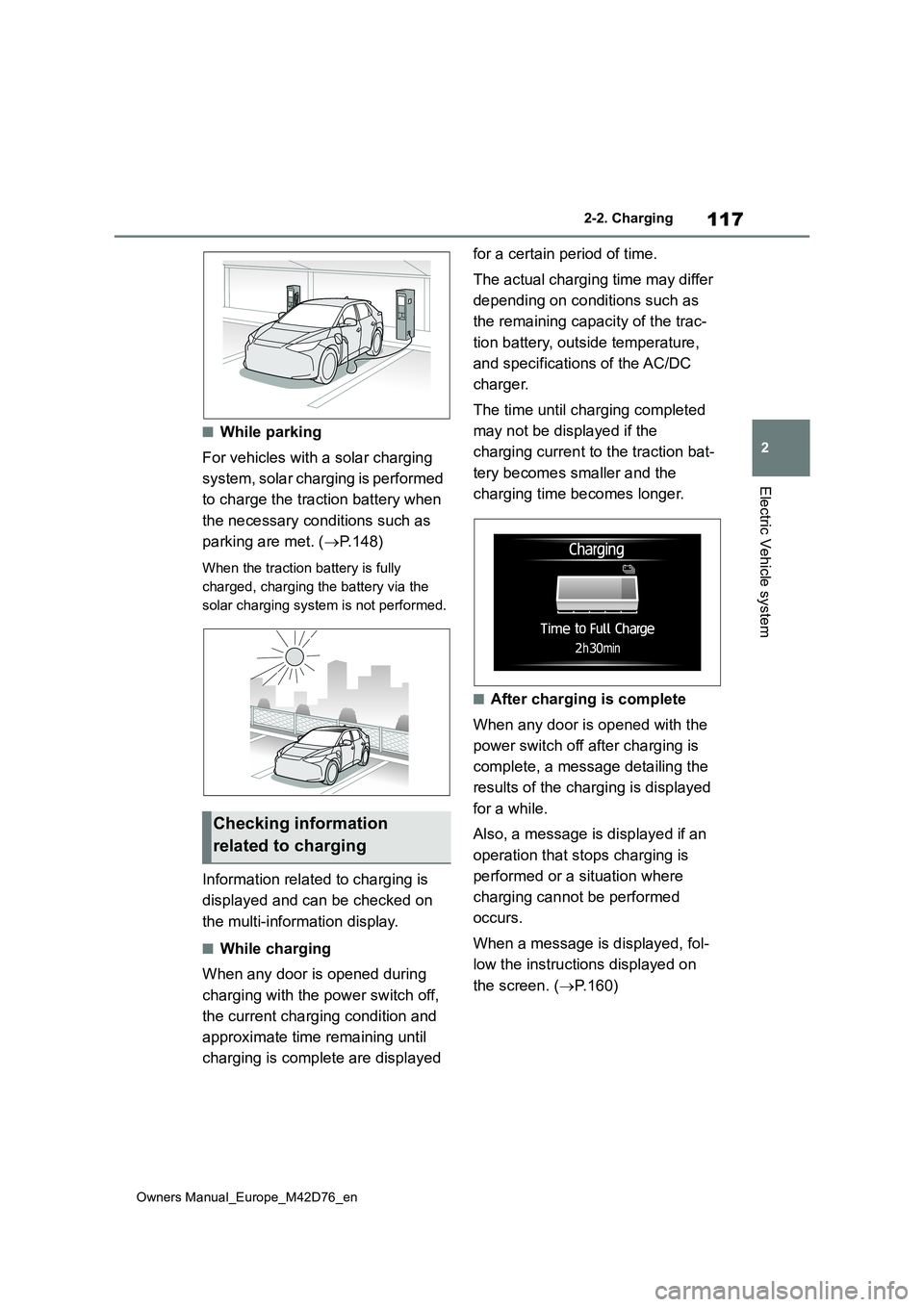
■While parking
For vehicles with a solar charging
system, solar charging is performed
to charge the traction battery when
the necessary conditions such as
parking are met. ( P.148)
When the traction battery is fully
charged, charging the battery via the
solar charging system is not performed.
Information related to charging is
displayed and can be checked on
the multi-information display.
■While charging
When any door is opened during
charging with the power switch off,
the current charging condition and
approximate time remaining until
charging is complete are displayed
for a certain period of time.
The actual charging time may differ
depending on conditions such as
the remaining capacity of the trac-
tion battery, outside temperature,
and specifications of the AC/DC
charger.
The time until charging completed
may not be displayed if the
charging current to the traction bat-
tery becomes smaller and the
charging time becomes longer.
■After charging is complete
When any door is opened with the
power switch off after charging is
complete, a message detailing the
results of the charging is displayed
for a while.
Also, a message is displayed if an
operation that stops charging is
performed or a situation where
charging cannot be performed
occurs.
When a message is displayed, fol-
low the instructions displayed on
the screen. ( P.160)
Checking information
related to charging
Page 132 of 674
130
Owners Manual_Europe_M42D76_en
2-2. Charging
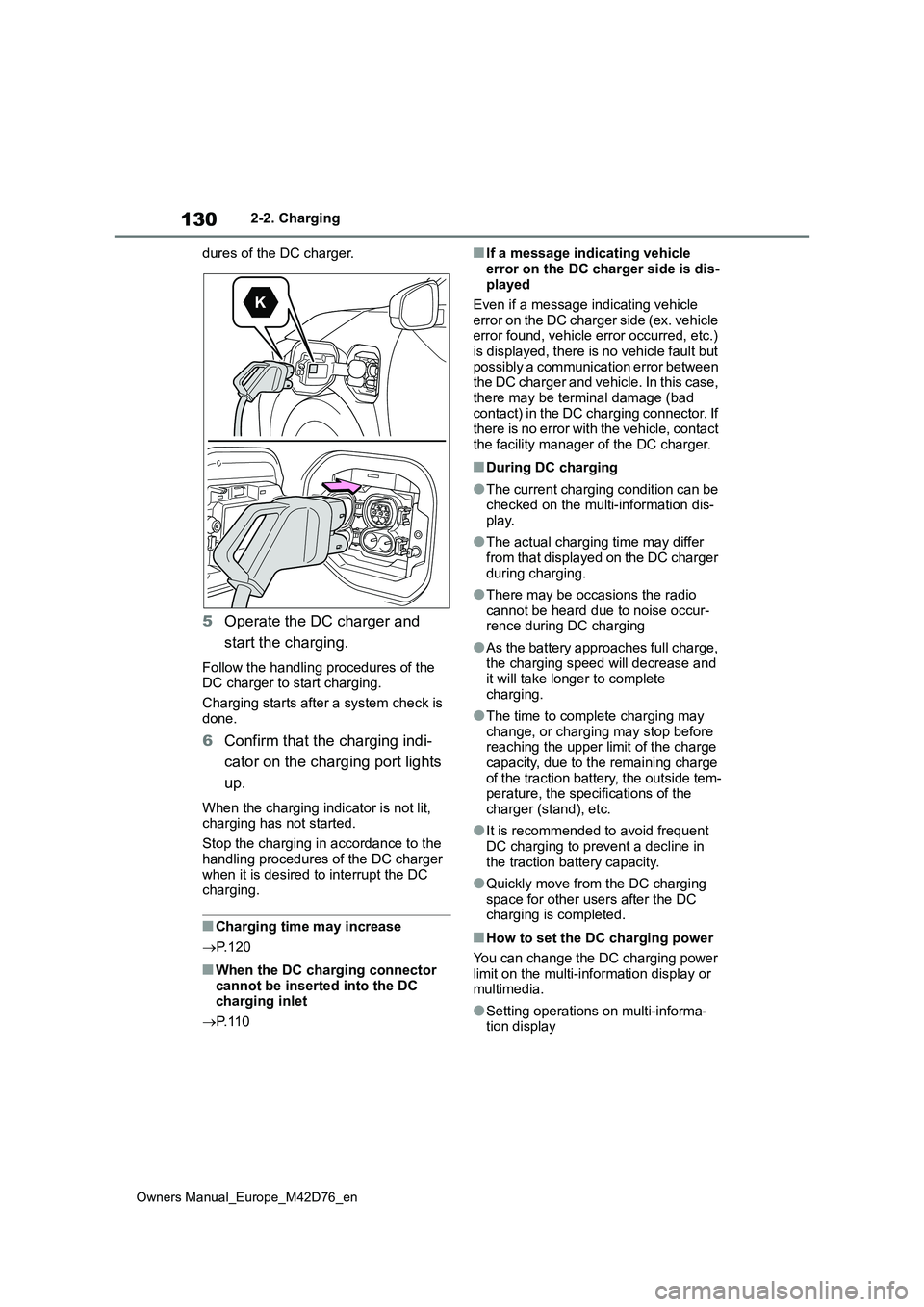
dures of the DC charger.
5 Operate the DC charger and
start the charging.
Follow the handling procedures of the DC charger to start charging.
Charging starts after a system check is
done.
6 Confirm that the charging indi-
cator on the charging port lights
up.
When the charging indicator is not lit, charging has not started.
Stop the charging in accordance to the
handling procedures of the DC charger when it is desired to interrupt the DC charging.
■Charging time may increase
P. 1 2 0
■When the DC charging connector cannot be inserted into the DC charging inlet
P. 1 1 0
■If a message indicating vehicle
error on the DC charger side is dis- played
Even if a message indicating vehicle
error on the DC charger side (ex. vehicle error found, vehicle error occurred, etc.) is displayed, there is no vehicle fault but
possibly a communication error between the DC charger and vehicle. In this case, there may be terminal damage (bad
contact) in the DC charging connector. If there is no error with the vehicle, contact the facility manager of the DC charger.
■During DC charging
●The current charging condition can be checked on the multi-information dis-
play.
●The actual charging time may differ
from that displayed on the DC charger during charging.
●There may be occasions the radio cannot be heard due to noise occur-rence during DC charging
●As the battery approaches full charge, the charging speed will decrease and
it will take longer to complete charging.
●The time to complete charging may change, or charging may stop before reaching the upper limit of the charge
capacity, due to the remaining charge of the traction battery, the outside tem-perature, the specifications of the
charger (stand), etc.
●It is recommended to avoid frequent
DC charging to prevent a decline in the traction battery capacity.
●Quickly move from the DC charging space for other users after the DC charging is completed.
■How to set the DC charging power
You can change the DC charging power limit on the multi-information display or multimedia.
●Setting operations on multi-informa-tion display
Page 164 of 674
162
Owners Manual_Europe_M42D76_en
2-2. Charging
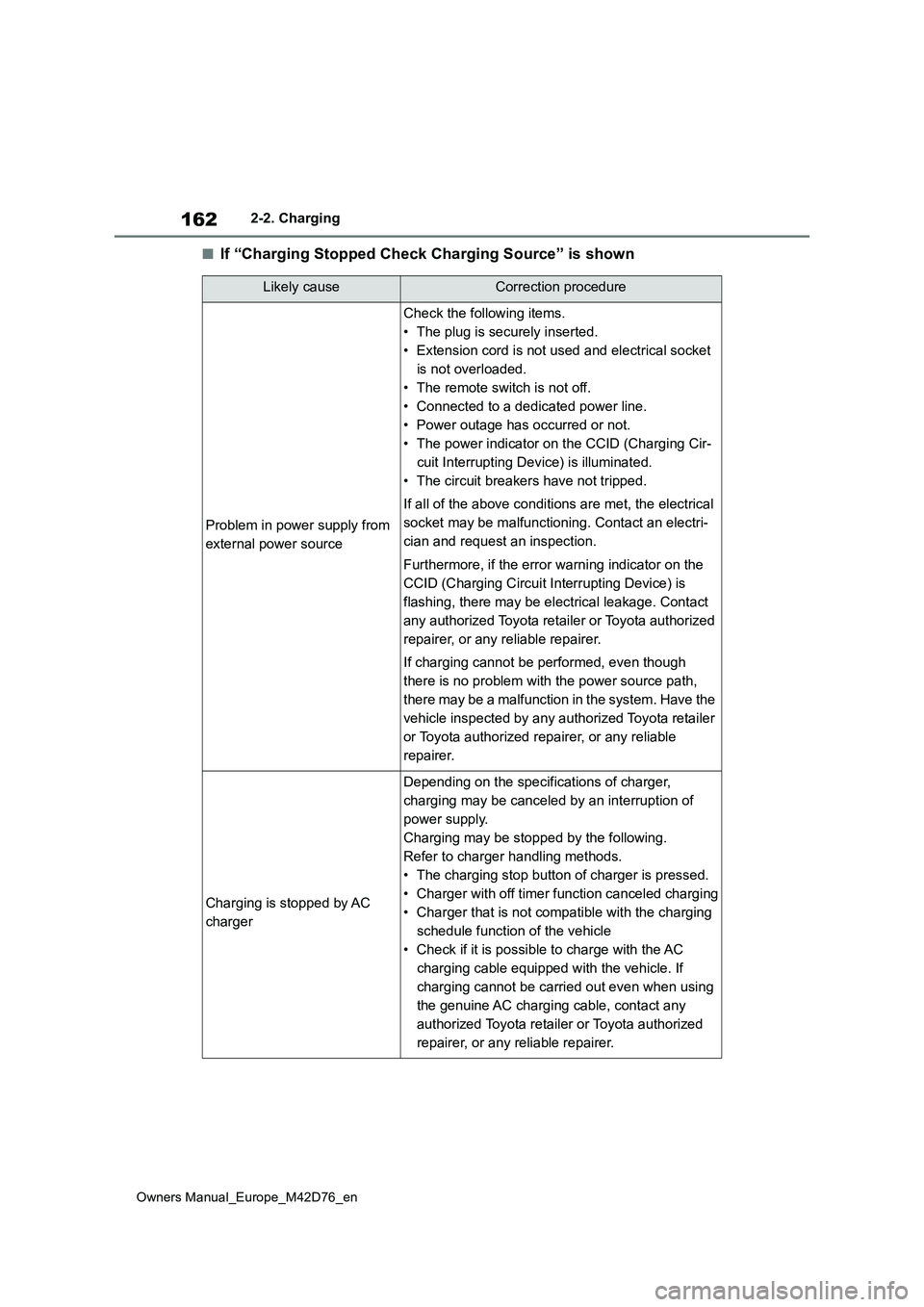
■If “Charging Stopped Check Charging Source” is shown
Likely causeCorrection procedure
Problem in power supply from
external power source
Check the following items.
• The plug is securely inserted.
• Extension cord is not used and electrical socket
is not overloaded.
• The remote switch is not off.
• Connected to a dedicated power line.
• Power outage has occurred or not.
• The power indicator on the CCID (Charging Cir-
cuit Interrupting Device) is illuminated.
• The circuit breakers have not tripped.
If all of the above conditions are met, the electrical
socket may be malfunctioning. Contact an electri-
cian and request an inspection.
Furthermore, if the error warning indicator on the
CCID (Charging Circuit In terrupting Device) is
flashing, there may be electrical leakage. Contact
any authorized Toyota retailer or Toyota authorized
repairer, or any reliable repairer.
If charging cannot be performed, even though
there is no problem with the power source path,
there may be a malfunction in the system. Have the
vehicle inspected by any authorized Toyota retailer
or Toyota authorized repairer, or any reliable
repairer.
Charging is stopped by AC
charger
Depending on the specifications of charger,
charging may be canceled by an interruption of
power supply.
Charging may be stopped by the following.
Refer to charger handling methods.
• The charging stop button of charger is pressed.
• Charger with off timer function canceled charging
• Charger that is not compatible with the charging
schedule function of the vehicle
• Check if it is possible to charge with the AC
charging cable equipped with the vehicle. If
charging cannot be carried out even when using
the genuine AC charging cable, contact any
authorized Toyota retailer or Toyota authorized
repairer, or any reliable repairer.
Page 306 of 674
304
Owners Manual_Europe_M42D76_en
5-4. Using the driving support systems
When the front camera detects a
sign or information of a sign is
available from the navigation
system (if equipped), the sign will
be displayed on the display.
Multiple signs can be displayed.
Depending on the specifications of the
vehicle, the number of displayed signs
may be limited.
■Operating conditions of sign dis- play
Signs will be displayed when the follow-
ing conditions are met:
●The system has detected a sign
In the following situations, a displayed sign may stop being displayed:
●When a new sign has not been detected for a certain distance
●When the system determines that the road being driven on has changed, such as after a left or right turn
■Situations in which the display
function may not operate properly
In the following situations, the RSA sys- tem may not operate properly and may
not detect signs or may display the incorrect sign. However, this does not indicate a malfunction.
●When a sign is dirty, faded, tilted or bent
●When the contrast of an electronic sign is low
●When all or part of a sign is hidden by a tree, utility pole, etc.
●When a sign is detected by the front
camera for a short amount of time
●When the driving state (turning,
changing lanes, etc.) is judged incor- rectly
●When a sign is immediately after a freeway junction or in an adjacent lane just before merging
●When stickers are attached to the rear of a preceding vehicle
●When a sign similar to a system com-patible sign is detected as a system
compatible sign
●When a speed limit sign for a frontage
road is within detection range of the front camera
RSA (Road Sign Assist)
The RSA system detects spe-
cific road signs using the front
camera and/or navigation sys-
tem (if equipped) (when speed
limit information is available)
and warns the driver via dis-
plays and buzzers.
WARNING
■For safe use
●Driving safely is solely the responsi- bility of the driver. Pay careful atten-tion to the surrounding conditions in
order to ensure safe driving.
●Do not rely solely upon the RSA.
The RSA assists the driver by pro- viding road sign information, but it is not a replacement for the driver’s
own vision and awareness. Driving safely is solely the responsibility of the driver. Pay careful attention to
the surrounding conditions in order to ensure safe driving.
■Situations in which the RSA should not be used
When it is necessary to disable the
system: P. 2 7 5
■Situations in which the system
may not operate properly
Situations in which the sensors may not operate properly: P. 2 7 9
Display Function
Page 309 of 674
307
5
Owners Manual_Europe_M42D76_en
5-4. Using the driving support systems
Driving
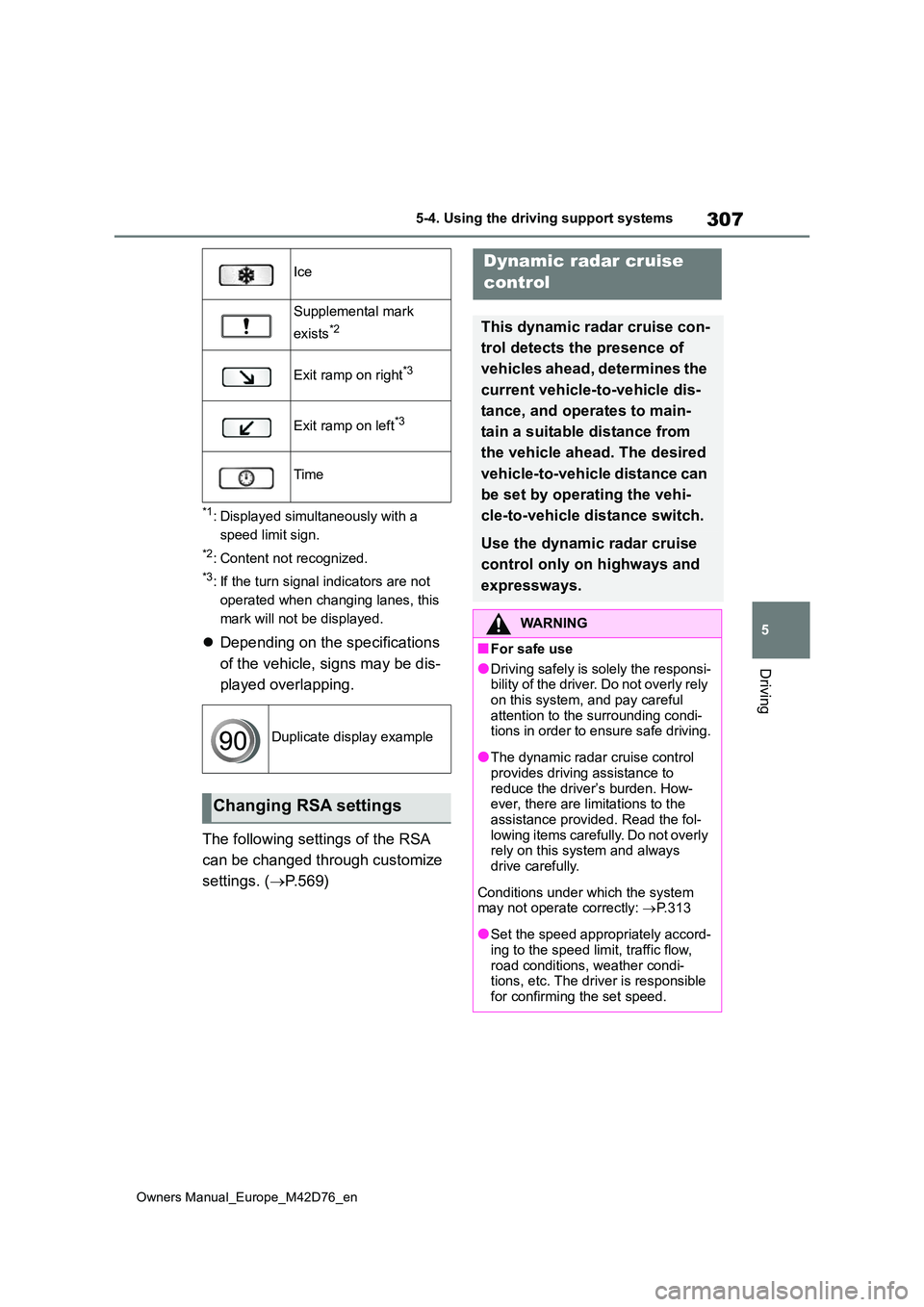
*1: Displayed simultaneously with a
speed limit sign.
*2: Content not recognized.
*3: If the turn signal indicators are not
operated when changing lanes, this
mark will not be displayed.
Depending on the specifications
of the vehicle, signs may be dis-
played overlapping.
The following settings of the RSA
can be changed through customize
settings. ( P. 5 6 9 )
Ice
Supplemental mark
exists*2
Exit ramp on right*3
Exit ramp on left*3
Time
Duplicate display example
Changing RSA settings
Dynamic radar cruise
control
This dynamic radar cruise con-
trol detects the presence of
vehicles ahead, determines the
current vehicle-to -vehicle dis-
tance, and operates to main-
tain a suitable distance from
the vehicle ahead. The desired
vehicle-to-vehicle distance can
be set by operating the vehi-
cle-to-vehicle distance switch.
Use the dynamic radar cruise
control only on highways and
expressways.
WARNING
■For safe use
●Driving safely is solely the responsi- bility of the driver. Do not overly rely
on this system, and pay careful attention to the surrounding condi-tions in order to ensure safe driving.
●The dynamic radar cruise control provides driving assistance to
reduce the driver’s burden. How- ever, there are limitations to the assistance provided. Read the fol-
lowing items carefully. Do not overly rely on this system and always drive carefully.
Conditions under which the system may not operate correctly: P.313
●Set the speed appropriately accord- ing to the speed limit, traffic flow,
road conditions, weather condi- tions, etc. The driver is responsible for confirming the set speed.
Page 454 of 674
452
Owners Manual_Europe_M42D76_en
6-4. Using the other interior features
Fold down the armrest for use.
NOTICE
• A case or cover attached with an uneven or tilted surface, so that the
charging side is not flat
• Thick decorations
• Accessories, such as finger rings, straps, etc.
●When the portable device is in con-tact with, or is covered by any of the
following metallic objects:
• A card that has metal on it, such as
aluminum foil, etc.
• A pack of cigarettes that includes
aluminum foil
• A wallet or bag that is made of
metal
•Coins
• A heating pad
• CDs, DVDs or other media
• A metal accessory
• A case or cover made of metal
●Electric wave type wireless remote controls are being used nearby
●The electronic key is not inside the vehicle
●2 or more portable devices are placed on the charging tray at the same time
If charging is abnormal or the opera- tion indicator light continues to flash
for any other reason, the wireless charger may be malfunctioning. Con-tact any authorized Toyota retailer or
Toyota authorized repairer, or any reli- able repairer.
■To prevent malfunctions and data corruptions
●When charging, bringing a credit, or
other magnetic card, or magnetic storage media close to the charge area may clear any stored data due
to magnetic influence. Also, do not bring a wristwatch or other preci-sion instrument close to the charge
area since doing so may cause it to malfunction.
●Do not charge with a non-contact IC card such as a transportation sys-tem IC card inserted between the
charging side of a portable device and the charge area. The IC chip may become extremely hot and
damage the portable device or IC card. Be especially careful not to charge a portable device inside a
case or cover with a non-contact IC card attached.
●Do not leave portable devices inside the vehicle. The inside of the vehicle can become hot in extreme
heat, which could cause a malfunc- tion.
■If the smartphone OS has been updated
If the smartphone OS has been
updated to a newer version, its charging specifications may have changed significantly.
For details, check the information on the manufacturer’s website.
■To prevent 12-volt battery dis-charge
Do not use the wireless charger for a
long period of time when the EV sys- tem is stopped.
Armrest
Page 525 of 674
523
8
Owners Manual_Europe_M42D76_en
8-2. Steps to take in an emergency
When trouble arises
■Warning messages
The warning messages explained below
may differ from the actual messages according to operation conditions and vehicle specifications.
■Warning buzzer
In some cases, the buzzer may not be heard due to being in a noisy location or audio sound.
■If “EV system stopped Steering
power low” is displayed
This message is displayed if the EV sys- tem is stopped while driving.
When steering wheel operations are
heavier than usual, grip the steering
wheel firmly and operate it using more force than usual.
■If “EV system overheated Output power reduced” is displayed
This message may be displayed when driving under severe operating condi-tions. (For example, when driving up a
long steep hill.) Handling method: P. 5 4 9
■If “Shift System Malfunction Shift- ing Unavailable Drive to a Safe
Place and Stop” or “Shift System Malfunction Driving Unavailable” is displayed
There is a malfunction in the shift control system. Have the vehicle inspected by any authorized Toyota retailer or Toyota
authorized repairer, or any reliable repairer immediately.
■If “Shift is in N Release accelerator Before Shifting” is displayed
The accelerator pedal has been depressed when the shift position is in N.
Release the accelerator pedal and shift the shift position to D or R.
■If “Press brake when vehicle is stopped EV system may overheat”
is displayed
The message may be displayed when the accelerator pedal is depressed to
hold the vehicle while the vehicle is stopped on an incline, etc. The EV sys-tem may overheat. Release the acceler-
ator pedal and depress the brake pedal.
■If “Auto Power Off To Conserve Battery” is displayed
Power was turned off due to the auto-
matic power off function. Next time when starting the EV system, operate the EV system for approximately 5 min-
utes to recharge the 12-volt battery.
■If “Regenerative Braking Limited Press Brake to Decelerate” is dis-played
Regenerative braking may be restricted in the following situations. Firmly
If a warning message is
displayed
The multi-information display
shows warnings of system
malfunctions, incorrectly per-
formed operations, and mes-
sages that indicate a need for
maintenance. When a message
is shown, perform the correc-
tion procedure appropriate to
the message.
If a warning message is dis-
played again after the appro-
priate actions have been
performed, contact any autho-
rized Toyota retailer or Toyota
authorized repairer, or any reli-
able repairer.
Additionally, if a warning light
comes on or flashes at the
same time that a warning mes-
sage is displayed, take the
appropriate corrective action
for the warning light. ( P.515)