light TOYOTA BZ4X 2023 Owners Manual
[x] Cancel search | Manufacturer: TOYOTA, Model Year: 2023, Model line: BZ4X, Model: TOYOTA BZ4X 2023Pages: 628, PDF Size: 11.91 MB
Page 520 of 628
5208-2. Steps to take in an emergency
Owners Manual_USA_M42C01_encome on due to natural causes such
as natural air leaks and tire inflation
pressure changes caused by tem-
perature. In this case, adjusting the
tire inflation pressure will turn off the
warning light (after a few minutes).
■Conditions that the tire pres-
sure warning system may not
function properly
P. 4 7 4
WARNING
■If both the ABS and the brake
system warning lights remain
on
Stop your vehicle in a safe place
immediately and contact your Toy-
ota dealer.
The vehicle will become
extremely unstable during brak-
ing, and the ABS system may fail,
which could cause an accident
resulting in death or serious injury.
■When the electric power
steering system warning light
comes on
When the light comes on yellow,
the assist to the power steering is
restricted. When the light comes
on red, the assist to the power
steering is lost and handling oper-
ations of the steering wheel
become extremely heavy.
When steering wheel operations
are heavier than usual, grip the
steering wheel firmly and operate
it using more force than usual.
■If the tire pressure warning
light comes on
Be sure to observe the following
precautions.
Failure to do so could cause a
loss of vehicle control and result
in death or serious injury.
●Stop your vehicle in a safe place
as soon as possible. Adjust the
tire inflation pressure immedi-
ately.
●If the tire pressure warning light
comes on even after tire infla-
tion pressure adjustment, it is
probable that you have a flat
tire. Check the tires. If a tire is
flat, repair the flat tire by using
emergency tire puncture repair
kit.
●Avoid abrupt maneuvering and
braking.
If the vehicle tires deteriorate,
you could lose control of the
steering wheel or the brakes.
■If a blowout or sudden air
leakage should occur
The tire pressure warning system
may not activate immediately.
■Maintenance of the tires
Each tire, includi ng the spare (if
provided), should be checked
monthly when cold and inflated to
the inflation pressure recom-
mended by the vehicle manufac-
turer on the vehicle placard or tire
inflation pressure label (tire and
load information label). (If your
vehicle has tires of a different size
than the size indicated on the
vehicle placard or tire inflation
pressure label [tire and load infor-
mation label], you should deter-
mine the proper tire inflation
pressure for those tires.)
Page 521 of 628
5218-2. Steps to take in an emergency
Owners Manual_USA_M42C01_en
8
When trouble arises
WARNING
As an added safe ty feature, your
vehicle has been equipped with a
tire pressure m onitoring system
(TPMS-tire pressure warning sys-
tem) that illuminates a low tire
pressure telltale (tire pressure
warning light) when one or more
of your tires is significantly under-
inflated. Accordingly, when the
low tire pressure telltale (tire pres-
sure warning light) illuminates,
you should stop and check your
tires as soon as possible, and
inflate them to the proper pres-
sure. Driving on a significantly
under-inflated tire causes the tire
to overheat and can lead to tire
failure. Under-inflation also
reduces fuel efficiency and tire
tread life, and may affect the vehi-
cle’s handling and stopping ability.
Please note that the TPMS (tire
pressure warning system) is not a
substitute for pro per tire mainte-
nance, and it is the driver’s
responsibility to maintain correct
tire pressure, even if under-infla-
tion has not reach ed the level to
trigger illumination of the TPMS
low tire pressure telltale (tire pres-
sure warning light).
Your vehicle has also been
equipped with a TPMS (tire pres-
sure warning system) malfunc-
tion indicator to indicate when the
system is not operating properly.
The TPMS (tire pressure warning
system) malfunction indicator is
combined with the low tire pres-
sure telltale (tire pressure warning
light). When the system detects a
malfunction, the te lltale will flash
for approximately one minute and
then remain continuously illumi-
nated. This sequence will con-
tinue upon subsequent vehicle
start-ups as long as the malfunc-
tion exists. When the malfunction
indicator is illuminated, the sys-
tem may not be ab le to detect or
signal low tire pressure as
intended.
TPMS (tire pressure warning sys-
tem) malfunctions may occur for a
variety of reasons, including the
installation of replacement or
alternate tires or wheels on the
vehicle that prevent the TPMS
(tire pressure warning system)
from functioning properly. Always
check the TPMS (tire pressure
warning system) malfunction tell-
tale after replacing one or more
tires or wheels on your vehicle to
ensure that the replacement or
alternate tires and wheels allow
the TPMS (tire pressure warning
system) to continue to function
properly.
NOTICE
■To ensure the tire pressure
warning system operates
properly
Do not install tires with different
specifications or makers, as the
tire pressure warning system may
not operate properly.
Page 522 of 628
5228-2. Steps to take in an emergency
Owners Manual_USA_M42C01_en
■Warning messages
The warning messages explained
below may differ from the actual
messages according to operation
conditions and vehicle specifica-
tions.
■Warning buzzer
In some cases, the buzzer may not
be heard due to being in a noisy
location or audio sound.
■If “EV system stopped Steering
power low” is displayed
This message is displayed if the EV
system is stopped while driving. When steering wheel operations are
heavier than usual, grip the steering
wheel firmly and
operate it using
more force than usual.
■If “EV system overheated Out-
put power reduced” is dis-
played
This message may be displayed
when driving under severe operat-
ing conditions. (For example, when
driving up a l ong steep hill.)
Handling method: P. 5 4 5
■If “Shift System Malfunction
Shifting Unavailable Drive to a
Safe Place and Stop” or “Shift
System Malfunction Driving
Unavailable” is displayed
There is a malfunc tion in the shift
control system. Have the vehicle
inspected by your Toyota dealer
immediately.
■If “Shift is in N Release acceler-
ator before shifting” is dis-
played
The accelerator pedal has been
depressed when the shift position is
in N.
Release the accelerator pedal and
shift the shift position to D or R.
■If “Press brake when vehicle is
stopped EV system may over-
heat” is displayed
The message may be displayed
when the accelerator pedal is
depressed to hold the vehicle while
the vehicle is stopped on an incline,
etc. The EV system may overheat.
Release the accelerator pedal and
depress the brake pedal.
■If “Auto Power Off To Conserve
Battery” is displayed
Power was turned off due to the
automatic power off function. Next
time when starting the EV system,
operate the EV system for approxi-
mately 5 minutes t o recharge the
12-volt battery.
If a war ning message
is displayed
The multi-information dis-
play shows warnings of
system malfunctions, incor-
rectly performed opera-
tions, and messages that
indicate a need for mainte-
nance. When a message is
shown, perform the correc-
tion procedure appropriate
to the message.
If a warning message is dis-
played again after the
appropriate actions have
been performed, contact
your Toyota dealer.
Additionally, if a warning
light comes on or flashes at
the same time that a warn-
ing message is displayed,
take the appropriate correc-
tive action for the warning
light. ( P.513)
Page 523 of 628
5238-2. Steps to take in an emergency
Owners Manual_USA_M42C01_en
8
When trouble arises
■If “Regenerative Braking Lim-
ited Press Brake to Decelerate”
is displayed
Regenerative br aking may be
restricted in the following situations.
Firmly depress the brake pedal to
decelerate the vehicle.
●When electrical energy cannot be
regenerated any more as the trac-
tion battery is fully charged
●When the temperature of the trac-
tion battery is extremely high or
extremely low
●When the temperature of the elec-
tric motor or power control unit,
etc., is extremely high
■If “High Power Consumption
Power to Climate Temporarily
Limited” is displayed
Turn off unnecessary electronic
equipment to reduce power con-
sumption.
Please wait until th e power supply
returns to normal.
■If “Headlight System Malfunc-
tion Visit Your Dealer” is dis-
played
The following systems may be mal-
functioning. Have the vehicle
inspected by your Toyota dealer
immediately.
●The LED headlight system
●Automatic High Beam
■If “System Malfunction Visit
Your Dealer” is displayed
Indicates one of the following sys-
tems is disabled.
●PCS (Pre-Collis ion System)
●LDA (Lane Departure Alert)
●LTA (Lane Tracing Assist)
●AHB (Automatic High Beam)
●Dynamic radar cruise control
●RSA (Road Sign Assist)
●BSM (Blind Spot Monitor) (if
equipped)
●RCTA (Rear Cross Traffic Alert) (if
equipped)
●SEA (Safe Exit Assist) (if
equipped)
●Intuitive parking assist (if
equipped)
●PKSB (Parking Suppor t Brake) (if
equipped)
●RCD (Rear Camera Detection) (if
equipped)
Have the vehicle inspected by your
Toyota dealer immediately.
■If “System Stopped See
Owner’s Manual” is displayed
Indicates one of the following sys-
tems is disabled.
●PCS (Pre-Collision System)
●LDA (Lane Departure Alert)
●LTA (Lane Tracing Assist)
●AHB (Automatic High Beam)
●Dynamic radar cruise control
●RSA (Road Sign Assist)
●BSM (Blind Spot Monitor) (if
equipped)
●RCTA (Rear Cross Traffic Alert) (if
equipped)
●SEA (Safe Exit Assist) (if
equipped)
●Intuitive parking assist (if
equipped)
●PKSB (Parking Suppor t Brake) (if
equipped)
●RCD (Rear Camera Detection) (if
equipped)
Follow the following correction
methods.
• Check the voltage of the battery
• Remove any dirt or foreign matter from the front/rear side radar sen-
sors
Page 524 of 628

5248-2. Steps to take in an emergency
Owners Manual_USA_M42C01_en
■If “System Stopped Front Cam-
era Low Visibility See Owner’s
Manual” is displayed
Indicates one of the following sys-
tems is disabled.
●PCS (Pre-Collis ion System)
●LDA (Lane Departure Alert)
●LTA (Lane Tracing Assist)
●AHB (Automatic High Beam)
●Dynamic radar cruise control
●RSA (Road Sign Assist)
Follow the followi ng correction
methods.
• Follow the follo wing correction
methods.
• Using the windshield wipers, remove the dirt o r foreign matter
from the windshield.
• Using the air conditioning system, defog the windshield.
Close the hood, remove any stick-
ers, etc. to clear th e obstruction in
front of the front camera.
■If “System Stopped Front Cam-
era Out of Temperature Range
Wait until Normal Temperature”
is displayed
Indicates one of the following sys-
tems is disabled.
●PCS (Pre-Collis ion System)
●LDA (Lane Departure Alert)
●LTA (Lane Tracing Assist)
●AHB (Automatic High Beam)
●Dynamic radar cruise control
●RSA (Road Sign Assist)
Follow the followi ng correction
methods.
• If the front camera is hot, such as after the vehicle is parked in the
sun, use the air conditioning sys-
tem to decrease the temperature
around the front camera
• If a sunshade was used when the vehicle was parked, depending on
its type, the sunlight reflected from
the surface of the sunshade may
cause the temperature of the front
camera to become excessively
high
• If the front camera is cold, such after the vehicle is parked in an
extremely cold environment, use
the air conditioning system to
increase the temperature around
the front camera
■If “System Stopped Front Radar
Sensor Blocked Clean Radar
Sensor” is displayed
Indicates one of the following sys-
tems is disabled.
●PCS (Pre-Collision System)
●LDA (Lane Departure Alert)
●LTA (Lane Tracing Assist)
●AHB (Automatic High Beam)
●Dynamic radar cruise control
●RSA (Road Sign Assist)
Follow the following correction
methods.
• Check if there is any foreign mat- ter attached to the radar sensor or
radar sensor cover and clean
them if necessary ( P.261)
• This message may be displayed when driving in an open area with
few nearby vehicles or structures,
such as a desert, grasslands, sub-
urbs, etc.
The message may be cleared by
driving the vehicle in an area with
structures, vehicles, etc., nearby.
■If “System Stopped Front Radar
Sensor Out of Temperature
Range Wait until Normal Tem-
perature” is displayed
Indicates one of the following sys-
tems is disabled.
●PCS (Pre-Collision System)
●LDA (Lane Departure Alert)
●LTA (Lane Tracing Assist)
Page 535 of 628
5358-2. Steps to take in an emergency
Owners Manual_USA_M42C01_en
8
When trouble arises
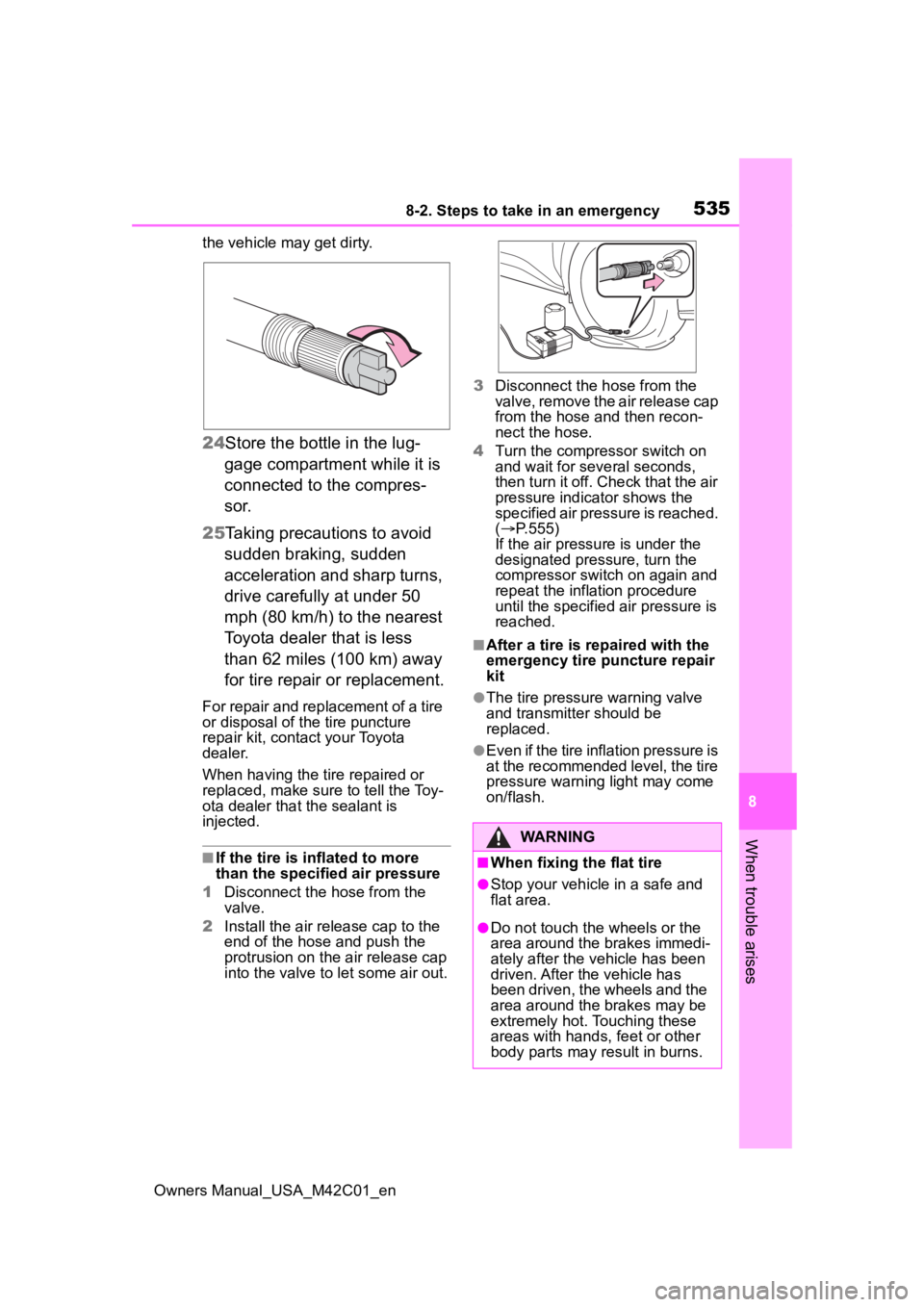
the vehicle ma y get dirty.
24Store the bottle in the lug-
gage compartment while it is
connected to the compres-
sor.
25 Taking precautions to avoid
sudden braking, sudden
acceleration and sharp turns,
drive carefully at under 50
mph (80 km/h) to the nearest
Toyota dealer that is less
than 62 miles (100 km) away
for tire repair or replacement.
For repair and replacement of a tire
or disposal of the tire puncture
repair kit, contact your Toyota
dealer.
When having the tire repaired or
replaced, make sure to tell the Toy-
ota dealer that the sealant is
injected.
■If the tire is i nflated to more
than the specified air pressure
1 Disconnect the hose from the
valve.
2 Install the air release cap to the
end of the hose and push the
protrusion on the air release cap
into the valve to let some air out. 3
Disconnect the hose from the
valve, remove the air release cap
from the hose and then recon-
nect the hose.
4 Turn the compressor switch on
and wait for seve ral seconds,
then turn it off. Check that the air
pressure indicator shows the
specified air pressure is reached.
( P.555)
If the air pressure is under the
designated pressure, turn the
compressor switch on again and
repeat the inflation procedure
until the specified air pressure is
reached.
■After a tire is re paired with the
emergency tire puncture repair
kit
●The tire pressure warning valve
and transmitter should be
replaced.
●Even if the tire inflation pressure is
at the recommended level, the tire
pressure warning light may come
on/flash.
WARNING
■When fixing the flat tire
●Stop your vehicle in a safe and
flat area.
●Do not touch the wheels or the
area around the brakes immedi-
ately after the vehicle has been
driven. After the vehicle has
been driven, the wheels and the
area around the brakes may be
extremely hot. Touching these
areas with hands, feet or other
body parts may result in burns.
Page 538 of 628
5388-2. Steps to take in an emergency
Owners Manual_USA_M42C01_en
depending on the type of mal-
function, an interim measure
is available to start the EV
system. (P.538)
There is a possibility that the
temperature of the traction
battery is extremely low
(approximately below -22°F [-
30°C]). ( P.77, 232)
*: It may not be possible to shift the
shift position from P
One of the following may be the
cause of the problem:
The 12-volt battery may be
discharged. ( P.541)
The 12-volt battery terminal
connections may be loose or
corroded. ( P.468)
One of the following may be the
cause of the problem:
The 12-volt battery may be
discharged. ( P.541)
One or both of the 12-volt bat-
tery terminals may be discon-
nected. ( P.468)
Contact your Toyota dealer if the problem cannot be repaired, or if
repair procedures are unknown.
When the EV system does not
start, the following steps can be
used as an interim measure to
start the EV system if the power
switch is functioning normally.
Do not use this starting proce-
dure except in cases of emer-
gency.
1
Set the parking brake.
2 Turn the power switch to
ACC.
*
3Press and hold the power
switch for about 15 seconds
while depressing the brake
pedal firmly.
After pressing the power switch for
a while, a message regarding 12-
volt battery control will be dis-
played, however continuing press-
ing the switch.
Even if the EV system can be
started using the above steps,
the system may be malfunction-
ing. Have the vehicle inspected
by your Toyota dealer.
*: Setting can be customized.
( P.571)
The interior lights and
headlights are dim, or the
horn does not sound or
sounds at a low volume
The interior lights and
headlights do not turn on,
or the horn does not
sound
Starting the EV system in
an emergency
Page 542 of 628
5428-2. Steps to take in an emergency
Owners Manual_USA_M42C01_ention.
4
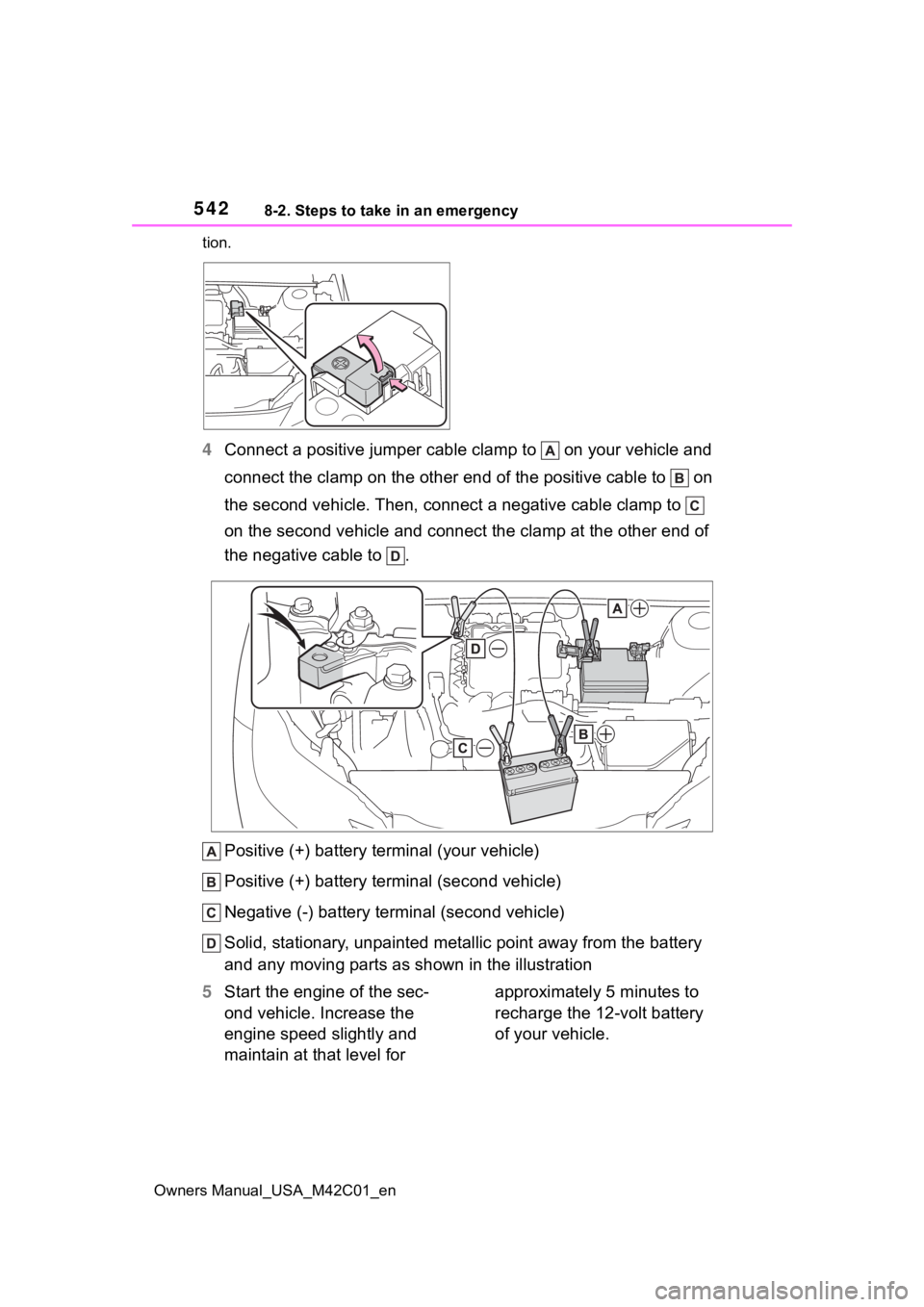
Connect a positive jumper cabl e clamp to on your vehicle and
connect the clamp on the other end of the positive cable to on
the second vehicle. Then, connect a negative cable clamp to
on the second vehicle and connect the clamp at the other end of
the negative cable to .
Positive (+) battery terminal (your vehicle)
Positive (+) battery terminal (second vehicle)
Negative (-) battery term inal (second vehicle)
Solid, stationary, unpainted metallic point away from the batte ry
and any moving parts as shown in the illustration
5 Start the engine of the sec-
ond vehicle. Increase the
engine speed slightly and
maintain at that level for approximately 5 minutes to
recharge the 12-volt battery
of your vehicle.
Page 543 of 628
5438-2. Steps to take in an emergency
Owners Manual_USA_M42C01_en
8
When trouble arises
6 Open and close any of the
doors of your vehicle with the
power switch OFF.
7 Maintain the engine speed of
the second vehicle and start
the EV system of your vehi-
cle by turning the power
switch to ON.
8 Make sure the “READY” indi-
cator comes on. If the indica-
tor light does not come on,
contact your Toyota dealer.
9 Once the EV system has
started, remove the jumper
cables in the exact reverse
order from which they were
connected.
10 Close the positive (+) battery
terminal cover.
Once the EV system starts,
have the vehicle inspected at
your Toyota dealer as soon as
possible.
■Starting the EV system when
the 12-volt battery is dis-
charged
The EV system cannot be started by
push-starting.
■To prevent 12-volt battery dis-
charge
●Turn off the headlights, the air
conditioning system, the audio
system, etc. while the EV system
is off.
●Turn off any unnecessary electri-
cal components when the vehicle
is running at a low speed for an
extended period, such as in heavy
traffic.
■Charging the 12-volt battery
The electricity stored in the 12-volt
battery will discha rge gradually even
when the vehicle i s not in use, due
to natural dischar ge and the drain-
ing effects of certain electrical appli-
ances. If the vehicle is left for a long
time, the 12-volt battery may dis-
charge, and the EV system may be
unable to start. (The 12-volt battery
recharges automatically while the
EV system is operating.)
■When the 12-volt battery is
removed or discharged
●Information stored in the ECU is
cleared. When the 12-volt battery
is depleted, have the vehicle
inspected at your Toyota dealer.
●In some cases, it may not be pos-
sible to unlock the doors using the
smart key system when the 12-
volt battery is discharged. Use the
wireless remote c ontrol or the
mechanical key to lock or unlock
the doors.
●The EV system may not start on
the first attempt a fter the 12-volt
battery has recharged but will start
normally after the second attempt.
This is not a malfunction.
●The power switch mode is memo-
rized by the vehicle. When the 12-
volt battery is reconnected, the
system will return to the mode it
was in before the 12-volt battery
was discharged. Before discon-
necting the 12-volt battery, turn
the power switch off.
If you are unsure what mode the
power switch was in before the
12-volt battery discharged, be
especially careful when recon-
necting the 12-volt battery.
●If the 12-volt battery discharges, it
may not be possible to shift the
shift position to o ther positions. In
this case, the vehicle cannot be
towed without lifting both front
wheels because the front wheels
will be locked.
●The power back door (if equipped)
Page 544 of 628
5448-2. Steps to take in an emergency
Owners Manual_USA_M42C01_enmust be initialized. (
P.181)
■When replacing the 12-volt bat-
tery
●Use a 12-volt battery that con-
forms to European regulations.
●Use a 12-volt battery that the case
size is same as the previous one
(LN1), 20 hour rate capacity
(20HR) is equiva lent (45Ah) or
greater, and performance rating
(CCA) is equivalent (286A) or
greater.
• If the sizes differ, the 12-volt bat- tery cannot be properly secured.
• If an improper 12- volt battery is
used, battery performance may
decrease and the EV system may
not be able to restart.
• If the 20 hour rate capacity is low,
even if the time period where the
vehicle is not used is a short time,
the 12-volt battery may discharge
and EV system may not be able to
start.
For details, consult your Toyota
dealer.
WARNING
■When removing the 12-volt
battery terminals
Always remove the negative (-)
terminal first. If the positive (+) ter-
minal contacts any metal in the
surrounding area when the posi-
tive (+) terminal is removed, a
spark may occur, l eading to a fire
in addition to electrical shocks
and death or serious injury.
■Avoiding 12-volt battery fires
or explosions
Observe the following precautions
to prevent accidentally igniting the
flammable gas that may be emit-
ted from the 12-volt battery:
●Make sure each jumper cable is
connected to the correct termi-
nal and that it is not unintention-
ally in contact with any other
than the intended terminal.
●Do not allow the other end of
the jumper cable connected to
the “+” terminal to come into
contact with any other parts or
metal surfaces in the area, such
as brackets or unpainted metal.
●Do not allow the + and - clamps
of the jumper cables to come
into contact with each other.
●Do not smoke, use matches,
cigarette lighter s or allow open
flame near the 1 2-volt battery.
■12-volt battery precautions
The 12-volt battery contains poi-
sonous and corrosive acidic elec-
trolyte, while related parts contain
lead and lead compounds.
Observe the following precautions
when handling the 12-volt battery:
●When working with the 12-volt
battery, always wear safety
glasses and take care not to
allow any battery fluids (acid) to
come into contact with skin,
clothing or the vehicle body.
●Do not lean over the 12-volt bat-
tery.
●In the event that battery fluid
(acid) comes into contact with
the skin or eyes, immediately
wash the affected area with
water and seek medical atten-
tion.
Place a wet sponge or cloth
over the affected area until
medical attention can be
received.
●Always wash your hands after
handling the 12-volt battery and
other battery-related parts.
●Do not allow children near the
12-volt battery.