lights TOYOTA BZ4X 2023 User Guide
[x] Cancel search | Manufacturer: TOYOTA, Model Year: 2023, Model line: BZ4X, Model: TOYOTA BZ4X 2023Pages: 628, PDF Size: 11.91 MB
Page 46 of 628
461-1. For safe use
Owners Manual_USA_M42C01_en
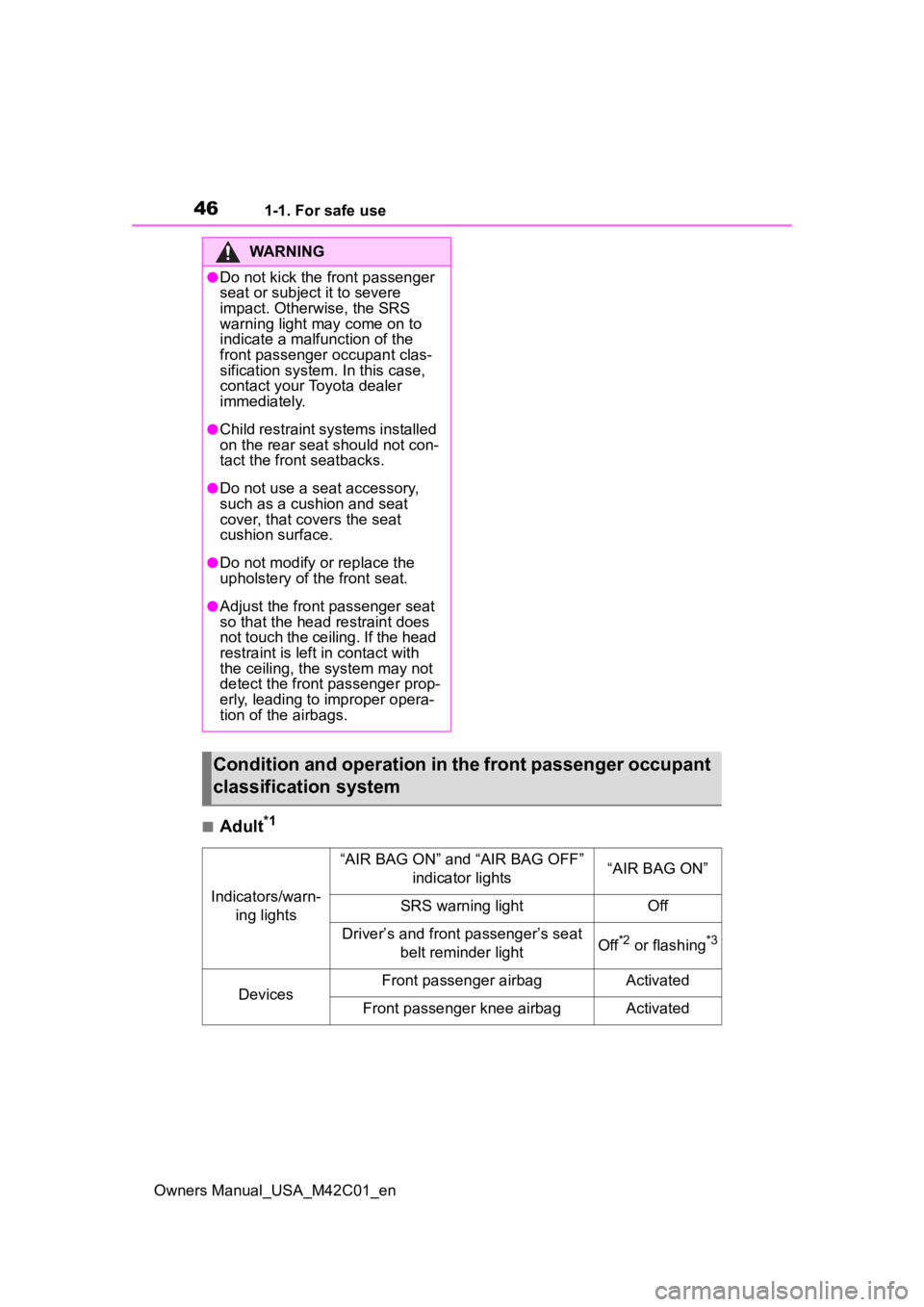
■Adult*1
WARNING
●Do not kick the front passenger
seat or subject it to severe
impact. Otherwise, the SRS
warning light may come on to
indicate a malfunction of the
front passenger occupant clas-
sification system. In this case,
contact your Toyota dealer
immediately.
●Child restraint systems installed
on the rear seat should not con-
tact the front seatbacks.
●Do not use a seat accessory,
such as a cushion and seat
cover, that covers the seat
cushion surface.
●Do not modify or replace the
upholstery of the front seat.
●Adjust the front passenger seat
so that the head restraint does
not touch the ceiling. If the head
restraint is left in contact with
the ceiling, the system may not
detect the front passenger prop-
erly, leading to improper opera-
tion of the airbags.
Condition and operation in the front passenger occupant
classification system
Indicators/warn- ing lights
“AIR BAG ON” and “AIR BAG OFF” indicator lights“AIR BAG ON”
SRS warning lightOff
Driver’s and front passenger’s seat belt reminder lightOff*2 or flashing*3
DevicesFront passenger airbagActivated
Front passenger knee airbagActivated
Page 47 of 628
471-1. For safe use
Owners Manual_USA_M42C01_en
1
For safety and security
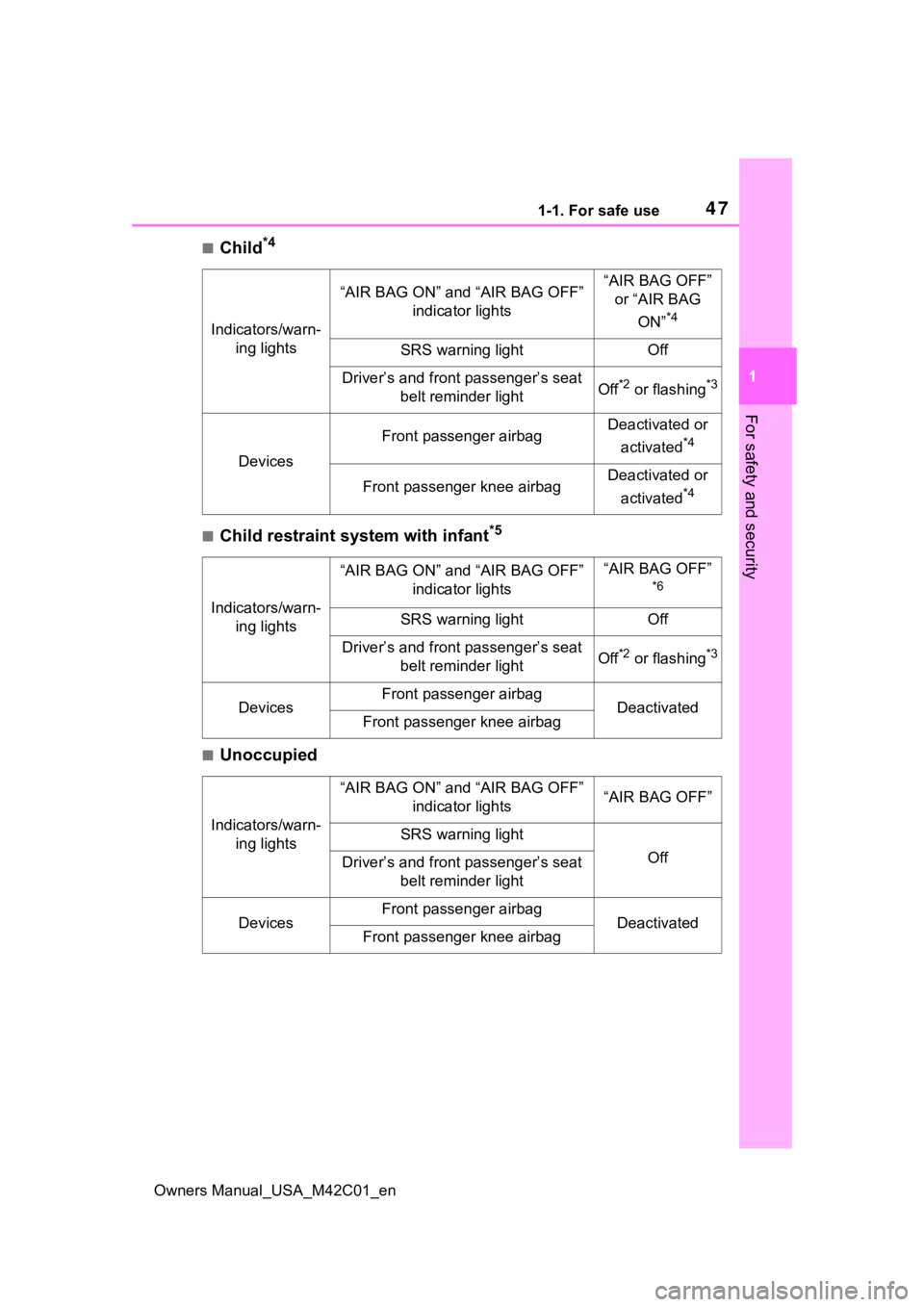
■Child*4
■Child restraint system with infant*5
■Unoccupied
Indicators/warn- ing lights
“AIR BAG ON” and “AIR BAG OFF” indicator lights“AIR BAG OFF” or “AIR BAG
ON”
*4
SRS warning lightOff
Driver’s and front passenger’s seat belt reminder lightOff*2 or flashing*3
Devices
Front passenger airbagDeactivated or
activated
*4
Front passenger knee airbagDeactivated or
activated
*4
Indicators/warn- ing lights
“AIR BAG ON” and “AIR BAG OFF” indicator lights“AIR BAG OFF”
*6
SRS warning lightOff
Driver’s and front passenger’s seat belt reminder lightOff*2 or flashing*3
DevicesFront passenger airbagDeactivatedFront passenger knee airbag
Indicators/warn-ing lights
“AIR BAG ON” and “AIR BAG OFF” indicator lights“AIR BAG OFF”
SRS warning light
OffDriver’s and front passenger’s seat belt reminder light
DevicesFront passenger airbagDeactivatedFront passenger knee airbag
Page 48 of 628
481-1. For safe use
Owners Manual_USA_M42C01_en
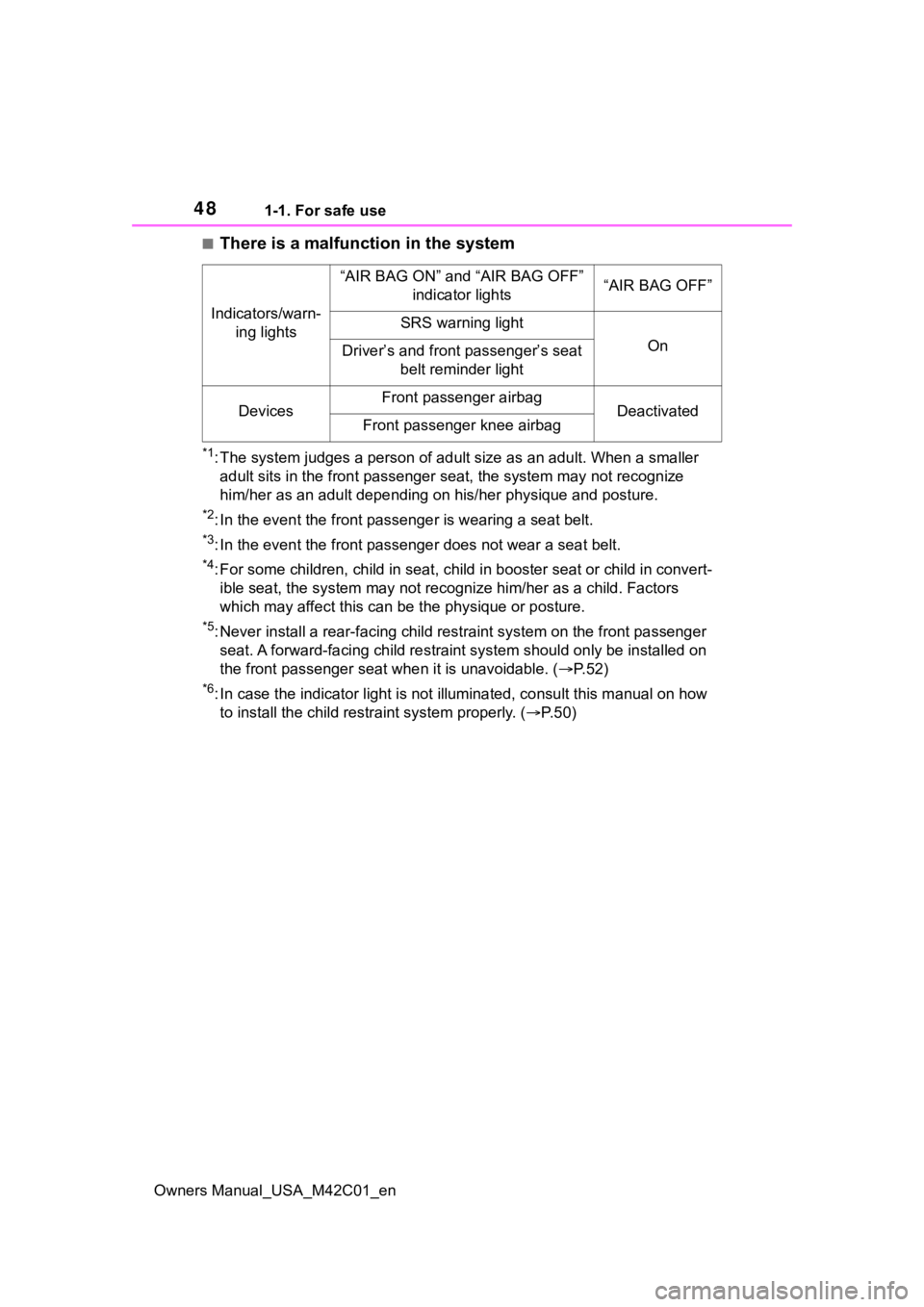
■There is a malfunction in the system
*1: The system judges a person of adult size as an adult. When a smaller
adult sits in the front passenger seat, the system may not recognize
him/her as an adult depending on his/her physique and posture.
*2: In the event the front passenger is wearing a seat belt.
*3: In the event the front passenge r does not wear a seat belt.
*4: For some children, child in seat, child in booster seat or chi ld in convert-
ible seat, the system may not recognize him/her as a child. Fac tors
which may affect this can be the physique or posture.
*5: Never install a rear-facing ch ild restraint system on the front passenger
seat. A forward-facing child restraint system should only be in stalled on
the front passenger sea t when it is unavoidable. ( P.52)
*6: In case the indicator light is not illuminated, consult this m anual on how
to install the child restr aint system properly. (P. 5 0 )
Indicators/warn-
ing lights
“AIR BAG ON” and “AIR BAG OFF” indicator lights“AIR BAG OFF”
SRS warning light
OnDriver’s and front passenger’s seat belt reminder light
DevicesFront passenger airbagDeactivatedFront passenger knee airbag
Page 73 of 628
732-1. Electric vehicle system
Owners Manual_USA_M42C01_en
2
Electric Vehicle system
Provides electricity to various vehicle systems such as the SRS airbags,
headlights, wipers, etc.
*: AWD models only
■When braking (regenera-
tive braking)
The electric motor (traction
motor) charges the traction bat-
tery.
The driving range can be
extended by actively using this
regenerative braking to store
electricity in the traction battery.
The battery electric vehicle is
driven using electricity, which is
received from an external power
source and stored in the traction
battery. Not only public charging
stations, but also household out-
lets can be used for charging.
Procedures are different from
refueling a conventional vehi-
cle. Therefore, make sure to
read the following thoroughly.
Charging equipment ( P.85)
AC charging cable ( P. 8 7 )
Power sources that can be
used ( P.102)
Things to know before
charging ( P.102)
How to charge your vehicle
( P.105, 113)
When charging cannot be
performed normally ( P.133)■Regenerative braking
In the following situ ations, kinetic
energy is converted to electric
energy and deceler ation force can
be obtained in con junction with the
recharging of the traction battery.
●The accelerator pedal is released
while driving with the shift position
in D.
●The brake pedal is depressed
while driving with the shift position
in D.
■Charging the 12-volt battery
The 12-volt battery is charged from
the traction battery when the EV
system is operated or while the trac-
tion battery is being charged.
If the vehicle has not been used for
a long time, the 12- volt battery may
become low due to self-discharge. If
this occurs, follow the correct proce-
dures. ( P.541)
■When not using t he vehicle for
an extended period of time
●When the vehicle will not be used
for an extended period of time,
charge the traction battery once a
month.
This protects the traction battery
from extreme voltage decline due
to self discharging.
●When the vehicle will not be used
for an extended period of time, the
12-volt battery will be charged
from the traction battery to reduce
the risk of the 12- volt battery dis-
charged. In this c ase, the cooling
fan may operate, however it is not
a malfunction.
●To p r e v e n t t h e 1 2 - v o l t b a t t e r y f r o m
being discharged, do not leave the
charging port lid open or the
charging cable connected to the
vehicle.
Charging
Page 82 of 628
822-1. Electric vehicle system
Owners Manual_USA_M42C01_en
battery cannot be charged. Also,
when using the air conditioning
system, etc., the traction battery
electricity is consumed.
(P.237)
Repeated acceleration and
deceleration due to traffic con-
gestion, long waits at traffic
lights, and driving on steep
inclines will lead to poor electric-
ity consumption. In order to
avoid those situations as much
as possible, check traffic reports
before leaving. If the vehicle is
driven in traffic congestion, gen-
tly release the brake pedal to
allow the vehicle to move for-
ward slightly, avoid overuse of
the accelerator pedal. Doing so
can help minimize unnecessary
electricity consumption.
Make sure to operate the brakes
gently and a timely manner. A
greater amount of electrical
energy can be regenerated
when slowing down.
Control and maintain the vehicle
at a constant speed. Before
stopping at a toll booth or simi-
lar, allow plenty of time to release the accelerator and gen-
tly apply the brakes. A greater
amount of electrical energy can
be regenerated when slowing
down.
Use the air conditioning only
when necessary. Doing so
can help reduce excessive
electricity consumption.
In summer: When the ambient tem-
perature is high, use the recircu-
lated air mode. Doing so will help to
reduce the burden on the air condi-
tioning system and reduce electric-
ity consumption as well.
In winter: Exce ssive or unneces-
sary heating should be avoided.
Also, electricity consumption can
be improved by avoiding overuse of
the heater.
When using the Remote Air
Conditioning System
( P.409) while the AC
charging cable is connected
to the vehicle, electricity con-
sumption immediately after
starting off will be reduced
because air conditioning is
operated mainly using elec-
tricity from an external power
source.
Make sure to check the tire infla-
tion pressure frequently.
Delays
When braking
Highway (or freeways)
driving
Air conditioning
Checking tire inflation
pressure
Page 103 of 628
1032-2. Charging
Owners Manual_USA_M42C01_en
2
Electric Vehicle system
Before charging, always check
the following items.
The parking brake is applied.
( P.243)
The power switch is turned to
OFF. ( P.231)
Lights such as the headlights,
emergency flashers and inte-
rior lights, etc. are turned off.
If these light switches are turned
on, then these features will con-
sume electricity, and charging time
will increase.
Before charging, make sure that
each part of the AC charging
cable is in good condition.
( P.92)
■During charging
●The charging starting time may
differ depending on the state of
the vehicle, but this does not indi-
cate a malfunction.
●During charging, sounds may be
heard from near the traction bat-
tery in accordance with the opera-
tion of the air conditioning system
or “Battery Cooler” ( P.99).
●During and after charging, the motor compartment and its sur-
rounding area in which the
onboard traction battery charger is
installed may get warm.
●The surface of the CCID
(Charging Circuit Interrupting
Device) may become hot, but this
does not indicate a malfunction.
●Depending on radio wave condi-
tions, interference may be heard
on the radio.
■When charging using a public
charging facility
●When charging using a public
charging facility, check the setting
of the charging schedule function.
• When the charging schedule is registered, temporarily turn off the
function or turn “ Charge Now” on.
( P. 1 1 9 )
• When the charging schedule is set to on, charging will not start even
if the AC charging cable is con-
nected. Also, charging fee may
occur due to connection of the AC
charging cable.
■Capacity reduction of the trac-
tion battery
The capacity of the traction battery
will decline gradually when the trac-
tion battery is in use. The rate at
which it declines will differ in accor-
dance with environmental conditions
and the way in which the vehicle is
used. Observing the following can
help suppress the decline in the
traction battery capacity.
●Avoid parking the vehicle in high
temperature areas, under direct
sunlight when the traction battery
is fully charged.
●Avoid accelerating and decelerat-
ing frequently and suddenly.
●Avoid frequent d riving at high
speed.
●Use the charging schedule func-
tion as much as possible in order
to fully charged the traction bat-
tery before starting off. ( P. 1 1 8 )
NOTICE
●When charging with a charger,
follow the procedures for using
each charger.
Confirm the following
before charging
Inspecting the AC
charging cable
Page 104 of 628
1042-2. Charging
Owners Manual_USA_M42C01_en
●Avoid frequent DC charging
Also, if the capacit y of the traction
battery capacity reduces, the dis-
tance that can be driven decreases.
However, vehicle performance does
not significantly become worse.
■When the remaining charge of
the traction battery is low after
charging
In the following situations, the
remaining charge of the traction bat-
tery after charging completes may
be less than normal in order to pro-
tect the traction bat tery (the driving
range after the battery is fully
charged may be shorter).
*
●Charging is perf ormed when the
outside temperature is low or high
●Charging is perf ormed immedi-
ately after high-l oad driving or in
extreme heat
In any other situati on, if the remain-
ing charge of the traction battery is
significantly lower than normal after
charging completes, have the vehi-
cle inspected by your Toyota dealer.
*: When this occurs, even if the remaining charge display of the
traction battery shows that it is
fully charged, the remaining
charge rapidly decreases faster
than normal.
■When the charging amount sent
to the traction battery
decreases
When the amount of power supplied
by the charger is low or operation of
the battery heater, etc., reduces the
charging power sent to the traction
battery, the charging amount sent to
the traction battery may decrease.
■Certification
This device complies with Part 15 of
the FCC Rules. Operation is subject
to the following two conditions:
(1) this device may not cause harm- ful interference, and (2) this device
must accept any interference
received, including interference that
may cause undesired operation.
■Charging time may increase
In the following situ ations, charging
time may become longer than nor-
mal:
●In very hot or very cold tempera-
tures.
●When the traction battery
becomes hot, such as immedi-
ately after high-load driving.
●The vehicle is consuming a lot of
electricity, for e xample, when the
headlights are on, etc.
●When using “My Room Mode”.
( P.129)
●There is a power outage during
charging.
●There is an interruption in the
electrical supply.
●There is a drop in the voltage of
external power source.
●The charge in the 12-volt battery
is low, for example due to the
vehicle being left unused for a
long period of time.
●When the upper limit of charging
current is changed in the charging
current setting of the vehicle
( P.108)
●When the battery heater operates.
( P. 9 9 )
●When the “Battery Cooler” is oper-
ated before charging. ( P. 9 9 )
●When the plug generates heat
due to a loose outlet connection,
etc.
●When adjusting the power supply
with the charger.
●When frequently and repeatedly
using DC charging.
●When selecting “DC charging
power” setting other than “MAX”.
●When the temperature of
charging-related parts is high.
Page 114 of 628
1142-2. Charging
Owners Manual_USA_M42C01_ennate.
2
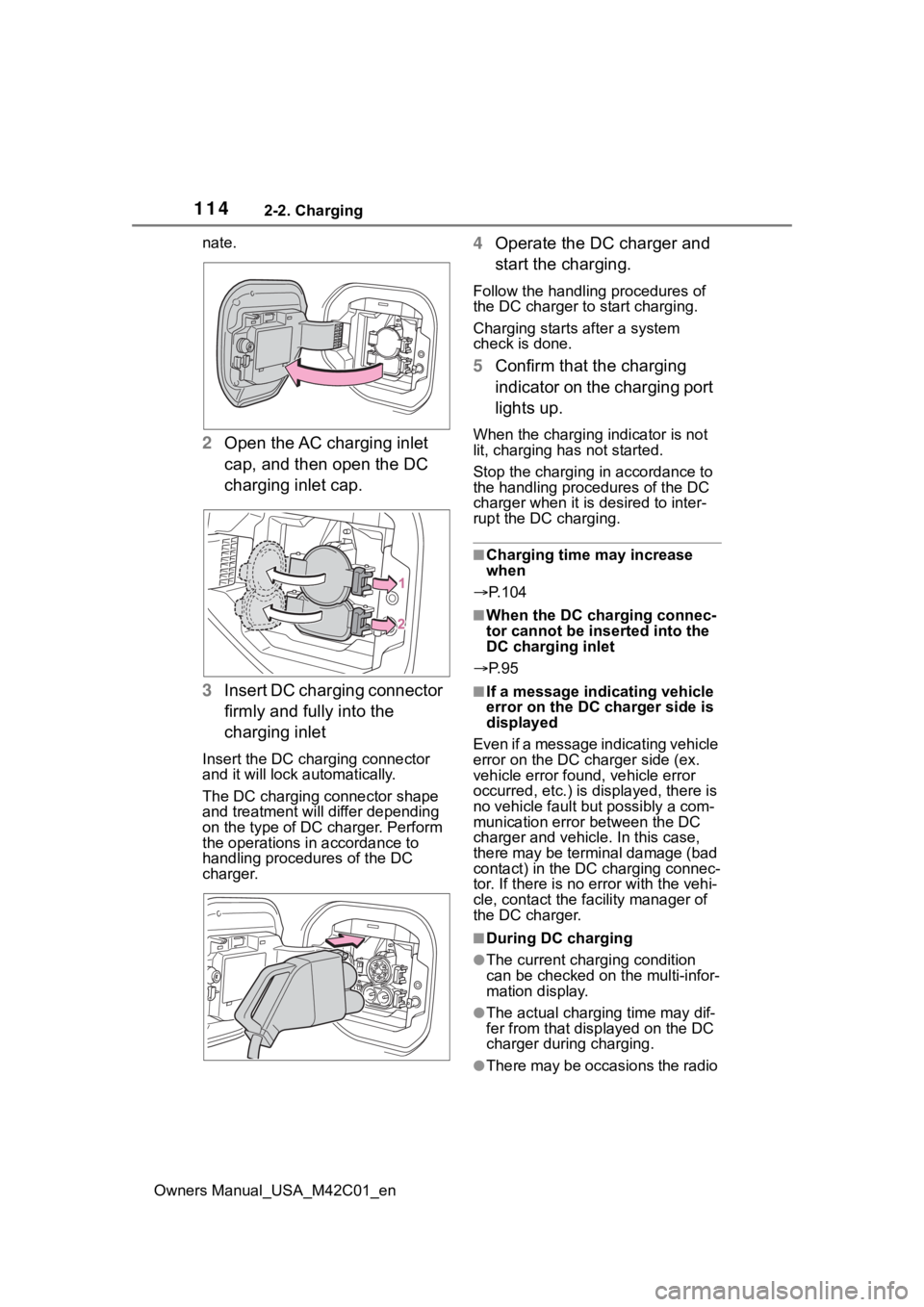
Open the AC charging inlet
cap, and then open the DC
charging inlet cap.
3 Insert DC charging connector
firmly and fully into the
charging inlet
Insert the DC charging connector
and it will lock automatically.
The DC charging connector shape
and treatment will differ depending
on the type of DC charger. Perform
the operations in accordance to
handling procedures of the DC
charger.
4Operate the DC charger and
start the charging.
Follow the handling procedures of
the DC charger to start charging.
Charging starts after a system
check is done.
5 Confirm that the charging
indicator on the charging port
lights up.
When the charging indicator is not
lit, charging has not started.
Stop the charging in accordance to
the handling procedures of the DC
charger when it is desired to inter-
rupt the DC charging.
■Charging time may increase
when
P.104
■When the DC charging connec-
tor cannot be inserted into the
DC charging inlet
P. 9 5
■If a message indicating vehicle
error on the DC charger side is
displayed
Even if a message indicating vehicle
error on the DC charger side (ex.
vehicle error found, vehicle error
occurred, etc.) is displayed, there is
no vehicle fault but possibly a com-
munication error between the DC
charger and vehicle. In this case,
there may be terminal damage (bad
contact) in the DC charging connec-
tor. If there is no er ror with the vehi-
cle, contact the fa cility manager of
the DC charger.
■During DC charging
●The current charging condition
can be checked on the multi-infor-
mation display.
●The actual charging time may dif-
fer from that dis played on the DC
charger during charging.
●There may be occasions the radio
Page 143 of 628
1432-2. Charging
Owners Manual_USA_M42C01_en
2
Electric Vehicle system
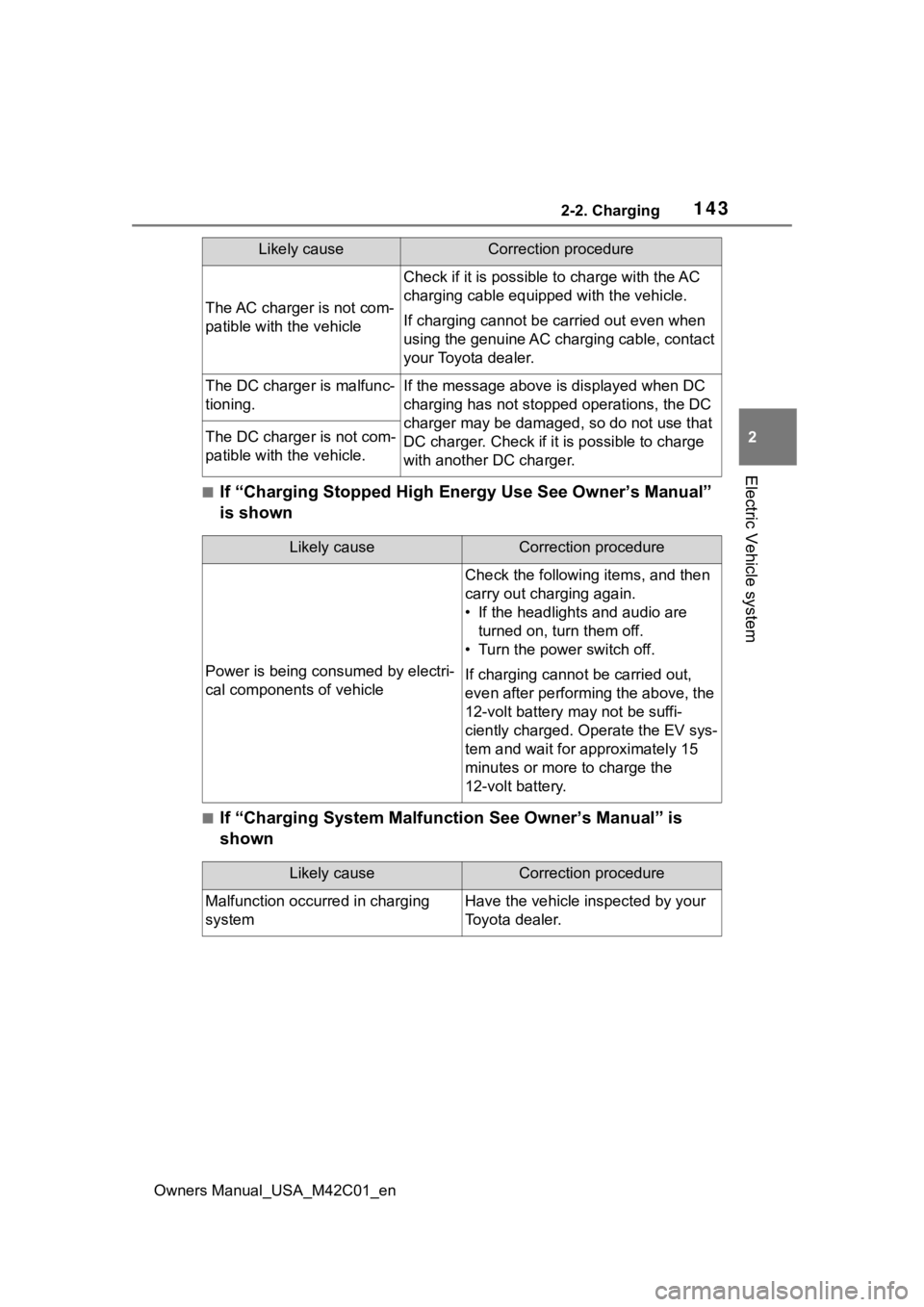
■If “Charging Stopped High Energy Use See Owner’s Manual”
is shown
■If “Charging System Malfunction See Owner’s Manual” is
shown
The AC charger is not com-
patible with the vehicle
Check if it is possible to charge with the AC
charging cable equipped with the vehicle.
If charging cannot be carried out even when
using the genuine AC charging cable, contact
your Toyota dealer.
The DC charger is malfunc-
tioning.If the message above is displayed when DC
charging has not stopp ed operations, the DC
charger may be damaged, so do not use that
DC charger. Check if it is possible to charge
with another DC charger.
The DC charger is not com-
patible with the vehicle.
Likely causeCorrection procedure
Likely causeCorrection procedure
Power is being consumed by electri-
cal components of vehicle
Check the following items, and then
carry out charging again.
• If the headlights and audio are turned on, tur n them off.
• Turn the power switch off.
If charging cannot be carried out,
even after performing the above, the
12-volt battery may not be suffi-
ciently charged. Operate the EV sys-
tem and wait for approximately 15
minutes or more to charge the
12-volt battery.
Likely causeCorrection procedure
Malfunction occurred in charging
systemHave the vehicle inspected by your
Toyota dealer.
Page 144 of 628
1442-2. Charging
Owners Manual_USA_M42C01_en
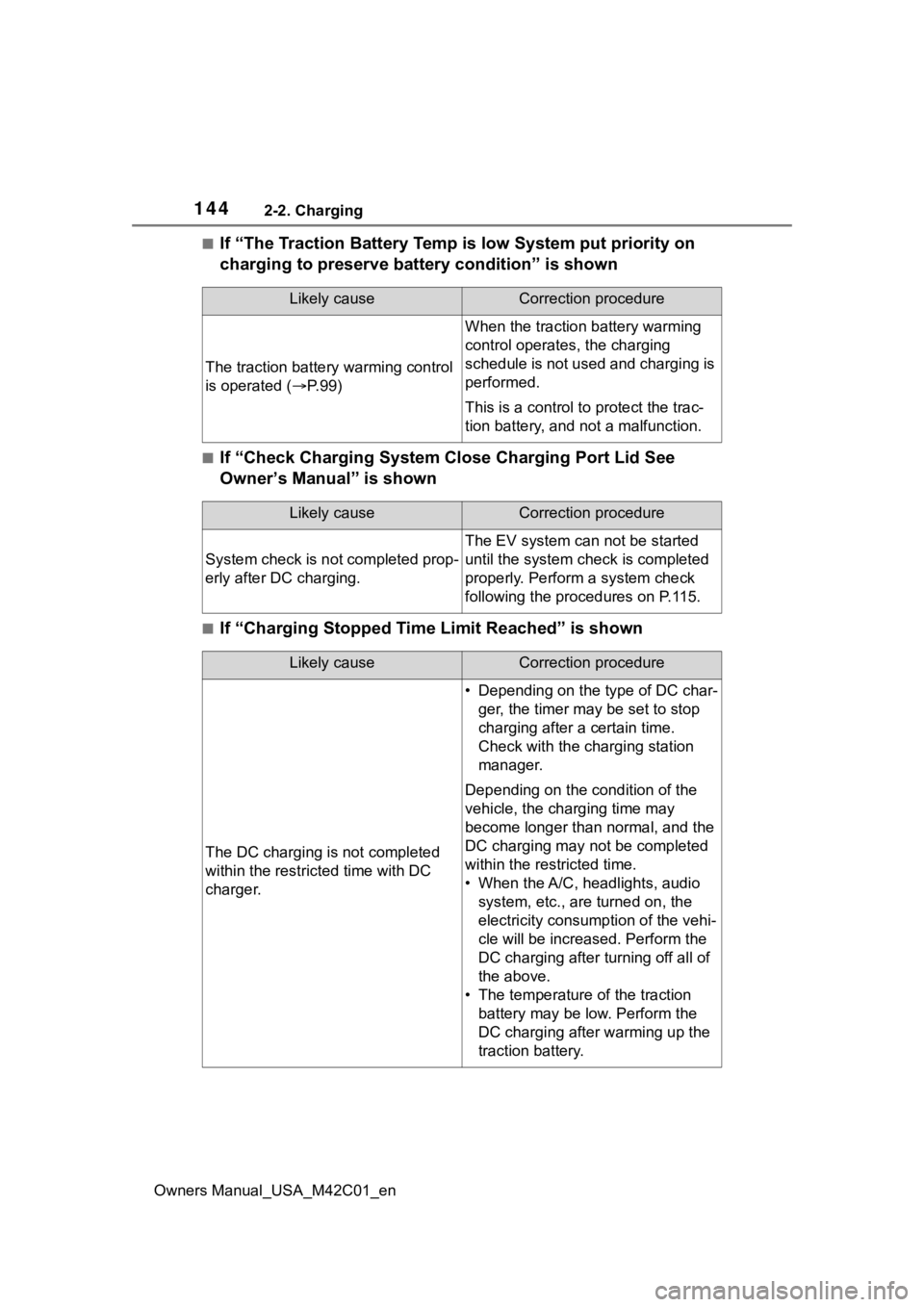
■If “The Traction Battery Temp is low System put priority on
charging to preserve battery condition” is shown
■If “Check Charging System Close Charging Port Lid See
Owner’s Manual” is shown
■If “Charging Stopped Time Limit Reached” is shown
Likely causeCorrection procedure
The traction battery warming control
is operated ( P. 9 9 )
When the traction battery warming
control operates, the charging
schedule is not used and charging is
performed.
This is a control to protect the trac-
tion battery, and not a malfunction.
Likely causeCorrection procedure
System check is not completed prop-
erly after DC charging.
The EV system can not be started
until the system check is completed
properly. Perform a system check
following the procedures on P.115.
Likely causeCorrection procedure
The DC charging is not completed
within the restric ted time with DC
charger.
• Depending on the type of DC char- ger, the timer may be set to stop
charging after a certain time.
Check with the charging station
manager.
Depending on the condition of the
vehicle, the charging time may
become longer than normal, and the
DC charging may not be completed
within the restricted time.
• When the A/C, headlights, audio system, etc., are turned on, the
electricity consum ption of the vehi-
cle will be increas ed. Perform the
DC charging after turning off all of
the above.
• The temperature of the traction battery may be low. Perform the
DC charging after warming up the
traction battery.