mirror TOYOTA BZ4X 2023 Service Manual
[x] Cancel search | Manufacturer: TOYOTA, Model Year: 2023, Model line: BZ4X, Model: TOYOTA BZ4X 2023Pages: 628, PDF Size: 11.91 MB
Page 428 of 628
4286-4. Using the other interior features
Owners Manual_USA_M42C01_en
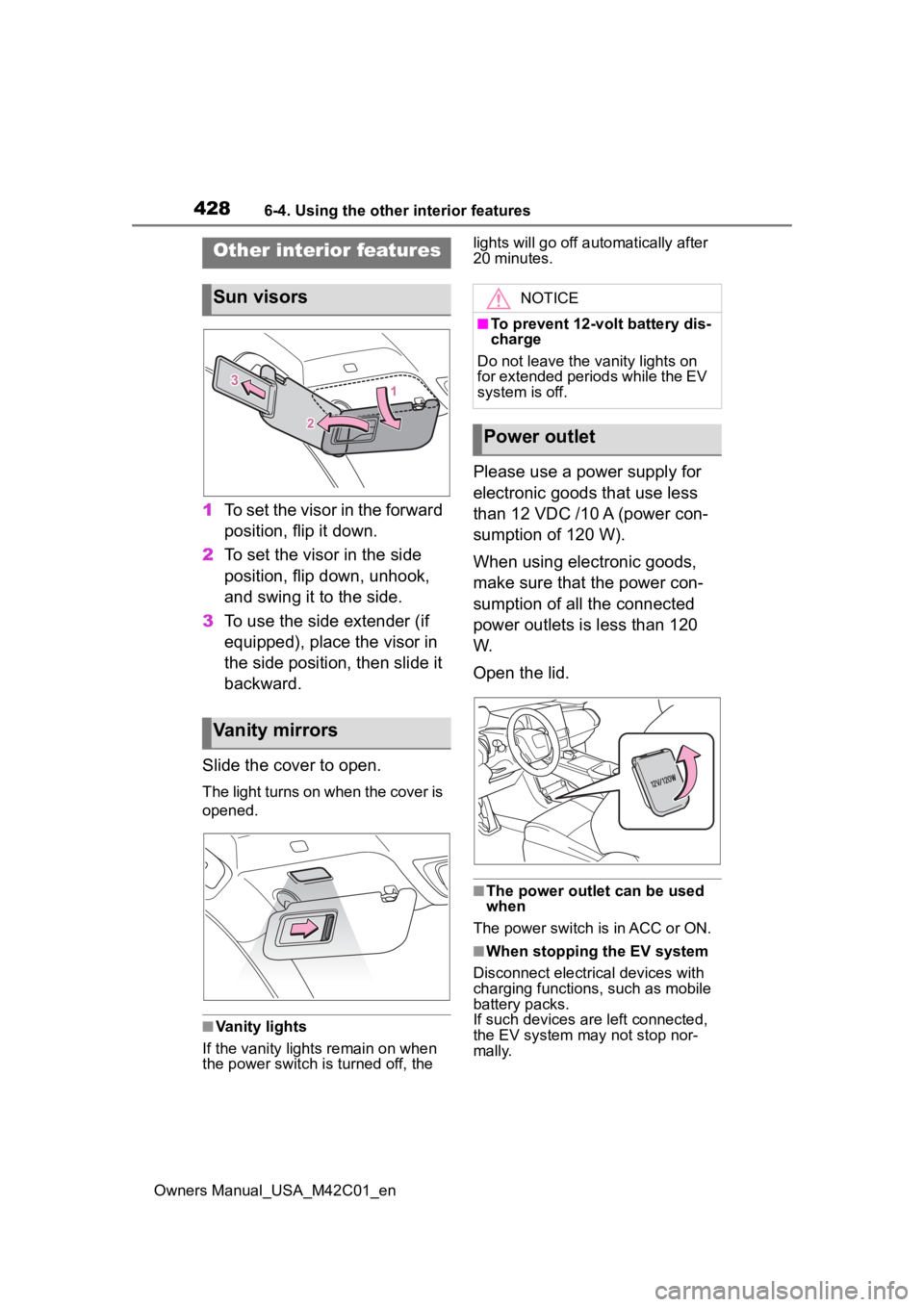
1To set the visor in the forward
position, flip it down.
2 To set the visor in the side
position, flip down, unhook,
and swing it to the side.
3 To use the side extender (if
equipped), place the visor in
the side position, then slide it
backward.
Slide the cover to open.
The light turns on when the cover is
opened.
■Vanity lights
If the vanity light s remain on when
the power switch is turned off, the lights will go off automatically after
20 minutes.
Please use a power supply for
electronic goods that use less
than 12 VDC /10 A (power con-
sumption of 120 W).
When using electronic goods,
make sure that the power con-
sumption of all the connected
power outlets is less than 120
W.
Open the lid.
■The power outlet can be used
when
The power switch is in ACC or ON.
■When stopping the EV system
Disconnect electrical devices with
charging functions, such as mobile
battery packs.
If such devices are left connected,
the EV system may not stop nor-
mally.
Other interior features
Sun visors
Vanity mirrors
NOTICE
■To prevent 12-volt battery dis-
charge
Do not leave the vanity lights on
for extended periods while the EV
system is off.
Power outlet
Page 439 of 628
4396-4. Using the other interior features
Owners Manual_USA_M42C01_en
6
Interior features
*: If equipped
■HomeLink® programming pro-
cedure
The programming procedures can
also be found at the following URL.
Website: www.homelink.com/toyota
For support, contact customer sup-
port at the following.
Help Line: 1-800-355-3515
The HomeLink® wireless control
system in your vehicle has 3
buttons which can be pro-
grammed to operate 3 different
devices. Refer to the program-
ming methods on the following
pages to determine the method
which is appropriate for the
device.
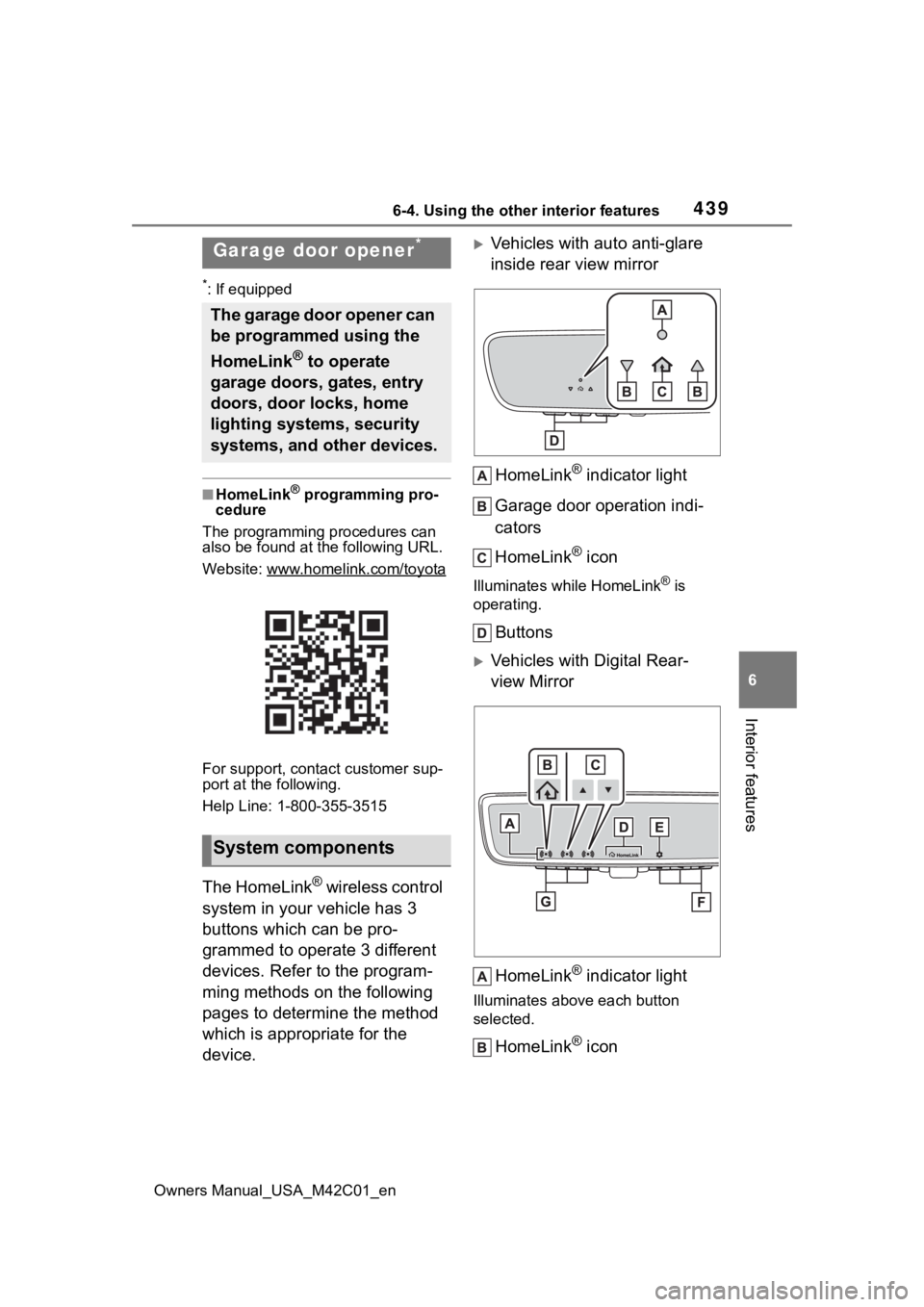
Vehicles with auto anti-glare
inside rear view mirror
HomeLink
® indicator light
Garage door operation indi-
cators
HomeLink
® icon
Illuminates while HomeLink® is
operating.
Buttons
Vehicles with Digital Rear-
view Mirror
HomeLink
® indicator light
Illuminates above each button
selected.
HomeLink® icon
Garage door opener*
The garage door opener can
be programmed using the
HomeLink
® to operate
garage doors, gates, entry
doors, door locks, home
lighting systems, security
systems, and other devices.
System components
Page 441 of 628
4416-4. Using the other interior features
Owners Manual_USA_M42C01_en
6
Interior features
reach the “Learn” or “Smart”
button on the garage door
opener motor.
■Programming HomeLink®
Steps 2 through 4 must be per-
formed within 60 seconds, oth-
erwise the HomeLink
® indicator
light will stop flashing and pro-
gramming will not be success-
fully completed.
1 Vehicles with Digital Rear-
view Mirror: Press the Home-
Link
® button or menu button
When the HomeLink® button is
pressed:
Homelink
® Training Tutorial will be
displayed to assist you program-
ming the HomeLink
®.
When Homelink
® Training Tutorial
is displayed, follow the instructions
displayed.
When the menu button is pressed:
Press the menu button and
select the “Set Up >”. Homelink
®
Training Tutorial will be displayed to
assist you programming the Home-
Link
®.
When Homelink
® Training Tutorial
is displayed, follow the instructions
displayed.
2 Press and release the Home-
Link
® button you want to pro-
gram and check that the
HomeLink
® indicator light
flashes (orange).
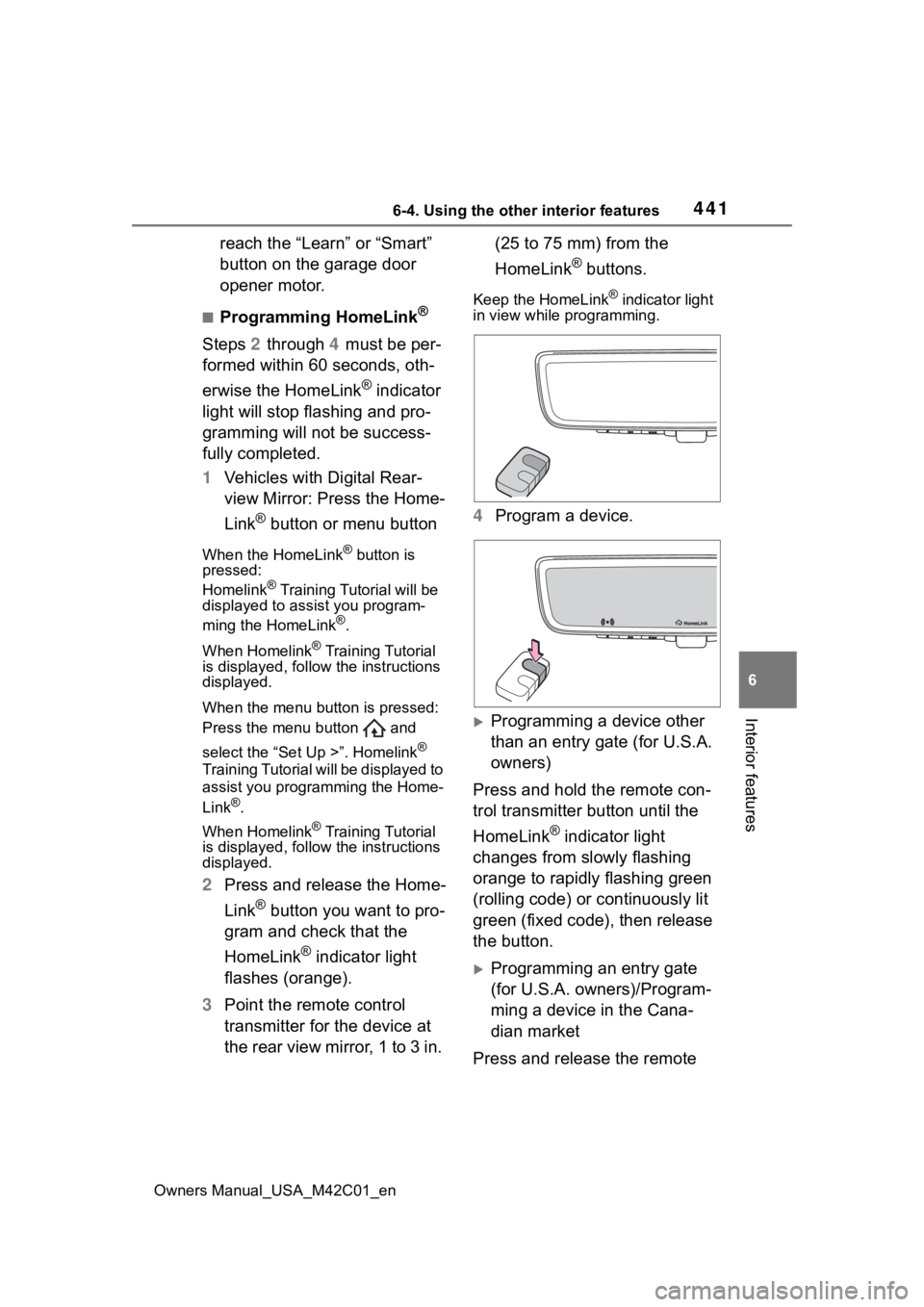
3 Point the remote control
transmitter for the device at
the rear view mirror, 1 to 3 in. (25 to 75 mm) from the
HomeLink
® buttons.
Keep the HomeLink® indicator light
in view while programming.
4 Program a device.
Programming a device other
than an entry gate (for U.S.A.
owners)
Press and hold the remote con-
trol transmitter button until the
HomeLink
® indicator light
changes from slowly flashing
orange to rapidly flashing green
(rolling code) or continuously lit
green (fixed code), then release
the button.
Programming an entry gate
(for U.S.A. owners)/Program-
ming a device in the Cana-
dian market
Press and release the remote
Page 444 of 628
4446-4. Using the other interior features
Owners Manual_USA_M42C01_en
1Press and hold the desired
HomeLink
® button.
2 When the HomeLink
® indica-
tor starts flashing orange,
release the HomeLink
® but-
ton and perform “Program-
ming HomeLink
®” 1 (it takes
20 seconds for the Home-
Link
® indicator to start flash-
ing).
■Before programming
●Install a new battery in the trans-
mitter.
●The battery side of the transmitter
must be pointed away from the
HomeLink
® buttons.
Press the appropriate Home-
Link
® button. The HomeLink®
indicator light should turn on.
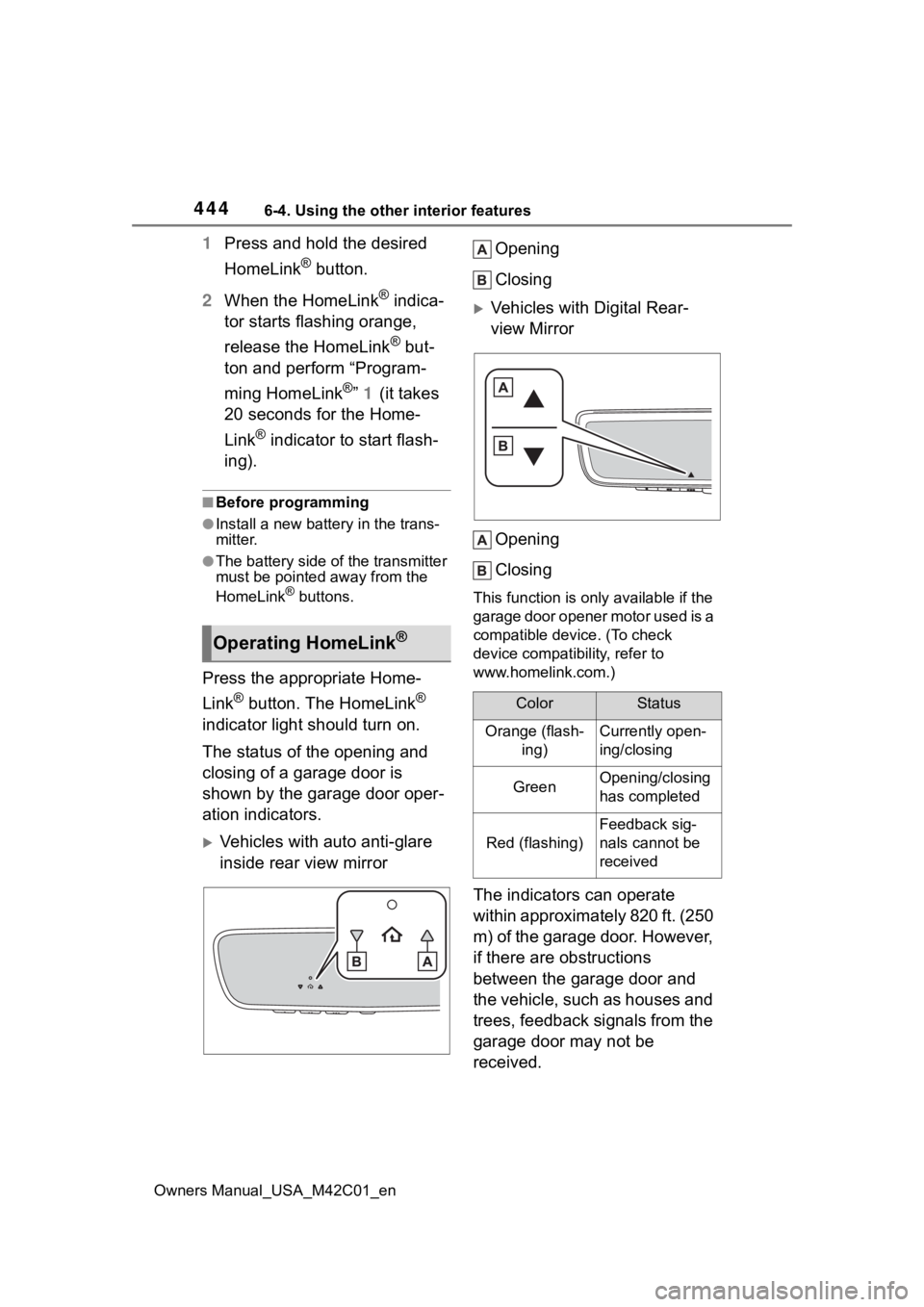
The status of the opening and
closing of a garage door is
shown by the garage door oper-
ation indicators.
Vehicles with auto anti-glare
inside rear view mirror Opening
Closing
Vehicles with Digital Rear-
view Mirror
Opening
Closing
This function is only available if the
garage door opener motor used is a
compatible device. (To check
device compatibility, refer to
www.homelink.com.)
The indicators can operate
within approximately 820 ft. (250
m) of the garage door. However,
if there are obstructions
between the garage door and
the vehicle, such as houses and
trees, feedback signals from the
garage door may not be
received.
Operating HomeLink®
ColorStatus
Orange (flash- ing)Currently open-
ing/closing
GreenOpening/closing
has completed
Red (flashing)
Feedback sig-
nals cannot be
received
Page 445 of 628
4456-4. Using the other interior features
Owners Manual_USA_M42C01_en
6
Interior features
To recall the previous door oper-
ation status, press and release
either HomeLink
® buttons
and or and (vehicles
with auto anti-glare inside rear
view mirror), and
or and (vehicles
with Digital R ear-view Mirror)
simultaneously. The last
recorded status will be dis-
played for 3 seconds.
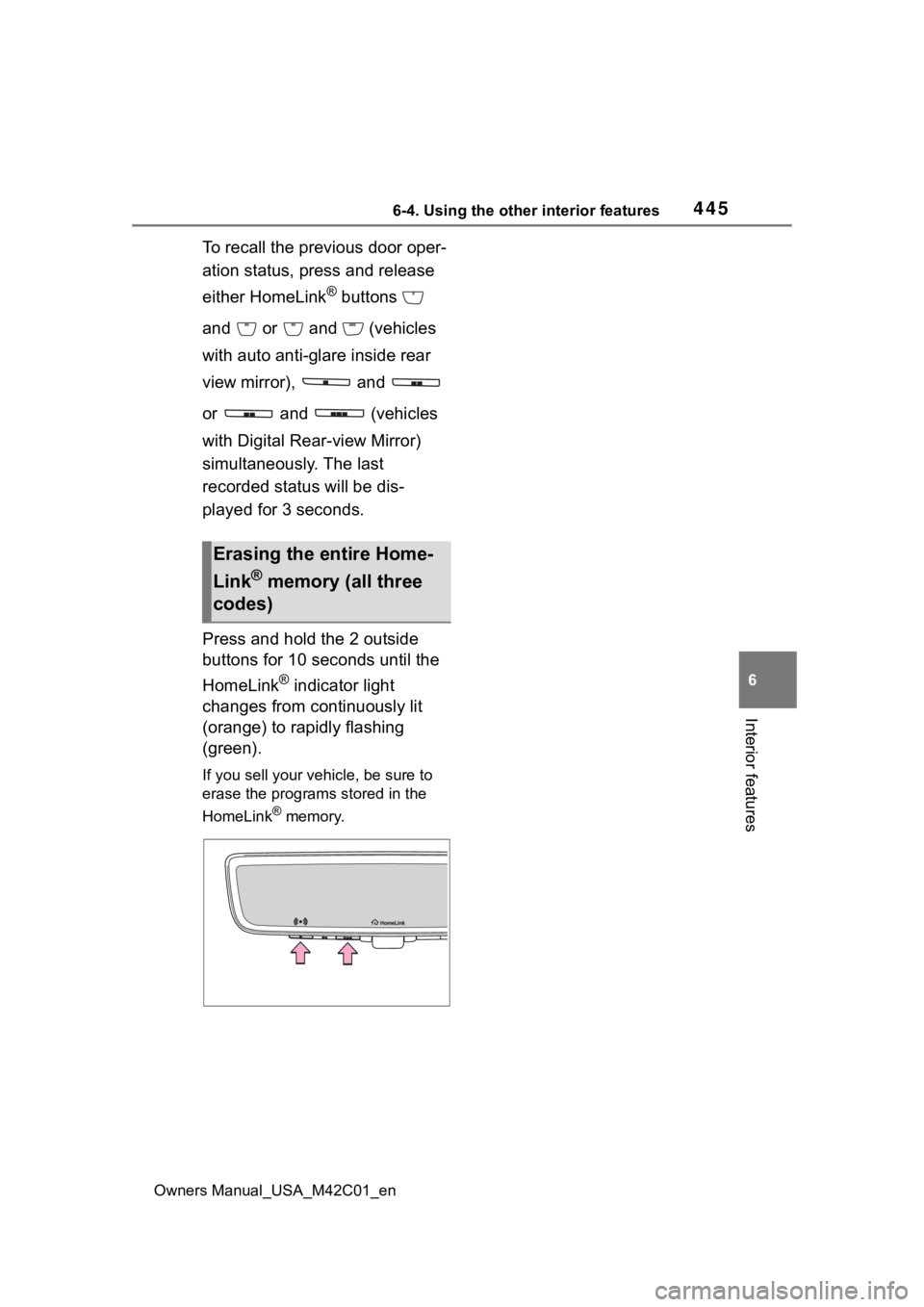
Press and hold the 2 outside
buttons for 10 seconds until the
HomeLink
® indicator light
changes from continuously lit
(orange) to rapidly flashing
(green).
If you sell your vehicle, be sure to
erase the programs stored in the
HomeLink
® memory.
Erasing the entire Home-
Link
® memory (all three
codes)
Page 448 of 628
4487-1. Maintenance and care
Owners Manual_USA_M42C01_en
7-1.Maintenance and care
Working from top to bottom,
liberally apply water to the
vehicle body, wheel wells and
underside of the vehicle to
remove any dirt and dust.
Wash the vehicle body using
a sponge or soft cloth, such
as a chamois.
For hard-to-remove marks,
use car wash soap and rinse
thoroughly with water.
Wipe away any water.
Wax the vehicle when the
waterproof coating deterio-
rates.
If water does not bead on a clean
surface, apply wax when the vehi-
cle body is cool.
■Self-restoring coat
The vehicle body has a self-restor-
ing coating that is resistant to small
surface scratches caused in a car
wash, etc.
●The coating lasts for 5 to 8 years
from when the vehicle is delivered
from the plant.
●The restoration time differs
depending on t he depth of the scratch and outside temperature.
The restoration time may become
shorter when the coating is
warmed by applying warm water.
●Deep scratches caused by keys,
coins, etc., cannot be restored.
●Do not use wax that contain abra-
sives.
■Automatic car washes
●Before washing the vehicle:
• Fold the mirrors
• Turn off the power back door (if equipped)
Start washing from the front of the
vehicle. Make sure to extend the
mirrors before driving.
●Brushes used in automatic car
washes may scratch the vehicle
surface, parts (wheel, etc.) and
harm your vehicle’s paint.
●Rear spoiler may not be washable
in some automatic car washes.
There may also be an increased
risk of damage to vehicle.
●When the shift position needs to
be held in N, refer to P.239.
■High pressure car washes
As water may enter the cabin, do
not bring the nozzle tip near the
gaps around the doors or perimeter
of the windows, or spray these
areas continuously.
■Note for a smart key system
●If the door handle becomes wet
while the electronic key is within
the effective range, the door may
lock and unlock repeatedly. In that
case, follow the following correc-
tion procedures to wash the vehi-
cle:
• Place the key in a position 6 ft. (2 m) or more separate from the
vehicle while the vehicle is being
washed. (Take care to ensure that
the key is not stolen.)
• Set the electronic key to battery-
saving mode to disable the smart
key system. ( P.188)
Cleaning and protect-
ing the vehicle exte-
rior
Perform the following to
protect the vehicle and
maintain it in prime condi-
tion:
Cleaning instructions
Page 573 of 628
5739-2. Customization
Owners Manual_USA_M42C01_en
9
Vehicle specifications
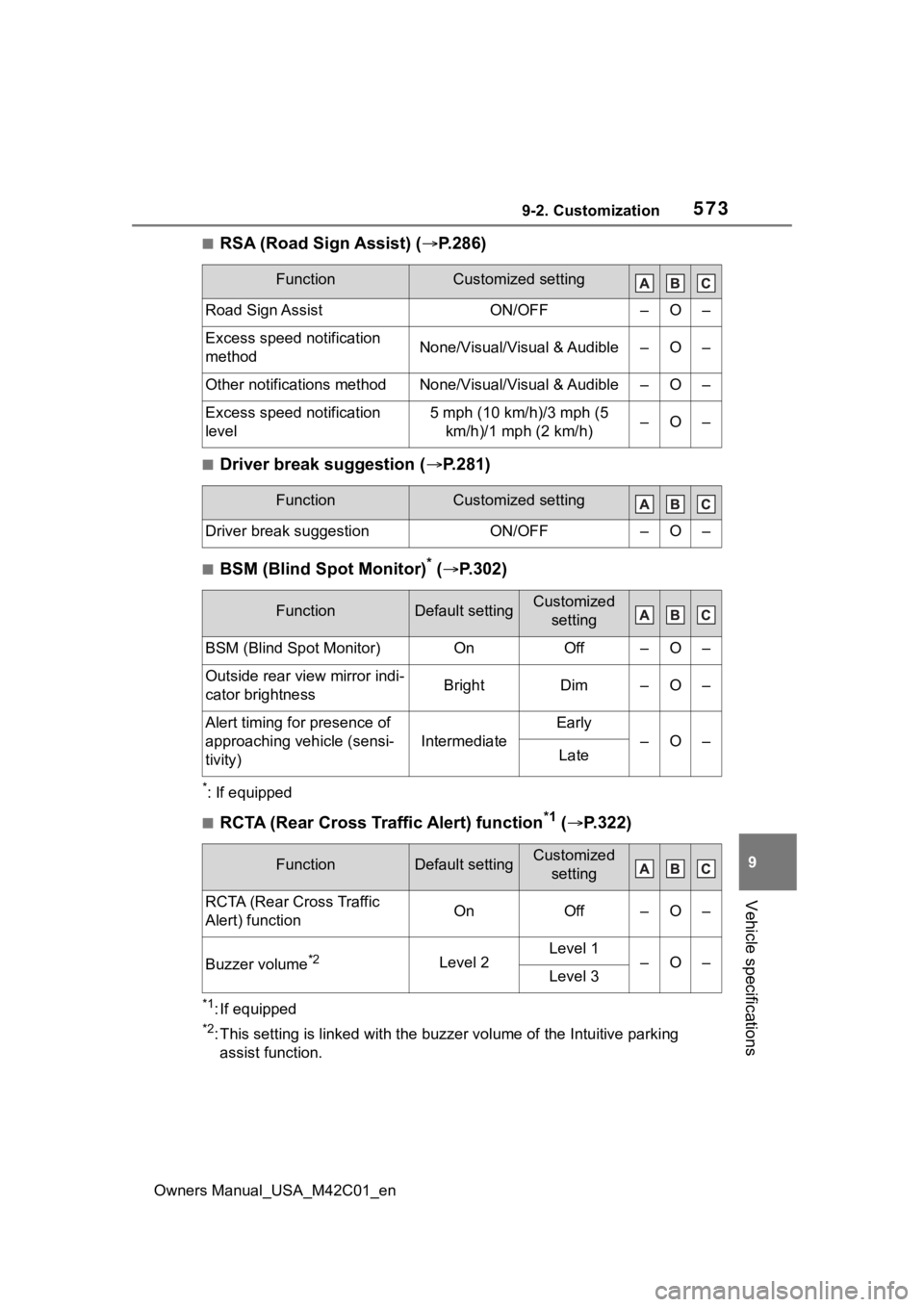
■RSA (Road Sign Assist) ( P.286)
■Driver break suggestion ( P.281)
■BSM (Blind Spot Monitor)* ( P.302)
*: If equipped
■RCTA (Rear Cross Traffic Alert) function*1 ( P.322)
*1: If equipped
*2: This setting is linked with the buzzer volume of the Intuitive parking
assist function.
FunctionCustomized setting
Road Sign AssistON/OFF–O–
Excess speed notification
methodNone/Visual/Visual & Audible–O–
Other notifications methodNone/Visual/Visual & Audible–O–
Excess speed notification
level5 mph (10 km/h)/3 mph (5 km/h)/1 mph (2 km/h)–O–
FunctionCustomized setting
Driver break suggestionON/OFF–O–
FunctionDefault settingCustomized setting
BSM (Blind Spot Monitor)OnOff–O–
Outside rear view mirror indi-
cator brightnessBrightDim–O–
Alert timing for presence of
approaching vehicle (sensi-
tivity)
Intermediate
Early
–O–Late
FunctionDefault settingCustomized setting
RCTA (Rear Cross Traffic
Alert) functionOnOff–O–
Buzzer volume*2Level 2Level 1–O–Level 3
Page 574 of 628
5749-2. Customization
Owners Manual_USA_M42C01_en
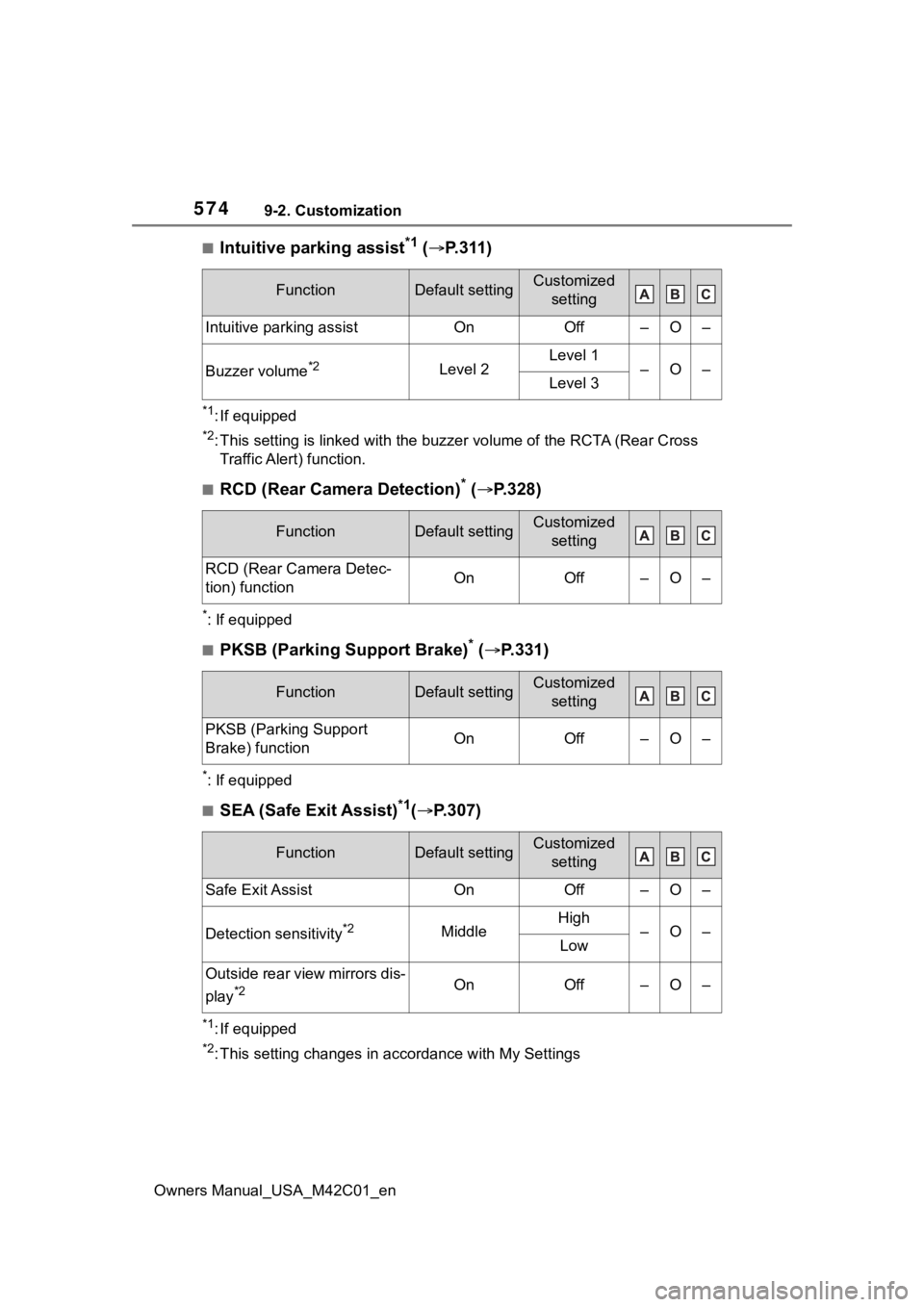
■Intuitive parking assist*1 ( P.311)
*1: If equipped
*2: This setting is linked with the buzzer volume of the RCTA (Rear Cross
Traffic Alert) function.
■RCD (Rear Camera Detection)* ( P.328)
*: If equipped
■PKSB (Parking Support Brake)* ( P.331)
*: If equipped
■SEA (Safe Exit Assist)*1( P.307)
*1: If equipped
*2: This setting changes in ac cordance with My Settings
FunctionDefault settingCustomized
setting
Intuitive parking assistOnOff–O–
Buzzer volume*2Level 2Level 1–O–Level 3
FunctionDefault settingCustomized setting
RCD (Rear Camera Detec-
tion) functionOnOff–O–
FunctionDefault settingCustomized setting
PKSB (Parking Support
Brake) functionOnOff–O–
FunctionDefault settingCustomized setting
Safe Exit AssistOnOff–O–
Detection sensitivity*2MiddleHigh–O–Low
Outside rear view mirrors dis-
play
*2OnOff–O–
Page 598 of 628
598Alphabetical Index
Owners Manual_USA_M42C01_en
Front seat concentrated airflow mode (S-FLOW) ................. 408
Remote Air Conditioning System ........................................... 409
“SYNC” mode ....................... 406
Automatic door locking and unlocking systems ............... 171
Automatic High Beam (AHB) . 250
Automatic light control system ............................................... 248
Auxiliary box lights ................ 415
Auxiliary boxes ....................... 420
Average power consumption 157
Average vehicle speed........... 158
B
Back door ................................ 172 Hands Free Power Back Door........................................... 177
Power back door .................. 175
Wireless remote control 164, 175
Back-up lights Replacing light bulbs ............ 502
Battery (12-volt battery) If the 12-volt battery is dis-charged .............................. 541
Preparing and c hecking before
winter.................................. 393
Replacing ............................. 544
Warning light ........................ 513
Battery (traction battery) ......... 72 Charging....................... 105, 113
Location.................................. 72
Specification ......................... 552
Traction battery cooler............ 99
Traction battery heater ........... 99
Warning messages............... 140
Battery Electric Vehicle driving tips ........................................... 81
Blind Spot Monitor (BSM) ...... 302 Enabling/disabling the system........................................... 303 Bottle holders .........................420
Brake
Brake Hold ............................246
Fluid......................................554
Parking brake .......................243
Regenerative braking .............73
Warning light.........................513
Brake assist ............................387 Brake Hold ............................246
Brake Override System ..........220
Break-in tips ............................220
Brightness control Instrument panel light control155
BSM (Blind Spot Monitor) ......302 Enabling/disabling the system...........................................303C
Camera Digital Rear-view Mirror ........206
Front camera ........................260
Toyota Teammate Advanced Park ....................................352
Card holders ...........................420
Care Aluminum wheels .................449
Brake calipers.......................449
Exterior .................................448
Interior ..................................451
Seat belts .............................451
Cargo and luggage .................225
Cargo capacity ................225, 228
Cargo hooks............................421
CCID (Charging Circuit Interrupt- ing Device) ..............................89Indicator..................................90
Operation................................90
Ceintures de sécurité Comment porter votre ceinture de sécurité ..........................581
Center console light ...............415
Chains......................................395
Page 599 of 628
Owners Manual_USA_M42C01_en
Alphabetical Index599
Charging ......................... 105, 113AC charging ......................... 105
AC charging cable .................. 87
Charging components ............ 85
Charging indicator .................. 90
Charging methods .................. 98
Charging procedure ..... 105, 113
Charging schedule function.. 118
Charging time may increase 104
Charging tips ........................ 100
DC charging ......................... 113
Display . 101, 121, 129, 131, 140
Information related to charging display 101, 121 , 129, 131, 140
Locking and unlocking the AC charging connector............... 93
My Room Mode .................... 129
Opening and closing the charging port lid s .................. 85
Power sources precautions .... 97
Power sources th at can be used
............................................. 96
Safety functions.............. 89, 102
Things to know before charging ........................................... 102
Warning messages............... 140
When AC charging cannot be performed ........................... 133
When charging schedule func- tion cannot be performed ... 138
When DC charging cannot be performed ........................... 135
Charging equipment ................ 85
Charging methods.................... 98 AC charging ......................... 105
DC charging ......................... 113
Charging ports Charging port lid ..................... 85
Locking and unlocking the AC charging connector............... 93
Opening and closing .............. 85
Charging schedule function .. 118 Setting ..................................121
Charging tips ..........................100
Charging-linked functions My Room Mode ......................98
Traction battery cooler ............99
Traction battery heater ...........99
Traction battery warming control.............................................99
Child restraint system ..............50 Fixed with a LATCH system ...59
Fixed with a seat belt..............54
Front passenger occupant clas-sification system ...................44
Points to remember ................50
Riding with children ................49
Types of child restraint system installation method ...............52
Using an anchor bracket ........61
Child safety ...............................49 12-volt battery precautions ...544
Airbag precautions .................39
Back door precautions..........172
Child restraint system .............52
Electronic sunshade .............427
How your child should wear the seat belt ................................30
Power window lock switch ....214
Power window precautions...213
Rear door child-protectors ....171
Seat belt extender precautions .............................................30
Seat belt precautions........29, 49
Child-protector........................171
Cleaning ..........................448, 451 Aluminum wheels .................449
Brake calipers.......................449
Digital Rear-view Mirror ........206
Exterior .................................448
Interior ..................................451
Radar sensor ........................261
Seat belts .............................451
Clock ................................152, 154